
Arista_VXLAN_EVPN_Lab
A VXLAN fabric has to answer one question before any host can talk: how does BUM traffic (Broadcast, Unknown unicast, Multicast) reach every remote VTEP? There are only two data-plane answers — head-end replication (HER, also called ingress replication) or an IP multicast underlay — and two control-plane ways to drive each of them (static configuration or BGP EVPN).
This lab builds the same Arista fabric four times, once per combination:
| Section | Flood mode | Control plane | Result in this lab |
|---|---|---|---|
| 2 | HER (static flood list) | Flood-and-learn | Works |
| 3 | Multicast underlay (PIM-SM) | Flood-and-learn | Config correct, data plane unsupported on vEOS-lab |
| 4 | HER (dynamic flood list) | BGP EVPN (Type-3 IMET) | Works |
| 4.1 | Multicast underlay | BGP EVPN (IMET + PMSI) | Config correct, same vEOS-lab limitation |
All four sections above only get traffic between hosts in the same VLAN. Section 5 covers inter-VLAN routing (IRB) — the asymmetric and symmetric models, the two prerequisites that break it silently, and the MLAG-specific configuration it needs. Section 6 then uses the finished fabric as the starting point of a second lab: a new iBGP EVPN site and a DCI route server are attached, and the original fabric is live-migrated from iBGP EVPN to eBGP everywhere, leaf by leaf, with packet walks for the before, interim, and final states — and closes by designing the true multi-domain version of the two-site build (EVPN gateways at the borders, D-path, stitched tunnels), with its own control- and data-plane walks. Section 7 continues with the deferred follow-up — a method of procedure for converting the numbered eBGP underlay to BGP unnumbered, link by link and make-before-break. Section 8 closes with the theory the lab keeps bumping into: HER vs multicast trade-offs, IGMP snooping, the differences between IGMPv1/v2/v3, and when an IGMP querier is required.
1. Lab setup and introduction
The lab runs in EVE-NG. All six switches are Arista vEOS-lab 4.33.1.1F nodes; the hosts (VPC1/VPC2/VPC3) are EVE-NG VPCS nodes, Switch is any L2-capable node that can form an LACP bond (in the CLI captures below it appears under its node name Linux2, an IOS-based switch at 192.168.20.100), and Test_Server hangs off Border for out-of-fabric tests.
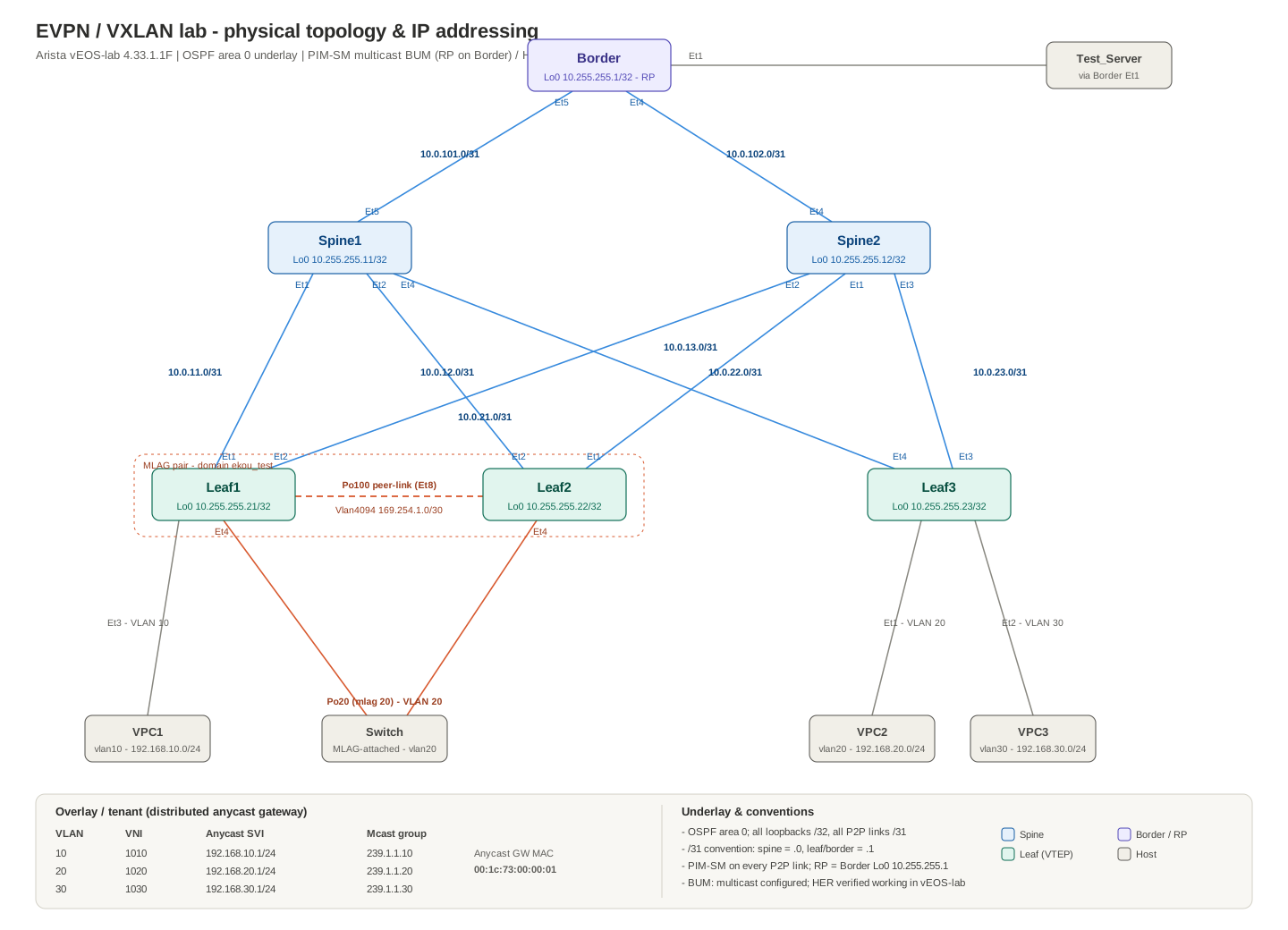
The same topology as text:
                        +----------------------+  Et1
                        |  Border  (mcast RP)  |------ Test_Server
                        |  Lo0 10.255.255.1    |
                        +----------------------+
                     Et5 /                  \ Et4
           10.0.101.0/31/                    \10.0.102.0/31
                    Et5/                      \Et4
            +-----------+                  +-----------+
            |  Spine1   |                  |  Spine2   |
            | Lo0 .11   |                  | Lo0 .12   |
            +-----------+                  +-----------+
            Et1 | Et2 | Et4              Et2 | Et1 | Et3
                |     |    \             /      |     \
                |     |     +----------------------+   \
                |     +-----------+    /        |   \   \
                |            \     \  /         |    \   \
            Et1 | Et2          \    \/          | Et1  \   \
        +-----------+        +-----------+      +-----------+
        |   Leaf1   |  Et8   |   Leaf2   |      |   Leaf3   |
        | Lo0 .21   |========| Lo0 .22   |      | Lo0 .23   |
        +-----------+ Po100  +-----------+      +-----------+
        Et3 |   Et4 \         / Et4             Et1 |    | Et2
            |        \       /                      |    |
         VPC1         Switch (Po20, LACP)        VPC2    VPC3
        vlan10        vlan20                    vlan20   vlan30

  Leaf1 + Leaf2 = MLAG pair (domain ekou_test), one logical VTEP
Roles:
- Border — pure underlay router; becomes the PIM RP in the multicast sections.
- Spine1/Spine2 — IP transit only; become BGP route reflectors in the EVPN sections. They never carry VXLAN state.
- Leaf1/Leaf2 — MLAG pair acting as one logical VTEP; the
Switchhost is dual-homed to them over LACP. - Leaf3 — standalone VTEP with two single-homed hosts.
1.1 IP addressing scheme
Loopbacks (all /32, all in OSPF area 0):
| Device | Loopback0 (router-id, BGP peering) | Loopback1 (VTEP source) |
|---|---|---|
| Border | 10.255.255.1 | — |
| Spine1 | 10.255.255.11 | — |
| Spine2 | 10.255.255.12 | — |
| Leaf1 | 10.255.255.21 | 10.255.255.112 (shared with Leaf2) |
| Leaf2 | 10.255.255.22 | 10.255.255.112 (shared with Leaf1) |
| Leaf3 | 10.255.255.23 | 10.255.255.113 |
The MLAG pair shares one VTEP address on Loopback1. Arista requires MLAG peers to present a single anycast VTEP IP so that remote VTEPs see one logical endpoint and the spines load-balance to whichever peer is alive. Loopback0 stays unique per device for router-ids and (later) BGP peering.
Point-to-point links (all /31; convention: spine side = .0, leaf/border side = .1):
| Link | Subnet | Side A | Side B |
|---|---|---|---|
| Border – Spine1 | 10.0.101.0/31 | Spine1 Et5 = .0 | Border Et5 = .1 |
| Border – Spine2 | 10.0.102.0/31 | Spine2 Et4 = .0 | Border Et4 = .1 |
| Spine1 – Leaf1 | 10.0.11.0/31 | Spine1 Et1 = .0 | Leaf1 Et1 = .1 |
| Spine1 – Leaf2 | 10.0.12.0/31 | Spine1 Et2 = .0 | Leaf2 Et2 = .1 |
| Spine1 – Leaf3 | 10.0.13.0/31 | Spine1 Et4 = .0 | Leaf3 Et4 = .1 |
| Spine2 – Leaf1 | 10.0.21.0/31 | Spine2 Et2 = .0 | Leaf1 Et2 = .1 |
| Spine2 – Leaf2 | 10.0.22.0/31 | Spine2 Et1 = .0 | Leaf2 Et1 = .1 |
| Spine2 – Leaf3 | 10.0.23.0/31 | Spine2 Et3 = .0 | Leaf3 Et3 = .1 |
Overlay plan (identical on every leaf):
| VLAN | VNI | Anycast SVI | Multicast group (sections 3 / 4.1) | Attached hosts |
|---|---|---|---|---|
| 10 | 1010 | 192.168.10.1/24 | 239.1.1.10 | VPC1 (Leaf1 Et3) |
| 20 | 1020 | 192.168.20.1/24 | 239.1.1.20 | Switch (MLAG Po20), VPC2 (Leaf3 Et1) |
| 30 | 1030 | 192.168.30.1/24 | 239.1.1.30 | VPC3 (Leaf3 Et2) |
Shared values:
| Item | Value |
|---|---|
| Anycast gateway MAC | 00:1c:73:00:00:01 |
| MLAG domain | ekou_test |
| MLAG peer VLAN / SVI | VLAN 4094, 169.254.1.1/30 (Leaf1) and 169.254.1.2/30 (Leaf2) |
| MLAG peer-link | Port-Channel100 (Et8 on both peers) |
| VXLAN UDP port | 4789 |
| BGP AS (sections 4 / 4.1) | 65000 (iBGP, spines as route reflectors) |
| Host IPs | VPC1 .10.100, Switch/Linux2 .20.100, VPC2 .20.200, VPC3 .30.103 |
VLAN 20 is the interesting one: it is stretched between the MLAG logical VTEP and Leaf3, so any BUM scheme has to carry its ARP/broadcast across the fabric before Switch and VPC2 can exchange a single ping.
2. Baseline: infrastructure + VXLAN with static HER
This section builds everything the four flood modes share — OSPF underlay, MLAG, anycast gateways — and then brings up VXLAN in the simplest possible way: static head-end replication, where each leaf is manually told the list of remote VTEPs to which it must unicast-replicate every BUM frame.
All switches already have service routing protocols model multi-agent and ip routing (vEOS-lab 4.33 defaults to the multi-agent model, which is also mandatory for EVPN later).
2.1 OSPF underlay
Every fabric link is a routed /31 with OSPF network type point-to-point (skips DR/BDR election and speeds up adjacency). All loopbacks are injected into area 0.
Border:
interface Ethernet4
   no switchport
   ip address 10.0.102.1/31
   ip ospf network point-to-point
   ip ospf area 0.0.0.0
!
interface Ethernet5
   no switchport
   ip address 10.0.101.1/31
   ip ospf network point-to-point
   ip ospf area 0.0.0.0
!
interface Loopback0
   ip address 10.255.255.1/32
   ip ospf area 0.0.0.0
!
ip routing
!
router ospf 1
   router-id 10.255.255.1
   max-lsa 12000
Spine1 (Spine2 is the same pattern with its own interfaces/addresses from the table in 1.1):
interface Ethernet1
   no switchport
   ip address 10.0.11.0/31
   ip ospf network point-to-point
   ip ospf area 0.0.0.0
!
interface Ethernet2
   no switchport
   ip address 10.0.12.0/31
   ip ospf network point-to-point
   ip ospf area 0.0.0.0
!
interface Ethernet4
   no switchport
   ip address 10.0.13.0/31
   ip ospf network point-to-point
   ip ospf area 0.0.0.0
!
interface Ethernet5
   no switchport
   ip address 10.0.101.0/31
   ip ospf network point-to-point
   ip ospf area 0.0.0.0
!
interface Loopback0
   ip address 10.255.255.11/32
   ip ospf area 0.0.0.0
!
ip routing
!
router ospf 1
   router-id 10.255.255.11
   max-lsa 12000
Leaf1 (Leaf2 mirrors it; Leaf3 uses Et3/Et4 as uplinks):
interface Ethernet1
   no switchport
   ip address 10.0.11.1/31
   ip ospf network point-to-point
   ip ospf area 0.0.0.0
!
interface Ethernet2
   no switchport
   ip address 10.0.21.1/31
   ip ospf network point-to-point
   ip ospf area 0.0.0.0
!
interface Loopback0
   ip address 10.255.255.21/32
   ip ospf area 0.0.0.0
!
interface Loopback1
   ip address 10.255.255.112/32
   ip ospf area 0.0.0.0
!
ip routing
!
router ospf 1
   router-id 10.255.255.21
   max-lsa 12000
Loopback1 is identical on Leaf1 and Leaf2 (10.255.255.112) and unique on Leaf3 (10.255.255.113). Both MLAG peers advertise the same /32 into OSPF, so the spines install it as a two-way ECMP route — this is exactly what makes the anycast VTEP work: encapsulated traffic to 10.255.255.112 hashes to either peer, and either peer can decapsulate it.
Verification:
show ip ospf neighbor          ! every P2P link FULL
show ip route 10.255.255.112   ! on a spine: two ECMP next-hops (Leaf1 and Leaf2)
show ip route ospf             ! all loopbacks and /31s present everywhere
ping 10.255.255.113 source Loopback1   ! VTEP-to-VTEP reachability from Leaf1
Do not continue until every loopback is pingable from every leaf — every flood mode in this post rides on this underlay.
2.2 MLAG on Leaf1/Leaf2
The MLAG pair uses VLAN 4094 over Port-Channel100 (Et8) as peer link and keepalive path. Identical on both peers except the SVI address and peer-address:
Leaf1:
no spanning-tree vlan-id 4094
!
vlan 4094
   name MLAG_PEER
!
interface Port-Channel100
   description MLAG_PEER_LINK
   switchport mode trunk
!
interface Ethernet8
   channel-group 100 mode active
!
interface Vlan4094
   ip address 169.254.1.1/30
!
mlag configuration
   domain-id ekou_test
   local-interface Vlan4094
   peer-address 169.254.1.2
   peer-link Port-Channel100
Leaf2 differs only in ip address 169.254.1.2/30 and peer-address 169.254.1.1.
The dual-homed member port toward Switch (both peers, identical mlag ID):
vlan 10,20,30
!
interface Port-Channel20
   description MLAG_TO_LINUX_VLAN20
   switchport access vlan 20
   mlag 20
!
interface Ethernet4
   channel-group 20 mode active
Access ports for the single-homed hosts:
! Leaf1
interface Ethernet3
   switchport access vlan 10
! Leaf3
interface Ethernet1
   switchport access vlan 20
interface Ethernet2
   switchport access vlan 30
Verification:
Leaf1 — show mlag, show mlag interfaces detail, … (45 lines)
show mlag                      ! State: Active, Peer-link up, negotiation status Connected
show mlag interfaces detail    ! mlag 20 active-full on both peers
show port-channel 20 detailed   ! LACP bundled on both members

Leaf1(config-if-Et1-2)#show mlag
MLAG Configuration:
domain-id                          :           ekou_test
local-interface                    :            Vlan4094
peer-address                       :         169.254.1.2
peer-link                          :     Port-Channel100
hb-peer-address                    :             0.0.0.0
peer-config                        :          consistent

MLAG Status:
state                              :              Active
negotiation status                 :           Connected
peer-link status                   :                  Up
local-int status                   :                  Up
system-id                          :   52:00:00:d5:5d:c0
dual-primary detection             :            Disabled
dual-primary interface errdisabled :               False

MLAG Ports:
Disabled                           :                   0
Configured                         :                   0
Inactive                           :                   0
Active-partial                     :                   0
Active-full                        :                   1

Leaf1(config-if-Et1-2)#show mlag interfaces detail
                                        local/remote
 mlag         state   local   remote    oper    config    last change   changes
------ ------------- ------- -------- ------- --------- --------------- -------
   20   active-full    Po20     Po20   up/up   ena/ena   21:28:14 ago         8
Leaf1(config-if-Et1-2)#show port-channel 20 detailed
Port Channel Port-Channel20 (Fallback State: Unconfigured):
Minimum links: unconfigured
Minimum speed: unconfigured
Current weight/Max weight: 1/16
  Active Ports:
     Port            Time Became Active   Protocol   Mode      Weight   State
    --------------- -------------------- ---------- --------- --------- -------
     Ethernet4       Sun 20:33:05         LACP       Active      1      Rx,Tx
     PeerEthernet4   Sun 20:33:04         LACP       Active      0      Unknown
Two MLAG+VXLAN rules worth repeating because they fail silently otherwise:
- Both peers must have the same VTEP IP (our shared Loopback1) and the same VLAN-to-VNI map.
- Keep the peer link as a trunk carrying all VXLAN VLANs — single-homed hosts and failure cases depend on it.
2.3 Distributed anycast gateway
Every leaf carries the same three SVIs with ip address virtual and the same shared virtual MAC. A host’s default gateway is therefore always its local leaf, no matter where it attaches or migrates:
ip virtual-router mac-address 00:1c:73:00:00:01
!
interface Vlan10
   ip address virtual 192.168.10.1/24
!
interface Vlan20
   ip address virtual 192.168.20.1/24
!
interface Vlan30
   ip address virtual 192.168.30.1/24
ip address virtual (Arista’s VARP-style anycast for VXLAN) means all leaves own the same IP and the same MAC for each SVI. Nothing is negotiated between leaves — unlike VRRP there is no master election and no hello traffic; every leaf simply answers ARP for the gateway locally.
Verification:
show ip virtual-router         ! virtual MAC and the three virtual IPs listed

Leaf2#show ip virtual-router
IP virtual router is configured with MAC address: 001c.7300.0001
IP virtual router address subnet routes not enabled
MAC address advertisement interval: 30 seconds
No interface with virtual IP address
From VPC1: ping 192.168.10.1 must succeed before touching VXLAN — this only exercises the local leaf.
2.4 VXLAN with a static HER flood list
Now the actual overlay. In static HER, each VTEP keeps a configured list of remote VTEP IPs; every BUM frame is replicated at ingress into one unicast VXLAN packet per list entry. There are exactly two logical VTEPs in this fabric (MLAG pair = 10.255.255.112, Leaf3 = 10.255.255.113), so each side floods to exactly one remote address.
Leaf1 and Leaf2 (identical):
interface Vxlan1
   vxlan source-interface Loopback1
   vxlan udp-port 4789
   vxlan vlan 10 vni 1010
   vxlan vlan 20 vni 1020
   vxlan vlan 30 vni 1030
   vxlan flood vtep 10.255.255.113
Leaf3:
interface Vxlan1
   vxlan source-interface Loopback1
   vxlan udp-port 4789
   vxlan vlan 10 vni 1010
   vxlan vlan 20 vni 1020
   vxlan vlan 30 vni 1030
   vxlan flood vtep 10.255.255.112
vxlan flood vtep sets a global flood list for all VNIs; a per-VLAN variant (vxlan vlan 20 flood vtep ...) exists if you want to scope flooding to only the VLANs a remote VTEP actually serves. Note the MLAG pair lists 10.255.255.113, not each other — the peer link handles intra-pair delivery, and a VTEP must never list its own address.
Verification:
show interfaces vxlan 1        ! source interface Loopback1, VLAN-VNI map, flood mode: headend replication
show vxlan flood vtep          ! the configured remote VTEP per VLAN
show vxlan vtep                ! remote VTEPs known to the data plane
show mac address-table vlan 20 ! after traffic: remote MACs learned against interface Vxlan1
show vxlan address-table       ! same view from the VXLAN side, MAC -> remote VTEP binding
show vxlan config-sanity detail ! VTEP-IP mismatch, MLAG inconsistency, VLAN-VNI disagreement, in one shot
Output:
Leaf3, Leaf1, vpc2 — show interfaces vxlan 1, show vxlan flood vtep, … (171 lines)
Leaf3(config-if-Vx1)#show interfaces vxlan 1
Vxlan1 is up, line protocol is up (connected)
  Hardware is Vxlan
  Source interface is Loopback1 and is active with 10.255.255.113
  Listening on UDP port 4789
  Replication/Flood Mode is headend with Flood List Source: CLI
  Remote MAC learning via Datapath
  VNI mapping to VLANs
  Static VLAN to VNI mapping is
    [10, 1010]        [20, 1020]        [30, 1030]
  Note: All Dynamic VLANs used by VCS are internal VLANs.
        Use 'show vxlan vni' for details.
  Static VRF to VNI mapping is not configured
  Headend replication flood vtep list is:
    10 10.255.255.112
    20 10.255.255.112
    30 10.255.255.112
  Shared Router MAC is 0000.0000.0000
Leaf3(config-if-Vx1)#show vxlan flood vtep
          VXLAN Flood VTEP Table
--------------------------------------------------------------------------------

VLANS                            Ip Address
-----------------------------   ------------------------------------------------
10,20,30 *                      10.255.255.112
* All VLANs in the indicated VLAN range list are using the default VTEP flood list
Leaf3(config-if-Vx1)#show vxlan vtep
Remote VTEPS for Vxlan1:

VTEP                 Tunnel Type(s)
-------------------- --------------
10.255.255.112       unicast, flood

Total number of remote VTEPS:  1
Leaf3(config-if-Vx1)#show mac address-table vlan 20
          Mac Address Table
------------------------------------------------------------------

Vlan    Mac Address       Type        Ports      Moves   Last Move
----    -----------       ----        -----      -----   ---------
  20    001c.7300.0001    STATIC      Cpu
  20    0050.7966.6807    DYNAMIC     Et1        1       0:00:36 ago
  20    5000.0008.0000    DYNAMIC     Vx1        1       0:00:41 ago
  20    5000.00d7.ee0b    DYNAMIC     Vx1        1       0:00:36 ago
Total Mac Addresses for this criterion: 4

          Multicast Mac Address Table
------------------------------------------------------------------

Vlan    Mac Address       Type        Ports
----    -----------       ----        -----
Total Mac Addresses for this criterion: 0
Leaf3(config-if-Vx1)#show vxlan address-table
          Vxlan Mac Address Table
----------------------------------------------------------------------

VLAN  Mac Address     Type      Prt  VTEP             Moves   Last Move
----  -----------     ----      ---  ----             -----   ---------
  10  0050.7966.6802  DYNAMIC   Vx1  10.255.255.112   1       0:00:42 ago
  20  5000.0008.0000  DYNAMIC   Vx1  10.255.255.112   1       0:00:48 ago
  20  5000.0008.0001  DYNAMIC   Vx1  10.255.255.112   1       0:00:03 ago
  20  5000.00d7.ee0b  DYNAMIC   Vx1  10.255.255.112   1       0:00:43 ago
Total Remote Mac Addresses for this criterion: 4


Leaf1(config-if-Vx1)#show interfaces vxlan 1
Vxlan1 is up, line protocol is up (connected)
  Hardware is Vxlan
  Source interface is Loopback1 and is active with 10.255.255.112
  Listening on UDP port 4789
  Replication/Flood Mode is headend with Flood List Source: CLI
  Remote MAC learning via Datapath
  VNI mapping to VLANs
  Static VLAN to VNI mapping is
    [10, 1010]        [20, 1020]        [30, 1030]
  Note: All Dynamic VLANs used by VCS are internal VLANs.
        Use 'show vxlan vni' for details.
  Static VRF to VNI mapping is not configured
  Headend replication flood vtep list is:
    10 10.255.255.113
    20 10.255.255.113
    30 10.255.255.113
  MLAG Shared Router MAC is 0000.0000.0000
Leaf1(config-if-Vx1)#show vxlan flood vtep
          VXLAN Flood VTEP Table
--------------------------------------------------------------------------------

VLANS                            Ip Address
-----------------------------   ------------------------------------------------
10,20,30 *                      10.255.255.113
* All VLANs in the indicated VLAN range list are using the default VTEP flood list
Leaf1(config-if-Vx1)#show vxlan vtep
Remote VTEPS for Vxlan1:

VTEP                 Tunnel Type(s)
-------------------- --------------
10.255.255.113       flood, unicast

Total number of remote VTEPS:  1
Leaf1(config-if-Vx1)#show mac address-table vlan 20
          Mac Address Table
------------------------------------------------------------------

Vlan    Mac Address       Type        Ports      Moves   Last Move
----    -----------       ----        -----      -----   ---------
  20    001c.7300.0001    STATIC      Cpu
  20    0050.7966.6807    DYNAMIC     Vx1        1       0:03:47 ago
  20    5000.0008.0000    DYNAMIC     Po20       1       4:16:34 ago
  20    5000.0008.0001    DYNAMIC     Po20       3       4:16:42 ago
  20    5000.0008.8014    DYNAMIC     Po20       1       0:02:06 ago
  20    5000.00d5.5dc0    STATIC      Po100
Total Mac Addresses for this criterion: 6

          Multicast Mac Address Table
------------------------------------------------------------------

Vlan    Mac Address       Type        Ports
----    -----------       ----        -----
Total Mac Addresses for this criterion: 0
Leaf1(config-if-Vx1)#show vxlan address-table
          Vxlan Mac Address Table
----------------------------------------------------------------------

VLAN  Mac Address     Type      Prt  VTEP             Moves   Last Move
----  -----------     ----      ---  ----             -----   ---------
  10  5000.0072.8b31  DYNAMIC   Vx1  10.255.255.113   1       0:03:52 ago
  20  0050.7966.6807  DYNAMIC   Vx1  10.255.255.113   1       0:03:52 ago
Total Remote Mac Addresses for this criterion: 2


vpc2> ping 192.168.20.1

84 bytes from 192.168.20.1 icmp_seq=1 ttl=64 time=3.138 ms
84 bytes from 192.168.20.1 icmp_seq=2 ttl=64 time=1.587 ms
84 bytes from 192.168.20.1 icmp_seq=3 ttl=64 time=1.423 ms
84 bytes from 192.168.20.1 icmp_seq=4 ttl=64 time=1.305 ms
84 bytes from 192.168.20.1 icmp_seq=5 ttl=64 time=1.577 ms

vpc2> ping 192.168.20.100

host (192.168.20.100) not reachable

vpc2> ping 192.168.20.1

84 bytes from 192.168.20.1 icmp_seq=1 ttl=64 time=1.159 ms
84 bytes from 192.168.20.1 icmp_seq=2 ttl=64 time=1.593 ms
84 bytes from 192.168.20.1 icmp_seq=3 ttl=64 time=1.257 ms
^C
vpc2> ping 192.168.20.100

host (192.168.20.100) not reachable

vpc2> ping 192.168.20.100

84 bytes from 192.168.20.100 icmp_seq=1 ttl=255 time=10.671 ms
84 bytes from 192.168.20.100 icmp_seq=2 ttl=255 time=8.776 ms
84 bytes from 192.168.20.100 icmp_seq=3 ttl=255 time=11.893 ms
84 bytes from 192.168.20.100 icmp_seq=4 ttl=255 time=9.070 ms
84 bytes from 192.168.20.100 icmp_seq=5 ttl=255 time=9.017 ms


vpc2>  show ip

NAME        : vpc2[1]
IP/MASK     : 192.168.20.200/24
GATEWAY     : 192.168.20.1
DNS         :
MAC         : 00:50:79:66:68:07
LPORT       : 20000
RHOST:PORT  : 127.0.0.1:30000
MTU         : 1500
One detail in that capture is worth keeping honest: the first two ping 192.168.20.100 attempts failed. They were taken while Vxlan1 still pointed at the wrong source interface (Loopback0 instead of Loopback1), so Leaf3 was flooding to 10.255.255.112 while the MLAG pair only decapsulated traffic addressed to their Loopback0 IPs. A VTEP only decapsulates VXLAN destined to its configured source IP — the symptom is exactly this: local MACs learn fine, show vxlan address-table stays empty on both ends. show vxlan config-sanity detail catches the mismatch immediately; after fixing the source interface, the same ping succeeds.
End-to-end tests:
- L2 stretch: VPC2 (192.168.20.200, on Leaf3) pings
Switch/Linux2 (192.168.20.100, on the MLAG pair) — the capture above. The first ARP broadcast is head-end replicated to 10.255.255.112, the MLAG pair floods it to VLAN 20, and both sides learn each other’s MAC againstVxlan1. - MLAG failover: shut Leaf1’s uplinks or the whole node;
Switchtraffic keeps flowing through Leaf2 because the spines still have a path to 10.255.255.112. - Inter-VLAN (VPC1 → VPC3)? Not yet — do not expect it to work at this stage. Routing between VNIs is a separate feature with its own prerequisites (including the virtual VTEP that
show vxlan config-sanityis already warning about); section 5 builds it properly.
This all works on vEOS-lab. The obvious drawback: every time a VTEP is added, every other VTEP’s flood list must be edited by hand. Two VTEPs make it trivial; two hundred make it an outage generator. That is the operational hole that either multicast (section 3) or EVPN (section 4) fills.
3. VXLAN with a multicast underlay (and why vEOS-lab can’t do it)
The second data-plane option replaces the unicast flood list with underlay IP multicast: each VNI maps to a group, every VTEP joins the groups of its local VNIs, and a BUM frame is encapsulated once toward the group address. The underlay multicast tree — built by PIM-SM — does all replication.
3.1 Configuration
On every leaf, the Vxlan1 flood list is replaced by group mappings (this is the configuration that was actually captured in the lab):
interface Vxlan1
   vxlan source-interface Loopback1
   vxlan udp-port 4789
   vxlan vlan 10 vni 1010
   vxlan vlan 20 vni 1020
   vxlan vlan 30 vni 1030
   vxlan vlan 10 multicast group 239.1.1.10
   vxlan vlan 20 multicast group 239.1.1.20
   vxlan vlan 30 multicast group 239.1.1.30
   no vxlan flood vtep 10.255.255.113    ! remove the static list from section 2.4
Multicast routing and PIM sparse mode on every device (leaves, spines, Border). vEOS-lab needs the explicit kernel software-forwarding knob:
router multicast
   ipv4
      routing
      software-forwarding kernel
!
router pim sparse-mode
   ipv4
      rp address 10.255.255.1
PIM on every fabric interface (shown for Spine1; same two lines go on all /31 interfaces of all devices):
interface Ethernet1
   pim ipv4 sparse-mode
interface Ethernet2
   pim ipv4 sparse-mode
interface Ethernet4
   pim ipv4 sparse-mode
interface Ethernet5
   pim ipv4 sparse-mode
Border is the rendezvous point simply because its Loopback0 (10.255.255.1) is what every router points at with rp address. A static RP is fine for a lab; production would use anycast RP on a pair of devices (typically the spines) with MSDP, or PIM BSR/Auto-RP for dynamic election.
3.2 What the control plane shows
PIM itself comes up perfectly. Real output from Spine1:
SP1 — show ip pim neighbor, show ip pim rp (12 lines)
SP1#show ip pim neighbor
PIM Neighbor Table for default VRF
Neighbor Address  Interface  Uptime    Expires   Mode    Transport
10.0.11.1         Ethernet1  00:16:28  00:01:19  sparse  datagram
10.0.12.1         Ethernet2  00:14:48  00:01:27  sparse  datagram
10.0.13.1         Ethernet4  00:15:36  00:01:40  sparse  datagram
10.0.101.1        Ethernet5  00:18:05  00:01:23  sparse  datagram

SP1#show ip pim rp
Group: 224.0.0.0/4
  RP: 10.255.255.1
    Uptime: 0:18:43, Expires: never, Priority: 0, Override: False
Every device sees all its PIM neighbors and agrees on the RP. On working hardware, the next step would be each VTEP joining its VNI groups, which shows up as (*, 239.1.1.20) entries rooted at the RP. Instead, on every single node:
Leaf1 — show ip mroute, show interfaces vxlan1 (21 lines)
Leaf1#show ip mroute
PIM Sparse Mode Multicast Routing Table
Flags: E - Entry forwarding on the RPT, J - Joining to the SPT
    ...
(no entries)


Leaf1#show interfaces vxlan1
Vxlan1 is down, line protocol is down (notconnect)
  Hardware is Vxlan
  Source interface is Loopback0 and is active with 10.255.255.21
  Listening on UDP port 4789
  Replication/Flood Mode is not initialized yet
  Remote MAC learning via Datapath
  VNI mapping to VLANs
  Static VLAN to VNI mapping is
    [10, 1010]        [20, 1020]        [30, 1030]
  Note: All Dynamic VLANs used by VCS are internal VLANs.
        Use 'show vxlan vni' for details.
  Static VRF to VNI mapping is not configured
  MLAG Shared Router MAC is 0000.0000.0000
The multicast routing table stays empty on all six devices. The leaves never originate a join for 239.1.1.10/20/30, Vxlan1 reports Replication/Flood Mode is not initialized yet and stays down, and any traffic that needs BUM — starting with the very first ARP between Switch and VPC2 — dies at the ingress VTEP. (This capture was taken before the lab moved the VXLAN source to Loopback1, hence Loopback0 in the output; the flood-mode and mroute behavior is identical either way.)
3.3 Why this cannot proceed in EVE-NG
Nothing is wrong with the configuration — the problem is the platform:
- vEOS-lab forwards in software. It is a control-plane simulator: the EOS agents (OSPF, PIM, BGP, MLAG) are the real thing, but packet forwarding is done by the Linux kernel instead of a switching ASIC.
- VXLAN multicast flood mode is a data-plane feature that vEOS-lab’s kernel path does not implement. The VTEP would need to (a) signal IGMP/PIM membership for each VNI group, (b) encapsulate BUM frames toward the group, and (c) decapsulate multicast-delivered VXLAN packets. None of that is wired up in the vEOS-lab forwarding path — which is exactly why the leaves never even send joins: the component that would drive them doesn’t exist here.
- The
router multicast ... software-forwarding kernelknob enables plain multicast routing in vEOS, but it does not extend to the VXLAN encap/decap replication path.
So the symptom pattern to recognize: PIM neighbors up + RP known + mroute table permanently empty + VXLAN flood mode never initialized = platform limitation, not misconfiguration. On hardware EOS (7050X/7060X/7280R and friends) the identical configuration builds (*,G) and (S,G) state and works. If you need to see VXLAN over multicast actually forward in a virtual lab, this is not achievable with vEOS-lab in EVE-NG; keep the configs as a hardware reference and use HER for anything you want to demonstrate live.
The lab therefore rolls back to a working state — and instead of returning to static flood lists, it moves to the modern answer: EVPN.
4. VXLAN EVPN with head-end replication
BGP EVPN replaces both weak spots of section 2: flood lists are learned instead of configured (EVPN Type-3, Inclusive Multicast Ethernet Tag), and MAC addresses are advertised instead of flood-learned (EVPN Type-2, MAC/IP). The data plane is still HER — ingress unicast replication — but the replication list now maintains itself. This is the mode the lab runs permanently, and everything in this section was verified working on vEOS-lab.
Design: iBGP AS 65000, spines as route reflectors, peering on Loopback0, EVPN address family only (no bgp default ipv4-unicast — the underlay stays OSPF’s job). RD is unique per leaf (<Loopback0>:<vlan>), RT is fabric-wide per VNI (1:<vlan>).
Step 1 — Clean up the multicast attempt
On all leaves:
interface Vxlan1
   no vxlan vlan 10 multicast group 239.1.1.10
   no vxlan vlan 20 multicast group 239.1.1.20
   no vxlan vlan 30 multicast group 239.1.1.30
!
no router pim sparse-mode
no router multicast
(Remove pim ipv4 sparse-mode from the interfaces and the RP config on Border too, unless you’re keeping them for section 4.1.)
Step 2 — Spines as EVPN route reflectors
Spine1 (Spine2 identical except router-id 10.255.255.12 and spine-peer 10.255.255.11):
service routing protocols model multi-agent
!
router bgp 65000
   router-id 10.255.255.11
   no bgp default ipv4-unicast
   !
   neighbor EVPN-RRC peer group
   neighbor EVPN-RRC remote-as 65000
   neighbor EVPN-RRC update-source Loopback0
   neighbor EVPN-RRC send-community extended
   neighbor EVPN-RRC route-reflector-client
   !
   neighbor 10.255.255.21 peer group EVPN-RRC
   neighbor 10.255.255.22 peer group EVPN-RRC
   neighbor 10.255.255.23 peer group EVPN-RRC
   !
   neighbor 10.255.255.12 remote-as 65000
   neighbor 10.255.255.12 update-source Loopback0
   neighbor 10.255.255.12 send-community extended
   !
   address-family evpn
      neighbor EVPN-RRC activate
      neighbor 10.255.255.12 activate
Spine2:
service routing protocols model multi-agent
!
router bgp 65000
   router-id 10.255.255.12
   no bgp default ipv4-unicast
   !
   neighbor EVPN-RRC peer group
   neighbor EVPN-RRC remote-as 65000
   neighbor EVPN-RRC update-source Loopback0
   neighbor EVPN-RRC send-community extended
   neighbor EVPN-RRC route-reflector-client
   !
   neighbor 10.255.255.21 peer group EVPN-RRC
   neighbor 10.255.255.22 peer group EVPN-RRC
   neighbor 10.255.255.23 peer group EVPN-RRC
   !
   neighbor 10.255.255.11 remote-as 65000
   neighbor 10.255.255.11 update-source Loopback0
   neighbor 10.255.255.11 send-community extended
   !
   address-family evpn
      neighbor EVPN-RRC activate
      neighbor 10.255.255.11 activate
send-community extended is not optional — route targets are extended communities, and without it the leaves receive routes they can never import. If service routing protocols model multi-agent was not already active, it requires a reload.
Step 3 — MLAG leaves (Leaf1/Leaf2)
Everything VXLAN-facing is identical on both peers (shared Loopback1, same VLAN-VNI map, same RTs); only router-id and the RDs are per-leaf. Leaf1 shown:
Leaf1:
interface Vxlan1
   vxlan source-interface Loopback1
   vxlan udp-port 4789
   vxlan vlan 10 vni 1010
   vxlan vlan 20 vni 1020
   vxlan vlan 30 vni 1030
!
router bgp 65000
   router-id 10.255.255.21
   no bgp default ipv4-unicast
   maximum-paths 4 ecmp 4
   !
   neighbor EVPN peer group
   neighbor EVPN remote-as 65000
   neighbor EVPN update-source Loopback0
   neighbor EVPN send-community extended
   neighbor 10.255.255.11 peer group EVPN
   neighbor 10.255.255.12 peer group EVPN
   !
   vlan 10
      rd 10.255.255.21:10
      route-target both 1:10
      redistribute learned
   vlan 20
      rd 10.255.255.21:20
      route-target both 1:20
      redistribute learned
   vlan 30
      rd 10.255.255.21:30
      route-target both 1:30
      redistribute learned
   !
   address-family evpn
      neighbor EVPN activate
Leaf2:
interface Vxlan1
   vxlan source-interface Loopback1
   vxlan udp-port 4789
   vxlan vlan 10 vni 1010
   vxlan vlan 20 vni 1020
   vxlan vlan 30 vni 1030
!
router bgp 65000
   router-id 10.255.255.22
   no bgp default ipv4-unicast
   maximum-paths 4 ecmp 4
   !
   neighbor EVPN peer group
   neighbor EVPN remote-as 65000
   neighbor EVPN update-source Loopback0
   neighbor EVPN send-community extended
   neighbor 10.255.255.11 peer group EVPN
   neighbor 10.255.255.12 peer group EVPN
   !
   vlan 10
      rd 10.255.255.22:10
      route-target both 1:10
      redistribute learned
   vlan 20
      rd 10.255.255.22:20
      route-target both 1:20
      redistribute learned
   vlan 30
      rd 10.255.255.22:30
      route-target both 1:30
      redistribute learned
   !
   address-family evpn
      neighbor EVPN activate
redistribute learned is what turns locally learned MACs (and ARP entries) into Type-2 advertisements. MLAG config, access ports, and anycast gateways from section 2 stay exactly as they were.
Step 4 — Standalone leaf (Leaf3)
Same pattern with its own identifiers:
interface Vxlan1
   vxlan source-interface Loopback1
   vxlan udp-port 4789
   vxlan vlan 10 vni 1010
   vxlan vlan 20 vni 1020
   vxlan vlan 30 vni 1030
!
router bgp 65000
   router-id 10.255.255.23
   no bgp default ipv4-unicast
   maximum-paths 4 ecmp 4
   neighbor EVPN peer group
   neighbor EVPN remote-as 65000
   neighbor EVPN update-source Loopback0
   neighbor EVPN send-community extended
   neighbor 10.255.255.11 peer group EVPN
   neighbor 10.255.255.12 peer group EVPN
   vlan 10
      rd 10.255.255.23:10
      route-target both 1:10
      redistribute learned
   vlan 20
      rd 10.255.255.23:20
      route-target both 1:20
      redistribute learned
   vlan 30
      rd 10.255.255.23:30
      route-target both 1:30
      redistribute learned
   address-family evpn
      neighbor EVPN activate
Step 5 — Verification
show bgp evpn summary            ! 2 sessions per leaf (both spines), Established, prefixes exchanged
show bgp evpn route-type imet    ! one Type-3 per (VTEP, VNI): 2 VTEPs x 3 VNIs = 6 IMET routes
show bgp evpn route-type mac-ip  ! Type-2 for every host MAC (and IP once ARP'd)
show vxlan vtep                  ! remote VTEP discovered via EVPN, not config
show vxlan flood vtep            ! HER flood list per VLAN, built from IMET routes
show vxlan address-table         ! remote MACs installed from Type-2, marked EVPN
show mlag                        ! still Active - EVPN and MLAG coexist
show vxlan config-sanity detail  ! VTEP-IP mismatch, MLAG inconsistency, VLAN-VNI disagreement, in one shot
show vxlan config-sanity detail is the single most useful command in this whole post. It compares the local VTEP config against the MLAG peer and against what the remote VTEPs are advertising, and it catches the two mistakes that cost the most time in this lab: a VXLAN source interface that doesn’t match what remote VTEPs are addressing, and the missing virtual VTEP IP covered in section 5.
Leaf1, Leaf3, SP2 — show bgp evpn summary, show bgp evpn route-type imet, … (297 lines)
Leaf1(config-router-bgp-af)#show bgp evpn summary
BGP summary information for VRF default
Router identifier 10.255.255.21, local AS number 65000
Neighbor Status Codes: m - Under maintenance
Neighbor V AS MsgRcvd MsgSent InQ OutQ Up/Down State PfxRcd PfxAcc
10.255.255.11 4 65000 16 10 0 0 00:02:20 Estab 8 8
10.255.255.12 4 65000 12 10 0 0 00:02:20 Estab 8 8
Leaf1(config-router-bgp-af)#show bgp evpn route-type imet
BGP routing table information for VRF default
Router identifier 10.255.255.21, local AS number 65000
Route status codes: * - valid, > - active, S - Stale, E - ECMP head, e - ECMP
c - Contributing to ECMP, % - Pending best path selection
Origin codes: i - IGP, e - EGP, ? - incomplete
AS Path Attributes: Or-ID - Originator ID, C-LST - Cluster List, LL Nexthop - Link Local Nexthop
Network Next Hop Metric LocPref Weight Path
* > RD: 10.255.255.21:10 imet 10.255.255.112
- - - 0 i
* > RD: 10.255.255.21:20 imet 10.255.255.112
- - - 0 i
* > RD: 10.255.255.21:30 imet 10.255.255.112
- - - 0 i
RD: 10.255.255.22:10 imet 10.255.255.112
10.255.255.112 - 100 0 i Or-ID: 10.255.255.22 C-LST: 10.255.255.11
RD: 10.255.255.22:10 imet 10.255.255.112
10.255.255.112 - 100 0 i Or-ID: 10.255.255.22 C-LST: 10.255.255.12 10.255.255.11
RD: 10.255.255.22:20 imet 10.255.255.112
10.255.255.112 - 100 0 i Or-ID: 10.255.255.22 C-LST: 10.255.255.11
RD: 10.255.255.22:20 imet 10.255.255.112
10.255.255.112 - 100 0 i Or-ID: 10.255.255.22 C-LST: 10.255.255.12 10.255.255.11
RD: 10.255.255.22:30 imet 10.255.255.112
10.255.255.112 - 100 0 i Or-ID: 10.255.255.22 C-LST: 10.255.255.11
RD: 10.255.255.22:30 imet 10.255.255.112
10.255.255.112 - 100 0 i Or-ID: 10.255.255.22 C-LST: 10.255.255.12 10.255.255.11
* >Ec RD: 10.255.255.23:10 imet 10.255.255.113
10.255.255.113 - 100 0 i Or-ID: 10.255.255.23 C-LST: 10.255.255.12
* ec RD: 10.255.255.23:10 imet 10.255.255.113
10.255.255.113 - 100 0 i Or-ID: 10.255.255.23 C-LST: 10.255.255.11 10.255.255.12
* >Ec RD: 10.255.255.23:20 imet 10.255.255.113
10.255.255.113 - 100 0 i Or-ID: 10.255.255.23 C-LST: 10.255.255.12
* ec RD: 10.255.255.23:20 imet 10.255.255.113
10.255.255.113 - 100 0 i Or-ID: 10.255.255.23 C-LST: 10.255.255.11 10.255.255.12
* >Ec RD: 10.255.255.23:30 imet 10.255.255.113
10.255.255.113 - 100 0 i Or-ID: 10.255.255.23 C-LST: 10.255.255.12
* ec RD: 10.255.255.23:30 imet 10.255.255.113
10.255.255.113 - 100 0 i Or-ID: 10.255.255.23 C-LST: 10.255.255.11 10.255.255.12
Leaf1(config-router-bgp-af)# show bgp evpn route-type mac-ip
BGP routing table information for VRF default
Router identifier 10.255.255.21, local AS number 65000
Route status codes: * - valid, > - active, S - Stale, E - ECMP head, e - ECMP
c - Contributing to ECMP, % - Pending best path selection
Origin codes: i - IGP, e - EGP, ? - incomplete
AS Path Attributes: Or-ID - Originator ID, C-LST - Cluster List, LL Nexthop - Link Local Nexthop
Network Next Hop Metric LocPref Weight Path
* > RD: 10.255.255.21:20 mac-ip 5000.0008.0000
- - - 0 i
RD: 10.255.255.22:20 mac-ip 5000.0008.0000
10.255.255.112 - 100 0 i Or-ID: 10.255.255.22 C-LST: 10.255.255.11
RD: 10.255.255.22:20 mac-ip 5000.0008.0000
10.255.255.112 - 100 0 i Or-ID: 10.255.255.22 C-LST: 10.255.255.12 10.255.255.11
* > RD: 10.255.255.21:20 mac-ip 5000.0008.0001
- - - 0 i
RD: 10.255.255.22:20 mac-ip 5000.0008.0001
10.255.255.112 - 100 0 i Or-ID: 10.255.255.22 C-LST: 10.255.255.11
RD: 10.255.255.22:20 mac-ip 5000.0008.0001
10.255.255.112 - 100 0 i Or-ID: 10.255.255.22 C-LST: 10.255.255.12 10.255.255.11
Leaf3(config-router-bgp-af)#show bgp evpn summary
BGP summary information for VRF default
Router identifier 10.255.255.23, local AS number 65000
Neighbor Status Codes: m - Under maintenance
Neighbor V AS MsgRcvd MsgSent InQ OutQ Up/Down State PfxRcd PfxAcc
10.255.255.11 4 65000 15 7 0 0 00:00:25 Estab 10 10
10.255.255.12 4 65000 12 7 0 0 00:00:25 Estab 10 10
Leaf3(config-router-bgp-af)#show bgp evpn route-type imet
BGP routing table information for VRF default
Router identifier 10.255.255.23, local AS number 65000
Route status codes: * - valid, > - active, S - Stale, E - ECMP head, e - ECMP
c - Contributing to ECMP, % - Pending best path selection
Origin codes: i - IGP, e - EGP, ? - incomplete
AS Path Attributes: Or-ID - Originator ID, C-LST - Cluster List, LL Nexthop - Link Local Nexthop
Network Next Hop Metric LocPref Weight Path
* >Ec RD: 10.255.255.21:10 imet 10.255.255.112
10.255.255.112 - 100 0 i Or-ID: 10.255.255.21 C-LST: 10.255.255.12
* ec RD: 10.255.255.21:10 imet 10.255.255.112
10.255.255.112 - 100 0 i Or-ID: 10.255.255.21 C-LST: 10.255.255.11 10.255.255.12
* >Ec RD: 10.255.255.21:20 imet 10.255.255.112
10.255.255.112 - 100 0 i Or-ID: 10.255.255.21 C-LST: 10.255.255.12
* ec RD: 10.255.255.21:20 imet 10.255.255.112
10.255.255.112 - 100 0 i Or-ID: 10.255.255.21 C-LST: 10.255.255.11 10.255.255.12
* >Ec RD: 10.255.255.21:30 imet 10.255.255.112
10.255.255.112 - 100 0 i Or-ID: 10.255.255.21 C-LST: 10.255.255.12
* ec RD: 10.255.255.21:30 imet 10.255.255.112
10.255.255.112 - 100 0 i Or-ID: 10.255.255.21 C-LST: 10.255.255.11 10.255.255.12
* >Ec RD: 10.255.255.22:10 imet 10.255.255.112
10.255.255.112 - 100 0 i Or-ID: 10.255.255.22 C-LST: 10.255.255.12 10.255.255.11
* ec RD: 10.255.255.22:10 imet 10.255.255.112
10.255.255.112 - 100 0 i Or-ID: 10.255.255.22 C-LST: 10.255.255.11
* >Ec RD: 10.255.255.22:20 imet 10.255.255.112
10.255.255.112 - 100 0 i Or-ID: 10.255.255.22 C-LST: 10.255.255.12 10.255.255.11
* ec RD: 10.255.255.22:20 imet 10.255.255.112
10.255.255.112 - 100 0 i Or-ID: 10.255.255.22 C-LST: 10.255.255.11
* >Ec RD: 10.255.255.22:30 imet 10.255.255.112
10.255.255.112 - 100 0 i Or-ID: 10.255.255.22 C-LST: 10.255.255.12 10.255.255.11
* ec RD: 10.255.255.22:30 imet 10.255.255.112
10.255.255.112 - 100 0 i Or-ID: 10.255.255.22 C-LST: 10.255.255.11
* > RD: 10.255.255.23:10 imet 10.255.255.113
- - - 0 i
* > RD: 10.255.255.23:20 imet 10.255.255.113
- - - 0 i
* > RD: 10.255.255.23:30 imet 10.255.255.113
- - - 0 i
Leaf3(config-router-bgp-af)#show bgp evpn route-type mac-ip
BGP routing table information for VRF default
Router identifier 10.255.255.23, local AS number 65000
Route status codes: * - valid, > - active, S - Stale, E - ECMP head, e - ECMP
c - Contributing to ECMP, % - Pending best path selection
Origin codes: i - IGP, e - EGP, ? - incomplete
AS Path Attributes: Or-ID - Originator ID, C-LST - Cluster List, LL Nexthop - Link Local Nexthop
Network Next Hop Metric LocPref Weight Path
* >Ec RD: 10.255.255.21:20 mac-ip 5000.0008.0000
10.255.255.112 - 100 0 i Or-ID: 10.255.255.21 C-LST: 10.255.255.12
* ec RD: 10.255.255.21:20 mac-ip 5000.0008.0000
10.255.255.112 - 100 0 i Or-ID: 10.255.255.21 C-LST: 10.255.255.11 10.255.255.12
* >Ec RD: 10.255.255.22:20 mac-ip 5000.0008.0000
10.255.255.112 - 100 0 i Or-ID: 10.255.255.22 C-LST: 10.255.255.12 10.255.255.11
* ec RD: 10.255.255.22:20 mac-ip 5000.0008.0000
10.255.255.112 - 100 0 i Or-ID: 10.255.255.22 C-LST: 10.255.255.11
* >Ec RD: 10.255.255.21:20 mac-ip 5000.0008.0001
10.255.255.112 - 100 0 i Or-ID: 10.255.255.21 C-LST: 10.255.255.12
* ec RD: 10.255.255.21:20 mac-ip 5000.0008.0001
10.255.255.112 - 100 0 i Or-ID: 10.255.255.21 C-LST: 10.255.255.11 10.255.255.12
* >Ec RD: 10.255.255.22:20 mac-ip 5000.0008.0001
10.255.255.112 - 100 0 i Or-ID: 10.255.255.22 C-LST: 10.255.255.12 10.255.255.11
* ec RD: 10.255.255.22:20 mac-ip 5000.0008.0001
10.255.255.112 - 100 0 i Or-ID: 10.255.255.22 C-LST: 10.255.255.11
Leaf3(config-router-bgp-af)#show vxlan vtep
Remote VTEPS for Vxlan1:
VTEP Tunnel Type(s)
-------------------- --------------
10.255.255.112 unicast, flood
Total number of remote VTEPS: 1
Leaf3(config-router-bgp-af)#show vxlan flood vtep
VXLAN Flood VTEP Table
--------------------------------------------------------------------------------
VLANS Ip Address
----------------------------- ------------------------------------------------
10,20,30 10.255.255.112
Leaf3(config-router-bgp-af)#show vxlan address-table
Vxlan Mac Address Table
----------------------------------------------------------------------
VLAN Mac Address Type Prt VTEP Moves Last Move
---- ----------- ---- --- ---- ----- ---------
20 5000.0008.0000 EVPN Vx1 10.255.255.112 1 0:02:27 ago
20 5000.0008.0001 EVPN Vx1 10.255.255.112 1 0:02:27 ago
Total Remote Mac Addresses for this criterion: 2
Leaf3(config-router-bgp-af)#show mlag
MLAG Configuration:
domain-id :
local-interface :
peer-address : 0.0.0.0
peer-link :
hb-peer-address : 0.0.0.0
peer-config :
MLAG Status:
state : Disabled
negotiation status :
peer-link status :
local-int status :
system-id : 00:00:00:00:00:00
dual-primary detection : Disabled
dual-primary interface errdisabled : False
MLAG Ports:
Disabled : 0
Configured : 0
Inactive : 0
Active-partial : 0
Active-full : 0
SP2(config-router-bgp)#show bgp evpn summary
BGP summary information for VRF default
Router identifier 10.255.255.12, local AS number 65000
Neighbor Status Codes: m - Under maintenance
Neighbor V AS MsgRcvd MsgSent InQ OutQ Up/Down State PfxRcd PfxAcc
10.255.255.11 4 65000 19 27 0 0 00:05:08 Estab 5 5
10.255.255.21 4 65000 10 12 0 0 00:02:11 Estab 5 5
10.255.255.22 4 65000 9 15 0 0 00:01:03 Estab 5 5
10.255.255.23 4 65000 7 12 0 0 00:00:30 Estab 3 3
SP2(config-router-bgp)#show bgp evpn route-type imet
BGP routing table information for VRF default
Router identifier 10.255.255.12, local AS number 65000
Route status codes: * - valid, > - active, S - Stale, E - ECMP head, e - ECMP
c - Contributing to ECMP, % - Pending best path selection
Origin codes: i - IGP, e - EGP, ? - incomplete
AS Path Attributes: Or-ID - Originator ID, C-LST - Cluster List, LL Nexthop - Link Local Nexthop
Network Next Hop Metric LocPref Weight Path
* > RD: 10.255.255.21:10 imet 10.255.255.112
10.255.255.112 - 100 0 i
* > RD: 10.255.255.21:20 imet 10.255.255.112
10.255.255.112 - 100 0 i
* > RD: 10.255.255.21:30 imet 10.255.255.112
10.255.255.112 - 100 0 i
* >Ec RD: 10.255.255.22:10 imet 10.255.255.112
10.255.255.112 - 100 0 i Or-ID: 10.255.255.22 C-LST: 10.255.255.11
* ec RD: 10.255.255.22:10 imet 10.255.255.112
10.255.255.112 - 100 0 i
* >Ec RD: 10.255.255.22:20 imet 10.255.255.112
10.255.255.112 - 100 0 i Or-ID: 10.255.255.22 C-LST: 10.255.255.11
* ec RD: 10.255.255.22:20 imet 10.255.255.112
10.255.255.112 - 100 0 i
* >Ec RD: 10.255.255.22:30 imet 10.255.255.112
10.255.255.112 - 100 0 i Or-ID: 10.255.255.22 C-LST: 10.255.255.11
* ec RD: 10.255.255.22:30 imet 10.255.255.112
10.255.255.112 - 100 0 i
* > RD: 10.255.255.23:10 imet 10.255.255.113
10.255.255.113 - 100 0 i
* > RD: 10.255.255.23:20 imet 10.255.255.113
10.255.255.113 - 100 0 i
* > RD: 10.255.255.23:30 imet 10.255.255.113
10.255.255.113 - 100 0 i
SP2(config-router-bgp)#show bgp evpn route-type imet
BGP routing table information for VRF default
Router identifier 10.255.255.12, local AS number 65000
Route status codes: * - valid, > - active, S - Stale, E - ECMP head, e - ECMP
c - Contributing to ECMP, % - Pending best path selection
Origin codes: i - IGP, e - EGP, ? - incomplete
AS Path Attributes: Or-ID - Originator ID, C-LST - Cluster List, LL Nexthop - Link Local Nexthop
Network Next Hop Metric LocPref Weight Path
* > RD: 10.255.255.21:10 imet 10.255.255.112
10.255.255.112 - 100 0 i
* > RD: 10.255.255.21:20 imet 10.255.255.112
10.255.255.112 - 100 0 i
* > RD: 10.255.255.21:30 imet 10.255.255.112
10.255.255.112 - 100 0 i
* >Ec RD: 10.255.255.22:10 imet 10.255.255.112
10.255.255.112 - 100 0 i Or-ID: 10.255.255.22 C-LST: 10.255.255.11
* ec RD: 10.255.255.22:10 imet 10.255.255.112
10.255.255.112 - 100 0 i
* >Ec RD: 10.255.255.22:20 imet 10.255.255.112
10.255.255.112 - 100 0 i Or-ID: 10.255.255.22 C-LST: 10.255.255.11
* ec RD: 10.255.255.22:20 imet 10.255.255.112
10.255.255.112 - 100 0 i
* >Ec RD: 10.255.255.22:30 imet 10.255.255.112
10.255.255.112 - 100 0 i Or-ID: 10.255.255.22 C-LST: 10.255.255.11
* ec RD: 10.255.255.22:30 imet 10.255.255.112
10.255.255.112 - 100 0 i
* > RD: 10.255.255.23:10 imet 10.255.255.113
10.255.255.113 - 100 0 i
* > RD: 10.255.255.23:20 imet 10.255.255.113
10.255.255.113 - 100 0 i
* > RD: 10.255.255.23:30 imet 10.255.255.113
10.255.255.113 - 100 0 i
SP2(config-router-bgp)#show bgp evpn route-type mac-ip
BGP routing table information for VRF default
Router identifier 10.255.255.12, local AS number 65000
Route status codes: * - valid, > - active, S - Stale, E - ECMP head, e - ECMP
c - Contributing to ECMP, % - Pending best path selection
Origin codes: i - IGP, e - EGP, ? - incomplete
AS Path Attributes: Or-ID - Originator ID, C-LST - Cluster List, LL Nexthop - Link Local Nexthop
Network Next Hop Metric LocPref Weight Path
* > RD: 10.255.255.21:20 mac-ip 5000.0008.0000
10.255.255.112 - 100 0 i
* >Ec RD: 10.255.255.22:20 mac-ip 5000.0008.0000
10.255.255.112 - 100 0 i Or-ID: 10.255.255.22 C-LST: 10.255.255.11
* ec RD: 10.255.255.22:20 mac-ip 5000.0008.0000
10.255.255.112 - 100 0 i
* > RD: 10.255.255.21:20 mac-ip 5000.0008.0001
10.255.255.112 - 100 0 i
* >Ec RD: 10.255.255.22:20 mac-ip 5000.0008.0001
10.255.255.112 - 100 0 i Or-ID: 10.255.255.22 C-LST: 10.255.255.11
* ec RD: 10.255.255.22:20 mac-ip 5000.0008.0001
10.255.255.112 - 100 0 i
SP2(config-router-bgp)#show vxlan vtep
SP2(config-router-bgp)#show bgp summary
BGP summary information for VRF default
Router identifier 10.255.255.12, local AS number 65000
Neighbor AS Session State AFI/SAFI AFI/SAFI State NLRI Rcd NLRI Acc
------------- ----------- ------------- ----------------------- -------------- ---------- ----------
10.255.255.11 65000 Established L2VPN EVPN Negotiated 15 15
10.255.255.21 65000 Established L2VPN EVPN Negotiated 9 9
10.255.255.22 65000 Established L2VPN EVPN Negotiated 9 9
10.255.255.23 65000 Established L2VPN EVPN Negotiated 5 5
What to look for, and what the lab confirmed:
Vxlan1comes up in head-end replication flood mode with novxlan flood vtepconfigured anywhere — the flood lists inshow vxlan flood vtepare exactly the remote VTEPs from the Type-3 routes. Add a fourth VTEP tomorrow and every flood list updates itself.- The MLAG pair originates its Type-3/Type-2 routes with next-hop 10.255.255.112 from both peers; remote leaves see one logical VTEP with two BGP paths.
- Type-2 routes carrying MAC+IP enable ARP suppression: once VPC2’s binding is known fabric-wide, a later ARP request for it is answered locally by the ingress leaf instead of being flooded at all — the first BUM-reduction win of EVPN before even touching multicast.
- Same-subnet (L2) tests pass on vEOS-lab:
Switch↔ VPC2 across the stretched VLAN 20, and MLAG failover.
Note what is not yet working at this point: hosts in different VLANs still cannot reach each other. Everything built so far is Layer 2 within a VNI plus a local default gateway. Bridging across the fabric and routing across the fabric are separate problems, and the second one needs its own configuration — that is section 5.
4.1 VXLAN EVPN with a multicast underlay
The fourth combination keeps the EVPN control plane and swaps the BUM data plane back to underlay multicast. EVPN still advertises Type-3 IMET routes, but they now carry a PMSI Tunnel Attribute announcing “reach my BUM via group 239.1.1.x” instead of “ingress-replicate to my VTEP IP”. You get EVPN’s MAC advertisement and ARP suppression plus single-copy BUM forwarding — the standard design for very large fabrics or multicast-heavy tenants.
Configuration on top of section 4: re-add the group mappings to Vxlan1 on every leaf, and restore the PIM underlay from section 3 (RP on Border, pim ipv4 sparse-mode on every fabric link, router multicast everywhere):
interface Vxlan1
   vxlan vlan 10 multicast group 239.1.1.10
   vxlan vlan 20 multicast group 239.1.1.20
   vxlan vlan 30 multicast group 239.1.1.30
!
router multicast
   ipv4
      routing
!
router pim sparse-mode
   ipv4
      rp address 10.255.255.1
Verification (in this order — control plane first, then data plane):
show bgp evpn route-type imet detail   ! PMSI tunnel attribute now shows the multicast group per VNI
show ip pim neighbor                   ! unchanged from section 3 - all neighbors up
show ip mroute                         ! hardware: (*,G)/(S,G) per VNI group with Vxlan1 in the OIL
show vxlan flood vtep                  ! flood mode multicast; no unicast HER list needed
show interfaces vxlan 1                ! flood mode: multicast group
On vEOS-lab the result splits exactly along the control/data boundary: the IMET routes with their PMSI attributes are advertised and received correctly, PIM neighbors are all up — and the mroute table stays empty for the same reason as section 3. The data-plane half of this mode is the same unsupported VXLAN multicast replication path, so BUM forwarding never starts. Type-2-driven known-unicast still works, which produces a deceptive half-alive fabric: hosts whose MACs are already in EVPN can ping, but any flow that needs an initial broadcast fails. Verify this mode on hardware; check the exact EOS release notes for EVPN-multicast-underlay support on your platform before designing around it.
5. Inter-VLAN routing (IRB)
Up to this point the fabric only bridges. VPC1 (VLAN 10) can reach anything else in VLAN 10, Switch and VPC2 share VLAN 20 across two VTEPs, and every host can ping its own default gateway because the anycast SVI is local. But VPC1 still cannot reach VPC3 in VLAN 30, and that is not a bug in the previous sections — routing between VNIs is a separate feature with its own requirements.
The anycast gateway from section 2.3 solves only the first hop. It gives every host a gateway on its own leaf so traffic never trombones to a central router. What it does not do by itself is tell the fabric how a packet gets from VNI 1010 to VNI 1030 on a different VTEP.
5.1 The two IRB models
Arista implements both models from the IETF EVPN IRB draft, and the EOS Integrated Routing and Bridging guide defines them precisely.
Asymmetric IRB — “the inter-subnet routing functionality is performed by the ingress VTEP, with the packet after the routing action being VXLAN bridged to the destination VTEP.” The egress VTEP “only then needs to remove the VXLAN header and forward the packet onto the local Layer 2 domain based on the VNI to VLAN mapping.”
Symmetric IRB — “the ingress VTEP routes the traffic between the local subnet and the IP-VRF, which both VTEPs are a member of; the egress VTEP then routes the frame from the IP-VRF to the destination subnet.” That IP-VRF has its own transit L3 VNI.
| Asymmetric IRB | Symmetric IRB | |
|---|---|---|
| Routing happens | ingress VTEP only | both ingress and egress VTEP |
| VNI used in flight | the destination VLAN’s L2 VNI | a dedicated L3 VNI (IP-VRF transit) |
| Every leaf must host | all tenant VLANs, VNIs and anycast SVIs | only its locally attached subnets |
| Every leaf must learn | all tenant MACs and ARP bindings, everywhere | local hosts + remote prefixes |
| Tenant VRF required | no — works in the default VRF | yes |
| Control plane | works with flood-and-learn or EVPN | EVPN only |
| Scales | poorly — state grows with the whole tenant | well — state grows with what you actually host |
| Good for | small fabrics, labs, “every VLAN is everywhere” | production multi-tenant fabrics |
Arista’s wording on the asymmetric requirement is worth quoting because it is the constraint people trip over: “the VTEP needs to be member of all the tenant’s subnets/VNI and have an associated SVI with anycast IP for all the subnets, and this will be required on all VTEPs participating in the routing functionality for the tenant.”
This lab already satisfies that — every leaf carries VLANs 10, 20 and 30 with identical anycast SVIs — so asymmetric IRB fits it naturally; sections 5.2 to 5.5 explain its mechanics and prerequisites. Section 5.6 then builds symmetric IRB, which — as 5.8 argues — is the one actually worth configuring, in the lab and everywhere else.
5.2 Two prerequisites that silently break asymmetric IRB
Before adding anything, two conditions have to be true on every leaf. Both fail by default in this topology.
Prerequisite 1: the SVI must actually be operationally up.
This is the one that catches most people in a lab. EOS applies autostate to SVIs by default, and the EOS VLANs guide states an SVI becomes active only when “the corresponding VLAN exists and is in the active state” and “one or more Layer 2 ports in the VLAN are up and in spanning-tree forwarding state.”
Now look at the topology, and note that the MLAG peer-link matters here. Leaf1 and Leaf2 have access ports in VLANs 10 and 20 only, but Port-Channel100 is a trunk carrying all VLANs including 30 — and a forwarding trunk port satisfies autostate just as well as an access port. So on the MLAG pair all three SVIs come up on their own.
Leaf3 is the exposed one. It is standalone, with no peer-link, and its only access ports are VLAN 20 (Et1) and VLAN 30 (Et2). Nothing on Leaf3 is in VLAN 10, so Vlan10 has no member port and its SVI stays down under default autostate. Asymmetric IRB needs every SVI on every leaf, so that one down SVI breaks routing into VLAN 10 from Leaf3’s side.
Arista’s docs do not state whether a vxlan vlan X vni Y mapping counts as a member port for autostate, so do not rely on the VNI mapping to hold an SVI up. Check first, then fix what’s actually down:
show ip interface brief | include Vlan
The documented, guaranteed fix is explicit — and it is cheap to apply to every stretched SVI on every leaf rather than reasoning about which ones need it:
interface Vlan10
   no autostate
interface Vlan20
   no autostate
interface Vlan30
   no autostate
Check it before anything else:
show interfaces Vlan10 | include line protocol
show interfaces Vlan30 | include line protocol
show ip interface brief | include Vlan
Every SVI on every leaf must read up/up. An SVI that is down silently blackholes all routed traffic for that subnet.
Prerequisite 2: routing must be enabled. ip routing is off by default on EOS. It is already in the section 2 configs, but confirm with show ip route — if the connected 192.168.X.0/24 routes are missing, this is why.
5.3 Flood-and-learn fabric: Direct VXLAN Routing and the virtual VTEP
For the sections 2 and 3 fabric (static flood lists, no EVPN), Arista calls this model Direct VXLAN Routing. From the EOS VXLAN Configuration guide: “Direct VXLAN routing with VXLAN enabled … configuring each VTEP with all VLANs. This allows packets to be VXLAN-bridged to a local VTEP and routed to remote VTEPs.” Head-end replication is a stated prerequisite: “Head-end replication is required for VXLAN routing and to support VXLANs over MLAG.” So the section 2 flood lists stay.
The piece that is missing is the virtual VTEP (vVTEP), and show vxlan config-sanity detail says so directly:
Category                            Result
---------------------------------- --------
Local VTEP Configuration Check       FAIL
  Loopback IP Address                 OK
  VLAN-VNI Map                        OK
  Flood List                          OK
  Routing                            FAIL   <-- Virtual VTEP IP is not configured
Why it is needed. Every leaf owns the same anycast gateway MAC 00:1c:73:00:00:01. In a flood-and-learn fabric, MACs are learned from the data plane, so a remote VTEP that sees that MAC arriving from Leaf1’s VTEP IP, then from Leaf3’s VTEP IP, would keep re-binding the same MAC to a different VTEP — the gateway MAC flaps around the fabric and routed traffic follows it to the wrong place. The virtual VTEP fixes this by anchoring the shared virtual MAC behind one shared VTEP address that every routing VTEP presents.
How it is configured. There is no vxlan virtual-vtep command — the vVTEP is simply a secondary address on the VXLAN source loopback. The EOS VXLAN Configuration guide: “A virtual VTEP address is specified by configuring a secondary address on the loopback interface designated as the VXLAN’s source interface,” and “All VTEPs in the direct routing topology share the same virtual VTEP address.”
So pick one new address — 10.255.255.110/32 — and put it on all three leaves, alongside each leaf’s existing primary VTEP IP:
! Leaf1 and Leaf2 (identical - shared MLAG VTEP plus shared vVTEP)
interface Loopback1
   ip address 10.255.255.112/32
   ip address 10.255.255.110/32 secondary
   ip ospf area 0.0.0.0
! Leaf3
interface Loopback1
   ip address 10.255.255.113/32
   ip address 10.255.255.110/32 secondary
   ip ospf area 0.0.0.0
Unlike the MLAG VTEP IP — which is shared only by Leaf1 and Leaf2 — the vVTEP is shared by every leaf that routes. It is the one address in the fabric that is deliberately identical everywhere.
Then re-run the check:
show vxlan config-sanity detail    ! Local VTEP Configuration Check -> Routing should now be OK
show ip route 10.255.255.110       ! on a spine: ECMP to all three leaves
Updated addressing table for this section:
| Device | Loopback0 (router-id) | Loopback1 primary (VTEP) | Loopback1 secondary (vVTEP) |
|---|---|---|---|
| Leaf1 | 10.255.255.21 | 10.255.255.112 (shared) | 10.255.255.110 |
| Leaf2 | 10.255.255.22 | 10.255.255.112 (shared) | 10.255.255.110 |
| Leaf3 | 10.255.255.23 | 10.255.255.113 | 10.255.255.110 |
5.4 MLAG: the shared router MAC
The show interfaces vxlan 1 output in section 2 contained a line that was easy to skip past:
MLAG Shared Router MAC is 0000.0000.0000
All-zeros means the feature is not enabled. On an MLAG pair doing VXLAN routing, each peer would otherwise use its own system MAC as the router MAC. Routed VXLAN traffic returning to the pair is ECMP-hashed to either peer, so a packet whose inner destination MAC belongs to Leaf1 can easily land on Leaf2, which then has to shunt it across the peer-link.
One command on interface Vxlan1, identical on both MLAG peers, fixes it:
interface Vxlan1
   vxlan virtual-router encapsulation mac-address mlag-system-id
Per Arista’s Symmetric IRB with MLAG lab guide, this “instructs the device to use the shared MLAG System ID as the router MAC when performing VXLAN routing operations and ensures that whichever switch in the MLAG receives the VXLAN Routed packet can provide forwarding of that traffic without shunting it over the MLAG peer-link.” Arista documents it as required for symmetric IRB with MLAG.
Leaf3 is standalone and does not take this command. Verify:
show interfaces vxlan 1 | include Shared Router MAC ! now a real MAC, e.g. 021c.73xx.xxxx
Both peers must show the same value, and — importantly — that value must be unique per MLAG pair in the fabric. Arista’s KB on common EVPN VXLAN misconfigurations warns that “if 2 or more MLAG VTEP pairs are configured with the same shared router MAC then EVPN Type-5 or Type-2 updates might get dropped and routes may also point to incorrect VTEP.” With mlag-system-id that uniqueness is automatic, which is why it is preferable to hardcoding a MAC.
5.5 Asymmetric IRB on the EVPN fabric
On the section 4 EVPN fabric, asymmetric IRB needs less configuration than the flood-and-learn version, because EVPN removes the reason the vVTEP existed. Type-2 MAC/IP routes advertise host reachability explicitly, so the anycast gateway MAC is no longer learned from the data plane and cannot flap between VTEPs. Everything needed is already in place from sections 2 to 4, plus:
no autostateon every stretched SVI (section 5.2) — still required.vxlan virtual-router encapsulation mac-address mlag-system-idon Leaf1 and Leaf2 (section 5.4) — still required.
That is it. No VRF, no L3 VNI, no additional BGP configuration. Because every leaf hosts every VLAN with an identical anycast SVI, each leaf can route locally into the destination VLAN and then bridge over that VLAN’s existing L2 VNI.
Packet walk for VPC1 (192.168.10.100, VLAN 10, Leaf1) reaching VPC3 (192.168.30.103, VLAN 30, Leaf3):
- VPC1 has no route to 192.168.30.0/24, so it sends the frame to its default gateway 192.168.10.1, destination MAC
00:1c:73:00:00:01. - Leaf1 owns that MAC locally and routes. 192.168.30.0/24 is a connected subnet via its own
Vlan30SVI — which is why that SVI must be up. - Leaf1 needs VPC3’s MAC. With EVPN it already has it from a Type-2 route; in flood-and-learn it ARPs into VNI 1030, which is head-end replicated to Leaf3.
- Leaf1 rewrites the frame into VLAN 30 and bridges it over VNI 1030 to 10.255.255.113.
- Leaf3 decapsulates and bridges to Et2. It performs no routing at all.
The return path is the mirror image, and it crosses the fabric on VNI 1010 instead — different VNI in each direction. That asymmetry is what names the model.
Verification:
show ip route 192.168.30.0/24          ! connected via Vlan30 on every leaf
show ip arp                            ! remote host bindings present
show bgp evpn route-type mac-ip        ! EVPN only: Type-2 with both MAC and IP
show vxlan address-table               ! destination MAC bound to the remote VTEP
Then from VPC1: ping 192.168.30.103. If it fails, work the list in order — SVI up, ip routing, ARP resolved, MAC in the VXLAN table.
5.6 Symmetric IRB with an L3 VNI (EVPN only)
Asymmetric IRB works here because the lab is tiny and every leaf genuinely hosts every VLAN. That assumption collapses at scale: with 200 leaves and 500 VLANs, every leaf would have to hold every tenant SVI plus every tenant MAC and ARP entry. Symmetric IRB fixes that by routing into a tenant IP-VRF carried over a dedicated L3 VNI, so a leaf only needs the subnets it actually hosts.
This requires EVPN. The L3 VNI is advertised through EVPN Type-5 (and Type-2 with the L3 VNI and Router MAC extended communities); there is no flood-and-learn mechanism that carries IP-VRF prefixes between VTEPs, so this cannot be bolted onto the section 2 fabric.
If you go straight to symmetric IRB, skip section 5.3 — you do not need the virtual VTEP. The vVTEP exists only to anchor the shared anycast gateway MAC in a fabric that learns MACs from the data plane. EVPN advertises that MAC explicitly in Type-2 routes, so the flapping problem never arises. Arista’s own Symmetric IRB with MLAG lab guide configures no secondary loopback address and still reports Virtual VTEP IP: OK in show vxlan config-sanity, which also suggests those Routing and Virtual VTEP IP rows key off the legacy direct-routing feature rather than EVPN symmetric IRB. Practical consequence: once you are on EVPN with an L3 VNI, do not chase a Routing FAIL in config-sanity — judge the fabric by show ip route vrf TENANT_A and an actual ping.
The Arista-specific detail worth knowing up front: unlike Cisco NX-OS, EOS does not require you to create a dedicated L3 VNI VLAN with an SVI. The vxlan vrf <NAME> vni <VNI> command binds the IP-VRF to the transit VNI directly and EOS allocates an internal VLAN for it automatically. You will see it in show interfaces Vxlan1 as, for example, Dynamic VLAN to VNI mapping for 'evpn' is [4092, 5001]. If you come from NX-OS and go looking for where to put the L3VNI SVI, there isn’t one.
The blocks below are complete for this step and given per device, so each one pastes straight into the right switch with no edits. They fold in the no autostate from 5.2 and the MLAG shared router MAC from 5.4, so you do not have to assemble them from three sections. They sit on top of the section 4 EVPN fabric (spines as route reflectors, per-leaf BGP with the L2 MAC-VRFs), which is unchanged. Only the L3 VNI in interface Vxlan1 and the vrf block in router bgp are genuinely new. The spines need nothing — they never carry VXLAN or tenant state.
Leaf1 — MLAG peer:
! --- global (unchanged from section 2.3, shown for completeness) ---
ip virtual-router mac-address 00:1c:73:00:00:01
!
! --- tenant VRF ---
vrf instance TENANT_A
!
ip routing vrf TENANT_A
!
! --- tenant SVIs: vrf FIRST, then the address ---
interface Vlan10
   vrf TENANT_A
   ip address virtual 192.168.10.1/24
   no autostate
!
interface Vlan20
   vrf TENANT_A
   ip address virtual 192.168.20.1/24
   no autostate
!
interface Vlan30
   vrf TENANT_A
   ip address virtual 192.168.30.1/24
   no autostate
!
interface Vxlan1
   vxlan source-interface Loopback1
   vxlan udp-port 4789
   vxlan vlan 10 vni 1010
   vxlan vlan 20 vni 1020
   vxlan vlan 30 vni 1030
   vxlan vrf TENANT_A vni 50000                              ! the L3 VNI
   vxlan virtual-router encapsulation mac-address mlag-system-id   ! MLAG pair only
!
router bgp 65000
   vrf TENANT_A
      rd 10.255.255.21:50000
      route-target import evpn 1:50000
      route-target export evpn 1:50000
      redistribute connected
Leaf2 — MLAG peer. Identical to Leaf1 apart from the RD in the router bgp vrf block (10.255.255.22:50000):
! --- global (unchanged from section 2.3, shown for completeness) ---
ip virtual-router mac-address 00:1c:73:00:00:01
!
! --- tenant VRF ---
vrf instance TENANT_A
!
ip routing vrf TENANT_A
!
! --- tenant SVIs: vrf FIRST, then the address ---
interface Vlan10
   vrf TENANT_A
   ip address virtual 192.168.10.1/24
   no autostate
!
interface Vlan20
   vrf TENANT_A
   ip address virtual 192.168.20.1/24
   no autostate
!
interface Vlan30
   vrf TENANT_A
   ip address virtual 192.168.30.1/24
   no autostate
!
interface Vxlan1
   vxlan source-interface Loopback1
   vxlan udp-port 4789
   vxlan vlan 10 vni 1010
   vxlan vlan 20 vni 1020
   vxlan vlan 30 vni 1030
   vxlan vrf TENANT_A vni 50000                              ! the L3 VNI
   vxlan virtual-router encapsulation mac-address mlag-system-id   ! MLAG pair only
!
router bgp 65000
   vrf TENANT_A
      rd 10.255.255.22:50000
      route-target import evpn 1:50000
      route-target export evpn 1:50000
      redistribute connected
Everything except the RD must match between the two peers — the VLAN-to-VNI map, the L3 VNI, the anycast addresses and the shared router MAC command. A mismatch here is what show vxlan config-sanity detail and show mlag config-sanity exist to catch.
Leaf3 — standalone. Same shape, with two differences: no vxlan virtual-router encapsulation line (it has no MLAG peer), and Vlan10 is optional:
ip virtual-router mac-address 00:1c:73:00:00:01
!
vrf instance TENANT_A
!
ip routing vrf TENANT_A
!
interface Vlan20
   vrf TENANT_A
   ip address virtual 192.168.20.1/24
   no autostate
!
interface Vlan30
   vrf TENANT_A
   ip address virtual 192.168.30.1/24
   no autostate
!
! Vlan10 is optional here - Leaf3 hosts no VLAN 10 device, and symmetric IRB
! reaches VLAN 10 through the IP-VRF. Keeping it is harmless; omitting it is
! the point of the model. If you keep it, keep 'no autostate' with it.
!
interface Vxlan1
   vxlan source-interface Loopback1
   vxlan udp-port 4789
   vxlan vlan 10 vni 1010
   vxlan vlan 20 vni 1020
   vxlan vlan 30 vni 1030
   vxlan vrf TENANT_A vni 50000
!
router bgp 65000
   vrf TENANT_A
      rd 10.255.255.23:50000
      route-target import evpn 1:50000
      route-target export evpn 1:50000
      redistribute connected
Four things that bite:
ip routing vrf TENANT_Ais mandatory. A new VRF is created with inter-subnet routing disabled. Without this line the VRF exists and routes nothing.- Order matters inside the SVI. Assigning
vrf TENANT_Ato an interface that already has an address clears that address. Setvrffirst, then re-applyip address virtual— which is why the blocks above are written in that order. no autostateis belt-and-braces here, and worth keeping. In the symmetric model a leaf only needs its local subnets, so most of these SVIs would stay up on their own. The case it protects against is a VLAN whose only member is a single host port: power off that host and the SVI drops, and the leaf silently stops routing for that subnet.- Do this on all leaves at once. Moving the SVIs out of the default VRF on some leaves and not others splits the tenant in half. The underlay SVIs, loopbacks and MLAG peer VLAN 4094 stay in the default VRF — only the tenant SVIs move.
The L3 VNI (50000) uses its own route target, distinct from the per-VLAN L2 route targets configured in section 4. The L2 RTs move MAC reachability; the L3 RT moves prefix reachability. Both sets of route targets stay configured — symmetric IRB adds L3 reachability, it does not replace the L2 fabric.
Verification:
show vrf                                  ! TENANT_A present, routing enabled
show ip route vrf TENANT_A                ! local connected subnets + remote subnets via VXLAN
show bgp evpn route-type ip-prefix ipv4   ! Type-5 prefix routes carrying the L3 VNI
show interfaces Vxlan1                     ! "Dynamic VLAN to VNI mapping" shows the auto-created L3VNI VLAN
show vxlan vni                             ! L2 VNIs plus the VRF-mapped L3 VNI
show bgp evpn route-type mac-ip           ! Type-2 mac-ip routing
Output:
vpc1, Linux2, vpc2 + — show ip, show bgp evpn route-type mac-ip, … (256 lines)
vpc1> ping 192.168.20.200

84 bytes from 192.168.20.200 icmp_seq=1 ttl=62 time=5.121 ms
84 bytes from 192.168.20.200 icmp_seq=2 ttl=62 time=6.291 ms
84 bytes from 192.168.20.200 icmp_seq=3 ttl=62 time=15.382 ms
84 bytes from 192.168.20.200 icmp_seq=4 ttl=62 time=5.087 ms
^C
vpc1> ping 192.168.20.100

84 bytes from 192.168.20.100 icmp_seq=1 ttl=254 time=3.370 ms
84 bytes from 192.168.20.100 icmp_seq=2 ttl=254 time=3.263 ms
84 bytes from 192.168.20.100 icmp_seq=3 ttl=254 time=2.616 ms
192.168.20.100 icmp_seq=4 timeout
84 bytes from 192.168.20.100 icmp_seq=5 ttl=254 time=6.732 ms

vpc1> show ip

NAME        : vpc1[1]
IP/MASK     : 192.168.10.100/24
GATEWAY     : 192.168.10.1
DNS         :
MAC         : 00:50:79:66:68:02
LPORT       : 20000
RHOST:PORT  : 127.0.0.1:30000
MTU         : 1500

vpc1>


Linux2#ping 192.168.10.1
Type escape sequence to abort.
Sending 5, 100-byte ICMP Echos to 192.168.10.1, timeout is 2 seconds:
!!!!!
Success rate is 100 percent (5/5), round-trip min/avg/max = 2/3/5 ms
Linux2#ping 192.168.10.100
Type escape sequence to abort.
Sending 5, 100-byte ICMP Echos to 192.168.10.100, timeout is 2 seconds:
!!!!!
Success rate is 100 percent (5/5), round-trip min/avg/max = 3/6/12 ms
Linux2#ping 192.168.20.200
Type escape sequence to abort.
Sending 5, 100-byte ICMP Echos to 192.168.20.200, timeout is 2 seconds:
!!!!!
Success rate is 100 percent (5/5), round-trip min/avg/max = 7/14/25 ms
Linux2#


vpc2>  show ip

NAME        : vpc2[1]
IP/MASK     : 192.168.20.200/24
GATEWAY     : 192.168.20.1
DNS         :
MAC         : 00:50:79:66:68:07
LPORT       : 20000
RHOST:PORT  : 127.0.0.1:30000
MTU         : 1500

vpc2> ping 192.168.20.100

84 bytes from 192.168.20.100 icmp_seq=1 ttl=255 time=16.116 ms
84 bytes from 192.168.20.100 icmp_seq=2 ttl=255 time=6.766 ms
84 bytes from 192.168.20.100 icmp_seq=3 ttl=255 time=7.727 ms
84 bytes from 192.168.20.100 icmp_seq=4 ttl=255 time=10.210 ms
84 bytes from 192.168.20.100 icmp_seq=5 ttl=255 time=8.469 ms

vpc2> ping 192.168.10.1

84 bytes from 192.168.10.1 icmp_seq=1 ttl=64 time=124.150 ms
84 bytes from 192.168.10.1 icmp_seq=2 ttl=64 time=8.681 ms
^C
vpc2> ping 192.168.10.100

84 bytes from 192.168.10.100 icmp_seq=1 ttl=62 time=11.000 ms
84 bytes from 192.168.10.100 icmp_seq=2 ttl=62 time=6.215 ms
84 bytes from 192.168.10.100 icmp_seq=3 ttl=62 time=5.763 ms
84 bytes from 192.168.10.100 icmp_seq=4 ttl=62 time=5.758 ms
84 bytes from 192.168.10.100 icmp_seq=5 ttl=62 time=4.766 ms

Leaf1(config)#  show bgp evpn route-type mac-ip
BGP routing table information for VRF default
Router identifier 10.255.255.21, local AS number 65000
Route status codes: * - valid, > - active, S - Stale, E - ECMP head, e - ECMP
                    c - Contributing to ECMP, % - Pending best path selection
Origin codes: i - IGP, e - EGP, ? - incomplete
AS Path Attributes: Or-ID - Originator ID, C-LST - Cluster List, LL Nexthop - Link Local Nexthop

          Network                Next Hop              Metric  LocPref Weight  Path
 * >      RD: 10.255.255.21:10 mac-ip 0050.7966.6802
                                 -                     -       -       0       i
          RD: 10.255.255.22:10 mac-ip 0050.7966.6802
                                 10.255.255.112        -       100     0       i Or-ID: 10.255.255.22 C-LST: 10.255.255.11
          RD: 10.255.255.22:10 mac-ip 0050.7966.6802
                                 10.255.255.112        -       100     0       i Or-ID: 10.255.255.22 C-LST: 10.255.255.12
 * >      RD: 10.255.255.21:10 mac-ip 0050.7966.6802 192.168.10.100
                                 -                     -       -       0       i
          RD: 10.255.255.22:10 mac-ip 0050.7966.6802 192.168.10.100
                                 10.255.255.112        -       100     0       i Or-ID: 10.255.255.22 C-LST: 10.255.255.11
          RD: 10.255.255.22:10 mac-ip 0050.7966.6802 192.168.10.100
                                 10.255.255.112        -       100     0       i Or-ID: 10.255.255.22 C-LST: 10.255.255.12
 * >      RD: 10.255.255.21:20 mac-ip 5000.0008.0000
                                 -                     -       -       0       i
          RD: 10.255.255.22:20 mac-ip 5000.0008.0000
                                 10.255.255.112        -       100     0       i Or-ID: 10.255.255.22 C-LST: 10.255.255.11
          RD: 10.255.255.22:20 mac-ip 5000.0008.0000
                                 10.255.255.112        -       100     0       i Or-ID: 10.255.255.22 C-LST: 10.255.255.12
 * >      RD: 10.255.255.21:20 mac-ip 5000.0008.0001
                                 -                     -       -       0       i
          RD: 10.255.255.22:20 mac-ip 5000.0008.0001
                                 10.255.255.112        -       100     0       i Or-ID: 10.255.255.22 C-LST: 10.255.255.11
          RD: 10.255.255.22:20 mac-ip 5000.0008.0001
                                 10.255.255.112        -       100     0       i Or-ID: 10.255.255.22 C-LST: 10.255.255.12
 * >      RD: 10.255.255.21:20 mac-ip 5000.0008.8014
                                 -                     -       -       0       i
          RD: 10.255.255.22:20 mac-ip 5000.0008.8014
                                 10.255.255.112        -       100     0       i Or-ID: 10.255.255.22 C-LST: 10.255.255.11
          RD: 10.255.255.22:20 mac-ip 5000.0008.8014
                                 10.255.255.112        -       100     0       i Or-ID: 10.255.255.22 C-LST: 10.255.255.12
 * >      RD: 10.255.255.21:20 mac-ip 5000.0008.8014 192.168.20.100
                                 -                     -       -       0       i
          RD: 10.255.255.22:20 mac-ip 5000.0008.8014 192.168.20.100
                                 10.255.255.112        -       100     0       i Or-ID: 10.255.255.22 C-LST: 10.255.255.11
          RD: 10.255.255.22:20 mac-ip 5000.0008.8014 192.168.20.100
                                 10.255.255.112        -       100     0       i Or-ID: 10.255.255.22 C-LST: 10.255.255.12
Leaf1(config)# show bgp evpn route-type ip-prefix ipv4
BGP routing table information for VRF default
Router identifier 10.255.255.21, local AS number 65000
Route status codes: * - valid, > - active, S - Stale, E - ECMP head, e - ECMP
                    c - Contributing to ECMP, % - Pending best path selection
Origin codes: i - IGP, e - EGP, ? - incomplete
AS Path Attributes: Or-ID - Originator ID, C-LST - Cluster List, LL Nexthop - Link Local Nexthop

          Network                Next Hop              Metric  LocPref Weight  Path
 * >      RD: 10.255.255.21:50000 ip-prefix 192.168.10.0/24
                                 -                     -       -       0       i
          RD: 10.255.255.22:50000 ip-prefix 192.168.10.0/24
                                 10.255.255.112        -       100     0       i Or-ID: 10.255.255.22 C-LST: 10.255.255.11
          RD: 10.255.255.22:50000 ip-prefix 192.168.10.0/24
                                 10.255.255.112        -       100     0       i Or-ID: 10.255.255.22 C-LST: 10.255.255.12
 * >      RD: 10.255.255.21:50000 ip-prefix 192.168.20.0/24
                                 -                     -       -       0       i
          RD: 10.255.255.22:50000 ip-prefix 192.168.20.0/24
                                 10.255.255.112        -       100     0       i Or-ID: 10.255.255.22 C-LST: 10.255.255.11
          RD: 10.255.255.22:50000 ip-prefix 192.168.20.0/24
                                 10.255.255.112        -       100     0       i Or-ID: 10.255.255.22 C-LST: 10.255.255.12
 * >Ec    RD: 10.255.255.23:50000 ip-prefix 192.168.20.0/24
                                 10.255.255.113        -       100     0       i Or-ID: 10.255.255.23 C-LST: 10.255.255.12
 *  ec    RD: 10.255.255.23:50000 ip-prefix 192.168.20.0/24
                                 10.255.255.113        -       100     0       i Or-ID: 10.255.255.23 C-LST: 10.255.255.11
 * >      RD: 10.255.255.21:50000 ip-prefix 192.168.30.0/24
                                 -                     -       -       0       i
          RD: 10.255.255.22:50000 ip-prefix 192.168.30.0/24
                                 10.255.255.112        -       100     0       i Or-ID: 10.255.255.22 C-LST: 10.255.255.11
          RD: 10.255.255.22:50000 ip-prefix 192.168.30.0/24
                                 10.255.255.112        -       100     0       i Or-ID: 10.255.255.22 C-LST: 10.255.255.12
 * >Ec    RD: 10.255.255.23:50000 ip-prefix 192.168.30.0/24
                                 10.255.255.113        -       100     0       i Or-ID: 10.255.255.23 C-LST: 10.255.255.12
 *  ec    RD: 10.255.255.23:50000 ip-prefix 192.168.30.0/24
                                 10.255.255.113        -       100     0       i Or-ID: 10.255.255.23 C-LST: 10.255.255.11

Leaf3#show bgp evpn route-type mac-ip
BGP routing table information for VRF default
Router identifier 10.255.255.23, local AS number 65000
Route status codes: * - valid, > - active, S - Stale, E - ECMP head, e - ECMP
                    c - Contributing to ECMP, % - Pending best path selection
Origin codes: i - IGP, e - EGP, ? - incomplete
AS Path Attributes: Or-ID - Originator ID, C-LST - Cluster List, LL Nexthop - Link Local Nexthop

          Network                Next Hop              Metric  LocPref Weight  Path
 * >Ec    RD: 10.255.255.21:10 mac-ip 0050.7966.6802
                                 10.255.255.112        -       100     0       i Or-ID: 10.255.255.21 C-LST: 10.255.255.12
 *  ec    RD: 10.255.255.21:10 mac-ip 0050.7966.6802
                                 10.255.255.112        -       100     0       i Or-ID: 10.255.255.21 C-LST: 10.255.255.11
 * >Ec    RD: 10.255.255.22:10 mac-ip 0050.7966.6802
                                 10.255.255.112        -       100     0       i Or-ID: 10.255.255.22 C-LST: 10.255.255.12
 *  ec    RD: 10.255.255.22:10 mac-ip 0050.7966.6802
                                 10.255.255.112        -       100     0       i Or-ID: 10.255.255.22 C-LST: 10.255.255.11
 * >Ec    RD: 10.255.255.21:10 mac-ip 0050.7966.6802 192.168.10.100
                                 10.255.255.112        -       100     0       i Or-ID: 10.255.255.21 C-LST: 10.255.255.12
 *  ec    RD: 10.255.255.21:10 mac-ip 0050.7966.6802 192.168.10.100
                                 10.255.255.112        -       100     0       i Or-ID: 10.255.255.21 C-LST: 10.255.255.11
 * >Ec    RD: 10.255.255.22:10 mac-ip 0050.7966.6802 192.168.10.100
                                 10.255.255.112        -       100     0       i Or-ID: 10.255.255.22 C-LST: 10.255.255.12
 *  ec    RD: 10.255.255.22:10 mac-ip 0050.7966.6802 192.168.10.100
                                 10.255.255.112        -       100     0       i Or-ID: 10.255.255.22 C-LST: 10.255.255.11
 * >Ec    RD: 10.255.255.21:20 mac-ip 5000.0008.0000
                                 10.255.255.112        -       100     0       i Or-ID: 10.255.255.21 C-LST: 10.255.255.12
 *  ec    RD: 10.255.255.21:20 mac-ip 5000.0008.0000
                                 10.255.255.112        -       100     0       i Or-ID: 10.255.255.21 C-LST: 10.255.255.11
 * >Ec    RD: 10.255.255.22:20 mac-ip 5000.0008.0000
                                 10.255.255.112        -       100     0       i Or-ID: 10.255.255.22 C-LST: 10.255.255.11
 *  ec    RD: 10.255.255.22:20 mac-ip 5000.0008.0000
                                 10.255.255.112        -       100     0       i Or-ID: 10.255.255.22 C-LST: 10.255.255.12
 * >Ec    RD: 10.255.255.21:20 mac-ip 5000.0008.0001
                                 10.255.255.112        -       100     0       i Or-ID: 10.255.255.21 C-LST: 10.255.255.12
 *  ec    RD: 10.255.255.21:20 mac-ip 5000.0008.0001
                                 10.255.255.112        -       100     0       i Or-ID: 10.255.255.21 C-LST: 10.255.255.11
 * >Ec    RD: 10.255.255.22:20 mac-ip 5000.0008.0001
                                 10.255.255.112        -       100     0       i Or-ID: 10.255.255.22 C-LST: 10.255.255.11
 *  ec    RD: 10.255.255.22:20 mac-ip 5000.0008.0001
                                 10.255.255.112        -       100     0       i Or-ID: 10.255.255.22 C-LST: 10.255.255.12
 * >Ec    RD: 10.255.255.21:20 mac-ip 5000.0008.8014
                                 10.255.255.112        -       100     0       i Or-ID: 10.255.255.21 C-LST: 10.255.255.12
 *  ec    RD: 10.255.255.21:20 mac-ip 5000.0008.8014
                                 10.255.255.112        -       100     0       i Or-ID: 10.255.255.21 C-LST: 10.255.255.11
 * >Ec    RD: 10.255.255.22:20 mac-ip 5000.0008.8014
                                 10.255.255.112        -       100     0       i Or-ID: 10.255.255.22 C-LST: 10.255.255.11
 *  ec    RD: 10.255.255.22:20 mac-ip 5000.0008.8014
                                 10.255.255.112        -       100     0       i Or-ID: 10.255.255.22 C-LST: 10.255.255.12
 * >Ec    RD: 10.255.255.21:20 mac-ip 5000.0008.8014 192.168.20.100
                                 10.255.255.112        -       100     0       i Or-ID: 10.255.255.21 C-LST: 10.255.255.12
 *  ec    RD: 10.255.255.21:20 mac-ip 5000.0008.8014 192.168.20.100
                                 10.255.255.112        -       100     0       i Or-ID: 10.255.255.21 C-LST: 10.255.255.11
 * >Ec    RD: 10.255.255.22:20 mac-ip 5000.0008.8014 192.168.20.100
                                 10.255.255.112        -       100     0       i Or-ID: 10.255.255.22 C-LST: 10.255.255.11
 *  ec    RD: 10.255.255.22:20 mac-ip 5000.0008.8014 192.168.20.100
                                 10.255.255.112        -       100     0       i Or-ID: 10.255.255.22 C-LST: 10.255.255.12
Leaf3# show bgp evpn route-type ip-prefix ipv4
BGP routing table information for VRF default
Router identifier 10.255.255.23, local AS number 65000
Route status codes: * - valid, > - active, S - Stale, E - ECMP head, e - ECMP
                    c - Contributing to ECMP, % - Pending best path selection
Origin codes: i - IGP, e - EGP, ? - incomplete
AS Path Attributes: Or-ID - Originator ID, C-LST - Cluster List, LL Nexthop - Link Local Nexthop

          Network                Next Hop              Metric  LocPref Weight  Path
 * >Ec    RD: 10.255.255.21:50000 ip-prefix 192.168.10.0/24
                                 10.255.255.112        -       100     0       i Or-ID: 10.255.255.21 C-LST: 10.255.255.12
 *  ec    RD: 10.255.255.21:50000 ip-prefix 192.168.10.0/24
                                 10.255.255.112        -       100     0       i Or-ID: 10.255.255.21 C-LST: 10.255.255.11
 * >Ec    RD: 10.255.255.22:50000 ip-prefix 192.168.10.0/24
                                 10.255.255.112        -       100     0       i Or-ID: 10.255.255.22 C-LST: 10.255.255.12
 *  ec    RD: 10.255.255.22:50000 ip-prefix 192.168.10.0/24
                                 10.255.255.112        -       100     0       i Or-ID: 10.255.255.22 C-LST: 10.255.255.11
 * >Ec    RD: 10.255.255.21:50000 ip-prefix 192.168.20.0/24
                                 10.255.255.112        -       100     0       i Or-ID: 10.255.255.21 C-LST: 10.255.255.12
 *  ec    RD: 10.255.255.21:50000 ip-prefix 192.168.20.0/24
                                 10.255.255.112        -       100     0       i Or-ID: 10.255.255.21 C-LST: 10.255.255.11
 * >Ec    RD: 10.255.255.22:50000 ip-prefix 192.168.20.0/24
                                 10.255.255.112        -       100     0       i Or-ID: 10.255.255.22 C-LST: 10.255.255.12
 *  ec    RD: 10.255.255.22:50000 ip-prefix 192.168.20.0/24
                                 10.255.255.112        -       100     0       i Or-ID: 10.255.255.22 C-LST: 10.255.255.11
 * >      RD: 10.255.255.23:50000 ip-prefix 192.168.20.0/24
                                 -                     -       -       0       i
 * >Ec    RD: 10.255.255.21:50000 ip-prefix 192.168.30.0/24
                                 10.255.255.112        -       100     0       i Or-ID: 10.255.255.21 C-LST: 10.255.255.12
 *  ec    RD: 10.255.255.21:50000 ip-prefix 192.168.30.0/24
                                 10.255.255.112        -       100     0       i Or-ID: 10.255.255.21 C-LST: 10.255.255.11
 * >Ec    RD: 10.255.255.22:50000 ip-prefix 192.168.30.0/24
                                 10.255.255.112        -       100     0       i Or-ID: 10.255.255.22 C-LST: 10.255.255.12
 *  ec    RD: 10.255.255.22:50000 ip-prefix 192.168.30.0/24
                                 10.255.255.112        -       100     0       i Or-ID: 10.255.255.22 C-LST: 10.255.255.11
 * >      RD: 10.255.255.23:50000 ip-prefix 192.168.30.0/24
                                 -                     -       -       0       i
In the routed path now, the packet leaves Leaf1 encapsulated in VNI 50000 rather than VNI 1030, and Leaf3 routes it out of the IP-VRF into VLAN 30. Both directions use the same L3 VNI — hence “symmetric”.
5.7 Verifying which model you are actually running
Both models produce working pings between the same pair of hosts, so “it works” does not tell you which one you built. Five checks do, in rough order of how fast they are.
1. Count the TTL decrements. The fastest test, and it needs no switch access at all — just ping between two hosts in different VLANs and read the TTL:
vpc1> ping 192.168.20.200
84 bytes from 192.168.20.200 icmp_seq=1 ttl=62
VPCS sends with TTL 64. It arrived at 62, so the packet was routed twice — once at the ingress VTEP and once at the egress VTEP. That is the definition of symmetric.
| Path | Routing hops | TTL at destination |
|---|---|---|
| Bridged, same subnet | 0 | unchanged |
| Asymmetric IRB | 1 (ingress only) | 63 |
| Symmetric IRB | 2 (ingress + egress) | 62 |
Spines never affect this count. They route the outer VXLAN header, so the inner packet’s TTL passes through untouched no matter how many spine hops the fabric has. The same-subnet case is a useful control: a ping across the stretched VLAN 20 arrives with its TTL completely unchanged, because that path is pure bridging.
2. Look for the L3 VNI. The structural answer — if a VRF-to-VNI binding exists and traffic uses it, you are symmetric by construction:
show vxlan vni
show interfaces Vxlan1
Two lines matter in show interfaces Vxlan1 — the static VRF mapping you configured, and the internal VLAN EOS allocated to carry it:
Static VRF to VNI mapping is [TENANT_A, 50000]
Dynamic VLAN to VNI mapping for 'evpn' is [4092, 50000]
An asymmetric fabric has neither line.
3. Check for Type-5 routes. Symmetric IRB advertises tenant subnets as EVPN Type-5 (IP Prefix) routes carrying the L3 VNI and a Router MAC extended community. Asymmetric IRB produces no Type-5 routes for tenant subnets at all — it works purely from Type-2, because the ingress VTEP needs the remote host’s MAC and ARP binding rather than a prefix:
show bgp evpn route-type ip-prefix
show ip route vrf TENANT_A
The distinction shows up inside the Type-2 routes too. Arista’s IRB guide notes that “the symmetric IRB type-2 route contains a number of additional extended community attributes over the asymmetric IRB type-2 route” — the additions being the second label (the L3 VNI) and the Router MAC:
show bgp evpn route-type mac-ip 0050.7966.6807 detail
4. Read the VNI off the wire. The unambiguous data-plane proof. Capture on a spine-to-leaf link in EVE-NG while pinging between VLANs, and look at the VNI field in the VXLAN header:
- VNI 50000 — the L3 VNI — means symmetric.
- VNI 1020 — the destination VLAN’s L2 VNI — means asymmetric.
Same-subnet traffic shows the L2 VNI either way, so only the inter-subnet flow distinguishes them.
5. Delete the destination SVI. Proof by construction, if you want it settled beyond argument. Remove interface Vlan10 from Leaf3 and re-run a ping from VPC2 to a VLAN 10 host.
Asymmetric IRB cannot survive this — the ingress VTEP must route into VLAN 10 locally before bridging, so with no Vlan10 there is no path. Symmetric IRB does not care: Leaf3 routes into the IP-VRF and lets the far leaf handle the last hop. If the ping still succeeds, you are definitively symmetric. This is not a lab trick either — it is precisely the property that lets a leaf carry only the subnets it actually hosts.
Summary of what each check shows:
| Check | Asymmetric | Symmetric |
|---|---|---|
| TTL at destination | 63 | 62 |
show vxlan vni | L2 VNIs only | L2 VNIs + VRF VNI |
show interfaces Vxlan1 | no VRF mapping | Static VRF to VNI mapping present |
| EVPN Type-5 routes | none | present, with L3 VNI + Router MAC |
| VNI on the wire, inter-subnet | destination L2 VNI | L3 VNI |
| Survives deleting the destination SVI | no | yes |
5.8 Which model should you use
Symmetric IRB, essentially always. In production fabrics it is close to universal — Arista’s validated designs and ATD lab guides are built on it, and it is what you will meet in the field. Asymmetric IRB survives mainly in small single-tenant deployments and in teaching material.
The reason is the requirement quoted back in 5.1: asymmetric needs every participating VTEP to be a member of all the tenant’s subnets, with an anycast SVI for each, and to hold every tenant MAC and ARP binding. That is fine for the three VLANs and three leaves here. It becomes both an operational burden and a hard scaling ceiling on MAC and ARP table size the moment leaves stop hosting every VLAN — which is immediately, in any fabric with more than a handful of tenants.
So a practical recommendation for working through this post: build section 5.6 and skip building the asymmetric variant. Sections 5.2 to 5.5 are worth reading, because the mechanics they explain — anycast gateways, autostate, the MLAG shared router MAC, and why a flood-and-learn fabric needs a virtual VTEP — all still apply underneath the symmetric design. But configuring asymmetric IRB end to end teaches you a model you are unlikely to deploy, and the lab time is better spent on the one you will. If you want to see the difference rather than build it, the TTL check in 5.7 shows it in a single ping.
The one case that still justifies asymmetric is a genuinely small, single-tenant fabric where every leaf really does host every VLAN and adding a tenant VRF buys you nothing. Even then, symmetric costs only a handful of extra lines and leaves you somewhere better when the fabric grows.
One honest caveat about reproducing section 5.6 in EVE-NG: VXLAN routing on vEOS-lab is not something Arista publishes a support matrix for. Community labs and the netlab project’s EVPN platform matrix report both asymmetric and symmetric IRB working on virtual EOS images, and unlike the multicast data plane in section 3 there is no known blocker. Some show vxlan config-sanity platform-dependent rows may report VXLAN routing as “not enabled” on a software image even when it is forwarding correctly, so trust the ping and the route table over that row. On real hardware there are platform prerequisites the virtual image does not have — R and R2 series need hardware tcam profile vxlan-routing, and Trident2 and some Tomahawk platforms need channel-group recirculation — so check the VXLAN configuration guide for your exact model before deploying this.
6. Migration lab: iBGP EVPN to eBGP everywhere, with a second site attached
Everything up to here runs as one fabric with one AS: 65000 everywhere, spines as route reflectors, OSPF underlay — Model A from the architecture post’s section 4.1. This section converts that fabric to Model B — eBGP everywhere — live, one leaf at a time.
To make the exercise honest, the fabric first stops being alone. A second, smaller fabric running its own iBGP EVPN is attached through a DCI route server, VLANs 10 and 20 are stretched across, and only then does the migration start — so every step has to preserve not just intra-fabric traffic but a working inter-site overlay. The end state is the eBGP-everywhere site of the architecture post’s section 12.3: per-leaf ASNs, a spine transit AS, a border with its own ASN, a route server in the middle, and an iBGP site on the far side that never notices any of it.
One honest scope note before building: this is the generic, single-overlay-domain version of a two-site design. vEOS-lab has no VXLAN stitching or Cisco-style border-gateway re-origination, so the borders here are EVPN control-plane transit hops, VXLAN tunnels run end to end between leaf VTEPs, and the VTEP loopbacks therefore must cross the DCI. The architecture post’s section 13 covers what a true Multi-Site BGW adds on top (VIP next-hop rewrite, site-scoped RDs, per-site BUM domains); everything else in this lab — the ASN plan, the session shapes, the next-hop discipline — is the same design. Section 6.4, once the migration is done, comes back and designs a gateway version onto this exact topology — Arista’s multi-domain/D-path variant of the same idea, not the Cisco BGW itself — with its own control-plane and data-plane walks.
The whole migration at a glance. Seven phases, executed one by one with live captures in 6.3:
| Phase | What happens | Impact |
|---|---|---|
| 0 — Prepare | Snapshot BGP/EVPN/VXLAN/route state on every device that will change, plus one site B witness (Leaf31); baseline pings | None — no config changes |
| 1 — Pin RDs and RTs | Freeze route-targets and RDs as static, ASN-free values fabric-wide, so later ASN changes cannot break route import; then verify on every leaf | None — a no-op on iBGP, and this lab’s day-one static RTs (1:10 etc.) already satisfy it |
| 2 — Prepare the spines | Add the eBGP machinery (peer filter, listen range, underlay and overlay peer groups) alongside the untouched RR config | Hitless — nothing peers with it yet |
| 3 — Migrate the leaves, one at a time | Leaf1 → verify → Leaf2 → verify → Leaf3: drain via maintenance mode, change the ASN (65101 / 65101 / 65102), flip underlay and overlay to eBGP, verify, unquiesce | One drained leaf per window; never both MLAG members at once; VPC1 (single-attached) takes a hit in Leaf1’s window |
| 4 — Cut Border1 over to AS 65100 | Rebuild the border as eBGP transit (next-hop-unchanged toward the spines), add the spine-side neighbors, remove its OSPF in the same commit | Graceful, not hitless — one border means site B is unreachable for the duration of its window. With a redundant border it can be hitless: swing traffic to the surviving border first — but design the switchover carefully, because mid-migration one border is iBGP and the other eBGP, and the transition changes path selection (AD, local-pref vs AS-path) |
| 5 — Remove OSPF from the underlay | One command per leaf, gated on the BGP table already carrying every loopback and VTEP | Hitless |
| 6 — Decommission the iBGP scaffolding | After the soak: remove the RR function, the interim spine-spine bridge, and stale neighbors | Hitless |
Phases 0–2 change nothing a packet can feel; every disruptive moment in the whole migration is confined to a single device’s window inside phases 3 and 4. The spines and the DCI never renumber, which is what keeps each blast radius to exactly one device. The lessons this plan earned when it ran for real — including the ones that corrected it — are collected in Summary and considerations from the test.
6.1 Background and design
What is being simulated
The scenario is the common enterprise one: a production fabric built years ago as iBGP + RR needs to become eBGP everywhere (per-rack ASNs, one routing protocol, per-session policy hooks), and it cannot be rebuilt from scratch because it is carrying traffic — including traffic to a second site. The migration follows a simple contract, which the packet walks in 6.2 then verify state by state:
VTEP IPs, VNIs, RTs, and the VXLAN data plane never change. Only the control plane that distributes the routes changes, one drained leaf at a time.
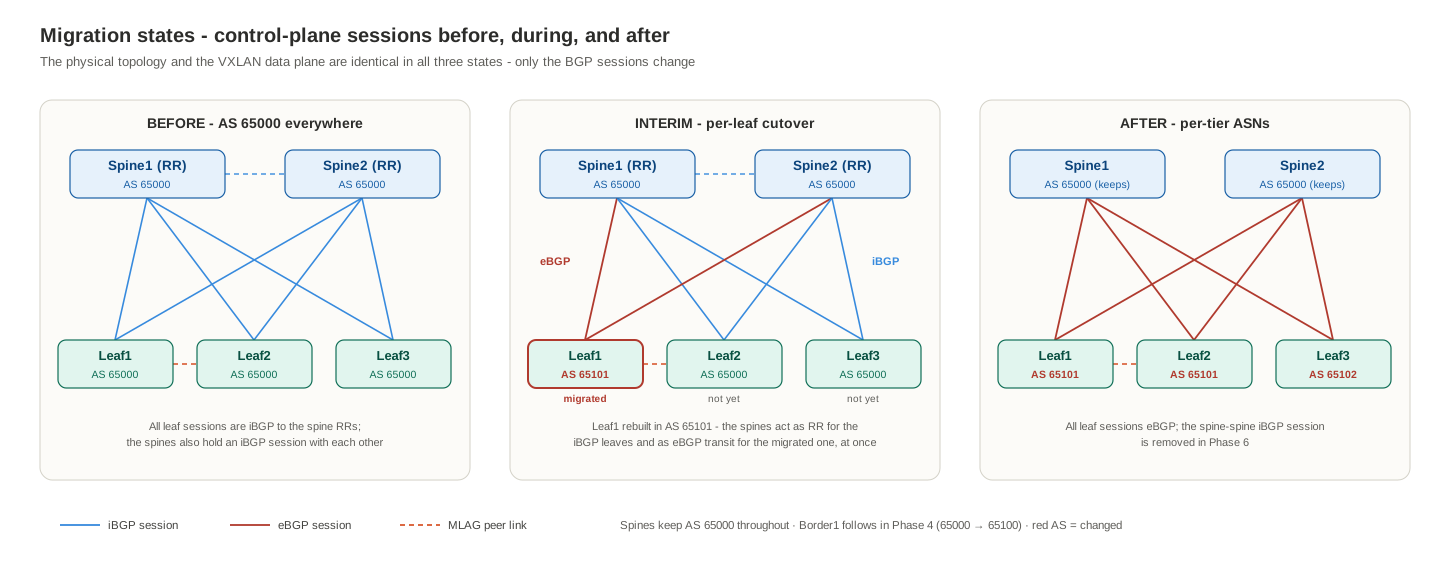
The spines are the pivot: during the interim they act as route reflectors for the not-yet-migrated iBGP leaves and as eBGP transit for the migrated ones, at the same time. Since iBGP-learned routes are always advertised to eBGP peers and vice versa, the two populations exchange EVPN routes through the whole migration with no redistribution anywhere.
ASN design and assignment
| Device | Before | After | Why |
|---|---|---|---|
| Spine1, Spine2 | 65000 | 65000 (unchanged) | Spines keep the legacy fabric AS and become the transit tier — no spine renumber, no flag day |
| Leaf1, Leaf2 | 65000 | 65101 (shared) | One ASN per MLAG pair — Arista best practice; both members share the anycast VTEP, so they share the ASN |
| Leaf3 | 65000 | 65102 | Standalone leaf, own ASN |
| Border1 | 65000 | 65100 | Migrates last; its ASN is what the rest of the world sees as “site A” after the cutover |
| DCI | 65099 | 65099 | EVPN route server between the sites; pure control-plane transit, no VXLAN |
| Border2, SP31, Leaf31 | 65030 | 65030 | Site B is one AS inside, iBGP with SP31 as RR — and stays that way forever |
Two properties of this plan are worth noticing. First, the migration never renumbers the spines or the DCI, so the blast radius of every step is exactly one device. Second, the AS path becomes self-documenting: after migration, a site A host route arrives at Border2 as 65099 65100 65000 65101 — route server, border tier, spine tier, leaf — the same readable chain as the architecture post’s worked example.
IP addressing design and assignment
Site A keeps every address it already has (section 1.1). The new devices extend the same conventions — loopbacks /32, point-to-point links /31, “spine side = .0” — with site B and the DCI in their own easily-recognized blocks:
Loopbacks:
| Device | Loopback0 (router-id, BGP peering) | Loopback1 (VTEP source) |
|---|---|---|
| Border1 | 10.255.255.1 (existing) | — (not a VTEP) |
| DCI | 10.255.99.1 | — |
| Border2 | 10.255.31.1 | — |
| SP31 | 10.255.31.11 | — |
| Leaf31 | 10.255.31.21 | 10.255.31.113 |
New point-to-point /31s (DCI/spine side = .0, border/leaf side = .1):
| Link | Subnet | Side A | Side B |
|---|---|---|---|
| Border1 – DCI | 10.0.103.0/31 | DCI Et3 = .0 | Border1 Et3 = .1 |
| DCI – Border2 | 10.0.104.0/31 | DCI Et2 = .0 | Border2 Et2 = .1 |
| Border2 – SP31 | 10.31.101.0/31 | SP31 Et1 = .0 | Border2 Et1 = .1 |
| SP31 – Leaf31 | 10.31.11.0/31 | SP31 Et3 = .0 | Leaf31 Et3 = .1 |
Overlay in site B — a deliberate subset of site A’s, with the same VNIs and the same static route-targets:
| VLAN | VNI | Anycast SVI (same MAC 00:1c:73:00:00:01) | Route-target | Site B host |
|---|---|---|---|---|
| 10 | 1010 | 192.168.10.1/24 | 1:10 | R_VPC1 = 192.168.10.150 |
| 20 | 1020 | 192.168.20.1/24 | 1:20 | R_VPC2 = 192.168.20.150 |
| — | 50000 (L3, VRF TENANT_A) | — | 1:50000 | routed reachability to VLAN 30, which is not stretched |
This lab’s static RTs turn out to be the single luckiest early decision in the whole post. They are the architecture post’s “explicit global RTs” option: because 1:10 does not embed an ASN, the two sites import each other’s routes with zero rewriting — and, as 6.3 shows, the migration cannot break route import by changing ASNs either.
Topology with addressing and ASNs
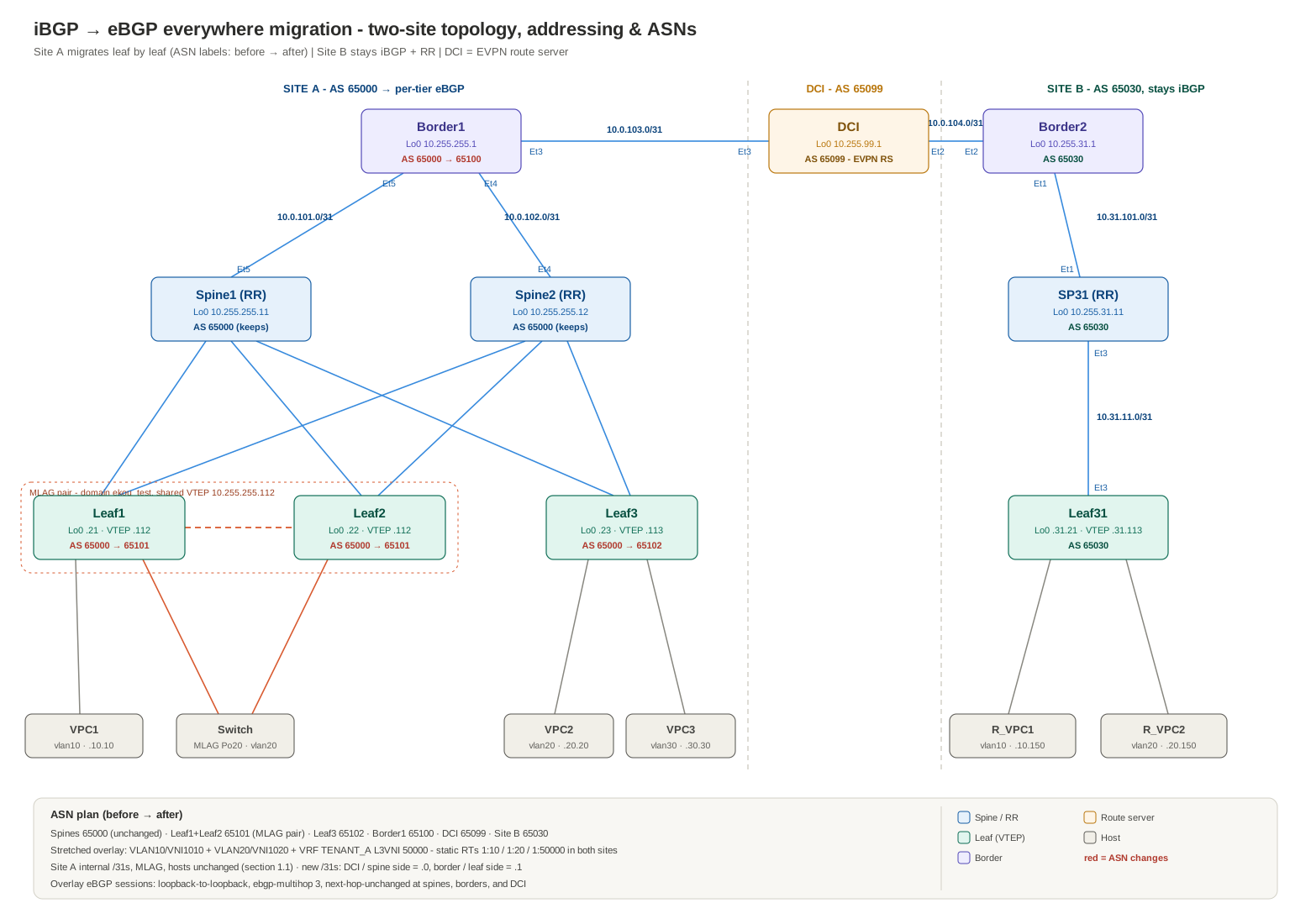
Site A’s internal /31s, MLAG, hosts, and overlay definitions are unchanged from section 1.1. Border from the earlier sections is renamed Border1 and promoted from pure underlay router (and erstwhile multicast RP) to site A’s border: it joins the EVPN overlay as an RR client of the spines and speaks eBGP to the DCI. If you kept the section 3/4.1 multicast config on it, remove PIM first — its RP days are over.
6.2 Initial state: bring-up and packet walks
Bring-up configuration
Five devices need configuration to reach the initial state (all-iBGP sites, DCI in the middle). Everything below is additive — nothing on Leaf1/Leaf2/Leaf3 changes yet.
Spine1 and Spine2 — one new RR client each, Border1:
router bgp 65000
   neighbor 10.255.255.1 peer group EVPN-RRC
Border1 — the DCI-facing interface, an EVPN session into its own fabric (iBGP, as an RR client), an eBGP underlay + overlay toward the DCI, and mutual redistribution so each side’s VTEP loopbacks reach the other side. next-hop-unchanged appears here for the first time — Border1 re-advertises leaf routes to the DCI, and without that knob it would rewrite their next hop to itself, a router with no VTEP:
interface Ethernet3
   no switchport
   ip address 10.0.103.1/31
!
router ospf 1
   redistribute bgp
!
router bgp 65000
   router-id 10.255.255.1
   no bgp default ipv4-unicast
   !
   neighbor EVPN peer group                  ! site-internal overlay, iBGP to both spines
   neighbor EVPN remote-as 65000
   neighbor EVPN update-source Loopback0
   neighbor EVPN send-community extended
   neighbor 10.255.255.11 peer group EVPN
   neighbor 10.255.255.12 peer group EVPN
   !
   neighbor 10.0.103.0 remote-as 65099       ! DCI, underlay (directly connected /31)
   !
   neighbor 10.255.99.1 remote-as 65099      ! DCI, overlay (loopback-to-loopback)
   neighbor 10.255.99.1 update-source Loopback0
   neighbor 10.255.99.1 ebgp-multihop 3
   neighbor 10.255.99.1 send-community extended
   !
   address-family ipv4
      neighbor 10.0.103.0 activate
      network 10.255.255.1/32
      redistribute ospf                      ! site A loopbacks (incl. VTEPs .112/.113) -> DCI
   !
   address-family evpn
      neighbor EVPN activate
      neighbor 10.255.99.1 activate
      neighbor 10.255.99.1 next-hop-unchanged
DCI — the route server. It carries EVPN between the borders and IPv4 between the underlays, and forwards the inter-site VXLAN packets — but it has no interface Vxlan1, no VRFs, and imports nothing. On EOS no extra knob is needed for that: unlike NX-OS (which needs retain route-target all on RT-less transit nodes), EOS keeps and propagates EVPN routes it has no local import for. What it does need, on both sessions, is next-hop-unchanged:
interface Ethernet2
   no switchport
   ip address 10.0.104.0/31
!
interface Ethernet3
   no switchport
   ip address 10.0.103.0/31
!
interface Loopback0
   ip address 10.255.99.1/32
!
ip routing
!
router bgp 65099
   router-id 10.255.99.1
   no bgp default ipv4-unicast
   !
   neighbor 10.0.103.1 remote-as 65000       ! Border1, underlay
   neighbor 10.0.104.1 remote-as 65030       ! Border2, underlay
   !
   neighbor 10.255.255.1 remote-as 65000     ! Border1, overlay
   neighbor 10.255.255.1 update-source Loopback0
   neighbor 10.255.255.1 ebgp-multihop 3
   neighbor 10.255.255.1 send-community extended
   neighbor 10.255.31.1 remote-as 65030      ! Border2, overlay
   neighbor 10.255.31.1 update-source Loopback0
   neighbor 10.255.31.1 ebgp-multihop 3
   neighbor 10.255.31.1 send-community extended
   !
   address-family ipv4
      neighbor 10.0.103.1 activate
      neighbor 10.0.104.1 activate
      network 10.255.99.1/32
   !
   address-family evpn
      neighbor 10.255.255.1 activate
      neighbor 10.255.255.1 next-hop-unchanged
      neighbor 10.255.31.1 activate
      neighbor 10.255.31.1 next-hop-unchanged
Border2 — Border1’s mirror image in site B: OSPF + iBGP inward, eBGP to the DCI outward, same redistribution, same next-hop-unchanged:
interface Ethernet1
   no switchport
   ip address 10.31.101.1/31
   ip ospf network point-to-point
   ip ospf area 0.0.0.0
!
interface Ethernet2
   no switchport
   ip address 10.0.104.1/31
!
interface Loopback0
   ip address 10.255.31.1/32
   ip ospf area 0.0.0.0
!
ip routing
!
router ospf 1
   router-id 10.255.31.1
   max-lsa 12000
   redistribute bgp
!
router bgp 65030
   router-id 10.255.31.1
   no bgp default ipv4-unicast
   !
   neighbor EVPN peer group                  ! site-internal overlay, iBGP to SP31 (RR)
   neighbor EVPN remote-as 65030
   neighbor EVPN update-source Loopback0
   neighbor EVPN send-community extended
   neighbor 10.255.31.11 peer group EVPN
   !
   neighbor 10.0.104.0 remote-as 65099       ! DCI, underlay
   !
   neighbor 10.255.99.1 remote-as 65099      ! DCI, overlay
   neighbor 10.255.99.1 update-source Loopback0
   neighbor 10.255.99.1 ebgp-multihop 3
   neighbor 10.255.99.1 send-community extended
   !
   address-family ipv4
      neighbor 10.0.104.0 activate
      network 10.255.31.1/32
      redistribute ospf                      ! site B loopbacks (incl. VTEP .31.113) -> DCI
   !
   address-family evpn
      neighbor EVPN activate
      neighbor 10.255.99.1 activate
      neighbor 10.255.99.1 next-hop-unchanged
SP31 — site B’s one spine, configured exactly like Spine1 in section 4, scaled down to two clients:
interface Ethernet1
   no switchport
   ip address 10.31.101.0/31
   ip ospf network point-to-point
   ip ospf area 0.0.0.0
!
interface Ethernet3
   no switchport
   ip address 10.31.11.0/31
   ip ospf network point-to-point
   ip ospf area 0.0.0.0
!
interface Loopback0
   ip address 10.255.31.11/32
   ip ospf area 0.0.0.0
!
ip routing
!
router ospf 1
   router-id 10.255.31.11
   max-lsa 12000
!
router bgp 65030
   router-id 10.255.31.11
   no bgp default ipv4-unicast
   !
   neighbor EVPN-RRC peer group
   neighbor EVPN-RRC remote-as 65030
   neighbor EVPN-RRC update-source Loopback0
   neighbor EVPN-RRC send-community extended
   neighbor EVPN-RRC route-reflector-client
   neighbor 10.255.31.1 peer group EVPN-RRC
   neighbor 10.255.31.21 peer group EVPN-RRC
   !
   address-family evpn
      neighbor EVPN-RRC activate
Leaf31 — a complete standalone VTEP in the section 4 + 5.6 pattern: VLANs 10 and 20, anycast gateways, symmetric IRB in TENANT_A, static RTs identical to site A’s. VLAN 30 is deliberately absent — R_VPC2 still reaches VPC3 routed, through the L3 VNI, which is exactly the point of symmetric IRB:
vlan 10,20
!
ip virtual-router mac-address 00:1c:73:00:00:01
!
vrf instance TENANT_A
!
ip routing
ip routing vrf TENANT_A
!
interface Ethernet1
   switchport access vlan 10
!
interface Ethernet2
   switchport access vlan 20
!
interface Ethernet3
   no switchport
   ip address 10.31.11.1/31
   ip ospf network point-to-point
   ip ospf area 0.0.0.0
!
interface Loopback0
   ip address 10.255.31.21/32
   ip ospf area 0.0.0.0
!
interface Loopback1
   ip address 10.255.31.113/32
   ip ospf area 0.0.0.0
!
interface Vlan10
   vrf TENANT_A
   ip address virtual 192.168.10.1/24
   no autostate
!
interface Vlan20
   vrf TENANT_A
   ip address virtual 192.168.20.1/24
   no autostate
!
interface Vxlan1
   vxlan source-interface Loopback1
   vxlan udp-port 4789
   vxlan vlan 10 vni 1010
   vxlan vlan 20 vni 1020
   vxlan vrf TENANT_A vni 50000
!
router ospf 1
   router-id 10.255.31.21
   max-lsa 12000
!
router bgp 65030
   router-id 10.255.31.21
   no bgp default ipv4-unicast
   !
   neighbor EVPN peer group
   neighbor EVPN remote-as 65030
   neighbor EVPN update-source Loopback0
   neighbor EVPN send-community extended
   neighbor 10.255.31.11 peer group EVPN
   !
   vlan 10
      rd 10.255.31.21:10
      route-target both 1:10
      redistribute learned
   vlan 20
      rd 10.255.31.21:20
      route-target both 1:20
      redistribute learned
   !
   vrf TENANT_A
      rd 10.255.31.21:50000
      route-target import evpn 1:50000
      route-target export evpn 1:50000
      redistribute connected
   !
   address-family evpn
      neighbor EVPN activate
The hosts: R_VPC1 gets 192.168.10.150/24 with gateway 192.168.10.1, R_VPC2 gets 192.168.20.150/24 with gateway 192.168.20.1.
Bring-up order and checks — underlay first, overlay second, data plane last:
show ip bgp summary                    ! on DCI: both underlay sessions Established
show ip route 10.255.31.113            ! on Leaf1: site B VTEP present as OSPF external via Border1
show ip route 10.255.255.112           ! on Leaf31: site A anycast VTEP present via Border2
show bgp evpn summary                  ! on DCI and both borders: overlay sessions Established
show bgp evpn route-type imet          ! on Leaf1: Leaf31's IMET (10.255.31.113) present
show vxlan vtep                        ! on Leaf1: flood list now includes 10.255.31.113
show vxlan address-table               ! after first pings: R_VPC1/R_VPC2 MACs behind 10.255.31.113
Then prove the overlay end to end from the site B side: R_VPC1 → VPC1 (192.168.10.10) is stretched-VLAN bridging across the DCI; R_VPC1 → VPC2, VPC3, and Linux2 (192.168.20.20, 192.168.30.30, 192.168.20.100) are routed through L3 VNI 50000 — including into VLAN 30, which site B does not carry at all. One production note this lab dodges: vEOS-lab tolerates the default MTU for these small pings, but a real DCI path needs the same ~50-byte VXLAN headroom as the fabric links.
Verification captures: the initial state, as built
The captures below are from the actual bring-up, kept in full — this is the baseline every migration phase later diffs against, and half their value is being able to come back and compare field by field. One addressing note for reading them: in the current build of the lab the VPCS hosts answer at 192.168.10.10 (VPC1), 192.168.20.20 (VPC2), and 192.168.30.30 (VPC3) — the section 1–5 captures were taken when they sat at .10.100/.20.200/.30.103 — while Switch/Linux2 keeps 192.168.20.100. The topology diagram above uses the current addresses.
R_VPC1 — address it, save, and test outward: gateway, same-VLAN across the DCI, routed across the DCI:
VPCS, r_vpc1_v10 — output (49 lines)
Press '?' to get help.

VPCS> ip 192.168.10.150/24 192.168.10.1
Checking for duplicate address...
VPCS : 192.168.10.150 255.255.255.0 gateway 192.168.10.1

VPCS>
VPCS>
VPCS>
VPCS> save
Saving startup configuration to startup.vpc
.  done

VPCS> ping 192.168.10.1

84 bytes from 192.168.10.1 icmp_seq=1 ttl=64 time=6.709 ms
84 bytes from 192.168.10.1 icmp_seq=2 ttl=64 time=2.623 ms
84 bytes from 192.168.10.1 icmp_seq=3 ttl=64 time=2.454 ms
^C
VPCS> ping 192.168.10.10

84 bytes from 192.168.10.10 icmp_seq=1 ttl=64 time=213.990 ms
84 bytes from 192.168.10.10 icmp_seq=2 ttl=64 time=87.502 ms
84 bytes from 192.168.10.10 icmp_seq=3 ttl=64 time=50.367 ms
^C
VPCS> set pcname r_vpc1_v10

r_vpc1_v10> save
Saving startup configuration to startup.vpc
.  done

r_vpc1_v10> ping 192.168.20.20

84 bytes from 192.168.20.20 icmp_seq=1 ttl=62 time=649.400 ms
84 bytes from 192.168.20.20 icmp_seq=2 ttl=62 time=316.464 ms
84 bytes from 192.168.20.20 icmp_seq=3 ttl=62 time=46.882 ms
^C
r_vpc1_v10> ping 192.168.30.30

84 bytes from 192.168.30.30 icmp_seq=1 ttl=62 time=216.531 ms
84 bytes from 192.168.30.30 icmp_seq=2 ttl=62 time=147.704 ms
84 bytes from 192.168.30.30 icmp_seq=3 ttl=62 time=20.053 ms
^C
r_vpc1_v10> ping 192.168.20.100

84 bytes from 192.168.20.100 icmp_seq=1 ttl=253 time=87.011 ms
84 bytes from 192.168.20.100 icmp_seq=2 ttl=253 time=127.444 ms
^C
r_vpc1_v10>
A second round from the same R_VPC1 console, repeating the reachability set:
VPCS, r_vpc1_v10 — output (42 lines)
VPCS> ip 192.168.10.150/24 192.168.10.1
Checking for duplicate address...
VPCS : 192.168.10.150 255.255.255.0 gateway 192.168.10.1

VPCS>
VPCS>
VPCS>
VPCS> save
Saving startup configuration to startup.vpc
.  done

VPCS> ping 192.168.10.1

84 bytes from 192.168.10.1 icmp_seq=1 ttl=64 time=6.709 ms
84 bytes from 192.168.10.1 icmp_seq=2 ttl=64 time=2.623 ms
84 bytes from 192.168.10.1 icmp_seq=3 ttl=64 time=2.454 ms
^C

r_vpc1_v10> ping 192.168.20.100

192.168.20.100 icmp_seq=1 timeout
84 bytes from 192.168.20.100 icmp_seq=2 ttl=253 time=838.770 ms
84 bytes from 192.168.20.100 icmp_seq=3 ttl=253 time=38.979 ms
^C
r_vpc1_v10> ping 192.168.20.20

84 bytes from 192.168.20.20 icmp_seq=1 ttl=62 time=533.911 ms
84 bytes from 192.168.20.20 icmp_seq=2 ttl=62 time=119.618 ms
^C
r_vpc1_v10> ping 192.168.10.10

84 bytes from 192.168.10.10 icmp_seq=1 ttl=64 time=119.114 ms
^C
r_vpc1_v10> ping 192.168.30.30

192.168.30.30 icmp_seq=1 timeout
192.168.30.30 icmp_seq=2 timeout
84 bytes from 192.168.30.30 icmp_seq=3 ttl=62 time=119.909 ms
84 bytes from 192.168.30.30 icmp_seq=4 ttl=62 time=389.629 ms
84 bytes from 192.168.30.30 icmp_seq=5 ttl=62 time=71.838 ms

r_vpc1_v10>
The TTLs tell the whole forwarding story on their own. ttl=64 to 192.168.10.10: same VLAN, bridged end to end across the DCI — VPCS starts at 64 and no router touched it. ttl=62 to .20.20 and .30.30: exactly two routed hops (ingress leaf SVI, egress leaf) — symmetric IRB through L3 VNI 50000, including into VLAN 30 which Leaf31 does not even carry. ttl=253 to Linux2: an IOS-based host starting at 255, again two routed hops away. The first-packet timeouts are ARP glean and route-programming warm-up on first contact — normal, and gone on the retry.
Leaf31 — one iBGP session to its RR, and the full EVPN view of both sites:
Leaf31(config)#show bgp summary
BGP summary information for VRF default
Router identifier 10.255.31.21, local AS number 65030
Neighbor              AS Session State AFI/SAFI                AFI/SAFI State   NLRI Rcd   NLRI Acc
------------ ----------- ------------- ----------------------- -------------- ---------- ----------
10.255.31.11       65030 Established   L2VPN EVPN              Negotiated             21         21
Leaf31 — show bgp evpn route-type mac-ip (49 lines)
Leaf31(config)#show bgp evpn route-type mac-ip
BGP routing table information for VRF default
Router identifier 10.255.31.21, local AS number 65030
Route status codes: * - valid, > - active, S - Stale, E - ECMP head, e - ECMP
                    c - Contributing to ECMP, % - Pending best path selection
Origin codes: i - IGP, e - EGP, ? - incomplete
AS Path Attributes: Or-ID - Originator ID, C-LST - Cluster List, LL Nexthop - Link Local Nexthop

          Network                Next Hop              Metric  LocPref Weight  Path
 * >      RD: 10.255.255.21:10 mac-ip 0050.7966.6802
                                 10.255.255.112        -       100     0       65099 65000 i Or-ID: 10.255.31.1
 * >      RD: 10.255.255.22:10 mac-ip 0050.7966.6802
                                 10.255.255.112        -       100     0       65099 65000 i Or-ID: 10.255.31.1
 * >      RD: 10.255.255.21:10 mac-ip 0050.7966.6802 192.168.10.10
                                 10.255.255.112        -       100     0       65099 65000 i Or-ID: 10.255.31.1
 * >      RD: 10.255.255.22:10 mac-ip 0050.7966.6802 192.168.10.10
                                 10.255.255.112        -       100     0       65099 65000 i Or-ID: 10.255.31.1
 * >      RD: 10.255.255.23:20 mac-ip 0050.7966.6807
                                 10.255.255.113        -       100     0       65099 65000 i Or-ID: 10.255.31.1
 * >      RD: 10.255.255.23:20 mac-ip 0050.7966.6807 192.168.20.20
                                 10.255.255.113        -       100     0       65099 65000 i Or-ID: 10.255.31.1
 * >      RD: 10.255.255.23:30 mac-ip 0050.7966.680b
                                 10.255.255.113        -       100     0       65099 65000 i Or-ID: 10.255.31.1
 * >      RD: 10.255.255.23:30 mac-ip 0050.7966.680b 192.168.30.30
                                 10.255.255.113        -       100     0       65099 65000 i Or-ID: 10.255.31.1
 * >      RD: 10.255.31.21:10 mac-ip 0050.7966.6810
                                 -                     -       -       0       i
 * >      RD: 10.255.31.21:10 mac-ip 0050.7966.6810 192.168.10.150
                                 -                     -       -       0       i
 * >      RD: 10.255.31.21:20 mac-ip 0050.7966.6811
                                 -                     -       -       0       i
 * >      RD: 10.255.31.21:20 mac-ip 0050.7966.6811 192.168.20.150
                                 -                     -       -       0       i
 * >      RD: 10.255.255.21:20 mac-ip 5000.0008.0000
                                 10.255.255.112        -       100     0       65099 65000 i Or-ID: 10.255.31.1
 * >      RD: 10.255.255.22:20 mac-ip 5000.0008.0000
                                 10.255.255.112        -       100     0       65099 65000 i Or-ID: 10.255.31.1
 * >      RD: 10.255.255.21:20 mac-ip 5000.0008.0001
                                 10.255.255.112        -       100     0       65099 65000 i Or-ID: 10.255.31.1
 * >      RD: 10.255.255.22:20 mac-ip 5000.0008.0001
                                 10.255.255.112        -       100     0       65099 65000 i Or-ID: 10.255.31.1
 * >      RD: 10.255.255.21:20 mac-ip 5000.0008.8014
                                 10.255.255.112        -       100     0       65099 65000 i Or-ID: 10.255.31.1
 * >      RD: 10.255.255.22:20 mac-ip 5000.0008.8014
                                 10.255.255.112        -       100     0       65099 65000 i Or-ID: 10.255.31.1
 * >      RD: 10.255.255.21:20 mac-ip 5000.0008.8014 192.168.20.100
                                 10.255.255.112        -       100     0       65099 65000 i Or-ID: 10.255.31.1
 * >      RD: 10.255.255.22:20 mac-ip 5000.0008.8014 192.168.20.100
                                 10.255.255.112        -       100     0       65099 65000 i Or-ID: 10.255.31.1
Read this table against walk 1 and every claim in it is visible. Every site A route carries AS path 65099 65000 — the DCI and site A ASNs, exactly as predicted — and a next hop of 10.255.255.112 or .113, the real leaf VTEPs: three eBGP hops away and the next hop is still untouched, which is next-hop-unchanged doing its job on Border1, the DCI, and Border2’s inbound iBGP default. The MLAG pair shows up as the same MAC advertised twice under RDs ...21:* and ...22:* with one shared next hop. And Or-ID: 10.255.31.1 is SP31’s reflection bookkeeping — the route entered site B at Border2 and was reflected, not re-originated.
Leaf31 — show bgp evpn route-type ip-prefix ipv4 (29 lines)
Leaf31(config)#show bgp evpn route-type ip-prefix ipv4
BGP routing table information for VRF default
Router identifier 10.255.31.21, local AS number 65030
Route status codes: * - valid, > - active, S - Stale, E - ECMP head, e - ECMP
                    c - Contributing to ECMP, % - Pending best path selection
Origin codes: i - IGP, e - EGP, ? - incomplete
AS Path Attributes: Or-ID - Originator ID, C-LST - Cluster List, LL Nexthop - Link Local Nexthop

          Network                Next Hop              Metric  LocPref Weight  Path
 * >      RD: 10.255.31.21:50000 ip-prefix 192.168.10.0/24
                                 -                     -       -       0       i
 * >      RD: 10.255.255.21:50000 ip-prefix 192.168.10.0/24
                                 10.255.255.112        -       100     0       65099 65000 i Or-ID: 10.255.31.1
 * >      RD: 10.255.255.22:50000 ip-prefix 192.168.10.0/24
                                 10.255.255.112        -       100     0       65099 65000 i Or-ID: 10.255.31.1
 * >      RD: 10.255.31.21:50000 ip-prefix 192.168.20.0/24
                                 -                     -       -       0       i
 * >      RD: 10.255.255.21:50000 ip-prefix 192.168.20.0/24
                                 10.255.255.112        -       100     0       65099 65000 i Or-ID: 10.255.31.1
 * >      RD: 10.255.255.22:50000 ip-prefix 192.168.20.0/24
                                 10.255.255.112        -       100     0       65099 65000 i Or-ID: 10.255.31.1
 * >      RD: 10.255.255.23:50000 ip-prefix 192.168.20.0/24
                                 10.255.255.113        -       100     0       65099 65000 i Or-ID: 10.255.31.1
 * >      RD: 10.255.255.21:50000 ip-prefix 192.168.30.0/24
                                 10.255.255.112        -       100     0       65099 65000 i Or-ID: 10.255.31.1
 * >      RD: 10.255.255.22:50000 ip-prefix 192.168.30.0/24
                                 10.255.255.112        -       100     0       65099 65000 i Or-ID: 10.255.31.1
 * >      RD: 10.255.255.23:50000 ip-prefix 192.168.30.0/24
                                 10.255.255.113        -       100     0       65099 65000 i Or-ID: 10.255.31.1
The Type-5 table is why R_VPC1 can ping into VLAN 30: 192.168.30.0/24 arrives from three site A VTEPs even though Leaf31 has no VLAN 30 — routed reachability through the L3 VNI, no stretched bridge domain required.
Leaf31 — show bgp evpn route-type imet (31 lines)
Leaf31(config)#show bgp evpn route-type imet
BGP routing table information for VRF default
Router identifier 10.255.31.21, local AS number 65030
Route status codes: * - valid, > - active, S - Stale, E - ECMP head, e - ECMP
                    c - Contributing to ECMP, % - Pending best path selection
Origin codes: i - IGP, e - EGP, ? - incomplete
AS Path Attributes: Or-ID - Originator ID, C-LST - Cluster List, LL Nexthop - Link Local Nexthop

          Network                Next Hop              Metric  LocPref Weight  Path
 * >      RD: 10.255.31.21:10 imet 10.255.31.113
                                 -                     -       -       0       i
 * >      RD: 10.255.31.21:20 imet 10.255.31.113
                                 -                     -       -       0       i
 * >      RD: 10.255.255.21:10 imet 10.255.255.112
                                 10.255.255.112        -       100     0       65099 65000 i Or-ID: 10.255.31.1
 * >      RD: 10.255.255.21:20 imet 10.255.255.112
                                 10.255.255.112        -       100     0       65099 65000 i Or-ID: 10.255.31.1
 * >      RD: 10.255.255.21:30 imet 10.255.255.112
                                 10.255.255.112        -       100     0       65099 65000 i Or-ID: 10.255.31.1
 * >      RD: 10.255.255.22:10 imet 10.255.255.112
                                 10.255.255.112        -       100     0       65099 65000 i Or-ID: 10.255.31.1
 * >      RD: 10.255.255.22:20 imet 10.255.255.112
                                 10.255.255.112        -       100     0       65099 65000 i Or-ID: 10.255.31.1
 * >      RD: 10.255.255.22:30 imet 10.255.255.112
                                 10.255.255.112        -       100     0       65099 65000 i Or-ID: 10.255.31.1
 * >      RD: 10.255.255.23:10 imet 10.255.255.113
                                 10.255.255.113        -       100     0       65099 65000 i Or-ID: 10.255.31.1
 * >      RD: 10.255.255.23:20 imet 10.255.255.113
                                 10.255.255.113        -       100     0       65099 65000 i Or-ID: 10.255.31.1
 * >      RD: 10.255.255.23:30 imet 10.255.255.113
                                 10.255.255.113        -       100     0       65099 65000 i Or-ID: 10.255.31.1
The IMET view is the HER flood machinery: Leaf31’s own Type-3s for VNIs 1010/1020, and the site A VTEPs advertising all three VNIs. The :30 rows sit in the BGP table like everything else, but with no VNI 1030 configured on Leaf31 only 1010 and 1020 program flood-list entries — BUM for the two stretched VLANs crosses the DCI, VLAN 30’s does not.
Leaf31 — show bgp evpn route-type mac-ip detail (113 lines)
Leaf31#show bgp evpn route-type mac-ip detail
BGP routing table information for VRF default
Router identifier 10.255.31.21, local AS number 65030
BGP routing table entry for mac-ip 0050.7966.6802, Route Distinguisher: 10.255.255.21:10
 Paths: 1 available
  65099 65000
    10.255.255.112 from 10.255.31.11 (10.255.31.11)
      Origin IGP, metric -, localpref 100, weight 0, tag 0, valid, internal, best
      Originator: 10.255.31.1, Cluster list: 10.255.31.11
      Extended Community: Route-Target-AS:1:10 TunnelEncap:tunnelTypeVxlan
      VNI: 1010 ESI: 0000:0000:0000:0000:0000
BGP routing table entry for mac-ip 0050.7966.6802, Route Distinguisher: 10.255.255.22:10
 Paths: 1 available
  65099 65000
    10.255.255.112 from 10.255.31.11 (10.255.31.11)
      Origin IGP, metric -, localpref 100, weight 0, tag 0, valid, internal, best
      Originator: 10.255.31.1, Cluster list: 10.255.31.11
      Extended Community: Route-Target-AS:1:10 TunnelEncap:tunnelTypeVxlan
      VNI: 1010 ESI: 0000:0000:0000:0000:0000
BGP routing table entry for mac-ip 0050.7966.6802 192.168.10.10, Route Distinguisher: 10.255.255.21:10
 Paths: 1 available
  65099 65000
    10.255.255.112 from 10.255.31.11 (10.255.31.11)
      Origin IGP, metric -, localpref 100, weight 0, tag 0, valid, internal, best
      Originator: 10.255.31.1, Cluster list: 10.255.31.11
      Extended Community: Route-Target-AS:1:10 Route-Target-AS:1:50000 TunnelEncap:tunnelTypeVxlan EvpnRouterMac0
      VNI: 1010 L3 VNI: 50000 ESI: 0000:0000:0000:0000:0000
BGP routing table entry for mac-ip 0050.7966.6802 192.168.10.10, Route Distinguisher: 10.255.255.22:10
 Paths: 1 available
  65099 65000
    10.255.255.112 from 10.255.31.11 (10.255.31.11)
      Origin IGP, metric -, localpref 100, weight 0, tag 0, valid, internal, best
      Originator: 10.255.31.1, Cluster list: 10.255.31.11
      Extended Community: Route-Target-AS:1:10 Route-Target-AS:1:50000 TunnelEncap:tunnelTypeVxlan EvpnRouterMac0
      VNI: 1010 L3 VNI: 50000 ESI: 0000:0000:0000:0000:0000
BGP routing table entry for mac-ip 0050.7966.6807, Route Distinguisher: 10.255.255.23:20
 Paths: 1 available
  65099 65000
    10.255.255.113 from 10.255.31.11 (10.255.31.11)
      Origin IGP, metric -, localpref 100, weight 0, tag 0, valid, internal, best
      Originator: 10.255.31.1, Cluster list: 10.255.31.11
      Extended Community: Route-Target-AS:1:20 TunnelEncap:tunnelTypeVxlan
      VNI: 1020 ESI: 0000:0000:0000:0000:0000
BGP routing table entry for mac-ip 0050.7966.6807 192.168.20.20, Route Distinguisher: 10.255.255.23:20
 Paths: 1 available
  65099 65000
    10.255.255.113 from 10.255.31.11 (10.255.31.11)
      Origin IGP, metric -, localpref 100, weight 0, tag 0, valid, internal, best
      Originator: 10.255.31.1, Cluster list: 10.255.31.11
      Extended Community: Route-Target-AS:1:20 Route-Target-AS:1:50000 TunnelEncap:tunnelTypeVxlan EvpnRouterMac1
      VNI: 1020 L3 VNI: 50000 ESI: 0000:0000:0000:0000:0000
BGP routing table entry for mac-ip 0050.7966.680b, Route Distinguisher: 10.255.255.23:30
 Paths: 1 available
  65099 65000
    10.255.255.113 from 10.255.31.11 (10.255.31.11)
      Origin IGP, metric -, localpref 100, weight 0, tag 0, valid, internal, best
      Originator: 10.255.31.1, Cluster list: 10.255.31.11
      Extended Community: Route-Target-AS:1:30 TunnelEncap:tunnelTypeVxlan
      VNI: 1030 ESI: 0000:0000:0000:0000:0000
BGP routing table entry for mac-ip 0050.7966.680b 192.168.30.30, Route Distinguisher: 10.255.255.23:30
 Paths: 1 available
  65099 65000
    10.255.255.113 from 10.255.31.11 (10.255.31.11)
      Origin IGP, metric -, localpref 100, weight 0, tag 0, valid, internal, best
      Originator: 10.255.31.1, Cluster list: 10.255.31.11
      Extended Community: Route-Target-AS:1:30 Route-Target-AS:1:50000 TunnelEncap:tunnelTypeVxlan EvpnRouterMac1
      VNI: 1030 L3 VNI: 50000 ESI: 0000:0000:0000:0000:0000
BGP routing table entry for mac-ip 0050.7966.6810, Route Distinguisher: 10.255.31.21:10
 Paths: 1 available
  Local
    - from - (0.0.0.0)
      Origin IGP, metric -, localpref -, weight 0, tag 0, valid, local, best
      Extended Community: Route-Target-AS:1:10 TunnelEncap:tunnelTypeVxlan
      VNI: 1010 ESI: 0000:0000:0000:0000:0000
BGP routing table entry for mac-ip 0050.7966.6810 192.168.10.150, Route Distinguisher: 10.255.31.21:10
 Paths: 1 available
  Local
    - from - (0.0.0.0)
      Origin IGP, metric -, localpref -, weight 0, tag 0, valid, local, best
      Extended Community: Route-Target-AS:1:10 Route-Target-AS:1:50000 TunnelEncap:tunnelTypeVxlan
      VNI: 1010 L3 VNI: 50000 ESI: 0000:0000:0000:0000:0000
BGP routing table entry for mac-ip 5000.0008.0000, Route Distinguisher: 10.255.255.21:20
 Paths: 1 available
  65099 65000
    10.255.255.112 from 10.255.31.11 (10.255.31.11)
      Origin IGP, metric -, localpref 100, weight 0, tag 0, valid, internal, best
      Originator: 10.255.31.1, Cluster list: 10.255.31.11
      Extended Community: Route-Target-AS:1:20 TunnelEncap:tunnelTypeVxlan
      VNI: 1020 ESI: 0000:0000:0000:0000:0000
BGP routing table entry for mac-ip 5000.0008.0000, Route Distinguisher: 10.255.255.22:20
 Paths: 1 available
  65099 65000
    10.255.255.112 from 10.255.31.11 (10.255.31.11)
      Origin IGP, metric -, localpref 100, weight 0, tag 0, valid, internal, best
      Originator: 10.255.31.1, Cluster list: 10.255.31.11
      Extended Community: Route-Target-AS:1:20 TunnelEncap:tunnelTypeVxlan
      VNI: 1020 ESI: 0000:0000:0000:0000:0000
BGP routing table entry for mac-ip 5000.0008.0001, Route Distinguisher: 10.255.255.21:20
 Paths: 1 available
  65099 65000
    10.255.255.112 from 10.255.31.11 (10.255.31.11)
      Origin IGP, metric -, localpref 100, weight 0, tag 0, valid, internal, best
      Originator: 10.255.31.1, Cluster list: 10.255.31.11
      Extended Community: Route-Target-AS:1:20 TunnelEncap:tunnelTypeVxlan
      VNI: 1020 ESI: 0000:0000:0000:0000:0000
BGP routing table entry for mac-ip 5000.0008.0001, Route Distinguisher: 10.255.255.22:20
 Paths: 1 available
  65099 65000
    10.255.255.112 from 10.255.31.11 (10.255.31.11)
      Origin IGP, metric -, localpref 100, weight 0, tag 0, valid, internal, best
      Originator: 10.255.31.1, Cluster list: 10.255.31.11
      Extended Community: Route-Target-AS:1:20 TunnelEncap:tunnelTypeVxlan
      VNI: 1020 ESI: 0000:0000:0000:0000:0000
The detail view is the architecture-post section 7.4 story on a live Arista switch: MAC-only Type-2s carry one RT (1:10 — the bridge domain), MAC/IP Type-2s carry two (1:10 and 1:50000 — bridge domain plus tenant VRF), alongside TunnelEncap:tunnelTypeVxlan, the router-MAC community, and both VNIs (VNI: 1010 L3 VNI: 50000). Those are the fields the migration must not disturb — and the RTs are the static ASN-free values that make Phase 1 a verification instead of a project. One contrast worth pinning here: in the other cross-site RT design — auto-derived ASN:VNI RTs plus rewrite-evpn-rt-asn, the NX-OS-idiomatic pattern — this RT would be rewritten at every eBGP hop and arrive looking locally derived; the architecture post’s section 12.3 traces that variant hop by hop. This lab’s RTs contain no ASN and are configured identically in both sites, so they cross the DCI byte-identical while only the AS path grows — same architecture, the “explicit global RTs” option. For the record: explicit RD/RT is EOS’s long-standing model and the only one this lab’s 4.33.1.1F image supports, but newer EOS does add auto-derivation (automatic RDs in 4.33.2F for MPLS VPN and 4.34.1F for L2/L3 EVPN, with ASN:VNI-style auto RTs alongside) — a fabric built on those auto values inherits the same ASN coupling, and the same Phase 1 pinning duty, as NX-OS and FRR. EOS still has no rewrite-evpn-rt-asn equivalent, so across sites the explicit shared RT remains the Arista answer either way.
SP31 — the site B route reflector’s view:
SP31#show bgp summary
BGP summary information for VRF default
Router identifier 10.255.31.11, local AS number 65030
Neighbor              AS Session State AFI/SAFI                AFI/SAFI State   NLRI Rcd   NLRI Acc
------------ ----------- ------------- ----------------------- -------------- ---------- ----------
10.255.31.1        65030 Established   L2VPN EVPN              Negotiated             33         33
10.255.31.21       65030 Established   L2VPN EVPN              Negotiated              8          8
SP31 — show bgp evpn route-type mac-ip (49 lines)
SP31# show bgp evpn route-type mac-ip
BGP routing table information for VRF default
Router identifier 10.255.31.11, local AS number 65030
Route status codes: * - valid, > - active, S - Stale, E - ECMP head, e - ECMP
                    c - Contributing to ECMP, % - Pending best path selection
Origin codes: i - IGP, e - EGP, ? - incomplete
AS Path Attributes: Or-ID - Originator ID, C-LST - Cluster List, LL Nexthop - Link Local Nexthop

          Network                Next Hop              Metric  LocPref Weight  Path
 * >      RD: 10.255.255.21:10 mac-ip 0050.7966.6802
                                 10.255.255.112        -       100     0       65099 65000 i
 * >      RD: 10.255.255.22:10 mac-ip 0050.7966.6802
                                 10.255.255.112        -       100     0       65099 65000 i
 * >      RD: 10.255.255.21:10 mac-ip 0050.7966.6802 192.168.10.10
                                 10.255.255.112        -       100     0       65099 65000 i
 * >      RD: 10.255.255.22:10 mac-ip 0050.7966.6802 192.168.10.10
                                 10.255.255.112        -       100     0       65099 65000 i
 * >      RD: 10.255.255.23:20 mac-ip 0050.7966.6807
                                 10.255.255.113        -       100     0       65099 65000 i
 * >      RD: 10.255.255.23:20 mac-ip 0050.7966.6807 192.168.20.20
                                 10.255.255.113        -       100     0       65099 65000 i
 * >      RD: 10.255.255.23:30 mac-ip 0050.7966.680b
                                 10.255.255.113        -       100     0       65099 65000 i
 * >      RD: 10.255.255.23:30 mac-ip 0050.7966.680b 192.168.30.30
                                 10.255.255.113        -       100     0       65099 65000 i
 * >      RD: 10.255.31.21:10 mac-ip 0050.7966.6810
                                 10.255.31.113         -       100     0       i
 * >      RD: 10.255.31.21:10 mac-ip 0050.7966.6810 192.168.10.150
                                 10.255.31.113         -       100     0       i
 * >      RD: 10.255.31.21:20 mac-ip 0050.7966.6811
                                 10.255.31.113         -       100     0       i
 * >      RD: 10.255.31.21:20 mac-ip 0050.7966.6811 192.168.20.150
                                 10.255.31.113         -       100     0       i
 * >      RD: 10.255.255.21:20 mac-ip 5000.0008.0000
                                 10.255.255.112        -       100     0       65099 65000 i
 * >      RD: 10.255.255.22:20 mac-ip 5000.0008.0000
                                 10.255.255.112        -       100     0       65099 65000 i
 * >      RD: 10.255.255.21:20 mac-ip 5000.0008.0001
                                 10.255.255.112        -       100     0       65099 65000 i
 * >      RD: 10.255.255.22:20 mac-ip 5000.0008.0001
                                 10.255.255.112        -       100     0       65099 65000 i
 * >      RD: 10.255.255.21:20 mac-ip 5000.0008.8014
                                 10.255.255.112        -       100     0       65099 65000 i
 * >      RD: 10.255.255.22:20 mac-ip 5000.0008.8014
                                 10.255.255.112        -       100     0       65099 65000 i
 * >      RD: 10.255.255.21:20 mac-ip 5000.0008.8014 192.168.20.100
                                 10.255.255.112        -       100     0       65099 65000 i
 * >      RD: 10.255.255.22:20 mac-ip 5000.0008.8014 192.168.20.100
                                 10.255.255.112        -       100     0       65099 65000 i
SP31 — show bgp evpn route-type ip-prefix ipv4 (29 lines)
SP31#show bgp evpn route-type ip-prefix ipv4
BGP routing table information for VRF default
Router identifier 10.255.31.11, local AS number 65030
Route status codes: * - valid, > - active, S - Stale, E - ECMP head, e - ECMP
                    c - Contributing to ECMP, % - Pending best path selection
Origin codes: i - IGP, e - EGP, ? - incomplete
AS Path Attributes: Or-ID - Originator ID, C-LST - Cluster List, LL Nexthop - Link Local Nexthop

          Network                Next Hop              Metric  LocPref Weight  Path
 * >      RD: 10.255.31.21:50000 ip-prefix 192.168.10.0/24
                                 10.255.31.113         -       100     0       i
 * >      RD: 10.255.255.21:50000 ip-prefix 192.168.10.0/24
                                 10.255.255.112        -       100     0       65099 65000 i
 * >      RD: 10.255.255.22:50000 ip-prefix 192.168.10.0/24
                                 10.255.255.112        -       100     0       65099 65000 i
 * >      RD: 10.255.31.21:50000 ip-prefix 192.168.20.0/24
                                 10.255.31.113         -       100     0       i
 * >      RD: 10.255.255.21:50000 ip-prefix 192.168.20.0/24
                                 10.255.255.112        -       100     0       65099 65000 i
 * >      RD: 10.255.255.22:50000 ip-prefix 192.168.20.0/24
                                 10.255.255.112        -       100     0       65099 65000 i
 * >      RD: 10.255.255.23:50000 ip-prefix 192.168.20.0/24
                                 10.255.255.113        -       100     0       65099 65000 i
 * >      RD: 10.255.255.21:50000 ip-prefix 192.168.30.0/24
                                 10.255.255.112        -       100     0       65099 65000 i
 * >      RD: 10.255.255.22:50000 ip-prefix 192.168.30.0/24
                                 10.255.255.112        -       100     0       65099 65000 i
 * >      RD: 10.255.255.23:50000 ip-prefix 192.168.30.0/24
                                 10.255.255.113        -       100     0       65099 65000 i
SP31 — show bgp evpn route-type imet (31 lines)
SP31#show bgp evpn route-type imet
BGP routing table information for VRF default
Router identifier 10.255.31.11, local AS number 65030
Route status codes: * - valid, > - active, S - Stale, E - ECMP head, e - ECMP
                    c - Contributing to ECMP, % - Pending best path selection
Origin codes: i - IGP, e - EGP, ? - incomplete
AS Path Attributes: Or-ID - Originator ID, C-LST - Cluster List, LL Nexthop - Link Local Nexthop

          Network                Next Hop              Metric  LocPref Weight  Path
 * >      RD: 10.255.31.21:10 imet 10.255.31.113
                                 10.255.31.113         -       100     0       i
 * >      RD: 10.255.31.21:20 imet 10.255.31.113
                                 10.255.31.113         -       100     0       i
 * >      RD: 10.255.255.21:10 imet 10.255.255.112
                                 10.255.255.112        -       100     0       65099 65000 i
 * >      RD: 10.255.255.21:20 imet 10.255.255.112
                                 10.255.255.112        -       100     0       65099 65000 i
 * >      RD: 10.255.255.21:30 imet 10.255.255.112
                                 10.255.255.112        -       100     0       65099 65000 i
 * >      RD: 10.255.255.22:10 imet 10.255.255.112
                                 10.255.255.112        -       100     0       65099 65000 i
 * >      RD: 10.255.255.22:20 imet 10.255.255.112
                                 10.255.255.112        -       100     0       65099 65000 i
 * >      RD: 10.255.255.22:30 imet 10.255.255.112
                                 10.255.255.112        -       100     0       65099 65000 i
 * >      RD: 10.255.255.23:10 imet 10.255.255.113
                                 10.255.255.113        -       100     0       65099 65000 i
 * >      RD: 10.255.255.23:20 imet 10.255.255.113
                                 10.255.255.113        -       100     0       65099 65000 i
 * >      RD: 10.255.255.23:30 imet 10.255.255.113
                                 10.255.255.113        -       100     0       65099 65000 i
SP31 — show bgp evpn route-type mac-ip detail (101 lines)
SP31#show bgp evpn route-type mac-ip detail
BGP routing table information for VRF default
Router identifier 10.255.31.11, local AS number 65030
BGP routing table entry for mac-ip 0050.7966.6802, Route Distinguisher: 10.255.255.21:10
 Paths: 1 available
  65099 65000 (Received from a RR-client)
    10.255.255.112 from 10.255.31.1 (10.255.31.1)
      Origin IGP, metric -, localpref 100, weight 0, tag 0, valid, internal, best
      Extended Community: Route-Target-AS:1:10 TunnelEncap:tunnelTypeVxlan
      VNI: 1010 ESI: 0000:0000:0000:0000:0000
BGP routing table entry for mac-ip 0050.7966.6802, Route Distinguisher: 10.255.255.22:10
 Paths: 1 available
  65099 65000 (Received from a RR-client)
    10.255.255.112 from 10.255.31.1 (10.255.31.1)
      Origin IGP, metric -, localpref 100, weight 0, tag 0, valid, internal, best
      Extended Community: Route-Target-AS:1:10 TunnelEncap:tunnelTypeVxlan
      VNI: 1010 ESI: 0000:0000:0000:0000:0000
BGP routing table entry for mac-ip 0050.7966.6802 192.168.10.10, Route Distinguisher: 10.255.255.21:10
 Paths: 1 available
  65099 65000 (Received from a RR-client)
    10.255.255.112 from 10.255.31.1 (10.255.31.1)
      Origin IGP, metric -, localpref 100, weight 0, tag 0, valid, internal, best
      Extended Community: Route-Target-AS:1:10 Route-Target-AS:1:50000 TunnelEncap:tunnelTypeVxlan EvpnRouterMac0
      VNI: 1010 L3 VNI: 50000 ESI: 0000:0000:0000:0000:0000
BGP routing table entry for mac-ip 0050.7966.6802 192.168.10.10, Route Distinguisher: 10.255.255.22:10
 Paths: 1 available
  65099 65000 (Received from a RR-client)
    10.255.255.112 from 10.255.31.1 (10.255.31.1)
      Origin IGP, metric -, localpref 100, weight 0, tag 0, valid, internal, best
      Extended Community: Route-Target-AS:1:10 Route-Target-AS:1:50000 TunnelEncap:tunnelTypeVxlan EvpnRouterMac0
      VNI: 1010 L3 VNI: 50000 ESI: 0000:0000:0000:0000:0000
BGP routing table entry for mac-ip 0050.7966.6807, Route Distinguisher: 10.255.255.23:20
 Paths: 1 available
  65099 65000 (Received from a RR-client)
    10.255.255.113 from 10.255.31.1 (10.255.31.1)
      Origin IGP, metric -, localpref 100, weight 0, tag 0, valid, internal, best
      Extended Community: Route-Target-AS:1:20 TunnelEncap:tunnelTypeVxlan
      VNI: 1020 ESI: 0000:0000:0000:0000:0000
BGP routing table entry for mac-ip 0050.7966.6807 192.168.20.20, Route Distinguisher: 10.255.255.23:20
 Paths: 1 available
  65099 65000 (Received from a RR-client)
    10.255.255.113 from 10.255.31.1 (10.255.31.1)
      Origin IGP, metric -, localpref 100, weight 0, tag 0, valid, internal, best
      Extended Community: Route-Target-AS:1:20 Route-Target-AS:1:50000 TunnelEncap:tunnelTypeVxlan EvpnRouterMac1
      VNI: 1020 L3 VNI: 50000 ESI: 0000:0000:0000:0000:0000
BGP routing table entry for mac-ip 0050.7966.680b, Route Distinguisher: 10.255.255.23:30
 Paths: 1 available
  65099 65000 (Received from a RR-client)
    10.255.255.113 from 10.255.31.1 (10.255.31.1)
      Origin IGP, metric -, localpref 100, weight 0, tag 0, valid, internal, best
      Extended Community: Route-Target-AS:1:30 TunnelEncap:tunnelTypeVxlan
      VNI: 1030 ESI: 0000:0000:0000:0000:0000
BGP routing table entry for mac-ip 0050.7966.680b 192.168.30.30, Route Distinguisher: 10.255.255.23:30
 Paths: 1 available
  65099 65000 (Received from a RR-client)
    10.255.255.113 from 10.255.31.1 (10.255.31.1)
      Origin IGP, metric -, localpref 100, weight 0, tag 0, valid, internal, best
      Extended Community: Route-Target-AS:1:30 Route-Target-AS:1:50000 TunnelEncap:tunnelTypeVxlan EvpnRouterMac1
      VNI: 1030 L3 VNI: 50000 ESI: 0000:0000:0000:0000:0000
BGP routing table entry for mac-ip 0050.7966.6810, Route Distinguisher: 10.255.31.21:10
 Paths: 1 available
  Local (Received from a RR-client)
    10.255.31.113 from 10.255.31.21 (10.255.31.21)
      Origin IGP, metric -, localpref 100, weight 0, tag 0, valid, internal, best
      Extended Community: Route-Target-AS:1:10 TunnelEncap:tunnelTypeVxlan
      VNI: 1010 ESI: 0000:0000:0000:0000:0000
BGP routing table entry for mac-ip 0050.7966.6810 192.168.10.150, Route Distinguisher: 10.255.31.21:10
 Paths: 1 available
  Local (Received from a RR-client)
    10.255.31.113 from 10.255.31.21 (10.255.31.21)
      Origin IGP, metric -, localpref 100, weight 0, tag 0, valid, internal, best
      Extended Community: Route-Target-AS:1:10 Route-Target-AS:1:50000 TunnelEncap:tunnelTypeVxlan EvpnRouterMac8
      VNI: 1010 L3 VNI: 50000 ESI: 0000:0000:0000:0000:0000
BGP routing table entry for mac-ip 5000.0008.0000, Route Distinguisher: 10.255.255.21:20
 Paths: 1 available
  65099 65000 (Received from a RR-client)
    10.255.255.112 from 10.255.31.1 (10.255.31.1)
      Origin IGP, metric -, localpref 100, weight 0, tag 0, valid, internal, best
      Extended Community: Route-Target-AS:1:20 TunnelEncap:tunnelTypeVxlan
      VNI: 1020 ESI: 0000:0000:0000:0000:0000
BGP routing table entry for mac-ip 5000.0008.0000, Route Distinguisher: 10.255.255.22:20
 Paths: 1 available
  65099 65000 (Received from a RR-client)
    10.255.255.112 from 10.255.31.1 (10.255.31.1)
      Origin IGP, metric -, localpref 100, weight 0, tag 0, valid, internal, best
      Extended Community: Route-Target-AS:1:20 TunnelEncap:tunnelTypeVxlan
      VNI: 1020 ESI: 0000:0000:0000:0000:0000
BGP routing table entry for mac-ip 5000.0008.0001, Route Distinguisher: 10.255.255.21:20
 Paths: 1 available
  65099 65000 (Received from a RR-client)
    10.255.255.112 from 10.255.31.1 (10.255.31.1)
      Origin IGP, metric -, localpref 100, weight 0, tag 0, valid, internal, best
      Extended Community: Route-Target-AS:1:20 TunnelEncap:tunnelTypeVxlan
      VNI: 1020 ESI: 0000:0000:0000:0000:0000
BGP routing table entry for mac-ip 5000.0008.0001, Route Distinguisher: 10.255.255.22:20
 Paths: 1 available
  65099 65000 (Received from a RR-client)
    10.255.255.112 from 10.255.31.1 (10.255.31.1)
      Origin IGP, metric -, localpref 100, weight 0, tag 0, valid, internal, best
      Extended Community: Route-Target-AS:1:20 TunnelEncap:tunnelTypeVxlan
      VNI: 1020 ESI: 0000:0000:0000:0000:0000
Two SP31-only details: (Received from a RR-client) on every entry — the reflector serving its two clients — and the session counters up top: 33 NLRI from Border2 (the entire remote site plus re-advertisements) against 8 from Leaf31. Site B’s whole view of site A funnels through one iBGP session.
Border2 — three sessions doing three different jobs, and the underlay contract made visible:
Border2#show bgp summary
BGP summary information for VRF default
Router identifier 10.255.31.1, local AS number 65030
Neighbor              AS Session State AFI/SAFI                AFI/SAFI State   NLRI Rcd   NLRI Acc
------------ ----------- ------------- ----------------------- -------------- ---------- ----------
10.0.104.0         65099 Established   IPv4 Unicast            Negotiated             15         15
10.255.31.11       65030 Established   L2VPN EVPN              Negotiated              6          6
10.255.99.1        65099 Established   L2VPN EVPN              Negotiated             29         29
Border2 — show bgp evpn route-type mac-ip (37 lines)
Border2#show bgp evpn route-type mac-ip
BGP routing table information for VRF default
Router identifier 10.255.31.1, local AS number 65030
Route status codes: * - valid, > - active, S - Stale, E - ECMP head, e - ECMP
                    c - Contributing to ECMP, % - Pending best path selection
Origin codes: i - IGP, e - EGP, ? - incomplete
AS Path Attributes: Or-ID - Originator ID, C-LST - Cluster List, LL Nexthop - Link Local Nexthop

          Network                Next Hop              Metric  LocPref Weight  Path
 * >      RD: 10.255.255.21:10 mac-ip 0050.7966.6802
                                 10.255.255.112        -       100     0       65099 65000 i
 * >      RD: 10.255.255.22:10 mac-ip 0050.7966.6802
                                 10.255.255.112        -       100     0       65099 65000 i
 * >      RD: 10.255.255.21:10 mac-ip 0050.7966.6802 192.168.10.10
                                 10.255.255.112        -       100     0       65099 65000 i
 * >      RD: 10.255.255.22:10 mac-ip 0050.7966.6802 192.168.10.10
                                 10.255.255.112        -       100     0       65099 65000 i
 * >      RD: 10.255.255.23:20 mac-ip 0050.7966.6807
                                 10.255.255.113        -       100     0       65099 65000 i
 * >      RD: 10.255.255.23:20 mac-ip 0050.7966.6807 192.168.20.20
                                 10.255.255.113        -       100     0       65099 65000 i
 * >      RD: 10.255.255.23:30 mac-ip 0050.7966.680b
                                 10.255.255.113        -       100     0       65099 65000 i
 * >      RD: 10.255.255.23:30 mac-ip 0050.7966.680b 192.168.30.30
                                 10.255.255.113        -       100     0       65099 65000 i
 * >      RD: 10.255.31.21:10 mac-ip 0050.7966.6810
                                 10.255.31.113         -       100     0       i Or-ID: 10.255.31.21 C-LST: 10.2
 * >      RD: 10.255.31.21:10 mac-ip 0050.7966.6810 192.168.10.150
                                 10.255.31.113         -       100     0       i Or-ID: 10.255.31.21 C-LST: 10.2
 * >      RD: 10.255.255.21:20 mac-ip 5000.0008.0000
                                 10.255.255.112        -       100     0       65099 65000 i
 * >      RD: 10.255.255.22:20 mac-ip 5000.0008.0000
                                 10.255.255.112        -       100     0       65099 65000 i
 * >      RD: 10.255.255.21:20 mac-ip 5000.0008.0001
                                 10.255.255.112        -       100     0       65099 65000 i
 * >      RD: 10.255.255.22:20 mac-ip 5000.0008.0001
                                 10.255.255.112        -       100     0       65099 65000 i
Border2 — show bgp evpn route-type ip-prefix ipv4 (29 lines)
Border2#show bgp evpn route-type ip-prefix ipv4
BGP routing table information for VRF default
Router identifier 10.255.31.1, local AS number 65030
Route status codes: * - valid, > - active, S - Stale, E - ECMP head, e - ECMP
                    c - Contributing to ECMP, % - Pending best path selection
Origin codes: i - IGP, e - EGP, ? - incomplete
AS Path Attributes: Or-ID - Originator ID, C-LST - Cluster List, LL Nexthop - Link Local Nexthop

          Network                Next Hop              Metric  LocPref Weight  Path
 * >      RD: 10.255.31.21:50000 ip-prefix 192.168.10.0/24
                                 10.255.31.113         -       100     0       i Or-ID: 10.255.31.21 C-LST: 10.2
 * >      RD: 10.255.255.21:50000 ip-prefix 192.168.10.0/24
                                 10.255.255.112        -       100     0       65099 65000 i
 * >      RD: 10.255.255.22:50000 ip-prefix 192.168.10.0/24
                                 10.255.255.112        -       100     0       65099 65000 i
 * >      RD: 10.255.31.21:50000 ip-prefix 192.168.20.0/24
                                 10.255.31.113         -       100     0       i Or-ID: 10.255.31.21 C-LST: 10.2
 * >      RD: 10.255.255.21:50000 ip-prefix 192.168.20.0/24
                                 10.255.255.112        -       100     0       65099 65000 i
 * >      RD: 10.255.255.22:50000 ip-prefix 192.168.20.0/24
                                 10.255.255.112        -       100     0       65099 65000 i
 * >      RD: 10.255.255.23:50000 ip-prefix 192.168.20.0/24
                                 10.255.255.113        -       100     0       65099 65000 i
 * >      RD: 10.255.255.21:50000 ip-prefix 192.168.30.0/24
                                 10.255.255.112        -       100     0       65099 65000 i
 * >      RD: 10.255.255.22:50000 ip-prefix 192.168.30.0/24
                                 10.255.255.112        -       100     0       65099 65000 i
 * >      RD: 10.255.255.23:50000 ip-prefix 192.168.30.0/24
                                 10.255.255.113        -       100     0       65099 65000 i
Border2 — show bgp evpn route-type imet (31 lines)
Border2#show bgp evpn route-type imet
BGP routing table information for VRF default
Router identifier 10.255.31.1, local AS number 65030
Route status codes: * - valid, > - active, S - Stale, E - ECMP head, e - ECMP
                    c - Contributing to ECMP, % - Pending best path selection
Origin codes: i - IGP, e - EGP, ? - incomplete
AS Path Attributes: Or-ID - Originator ID, C-LST - Cluster List, LL Nexthop - Link Local Nexthop

          Network                Next Hop              Metric  LocPref Weight  Path
 * >      RD: 10.255.31.21:10 imet 10.255.31.113
                                 10.255.31.113         -       100     0       i Or-ID: 10.255.31.21 C-LST: 10.2
 * >      RD: 10.255.31.21:20 imet 10.255.31.113
                                 10.255.31.113         -       100     0       i Or-ID: 10.255.31.21 C-LST: 10.2
 * >      RD: 10.255.255.21:10 imet 10.255.255.112
                                 10.255.255.112        -       100     0       65099 65000 i
 * >      RD: 10.255.255.21:20 imet 10.255.255.112
                                 10.255.255.112        -       100     0       65099 65000 i
 * >      RD: 10.255.255.21:30 imet 10.255.255.112
                                 10.255.255.112        -       100     0       65099 65000 i
 * >      RD: 10.255.255.22:10 imet 10.255.255.112
                                 10.255.255.112        -       100     0       65099 65000 i
 * >      RD: 10.255.255.22:20 imet 10.255.255.112
                                 10.255.255.112        -       100     0       65099 65000 i
 * >      RD: 10.255.255.22:30 imet 10.255.255.112
                                 10.255.255.112        -       100     0       65099 65000 i
 * >      RD: 10.255.255.23:10 imet 10.255.255.113
                                 10.255.255.113        -       100     0       65099 65000 i
 * >      RD: 10.255.255.23:20 imet 10.255.255.113
                                 10.255.255.113        -       100     0       65099 65000 i
 * >      RD: 10.255.255.23:30 imet 10.255.255.113
                                 10.255.255.113        -       100     0       65099 65000 i
Border2 — show ip bgp (31 lines)
Border2#show ip bgp
BGP routing table information for VRF default
Router identifier 10.255.31.1, local AS number 65030
Route status codes: s - suppressed contributor, * - valid, > - active, E - ECMP head, e - ECMP
                    S - Stale, c - Contributing to ECMP, b - backup, L - labeled-unicast
                    % - Pending best path selection
Origin codes: i - IGP, e - EGP, ? - incomplete
RPKI Origin Validation codes: V - valid, I - invalid, U - unknown
AS Path Attributes: Or-ID - Originator ID, C-LST - Cluster List, LL Nexthop - Link Local Nexthop

          Network                Next Hop              Metric  AIGP       LocPref Weight  Path
 * >      10.0.11.0/31           10.0.104.0            0       -          100     0       65099 65000 i
 * >      10.0.12.0/31           10.0.104.0            0       -          100     0       65099 65000 i
 * >      10.0.13.0/31           10.0.104.0            0       -          100     0       65099 65000 i
 * >      10.0.21.0/31           10.0.104.0            0       -          100     0       65099 65000 i
 * >      10.0.22.0/31           10.0.104.0            0       -          100     0       65099 65000 i
 * >      10.0.23.0/31           10.0.104.0            0       -          100     0       65099 65000 i
 * >      10.31.11.0/31          10.31.101.0           -       -          -       0       i
 * >      10.255.31.1/32         -                     -       -          -       0       i
 * >      10.255.31.11/32        10.31.101.0           -       -          -       0       i
 * >      10.255.31.21/32        10.31.101.0           -       -          -       0       i
 * >      10.255.31.113/32       10.31.101.0           -       -          -       0       i
 * >      10.255.99.1/32         10.0.104.0            0       -          100     0       65099 i
 * >      10.255.255.1/32        10.0.104.0            0       -          100     0       65099 65000 i
 * >      10.255.255.11/32       10.0.104.0            0       -          100     0       65099 65000 i
 * >      10.255.255.12/32       10.0.104.0            0       -          100     0       65099 65000 i
 * >      10.255.255.21/32       10.0.104.0            0       -          100     0       65099 65000 i
 * >      10.255.255.22/32       10.0.104.0            0       -          100     0       65099 65000 i
 * >      10.255.255.23/32       10.0.104.0            0       -          100     0       65099 65000 i
 * >      10.255.255.112/32      10.0.104.0            0       -          100     0       65099 65000 i
 * >      10.255.255.113/32      10.0.104.0            0       -          100     0       65099 65000 i
The show ip bgp table is the inter-site underlay in its entirety: loopbacks and /31s, nothing else — no tenant prefixes, no host routes. Site A’s VTEPs (10.255.255.112/.113) arrive with AS path 65099 65000 via the DCI, and site B’s own loopbacks are the locally originated i entries that Border2 sends the other way. This is the “what actually crosses the DCI” list from 6.1, printed by the router itself.
DCI — the route server, holding both sites’ EVPN routes with one-hop AS paths and no VXLAN anywhere:
DCI(config)#show bgp summary
BGP summary information for VRF default
Router identifier 10.255.99.1, local AS number 65099
Neighbor              AS Session State AFI/SAFI                AFI/SAFI State   NLRI Rcd   NLRI Acc
------------ ----------- ------------- ----------------------- -------------- ---------- ----------
10.0.103.1         65000 Established   IPv4 Unicast            Negotiated             14         14
10.0.104.1         65030 Established   IPv4 Unicast            Negotiated              5          5
10.255.31.1        65030 Established   L2VPN EVPN              Negotiated              6          6
10.255.255.1       65000 Established   L2VPN EVPN              Negotiated             29         29
DCI — show bgp evpn route-type mac-ip (37 lines)
DCI(config)#show bgp evpn route-type mac-ip
BGP routing table information for VRF default
Router identifier 10.255.99.1, local AS number 65099
Route status codes: * - valid, > - active, S - Stale, E - ECMP head, e - ECMP
                    c - Contributing to ECMP, % - Pending best path selection
Origin codes: i - IGP, e - EGP, ? - incomplete
AS Path Attributes: Or-ID - Originator ID, C-LST - Cluster List, LL Nexthop - Link Local Nexthop

          Network                Next Hop              Metric  LocPref Weight  Path
 * >      RD: 10.255.255.21:10 mac-ip 0050.7966.6802
                                 10.255.255.112        -       100     0       65000 i
 * >      RD: 10.255.255.22:10 mac-ip 0050.7966.6802
                                 10.255.255.112        -       100     0       65000 i
 * >      RD: 10.255.255.21:10 mac-ip 0050.7966.6802 192.168.10.10
                                 10.255.255.112        -       100     0       65000 i
 * >      RD: 10.255.255.22:10 mac-ip 0050.7966.6802 192.168.10.10
                                 10.255.255.112        -       100     0       65000 i
 * >      RD: 10.255.255.23:20 mac-ip 0050.7966.6807
                                 10.255.255.113        -       100     0       65000 i
 * >      RD: 10.255.255.23:20 mac-ip 0050.7966.6807 192.168.20.20
                                 10.255.255.113        -       100     0       65000 i
 * >      RD: 10.255.255.23:30 mac-ip 0050.7966.680b
                                 10.255.255.113        -       100     0       65000 i
 * >      RD: 10.255.255.23:30 mac-ip 0050.7966.680b 192.168.30.30
                                 10.255.255.113        -       100     0       65000 i
 * >      RD: 10.255.31.21:10 mac-ip 0050.7966.6810
                                 10.255.31.113         -       100     0       65030 i
 * >      RD: 10.255.31.21:10 mac-ip 0050.7966.6810 192.168.10.150
                                 10.255.31.113         -       100     0       65030 i
 * >      RD: 10.255.255.21:20 mac-ip 5000.0008.0000
                                 10.255.255.112        -       100     0       65000 i
 * >      RD: 10.255.255.22:20 mac-ip 5000.0008.0000
                                 10.255.255.112        -       100     0       65000 i
 * >      RD: 10.255.255.21:20 mac-ip 5000.0008.0001
                                 10.255.255.112        -       100     0       65000 i
 * >      RD: 10.255.255.22:20 mac-ip 5000.0008.0001
                                 10.255.255.112        -       100     0       65000 i
DCI — show bgp evpn route-type ip-prefix ipv4 (29 lines)
DCI(config)#show bgp evpn route-type ip-prefix ipv4
BGP routing table information for VRF default
Router identifier 10.255.99.1, local AS number 65099
Route status codes: * - valid, > - active, S - Stale, E - ECMP head, e - ECMP
                    c - Contributing to ECMP, % - Pending best path selection
Origin codes: i - IGP, e - EGP, ? - incomplete
AS Path Attributes: Or-ID - Originator ID, C-LST - Cluster List, LL Nexthop - Link Local Nexthop

          Network                Next Hop              Metric  LocPref Weight  Path
 * >      RD: 10.255.31.21:50000 ip-prefix 192.168.10.0/24
                                 10.255.31.113         -       100     0       65030 i
 * >      RD: 10.255.255.21:50000 ip-prefix 192.168.10.0/24
                                 10.255.255.112        -       100     0       65000 i
 * >      RD: 10.255.255.22:50000 ip-prefix 192.168.10.0/24
                                 10.255.255.112        -       100     0       65000 i
 * >      RD: 10.255.31.21:50000 ip-prefix 192.168.20.0/24
                                 10.255.31.113         -       100     0       65030 i
 * >      RD: 10.255.255.21:50000 ip-prefix 192.168.20.0/24
                                 10.255.255.112        -       100     0       65000 i
 * >      RD: 10.255.255.22:50000 ip-prefix 192.168.20.0/24
                                 10.255.255.112        -       100     0       65000 i
 * >      RD: 10.255.255.23:50000 ip-prefix 192.168.20.0/24
                                 10.255.255.113        -       100     0       65000 i
 * >      RD: 10.255.255.21:50000 ip-prefix 192.168.30.0/24
                                 10.255.255.112        -       100     0       65000 i
 * >      RD: 10.255.255.22:50000 ip-prefix 192.168.30.0/24
                                 10.255.255.112        -       100     0       65000 i
 * >      RD: 10.255.255.23:50000 ip-prefix 192.168.30.0/24
                                 10.255.255.113        -       100     0       65000 i
DCI — show bgp evpn route-type imet (31 lines)
DCI(config)#show bgp evpn route-type imet
BGP routing table information for VRF default
Router identifier 10.255.99.1, local AS number 65099
Route status codes: * - valid, > - active, S - Stale, E - ECMP head, e - ECMP
                    c - Contributing to ECMP, % - Pending best path selection
Origin codes: i - IGP, e - EGP, ? - incomplete
AS Path Attributes: Or-ID - Originator ID, C-LST - Cluster List, LL Nexthop - Link Local Nexthop

          Network                Next Hop              Metric  LocPref Weight  Path
 * >      RD: 10.255.31.21:10 imet 10.255.31.113
                                 10.255.31.113         -       100     0       65030 i
 * >      RD: 10.255.31.21:20 imet 10.255.31.113
                                 10.255.31.113         -       100     0       65030 i
 * >      RD: 10.255.255.21:10 imet 10.255.255.112
                                 10.255.255.112        -       100     0       65000 i
 * >      RD: 10.255.255.21:20 imet 10.255.255.112
                                 10.255.255.112        -       100     0       65000 i
 * >      RD: 10.255.255.21:30 imet 10.255.255.112
                                 10.255.255.112        -       100     0       65000 i
 * >      RD: 10.255.255.22:10 imet 10.255.255.112
                                 10.255.255.112        -       100     0       65000 i
 * >      RD: 10.255.255.22:20 imet 10.255.255.112
                                 10.255.255.112        -       100     0       65000 i
 * >      RD: 10.255.255.22:30 imet 10.255.255.112
                                 10.255.255.112        -       100     0       65000 i
 * >      RD: 10.255.255.23:10 imet 10.255.255.113
                                 10.255.255.113        -       100     0       65000 i
 * >      RD: 10.255.255.23:20 imet 10.255.255.113
                                 10.255.255.113        -       100     0       65000 i
 * >      RD: 10.255.255.23:30 imet 10.255.255.113
                                 10.255.255.113        -       100     0       65000 i
On the DCI every path is exactly one AS deep — 65000 i from site A, 65030 i from site B — because this is where the two sites meet; the DCI prepends its own 65099 only on the way out, which is why the same routes show 65099 65000 once they land in site B. Next hops are already the leaf VTEPs here, confirming Border1 passed them through unchanged. And note what this device does not have: no interface Vxlan1, no VRFs, no import RTs — it holds and relays all 29+6 EVPN routes purely as a control-plane speaker, the EOS behavior that replaces the retain route-target all knob other platforms need.
These captures are the walk-1 state, proven. When Phase 3 starts converting leaves, the fields to watch in these same commands are exactly two: the AS path (which will grow) and the next hop (which must never change).
Walk 1 — the all-iBGP starting state
How VPC1 (192.168.10.10, behind the MLAG VTEP) becomes reachable from Leaf31, hop by hop:
- Leaf1 learns VPC1’s MAC on Et3 and
redistribute learnedturns it into a Type-2 route: RD10.255.255.21:10, RT1:10, next hop 10.255.255.112 — the shared anycast VTEP. Its MLAG peer advertises the same reachability under its own RD (10.255.255.22:10), same next hop. - The spines reflect it to their other clients — Leaf3 and Border1. iBGP touches nothing: next hop, RT, and the empty AS path all survive.
- Border1 re-advertises it to the DCI over eBGP. The AS path grows to
65000;next-hop-unchangedkeeps the next hop at 10.255.255.112 — without it, Border1 would substitute its own loopback and every inter-site tunnel would aim at a router with no VTEP. - The DCI relays it to Border2, prepending 65099 and preserving the next hop. AS path so far:
65099 65000. - Border2 advertises it into site B over iBGP. An eBGP-learned route keeps its next hop when advertised into iBGP by default — the one direction where doing nothing is the right configuration. SP31 reflects it to Leaf31.
- Leaf31 imports on RT
1:10— identical by design in both sites — and installs VPC1 behind 10.255.255.112, AS path65099 65000.
The RD minted on Leaf1 arrives at Leaf31 untouched, and so does the next hop: there is no re-origination anywhere on this path. That is the defining difference from a Cisco Multi-Site BGW, which would have rewritten the next hop to a site VIP and re-originated under a site-scoped RD at each border — the architecture post’s section 12.3 walks that design, including its control-plane and data-plane counterparts to this one — and section 6.4 below re-runs this same walk with re-origination at the borders, in the Arista multi-domain form.
Data plane, R_VPC1 → VPC1: one VXLAN tunnel, 10.255.31.113 → 10.255.255.112, routed Leaf31 → SP31 → Border2 → DCI → Border1 → either spine → either MLAG peer, decapsulated at the pair. BUM works the same way: Leaf31’s Type-3 IMET put 10.255.31.113 into every site A flood list, so the very first ARP broadcast crosses the DCI as a HER unicast copy.
Walk 2 — the interim state (Leaf1 migrated, Leaf2 not yet)
Freeze the migration halfway — Leaf1 rebuilt in AS 65101, everything else still iBGP — and look at what the fabric is actually doing:
- Two populations share the spines. Leaf2, Leaf3, and Border1 still peer iBGP with the RR function; Leaf1 now runs eBGP to the spines for both underlay and overlay. iBGP-learned routes flow to eBGP peers and vice versa by ordinary BGP rules, so the populations see each other with no redistribution.
- VPC1’s route now arrives with an AS path. Leaf1 advertises it over eBGP (path
65101, next hop still 10.255.255.112 thanks to the spine’snext-hop-unchanged); the spines pass it to iBGP clients unchanged. Leaf3 and Border1 therefore hold the MAC twice: Leaf2’s iBGP copy (empty path, RD...22:10) and Leaf1’s eBGP copy (path65101, RD...21:10) — both pointing at the same VTEP. - The underlay changes shape under the anycast VTEP — in the direction Cisco instincts get wrong. EOS gives all BGP routes a default administrative distance of 200 — there is no 20/200 eBGP/iBGP split as on Cisco — so OSPF at 110 keeps outranking the new eBGP underlay in the spines’ RIB. While Leaf1 still runs OSPF, nothing moves: the spines keep two-way OSPF ECMP to 10.255.255.112. The moment Leaf1 drops OSPF, the spines’ best remaining route is Leaf2’s OSPF advertisement, and all traffic to the MLAG VTEP funnels through the unmigrated member until Leaf2 completes its own window — only when the last OSPF advertisement of .112 disappears do the two eBGP paths (same ASN 65101) install and restore the split via BGP multipath. On a Cisco fabric the same migration behaves as the mirror image: NX-OS gives eBGP distance 20, so the funnel forms immediately when the migrated leaf’s eBGP underlay session comes up — beating OSPF while OSPF is still running — and it pulls all traffic through the migrated member instead, until its MLAG peer follows. Same transient, opposite member, different trigger: on EOS it starts when OSPF is removed, on NX-OS when eBGP comes up. Either way, expect it; don’t debug it — keep the window between MLAG members short, and watch it live with
show ip route 10.255.255.112on a spine at each stage. - Site B notices nothing. Border2 and Leaf31 see site A routes with path
65099 65000(from unmigrated leaves) or65099 65000 65101(from Leaf1). Both import on1:10as always; next hops and tunnels are unchanged.
This is the state the whole migration design optimizes for: mixed control planes, one data plane, no flag day.
Walk 3 — the final state
All of site A migrated: leaves 65101/65102, spines 65000, Border1 65100. The same Type-2 route now crosses four eBGP hops, and the AS path becomes a map of the design:
- Leaf1 (65101) → spines (65000): path
65101, next hop 10.255.255.112, preserved by the spines’next-hop-unchanged. - Spines → Border1 (65100): path
65000 65101— the spines are now transit between two eBGP neighbors, exactly the section 4.1 Model B role. - Border1 → DCI (65099): path
65100 65000 65101, next hop still untouched. - DCI → Border2: path
65099 65100 65000 65101— route server, border tier, spine tier, originating leaf, readable straight offshow bgp evpn. - Border2 → SP31 → Leaf31: iBGP as always; Leaf31 imports on
1:10exactly as in walk 1.
Three consecutive transit tiers — spines, Border1, DCI — each preserve the next hop now, and a missing next-hop-unchanged at any of them blackholes cross-site traffic into that device. That is why the runbook’s verification step checks next hops before undraining anything.
Data plane: byte-for-byte identical to walk 1. Same tunnel, same VTEPs, same flood lists, same MTU. The only externally visible change of the entire migration is the AS path — which is the migration contract from 6.1, demonstrated.
6.3 The migration runbook
The sequencing below is the generic iBGP→eBGP procedure adapted to this lab’s addressing; the gotchas are identical on other vendors, only CLI differs. Execute from pre-staged, rendered configs — not typed live.
(A Nexus run would have been the natural companion — the images sit in the same EVE-NG library — but this topology needs ten switches plus hosts, and a Nexus 9000v wants roughly 9 GB of memory apiece: ninety-odd gigabytes of switches against this desktop’s 64 GB. vEOS-lab runs the whole exercise in a fraction of that, which is why every capture in this section is Arista.)
Phase 0 — preparation (no config changes)
Snapshot state on every device that will change (Leaf1/2/3, Border1) plus one witness that must not (Leaf31), for later diffing:
show bgp evpn summary
show bgp evpn route-type mac-ip | no-more
show bgp evpn route-type imet | no-more
show vxlan vtep
show vxlan address-table
show mlag detail
show ip route summary
Also from Phase 0: confirm every uplink is a routed /31 (they are — section 2.1), identify single-attached hosts (VPC1 on Leaf1, VPC2/VPC3 on Leaf3 — each takes a brief hit when its leaf drains; the MLAG-attached Switch does not), and pre-stage every config block in this section.
Phase 1 — pin RDs and RTs (this lab already did; verify it)
In the generic runbook this is the single most important step: a fabric whose route-targets embed the ASN (auto-derived 65000:1010 style, the default on NX-OS and FRR, and common in EOS configs generated from <ASN>:<VNI> templates) must freeze those current values as static configuration fabric-wide before any ASN changes — a no-op while still on iBGP — because the moment a leaf’s ASN changes, regenerated RTs stop matching and route import silently dies with every session happily Established.
This lab dodged the trap on day one: sections 4 and 5.6 configured static RTs that contain no ASN at all (1:10, 1:20, 1:30, 1:50000) and explicit RDs (loopback:service). ASN changes cannot move them. What remains is to prove that on every leaf, and re-prove it after every phase:
show bgp evpn instance ! per VLAN and VRF: RD and import/export RTs, exactly the configured values
The pinned values, side by side — a site A leaf against the site B leaf. Read the two blocks vertically: the RDs are unique per device (loopback:service), while the RTs are identical everywhere (1:service):
Leaf1:

interface Loopback0
   ip address 10.255.255.21/32
   ip ospf area 0.0.0.0
!
interface Loopback1
   ip address 10.255.255.112/32
   ip ospf area 0.0.0.0
!

router bgp 65000
   router-id 10.255.255.21
   no bgp default ipv4-unicast
   maximum-paths 4 ecmp 4
   neighbor EVPN peer group
   neighbor EVPN remote-as 65000
   neighbor EVPN update-source Loopback0
   neighbor EVPN send-community extended
   neighbor 10.255.255.11 peer group EVPN
   neighbor 10.255.255.12 peer group EVPN
   !
   vlan 10
      rd 10.255.255.21:10
      route-target both 1:10
      redistribute learned
   !
   vlan 20
      rd 10.255.255.21:20
      route-target both 1:20
      redistribute learned
   !
   vlan 30
      rd 10.255.255.21:30
      route-target both 1:30
      redistribute learned
   !
   address-family evpn
      neighbor EVPN activate
   !
   vrf TENANT_A
      rd 10.255.255.21:50000
      route-target import evpn 1:50000
      route-target export evpn 1:50000
      redistribute connected
!

Leaf31:

interface Loopback0
   ip address 10.255.31.21/32
   ip ospf area 0.0.0.0
!
interface Loopback1
   ip address 10.255.31.113/32
   ip ospf area 0.0.0.0
!

router bgp 65030
   router-id 10.255.31.21
   no bgp default ipv4-unicast
   neighbor EVPN peer group
   neighbor EVPN remote-as 65030
   neighbor EVPN update-source Loopback0
   neighbor EVPN send-community extended
   neighbor 10.255.31.11 peer group EVPN
   !
   vlan 10
      rd 10.255.31.21:10
      route-target both 1:10
      redistribute learned
   !
   vlan 20
      rd 10.255.31.21:20
      route-target both 1:20
      redistribute learned
   !
   address-family evpn
      neighbor EVPN activate
   !
   vrf TENANT_A
      rd 10.255.31.21:50000
      route-target import evpn 1:50000
      route-target export evpn 1:50000
      redistribute connected
!
Why plan RDs and RTs by hand? Auto-derivation is convenient exactly once — at day-one provisioning — and it pays for that convenience by welding your control-plane identifiers to values that were never chosen as identifiers: the local ASN, a vendor formula, an internal index. Planning them deliberately keeps the control plane under your control, and the two conventions this lab uses are the ones worth copying:
- RD =
loopback:service, notASN:service. The loopback half guarantees per-VTEP uniqueness — which the MLAG pair silently depends on, since remote leaves must hold both members’ advertisements as distinct routes (visible as the paired...21:*/...22:*entries in every capture above) — and it contains nothing that renumbering touches. That is exactly why the RDs in this migration never move while ASNs change underneath them. - RT = a scheme that reads as policy, whether this lab’s
1:VLAN/1:L3VNIor an organization-definedtenant-id:VNI. An operator can parse1:20inshow bgp evpnoutput as “VLAN 20’s bridge domain” with no lookup table — worth real minutes in an outage — and because no ASN is embedded, import policy is decoupled from the AS plan: the same values match across both sites (the 6.2 captures) and across the ASN renumbering (this migration).
This migration is that argument made concrete. Because the RD/RT plan was right on day one, the most dangerous phase of the whole procedure collapsed into a read-only verification — no fabric-wide re-pinning window, no silent import-mismatch risk, no downtime spent on identifiers. RD/RT design debt is invisible until the day you renumber ASNs, attach a second site, or trip over a vendor’s auto-derivation — and this section is what it looks like to have paid that debt off in advance.
Run the Phase 0 route-type snapshots once more after checking — this pair of outputs is the “zero churn expected” baseline every later step diffs against.
Phase 2 — prepare the spines (hitless)
Add the eBGP machinery alongside the untouched RR config. Nothing peers with it yet, so this changes nothing — but every knob here is load-bearing later. Spine1 shown; Spine2 identical except network 10.255.255.12/32:
peer-filter LEAF-ASNS
   10 match as-range 65100-65199 result accept
router bgp 65000
   ! existing EVPN-RRC route-reflector config stays untouched
   !
   ! --- overlay eBGP toward migrated leaves and (later) Border1 ---
   neighbor EVPN-EBGP peer group
   neighbor EVPN-EBGP update-source Loopback0
   neighbor EVPN-EBGP ebgp-multihop 3
   neighbor EVPN-EBGP send-community extended
   neighbor EVPN-EBGP maximum-routes 0
   bgp listen range 10.255.255.0/24 peer-group EVPN-EBGP peer-filter LEAF-ASNS
   ! --- underlay eBGP peer group (members added per migrated leaf) ---
   neighbor UNDERLAY-EBGP peer group
   neighbor UNDERLAY-EBGP send-community
   neighbor UNDERLAY-EBGP maximum-routes 12000
   !
   address-family ipv4
      neighbor UNDERLAY-EBGP activate
      network 10.255.255.11/32               ! own loopback -> migrated leaves reach the RR/overlay address
      redistribute ospf                      ! interim only: unmigrated-leaf loopbacks -> eBGP population
   !
   address-family evpn
      neighbor EVPN-EBGP activate
      neighbor EVPN-EBGP next-hop-unchanged
   !
   maximum-paths 64 ecmp 64
   bgp bestpath as-path multipath-relax
   !
   graceful-restart restart-time 300
   graceful-restart-helper
!

router ospf 1
   redistribute bgp                          ! interim only: migrated-leaf loopbacks -> iBGP population
Why each knob exists:
next-hop-unchangedunderaddress-family evpn— mandatory. eBGP rewrites the next hop by default; if the VTEP address does not survive the spine, VXLAN tunnels point at the spine and traffic blackholes. Walk 3 depends on this three times over.ebgp-multihop 3+update-source Loopback0— overlay sessions run loopback-to-loopback, exactly like the iBGP ones they replace.bgp listen range+peer-filter— the spine accepts overlay sessions from any fabric loopback presenting an AS in 65100–65199, so no new overlay neighbor statement is ever configured; the range deliberately includes 65100 so Border1’s Phase 4 cutover rides the same mechanism. One precedence rule to respect: a statically configured neighbor for the same address shadows the listen range — which is why every Phase 3 window starts by retiring that leaf’s oldEVPN-RRCentry. Skip it and the spine rejects the new session withBAD_AS_NUMBER; the real log is in 3.2.multipath-relax— with unique leaf ASNs, equal-cost paths carry different AS paths; without this the fabric silently loses ECMP.- The two
redistributelines are the interim underlay bridge, and they are this lab’s addition to the generic procedure: once a migrated leaf drops OSPF, it can only learn unmigrated VTEP loopbacks if the spine leaks OSPF into BGP — and the unmigrated population can only reach the migrated leaf’s loopbacks if the spine leaks BGP back into OSPF. Mutual redistribution on two spines is normally a looping hazard; here it is transient, /32-only in practice, and removed in Phase 6 — in production, tag and filter it. graceful-restarthelpers keep route churn survivable if a BGP process restarts mid-migration.
Phase 3 — migrate the leaves, one at a time
Order: Leaf1 → verify → Leaf2 → verify → Leaf3. Never both MLAG members in one window — the pair is what keeps VLAN 20 alive while one member is down. VPC1 (single-attached to Leaf1) takes a hit during Leaf1’s window; plan for it.
3.1 — Drain the leaf. EOS maintenance mode applies BGP graceful-shutdown (GSHUT + depreference) and bleeds traffic onto the MLAG peer and the other leaves before anything is touched. EOS ships a built-in unit named System that already covers every BGP instance and every interface, so nothing needs defining — entering maintenance is one verb:
configure
maintenance
   unit System
      quiesce
Watch it drain, and proceed only when uplink and MLAG counters are near zero:
show maintenance
show interfaces counters rates | nz
show mlag detail                 ! peer active and carrying the pair's traffic
3.2 — Rebuild BGP under the new ASN. Changing the ASN means removing the BGP instance, so the whole target block goes in as one atomic transaction. Leaf1 shown in full — the pinned service configuration at the bottom is verbatim from sections 4 and 5.6, which is the entire point of Phase 1:
First, the per-leaf spine touch — one visit to each spine, two changes: retire the leaf’s old iBGP RR-client entry, then pre-add its underlay sessions. The retirement is not optional cleanup; it is what lets the new session form at all. A statically configured neighbor always shadows the bgp listen range for its address, so until the old entry is gone the spine keeps expecting AS 65000 from this loopback and rejects the new OPEN:
! Spine1
router bgp 65000
   no neighbor 10.255.255.21 peer group EVPN-RRC   ! retire the old iBGP client entry - it shadows the listen range
   neighbor 10.0.11.1 peer group UNDERLAY-EBGP
   neighbor 10.0.11.1 remote-as 65101
! Spine2
router bgp 65000
   no neighbor 10.255.255.21 peer group EVPN-RRC
   neighbor 10.0.21.1 peer group UNDERLAY-EBGP
   neighbor 10.0.21.1 remote-as 65101
With the spines prepared, rebuild the leaf:
configure session migrate-leaf1
no router bgp 65000
router bgp 65101
   router-id 10.255.255.21
   no bgp default ipv4-unicast
   maximum-paths 4 ecmp 4
   bgp bestpath as-path multipath-relax
   graceful-restart restart-time 300
   !
   neighbor UNDERLAY peer group
   neighbor UNDERLAY remote-as 65000
   neighbor UNDERLAY send-community
   neighbor 10.0.11.0 peer group UNDERLAY       ! Et1 -> Spine1
   neighbor 10.0.21.0 peer group UNDERLAY       ! Et2 -> Spine2
   !
   neighbor EVPN peer group
   neighbor EVPN remote-as 65000
   neighbor EVPN update-source Loopback0
   neighbor EVPN ebgp-multihop 3
   neighbor EVPN send-community extended
   neighbor 10.255.255.11 peer group EVPN       ! Spine1 Lo0
   neighbor 10.255.255.12 peer group EVPN       ! Spine2 Lo0
   !
   address-family ipv4
      neighbor UNDERLAY activate
      network 10.255.255.21/32                  ! router-id loopback
      network 10.255.255.112/32                 ! anycast VTEP loopback (shared with Leaf2)
   !
   address-family evpn
      neighbor EVPN activate
   !
   ! === pinned service config, verbatim from sections 4 and 5.6 ===
   vlan 10
      rd 10.255.255.21:10
      route-target both 1:10
      redistribute learned
   vlan 20
      rd 10.255.255.21:20
      route-target both 1:20
      redistribute learned
   vlan 30
      rd 10.255.255.21:30
      route-target both 1:30
      redistribute learned
   !
   vrf TENANT_A
      rd 10.255.255.21:50000
      route-target import evpn 1:50000
      route-target export evpn 1:50000
      redistribute connected
commit
The spines still run OSPF for the unmigrated leaves — ships in the night. With the spine visit already done, everything establishes on the leaf’s commit: the underlay sessions against the static UNDERLAY-EBGP entries, and the overlay sessions as dynamic listen-range peers — they appear in the spines’ show bgp evpn summary with AS 65101 and no neighbor statement behind them.
One EOS-specific reading note before removing OSPF, because Cisco instincts mislead here: EOS gives all BGP routes administrative distance 200 by default (there is no 20/200 eBGP/iBGP split), so while OSPF is still running at 110, show ip route keeps showing OSPF routes and the eBGP copies sit unused in the BGP table. “BGP has taken over” is therefore checked in the BGP table, and the RIB flips only at the moment OSPF is removed:
show ip bgp summary
show ip bgp 10.255.255.11/32       ! spine loopbacks present in the BGP table (RIB still prefers OSPF, 110 vs 200)
show ip bgp 10.255.255.113/32      ! unmigrated Leaf3's VTEP - arriving via the spines' interim redistribution
no router ospf 1
show ip route 10.255.255.11/32     ! now B E [200/0] - BGP owns this leaf's underlay
The interim state, captured live. Everything below was taken at exactly this point of the first run — Leaf1 rebuilt in AS 65101, Leaf2 and Leaf3 still iBGP — which makes it walk 2 recorded from four vantage points: a site B host, the migrated leaf, the pivot spine, and an unmigrated leaf. First the host view, taken from R_VPC1 across the DCI while the fabric was mid-migration:
r_vpc1_v10 — output (29 lines)
r_vpc1_v10> ping 192.168.10.10

84 bytes from 192.168.10.10 icmp_seq=1 ttl=64 time=67.711 ms
84 bytes from 192.168.10.10 icmp_seq=2 ttl=64 time=31.124 ms
^C
r_vpc1_v10> ping 192.168.20.20

84 bytes from 192.168.20.20 icmp_seq=1 ttl=62 time=770.605 ms
84 bytes from 192.168.20.20 icmp_seq=2 ttl=62 time=267.421 ms
84 bytes from 192.168.20.20 icmp_seq=3 ttl=62 time=106.410 ms
84 bytes from 192.168.20.20 icmp_seq=4 ttl=62 time=108.058 ms
84 bytes from 192.168.20.20 icmp_seq=5 ttl=62 time=231.724 ms

r_vpc1_v10> ping 192.168.10.100

host (192.168.10.100) not reachable

r_vpc1_v10> ping 192.168.20.100

84 bytes from 192.168.20.100 icmp_seq=1 ttl=253 time=653.950 ms
84 bytes from 192.168.20.100 icmp_seq=2 ttl=253 time=29.699 ms
^C
r_vpc1_v10> ping 192.168.30.30

84 bytes from 192.168.30.30 icmp_seq=1 ttl=62 time=219.579 ms
192.168.30.30 icmp_seq=2 timeout
84 bytes from 192.168.30.30 icmp_seq=3 ttl=62 time=69.816 ms
84 bytes from 192.168.30.30 icmp_seq=4 ttl=62 time=362.515 ms
84 bytes from 192.168.30.30 icmp_seq=5 ttl=62 time=21.980 ms
Two things in the host view deserve a note. First, nothing blinked: R_VPC1 still reaches VPC1 bridged (ttl=64) — and VPC1 sits behind the leaf that was just rebuilt — plus the routed targets (ttl=62) and Linux2 (ttl=253), all mid-migration. Second, the one failure is not a failure: 192.168.10.100 is VPC1’s retired address from the section 1–5 era, so nothing answers its ARP in the current build — it is kept here precisely so nobody diffs an old capture and panics.
Next, the migrated leaf itself:
Leaf1 — show bgp summary, show bgp evpn route-type mac-ip, … (169 lines)
Leaf1#show bgp summary
BGP summary information for VRF default
Router identifier 10.255.255.21, local AS number 65101
Neighbor               AS Session State AFI/SAFI                AFI/SAFI State   NLRI Rcd   NLRI Acc
------------- ----------- ------------- ----------------------- -------------- ---------- ----------
10.0.11.0           65000 Established   IPv4 Unicast            Negotiated             12         12
10.0.21.0           65000 Established   IPv4 Unicast            Negotiated             12         12
10.255.255.11       65000 Established   L2VPN EVPN              Negotiated             17         17
10.255.255.12       65000 Established   L2VPN EVPN              Negotiated             17         17
Leaf1#
Leaf1#show bgp evpn route-type mac-ip
BGP routing table information for VRF default
Router identifier 10.255.255.21, local AS number 65101
Route status codes: * - valid, > - active, S - Stale, E - ECMP head, e - ECMP
                    c - Contributing to ECMP, % - Pending best path selection
Origin codes: i - IGP, e - EGP, ? - incomplete
AS Path Attributes: Or-ID - Originator ID, C-LST - Cluster List, LL Nexthop - Link Local Nexthop

          Network                Next Hop              Metric  LocPref Weight  Path
 * >      RD: 10.255.255.21:10 mac-ip 0050.7966.6802
                                 -                     -       -       0       i
          RD: 10.255.255.22:10 mac-ip 0050.7966.6802
                                 10.255.255.112        -       100     0       65000 i
          RD: 10.255.255.22:10 mac-ip 0050.7966.6802
                                 10.255.255.112        -       100     0       65000 i
 * >      RD: 10.255.255.21:10 mac-ip 0050.7966.6802 192.168.10.10
                                 -                     -       -       0       i
          RD: 10.255.255.22:10 mac-ip 0050.7966.6802 192.168.10.10
                                 10.255.255.112        -       100     0       65000 i
          RD: 10.255.255.22:10 mac-ip 0050.7966.6802 192.168.10.10
                                 10.255.255.112        -       100     0       65000 i
 * >Ec    RD: 10.255.255.23:20 mac-ip 0050.7966.6807
                                 10.255.255.113        -       100     0       65000 i
 *  ec    RD: 10.255.255.23:20 mac-ip 0050.7966.6807
                                 10.255.255.113        -       100     0       65000 i
 * >Ec    RD: 10.255.255.23:20 mac-ip 0050.7966.6807 192.168.20.20
                                 10.255.255.113        -       100     0       65000 i
 *  ec    RD: 10.255.255.23:20 mac-ip 0050.7966.6807 192.168.20.20
                                 10.255.255.113        -       100     0       65000 i
 * >Ec    RD: 10.255.255.23:30 mac-ip 0050.7966.680b
                                 10.255.255.113        -       100     0       65000 i
 *  ec    RD: 10.255.255.23:30 mac-ip 0050.7966.680b
                                 10.255.255.113        -       100     0       65000 i
 * >Ec    RD: 10.255.255.23:30 mac-ip 0050.7966.680b 192.168.30.30
                                 10.255.255.113        -       100     0       65000 i
 *  ec    RD: 10.255.255.23:30 mac-ip 0050.7966.680b 192.168.30.30
                                 10.255.255.113        -       100     0       65000 i
 * >Ec    RD: 10.255.31.21:10 mac-ip 0050.7966.6810
                                 10.255.31.113         -       100     0       65000 65099 65030 i
 *  ec    RD: 10.255.31.21:10 mac-ip 0050.7966.6810
                                 10.255.31.113         -       100     0       65000 65099 65030 i
 * >Ec    RD: 10.255.31.21:10 mac-ip 0050.7966.6810 192.168.10.150
                                 10.255.31.113         -       100     0       65000 65099 65030 i
 *  ec    RD: 10.255.31.21:10 mac-ip 0050.7966.6810 192.168.10.150
                                 10.255.31.113         -       100     0       65000 65099 65030 i
 * >      RD: 10.255.255.21:20 mac-ip 5000.0008.0000
                                 -                     -       -       0       i
          RD: 10.255.255.22:20 mac-ip 5000.0008.0000
                                 10.255.255.112        -       100     0       65000 i
          RD: 10.255.255.22:20 mac-ip 5000.0008.0000
                                 10.255.255.112        -       100     0       65000 i
 * >      RD: 10.255.255.21:20 mac-ip 5000.0008.0001
                                 -                     -       -       0       i
          RD: 10.255.255.22:20 mac-ip 5000.0008.0001
                                 10.255.255.112        -       100     0       65000 i
          RD: 10.255.255.22:20 mac-ip 5000.0008.0001
                                 10.255.255.112        -       100     0       65000 i
 * >      RD: 10.255.255.21:20 mac-ip 5000.0008.8014
                                 -                     -       -       0       i
          RD: 10.255.255.22:20 mac-ip 5000.0008.8014
                                 10.255.255.112        -       100     0       65000 i
          RD: 10.255.255.22:20 mac-ip 5000.0008.8014
                                 10.255.255.112        -       100     0       65000 i
 * >      RD: 10.255.255.21:20 mac-ip 5000.0008.8014 192.168.20.100
                                 -                     -       -       0       i
          RD: 10.255.255.22:20 mac-ip 5000.0008.8014 192.168.20.100
                                 10.255.255.112        -       100     0       65000 i
          RD: 10.255.255.22:20 mac-ip 5000.0008.8014 192.168.20.100
                                 10.255.255.112        -       100     0       65000 i
Leaf1#show bgp evpn route-type ip-prefix ipv4
BGP routing table information for VRF default
Router identifier 10.255.255.21, local AS number 65101
Route status codes: * - valid, > - active, S - Stale, E - ECMP head, e - ECMP
                    c - Contributing to ECMP, % - Pending best path selection
Origin codes: i - IGP, e - EGP, ? - incomplete
AS Path Attributes: Or-ID - Originator ID, C-LST - Cluster List, LL Nexthop - Link Local Nexthop

          Network                Next Hop              Metric  LocPref Weight  Path
 * >Ec    RD: 10.255.31.21:50000 ip-prefix 192.168.10.0/24
                                 10.255.31.113         -       100     0       65000 65099 65030 i
 *  ec    RD: 10.255.31.21:50000 ip-prefix 192.168.10.0/24
                                 10.255.31.113         -       100     0       65000 65099 65030 i
 * >      RD: 10.255.255.21:50000 ip-prefix 192.168.10.0/24
                                 -                     -       -       0       i
          RD: 10.255.255.22:50000 ip-prefix 192.168.10.0/24
                                 10.255.255.112        -       100     0       65000 i
          RD: 10.255.255.22:50000 ip-prefix 192.168.10.0/24
                                 10.255.255.112        -       100     0       65000 i
 * >Ec    RD: 10.255.31.21:50000 ip-prefix 192.168.20.0/24
                                 10.255.31.113         -       100     0       65000 65099 65030 i
 *  ec    RD: 10.255.31.21:50000 ip-prefix 192.168.20.0/24
                                 10.255.31.113         -       100     0       65000 65099 65030 i
 * >      RD: 10.255.255.21:50000 ip-prefix 192.168.20.0/24
                                 -                     -       -       0       i
          RD: 10.255.255.22:50000 ip-prefix 192.168.20.0/24
                                 10.255.255.112        -       100     0       65000 i
          RD: 10.255.255.22:50000 ip-prefix 192.168.20.0/24
                                 10.255.255.112        -       100     0       65000 i
 * >Ec    RD: 10.255.255.23:50000 ip-prefix 192.168.20.0/24
                                 10.255.255.113        -       100     0       65000 i
 *  ec    RD: 10.255.255.23:50000 ip-prefix 192.168.20.0/24
                                 10.255.255.113        -       100     0       65000 i
 * >      RD: 10.255.255.21:50000 ip-prefix 192.168.30.0/24
                                 -                     -       -       0       i
          RD: 10.255.255.22:50000 ip-prefix 192.168.30.0/24
                                 10.255.255.112        -       100     0       65000 i
          RD: 10.255.255.22:50000 ip-prefix 192.168.30.0/24
                                 10.255.255.112        -       100     0       65000 i
 * >Ec    RD: 10.255.255.23:50000 ip-prefix 192.168.30.0/24
                                 10.255.255.113        -       100     0       65000 i
 *  ec    RD: 10.255.255.23:50000 ip-prefix 192.168.30.0/24
                                 10.255.255.113        -       100     0       65000 i
Leaf1#show bgp evpn route-type imet
BGP routing table information for VRF default
Router identifier 10.255.255.21, local AS number 65101
Route status codes: * - valid, > - active, S - Stale, E - ECMP head, e - ECMP
                    c - Contributing to ECMP, % - Pending best path selection
Origin codes: i - IGP, e - EGP, ? - incomplete
AS Path Attributes: Or-ID - Originator ID, C-LST - Cluster List, LL Nexthop - Link Local Nexthop

          Network                Next Hop              Metric  LocPref Weight  Path
 * >Ec    RD: 10.255.31.21:10 imet 10.255.31.113
                                 10.255.31.113         -       100     0       65000 65099 65030 i
 *  ec    RD: 10.255.31.21:10 imet 10.255.31.113
                                 10.255.31.113         -       100     0       65000 65099 65030 i
 * >Ec    RD: 10.255.31.21:20 imet 10.255.31.113
                                 10.255.31.113         -       100     0       65000 65099 65030 i
 *  ec    RD: 10.255.31.21:20 imet 10.255.31.113
                                 10.255.31.113         -       100     0       65000 65099 65030 i
 * >      RD: 10.255.255.21:10 imet 10.255.255.112
                                 -                     -       -       0       i
 * >      RD: 10.255.255.21:20 imet 10.255.255.112
                                 -                     -       -       0       i
 * >      RD: 10.255.255.21:30 imet 10.255.255.112
                                 -                     -       -       0       i
          RD: 10.255.255.22:10 imet 10.255.255.112
                                 10.255.255.112        -       100     0       65000 i
          RD: 10.255.255.22:10 imet 10.255.255.112
                                 10.255.255.112        -       100     0       65000 i
          RD: 10.255.255.22:20 imet 10.255.255.112
                                 10.255.255.112        -       100     0       65000 i
          RD: 10.255.255.22:20 imet 10.255.255.112
                                 10.255.255.112        -       100     0       65000 i
          RD: 10.255.255.22:30 imet 10.255.255.112
                                 10.255.255.112        -       100     0       65000 i
          RD: 10.255.255.22:30 imet 10.255.255.112
                                 10.255.255.112        -       100     0       65000 i
 * >Ec    RD: 10.255.255.23:10 imet 10.255.255.113
                                 10.255.255.113        -       100     0       65000 i
 *  ec    RD: 10.255.255.23:10 imet 10.255.255.113
                                 10.255.255.113        -       100     0       65000 i
 * >Ec    RD: 10.255.255.23:20 imet 10.255.255.113
                                 10.255.255.113        -       100     0       65000 i
 *  ec    RD: 10.255.255.23:20 imet 10.255.255.113
                                 10.255.255.113        -       100     0       65000 i
 * >Ec    RD: 10.255.255.23:30 imet 10.255.255.113
                                 10.255.255.113        -       100     0       65000 i
 *  ec    RD: 10.255.255.23:30 imet 10.255.255.113
                                 10.255.255.113        -       100     0       65000 i
Leaf1’s tables are the migrated world, and three details in them matter:
- The summary is the exact target session set: two underlay eBGP sessions on the /31s and two overlay eBGP sessions to the spine loopbacks, all toward AS 65000, all Established with NLRI moving.
- Leaf2’s routes (RD
...22:*) appear with no status flags at all — not valid, not active. Their next hop is 10.255.255.112, which is Leaf1’s own anycast VTEP address, and BGP will not validate a route whose next hop is a local address. This is the anycast-VTEP cousin of the MLAG loop-prevention note in the Leaf2 step below: harmless by construction, since Leaf1 originates its own routes for the same MAC/IPs and MLAG syncs the state directly over the peer link. Do not “fix” it. - Leaf3 and site B routes now show
Ec/ecpairs — two equal-cost BGP paths, one per spine:maximum-pathsplusas-path multipath-relaxearning their keep on the very first migrated leaf. And the site B paths read65000 65099 65030— spine tier, DCI, remote site — exactly walk 2’s prediction. Every next hop in all three tables is a VTEP loopback (.112, .113, .31.113); not one is a spine address, which means the 3.3 gate is already passing.
The pivot spine next — this is where both control planes coexist:
SP1 — show ip route 10.255.255.112, show bgp summary, … (207 lines)
!!on spine check what's the next hop for the ANYCAST IP FOR LEAF1/2
SP1(config-router-bgp)#show ip route 10.255.255.112

VRF: default
Source Codes:
       C - connected, S - static, K - kernel,
       O - OSPF, IA - OSPF inter area, E1 - OSPF external type 1,
       E2 - OSPF external type 2, N1 - OSPF NSSA external type 1,
       N2 - OSPF NSSA external type2, B - Other BGP Routes,
       B I - iBGP, B E - eBGP, R - RIP, I L1 - IS-IS level 1,
       I L2 - IS-IS level 2, O3 - OSPFv3, A B - BGP Aggregate,
       A O - OSPF Summary, NG - Nexthop Group Static Route,
       V - VXLAN Control Service, M - Martian,
       DH - DHCP client installed default route,
       DP - Dynamic Policy Route, L - VRF Leaked,
       G  - gRIBI, RC - Route Cache Route,
       CL - CBF Leaked Route

 O        10.255.255.112/32 [110/20]
           via 10.0.11.1, Ethernet1
           via 10.0.12.1, Ethernet2
SP1(config-router-bgp)#show bgp summary
BGP summary information for VRF default
Router identifier 10.255.255.11, local AS number 65000
Neighbor               AS Session State AFI/SAFI                AFI/SAFI State   NLRI Rcd   NLRI Acc
------------- ----------- ------------- ----------------------- -------------- ---------- ----------
10.0.11.1           65101 Established   IPv4 Unicast            Negotiated              2          2
10.255.255.1        65000 Established   L2VPN EVPN              Negotiated              6          6
10.255.255.12       65000 Established   L2VPN EVPN              Negotiated             31         31
10.255.255.21       65101 Established   L2VPN EVPN              Negotiated             12         12
10.255.255.22       65000 Established   L2VPN EVPN              Negotiated             12         12
10.255.255.23       65000 Established   L2VPN EVPN              Negotiated              9          9
SP1(config-router-bgp)#
SP1(config-router-bgp)#
SP1(config-router-bgp)#
SP1(config-router-bgp)#
SP1(config-router-bgp)#show bgp evpn mac-ip
% Invalid input
SP1(config-router-bgp)#show bgp evpn route-type mac-ip
BGP routing table information for VRF default
Router identifier 10.255.255.11, local AS number 65000
Route status codes: * - valid, > - active, S - Stale, E - ECMP head, e - ECMP
                    c - Contributing to ECMP, % - Pending best path selection
Origin codes: i - IGP, e - EGP, ? - incomplete
AS Path Attributes: Or-ID - Originator ID, C-LST - Cluster List, LL Nexthop - Link Local Nexthop

          Network                Next Hop              Metric  LocPref Weight  Path
 * >      RD: 10.255.255.21:10 mac-ip 0050.7966.6802
                                 10.255.255.112        -       100     0       65101 i
 *        RD: 10.255.255.21:10 mac-ip 0050.7966.6802
                                 10.255.255.112        -       100     0       65101 i
 * >Ec    RD: 10.255.255.22:10 mac-ip 0050.7966.6802
                                 10.255.255.112        -       100     0       i
 *  ec    RD: 10.255.255.22:10 mac-ip 0050.7966.6802
                                 10.255.255.112        -       100     0       i Or-ID: 10.255.255.22 C-LST: 10.255.2
 * >      RD: 10.255.255.21:10 mac-ip 0050.7966.6802 192.168.10.10
                                 10.255.255.112        -       100     0       65101 i
 *        RD: 10.255.255.21:10 mac-ip 0050.7966.6802 192.168.10.10
                                 10.255.255.112        -       100     0       65101 i
 * >Ec    RD: 10.255.255.22:10 mac-ip 0050.7966.6802 192.168.10.10
                                 10.255.255.112        -       100     0       i
 *  ec    RD: 10.255.255.22:10 mac-ip 0050.7966.6802 192.168.10.10
                                 10.255.255.112        -       100     0       i Or-ID: 10.255.255.22 C-LST: 10.255.2
 * >Ec    RD: 10.255.255.23:20 mac-ip 0050.7966.6807
                                 10.255.255.113        -       100     0       i
 *  ec    RD: 10.255.255.23:20 mac-ip 0050.7966.6807
                                 10.255.255.113        -       100     0       i Or-ID: 10.255.255.23 C-LST: 10.255.2
 * >Ec    RD: 10.255.255.23:20 mac-ip 0050.7966.6807 192.168.20.20
                                 10.255.255.113        -       100     0       i
 *  ec    RD: 10.255.255.23:20 mac-ip 0050.7966.6807 192.168.20.20
                                 10.255.255.113        -       100     0       i Or-ID: 10.255.255.23 C-LST: 10.255.2
 * >Ec    RD: 10.255.255.23:30 mac-ip 0050.7966.680b
                                 10.255.255.113        -       100     0       i
 *  ec    RD: 10.255.255.23:30 mac-ip 0050.7966.680b
                                 10.255.255.113        -       100     0       i Or-ID: 10.255.255.23 C-LST: 10.255.2
 * >Ec    RD: 10.255.255.23:30 mac-ip 0050.7966.680b 192.168.30.30
                                 10.255.255.113        -       100     0       i
 *  ec    RD: 10.255.255.23:30 mac-ip 0050.7966.680b 192.168.30.30
                                 10.255.255.113        -       100     0       i Or-ID: 10.255.255.23 C-LST: 10.255.2
 * >Ec    RD: 10.255.31.21:10 mac-ip 0050.7966.6810
                                 10.255.31.113         -       100     0       65099 65030 i
 *  ec    RD: 10.255.31.21:10 mac-ip 0050.7966.6810
                                 10.255.31.113         -       100     0       65099 65030 i Or-ID: 10.255.255.1 C-LS
 * >      RD: 10.255.31.21:10 mac-ip 0050.7966.6810 192.168.10.150
                                 10.255.31.113         -       100     0       65099 65030 i
 * >      RD: 10.255.255.21:20 mac-ip 5000.0008.0000
                                 10.255.255.112        -       100     0       65101 i
 *        RD: 10.255.255.21:20 mac-ip 5000.0008.0000
                                 10.255.255.112        -       100     0       65101 i
 * >Ec    RD: 10.255.255.22:20 mac-ip 5000.0008.0000
                                 10.255.255.112        -       100     0       i
 *  ec    RD: 10.255.255.22:20 mac-ip 5000.0008.0000
                                 10.255.255.112        -       100     0       i Or-ID: 10.255.255.22 C-LST: 10.255.2
 * >      RD: 10.255.255.21:20 mac-ip 5000.0008.0001
                                 10.255.255.112        -       100     0       65101 i
 *        RD: 10.255.255.21:20 mac-ip 5000.0008.0001
                                 10.255.255.112        -       100     0       65101 i
 * >Ec    RD: 10.255.255.22:20 mac-ip 5000.0008.0001
                                 10.255.255.112        -       100     0       i
 *  ec    RD: 10.255.255.22:20 mac-ip 5000.0008.0001
                                 10.255.255.112        -       100     0       i Or-ID: 10.255.255.22 C-LST: 10.255.2
 * >      RD: 10.255.255.21:20 mac-ip 5000.0008.8014
                                 10.255.255.112        -       100     0       65101 i
 *        RD: 10.255.255.21:20 mac-ip 5000.0008.8014
                                 10.255.255.112        -       100     0       65101 i
 * >Ec    RD: 10.255.255.22:20 mac-ip 5000.0008.8014
                                 10.255.255.112        -       100     0       i
 *  ec    RD: 10.255.255.22:20 mac-ip 5000.0008.8014
                                 10.255.255.112        -       100     0       i Or-ID: 10.255.255.22 C-LST: 10.255.2
 * >      RD: 10.255.255.21:20 mac-ip 5000.0008.8014 192.168.20.100
                                 10.255.255.112        -       100     0       65101 i
 *        RD: 10.255.255.21:20 mac-ip 5000.0008.8014 192.168.20.100
                                 10.255.255.112        -       100     0       65101 i
 * >Ec    RD: 10.255.255.22:20 mac-ip 5000.0008.8014 192.168.20.100
                                 10.255.255.112        -       100     0       i
 *  ec    RD: 10.255.255.22:20 mac-ip 5000.0008.8014 192.168.20.100
                                 10.255.255.112        -       100     0       i Or-ID: 10.255.255.22 C-LST: 10.255.2
SP1(config-router-bgp)#show bgp evpn route-type ip-prefix
% Incomplete command
SP1(config-router-bgp)#show bgp evpn route-type ip-prefix ipv4
BGP routing table information for VRF default
Router identifier 10.255.255.11, local AS number 65000
Route status codes: * - valid, > - active, S - Stale, E - ECMP head, e - ECMP
                    c - Contributing to ECMP, % - Pending best path selection
Origin codes: i - IGP, e - EGP, ? - incomplete
AS Path Attributes: Or-ID - Originator ID, C-LST - Cluster List, LL Nexthop - Link Local Nexthop

          Network                Next Hop              Metric  LocPref Weight  Path
 * >Ec    RD: 10.255.31.21:50000 ip-prefix 192.168.10.0/24
                                 10.255.31.113         -       100     0       65099 65030 i
 *  ec    RD: 10.255.31.21:50000 ip-prefix 192.168.10.0/24
                                 10.255.31.113         -       100     0       65099 65030 i Or-ID: 10.255.255.1 C-LS
 * >      RD: 10.255.255.21:50000 ip-prefix 192.168.10.0/24
                                 10.255.255.112        -       100     0       65101 i
 *        RD: 10.255.255.21:50000 ip-prefix 192.168.10.0/24
                                 10.255.255.112        -       100     0       65101 i
 * >Ec    RD: 10.255.255.22:50000 ip-prefix 192.168.10.0/24
                                 10.255.255.112        -       100     0       i
 *  ec    RD: 10.255.255.22:50000 ip-prefix 192.168.10.0/24
                                 10.255.255.112        -       100     0       i Or-ID: 10.255.255.22 C-LST: 10.255.2
 * >Ec    RD: 10.255.31.21:50000 ip-prefix 192.168.20.0/24
                                 10.255.31.113         -       100     0       65099 65030 i
 *  ec    RD: 10.255.31.21:50000 ip-prefix 192.168.20.0/24
                                 10.255.31.113         -       100     0       65099 65030 i Or-ID: 10.255.255.1 C-LS
 * >      RD: 10.255.255.21:50000 ip-prefix 192.168.20.0/24
                                 10.255.255.112        -       100     0       65101 i
 *        RD: 10.255.255.21:50000 ip-prefix 192.168.20.0/24
                                 10.255.255.112        -       100     0       65101 i
 * >Ec    RD: 10.255.255.22:50000 ip-prefix 192.168.20.0/24
                                 10.255.255.112        -       100     0       i
 *  ec    RD: 10.255.255.22:50000 ip-prefix 192.168.20.0/24
                                 10.255.255.112        -       100     0       i Or-ID: 10.255.255.22 C-LST: 10.255.2
 * >Ec    RD: 10.255.255.23:50000 ip-prefix 192.168.20.0/24
                                 10.255.255.113        -       100     0       i
 *  ec    RD: 10.255.255.23:50000 ip-prefix 192.168.20.0/24
                                 10.255.255.113        -       100     0       i Or-ID: 10.255.255.23 C-LST: 10.255.2
 * >      RD: 10.255.255.21:50000 ip-prefix 192.168.30.0/24
                                 10.255.255.112        -       100     0       65101 i
 *        RD: 10.255.255.21:50000 ip-prefix 192.168.30.0/24
                                 10.255.255.112        -       100     0       65101 i
 * >Ec    RD: 10.255.255.22:50000 ip-prefix 192.168.30.0/24
                                 10.255.255.112        -       100     0       i
 *  ec    RD: 10.255.255.22:50000 ip-prefix 192.168.30.0/24
                                 10.255.255.112        -       100     0       i Or-ID: 10.255.255.22 C-LST: 10.255.2
 * >Ec    RD: 10.255.255.23:50000 ip-prefix 192.168.30.0/24
                                 10.255.255.113        -       100     0       i
 *  ec    RD: 10.255.255.23:50000 ip-prefix 192.168.30.0/24
                                 10.255.255.113        -       100     0       i Or-ID: 10.255.255.23 C-LST: 10.255.2
SP1(config-router-bgp)#show bgp evpn route-type imet
BGP routing table information for VRF default
Router identifier 10.255.255.11, local AS number 65000
Route status codes: * - valid, > - active, S - Stale, E - ECMP head, e - ECMP
                    c - Contributing to ECMP, % - Pending best path selection
Origin codes: i - IGP, e - EGP, ? - incomplete
AS Path Attributes: Or-ID - Originator ID, C-LST - Cluster List, LL Nexthop - Link Local Nexthop

          Network                Next Hop              Metric  LocPref Weight  Path
 * >Ec    RD: 10.255.31.21:10 imet 10.255.31.113
                                 10.255.31.113         -       100     0       65099 65030 i
 *  ec    RD: 10.255.31.21:10 imet 10.255.31.113
                                 10.255.31.113         -       100     0       65099 65030 i Or-ID: 10.255.255.1 C-LS
 * >      RD: 10.255.31.21:20 imet 10.255.31.113
                                 10.255.31.113         -       100     0       65099 65030 i
 * >      RD: 10.255.255.21:10 imet 10.255.255.112
                                 10.255.255.112        -       100     0       65101 i
 *        RD: 10.255.255.21:10 imet 10.255.255.112
                                 10.255.255.112        -       100     0       65101 i
 * >      RD: 10.255.255.21:20 imet 10.255.255.112
                                 10.255.255.112        -       100     0       65101 i
 *        RD: 10.255.255.21:20 imet 10.255.255.112
                                 10.255.255.112        -       100     0       65101 i
 * >      RD: 10.255.255.21:30 imet 10.255.255.112
                                 10.255.255.112        -       100     0       65101 i
 *        RD: 10.255.255.21:30 imet 10.255.255.112
                                 10.255.255.112        -       100     0       65101 i
 * >      RD: 10.255.255.22:10 imet 10.255.255.112
                                 10.255.255.112        -       100     0       i
 * >      RD: 10.255.255.22:20 imet 10.255.255.112
                                 10.255.255.112        -       100     0       i
 * >      RD: 10.255.255.22:30 imet 10.255.255.112
                                 10.255.255.112        -       100     0       i
 * >      RD: 10.255.255.23:10 imet 10.255.255.113
                                 10.255.255.113        -       100     0       i
 * >      RD: 10.255.255.23:20 imet 10.255.255.113
                                 10.255.255.113        -       100     0       i
 * >      RD: 10.255.255.23:30 imet 10.255.255.113
                                 10.255.255.113        -       100     0       i
SP1’s summary table is the whole interim design in six rows: 10.255.255.21 Established at AS 65101 — a dynamic listen-range peer with no neighbor statement behind it — sitting beside .22, .23, and .1 still at AS 65000 under the RR function, plus the new underlay session to 10.0.11.1. Two control planes, one switch, zero redistribution between them. In its EVPN table the origin of every path is readable at a glance: Leaf1’s routes carry 65101, the unmigrated leaves’ carry an empty AS path with Or-ID/C-LST reflection bookkeeping (many arriving twice — the second copy via the spine–spine iBGP session), and site B’s carry 65099 65030. The spine advertises all of it to both populations — the interworking the runbook promised, visible. (The % Invalid input line stays in the capture as a small reminder: on EOS the route-type keyword is mandatory.)
Last, the best witness of all — Leaf3, still iBGP, completely untouched:
Leaf3 — show bgp evpn route-type mac-ip 192.168.10.10 detail, show bgp evpn route-type ip-prefix ipv4, … (123 lines)
Leaf3#show bgp evpn route-type mac-ip 192.168.10.10 detail
BGP routing table information for VRF default
Router identifier 10.255.255.23, local AS number 65000
BGP routing table entry for mac-ip 0050.7966.6802 192.168.10.10, Route Distinguisher: 10.255.255.21:10
 Paths: 2 available
  65101
    10.255.255.112 from 10.255.255.11 (10.255.255.11)
      Origin IGP, metric -, localpref 100, weight 0, tag 0, valid, internal, ECMP head, ECMP, best, ECMP contributor
      Extended Community: Route-Target-AS:1:10 Route-Target-AS:1:50000 TunnelEncap:tunnelTypeVxlan EvpnRouterMac:52:00
      VNI: 1010 L3 VNI: 50000 ESI: 0000:0000:0000:0000:0000
  65101
    10.255.255.112 from 10.255.255.12 (10.255.255.12)
      Origin IGP, metric -, localpref 100, weight 0, tag 0, valid, internal, ECMP, ECMP contributor
      Extended Community: Route-Target-AS:1:10 Route-Target-AS:1:50000 TunnelEncap:tunnelTypeVxlan EvpnRouterMac:52:00
      VNI: 1010 L3 VNI: 50000 ESI: 0000:0000:0000:0000:0000
BGP routing table entry for mac-ip 0050.7966.6802 192.168.10.10, Route Distinguisher: 10.255.255.22:10
 Paths: 2 available
  Local
    10.255.255.112 from 10.255.255.11 (10.255.255.11)
      Origin IGP, metric -, localpref 100, weight 0, tag 0, valid, internal, ECMP head, ECMP, best, ECMP contributor
      Originator: 10.255.255.22, Cluster list: 10.255.255.11
      Extended Community: Route-Target-AS:1:10 Route-Target-AS:1:50000 TunnelEncap:tunnelTypeVxlan EvpnRouterMac:52:00
      VNI: 1010 L3 VNI: 50000 ESI: 0000:0000:0000:0000:0000
  Local
    10.255.255.112 from 10.255.255.12 (10.255.255.12)
      Origin IGP, metric -, localpref 100, weight 0, tag 0, valid, internal, ECMP, ECMP contributor
      Originator: 10.255.255.22, Cluster list: 10.255.255.12
      Extended Community: Route-Target-AS:1:10 Route-Target-AS:1:50000 TunnelEncap:tunnelTypeVxlan EvpnRouterMac:52:00
      VNI: 1010 L3 VNI: 50000 ESI: 0000:0000:0000:0000:0000
Leaf3#show bgp evpn route-type ip-prefix ipv4
BGP routing table information for VRF default
Router identifier 10.255.255.23, local AS number 65000
Route status codes: * - valid, > - active, S - Stale, E - ECMP head, e - ECMP
                    c - Contributing to ECMP, % - Pending best path selection
Origin codes: i - IGP, e - EGP, ? - incomplete
AS Path Attributes: Or-ID - Originator ID, C-LST - Cluster List, LL Nexthop - Link Local Nexthop

          Network                Next Hop              Metric  LocPref Weight  Path
 * >Ec    RD: 10.255.31.21:50000 ip-prefix 192.168.10.0/24
                                 10.255.31.113         -       100     0       65099 65030 i Or-ID: 10.255.255.1 C-LS
 *  ec    RD: 10.255.31.21:50000 ip-prefix 192.168.10.0/24
                                 10.255.31.113         -       100     0       65099 65030 i Or-ID: 10.255.255.1 C-LS
 * >Ec    RD: 10.255.255.21:50000 ip-prefix 192.168.10.0/24
                                 10.255.255.112        -       100     0       65101 i
 *  ec    RD: 10.255.255.21:50000 ip-prefix 192.168.10.0/24
                                 10.255.255.112        -       100     0       65101 i
 * >Ec    RD: 10.255.255.22:50000 ip-prefix 192.168.10.0/24
                                 10.255.255.112        -       100     0       i Or-ID: 10.255.255.22 C-LST: 10.255.2
 *  ec    RD: 10.255.255.22:50000 ip-prefix 192.168.10.0/24
                                 10.255.255.112        -       100     0       i Or-ID: 10.255.255.22 C-LST: 10.255.2
 * >Ec    RD: 10.255.31.21:50000 ip-prefix 192.168.20.0/24
                                 10.255.31.113         -       100     0       65099 65030 i Or-ID: 10.255.255.1 C-LS
 *  ec    RD: 10.255.31.21:50000 ip-prefix 192.168.20.0/24
                                 10.255.31.113         -       100     0       65099 65030 i Or-ID: 10.255.255.1 C-LS
 * >Ec    RD: 10.255.255.21:50000 ip-prefix 192.168.20.0/24
                                 10.255.255.112        -       100     0       65101 i
 *  ec    RD: 10.255.255.21:50000 ip-prefix 192.168.20.0/24
                                 10.255.255.112        -       100     0       65101 i
 * >Ec    RD: 10.255.255.22:50000 ip-prefix 192.168.20.0/24
                                 10.255.255.112        -       100     0       i Or-ID: 10.255.255.22 C-LST: 10.255.2
 *  ec    RD: 10.255.255.22:50000 ip-prefix 192.168.20.0/24
                                 10.255.255.112        -       100     0       i Or-ID: 10.255.255.22 C-LST: 10.255.2
 * >      RD: 10.255.255.23:50000 ip-prefix 192.168.20.0/24
                                 -                     -       -       0       i
 * >Ec    RD: 10.255.255.21:50000 ip-prefix 192.168.30.0/24
                                 10.255.255.112        -       100     0       65101 i
 *  ec    RD: 10.255.255.21:50000 ip-prefix 192.168.30.0/24
                                 10.255.255.112        -       100     0       65101 i
 * >Ec    RD: 10.255.255.22:50000 ip-prefix 192.168.30.0/24
                                 10.255.255.112        -       100     0       i Or-ID: 10.255.255.22 C-LST: 10.255.2
 *  ec    RD: 10.255.255.22:50000 ip-prefix 192.168.30.0/24
                                 10.255.255.112        -       100     0       i Or-ID: 10.255.255.22 C-LST: 10.255.2
 * >      RD: 10.255.255.23:50000 ip-prefix 192.168.30.0/24
                                 -                     -       -       0       i


Leaf3#show bgp evpn route-type imet
BGP routing table information for VRF default
Router identifier 10.255.255.23, local AS number 65000
Route status codes: * - valid, > - active, S - Stale, E - ECMP head, e - ECMP
                    c - Contributing to ECMP, % - Pending best path selection
Origin codes: i - IGP, e - EGP, ? - incomplete
AS Path Attributes: Or-ID - Originator ID, C-LST - Cluster List, LL Nexthop - Link Local Nexthop

          Network                Next Hop              Metric  LocPref Weight  Path
 * >Ec    RD: 10.255.31.21:10 imet 10.255.31.113
                                 10.255.31.113         -       100     0       65099 65030 i Or-ID: 10.255.255.1 C-LS
 *  ec    RD: 10.255.31.21:10 imet 10.255.31.113
                                 10.255.31.113         -       100     0       65099 65030 i Or-ID: 10.255.255.1 C-LS
 * >Ec    RD: 10.255.31.21:20 imet 10.255.31.113
                                 10.255.31.113         -       100     0       65099 65030 i Or-ID: 10.255.255.1 C-LS
 *  ec    RD: 10.255.31.21:20 imet 10.255.31.113
                                 10.255.31.113         -       100     0       65099 65030 i Or-ID: 10.255.255.1 C-LS
 * >Ec    RD: 10.255.255.21:10 imet 10.255.255.112
                                 10.255.255.112        -       100     0       65101 i
 *  ec    RD: 10.255.255.21:10 imet 10.255.255.112
                                 10.255.255.112        -       100     0       65101 i
 * >Ec    RD: 10.255.255.21:20 imet 10.255.255.112
                                 10.255.255.112        -       100     0       65101 i
 *  ec    RD: 10.255.255.21:20 imet 10.255.255.112
                                 10.255.255.112        -       100     0       65101 i
 * >Ec    RD: 10.255.255.21:30 imet 10.255.255.112
                                 10.255.255.112        -       100     0       65101 i
 *  ec    RD: 10.255.255.21:30 imet 10.255.255.112
                                 10.255.255.112        -       100     0       65101 i
 * >Ec    RD: 10.255.255.22:10 imet 10.255.255.112
                                 10.255.255.112        -       100     0       i Or-ID: 10.255.255.22 C-LST: 10.255.2
 *  ec    RD: 10.255.255.22:10 imet 10.255.255.112
                                 10.255.255.112        -       100     0       i Or-ID: 10.255.255.22 C-LST: 10.255.2
 * >Ec    RD: 10.255.255.22:20 imet 10.255.255.112
                                 10.255.255.112        -       100     0       i Or-ID: 10.255.255.22 C-LST: 10.255.2
 *  ec    RD: 10.255.255.22:20 imet 10.255.255.112
                                 10.255.255.112        -       100     0       i Or-ID: 10.255.255.22 C-LST: 10.255.2
 * >Ec    RD: 10.255.255.22:30 imet 10.255.255.112
                                 10.255.255.112        -       100     0       i Or-ID: 10.255.255.22 C-LST: 10.255.2
 *  ec    RD: 10.255.255.22:30 imet 10.255.255.112
                                 10.255.255.112        -       100     0       i Or-ID: 10.255.255.22 C-LST: 10.255.2
 * >      RD: 10.255.255.23:10 imet 10.255.255.113
                                 -                     -       -       0       i
 * >      RD: 10.255.255.23:20 imet 10.255.255.113
                                 -                     -       -       0       i
 * >      RD: 10.255.255.23:30 imet 10.255.255.113
                                 -                     -       -       0       i
Leaf3’s detail view of VPC1’s MAC/IP is the single best proof that the interim state works: the same host visible through both worlds at once — under RD ...21:10 with AS path 65101 (Leaf1’s eBGP advertisement, ECMP’d through both spines) and under RD ...22:10 as an iBGP Local path with Originator/Cluster list (Leaf2’s reflected copy) — same next hop 10.255.255.112, same RTs 1:10 + 1:50000, same VNIs 1010/50000. Whichever copy best-path picks, the frame lands on the same MLAG VTEP. One thing these outputs cannot show is what the spines’ RIB is doing underneath the anycast VTEP — so it was checked directly, and the answer is not the Cisco-trained guess:
SP1, SP2 — show ip route 10.255.255.112 (42 lines)
SP1(config-router-bgp)#show ip route 10.255.255.112

VRF: default
Source Codes:
       C - connected, S - static, K - kernel,
       O - OSPF, IA - OSPF inter area, E1 - OSPF external type 1,
       E2 - OSPF external type 2, N1 - OSPF NSSA external type 1,
       N2 - OSPF NSSA external type2, B - Other BGP Routes,
       B I - iBGP, B E - eBGP, R - RIP, I L1 - IS-IS level 1,
       I L2 - IS-IS level 2, O3 - OSPFv3, A B - BGP Aggregate,
       A O - OSPF Summary, NG - Nexthop Group Static Route,
       V - VXLAN Control Service, M - Martian,
       DH - DHCP client installed default route,
       DP - Dynamic Policy Route, L - VRF Leaked,
       G  - gRIBI, RC - Route Cache Route,
       CL - CBF Leaked Route

 O        10.255.255.112/32 [110/20]
           via 10.0.11.1, Ethernet1
           via 10.0.12.1, Ethernet2


SP2(config-router-bgp)#show ip route 10.255.255.112

VRF: default
Source Codes:
       C - connected, S - static, K - kernel,
       O - OSPF, IA - OSPF inter area, E1 - OSPF external type 1,
       E2 - OSPF external type 2, N1 - OSPF NSSA external type 1,
       N2 - OSPF NSSA external type2, B - Other BGP Routes,
       B I - iBGP, B E - eBGP, R - RIP, I L1 - IS-IS level 1,
       I L2 - IS-IS level 2, O3 - OSPFv3, A B - BGP Aggregate,
       A O - OSPF Summary, NG - Nexthop Group Static Route,
       V - VXLAN Control Service, M - Martian,
       DH - DHCP client installed default route,
       DP - Dynamic Policy Route, L - VRF Leaked,
       G  - gRIBI, RC - Route Cache Route,
       CL - CBF Leaked Route

 O        10.255.255.112/32 [110/20]
           via 10.0.22.1, Ethernet1
           via 10.0.21.1, Ethernet2
Both spines still hold the OSPF route — [110/20], ECMP through both members — even though Leaf1’s eBGP underlay is up and advertising the same /32. Two facts explain it, and together they invert the Cisco-trained prediction. First, EOS gives all BGP routes administrative distance 200 by default (no 20/200 eBGP/iBGP split), so OSPF at 110 outranks the new eBGP route in the RIB, full stop. Second, at the moment of this capture Leaf1 had not yet run no router ospf 1, so Leaf1’s own OSPF advertisement of .112 is still one of the two ECMP paths. The pair’s real sequence is therefore: two-way ECMP while the migrated leaf still speaks OSPF → all inbound through Leaf2, the unmigrated member, once Leaf1 drops OSPF (Leaf2’s 110 beats Leaf1’s 200) → ECMP again only when Leaf2 finishes and the eBGP paths are all that remain. For the dual-homed Switch/Linux2 that is the whole inbound story; its outbound never changes — the LACP hash keeps using both Po20 members, whichever leaf receives a frame forwards it, and bridging keeps no flow state, so the asymmetry is fine.
And the far end — Leaf31 in site B, which nobody touched:
Leaf31 — show bgp summary, show bgp evpn route-type mac-ip 192.168.10.10 detail, … (100 lines)
Leaf31#show bgp summary
BGP summary information for VRF default
Router identifier 10.255.31.21, local AS number 65030
Neighbor              AS Session State AFI/SAFI                AFI/SAFI State   NLRI Rcd   NLRI Acc
------------ ----------- ------------- ----------------------- -------------- ---------- ----------
10.255.31.11       65030 Established   L2VPN EVPN              Negotiated             29         29

Leaf31#show bgp evpn route-type mac-ip 192.168.10.10 detail
BGP routing table information for VRF default
Router identifier 10.255.31.21, local AS number 65030
BGP routing table entry for mac-ip 0050.7966.6802 192.168.10.10, Route Distinguisher: 10.255.255.21:10
 Paths: 1 available
  65099 65000 65101
    10.255.255.112 from 10.255.31.11 (10.255.31.11)
      Origin IGP, metric -, localpref 100, weight 0, tag 0, valid, internal, best
      Originator: 10.255.31.1, Cluster list: 10.255.31.11
      Extended Community: Route-Target-AS:1:10 Route-Target-AS:1:50000 TunnelEncap:tunnelTypeVxlan EvpnRouterMac:52:00:00:d5:50
      VNI: 1010 L3 VNI: 50000 ESI: 0000:0000:0000:0000:0000
BGP routing table entry for mac-ip 0050.7966.6802 192.168.10.10, Route Distinguisher: 10.255.255.22:10
 Paths: 1 available
  65099 65000
    10.255.255.112 from 10.255.31.11 (10.255.31.11)
      Origin IGP, metric -, localpref 100, weight 0, tag 0, valid, internal, best
      Originator: 10.255.31.1, Cluster list: 10.255.31.11
      Extended Community: Route-Target-AS:1:10 Route-Target-AS:1:50000 TunnelEncap:tunnelTypeVxlan EvpnRouterMac:52:00:00:d5:50
      VNI: 1010 L3 VNI: 50000 ESI: 0000:0000:0000:0000:0000
Leaf31#show bgp evpn route-type mac-ip 192.168.10.10
BGP routing table information for VRF default
Router identifier 10.255.31.21, local AS number 65030
Route status codes: * - valid, > - active, S - Stale, E - ECMP head, e - ECMP
                    c - Contributing to ECMP, % - Pending best path selection
Origin codes: i - IGP, e - EGP, ? - incomplete
AS Path Attributes: Or-ID - Originator ID, C-LST - Cluster List, LL Nexthop - Link Local Nexthop

          Network                Next Hop              Metric  LocPref Weight  Path
 * >      RD: 10.255.255.21:10 mac-ip 0050.7966.6802 192.168.10.10
                                 10.255.255.112        -       100     0       65099 65000 65101 i Or-ID: 10.255.31.1
 * >      RD: 10.255.255.22:10 mac-ip 0050.7966.6802 192.168.10.10
                                 10.255.255.112        -       100     0       65099 65000 i Or-ID: 10.255.31.1 C-LST
Leaf31#show bgp evpn route-type imet
BGP routing table information for VRF default
Router identifier 10.255.31.21, local AS number 65030
Route status codes: * - valid, > - active, S - Stale, E - ECMP head, e - ECMP
                    c - Contributing to ECMP, % - Pending best path selection
Origin codes: i - IGP, e - EGP, ? - incomplete
AS Path Attributes: Or-ID - Originator ID, C-LST - Cluster List, LL Nexthop - Link Local Nexthop

          Network                Next Hop              Metric  LocPref Weight  Path
 * >      RD: 10.255.31.21:10 imet 10.255.31.113
                                 -                     -       -       0       i
 * >      RD: 10.255.31.21:20 imet 10.255.31.113
                                 -                     -       -       0       i
 * >      RD: 10.255.255.21:10 imet 10.255.255.112
                                 10.255.255.112        -       100     0       65099 65000 65101 i Or-ID: 10.255.31.1
 * >      RD: 10.255.255.21:20 imet 10.255.255.112
                                 10.255.255.112        -       100     0       65099 65000 65101 i Or-ID: 10.255.31.1
 * >      RD: 10.255.255.21:30 imet 10.255.255.112
                                 10.255.255.112        -       100     0       65099 65000 65101 i Or-ID: 10.255.31.1
 * >      RD: 10.255.255.22:10 imet 10.255.255.112
                                 10.255.255.112        -       100     0       65099 65000 i Or-ID: 10.255.31.1 C-LST
 * >      RD: 10.255.255.22:20 imet 10.255.255.112
                                 10.255.255.112        -       100     0       65099 65000 i Or-ID: 10.255.31.1 C-LST
 * >      RD: 10.255.255.22:30 imet 10.255.255.112
                                 10.255.255.112        -       100     0       65099 65000 i Or-ID: 10.255.31.1 C-LST
 * >      RD: 10.255.255.23:10 imet 10.255.255.113
                                 10.255.255.113        -       100     0       65099 65000 i Or-ID: 10.255.31.1 C-LST
 * >      RD: 10.255.255.23:20 imet 10.255.255.113
                                 10.255.255.113        -       100     0       65099 65000 i Or-ID: 10.255.31.1 C-LST
 * >      RD: 10.255.255.23:30 imet 10.255.255.113
                                 10.255.255.113        -       100     0       65099 65000 i Or-ID: 10.255.31.1 C-LST
Leaf31#show bgp evpn route-type ip-prefix ipv4
BGP routing table information for VRF default
Router identifier 10.255.31.21, local AS number 65030
Route status codes: * - valid, > - active, S - Stale, E - ECMP head, e - ECMP
                    c - Contributing to ECMP, % - Pending best path selection
Origin codes: i - IGP, e - EGP, ? - incomplete
AS Path Attributes: Or-ID - Originator ID, C-LST - Cluster List, LL Nexthop - Link Local Nexthop

          Network                Next Hop              Metric  LocPref Weight  Path
 * >      RD: 10.255.31.21:50000 ip-prefix 192.168.10.0/24
                                 -                     -       -       0       i
 * >      RD: 10.255.255.21:50000 ip-prefix 192.168.10.0/24
                                 10.255.255.112        -       100     0       65099 65000 65101 i Or-ID: 10.255.31.1
 * >      RD: 10.255.255.22:50000 ip-prefix 192.168.10.0/24
                                 10.255.255.112        -       100     0       65099 65000 i Or-ID: 10.255.31.1 C-LST
 * >      RD: 10.255.31.21:50000 ip-prefix 192.168.20.0/24
                                 -                     -       -       0       i
 * >      RD: 10.255.255.21:50000 ip-prefix 192.168.20.0/24
                                 10.255.255.112        -       100     0       65099 65000 65101 i Or-ID: 10.255.31.1
 * >      RD: 10.255.255.22:50000 ip-prefix 192.168.20.0/24
                                 10.255.255.112        -       100     0       65099 65000 i Or-ID: 10.255.31.1 C-LST
 * >      RD: 10.255.255.23:50000 ip-prefix 192.168.20.0/24
                                 10.255.255.113        -       100     0       65099 65000 i Or-ID: 10.255.31.1 C-LST
 * >      RD: 10.255.255.21:50000 ip-prefix 192.168.30.0/24
                                 10.255.255.112        -       100     0       65099 65000 65101 i Or-ID: 10.255.31.1
 * >      RD: 10.255.255.22:50000 ip-prefix 192.168.30.0/24
                                 10.255.255.112        -       100     0       65099 65000 i Or-ID: 10.255.31.1 C-LST
 * >      RD: 10.255.255.23:50000 ip-prefix 192.168.30.0/24
                                 10.255.255.113        -       100     0       65099 65000 i Or-ID: 10.255.31.1 C-LST
Leaf31#
From site B, the entire migration is visible as exactly one thing: an extra ASN. VPC1’s MAC/IP arrives twice as always — the MLAG pair’s two RDs — but Leaf1’s copy now reads 65099 65000 65101 while Leaf2’s still reads 65099 65000. (65000 appears once, not twice, even though both the spines and Border1 sit in it — the spine-to-Border1 leg is still iBGP, so only Border1’s eBGP hop toward the DCI prepends it.) The detail view makes “exactly one thing” literal: apart from the AS path, the two copies are attribute-for-attribute identical — Route-Target-AS:1:10 and 1:50000, TunnelEncap:tunnelTypeVxlan, the same EvpnRouterMac, VNI: 1010 L3 VNI: 50000 — the static RTs crossing the DCI untouched mid-migration, exactly as Phase 1 intended. Same next hop 10.255.255.112 on both copies, the same three VTEPs in every IMET route, flood lists unchanged — and Leaf31 itself untouched, its show bgp summary still the same single iBGP session to SP31 it has had since bring-up. This is the section 6.1 contract holding at the far end of the design: the remote site can read that site A is renumbering, but cannot feel it. Run the 3.3 list, undrain, and take Leaf2 next.
3.3 — Verify before undraining. This list is the safety net; the next-hop check is the one that catches a missing next-hop-unchanged on a spine:
show ip bgp summary                ! underlay sessions Established, prefixes exchanged
show bgp evpn summary              ! both overlay sessions Established
show bgp evpn route-type mac-ip    ! remote MACs present, next hops = VTEP addresses, NOT spine loopbacks
show bgp evpn route-type imet
show vxlan vtep                    ! full remote VTEP list, identical to the Phase 0 snapshot (incl. 10.255.31.113)
show vxlan address-table
show bgp evpn instance             ! RDs/RTs exactly as pinned
If any next hop shows a spine loopback — stop, fix the spine, do not undrain.
3.4 — Undrain and spot-check the data plane:
maintenance
   unit System
      no quiesce
!
show maintenance
show mlag detail
ping 192.168.20.20                 ! from Switch/Linux2: MLAG VTEP -> Leaf3, same VLAN
ping 192.168.10.150                ! from VPC1: across the DCI to site B
Then Leaf2, identically, with its own values: same new ASN 65101, RDs 10.255.255.22:*, underlay neighbors 10.0.12.0 (its Et2 → Spine1) and 10.0.22.0 (its Et1 → Spine2), spine-side adds 10.0.12.1 / 10.0.22.1 with remote-as 65101. Two things are expected as Leaf2’s window completes: once its OSPF is removed and the two eBGP advertisements are all that is left of 10.255.255.112, the spines’ ECMP to the anycast VTEP returns (walk 2’s interim funnel — through Leaf2 — ends); and each MLAG member starts rejecting the other’s routes relayed via the spines — its own AS 65101 is in the path. That rejection is normal and harmless: MLAG peers sync MAC/ARP state directly over the peer link and share the anycast VTEP. Do not add allowas-in to “fix” it.
A detour worth keeping: the first attempt gave Leaf2 its own ASN. In the first run of this window, Leaf2 was rebuilt as AS 65102 instead of joining Leaf1 in 65101 — the “one ASN per device” reflex instead of one per MLAG pair. Everything came up and traffic kept flowing: this is a working design. The captures are kept precisely because they show, better than any argument, what the shared ASN buys. Three differences, all visible in the output.
First, Leaf2’s own table (note local AS number 65102 in the header):
Leaf2 — show bgp evpn route-type imet, show bgp evpn route-type ip-prefix ipv4 (90 lines)
Leaf2#show bgp evpn route-type imet
BGP routing table information for VRF default
Router identifier 10.255.255.22, local AS number 65102
Route status codes: * - valid, > - active, S - Stale, E - ECMP head, e - ECMP
                    c - Contributing to ECMP, % - Pending best path selection
Origin codes: i - IGP, e - EGP, ? - incomplete
AS Path Attributes: Or-ID - Originator ID, C-LST - Cluster List, LL Nexthop - Link Local Nexthop

          Network                Next Hop              Metric  LocPref Weight  Path
 * >Ec    RD: 10.255.31.21:10 imet 10.255.31.113
                                 10.255.31.113         -       100     0       65000 65099 65030 i
 *  ec    RD: 10.255.31.21:10 imet 10.255.31.113
                                 10.255.31.113         -       100     0       65000 65099 65030 i
 * >Ec    RD: 10.255.31.21:20 imet 10.255.31.113
                                 10.255.31.113         -       100     0       65000 65099 65030 i
 *  ec    RD: 10.255.31.21:20 imet 10.255.31.113
                                 10.255.31.113         -       100     0       65000 65099 65030 i
          RD: 10.255.255.21:10 imet 10.255.255.112
                                 10.255.255.112        -       100     0       65000 65101 i
          RD: 10.255.255.21:10 imet 10.255.255.112
                                 10.255.255.112        -       100     0       65000 65101 i
          RD: 10.255.255.21:20 imet 10.255.255.112
                                 10.255.255.112        -       100     0       65000 65101 i
          RD: 10.255.255.21:20 imet 10.255.255.112
                                 10.255.255.112        -       100     0       65000 65101 i
          RD: 10.255.255.21:30 imet 10.255.255.112
                                 10.255.255.112        -       100     0       65000 65101 i
          RD: 10.255.255.21:30 imet 10.255.255.112
                                 10.255.255.112        -       100     0       65000 65101 i
 * >      RD: 10.255.255.22:10 imet 10.255.255.112
                                 -                     -       -       0       i
 * >      RD: 10.255.255.22:20 imet 10.255.255.112
                                 -                     -       -       0       i
 * >      RD: 10.255.255.22:30 imet 10.255.255.112
                                 -                     -       -       0       i
 * >Ec    RD: 10.255.255.23:10 imet 10.255.255.113
                                 10.255.255.113        -       100     0       65000 i
 *  ec    RD: 10.255.255.23:10 imet 10.255.255.113
                                 10.255.255.113        -       100     0       65000 i
 * >Ec    RD: 10.255.255.23:20 imet 10.255.255.113
                                 10.255.255.113        -       100     0       65000 i
 *  ec    RD: 10.255.255.23:20 imet 10.255.255.113
                                 10.255.255.113        -       100     0       65000 i
 * >Ec    RD: 10.255.255.23:30 imet 10.255.255.113
                                 10.255.255.113        -       100     0       65000 i
 *  ec    RD: 10.255.255.23:30 imet 10.255.255.113
                                 10.255.255.113        -       100     0       65000 i
Leaf2#show bgp evpn route-type ip-prefix ipv4
BGP routing table information for VRF default
Router identifier 10.255.255.22, local AS number 65102
Route status codes: * - valid, > - active, S - Stale, E - ECMP head, e - ECMP
                    c - Contributing to ECMP, % - Pending best path selection
Origin codes: i - IGP, e - EGP, ? - incomplete
AS Path Attributes: Or-ID - Originator ID, C-LST - Cluster List, LL Nexthop - Link Local Nexthop

          Network                Next Hop              Metric  LocPref Weight  Path
 * >Ec    RD: 10.255.31.21:50000 ip-prefix 192.168.10.0/24
                                 10.255.31.113         -       100     0       65000 65099 65030 i
 *  ec    RD: 10.255.31.21:50000 ip-prefix 192.168.10.0/24
                                 10.255.31.113         -       100     0       65000 65099 65030 i
          RD: 10.255.255.21:50000 ip-prefix 192.168.10.0/24
                                 10.255.255.112        -       100     0       65000 65101 i
          RD: 10.255.255.21:50000 ip-prefix 192.168.10.0/24
                                 10.255.255.112        -       100     0       65000 65101 i
 * >      RD: 10.255.255.22:50000 ip-prefix 192.168.10.0/24
                                 -                     -       -       0       i
 * >Ec    RD: 10.255.31.21:50000 ip-prefix 192.168.20.0/24
                                 10.255.31.113         -       100     0       65000 65099 65030 i
 *  ec    RD: 10.255.31.21:50000 ip-prefix 192.168.20.0/24
                                 10.255.31.113         -       100     0       65000 65099 65030 i
          RD: 10.255.255.21:50000 ip-prefix 192.168.20.0/24
                                 10.255.255.112        -       100     0       65000 65101 i
          RD: 10.255.255.21:50000 ip-prefix 192.168.20.0/24
                                 10.255.255.112        -       100     0       65000 65101 i
 * >      RD: 10.255.255.22:50000 ip-prefix 192.168.20.0/24
                                 -                     -       -       0       i
 * >Ec    RD: 10.255.255.23:50000 ip-prefix 192.168.20.0/24
                                 10.255.255.113        -       100     0       65000 i
 *  ec    RD: 10.255.255.23:50000 ip-prefix 192.168.20.0/24
                                 10.255.255.113        -       100     0       65000 i
          RD: 10.255.255.21:50000 ip-prefix 192.168.30.0/24
                                 10.255.255.112        -       100     0       65000 65101 i
          RD: 10.255.255.21:50000 ip-prefix 192.168.30.0/24
                                 10.255.255.112        -       100     0       65000 65101 i
 * >      RD: 10.255.255.22:50000 ip-prefix 192.168.30.0/24
                                 -                     -       -       0       i
 * >Ec    RD: 10.255.255.23:50000 ip-prefix 192.168.30.0/24
                                 10.255.255.113        -       100     0       65000 i
 *  ec    RD: 10.255.255.23:50000 ip-prefix 192.168.30.0/24
                                 10.255.255.113        -       100     0       65000 i
With per-member ASNs there is no AS-path rejection between the members: Leaf1’s routes — RD ...21:*, path 65000 65101 — are accepted (65102 is nowhere in that path) and sit in the table flag-less, invalidated only by the next-hop-is-local rule. The end state looks like the shared-ASN design, but for a weaker reason, and the useless copies stay in the table to be re-evaluated on every churn instead of being dropped at the door.
Second, the spine’s view of the pair:
SP1 — show bgp evpn route-type mac-ip, show bgp evpn route-type imet, … (160 lines)
SP1(config-router-bgp)#show bgp evpn route-type mac-ip
BGP routing table information for VRF default
Router identifier 10.255.255.11, local AS number 65000
Route status codes: * - valid, > - active, S - Stale, E - ECMP head, e - ECMP
                    c - Contributing to ECMP, % - Pending best path selection
Origin codes: i - IGP, e - EGP, ? - incomplete
AS Path Attributes: Or-ID - Originator ID, C-LST - Cluster List, LL Nexthop - Link Local Nexthop

          Network                Next Hop              Metric  LocPref Weight  Path
 * >      RD: 10.255.255.21:10 mac-ip 0050.7966.6802
                                 10.255.255.112        -       100     0       65101 i
 *        RD: 10.255.255.21:10 mac-ip 0050.7966.6802
                                 10.255.255.112        -       100     0       65101 i
 * >      RD: 10.255.255.22:10 mac-ip 0050.7966.6802
                                 10.255.255.112        -       100     0       65102 i
 *        RD: 10.255.255.22:10 mac-ip 0050.7966.6802
                                 10.255.255.112        -       100     0       65102 i
 * >      RD: 10.255.255.21:10 mac-ip 0050.7966.6802 192.168.10.10
                                 10.255.255.112        -       100     0       65101 i
 *        RD: 10.255.255.21:10 mac-ip 0050.7966.6802 192.168.10.10
                                 10.255.255.112        -       100     0       65101 i
 * >      RD: 10.255.255.22:10 mac-ip 0050.7966.6802 192.168.10.10
                                 10.255.255.112        -       100     0       65102 i
 *        RD: 10.255.255.22:10 mac-ip 0050.7966.6802 192.168.10.10
                                 10.255.255.112        -       100     0       65102 i
 * >Ec    RD: 10.255.31.21:10 mac-ip 0050.7966.6810
                                 10.255.31.113         -       100     0       65099 65030 i
 *  ec    RD: 10.255.31.21:10 mac-ip 0050.7966.6810
                                 10.255.31.113         -       100     0       65099 65030 i Or-ID: 10.255.255.1 C-LST: 10.255
 * >Ec    RD: 10.255.31.21:10 mac-ip 0050.7966.6810 192.168.10.150
                                 10.255.31.113         -       100     0       65099 65030 i
 *  ec    RD: 10.255.31.21:10 mac-ip 0050.7966.6810 192.168.10.150
                                 10.255.31.113         -       100     0       65099 65030 i Or-ID: 10.255.255.1 C-LST: 10.255
 * >      RD: 10.255.255.21:20 mac-ip 5000.0008.0000
                                 10.255.255.112        -       100     0       65101 i
 *        RD: 10.255.255.21:20 mac-ip 5000.0008.0000
                                 10.255.255.112        -       100     0       65101 i
 * >      RD: 10.255.255.22:20 mac-ip 5000.0008.0000
                                 10.255.255.112        -       100     0       65102 i
 *        RD: 10.255.255.22:20 mac-ip 5000.0008.0000
                                 10.255.255.112        -       100     0       65102 i
 * >      RD: 10.255.255.21:20 mac-ip 5000.0008.0001
                                 10.255.255.112        -       100     0       65101 i
 *        RD: 10.255.255.21:20 mac-ip 5000.0008.0001
                                 10.255.255.112        -       100     0       65101 i
 * >      RD: 10.255.255.22:20 mac-ip 5000.0008.0001
                                 10.255.255.112        -       100     0       65102 i
 *        RD: 10.255.255.22:20 mac-ip 5000.0008.0001
                                 10.255.255.112        -       100     0       65102 i
 * >      RD: 10.255.255.21:20 mac-ip 5000.0008.8014
                                 10.255.255.112        -       100     0       65101 i
 *        RD: 10.255.255.21:20 mac-ip 5000.0008.8014
                                 10.255.255.112        -       100     0       65101 i
 * >      RD: 10.255.255.22:20 mac-ip 5000.0008.8014
                                 10.255.255.112        -       100     0       65102 i
 *        RD: 10.255.255.22:20 mac-ip 5000.0008.8014
                                 10.255.255.112        -       100     0       65102 i
 * >      RD: 10.255.255.21:20 mac-ip 5000.0008.8014 192.168.20.100
                                 10.255.255.112        -       100     0       65101 i
 *        RD: 10.255.255.21:20 mac-ip 5000.0008.8014 192.168.20.100
                                 10.255.255.112        -       100     0       65101 i
 * >      RD: 10.255.255.22:20 mac-ip 5000.0008.8014 192.168.20.100
                                 10.255.255.112        -       100     0       65102 i
 *        RD: 10.255.255.22:20 mac-ip 5000.0008.8014 192.168.20.100
                                 10.255.255.112        -       100     0       65102 i
SP1(config-router-bgp)#show bgp evpn route-type imet
BGP routing table information for VRF default
Router identifier 10.255.255.11, local AS number 65000
Route status codes: * - valid, > - active, S - Stale, E - ECMP head, e - ECMP
                    c - Contributing to ECMP, % - Pending best path selection
Origin codes: i - IGP, e - EGP, ? - incomplete
AS Path Attributes: Or-ID - Originator ID, C-LST - Cluster List, LL Nexthop - Link Local Nexthop

          Network                Next Hop              Metric  LocPref Weight  Path
 * >Ec    RD: 10.255.31.21:10 imet 10.255.31.113
                                 10.255.31.113         -       100     0       65099 65030 i
 *  ec    RD: 10.255.31.21:10 imet 10.255.31.113
                                 10.255.31.113         -       100     0       65099 65030 i Or-ID: 10.255.255.1 C-LST: 10.255
 * >      RD: 10.255.31.21:20 imet 10.255.31.113
                                 10.255.31.113         -       100     0       65099 65030 i
 * >      RD: 10.255.255.21:10 imet 10.255.255.112
                                 10.255.255.112        -       100     0       65101 i
 *        RD: 10.255.255.21:10 imet 10.255.255.112
                                 10.255.255.112        -       100     0       65101 i
 * >      RD: 10.255.255.21:20 imet 10.255.255.112
                                 10.255.255.112        -       100     0       65101 i
 *        RD: 10.255.255.21:20 imet 10.255.255.112
                                 10.255.255.112        -       100     0       65101 i
 * >      RD: 10.255.255.21:30 imet 10.255.255.112
                                 10.255.255.112        -       100     0       65101 i
 *        RD: 10.255.255.21:30 imet 10.255.255.112
                                 10.255.255.112        -       100     0       65101 i
 * >      RD: 10.255.255.22:10 imet 10.255.255.112
                                 10.255.255.112        -       100     0       65102 i
 *        RD: 10.255.255.22:10 imet 10.255.255.112
                                 10.255.255.112        -       100     0       65102 i
 * >      RD: 10.255.255.22:20 imet 10.255.255.112
                                 10.255.255.112        -       100     0       65102 i
 *        RD: 10.255.255.22:20 imet 10.255.255.112
                                 10.255.255.112        -       100     0       65102 i
 * >      RD: 10.255.255.22:30 imet 10.255.255.112
                                 10.255.255.112        -       100     0       65102 i
 *        RD: 10.255.255.22:30 imet 10.255.255.112
                                 10.255.255.112        -       100     0       65102 i
 * >      RD: 10.255.255.23:10 imet 10.255.255.113
                                 10.255.255.113        -       100     0       i
 * >      RD: 10.255.255.23:20 imet 10.255.255.113
                                 10.255.255.113        -       100     0       i
 * >      RD: 10.255.255.23:30 imet 10.255.255.113
                                 10.255.255.113        -       100     0       i
SP1(config-router-bgp)#show bgp evpn route-type ip-prefix ipv4
BGP routing table information for VRF default
Router identifier 10.255.255.11, local AS number 65000
Route status codes: * - valid, > - active, S - Stale, E - ECMP head, e - ECMP
                    c - Contributing to ECMP, % - Pending best path selection
Origin codes: i - IGP, e - EGP, ? - incomplete
AS Path Attributes: Or-ID - Originator ID, C-LST - Cluster List, LL Nexthop - Link Local Nexthop

          Network                Next Hop              Metric  LocPref Weight  Path
 * >Ec    RD: 10.255.31.21:50000 ip-prefix 192.168.10.0/24
                                 10.255.31.113         -       100     0       65099 65030 i
 *  ec    RD: 10.255.31.21:50000 ip-prefix 192.168.10.0/24
                                 10.255.31.113         -       100     0       65099 65030 i Or-ID: 10.255.255.1 C-LST: 10.255
 * >      RD: 10.255.255.21:50000 ip-prefix 192.168.10.0/24
                                 10.255.255.112        -       100     0       65101 i
 *        RD: 10.255.255.21:50000 ip-prefix 192.168.10.0/24
                                 10.255.255.112        -       100     0       65101 i
 * >      RD: 10.255.255.22:50000 ip-prefix 192.168.10.0/24
                                 10.255.255.112        -       100     0       65102 i
 *        RD: 10.255.255.22:50000 ip-prefix 192.168.10.0/24
                                 10.255.255.112        -       100     0       65102 i
 * >Ec    RD: 10.255.31.21:50000 ip-prefix 192.168.20.0/24
                                 10.255.31.113         -       100     0       65099 65030 i
 *  ec    RD: 10.255.31.21:50000 ip-prefix 192.168.20.0/24
                                 10.255.31.113         -       100     0       65099 65030 i Or-ID: 10.255.255.1 C-LST: 10.255
 * >      RD: 10.255.255.21:50000 ip-prefix 192.168.20.0/24
                                 10.255.255.112        -       100     0       65101 i
 *        RD: 10.255.255.21:50000 ip-prefix 192.168.20.0/24
                                 10.255.255.112        -       100     0       65101 i
 * >      RD: 10.255.255.22:50000 ip-prefix 192.168.20.0/24
                                 10.255.255.112        -       100     0       65102 i
 *        RD: 10.255.255.22:50000 ip-prefix 192.168.20.0/24
                                 10.255.255.112        -       100     0       65102 i
 * >Ec    RD: 10.255.255.23:50000 ip-prefix 192.168.20.0/24
                                 10.255.255.113        -       100     0       i
 *  ec    RD: 10.255.255.23:50000 ip-prefix 192.168.20.0/24
                                 10.255.255.113        -       100     0       i Or-ID: 10.255.255.23 C-LST: 10.255.255.12
 * >      RD: 10.255.255.21:50000 ip-prefix 192.168.30.0/24
                                 10.255.255.112        -       100     0       65101 i
 *        RD: 10.255.255.21:50000 ip-prefix 192.168.30.0/24
                                 10.255.255.112        -       100     0       65101 i
 * >      RD: 10.255.255.22:50000 ip-prefix 192.168.30.0/24
                                 10.255.255.112        -       100     0       65102 i
 *        RD: 10.255.255.22:50000 ip-prefix 192.168.30.0/24
                                 10.255.255.112        -       100     0       65102 i
 * >Ec    RD: 10.255.255.23:50000 ip-prefix 192.168.30.0/24
                                 10.255.255.113        -       100     0       i
 *  ec    RD: 10.255.255.23:50000 ip-prefix 192.168.30.0/24
                                 10.255.255.113        -       100     0       i Or-ID: 10.255.255.23 C-LST: 10.255.255.12
SP1(config-router-bgp)#
The anycast VTEP now stands behind two different AS paths — 65101 i on Leaf1’s copies, 65102 i on Leaf2’s. Everything is valid, but ECMP toward 10.255.255.112 is now hostage to bestpath as-path multipath-relax: the spines have it from Phase 2, so the split works here — but every future eBGP speaker that should load-balance toward the pair has to remember the same knob forever. With a shared ASN the two paths are identical and ECMP needs no favors.
Third, the remote-site view — captured twice a few minutes apart, which accidentally produced a before/after of Leaf2’s cutover:
Leaf31 — show bgp evpn route-type mac-ip 192.168.10.10 detail, show bgp evpn route-type mac-ip 192.168.20.100 detail (58 lines)
Leaf31#show bgp evpn route-type mac-ip 192.168.10.10 detail
BGP routing table information for VRF default
Router identifier 10.255.31.21, local AS number 65030
BGP routing table entry for mac-ip 0050.7966.6802 192.168.10.10, Route Distinguisher: 10.255.255.21:10
 Paths: 1 available
  65099 65000 65101
    10.255.255.112 from 10.255.31.11 (10.255.31.11)
      Origin IGP, metric -, localpref 100, weight 0, tag 0, valid, internal, best
      Originator: 10.255.31.1, Cluster list: 10.255.31.11
      Extended Community: Route-Target-AS:1:10 Route-Target-AS:1:50000 TunnelEncap:tunnelTypeVxlan EvpnRouterMac:52:00:00:d5:50
      VNI: 1010 L3 VNI: 50000 ESI: 0000:0000:0000:0000:0000
BGP routing table entry for mac-ip 0050.7966.6802 192.168.10.10, Route Distinguisher: 10.255.255.22:10
 Paths: 1 available
  65099 65000
    10.255.255.112 from 10.255.31.11 (10.255.31.11)
      Origin IGP, metric -, localpref 100, weight 0, tag 0, valid, internal, best
      Originator: 10.255.31.1, Cluster list: 10.255.31.11
      Extended Community: Route-Target-AS:1:10 Route-Target-AS:1:50000 TunnelEncap:tunnelTypeVxlan EvpnRouterMac:52:00:00:d5:50
      VNI: 1010 L3 VNI: 50000 ESI: 0000:0000:0000:0000:0000
Leaf31#show bgp evpn route-type mac-ip 192.168.10.10 detail
BGP routing table information for VRF default
Router identifier 10.255.31.21, local AS number 65030
BGP routing table entry for mac-ip 0050.7966.6802 192.168.10.10, Route Distinguisher: 10.255.255.21:10
 Paths: 1 available
  65099 65000 65101
    10.255.255.112 from 10.255.31.11 (10.255.31.11)
      Origin IGP, metric -, localpref 100, weight 0, tag 0, valid, internal, best
      Originator: 10.255.31.1, Cluster list: 10.255.31.11
      Extended Community: Route-Target-AS:1:10 Route-Target-AS:1:50000 TunnelEncap:tunnelTypeVxlan EvpnRouterMac:52:00:00:d5:50
      VNI: 1010 L3 VNI: 50000 ESI: 0000:0000:0000:0000:0000
BGP routing table entry for mac-ip 0050.7966.6802 192.168.10.10, Route Distinguisher: 10.255.255.22:10
 Paths: 1 available
  65099 65000 65102
    10.255.255.112 from 10.255.31.11 (10.255.31.11)
      Origin IGP, metric -, localpref 100, weight 0, tag 0, valid, internal, best
      Originator: 10.255.31.1, Cluster list: 10.255.31.11
      Extended Community: Route-Target-AS:1:10 Route-Target-AS:1:50000 TunnelEncap:tunnelTypeVxlan EvpnRouterMac:52:00:00:d5:50
      VNI: 1010 L3 VNI: 50000 ESI: 0000:0000:0000:0000:0000
Leaf31#show bgp evpn route-type mac-ip 192.168.20.100 detail
BGP routing table information for VRF default
Router identifier 10.255.31.21, local AS number 65030
BGP routing table entry for mac-ip 5000.0008.8014 192.168.20.100, Route Distinguisher: 10.255.255.21:20
 Paths: 1 available
  65099 65000 65101
    10.255.255.112 from 10.255.31.11 (10.255.31.11)
      Origin IGP, metric -, localpref 100, weight 0, tag 0, valid, internal, best
      Originator: 10.255.31.1, Cluster list: 10.255.31.11
      Extended Community: Route-Target-AS:1:20 Route-Target-AS:1:50000 TunnelEncap:tunnelTypeVxlan EvpnRouterMac:52:00:00:d5:50
      VNI: 1020 L3 VNI: 50000 ESI: 0000:0000:0000:0000:0000
BGP routing table entry for mac-ip 5000.0008.8014 192.168.20.100, Route Distinguisher: 10.255.255.22:20
 Paths: 1 available
  65099 65000 65102
    10.255.255.112 from 10.255.31.11 (10.255.31.11)
      Origin IGP, metric -, localpref 100, weight 0, tag 0, valid, internal, best
      Originator: 10.255.31.1, Cluster list: 10.255.31.11
      Extended Community: Route-Target-AS:1:20 Route-Target-AS:1:50000 TunnelEncap:tunnelTypeVxlan EvpnRouterMac:52:00:00:d5:50
      VNI: 1020 L3 VNI: 50000 ESI: 0000:0000:0000:0000:0000
Leaf31#
In the first run the ...22:10 copy still reads 65099 65000 (Leaf2 mid-window, still iBGP); in the second, 65099 65000 65102. Leaf31 now sees one host, one VTEP, one MLAG pair — behind two ASNs. Nothing breaks, but every AS-path analysis from here on treats the pair as two devices, and the plan has quietly burned 65102, the number reserved for Leaf3.
That is the case for the shared pair ASN, stated by the fabric itself: the same end behavior with fewer conditions — member copies rejected outright instead of lingering flag-less, ECMP to the anycast VTEP with no multipath-relax dependency, AS paths that map one-to-one onto logical devices, and an intact ASN plan. Leaf2 was therefore drained again and rebuilt with the pair’s shared 65101 — the same 3.2 transaction with the right number, plus remote-as 65101 corrections on the spines’ underlay entries for 10.0.12.1 / 10.0.22.1.
The pair, corrected — Leaf2 retaken at 65101. Same commands as the detour, and every difference the shared ASN promised shows up on cue. Leaf2’s own view first:
Leaf2 — show bgp summary, show bgp evpn route-type mac-ip, … (123 lines)
Leaf2#show bgp summary
BGP summary information for VRF default
Router identifier 10.255.255.22, local AS number 65101
Neighbor               AS Session State AFI/SAFI                AFI/SAFI State   NLRI Rcd   NLRI Acc
------------- ----------- ------------- ----------------------- -------------- ---------- ----------
10.0.12.0           65000 Established   IPv4 Unicast            Negotiated             12         12
10.0.22.0           65000 Established   IPv4 Unicast            Negotiated             12         12
10.255.255.11       65000 Established   L2VPN EVPN              Negotiated              9          9
10.255.255.12       65000 Established   L2VPN EVPN              Negotiated              9          9
Leaf2#
Leaf2#
Leaf2#
Leaf2#show bgp evpn route-type mac-ip
BGP routing table information for VRF default
Router identifier 10.255.255.22, local AS number 65101
Route status codes: * - valid, > - active, S - Stale, E - ECMP head, e - ECMP
                    c - Contributing to ECMP, % - Pending best path selection
Origin codes: i - IGP, e - EGP, ? - incomplete
AS Path Attributes: Or-ID - Originator ID, C-LST - Cluster List, LL Nexthop - Link Local Nexthop

          Network                Next Hop              Metric  LocPref Weight  Path
 * >      RD: 10.255.255.22:10 mac-ip 0050.7966.6802
                                 -                     -       -       0       i
 * >      RD: 10.255.255.22:10 mac-ip 0050.7966.6802 192.168.10.10
                                 -                     -       -       0       i
 * >Ec    RD: 10.255.31.21:10 mac-ip 0050.7966.6810
                                 10.255.31.113         -       100     0       65000 65099 65030 i
 *  ec    RD: 10.255.31.21:10 mac-ip 0050.7966.6810
                                 10.255.31.113         -       100     0       65000 65099 65030 i
 * >Ec    RD: 10.255.31.21:10 mac-ip 0050.7966.6810 192.168.10.150
                                 10.255.31.113         -       100     0       65000 65099 65030 i
 *  ec    RD: 10.255.31.21:10 mac-ip 0050.7966.6810 192.168.10.150
                                 10.255.31.113         -       100     0       65000 65099 65030 i
 * >      RD: 10.255.255.22:20 mac-ip 5000.0008.0000
                                 -                     -       -       0       i
 * >      RD: 10.255.255.22:20 mac-ip 5000.0008.0001
                                 -                     -       -       0       i
 * >      RD: 10.255.255.22:20 mac-ip 5000.0008.8014
                                 -                     -       -       0       i
 * >      RD: 10.255.255.22:20 mac-ip 5000.0008.8014 192.168.20.100
                                 -                     -       -       0       i
Leaf2#show bgp evpn route-type ip-prefix ipv4
BGP routing table information for VRF default
Router identifier 10.255.255.22, local AS number 65101
Route status codes: * - valid, > - active, S - Stale, E - ECMP head, e - ECMP
                    c - Contributing to ECMP, % - Pending best path selection
Origin codes: i - IGP, e - EGP, ? - incomplete
AS Path Attributes: Or-ID - Originator ID, C-LST - Cluster List, LL Nexthop - Link Local Nexthop

          Network                Next Hop              Metric  LocPref Weight  Path
 * >Ec    RD: 10.255.31.21:50000 ip-prefix 192.168.10.0/24
                                 10.255.31.113         -       100     0       65000 65099 65030 i
 *  ec    RD: 10.255.31.21:50000 ip-prefix 192.168.10.0/24
                                 10.255.31.113         -       100     0       65000 65099 65030 i
 * >      RD: 10.255.255.22:50000 ip-prefix 192.168.10.0/24
                                 -                     -       -       0       i
 * >Ec    RD: 10.255.31.21:50000 ip-prefix 192.168.20.0/24
                                 10.255.31.113         -       100     0       65000 65099 65030 i
 *  ec    RD: 10.255.31.21:50000 ip-prefix 192.168.20.0/24
                                 10.255.31.113         -       100     0       65000 65099 65030 i
 * >      RD: 10.255.255.22:50000 ip-prefix 192.168.20.0/24
                                 -                     -       -       0       i
 * >Ec    RD: 10.255.255.23:50000 ip-prefix 192.168.20.0/24
                                 10.255.255.113        -       100     0       65000 i
 *  ec    RD: 10.255.255.23:50000 ip-prefix 192.168.20.0/24
                                 10.255.255.113        -       100     0       65000 i
 * >      RD: 10.255.255.22:50000 ip-prefix 192.168.30.0/24
                                 -                     -       -       0       i
 * >Ec    RD: 10.255.255.23:50000 ip-prefix 192.168.30.0/24
                                 10.255.255.113        -       100     0       65000 i
 *  ec    RD: 10.255.255.23:50000 ip-prefix 192.168.30.0/24
                                 10.255.255.113        -       100     0       65000 i
Leaf2#show bgp evpn route-type imet
BGP routing table information for VRF default
Router identifier 10.255.255.22, local AS number 65101
Route status codes: * - valid, > - active, S - Stale, E - ECMP head, e - ECMP
                    c - Contributing to ECMP, % - Pending best path selection
Origin codes: i - IGP, e - EGP, ? - incomplete
AS Path Attributes: Or-ID - Originator ID, C-LST - Cluster List, LL Nexthop - Link Local Nexthop

          Network                Next Hop              Metric  LocPref Weight  Path
 * >Ec    RD: 10.255.31.21:10 imet 10.255.31.113
                                 10.255.31.113         -       100     0       65000 65099 65030 i
 *  ec    RD: 10.255.31.21:10 imet 10.255.31.113
                                 10.255.31.113         -       100     0       65000 65099 65030 i
 * >Ec    RD: 10.255.31.21:20 imet 10.255.31.113
                                 10.255.31.113         -       100     0       65000 65099 65030 i
 *  ec    RD: 10.255.31.21:20 imet 10.255.31.113
                                 10.255.31.113         -       100     0       65000 65099 65030 i
 * >      RD: 10.255.255.22:10 imet 10.255.255.112
                                 -                     -       -       0       i
 * >      RD: 10.255.255.22:20 imet 10.255.255.112
                                 -                     -       -       0       i
 * >      RD: 10.255.255.22:30 imet 10.255.255.112
                                 -                     -       -       0       i
 * >Ec    RD: 10.255.255.23:10 imet 10.255.255.113
                                 10.255.255.113        -       100     0       65000 i
 *  ec    RD: 10.255.255.23:10 imet 10.255.255.113
                                 10.255.255.113        -       100     0       65000 i
 * >Ec    RD: 10.255.255.23:20 imet 10.255.255.113
                                 10.255.255.113        -       100     0       65000 i
 *  ec    RD: 10.255.255.23:20 imet 10.255.255.113
                                 10.255.255.113        -       100     0       65000 i
 * >Ec    RD: 10.255.255.23:30 imet 10.255.255.113
                                 10.255.255.113        -       100     0       65000 i
 *  ec    RD: 10.255.255.23:30 imet 10.255.255.113
                                 10.255.255.113        -       100     0       65000 i
Leaf2# show bgp evpn route-type mac-ip 192.168.10.150 detail
BGP routing table information for VRF default
Router identifier 10.255.255.22, local AS number 65101
BGP routing table entry for mac-ip 0050.7966.6810 192.168.10.150, Route Distinguisher: 10.255.31.21:10
 Paths: 2 available
  65000 65099 65030
    10.255.31.113 from 10.255.255.11 (10.255.255.11)
      Origin IGP, metric -, localpref 100, weight 0, tag 0, valid, external, ECMP head, ECMP, best, ECMP contributor
      Extended Community: Route-Target-AS:1:10 Route-Target-AS:1:50000 TunnelEncap:tunnelTypeVxlan EvpnRouterMac:50:00:00:ba:c8
      VNI: 1010 L3 VNI: 50000 ESI: 0000:0000:0000:0000:0000
  65000 65099 65030
    10.255.31.113 from 10.255.255.12 (10.255.255.12)
      Origin IGP, metric -, localpref 100, weight 0, tag 0, valid, external, ECMP, ECMP contributor
      Extended Community: Route-Target-AS:1:10 Route-Target-AS:1:50000 TunnelEncap:tunnelTypeVxlan EvpnRouterMac:50:00:00:ba:c8
      VNI: 1010 L3 VNI: 50000 ESI: 0000:0000:0000:0000:0000
Leaf2#
Three proofs in Leaf2’s tables. The summary says local AS number 65101, and — the quiet one — EVPN NLRI accepted is down to 9 per spine: Leaf1’s advertisements are no longer among them. That is why the route-type views contain no RD ...21:* entries at all: with both members in 65101, Leaf1’s routes arrive carrying 65000 65101, eBGP finds the receiver’s own AS in the path, and drops them at the door — compare the detour, where the same routes lingered flag-less on next-hop grounds. And the R_VPC1 detail now reads valid, external: site B reachable over two clean eBGP ECMP paths, one per spine, RTs and VNIs untouched as always.
The spines’ session tables:
SP1, SP2 — show bgp evpn summary, show bgp summary (34 lines)
SP1(config-router-bgp)# show bgp evpn summary
BGP summary information for VRF default
Router identifier 10.255.255.11, local AS number 65000
Neighbor Status Codes: m - Under maintenance
  Neighbor      V AS           MsgRcvd   MsgSent  InQ OutQ  Up/Down State   PfxRcd PfxAcc
  10.255.255.1  4 65000            245       507    0    0 03:01:20 Estab   4      4
  10.255.255.12 4 65000           1066      1111    0    0 03:16:28 Estab   21     21
  10.255.255.21 4 65101            128       211    0    0 01:13:59 Estab   8      8
  10.255.255.22 4 65101             20        42    0    0 00:06:36 Estab   8      8
  10.255.255.23 4 65000            903      1243    0    0 11:58:19 Estab   5      5

SP2(config-router-bgp)#show bgp evpn summary
BGP summary information for VRF default
Router identifier 10.255.255.12, local AS number 65000
Neighbor Status Codes: m - Under maintenance
  Neighbor      V AS           MsgRcvd   MsgSent  InQ OutQ  Up/Down State   PfxRcd PfxAcc
  10.255.255.1  4 65000            245       438    0    0 03:01:43 Estab   4      4
  10.255.255.11 4 65000            442       406    0    0 03:16:55 Estab   25     25
  10.255.255.21 4 65101            149       195    0    0 01:14:12 Estab   8      8
  10.255.255.22 4 65101             31        43    0    0 00:07:04 Estab   8      8
  10.255.255.23 4 65000            266       461    0    0 03:16:55 Estab   5      5

SP2(config-router-bgp)#show bgp summary
BGP summary information for VRF default
Router identifier 10.255.255.12, local AS number 65000
Neighbor               AS Session State AFI/SAFI                AFI/SAFI State   NLRI Rcd   NLRI Acc
------------- ----------- ------------- ----------------------- -------------- ---------- ----------
10.0.21.1           65101 Established   IPv4 Unicast            Negotiated              2          2
10.0.22.1           65101 Established   IPv4 Unicast            Negotiated              2          2
10.255.255.1        65000 Established   L2VPN EVPN              Negotiated              4          4
10.255.255.11       65000 Established   L2VPN EVPN              Negotiated             25         25
10.255.255.21       65101 Established   L2VPN EVPN              Negotiated              8          8
10.255.255.22       65101 Established   L2VPN EVPN              Negotiated              8          8
10.255.255.23       65000 Established   L2VPN EVPN              Negotiated              5          5
The pair is coherent again from the spines’ seats: .21 and .22 both Established at 65101 with symmetric PfxRcd 8/8, the underlay /31 pairs at 65101 beneath them — and note the m - Under maintenance status code in the summary header, EOS’s reminder of which peers are quiesced (none, here).
Then the capture that earns its place in the runbook:
SP1, SP2 — show ip route 10.255.255.112 (41 lines)
SP1(config-router-bgp)# show ip route 10.255.255.112

VRF: default
Source Codes:
       C - connected, S - static, K - kernel,
       O - OSPF, IA - OSPF inter area, E1 - OSPF external type 1,
       E2 - OSPF external type 2, N1 - OSPF NSSA external type 1,
       N2 - OSPF NSSA external type2, B - Other BGP Routes,
       B I - iBGP, B E - eBGP, R - RIP, I L1 - IS-IS level 1,
       I L2 - IS-IS level 2, O3 - OSPFv3, A B - BGP Aggregate,
       A O - OSPF Summary, NG - Nexthop Group Static Route,
       V - VXLAN Control Service, M - Martian,
       DH - DHCP client installed default route,
       DP - Dynamic Policy Route, L - VRF Leaked,
       G  - gRIBI, RC - Route Cache Route,
       CL - CBF Leaked Route

 O        10.255.255.112/32 [110/20]
           via 10.0.11.1, Ethernet1
           via 10.0.12.1, Ethernet2

SP2(config-router-bgp)#show ip route 10.255.255.112

VRF: default
Source Codes:
       C - connected, S - static, K - kernel,
       O - OSPF, IA - OSPF inter area, E1 - OSPF external type 1,
       E2 - OSPF external type 2, N1 - OSPF NSSA external type 1,
       N2 - OSPF NSSA external type2, B - Other BGP Routes,
       B I - iBGP, B E - eBGP, R - RIP, I L1 - IS-IS level 1,
       I L2 - IS-IS level 2, O3 - OSPFv3, A B - BGP Aggregate,
       A O - OSPF Summary, NG - Nexthop Group Static Route,
       V - VXLAN Control Service, M - Martian,
       DH - DHCP client installed default route,
       DP - Dynamic Policy Route, L - VRF Leaked,
       G  - gRIBI, RC - Route Cache Route,
       CL - CBF Leaked Route

 O        10.255.255.112/32 [110/20]
           via 10.0.22.1, Ethernet1
           via 10.0.21.1, Ethernet2
Both spines still route 10.255.255.112 via OSPF — [110/20], ECMP through both members — after both members migrated. Nothing is wrong; this is EOS’s BGP distance of 200 again. Neither leaf has run no router ospf 1 yet, so the eBGP copies stay benched and the RIB never budged through either window. Which reveals a sequencing option walk 2 did not promise: rebuild both MLAG members’ BGP first, then remove OSPF from both — and the single-member funnel never happens at all. The RIB steps from two-way OSPF ECMP straight to two-way eBGP ECMP. The price is a longer ships-in-the-night period per pair; the prize is skipping the asymmetric window entirely. (On NX-OS this trick does not exist — eBGP at distance 20 seizes the RIB the moment the first member’s session opens.) The step still owed on both leaves is no router ospf 1, after which this same command should show two B E [200/0] paths.
SP1’s EVPN view of the corrected pair:
SP1 — show bgp summary, show bgp evpn route-type mac-ip, … (171 lines)
SP1(config-router-bgp)#show bgp summary
BGP summary information for VRF default
Router identifier 10.255.255.11, local AS number 65000
Neighbor               AS Session State AFI/SAFI                AFI/SAFI State   NLRI Rcd   NLRI Acc
------------- ----------- ------------- ----------------------- -------------- ---------- ----------
10.0.11.1           65101 Established   IPv4 Unicast            Negotiated              2          2
10.0.12.1           65101 Established   IPv4 Unicast            Negotiated              2          2
10.255.255.1        65000 Established   L2VPN EVPN              Negotiated              6          6
10.255.255.12       65000 Established   L2VPN EVPN              Negotiated             31         31
10.255.255.21       65101 Established   L2VPN EVPN              Negotiated             12         12
10.255.255.22       65101 Established   L2VPN EVPN              Negotiated             12         12
10.255.255.23       65000 Established   L2VPN EVPN              Negotiated              5          5
SP1(config-router-bgp)#show bgp evpn route-type mac-ip
BGP routing table information for VRF default
Router identifier 10.255.255.11, local AS number 65000
Route status codes: * - valid, > - active, S - Stale, E - ECMP head, e - ECMP
                    c - Contributing to ECMP, % - Pending best path selection
Origin codes: i - IGP, e - EGP, ? - incomplete
AS Path Attributes: Or-ID - Originator ID, C-LST - Cluster List, LL Nexthop - Link Local Nexthop

          Network                Next Hop              Metric  LocPref Weight  Path
 * >      RD: 10.255.255.21:10 mac-ip 0050.7966.6802
                                 10.255.255.112        -       100     0       65101 i
 *        RD: 10.255.255.21:10 mac-ip 0050.7966.6802
                                 10.255.255.112        -       100     0       65101 i
 * >      RD: 10.255.255.22:10 mac-ip 0050.7966.6802
                                 10.255.255.112        -       100     0       65101 i
 *        RD: 10.255.255.22:10 mac-ip 0050.7966.6802
                                 10.255.255.112        -       100     0       65101 i
 * >      RD: 10.255.255.21:10 mac-ip 0050.7966.6802 192.168.10.10
                                 10.255.255.112        -       100     0       65101 i
 *        RD: 10.255.255.21:10 mac-ip 0050.7966.6802 192.168.10.10
                                 10.255.255.112        -       100     0       65101 i
 * >      RD: 10.255.255.22:10 mac-ip 0050.7966.6802 192.168.10.10
                                 10.255.255.112        -       100     0       65101 i
 *        RD: 10.255.255.22:10 mac-ip 0050.7966.6802 192.168.10.10
                                 10.255.255.112        -       100     0       65101 i
 * >Ec    RD: 10.255.31.21:10 mac-ip 0050.7966.6810
                                 10.255.31.113         -       100     0       65099 65030 i
 *  ec    RD: 10.255.31.21:10 mac-ip 0050.7966.6810
                                 10.255.31.113         -       100     0       65099 65030 i Or-ID: 10.255.255.1 C-LST: 10.255
 * >Ec    RD: 10.255.31.21:10 mac-ip 0050.7966.6810 192.168.10.150
                                 10.255.31.113         -       100     0       65099 65030 i
 *  ec    RD: 10.255.31.21:10 mac-ip 0050.7966.6810 192.168.10.150
                                 10.255.31.113         -       100     0       65099 65030 i Or-ID: 10.255.255.1 C-LST: 10.255
 * >      RD: 10.255.255.21:20 mac-ip 5000.0008.0000
                                 10.255.255.112        -       100     0       65101 i
 *        RD: 10.255.255.21:20 mac-ip 5000.0008.0000
                                 10.255.255.112        -       100     0       65101 i
 * >      RD: 10.255.255.22:20 mac-ip 5000.0008.0000
                                 10.255.255.112        -       100     0       65101 i
 *        RD: 10.255.255.22:20 mac-ip 5000.0008.0000
                                 10.255.255.112        -       100     0       65101 i
 * >      RD: 10.255.255.21:20 mac-ip 5000.0008.0001
                                 10.255.255.112        -       100     0       65101 i
 *        RD: 10.255.255.21:20 mac-ip 5000.0008.0001
                                 10.255.255.112        -       100     0       65101 i
 * >      RD: 10.255.255.22:20 mac-ip 5000.0008.0001
                                 10.255.255.112        -       100     0       65101 i
 *        RD: 10.255.255.22:20 mac-ip 5000.0008.0001
                                 10.255.255.112        -       100     0       65101 i
 * >      RD: 10.255.255.21:20 mac-ip 5000.0008.8014
                                 10.255.255.112        -       100     0       65101 i
 *        RD: 10.255.255.21:20 mac-ip 5000.0008.8014
                                 10.255.255.112        -       100     0       65101 i
 * >      RD: 10.255.255.22:20 mac-ip 5000.0008.8014
                                 10.255.255.112        -       100     0       65101 i
 *        RD: 10.255.255.22:20 mac-ip 5000.0008.8014
                                 10.255.255.112        -       100     0       65101 i
 * >      RD: 10.255.255.21:20 mac-ip 5000.0008.8014 192.168.20.100
                                 10.255.255.112        -       100     0       65101 i
 *        RD: 10.255.255.21:20 mac-ip 5000.0008.8014 192.168.20.100
                                 10.255.255.112        -       100     0       65101 i
 * >      RD: 10.255.255.22:20 mac-ip 5000.0008.8014 192.168.20.100
                                 10.255.255.112        -       100     0       65101 i
 *        RD: 10.255.255.22:20 mac-ip 5000.0008.8014 192.168.20.100
                                 10.255.255.112        -       100     0       65101 i
SP1(config-router-bgp)#show bgp evpn route-type ip-prefix ipv4
BGP routing table information for VRF default
Router identifier 10.255.255.11, local AS number 65000
Route status codes: * - valid, > - active, S - Stale, E - ECMP head, e - ECMP
                    c - Contributing to ECMP, % - Pending best path selection
Origin codes: i - IGP, e - EGP, ? - incomplete
AS Path Attributes: Or-ID - Originator ID, C-LST - Cluster List, LL Nexthop - Link Local Nexthop

          Network                Next Hop              Metric  LocPref Weight  Path
 * >Ec    RD: 10.255.31.21:50000 ip-prefix 192.168.10.0/24
                                 10.255.31.113         -       100     0       65099 65030 i
 *  ec    RD: 10.255.31.21:50000 ip-prefix 192.168.10.0/24
                                 10.255.31.113         -       100     0       65099 65030 i Or-ID: 10.255.255.1 C-LST: 10.255
 * >      RD: 10.255.255.21:50000 ip-prefix 192.168.10.0/24
                                 10.255.255.112        -       100     0       65101 i
 *        RD: 10.255.255.21:50000 ip-prefix 192.168.10.0/24
                                 10.255.255.112        -       100     0       65101 i
 * >      RD: 10.255.255.22:50000 ip-prefix 192.168.10.0/24
                                 10.255.255.112        -       100     0       65101 i
 *        RD: 10.255.255.22:50000 ip-prefix 192.168.10.0/24
                                 10.255.255.112        -       100     0       65101 i
 * >Ec    RD: 10.255.31.21:50000 ip-prefix 192.168.20.0/24
                                 10.255.31.113         -       100     0       65099 65030 i
 *  ec    RD: 10.255.31.21:50000 ip-prefix 192.168.20.0/24
                                 10.255.31.113         -       100     0       65099 65030 i Or-ID: 10.255.255.1 C-LST: 10.255
 * >      RD: 10.255.255.21:50000 ip-prefix 192.168.20.0/24
                                 10.255.255.112        -       100     0       65101 i
 *        RD: 10.255.255.21:50000 ip-prefix 192.168.20.0/24
                                 10.255.255.112        -       100     0       65101 i
 * >      RD: 10.255.255.22:50000 ip-prefix 192.168.20.0/24
                                 10.255.255.112        -       100     0       65101 i
 *        RD: 10.255.255.22:50000 ip-prefix 192.168.20.0/24
                                 10.255.255.112        -       100     0       65101 i
 * >Ec    RD: 10.255.255.23:50000 ip-prefix 192.168.20.0/24
                                 10.255.255.113        -       100     0       i
 *  ec    RD: 10.255.255.23:50000 ip-prefix 192.168.20.0/24
                                 10.255.255.113        -       100     0       i Or-ID: 10.255.255.23 C-LST: 10.255.255.12
 * >      RD: 10.255.255.21:50000 ip-prefix 192.168.30.0/24
                                 10.255.255.112        -       100     0       65101 i
 *        RD: 10.255.255.21:50000 ip-prefix 192.168.30.0/24
                                 10.255.255.112        -       100     0       65101 i
 * >      RD: 10.255.255.22:50000 ip-prefix 192.168.30.0/24
                                 10.255.255.112        -       100     0       65101 i
 *        RD: 10.255.255.22:50000 ip-prefix 192.168.30.0/24
                                 10.255.255.112        -       100     0       65101 i
 * >Ec    RD: 10.255.255.23:50000 ip-prefix 192.168.30.0/24
                                 10.255.255.113        -       100     0       i
 *  ec    RD: 10.255.255.23:50000 ip-prefix 192.168.30.0/24
                                 10.255.255.113        -       100     0       i Or-ID: 10.255.255.23 C-LST: 10.255.255.12
SP1(config-router-bgp)#show bgp evpn route-type imet
BGP routing table information for VRF default
Router identifier 10.255.255.11, local AS number 65000
Route status codes: * - valid, > - active, S - Stale, E - ECMP head, e - ECMP
                    c - Contributing to ECMP, % - Pending best path selection
Origin codes: i - IGP, e - EGP, ? - incomplete
AS Path Attributes: Or-ID - Originator ID, C-LST - Cluster List, LL Nexthop - Link Local Nexthop

          Network                Next Hop              Metric  LocPref Weight  Path
 * >Ec    RD: 10.255.31.21:10 imet 10.255.31.113
                                 10.255.31.113         -       100     0       65099 65030 i
 *  ec    RD: 10.255.31.21:10 imet 10.255.31.113
                                 10.255.31.113         -       100     0       65099 65030 i Or-ID: 10.255.255.1 C-LST: 10.255
 * >      RD: 10.255.31.21:20 imet 10.255.31.113
                                 10.255.31.113         -       100     0       65099 65030 i
 * >      RD: 10.255.255.21:10 imet 10.255.255.112
                                 10.255.255.112        -       100     0       65101 i
 *        RD: 10.255.255.21:10 imet 10.255.255.112
                                 10.255.255.112        -       100     0       65101 i
 * >      RD: 10.255.255.21:20 imet 10.255.255.112
                                 10.255.255.112        -       100     0       65101 i
 *        RD: 10.255.255.21:20 imet 10.255.255.112
                                 10.255.255.112        -       100     0       65101 i
 * >      RD: 10.255.255.21:30 imet 10.255.255.112
                                 10.255.255.112        -       100     0       65101 i
 *        RD: 10.255.255.21:30 imet 10.255.255.112
                                 10.255.255.112        -       100     0       65101 i
 * >      RD: 10.255.255.22:10 imet 10.255.255.112
                                 10.255.255.112        -       100     0       65101 i
 *        RD: 10.255.255.22:10 imet 10.255.255.112
                                 10.255.255.112        -       100     0       65101 i
 * >      RD: 10.255.255.22:20 imet 10.255.255.112
                                 10.255.255.112        -       100     0       65101 i
 *        RD: 10.255.255.22:20 imet 10.255.255.112
                                 10.255.255.112        -       100     0       65101 i
 * >      RD: 10.255.255.22:30 imet 10.255.255.112
                                 10.255.255.112        -       100     0       65101 i
 *        RD: 10.255.255.22:30 imet 10.255.255.112
                                 10.255.255.112        -       100     0       65101 i
 * >      RD: 10.255.255.23:10 imet 10.255.255.113
                                 10.255.255.113        -       100     0       i
 * >      RD: 10.255.255.23:20 imet 10.255.255.113
                                 10.255.255.113        -       100     0       i
 * >      RD: 10.255.255.23:30 imet 10.255.255.113
                                 10.255.255.113        -       100     0       i
This closes the case the detour opened: every pair route — both RDs — now carries the identical path 65101 i, so ECMP toward the pair no longer depends on multipath-relax, and the AS path maps one-to-one onto the logical device again.
And the verdict from site B:
Leaf31 — show bgp summary, show bgp evpn route-type mac-ip, … (124 lines)
Leaf31#show bgp summary
BGP summary information for VRF default
Router identifier 10.255.31.21, local AS number 65030
Neighbor              AS Session State AFI/SAFI                AFI/SAFI State   NLRI Rcd   NLRI Acc
------------ ----------- ------------- ----------------------- -------------- ---------- ----------
10.255.31.11       65030 Established   L2VPN EVPN              Negotiated             29         29
Leaf31#show bgp evpn route-type mac-ip
show bgp evpn route-type ip-prefix ipv4
show bgp evpn route-type imet BGP routing table information for VRF default
Router identifier 10.255.31.21, local AS number 65030
Route status codes: * - valid, > - active, S - Stale, E - ECMP head, e - ECMP
                    c - Contributing to ECMP, % - Pending best path selection
Origin codes: i - IGP, e - EGP, ? - incomplete
AS Path Attributes: Or-ID - Originator ID, C-LST - Cluster List, LL Nexthop - Link Local Nexthop

          Network                Next Hop              Metric  LocPref Weight  Path
 * >      RD: 10.255.255.21:10 mac-ip 0050.7966.6802
                                 10.255.255.112        -       100     0       65099 65000 65101 i Or-ID: 10.255.31.1 C-LST: 1
 * >      RD: 10.255.255.22:10 mac-ip 0050.7966.6802
                                 10.255.255.112        -       100     0       65099 65000 65101 i Or-ID: 10.255.31.1 C-LST: 1
 * >      RD: 10.255.255.21:10 mac-ip 0050.7966.6802 192.168.10.10
                                 10.255.255.112        -       100     0       65099 65000 65101 i Or-ID: 10.255.31.1 C-LST: 1
 * >      RD: 10.255.255.22:10 mac-ip 0050.7966.6802 192.168.10.10
                                 10.255.255.112        -       100     0       65099 65000 65101 i Or-ID: 10.255.31.1 C-LST: 1
 * >      RD: 10.255.31.21:10 mac-ip 0050.7966.6810
                                 -                     -       -       0       i
 * >      RD: 10.255.31.21:10 mac-ip 0050.7966.6810 192.168.10.150
                                 -                     -       -       0       i
 * >      RD: 10.255.255.21:20 mac-ip 5000.0008.0000
                                 10.255.255.112        -       100     0       65099 65000 65101 i Or-ID: 10.255.31.1 C-LST: 1
 * >      RD: 10.255.255.22:20 mac-ip 5000.0008.0000
                                 10.255.255.112        -       100     0       65099 65000 65101 i Or-ID: 10.255.31.1 C-LST: 1
 * >      RD: 10.255.255.21:20 mac-ip 5000.0008.0001
                                 10.255.255.112        -       100     0       65099 65000 65101 i Or-ID: 10.255.31.1 C-LST: 1
 * >      RD: 10.255.255.22:20 mac-ip 5000.0008.0001
                                 10.255.255.112        -       100     0       65099 65000 65101 i Or-ID: 10.255.31.1 C-LST: 1
 * >      RD: 10.255.255.21:20 mac-ip 5000.0008.8014
                                 10.255.255.112        -       100     0       65099 65000 65101 i Or-ID: 10.255.31.1 C-LST: 1
 * >      RD: 10.255.255.22:20 mac-ip 5000.0008.8014
                                 10.255.255.112        -       100     0       65099 65000 65101 i Or-ID: 10.255.31.1 C-LST: 1
 * >      RD: 10.255.255.21:20 mac-ip 5000.0008.8014 192.168.20.100
                                 10.255.255.112        -       100     0       65099 65000 65101 i Or-ID: 10.255.31.1 C-LST: 1
 * >      RD: 10.255.255.22:20 mac-ip 5000.0008.8014 192.168.20.100
                                 10.255.255.112        -       100     0       65099 65000 65101 i Or-ID: 10.255.31.1 C-LST: 1
Leaf31#show bgp evpn route-type ip-prefix ipv4
BGP routing table information for VRF default
Router identifier 10.255.31.21, local AS number 65030
Route status codes: * - valid, > - active, S - Stale, E - ECMP head, e - ECMP
                    c - Contributing to ECMP, % - Pending best path selection
Origin codes: i - IGP, e - EGP, ? - incomplete
AS Path Attributes: Or-ID - Originator ID, C-LST - Cluster List, LL Nexthop - Link Local Nexthop

          Network                Next Hop              Metric  LocPref Weight  Path
 * >      RD: 10.255.31.21:50000 ip-prefix 192.168.10.0/24
                                 -                     -       -       0       i
 * >      RD: 10.255.255.21:50000 ip-prefix 192.168.10.0/24
                                 10.255.255.112        -       100     0       65099 65000 65101 i Or-ID: 10.255.31.1 C-LST: 1
 * >      RD: 10.255.255.22:50000 ip-prefix 192.168.10.0/24
                                 10.255.255.112        -       100     0       65099 65000 65101 i Or-ID: 10.255.31.1 C-LST: 1
 * >      RD: 10.255.31.21:50000 ip-prefix 192.168.20.0/24
                                 -                     -       -       0       i
 * >      RD: 10.255.255.21:50000 ip-prefix 192.168.20.0/24
                                 10.255.255.112        -       100     0       65099 65000 65101 i Or-ID: 10.255.31.1 C-LST: 1
 * >      RD: 10.255.255.22:50000 ip-prefix 192.168.20.0/24
                                 10.255.255.112        -       100     0       65099 65000 65101 i Or-ID: 10.255.31.1 C-LST: 1
 * >      RD: 10.255.255.23:50000 ip-prefix 192.168.20.0/24
                                 10.255.255.113        -       100     0       65099 65000 i Or-ID: 10.255.31.1 C-LST: 10.255.
 * >      RD: 10.255.255.21:50000 ip-prefix 192.168.30.0/24
                                 10.255.255.112        -       100     0       65099 65000 65101 i Or-ID: 10.255.31.1 C-LST: 1
 * >      RD: 10.255.255.22:50000 ip-prefix 192.168.30.0/24
                                 10.255.255.112        -       100     0       65099 65000 65101 i Or-ID: 10.255.31.1 C-LST: 1
 * >      RD: 10.255.255.23:50000 ip-prefix 192.168.30.0/24
                                 10.255.255.113        -       100     0       65099 65000 i Or-ID: 10.255.31.1 C-LST: 10.255.
Leaf31#show bgp evpn route-type imet
BGP routing table information for VRF default
Router identifier 10.255.31.21, local AS number 65030
Route status codes: * - valid, > - active, S - Stale, E - ECMP head, e - ECMP
                    c - Contributing to ECMP, % - Pending best path selection
Origin codes: i - IGP, e - EGP, ? - incomplete
AS Path Attributes: Or-ID - Originator ID, C-LST - Cluster List, LL Nexthop - Link Local Nexthop

          Network                Next Hop              Metric  LocPref Weight  Path
 * >      RD: 10.255.31.21:10 imet 10.255.31.113
                                 -                     -       -       0       i
 * >      RD: 10.255.31.21:20 imet 10.255.31.113
                                 -                     -       -       0       i
 * >      RD: 10.255.255.21:10 imet 10.255.255.112
                                 10.255.255.112        -       100     0       65099 65000 65101 i Or-ID: 10.255.31.1 C-LST: 1
 * >      RD: 10.255.255.21:20 imet 10.255.255.112
                                 10.255.255.112        -       100     0       65099 65000 65101 i Or-ID: 10.255.31.1 C-LST: 1
 * >      RD: 10.255.255.21:30 imet 10.255.255.112
                                 10.255.255.112        -       100     0       65099 65000 65101 i Or-ID: 10.255.31.1 C-LST: 1
 * >      RD: 10.255.255.22:10 imet 10.255.255.112
                                 10.255.255.112        -       100     0       65099 65000 65101 i Or-ID: 10.255.31.1 C-LST: 1
 * >      RD: 10.255.255.22:20 imet 10.255.255.112
                                 10.255.255.112        -       100     0       65099 65000 65101 i Or-ID: 10.255.31.1 C-LST: 1
 * >      RD: 10.255.255.22:30 imet 10.255.255.112
                                 10.255.255.112        -       100     0       65099 65000 65101 i Or-ID: 10.255.31.1 C-LST: 1
 * >      RD: 10.255.255.23:10 imet 10.255.255.113
                                 10.255.255.113        -       100     0       65099 65000 i Or-ID: 10.255.31.1 C-LST: 10.255.
 * >      RD: 10.255.255.23:20 imet 10.255.255.113
                                 10.255.255.113        -       100     0       65099 65000 i Or-ID: 10.255.31.1 C-LST: 10.255.
 * >      RD: 10.255.255.23:30 imet 10.255.255.113
                                 10.255.255.113        -       100     0       65099 65000 i Or-ID: 10.255.31.1 C-LST: 10.255.
Leaf31#show bgp evpn route-type mac-ip 192.168.10.10 detail
BGP routing table information for VRF default
Router identifier 10.255.31.21, local AS number 65030
BGP routing table entry for mac-ip 0050.7966.6802 192.168.10.10, Route Distinguisher: 10.255.255.21:10
 Paths: 1 available
  65099 65000 65101
    10.255.255.112 from 10.255.31.11 (10.255.31.11)
      Origin IGP, metric -, localpref 100, weight 0, tag 0, valid, internal, best
      Originator: 10.255.31.1, Cluster list: 10.255.31.11
      Extended Community: Route-Target-AS:1:10 Route-Target-AS:1:50000 TunnelEncap:tunnelTypeVxlan EvpnRouterMac:52:00:00:d5:50
      VNI: 1010 L3 VNI: 50000 ESI: 0000:0000:0000:0000:0000
BGP routing table entry for mac-ip 0050.7966.6802 192.168.10.10, Route Distinguisher: 10.255.255.22:10
 Paths: 1 available
  65099 65000 65101
    10.255.255.112 from 10.255.31.11 (10.255.31.11)
      Origin IGP, metric -, localpref 100, weight 0, tag 0, valid, internal, best
      Originator: 10.255.31.1, Cluster list: 10.255.31.11
      Extended Community: Route-Target-AS:1:10 Route-Target-AS:1:50000 TunnelEncap:tunnelTypeVxlan EvpnRouterMac:52:00:00:d5:50
      VNI: 1010 L3 VNI: 50000 ESI: 0000:0000:0000:0000:0000
Leaf31#
Both copies of VPC1 are back to 65099 65000 65101 — one host, one VTEP, one pair, one ASN — and the detail view is attribute-identical on both RDs, down to the router MAC. Put this next to the same command in the detour and the whole argument for the shared pair ASN is two captures long.
Then Leaf3, as AS 65102: RDs 10.255.255.23:*, network 10.255.255.113/32 instead of .112, underlay neighbors 10.0.13.0 / 10.0.23.0, spine-side adds 10.0.13.1 / 10.0.23.1 with remote-as 65102, and no MLAG lines anywhere. Leaf3 has no MLAG peer to drain onto, so VPC2 and VPC3 are down for the whole window — keep it short, and schedule it. And one warning earned the hard way in this lab: when cloning the pair’s block as a template, the RDs are exactly the thing that must not survive the copy. A reused RD merges this leaf’s routes with its donor’s into single NLRI — remote devices then run best-path inside what should be two separate routes, and since BGP propagates only the winner, the losing VTEP silently disappears from remote sites. The symptom to grep for in 3.3 is your own show bgp evpn output advertising another leaf’s RD with this leaf’s next hop.
Leaf3, retaken with its own RDs. The four rd statements corrected — the (config-router-bgp-vrf-TENANT_A)# prompt is the fix still warm — and the same commands re-run:
Leaf3 — show bgp summary, show bgp evpn route-type mac-ip, … (161 lines)
Leaf3(config-router-bgp-vrf-TENANT_A)#show bgp summary
BGP summary information for VRF default
Router identifier 10.255.255.23, local AS number 65102
Neighbor               AS Session State AFI/SAFI                AFI/SAFI State   NLRI Rcd   NLRI Acc
------------- ----------- ------------- ----------------------- -------------- ---------- ----------
10.0.13.0           65000 Established   IPv4 Unicast            Negotiated             12         12
10.0.23.0           65000 Established   IPv4 Unicast            Negotiated             12         12
10.255.255.11       65000 Established   L2VPN EVPN              Negotiated             20         20
10.255.255.12       65000 Established   L2VPN EVPN              Negotiated             20         20
Leaf3(config-router-bgp-vrf-TENANT_A)#
Leaf3(config-router-bgp-vrf-TENANT_A)#
Leaf3(config-router-bgp-vrf-TENANT_A)#
Leaf3(config-router-bgp-vrf-TENANT_A)#show bgp evpn route-type mac-ip
BGP routing table information for VRF default
Router identifier 10.255.255.23, local AS number 65102
Route status codes: * - valid, > - active, S - Stale, E - ECMP head, e - ECMP
                    c - Contributing to ECMP, % - Pending best path selection
Origin codes: i - IGP, e - EGP, ? - incomplete
AS Path Attributes: Or-ID - Originator ID, C-LST - Cluster List, LL Nexthop - Link Local Nexthop

          Network                Next Hop              Metric  LocPref Weight  Path
 * >      RD: 10.255.255.23:20 mac-ip 0050.7966.6807
                                 -                     -       -       0       i
 * >      RD: 10.255.255.23:20 mac-ip 0050.7966.6807 192.168.20.20
                                 -                     -       -       0       i
 * >      RD: 10.255.255.23:30 mac-ip 0050.7966.680b
                                 -                     -       -       0       i
 * >      RD: 10.255.255.23:30 mac-ip 0050.7966.680b 192.168.30.30
                                 -                     -       -       0       i
 * >Ec    RD: 10.255.31.21:10 mac-ip 0050.7966.6810
                                 10.255.31.113         -       100     0       65000 65099 65030 i
 *  ec    RD: 10.255.31.21:10 mac-ip 0050.7966.6810
                                 10.255.31.113         -       100     0       65000 65099 65030 i
 * >Ec    RD: 10.255.31.21:10 mac-ip 0050.7966.6810 192.168.10.150
                                 10.255.31.113         -       100     0       65000 65099 65030 i
 *  ec    RD: 10.255.31.21:10 mac-ip 0050.7966.6810 192.168.10.150
                                 10.255.31.113         -       100     0       65000 65099 65030 i
 * >Ec    RD: 10.255.255.21:20 mac-ip 5000.0008.0000
                                 10.255.255.112        -       100     0       65000 65101 i
 *  ec    RD: 10.255.255.21:20 mac-ip 5000.0008.0000
                                 10.255.255.112        -       100     0       65000 65101 i
 * >Ec    RD: 10.255.255.22:20 mac-ip 5000.0008.0000
                                 10.255.255.112        -       100     0       65000 65101 i
 *  ec    RD: 10.255.255.22:20 mac-ip 5000.0008.0000
                                 10.255.255.112        -       100     0       65000 65101 i
 * >Ec    RD: 10.255.255.21:20 mac-ip 5000.0008.0001
                                 10.255.255.112        -       100     0       65000 65101 i
 *  ec    RD: 10.255.255.21:20 mac-ip 5000.0008.0001
                                 10.255.255.112        -       100     0       65000 65101 i
 * >Ec    RD: 10.255.255.22:20 mac-ip 5000.0008.0001
                                 10.255.255.112        -       100     0       65000 65101 i
 *  ec    RD: 10.255.255.22:20 mac-ip 5000.0008.0001
                                 10.255.255.112        -       100     0       65000 65101 i
Leaf3(config-router-bgp-vrf-TENANT_A)#show bgp evpn route-type ip-prefix ipv4
BGP routing table information for VRF default
Router identifier 10.255.255.23, local AS number 65102
Route status codes: * - valid, > - active, S - Stale, E - ECMP head, e - ECMP
                    c - Contributing to ECMP, % - Pending best path selection
Origin codes: i - IGP, e - EGP, ? - incomplete
AS Path Attributes: Or-ID - Originator ID, C-LST - Cluster List, LL Nexthop - Link Local Nexthop

          Network                Next Hop              Metric  LocPref Weight  Path
 * >Ec    RD: 10.255.31.21:50000 ip-prefix 192.168.10.0/24
                                 10.255.31.113         -       100     0       65000 65099 65030 i
 *  ec    RD: 10.255.31.21:50000 ip-prefix 192.168.10.0/24
                                 10.255.31.113         -       100     0       65000 65099 65030 i
 * >Ec    RD: 10.255.255.21:50000 ip-prefix 192.168.10.0/24
                                 10.255.255.112        -       100     0       65000 65101 i
 *  ec    RD: 10.255.255.21:50000 ip-prefix 192.168.10.0/24
                                 10.255.255.112        -       100     0       65000 65101 i
 * >Ec    RD: 10.255.255.22:50000 ip-prefix 192.168.10.0/24
                                 10.255.255.112        -       100     0       65000 65101 i
 *  ec    RD: 10.255.255.22:50000 ip-prefix 192.168.10.0/24
                                 10.255.255.112        -       100     0       65000 65101 i
 * >Ec    RD: 10.255.31.21:50000 ip-prefix 192.168.20.0/24
                                 10.255.31.113         -       100     0       65000 65099 65030 i
 *  ec    RD: 10.255.31.21:50000 ip-prefix 192.168.20.0/24
                                 10.255.31.113         -       100     0       65000 65099 65030 i
 * >Ec    RD: 10.255.255.21:50000 ip-prefix 192.168.20.0/24
                                 10.255.255.112        -       100     0       65000 65101 i
 *  ec    RD: 10.255.255.21:50000 ip-prefix 192.168.20.0/24
                                 10.255.255.112        -       100     0       65000 65101 i
 * >Ec    RD: 10.255.255.22:50000 ip-prefix 192.168.20.0/24
                                 10.255.255.112        -       100     0       65000 65101 i
 *  ec    RD: 10.255.255.22:50000 ip-prefix 192.168.20.0/24
                                 10.255.255.112        -       100     0       65000 65101 i
 * >      RD: 10.255.255.23:50000 ip-prefix 192.168.20.0/24
                                 -                     -       -       0       i
 * >Ec    RD: 10.255.255.21:50000 ip-prefix 192.168.30.0/24
                                 10.255.255.112        -       100     0       65000 65101 i
 *  ec    RD: 10.255.255.21:50000 ip-prefix 192.168.30.0/24
                                 10.255.255.112        -       100     0       65000 65101 i
 * >Ec    RD: 10.255.255.22:50000 ip-prefix 192.168.30.0/24
                                 10.255.255.112        -       100     0       65000 65101 i
 *  ec    RD: 10.255.255.22:50000 ip-prefix 192.168.30.0/24
                                 10.255.255.112        -       100     0       65000 65101 i
 * >      RD: 10.255.255.23:50000 ip-prefix 192.168.30.0/24
                                 -                     -       -       0       i
Leaf3(config-router-bgp-vrf-TENANT_A)#show bgp evpn route-type imet
BGP routing table information for VRF default
Router identifier 10.255.255.23, local AS number 65102
Route status codes: * - valid, > - active, S - Stale, E - ECMP head, e - ECMP
                    c - Contributing to ECMP, % - Pending best path selection
Origin codes: i - IGP, e - EGP, ? - incomplete
AS Path Attributes: Or-ID - Originator ID, C-LST - Cluster List, LL Nexthop - Link Local Nexthop

          Network                Next Hop              Metric  LocPref Weight  Path
 * >Ec    RD: 10.255.31.21:10 imet 10.255.31.113
                                 10.255.31.113         -       100     0       65000 65099 65030 i
 *  ec    RD: 10.255.31.21:10 imet 10.255.31.113
                                 10.255.31.113         -       100     0       65000 65099 65030 i
 * >Ec    RD: 10.255.31.21:20 imet 10.255.31.113
                                 10.255.31.113         -       100     0       65000 65099 65030 i
 *  ec    RD: 10.255.31.21:20 imet 10.255.31.113
                                 10.255.31.113         -       100     0       65000 65099 65030 i
 * >Ec    RD: 10.255.255.21:10 imet 10.255.255.112
                                 10.255.255.112        -       100     0       65000 65101 i
 *  ec    RD: 10.255.255.21:10 imet 10.255.255.112
                                 10.255.255.112        -       100     0       65000 65101 i
 * >Ec    RD: 10.255.255.21:20 imet 10.255.255.112
                                 10.255.255.112        -       100     0       65000 65101 i
 *  ec    RD: 10.255.255.21:20 imet 10.255.255.112
                                 10.255.255.112        -       100     0       65000 65101 i
 * >Ec    RD: 10.255.255.21:30 imet 10.255.255.112
                                 10.255.255.112        -       100     0       65000 65101 i
 *  ec    RD: 10.255.255.21:30 imet 10.255.255.112
                                 10.255.255.112        -       100     0       65000 65101 i
 * >Ec    RD: 10.255.255.22:10 imet 10.255.255.112
                                 10.255.255.112        -       100     0       65000 65101 i
 *  ec    RD: 10.255.255.22:10 imet 10.255.255.112
                                 10.255.255.112        -       100     0       65000 65101 i
 * >Ec    RD: 10.255.255.22:20 imet 10.255.255.112
                                 10.255.255.112        -       100     0       65000 65101 i
 *  ec    RD: 10.255.255.22:20 imet 10.255.255.112
                                 10.255.255.112        -       100     0       65000 65101 i
 * >Ec    RD: 10.255.255.22:30 imet 10.255.255.112
                                 10.255.255.112        -       100     0       65000 65101 i
 *  ec    RD: 10.255.255.22:30 imet 10.255.255.112
                                 10.255.255.112        -       100     0       65000 65101 i
 * >      RD: 10.255.255.23:10 imet 10.255.255.113
                                 -                     -       -       0       i
 * >      RD: 10.255.255.23:20 imet 10.255.255.113
                                 -                     -       -       0       i
 * >      RD: 10.255.255.23:30 imet 10.255.255.113
                                 -                     -       -       0       i
Leaf3#show bgp evpn route-type mac-ip 192.168.10 150 detail
BGP routing table information for VRF default
Router identifier 10.255.255.23, local AS number 65102
BGP routing table entry for mac-ip 0050.7966.6810 192.168.10.150, Route Distinguisher: 10.255.31.21:10
 Paths: 2 available
  65000 65099 65030
    10.255.31.113 from 10.255.255.11 (10.255.255.11)
      Origin IGP, metric -, localpref 100, weight 0, tag 0, valid, external, ECMP head, ECMP, best, ECMP conr
      Extended Community: Route-Target-AS:1:10 Route-Target-AS:1:50000 TunnelEncap:tunnelTypeVxlan EvpnRoute8
      VNI: 1010 L3 VNI: 50000 ESI: 0000:0000:0000:0000:0000
  65000 65099 65030
    10.255.31.113 from 10.255.255.12 (10.255.255.12)
      Origin IGP, metric -, localpref 100, weight 0, tag 0, valid, external, ECMP, ECMP contributor
      Extended Community: Route-Target-AS:1:10 Route-Target-AS:1:50000 TunnelEncap:tunnelTypeVxlan EvpnRoute8
      VNI: 1010 L3 VNI: 50000 ESI: 0000:0000:0000:0000:0000
Leaf3#end
Leaf3’s identity is its own again: every local route — MAC/IP, Type-5, IMET — sits under RD 10.255.255.23:* with next hop -. The pair arrives as distinct Ec/ec routes per NLRI (two RDs, two spines) carrying 65000 65101, and site B as 65000 65099 65030, flagged external. With that, all three leaves are migrated: the site A leaf tier is fully eBGP.
The spine, where the collision had lived:
SP1 — show bgp summary, show bgp evpn route-type mac-ip, … (164 lines)
SP1(config-router-bgp)#show bgp summary
BGP summary information for VRF default
Router identifier 10.255.255.11, local AS number 65000
Neighbor               AS Session State AFI/SAFI                AFI/SAFI State   NLRI Rcd   NLRI Acc
------------- ----------- ------------- ----------------------- -------------- ---------- ----------
10.0.11.1           65101 Established   IPv4 Unicast            Negotiated              2          2
10.0.12.1           65101 Established   IPv4 Unicast            Negotiated              2          2
10.0.13.1           65102 Established   IPv4 Unicast            Negotiated              2          2
10.255.255.1        65000 Established   L2VPN EVPN              Negotiated              6          6
10.255.255.12       65000 Established   L2VPN EVPN              Negotiated             30         30
10.255.255.21       65101 Established   L2VPN EVPN              Negotiated              8          8
10.255.255.22       65101 Established   L2VPN EVPN              Negotiated              8          8
10.255.255.23       65102 Established   L2VPN EVPN              Negotiated              9          9
SP1(config-router-bgp)#show bgp evpn route-type mac-ip
show bgp evpn route-type ip-prefix ipv4
show bgp evpn route-type imet BGP routing table information for VRF default
Router identifier 10.255.255.11, local AS number 65000
Route status codes: * - valid, > - active, S - Stale, E - ECMP head, e - ECMP
                    c - Contributing to ECMP, % - Pending best path selection
Origin codes: i - IGP, e - EGP, ? - incomplete
AS Path Attributes: Or-ID - Originator ID, C-LST - Cluster List, LL Nexthop - Link Local Nexthop

          Network                Next Hop              Metric  LocPref Weight  Path
 * >      RD: 10.255.255.23:20 mac-ip 0050.7966.6807
                                 10.255.255.113        -       100     0       65102 i
 *        RD: 10.255.255.23:20 mac-ip 0050.7966.6807
                                 10.255.255.113        -       100     0       65102 i
 * >      RD: 10.255.255.23:20 mac-ip 0050.7966.6807 192.168.20.20
                                 10.255.255.113        -       100     0       65102 i
 *        RD: 10.255.255.23:20 mac-ip 0050.7966.6807 192.168.20.20
                                 10.255.255.113        -       100     0       65102 i
 * >      RD: 10.255.255.23:30 mac-ip 0050.7966.680b
                                 10.255.255.113        -       100     0       65102 i
 *        RD: 10.255.255.23:30 mac-ip 0050.7966.680b
                                 10.255.255.113        -       100     0       65102 i
 * >      RD: 10.255.255.23:30 mac-ip 0050.7966.680b 192.168.30.30
                                 10.255.255.113        -       100     0       65102 i
 *        RD: 10.255.255.23:30 mac-ip 0050.7966.680b 192.168.30.30
                                 10.255.255.113        -       100     0       65102 i
 * >Ec    RD: 10.255.31.21:10 mac-ip 0050.7966.6810
                                 10.255.31.113         -       100     0       65099 65030 i
 *  ec    RD: 10.255.31.21:10 mac-ip 0050.7966.6810
                                 10.255.31.113         -       100     0       65099 65030 i Or-ID: 10.255.255.1 C-LST: 10.255
 * >Ec    RD: 10.255.31.21:10 mac-ip 0050.7966.6810 192.168.10.150
                                 10.255.31.113         -       100     0       65099 65030 i
 *  ec    RD: 10.255.31.21:10 mac-ip 0050.7966.6810 192.168.10.150
                                 10.255.31.113         -       100     0       65099 65030 i Or-ID: 10.255.255.1 C-LST: 10.255
 * >      RD: 10.255.255.21:20 mac-ip 5000.0008.0000
                                 10.255.255.112        -       100     0       65101 i
 *        RD: 10.255.255.21:20 mac-ip 5000.0008.0000
                                 10.255.255.112        -       100     0       65101 i
 * >      RD: 10.255.255.22:20 mac-ip 5000.0008.0000
                                 10.255.255.112        -       100     0       65101 i
 *        RD: 10.255.255.22:20 mac-ip 5000.0008.0000
                                 10.255.255.112        -       100     0       65101 i
 * >      RD: 10.255.255.21:20 mac-ip 5000.0008.0001
                                 10.255.255.112        -       100     0       65101 i
 *        RD: 10.255.255.21:20 mac-ip 5000.0008.0001
                                 10.255.255.112        -       100     0       65101 i
 * >      RD: 10.255.255.22:20 mac-ip 5000.0008.0001
                                 10.255.255.112        -       100     0       65101 i
 *        RD: 10.255.255.22:20 mac-ip 5000.0008.0001
                                 10.255.255.112        -       100     0       65101 i
SP1(config-router-bgp)#show bgp evpn route-type ip-prefix ipv4
BGP routing table information for VRF default
Router identifier 10.255.255.11, local AS number 65000
Route status codes: * - valid, > - active, S - Stale, E - ECMP head, e - ECMP
                    c - Contributing to ECMP, % - Pending best path selection
Origin codes: i - IGP, e - EGP, ? - incomplete
AS Path Attributes: Or-ID - Originator ID, C-LST - Cluster List, LL Nexthop - Link Local Nexthop

          Network                Next Hop              Metric  LocPref Weight  Path
 * >Ec    RD: 10.255.31.21:50000 ip-prefix 192.168.10.0/24
                                 10.255.31.113         -       100     0       65099 65030 i
 *  ec    RD: 10.255.31.21:50000 ip-prefix 192.168.10.0/24
                                 10.255.31.113         -       100     0       65099 65030 i Or-ID: 10.255.255.1 C-LST: 10.255
 * >      RD: 10.255.255.21:50000 ip-prefix 192.168.10.0/24
                                 10.255.255.112        -       100     0       65101 i
 *        RD: 10.255.255.21:50000 ip-prefix 192.168.10.0/24
                                 10.255.255.112        -       100     0       65101 i
 * >      RD: 10.255.255.22:50000 ip-prefix 192.168.10.0/24
                                 10.255.255.112        -       100     0       65101 i
 *        RD: 10.255.255.22:50000 ip-prefix 192.168.10.0/24
                                 10.255.255.112        -       100     0       65101 i
 * >Ec    RD: 10.255.31.21:50000 ip-prefix 192.168.20.0/24
                                 10.255.31.113         -       100     0       65099 65030 i
 *  ec    RD: 10.255.31.21:50000 ip-prefix 192.168.20.0/24
                                 10.255.31.113         -       100     0       65099 65030 i Or-ID: 10.255.255.1 C-LST: 10.255
 * >      RD: 10.255.255.21:50000 ip-prefix 192.168.20.0/24
                                 10.255.255.112        -       100     0       65101 i
 *        RD: 10.255.255.21:50000 ip-prefix 192.168.20.0/24
                                 10.255.255.112        -       100     0       65101 i
 * >      RD: 10.255.255.22:50000 ip-prefix 192.168.20.0/24
                                 10.255.255.112        -       100     0       65101 i
 *        RD: 10.255.255.22:50000 ip-prefix 192.168.20.0/24
                                 10.255.255.112        -       100     0       65101 i
 * >      RD: 10.255.255.23:50000 ip-prefix 192.168.20.0/24
                                 10.255.255.113        -       100     0       65102 i
 *        RD: 10.255.255.23:50000 ip-prefix 192.168.20.0/24
                                 10.255.255.113        -       100     0       65102 i
 * >      RD: 10.255.255.21:50000 ip-prefix 192.168.30.0/24
                                 10.255.255.112        -       100     0       65101 i
 *        RD: 10.255.255.21:50000 ip-prefix 192.168.30.0/24
                                 10.255.255.112        -       100     0       65101 i
 * >      RD: 10.255.255.22:50000 ip-prefix 192.168.30.0/24
                                 10.255.255.112        -       100     0       65101 i
 *        RD: 10.255.255.22:50000 ip-prefix 192.168.30.0/24
                                 10.255.255.112        -       100     0       65101 i
 * >      RD: 10.255.255.23:50000 ip-prefix 192.168.30.0/24
                                 10.255.255.113        -       100     0       65102 i
 *        RD: 10.255.255.23:50000 ip-prefix 192.168.30.0/24
                                 10.255.255.113        -       100     0       65102 i
SP1(config-router-bgp)#show bgp evpn route-type imet
BGP routing table information for VRF default
Router identifier 10.255.255.11, local AS number 65000
Route status codes: * - valid, > - active, S - Stale, E - ECMP head, e - ECMP
                    c - Contributing to ECMP, % - Pending best path selection
Origin codes: i - IGP, e - EGP, ? - incomplete
AS Path Attributes: Or-ID - Originator ID, C-LST - Cluster List, LL Nexthop - Link Local Nexthop

          Network                Next Hop              Metric  LocPref Weight  Path
 * >Ec    RD: 10.255.31.21:10 imet 10.255.31.113
                                 10.255.31.113         -       100     0       65099 65030 i
 *  ec    RD: 10.255.31.21:10 imet 10.255.31.113
                                 10.255.31.113         -       100     0       65099 65030 i Or-ID: 10.255.255.1 C-LST: 10.255
 * >      RD: 10.255.31.21:20 imet 10.255.31.113
                                 10.255.31.113         -       100     0       65099 65030 i
 * >      RD: 10.255.255.21:10 imet 10.255.255.112
                                 10.255.255.112        -       100     0       65101 i
 *        RD: 10.255.255.21:10 imet 10.255.255.112
                                 10.255.255.112        -       100     0       65101 i
 * >      RD: 10.255.255.21:20 imet 10.255.255.112
                                 10.255.255.112        -       100     0       65101 i
 *        RD: 10.255.255.21:20 imet 10.255.255.112
                                 10.255.255.112        -       100     0       65101 i
 * >      RD: 10.255.255.21:30 imet 10.255.255.112
                                 10.255.255.112        -       100     0       65101 i
 *        RD: 10.255.255.21:30 imet 10.255.255.112
                                 10.255.255.112        -       100     0       65101 i
 * >      RD: 10.255.255.22:10 imet 10.255.255.112
                                 10.255.255.112        -       100     0       65101 i
 *        RD: 10.255.255.22:10 imet 10.255.255.112
                                 10.255.255.112        -       100     0       65101 i
 * >      RD: 10.255.255.22:20 imet 10.255.255.112
                                 10.255.255.112        -       100     0       65101 i
 *        RD: 10.255.255.22:20 imet 10.255.255.112
                                 10.255.255.112        -       100     0       65101 i
 * >      RD: 10.255.255.22:30 imet 10.255.255.112
                                 10.255.255.112        -       100     0       65101 i
 *        RD: 10.255.255.22:30 imet 10.255.255.112
                                 10.255.255.112        -       100     0       65101 i
 * >      RD: 10.255.255.23:10 imet 10.255.255.113
                                 10.255.255.113        -       100     0       65102 i
 *        RD: 10.255.255.23:10 imet 10.255.255.113
                                 10.255.255.113        -       100     0       65102 i
 * >      RD: 10.255.255.23:20 imet 10.255.255.113
                                 10.255.255.113        -       100     0       65102 i
 *        RD: 10.255.255.23:20 imet 10.255.255.113
                                 10.255.255.113        -       100     0       65102 i
 * >      RD: 10.255.255.23:30 imet 10.255.255.113
                                 10.255.255.113        -       100     0       65102 i
 *        RD: 10.255.255.23:30 imet 10.255.255.113
                                 10.255.255.113        -       100     0       65102 i
SP1(config-router-bgp)#
SP1’s Type-5 table is the un-merge, printed. 192.168.20.0/24 and 192.168.30.0/24 now exist as separate routes per leaf — .21:50000 and .22:50000 behind 10.255.255.112 with 65101 i, .23:50000 behind 10.255.255.113 with 65102 i — where the reused RD had fused them into one NLRI with mixed next hops. The summary reads like the ASN plan itself: .21/.22 at 65101, .23 at 65102, three underlay sessions beneath. And the IMET view is the full flood matrix again — three VNIs, three site A identities, plus site B — every next hop a VTEP.
And site B, where the collision had done its silent damage:
Leaf31 — show bgp evpn route-type mac-ip, show bgp evpn route-type ip-prefix ipv4, … (112 lines)
Leaf31#
Leaf31#show bgp evpn route-type mac-ip
show bgp evpn route-type imet BGP routing table information for VRF default
Router identifier 10.255.31.21, local AS number 65030
Route status codes: * - valid, > - active, S - Stale, E - ECMP head, e - ECMP
                    c - Contributing to ECMP, % - Pending best path selection
Origin codes: i - IGP, e - EGP, ? - incomplete
AS Path Attributes: Or-ID - Originator ID, C-LST - Cluster List, LL Nexthop - Link Local Nexthop

          Network                Next Hop              Metric  LocPref Weight  Path
 * >      RD: 10.255.255.23:20 mac-ip 0050.7966.6807
                                 10.255.255.113        -       100     0       65099 65000 65102 i Or-ID: 10.255.31.1 C-LST: 1
 * >      RD: 10.255.255.23:20 mac-ip 0050.7966.6807 192.168.20.20
                                 10.255.255.113        -       100     0       65099 65000 65102 i Or-ID: 10.255.31.1 C-LST: 1
 * >      RD: 10.255.255.23:30 mac-ip 0050.7966.680b
                                 10.255.255.113        -       100     0       65099 65000 65102 i Or-ID: 10.255.31.1 C-LST: 1
 * >      RD: 10.255.255.23:30 mac-ip 0050.7966.680b 192.168.30.30
                                 10.255.255.113        -       100     0       65099 65000 65102 i Or-ID: 10.255.31.1 C-LST: 1
 * >      RD: 10.255.31.21:10 mac-ip 0050.7966.6810
                                 -                     -       -       0       i
 * >      RD: 10.255.31.21:10 mac-ip 0050.7966.6810 192.168.10.150
                                 -                     -       -       0       i
 * >      RD: 10.255.255.21:20 mac-ip 5000.0008.0000
                                 10.255.255.112        -       100     0       65099 65000 65101 i Or-ID: 10.255.31.1 C-LST: 1
 * >      RD: 10.255.255.22:20 mac-ip 5000.0008.0000
                                 10.255.255.112        -       100     0       65099 65000 65101 i Or-ID: 10.255.31.1 C-LST: 1
 * >      RD: 10.255.255.21:20 mac-ip 5000.0008.0001
                                 10.255.255.112        -       100     0       65099 65000 65101 i Or-ID: 10.255.31.1 C-LST: 1
 * >      RD: 10.255.255.22:20 mac-ip 5000.0008.0001
                                 10.255.255.112        -       100     0       65099 65000 65101 i Or-ID: 10.255.31.1 C-LST: 1
Leaf31#show bgp evpn route-type ip-prefix ipv4
BGP routing table information for VRF default
Router identifier 10.255.31.21, local AS number 65030
Route status codes: * - valid, > - active, S - Stale, E - ECMP head, e - ECMP
                    c - Contributing to ECMP, % - Pending best path selection
Origin codes: i - IGP, e - EGP, ? - incomplete
AS Path Attributes: Or-ID - Originator ID, C-LST - Cluster List, LL Nexthop - Link Local Nexthop

          Network                Next Hop              Metric  LocPref Weight  Path
 * >      RD: 10.255.31.21:50000 ip-prefix 192.168.10.0/24
                                 -                     -       -       0       i
 * >      RD: 10.255.255.21:50000 ip-prefix 192.168.10.0/24
                                 10.255.255.112        -       100     0       65099 65000 65101 i Or-ID: 10.255.31.1 C-LST: 1
 * >      RD: 10.255.255.22:50000 ip-prefix 192.168.10.0/24
                                 10.255.255.112        -       100     0       65099 65000 65101 i Or-ID: 10.255.31.1 C-LST: 1
 * >      RD: 10.255.31.21:50000 ip-prefix 192.168.20.0/24
                                 -                     -       -       0       i
 * >      RD: 10.255.255.21:50000 ip-prefix 192.168.20.0/24
                                 10.255.255.112        -       100     0       65099 65000 65101 i Or-ID: 10.255.31.1 C-LST: 1
 * >      RD: 10.255.255.22:50000 ip-prefix 192.168.20.0/24
                                 10.255.255.112        -       100     0       65099 65000 65101 i Or-ID: 10.255.31.1 C-LST: 1
 * >      RD: 10.255.255.23:50000 ip-prefix 192.168.20.0/24
                                 10.255.255.113        -       100     0       65099 65000 65102 i Or-ID: 10.255.31.1 C-LST: 1
 * >      RD: 10.255.255.21:50000 ip-prefix 192.168.30.0/24
                                 10.255.255.112        -       100     0       65099 65000 65101 i Or-ID: 10.255.31.1 C-LST: 1
 * >      RD: 10.255.255.22:50000 ip-prefix 192.168.30.0/24
                                 10.255.255.112        -       100     0       65099 65000 65101 i Or-ID: 10.255.31.1 C-LST: 1
 * >      RD: 10.255.255.23:50000 ip-prefix 192.168.30.0/24
                                 10.255.255.113        -       100     0       65099 65000 65102 i Or-ID: 10.255.31.1 C-LST: 1
Leaf31#show bgp evpn route-type imet
BGP routing table information for VRF default
Router identifier 10.255.31.21, local AS number 65030
Route status codes: * - valid, > - active, S - Stale, E - ECMP head, e - ECMP
                    c - Contributing to ECMP, % - Pending best path selection
Origin codes: i - IGP, e - EGP, ? - incomplete
AS Path Attributes: Or-ID - Originator ID, C-LST - Cluster List, LL Nexthop - Link Local Nexthop

          Network                Next Hop              Metric  LocPref Weight  Path
 * >      RD: 10.255.31.21:10 imet 10.255.31.113
                                 -                     -       -       0       i
 * >      RD: 10.255.31.21:20 imet 10.255.31.113
                                 -                     -       -       0       i
 * >      RD: 10.255.255.21:10 imet 10.255.255.112
                                 10.255.255.112        -       100     0       65099 65000 65101 i Or-ID: 10.255.31.1 C-LST: 1
 * >      RD: 10.255.255.21:20 imet 10.255.255.112
                                 10.255.255.112        -       100     0       65099 65000 65101 i Or-ID: 10.255.31.1 C-LST: 1
 * >      RD: 10.255.255.21:30 imet 10.255.255.112
                                 10.255.255.112        -       100     0       65099 65000 65101 i Or-ID: 10.255.31.1 C-LST: 1
 * >      RD: 10.255.255.22:10 imet 10.255.255.112
                                 10.255.255.112        -       100     0       65099 65000 65101 i Or-ID: 10.255.31.1 C-LST: 1
 * >      RD: 10.255.255.22:20 imet 10.255.255.112
                                 10.255.255.112        -       100     0       65099 65000 65101 i Or-ID: 10.255.31.1 C-LST: 1
 * >      RD: 10.255.255.22:30 imet 10.255.255.112
                                 10.255.255.112        -       100     0       65099 65000 65101 i Or-ID: 10.255.31.1 C-LST: 1
 * >      RD: 10.255.255.23:10 imet 10.255.255.113
                                 10.255.255.113        -       100     0       65099 65000 65102 i Or-ID: 10.255.31.1 C-LST: 1
 * >      RD: 10.255.255.23:20 imet 10.255.255.113
                                 10.255.255.113        -       100     0       65099 65000 65102 i Or-ID: 10.255.31.1 C-LST: 1
 * >      RD: 10.255.255.23:30 imet 10.255.255.113
                                 10.255.255.113        -       100     0       65099 65000 65102 i Or-ID: 10.255.31.1 C-LST: 1
Leaf31#show bgp evpn route-type mac-ip 192.168.20.20 detail
BGP routing table information for VRF default
Router identifier 10.255.31.21, local AS number 65030
BGP routing table entry for mac-ip 0050.7966.6807 192.168.20.20, Route Distinguisher: 10.255.255.23:20
 Paths: 1 available
  65099 65000 65102
    10.255.255.113 from 10.255.31.11 (10.255.31.11)
      Origin IGP, metric -, localpref 100, weight 0, tag 0, valid, internal, best
      Originator: 10.255.31.1, Cluster list: 10.255.31.11
      Extended Community: Route-Target-AS:1:20 Route-Target-AS:1:50000 TunnelEncap:tunnelTypeVxlan EvpnRouterMac:50:00:00:72:81
      VNI: 1020 L3 VNI: 50000 ESI: 0000:0000:0000:0000:0000
Leaf31#show bgp evpn route-type mac-ip 192.168.30.30 detail
BGP routing table information for VRF default
Router identifier 10.255.31.21, local AS number 65030
BGP routing table entry for mac-ip 0050.7966.680b 192.168.30.30, Route Distinguisher: 10.255.255.23:30
 Paths: 1 available
  65099 65000 65102
    10.255.255.113 from 10.255.31.11 (10.255.31.11)
      Origin IGP, metric -, localpref 100, weight 0, tag 0, valid, internal, best
      Originator: 10.255.31.1, Cluster list: 10.255.31.11
      Extended Community: Route-Target-AS:1:30 Route-Target-AS:1:50000 TunnelEncap:tunnelTypeVxlan EvpnRouterMac:50:00:00:72:81
      VNI: 1030 L3 VNI: 50000 ESI: 0000:0000:0000:0000:0000
This is the restoration that matters most, because this was the invisible loss: site B can see Leaf3 again. The .23:50000 prefixes for VLANs 20 and 30 are back in Leaf31’s table behind .113 with path 65099 65000 65102, and the host details carry the full attribute set — both RTs, both VNIs, router MAC — under Leaf3’s own RD. From across the DCI, site A’s leaf tier now reads 65101/65102: one device short of walk 3’s final AS path. Border1 is next.
Phase 4 — cut Border1 over to AS 65100
Last device, biggest caveat: this lab has one border. Draining it makes the inter-site cutover graceful, not hitless — site B is unreachable from the moment Border1’s BGP instance is removed until the new sessions establish. In production this design runs two borders and migrates them one at a time, exactly like the MLAG pair.
Two devices change. Border1 is rebuilt (note the new next-hop-unchanged toward the spines — as an eBGP transit hop it would now rewrite site B’s VTEP next hop on the way in, something its old iBGP session never did — and note that OSPF goes away in the same commit, since every site A device it needed OSPF for is already on BGP):
configure session migrate-border1
no router bgp 65000
router bgp 65100
   router-id 10.255.255.1
   no bgp default ipv4-unicast
   bgp bestpath as-path multipath-relax
   graceful-restart restart-time 300
   !
   neighbor UNDERLAY peer group
   neighbor UNDERLAY remote-as 65000
   neighbor UNDERLAY send-community
   neighbor 10.0.101.0 peer group UNDERLAY      ! Et5 -> Spine1
   neighbor 10.0.102.0 peer group UNDERLAY      ! Et4 -> Spine2
   !
   neighbor EVPN peer group                     ! overlay toward the spines - now eBGP
   neighbor EVPN remote-as 65000
   neighbor EVPN update-source Loopback0
   neighbor EVPN ebgp-multihop 3
   neighbor EVPN send-community extended
   neighbor 10.255.255.11 peer group EVPN
   neighbor 10.255.255.12 peer group EVPN
   !
   neighbor 10.0.103.0 remote-as 65099          ! DCI underlay - unchanged addresses
   neighbor 10.255.99.1 remote-as 65099         ! DCI overlay - unchanged addresses
   neighbor 10.255.99.1 update-source Loopback0
   neighbor 10.255.99.1 ebgp-multihop 3
   neighbor 10.255.99.1 send-community extended
   !
   address-family ipv4
      neighbor UNDERLAY activate
      neighbor 10.0.103.0 activate
      network 10.255.255.1/32
   !
   address-family evpn
      neighbor EVPN activate
      neighbor EVPN next-hop-unchanged          ! NEW: eBGP toward the spines must preserve site B's VTEP next hops
      neighbor 10.255.99.1 activate
      neighbor 10.255.99.1 next-hop-unchanged
no router ospf 1
commit
On the spines, the same two-part visit as every leaf window: retire Border1’s old client entry (it shadows the listen range), and add its underlay sessions. The second part is not optional bookkeeping — Border1’s rebuild removes OSPF in the same commit, and the listen range only covers the overlay loopbacks, so without these underlay entries Border1 comes out of its rebuild with no routes at all and the cutover outage never ends:
! Spine1
router bgp 65000
   no neighbor 10.255.255.1 peer group EVPN-RRC   ! retire the old iBGP client entry - it shadows the listen range
   neighbor 10.0.101.1 peer group UNDERLAY-EBGP
   neighbor 10.0.101.1 remote-as 65100
! Spine2
router bgp 65000
   no neighbor 10.255.255.1 peer group EVPN-RRC
   neighbor 10.0.102.1 peer group UNDERLAY-EBGP
   neighbor 10.0.102.1 remote-as 65100
And the DCI updates its idea of who site A is — the only time anything outside site A is touched:
router bgp 65099
   neighbor 10.0.103.1 remote-as 65100
   neighbor 10.255.255.1 remote-as 65100
A fair question here, fresh from the 3.2 lesson: why not delete the old neighbors first? Because the two situations are opposites. On the spines the stale entry had to go — the new session was meant to arrive through the dynamic listen range, and a static neighbor for the same address shadows the range. On the DCI the sessions stay static: same addresses, same update-source, ebgp-multihop, send-community extended, and — critically — the same next-hop-unchanged. Re-entering remote-as updates that single attribute in place and bounces the session; no neighbor 10.255.255.1 would instead erase the neighbor’s whole attribute set, and re-typing it from memory is exactly how a next-hop-unchanged gets forgotten and cross-site traffic blackholes into the DCI. Update, don’t delete.
Phase 4, captured. The cutover applied — Border1 rebuilt as 65100, the spines retired and re-peered, the DCI updated in place. The spine’s overlay view first:
SP1 — show bgp evpn route-type mac-ip, show bgp evpn route-type ip-prefix ipv4, … (154 lines)
SP1(config-router-bgp)#show bgp evpn route-type mac-ip
show bgp evpn route-type ip-prefix ipv4
show bgp evpn route-type imet BGP routing table information for VRF default
Router identifier 10.255.255.11, local AS number 65000
Route status codes: * - valid, > - active, S - Stale, E - ECMP head, e - ECMP
                    c - Contributing to ECMP, % - Pending best path selection
Origin codes: i - IGP, e - EGP, ? - incomplete
AS Path Attributes: Or-ID - Originator ID, C-LST - Cluster List, LL Nexthop - Link Local Nexthop

          Network                Next Hop              Metric  LocPref Weight  Path
 * >      RD: 10.255.255.23:20 mac-ip 0050.7966.6807
                                 10.255.255.113        -       100     0       65102 i
 *        RD: 10.255.255.23:20 mac-ip 0050.7966.6807
                                 10.255.255.113        -       100     0       65102 i
 * >      RD: 10.255.255.23:20 mac-ip 0050.7966.6807 192.168.20.20
                                 10.255.255.113        -       100     0       65102 i
 *        RD: 10.255.255.23:20 mac-ip 0050.7966.6807 192.168.20.20
                                 10.255.255.113        -       100     0       65102 i
 * >      RD: 10.255.255.23:30 mac-ip 0050.7966.680b
                                 10.255.255.113        -       100     0       65102 i
 *        RD: 10.255.255.23:30 mac-ip 0050.7966.680b
                                 10.255.255.113        -       100     0       65102 i
 * >      RD: 10.255.255.23:30 mac-ip 0050.7966.680b 192.168.30.30
                                 10.255.255.113        -       100     0       65102 i
 *        RD: 10.255.255.23:30 mac-ip 0050.7966.680b 192.168.30.30
                                 10.255.255.113        -       100     0       65102 i
 * >      RD: 10.255.31.21:10 mac-ip 0050.7966.6810
                                 10.255.31.113         -       100     0       65100 65099 65030 i
 *        RD: 10.255.31.21:10 mac-ip 0050.7966.6810
                                 10.255.31.113         -       100     0       65100 65099 65030 i
 * >      RD: 10.255.31.21:10 mac-ip 0050.7966.6810 192.168.10.150
                                 10.255.31.113         -       100     0       65100 65099 65030 i
 *        RD: 10.255.31.21:10 mac-ip 0050.7966.6810 192.168.10.150
                                 10.255.31.113         -       100     0       65100 65099 65030 i
 * >      RD: 10.255.255.21:20 mac-ip 5000.0008.0000
                                 10.255.255.112        -       100     0       65101 i
 *        RD: 10.255.255.21:20 mac-ip 5000.0008.0000
                                 10.255.255.112        -       100     0       65101 i
 * >      RD: 10.255.255.22:20 mac-ip 5000.0008.0000
                                 10.255.255.112        -       100     0       65101 i
 *        RD: 10.255.255.22:20 mac-ip 5000.0008.0000
                                 10.255.255.112        -       100     0       65101 i
 * >      RD: 10.255.255.21:20 mac-ip 5000.0008.0001
                                 10.255.255.112        -       100     0       65101 i
 *        RD: 10.255.255.21:20 mac-ip 5000.0008.0001
                                 10.255.255.112        -       100     0       65101 i
 * >      RD: 10.255.255.22:20 mac-ip 5000.0008.0001
                                 10.255.255.112        -       100     0       65101 i
 *        RD: 10.255.255.22:20 mac-ip 5000.0008.0001
                                 10.255.255.112        -       100     0       65101 i
SP1(config-router-bgp)#show bgp evpn route-type ip-prefix ipv4
BGP routing table information for VRF default
Router identifier 10.255.255.11, local AS number 65000
Route status codes: * - valid, > - active, S - Stale, E - ECMP head, e - ECMP
                    c - Contributing to ECMP, % - Pending best path selection
Origin codes: i - IGP, e - EGP, ? - incomplete
AS Path Attributes: Or-ID - Originator ID, C-LST - Cluster List, LL Nexthop - Link Local Nexthop

          Network                Next Hop              Metric  LocPref Weight  Path
 * >      RD: 10.255.31.21:50000 ip-prefix 192.168.10.0/24
                                 10.255.31.113         -       100     0       65100 65099 65030 i
 *        RD: 10.255.31.21:50000 ip-prefix 192.168.10.0/24
                                 10.255.31.113         -       100     0       65100 65099 65030 i
 * >      RD: 10.255.255.21:50000 ip-prefix 192.168.10.0/24
                                 10.255.255.112        -       100     0       65101 i
 *        RD: 10.255.255.21:50000 ip-prefix 192.168.10.0/24
                                 10.255.255.112        -       100     0       65101 i
 * >      RD: 10.255.255.22:50000 ip-prefix 192.168.10.0/24
                                 10.255.255.112        -       100     0       65101 i
 *        RD: 10.255.255.22:50000 ip-prefix 192.168.10.0/24
                                 10.255.255.112        -       100     0       65101 i
 * >      RD: 10.255.31.21:50000 ip-prefix 192.168.20.0/24
                                 10.255.31.113         -       100     0       65100 65099 65030 i
 *        RD: 10.255.31.21:50000 ip-prefix 192.168.20.0/24
                                 10.255.31.113         -       100     0       65100 65099 65030 i
 * >      RD: 10.255.255.21:50000 ip-prefix 192.168.20.0/24
                                 10.255.255.112        -       100     0       65101 i
 *        RD: 10.255.255.21:50000 ip-prefix 192.168.20.0/24
                                 10.255.255.112        -       100     0       65101 i
 * >      RD: 10.255.255.22:50000 ip-prefix 192.168.20.0/24
                                 10.255.255.112        -       100     0       65101 i
 *        RD: 10.255.255.22:50000 ip-prefix 192.168.20.0/24
                                 10.255.255.112        -       100     0       65101 i
 * >      RD: 10.255.255.23:50000 ip-prefix 192.168.20.0/24
                                 10.255.255.113        -       100     0       65102 i
 *        RD: 10.255.255.23:50000 ip-prefix 192.168.20.0/24
                                 10.255.255.113        -       100     0       65102 i
 * >      RD: 10.255.255.21:50000 ip-prefix 192.168.30.0/24
                                 10.255.255.112        -       100     0       65101 i
 *        RD: 10.255.255.21:50000 ip-prefix 192.168.30.0/24
                                 10.255.255.112        -       100     0       65101 i
 * >      RD: 10.255.255.22:50000 ip-prefix 192.168.30.0/24
                                 10.255.255.112        -       100     0       65101 i
 *        RD: 10.255.255.22:50000 ip-prefix 192.168.30.0/24
                                 10.255.255.112        -       100     0       65101 i
 * >      RD: 10.255.255.23:50000 ip-prefix 192.168.30.0/24
                                 10.255.255.113        -       100     0       65102 i
 *        RD: 10.255.255.23:50000 ip-prefix 192.168.30.0/24
                                 10.255.255.113        -       100     0       65102 i
SP1(config-router-bgp)#show bgp evpn route-type imet
BGP routing table information for VRF default
Router identifier 10.255.255.11, local AS number 65000
Route status codes: * - valid, > - active, S - Stale, E - ECMP head, e - ECMP
                    c - Contributing to ECMP, % - Pending best path selection
Origin codes: i - IGP, e - EGP, ? - incomplete
AS Path Attributes: Or-ID - Originator ID, C-LST - Cluster List, LL Nexthop - Link Local Nexthop

          Network                Next Hop              Metric  LocPref Weight  Path
 * >      RD: 10.255.31.21:10 imet 10.255.31.113
                                 10.255.31.113         -       100     0       65100 65099 65030 i
 *        RD: 10.255.31.21:10 imet 10.255.31.113
                                 10.255.31.113         -       100     0       65100 65099 65030 i
 * >      RD: 10.255.31.21:20 imet 10.255.31.113
                                 10.255.31.113         -       100     0       65100 65099 65030 i
 *        RD: 10.255.31.21:20 imet 10.255.31.113
                                 10.255.31.113         -       100     0       65100 65099 65030 i
 * >      RD: 10.255.255.21:10 imet 10.255.255.112
                                 10.255.255.112        -       100     0       65101 i
 *        RD: 10.255.255.21:10 imet 10.255.255.112
                                 10.255.255.112        -       100     0       65101 i
 * >      RD: 10.255.255.21:20 imet 10.255.255.112
                                 10.255.255.112        -       100     0       65101 i
 *        RD: 10.255.255.21:20 imet 10.255.255.112
                                 10.255.255.112        -       100     0       65101 i
 * >      RD: 10.255.255.21:30 imet 10.255.255.112
                                 10.255.255.112        -       100     0       65101 i
 *        RD: 10.255.255.21:30 imet 10.255.255.112
                                 10.255.255.112        -       100     0       65101 i
 * >      RD: 10.255.255.22:10 imet 10.255.255.112
                                 10.255.255.112        -       100     0       65101 i
 *        RD: 10.255.255.22:10 imet 10.255.255.112
                                 10.255.255.112        -       100     0       65101 i
 * >      RD: 10.255.255.22:20 imet 10.255.255.112
                                 10.255.255.112        -       100     0       65101 i
 *        RD: 10.255.255.22:20 imet 10.255.255.112
                                 10.255.255.112        -       100     0       65101 i
 * >      RD: 10.255.255.22:30 imet 10.255.255.112
                                 10.255.255.112        -       100     0       65101 i
 *        RD: 10.255.255.22:30 imet 10.255.255.112
                                 10.255.255.112        -       100     0       65101 i
 * >      RD: 10.255.255.23:10 imet 10.255.255.113
                                 10.255.255.113        -       100     0       65102 i
 *        RD: 10.255.255.23:10 imet 10.255.255.113
                                 10.255.255.113        -       100     0       65102 i
 * >      RD: 10.255.255.23:20 imet 10.255.255.113
                                 10.255.255.113        -       100     0       65102 i
 *        RD: 10.255.255.23:20 imet 10.255.255.113
                                 10.255.255.113        -       100     0       65102 i
 * >      RD: 10.255.255.23:30 imet 10.255.255.113
                                 10.255.255.113        -       100     0       65102 i
 *        RD: 10.255.255.23:30 imet 10.255.255.113
                                 10.255.255.113        -       100     0       65102 i

SP1(config-router-bgp)#
Site B’s routes now carry 65100 65099 65030 — Border1’s new ASN in the path, the inward half of walk 3. A quieter change rides along: these routes used to appear as Ec/ec pairs (two iBGP reflections), and now show an eBGP best with an iBGP shadow via Spine2 — external and internal paths do not ECMP together, so the pairing is gone. Site A’s own routes sit untouched at 65101/65102.
The same spine’s RIB:
SP1 — show ip route (68 lines)
SP1(config-router-bgp)#show ip route

VRF: default
Source Codes:
       C - connected, S - static, K - kernel,
       O - OSPF, IA - OSPF inter area, E1 - OSPF external type 1,
       E2 - OSPF external type 2, N1 - OSPF NSSA external type 1,
       N2 - OSPF NSSA external type2, B - Other BGP Routes,
       B I - iBGP, B E - eBGP, R - RIP, I L1 - IS-IS level 1,
       I L2 - IS-IS level 2, O3 - OSPFv3, A B - BGP Aggregate,
       A O - OSPF Summary, NG - Nexthop Group Static Route,
       V - VXLAN Control Service, M - Martian,
       DH - DHCP client installed default route,
       DP - Dynamic Policy Route, L - VRF Leaked,
       G  - gRIBI, RC - Route Cache Route,
       CL - CBF Leaked Route

Gateway of last resort is not set

 C        10.0.11.0/31
           directly connected, Ethernet1
 C        10.0.12.0/31
           directly connected, Ethernet2
 C        10.0.13.0/31
           directly connected, Ethernet4
 O        10.0.21.0/31 [110/20]
           via 10.0.11.1, Ethernet1
 O        10.0.22.0/31 [110/20]
           via 10.0.12.1, Ethernet2
 O        10.0.23.0/31 [110/20]
           via 10.0.13.1, Ethernet4
 C        10.0.101.0/31
           directly connected, Ethernet5
 O        10.0.102.0/31 [110/30]
           via 10.0.11.1, Ethernet1
           via 10.0.12.1, Ethernet2
           via 10.0.13.1, Ethernet4
 B E      10.31.11.0/31 [200/0]
           via 10.0.101.1, Ethernet5
 B E      10.255.31.1/32 [200/0]
           via 10.0.101.1, Ethernet5
 B E      10.255.31.11/32 [200/0]
           via 10.0.101.1, Ethernet5
 B E      10.255.31.21/32 [200/0]
           via 10.0.101.1, Ethernet5
 B E      10.255.31.113/32 [200/0]
           via 10.0.101.1, Ethernet5
 B E      10.255.99.1/32 [200/0]
           via 10.0.101.1, Ethernet5
 B E      10.255.255.1/32 [200/0]
           via 10.0.101.1, Ethernet5
 C        10.255.255.11/32
           directly connected, Loopback0
 O        10.255.255.12/32 [110/30]
           via 10.0.11.1, Ethernet1
           via 10.0.12.1, Ethernet2
           via 10.0.13.1, Ethernet4
 O        10.255.255.21/32 [110/20]
           via 10.0.11.1, Ethernet1
 O        10.255.255.22/32 [110/20]
           via 10.0.12.1, Ethernet2
 O        10.255.255.23/32 [110/20]
           via 10.0.13.1, Ethernet4
 O        10.255.255.112/32 [110/20]
           via 10.0.11.1, Ethernet1
           via 10.0.12.1, Ethernet2
 O        10.255.255.113/32 [110/20]
           via 10.0.13.1, Ethernet4
Everything south of Border1 — the site B loopbacks, the DCI, Border1’s own 10.255.255.1/32 — is now B E [200/0] via 10.0.101.1: the OSPF externals that Border1’s old redistribute bgp used to provide died with its OSPF process, and direct eBGP replaced them. Two details worth a pause: the leaf loopbacks are still OSPF — no router ospf 1 on the leaves remains Phase 3’s open item, so the AD-200 finale is still owed — and every site B route lists exactly one next hop, via Ethernet5. The next capture explains why:
Border1 — show bgp summary, show bgp evpn route-type mac-ip, … (151 lines)
Border1(config)#show bgp summary
BGP summary information for VRF default
Router identifier 10.255.255.1, local AS number 65100
Neighbor               AS Session State AFI/SAFI                AFI/SAFI State   NLRI Rcd   NLRI Acc
------------- ----------- ------------- ----------------------- -------------- ---------- ----------
10.0.101.0          65000 Established   IPv4 Unicast            Negotiated             11         11
10.0.102.0          65000 Connect       IPv4 Unicast            Configured              0          0
10.0.103.0          65099 Established   IPv4 Unicast            Negotiated              6          6
10.255.99.1         65099 Established   L2VPN EVPN              Negotiated              6          6
10.255.255.11       65000 Established   L2VPN EVPN              Negotiated             25         25
10.255.255.12       65000 Established   L2VPN EVPN              Negotiated             25         25
Border1(config)#show bgp evpn route-type mac-ip
show bgp evpn route-type ip-prefix ipv4
show bgp evpn route-type imet BGP routing table information for VRF default
Router identifier 10.255.255.1, local AS number 65100
Route status codes: * - valid, > - active, S - Stale, E - ECMP head, e - ECMP
                    c - Contributing to ECMP, % - Pending best path selection
Origin codes: i - IGP, e - EGP, ? - incomplete
AS Path Attributes: Or-ID - Originator ID, C-LST - Cluster List, LL Nexthop - Link Local Nexthop

          Network                Next Hop              Metric  LocPref Weight  Path
 * >Ec    RD: 10.255.255.23:20 mac-ip 0050.7966.6807
                                 10.255.255.113        -       100     0       65000 65102 i
 *  ec    RD: 10.255.255.23:20 mac-ip 0050.7966.6807
                                 10.255.255.113        -       100     0       65000 65102 i
 * >Ec    RD: 10.255.255.23:20 mac-ip 0050.7966.6807 192.168.20.20
                                 10.255.255.113        -       100     0       65000 65102 i
 *  ec    RD: 10.255.255.23:20 mac-ip 0050.7966.6807 192.168.20.20
                                 10.255.255.113        -       100     0       65000 65102 i
 * >Ec    RD: 10.255.255.23:30 mac-ip 0050.7966.680b
                                 10.255.255.113        -       100     0       65000 65102 i
 *  ec    RD: 10.255.255.23:30 mac-ip 0050.7966.680b
                                 10.255.255.113        -       100     0       65000 65102 i
 * >Ec    RD: 10.255.255.23:30 mac-ip 0050.7966.680b 192.168.30.30
                                 10.255.255.113        -       100     0       65000 65102 i
 *  ec    RD: 10.255.255.23:30 mac-ip 0050.7966.680b 192.168.30.30
                                 10.255.255.113        -       100     0       65000 65102 i
 * >      RD: 10.255.31.21:10 mac-ip 0050.7966.6810
                                 10.255.31.113         -       100     0       65099 65030 i
 * >      RD: 10.255.31.21:10 mac-ip 0050.7966.6810 192.168.10.150
                                 10.255.31.113         -       100     0       65099 65030 i
 * >Ec    RD: 10.255.255.21:20 mac-ip 5000.0008.0000
                                 10.255.255.112        -       100     0       65000 65101 i
 *  ec    RD: 10.255.255.21:20 mac-ip 5000.0008.0000
                                 10.255.255.112        -       100     0       65000 65101 i
 * >Ec    RD: 10.255.255.22:20 mac-ip 5000.0008.0000
                                 10.255.255.112        -       100     0       65000 65101 i
 *  ec    RD: 10.255.255.22:20 mac-ip 5000.0008.0000
                                 10.255.255.112        -       100     0       65000 65101 i
 * >Ec    RD: 10.255.255.21:20 mac-ip 5000.0008.0001
                                 10.255.255.112        -       100     0       65000 65101 i
 *  ec    RD: 10.255.255.21:20 mac-ip 5000.0008.0001
                                 10.255.255.112        -       100     0       65000 65101 i
 * >Ec    RD: 10.255.255.22:20 mac-ip 5000.0008.0001
                                 10.255.255.112        -       100     0       65000 65101 i
 *  ec    RD: 10.255.255.22:20 mac-ip 5000.0008.0001
                                 10.255.255.112        -       100     0       65000 65101 i
Border1(config)#show bgp evpn route-type ip-prefix ipv4
BGP routing table information for VRF default
Router identifier 10.255.255.1, local AS number 65100
Route status codes: * - valid, > - active, S - Stale, E - ECMP head, e - ECMP
                    c - Contributing to ECMP, % - Pending best path selection
Origin codes: i - IGP, e - EGP, ? - incomplete
AS Path Attributes: Or-ID - Originator ID, C-LST - Cluster List, LL Nexthop - Link Local Nexthop

          Network                Next Hop              Metric  LocPref Weight  Path
 * >      RD: 10.255.31.21:50000 ip-prefix 192.168.10.0/24
                                 10.255.31.113         -       100     0       65099 65030 i
 * >      RD: 10.255.255.21:50000 ip-prefix 192.168.10.0/24
                                 10.255.255.112        -       100     0       65000 65101 i
 *        RD: 10.255.255.21:50000 ip-prefix 192.168.10.0/24
                                 10.255.255.112        -       100     0       65000 65101 i
 * >      RD: 10.255.255.22:50000 ip-prefix 192.168.10.0/24
                                 10.255.255.112        -       100     0       65000 65101 i
 *        RD: 10.255.255.22:50000 ip-prefix 192.168.10.0/24
                                 10.255.255.112        -       100     0       65000 65101 i
 * >      RD: 10.255.31.21:50000 ip-prefix 192.168.20.0/24
                                 10.255.31.113         -       100     0       65099 65030 i
 * >      RD: 10.255.255.21:50000 ip-prefix 192.168.20.0/24
                                 10.255.255.112        -       100     0       65000 65101 i
 *        RD: 10.255.255.21:50000 ip-prefix 192.168.20.0/24
                                 10.255.255.112        -       100     0       65000 65101 i
 * >      RD: 10.255.255.22:50000 ip-prefix 192.168.20.0/24
                                 10.255.255.112        -       100     0       65000 65101 i
 *        RD: 10.255.255.22:50000 ip-prefix 192.168.20.0/24
                                 10.255.255.112        -       100     0       65000 65101 i
 * >      RD: 10.255.255.23:50000 ip-prefix 192.168.20.0/24
                                 10.255.255.113        -       100     0       65000 65102 i
 *        RD: 10.255.255.23:50000 ip-prefix 192.168.20.0/24
                                 10.255.255.113        -       100     0       65000 65102 i
 * >      RD: 10.255.255.21:50000 ip-prefix 192.168.30.0/24
                                 10.255.255.112        -       100     0       65000 65101 i
 *        RD: 10.255.255.21:50000 ip-prefix 192.168.30.0/24
                                 10.255.255.112        -       100     0       65000 65101 i
 * >      RD: 10.255.255.22:50000 ip-prefix 192.168.30.0/24
                                 10.255.255.112        -       100     0       65000 65101 i
 *        RD: 10.255.255.22:50000 ip-prefix 192.168.30.0/24
                                 10.255.255.112        -       100     0       65000 65101 i
 * >      RD: 10.255.255.23:50000 ip-prefix 192.168.30.0/24
                                 10.255.255.113        -       100     0       65000 65102 i
 *        RD: 10.255.255.23:50000 ip-prefix 192.168.30.0/24
                                 10.255.255.113        -       100     0       65000 65102 i
Border1(config)#show bgp evpn route-type imet
BGP routing table information for VRF default
Router identifier 10.255.255.1, local AS number 65100
Route status codes: * - valid, > - active, S - Stale, E - ECMP head, e - ECMP
                    c - Contributing to ECMP, % - Pending best path selection
Origin codes: i - IGP, e - EGP, ? - incomplete
AS Path Attributes: Or-ID - Originator ID, C-LST - Cluster List, LL Nexthop - Link Local Nexthop

          Network                Next Hop              Metric  LocPref Weight  Path
 * >      RD: 10.255.31.21:10 imet 10.255.31.113
                                 10.255.31.113         -       100     0       65099 65030 i
 * >      RD: 10.255.31.21:20 imet 10.255.31.113
                                 10.255.31.113         -       100     0       65099 65030 i
 * >Ec    RD: 10.255.255.21:10 imet 10.255.255.112
                                 10.255.255.112        -       100     0       65000 65101 i
 *  ec    RD: 10.255.255.21:10 imet 10.255.255.112
                                 10.255.255.112        -       100     0       65000 65101 i
 * >Ec    RD: 10.255.255.21:20 imet 10.255.255.112
                                 10.255.255.112        -       100     0       65000 65101 i
 *  ec    RD: 10.255.255.21:20 imet 10.255.255.112
                                 10.255.255.112        -       100     0       65000 65101 i
 * >Ec    RD: 10.255.255.21:30 imet 10.255.255.112
                                 10.255.255.112        -       100     0       65000 65101 i
 *  ec    RD: 10.255.255.21:30 imet 10.255.255.112
                                 10.255.255.112        -       100     0       65000 65101 i
 * >Ec    RD: 10.255.255.22:10 imet 10.255.255.112
                                 10.255.255.112        -       100     0       65000 65101 i
 *  ec    RD: 10.255.255.22:10 imet 10.255.255.112
                                 10.255.255.112        -       100     0       65000 65101 i
 * >Ec    RD: 10.255.255.22:20 imet 10.255.255.112
                                 10.255.255.112        -       100     0       65000 65101 i
 *  ec    RD: 10.255.255.22:20 imet 10.255.255.112
                                 10.255.255.112        -       100     0       65000 65101 i
 * >Ec    RD: 10.255.255.22:30 imet 10.255.255.112
                                 10.255.255.112        -       100     0       65000 65101 i
 *  ec    RD: 10.255.255.22:30 imet 10.255.255.112
                                 10.255.255.112        -       100     0       65000 65101 i
 * >Ec    RD: 10.255.255.23:10 imet 10.255.255.113
                                 10.255.255.113        -       100     0       65000 65102 i
 *  ec    RD: 10.255.255.23:10 imet 10.255.255.113
                                 10.255.255.113        -       100     0       65000 65102 i
 * >Ec    RD: 10.255.255.23:20 imet 10.255.255.113
                                 10.255.255.113        -       100     0       65000 65102 i
 *  ec    RD: 10.255.255.23:20 imet 10.255.255.113
                                 10.255.255.113        -       100     0       65000 65102 i
 * >Ec    RD: 10.255.255.23:30 imet 10.255.255.113
                                 10.255.255.113        -       100     0       65000 65102 i
 *  ec    RD: 10.255.255.23:30 imet 10.255.255.113
                                 10.255.255.113        -       100     0       65000 65102 i
Two proofs and one problem. The proofs: the DCI sessions — underlay and overlay — re-established at 65100 with nothing but the in-place remote-as change (the update-don’t-delete argument, vindicated), and both spine overlay sessions Established through the listen range, 25 NLRI each, no neighbor statements behind them. The problem, in plain sight: 10.0.102.0, the Spine2 underlay session, is stuck in Connect. A session that never leaves Connect means TCP itself is not completing, and the checklist runs in order: the far end’s neighbor pair (the Phase 4 spine visit), then the transport underneath. In this lab the config checked out on both ends — the root cause was the virtual lab itself, an EVE-NG fault on that emulated wire, the kind of failure no show bgp output can explain. Which is a better lesson than a typo would have been: Connect-state debugging starts below BGP — prove the /31 actually forwards before touching neighbor statements, doubly so in emulated labs where the wire is software too. Until the link passes traffic, Border1’s underlay is single-homed through Spine1 — the RIB above already showed it — and one link failure severs the sites. The 3.3 discipline applies to borders too: this row is exactly what verify-before-undrain exists to catch.
The far end, and the finish line:
Leaf31 — show bgp evpn route-type mac-ip, show bgp evpn route-type ip-prefix ipv4, … (159 lines)
Leaf31#show bgp evpn route-type mac-ip
show bgp evpn route-type ip-prefix ipv4
show bgp evpn route-type imet BGP routing table information for VRF default
Router identifier 10.255.31.21, local AS number 65030
Route status codes: * - valid, > - active, S - Stale, E - ECMP head, e - ECMP
                    c - Contributing to ECMP, % - Pending best path selection
Origin codes: i - IGP, e - EGP, ? - incomplete
AS Path Attributes: Or-ID - Originator ID, C-LST - Cluster List, LL Nexthop - Link Local Nexthop

          Network                Next Hop              Metric  LocPref Weight  Path
 * >      RD: 10.255.255.23:20 mac-ip 0050.7966.6807
                                 10.255.255.113        -       100     0       65099 65100 65000 65102 i Or-ID: 10.255.31.1 C-
 * >      RD: 10.255.255.23:20 mac-ip 0050.7966.6807 192.168.20.20
                                 10.255.255.113        -       100     0       65099 65100 65000 65102 i Or-ID: 10.255.31.1 C-
 * >      RD: 10.255.255.23:30 mac-ip 0050.7966.680b
                                 10.255.255.113        -       100     0       65099 65100 65000 65102 i Or-ID: 10.255.31.1 C-
 * >      RD: 10.255.255.23:30 mac-ip 0050.7966.680b 192.168.30.30
                                 10.255.255.113        -       100     0       65099 65100 65000 65102 i Or-ID: 10.255.31.1 C-
 * >      RD: 10.255.31.21:10 mac-ip 0050.7966.6810
                                 -                     -       -       0       i
 * >      RD: 10.255.31.21:10 mac-ip 0050.7966.6810 192.168.10.150
                                 -                     -       -       0       i
 * >      RD: 10.255.255.21:20 mac-ip 5000.0008.0000
                                 10.255.255.112        -       100     0       65099 65100 65000 65101 i Or-ID: 10.255.31.1 C-
 * >      RD: 10.255.255.22:20 mac-ip 5000.0008.0000
                                 10.255.255.112        -       100     0       65099 65100 65000 65101 i Or-ID: 10.255.31.1 C-
 * >      RD: 10.255.255.21:20 mac-ip 5000.0008.0001
                                 10.255.255.112        -       100     0       65099 65100 65000 65101 i Or-ID: 10.255.31.1 C-
 * >      RD: 10.255.255.22:20 mac-ip 5000.0008.0001
                                 10.255.255.112        -       100     0       65099 65100 65000 65101 i Or-ID: 10.255.31.1 C-
Leaf31#show bgp evpn route-type ip-prefix ipv4
BGP routing table information for VRF default
Router identifier 10.255.31.21, local AS number 65030
Route status codes: * - valid, > - active, S - Stale, E - ECMP head, e - ECMP
                    c - Contributing to ECMP, % - Pending best path selection
Origin codes: i - IGP, e - EGP, ? - incomplete
AS Path Attributes: Or-ID - Originator ID, C-LST - Cluster List, LL Nexthop - Link Local Nexthop

          Network                Next Hop              Metric  LocPref Weight  Path
 * >      RD: 10.255.31.21:50000 ip-prefix 192.168.10.0/24
                                 -                     -       -       0       i
 * >      RD: 10.255.255.21:50000 ip-prefix 192.168.10.0/24
                                 10.255.255.112        -       100     0       65099 65100 65000 65101 i Or-ID: 10.255.31.1 C-
 * >      RD: 10.255.255.22:50000 ip-prefix 192.168.10.0/24
                                 10.255.255.112        -       100     0       65099 65100 65000 65101 i Or-ID: 10.255.31.1 C-
 * >      RD: 10.255.31.21:50000 ip-prefix 192.168.20.0/24
                                 -                     -       -       0       i
 * >      RD: 10.255.255.21:50000 ip-prefix 192.168.20.0/24
                                 10.255.255.112        -       100     0       65099 65100 65000 65101 i Or-ID: 10.255.31.1 C-
 * >      RD: 10.255.255.22:50000 ip-prefix 192.168.20.0/24
                                 10.255.255.112        -       100     0       65099 65100 65000 65101 i Or-ID: 10.255.31.1 C-
 * >      RD: 10.255.255.23:50000 ip-prefix 192.168.20.0/24
                                 10.255.255.113        -       100     0       65099 65100 65000 65102 i Or-ID: 10.255.31.1 C-
 * >      RD: 10.255.255.21:50000 ip-prefix 192.168.30.0/24
                                 10.255.255.112        -       100     0       65099 65100 65000 65101 i Or-ID: 10.255.31.1 C-
 * >      RD: 10.255.255.22:50000 ip-prefix 192.168.30.0/24
                                 10.255.255.112        -       100     0       65099 65100 65000 65101 i Or-ID: 10.255.31.1 C-
 * >      RD: 10.255.255.23:50000 ip-prefix 192.168.30.0/24
                                 10.255.255.113        -       100     0       65099 65100 65000 65102 i Or-ID: 10.255.31.1 C-
Leaf31#show bgp evpn route-type imet
BGP routing table information for VRF default
Router identifier 10.255.31.21, local AS number 65030
Route status codes: * - valid, > - active, S - Stale, E - ECMP head, e - ECMP
                    c - Contributing to ECMP, % - Pending best path selection
Origin codes: i - IGP, e - EGP, ? - incomplete
AS Path Attributes: Or-ID - Originator ID, C-LST - Cluster List, LL Nexthop - Link Local Nexthop

          Network                Next Hop              Metric  LocPref Weight  Path
 * >      RD: 10.255.31.21:10 imet 10.255.31.113
                                 -                     -       -       0       i
 * >      RD: 10.255.31.21:20 imet 10.255.31.113
                                 -                     -       -       0       i
 * >      RD: 10.255.255.21:10 imet 10.255.255.112
                                 10.255.255.112        -       100     0       65099 65100 65000 65101 i Or-ID: 10.255.31.1 C-
 * >      RD: 10.255.255.21:20 imet 10.255.255.112
                                 10.255.255.112        -       100     0       65099 65100 65000 65101 i Or-ID: 10.255.31.1 C-
 * >      RD: 10.255.255.21:30 imet 10.255.255.112
                                 10.255.255.112        -       100     0       65099 65100 65000 65101 i Or-ID: 10.255.31.1 C-
 * >      RD: 10.255.255.22:10 imet 10.255.255.112
                                 10.255.255.112        -       100     0       65099 65100 65000 65101 i Or-ID: 10.255.31.1 C-
 * >      RD: 10.255.255.22:20 imet 10.255.255.112
                                 10.255.255.112        -       100     0       65099 65100 65000 65101 i Or-ID: 10.255.31.1 C-
 * >      RD: 10.255.255.22:30 imet 10.255.255.112
                                 10.255.255.112        -       100     0       65099 65100 65000 65101 i Or-ID: 10.255.31.1 C-
 * >      RD: 10.255.255.23:10 imet 10.255.255.113
                                 10.255.255.113        -       100     0       65099 65100 65000 65102 i Or-ID: 10.255.31.1 C-
 * >      RD: 10.255.255.23:20 imet 10.255.255.113
                                 10.255.255.113        -       100     0       65099 65100 65000 65102 i Or-ID: 10.255.31.1 C-
 * >      RD: 10.255.255.23:30 imet 10.255.255.113
                                 10.255.255.113        -       100     0       65099 65100 65000 65102 i Or-ID: 10.255.31.1 C-
Leaf31#
Leaf31#show bgp evpn route-type mac-ip 192.168.20.20
BGP routing table information for VRF default
Router identifier 10.255.31.21, local AS number 65030
Route status codes: * - valid, > - active, S - Stale, E - ECMP head, e - ECMP
                    c - Contributing to ECMP, % - Pending best path selection
Origin codes: i - IGP, e - EGP, ? - incomplete
AS Path Attributes: Or-ID - Originator ID, C-LST - Cluster List, LL Nexthop - Link Local Nexthop

          Network                Next Hop              Metric  LocPref Weight  Path
 * >      RD: 10.255.255.23:20 mac-ip 0050.7966.6807 192.168.20.20
                                 10.255.255.113        -       100     0       65099 65100 65000 65102 i Or-ID: 10.255.31.1 C-
Leaf31#show bgp evpn route-type mac-ip 192.168.30.30
BGP routing table information for VRF default
Router identifier 10.255.31.21, local AS number 65030
Route status codes: * - valid, > - active, S - Stale, E - ECMP head, e - ECMP
                    c - Contributing to ECMP, % - Pending best path selection
Origin codes: i - IGP, e - EGP, ? - incomplete
AS Path Attributes: Or-ID - Originator ID, C-LST - Cluster List, LL Nexthop - Link Local Nexthop

          Network                Next Hop              Metric  LocPref Weight  Path
 * >      RD: 10.255.255.23:30 mac-ip 0050.7966.680b 192.168.30.30
                                 10.255.255.113        -       100     0       65099 65100 65000 65102 i Or-ID: 10.255.31.1 C-
Leaf31#
Leaf31#show bgp evpn route-type mac-ip 192.168.20.20
BGP routing table information for VRF default
Router identifier 10.255.31.21, local AS number 65030
Route status codes: * - valid, > - active, S - Stale, E - ECMP head, e - ECMP
                    c - Contributing to ECMP, % - Pending best path selection
Origin codes: i - IGP, e - EGP, ? - incomplete
AS Path Attributes: Or-ID - Originator ID, C-LST - Cluster List, LL Nexthop - Link Local Nexthop

          Network                Next Hop              Metric  LocPref Weight  Path
 * >      RD: 10.255.255.23:20 mac-ip 0050.7966.6807 192.168.20.20
                                 10.255.255.113        -       100     0       65099 65100 65000 65102 i Or-ID: 10.255.31.1 C-
Leaf31#show bgp evpn route-type mac-ip 192.168.30.30
BGP routing table information for VRF default
Router identifier 10.255.31.21, local AS number 65030
Route status codes: * - valid, > - active, S - Stale, E - ECMP head, e - ECMP
                    c - Contributing to ECMP, % - Pending best path selection
Origin codes: i - IGP, e - EGP, ? - incomplete
AS Path Attributes: Or-ID - Originator ID, C-LST - Cluster List, LL Nexthop - Link Local Nexthop

          Network                Next Hop              Metric  LocPref Weight  Path
 * >      RD: 10.255.255.23:30 mac-ip 0050.7966.680b 192.168.30.30
                                 10.255.255.113        -       100     0       65099 65100 65000 65102 i Or-ID: 10.255.31.1 C-
Leaf31#show bgp evpn route-type mac-ip 192.168.20.20 detail
BGP routing table information for VRF default
Router identifier 10.255.31.21, local AS number 65030
BGP routing table entry for mac-ip 0050.7966.6807 192.168.20.20, Route Distinguisher: 10.255.255.23:20
 Paths: 1 available
  65099 65100 65000 65102
    10.255.255.113 from 10.255.31.11 (10.255.31.11)
      Origin IGP, metric -, localpref 100, weight 0, tag 0, valid, internal, best
      Originator: 10.255.31.1, Cluster list: 10.255.31.11
      Extended Community: Route-Target-AS:1:20 Route-Target-AS:1:50000 TunnelEncap:tunnelTypeVxlan EvpnRouterMac:50:00:00:72:81
      VNI: 1020 L3 VNI: 50000 ESI: 0000:0000:0000:0000:0000
Leaf31#show bgp evpn route-type mac-ip 192.168.30.30 detail
BGP routing table information for VRF default
Router identifier 10.255.31.21, local AS number 65030
BGP routing table entry for mac-ip 0050.7966.680b 192.168.30.30, Route Distinguisher: 10.255.255.23:30
 Paths: 1 available
  65099 65100 65000 65102
    10.255.255.113 from 10.255.31.11 (10.255.31.11)
      Origin IGP, metric -, localpref 100, weight 0, tag 0, valid, internal, best
      Originator: 10.255.31.1, Cluster list: 10.255.31.11
      Extended Community: Route-Target-AS:1:30 Route-Target-AS:1:50000 TunnelEncap:tunnelTypeVxlan EvpnRouterMac:50:00:00:72:81
      VNI: 1030 L3 VNI: 50000 ESI: 0000:0000:0000:0000:0000
Leaf31#
And there it is. Leaf31 — untouched, in another autonomous system, three eBGP domains away — now shows every site A host behind AS path 65099 65100 65000 65101 or …65102: route server, border tier, spine tier, originating leaf. Walk 3’s predicted path, character for character, with the next hops still the same two VTEPs and the RTs still the same 1:* values. The migration’s externally visible change is complete, and it is exactly one attribute wide.
And the mirror from inside site A:
Leaf3 — show bgp evpn route-type mac-ip, show bgp evpn route-type ip-prefix ipv4, … (166 lines)
Leaf3#show bgp evpn route-type mac-ip
show bgp evpn route-type ip-prefix ipv4
show bgp evpn route-type imet BGP routing table information for VRF default
Router identifier 10.255.255.23, local AS number 65102
Route status codes: * - valid, > - active, S - Stale, E - ECMP head, e - ECMP
                    c - Contributing to ECMP, % - Pending best path selection
Origin codes: i - IGP, e - EGP, ? - incomplete
AS Path Attributes: Or-ID - Originator ID, C-LST - Cluster List, LL Nexthop - Link Local Nexthop

          Network                Next Hop              Metric  LocPref Weight  Path
 * >      RD: 10.255.255.23:20 mac-ip 0050.7966.6807
                                 -                     -       -       0       i
 * >      RD: 10.255.255.23:20 mac-ip 0050.7966.6807 192.168.20.20
                                 -                     -       -       0       i
 * >      RD: 10.255.255.23:30 mac-ip 0050.7966.680b
                                 -                     -       -       0       i
 * >      RD: 10.255.255.23:30 mac-ip 0050.7966.680b 192.168.30.30
                                 -                     -       -       0       i
 * >Ec    RD: 10.255.31.21:10 mac-ip 0050.7966.6810
                                 10.255.31.113         -       100     0       65000 65100 65099 65030 i
 *  ec    RD: 10.255.31.21:10 mac-ip 0050.7966.6810
                                 10.255.31.113         -       100     0       65000 65100 65099 65030 i
 * >Ec    RD: 10.255.31.21:10 mac-ip 0050.7966.6810 192.168.10.150
                                 10.255.31.113         -       100     0       65000 65100 65099 65030 i
 *  ec    RD: 10.255.31.21:10 mac-ip 0050.7966.6810 192.168.10.150
                                 10.255.31.113         -       100     0       65000 65100 65099 65030 i
 * >Ec    RD: 10.255.255.21:20 mac-ip 5000.0008.0000
                                 10.255.255.112        -       100     0       65000 65101 i
 *  ec    RD: 10.255.255.21:20 mac-ip 5000.0008.0000
                                 10.255.255.112        -       100     0       65000 65101 i
 * >Ec    RD: 10.255.255.22:20 mac-ip 5000.0008.0000
                                 10.255.255.112        -       100     0       65000 65101 i
 *  ec    RD: 10.255.255.22:20 mac-ip 5000.0008.0000
                                 10.255.255.112        -       100     0       65000 65101 i
 * >Ec    RD: 10.255.255.21:20 mac-ip 5000.0008.0001
                                 10.255.255.112        -       100     0       65000 65101 i
 *  ec    RD: 10.255.255.21:20 mac-ip 5000.0008.0001
                                 10.255.255.112        -       100     0       65000 65101 i
 * >Ec    RD: 10.255.255.22:20 mac-ip 5000.0008.0001
                                 10.255.255.112        -       100     0       65000 65101 i
 *  ec    RD: 10.255.255.22:20 mac-ip 5000.0008.0001
                                 10.255.255.112        -       100     0       65000 65101 i
Leaf3#show bgp evpn route-type ip-prefix ipv4
BGP routing table information for VRF default
Router identifier 10.255.255.23, local AS number 65102
Route status codes: * - valid, > - active, S - Stale, E - ECMP head, e - ECMP
                    c - Contributing to ECMP, % - Pending best path selection
Origin codes: i - IGP, e - EGP, ? - incomplete
AS Path Attributes: Or-ID - Originator ID, C-LST - Cluster List, LL Nexthop - Link Local Nexthop

          Network                Next Hop              Metric  LocPref Weight  Path
 * >Ec    RD: 10.255.31.21:50000 ip-prefix 192.168.10.0/24
                                 10.255.31.113         -       100     0       65000 65100 65099 65030 i
 *  ec    RD: 10.255.31.21:50000 ip-prefix 192.168.10.0/24
                                 10.255.31.113         -       100     0       65000 65100 65099 65030 i
 * >Ec    RD: 10.255.255.21:50000 ip-prefix 192.168.10.0/24
                                 10.255.255.112        -       100     0       65000 65101 i
 *  ec    RD: 10.255.255.21:50000 ip-prefix 192.168.10.0/24
                                 10.255.255.112        -       100     0       65000 65101 i
 * >Ec    RD: 10.255.255.22:50000 ip-prefix 192.168.10.0/24
                                 10.255.255.112        -       100     0       65000 65101 i
 *  ec    RD: 10.255.255.22:50000 ip-prefix 192.168.10.0/24
                                 10.255.255.112        -       100     0       65000 65101 i
 * >Ec    RD: 10.255.31.21:50000 ip-prefix 192.168.20.0/24
                                 10.255.31.113         -       100     0       65000 65100 65099 65030 i
 *  ec    RD: 10.255.31.21:50000 ip-prefix 192.168.20.0/24
                                 10.255.31.113         -       100     0       65000 65100 65099 65030 i
 * >Ec    RD: 10.255.255.21:50000 ip-prefix 192.168.20.0/24
                                 10.255.255.112        -       100     0       65000 65101 i
 *  ec    RD: 10.255.255.21:50000 ip-prefix 192.168.20.0/24
                                 10.255.255.112        -       100     0       65000 65101 i
 * >Ec    RD: 10.255.255.22:50000 ip-prefix 192.168.20.0/24
                                 10.255.255.112        -       100     0       65000 65101 i
 *  ec    RD: 10.255.255.22:50000 ip-prefix 192.168.20.0/24
                                 10.255.255.112        -       100     0       65000 65101 i
 * >      RD: 10.255.255.23:50000 ip-prefix 192.168.20.0/24
                                 -                     -       -       0       i
 * >Ec    RD: 10.255.255.21:50000 ip-prefix 192.168.30.0/24
                                 10.255.255.112        -       100     0       65000 65101 i
 *  ec    RD: 10.255.255.21:50000 ip-prefix 192.168.30.0/24
                                 10.255.255.112        -       100     0       65000 65101 i
 * >Ec    RD: 10.255.255.22:50000 ip-prefix 192.168.30.0/24
                                 10.255.255.112        -       100     0       65000 65101 i
 *  ec    RD: 10.255.255.22:50000 ip-prefix 192.168.30.0/24
                                 10.255.255.112        -       100     0       65000 65101 i
 * >      RD: 10.255.255.23:50000 ip-prefix 192.168.30.0/24
                                 -                     -       -       0       i
Leaf3#show bgp evpn route-type imet
BGP routing table information for VRF default
Router identifier 10.255.255.23, local AS number 65102
Route status codes: * - valid, > - active, S - Stale, E - ECMP head, e - ECMP
                    c - Contributing to ECMP, % - Pending best path selection
Origin codes: i - IGP, e - EGP, ? - incomplete
AS Path Attributes: Or-ID - Originator ID, C-LST - Cluster List, LL Nexthop - Link Local Nexthop

          Network                Next Hop              Metric  LocPref Weight  Path
 * >Ec    RD: 10.255.31.21:10 imet 10.255.31.113
                                 10.255.31.113         -       100     0       65000 65100 65099 65030 i
 *  ec    RD: 10.255.31.21:10 imet 10.255.31.113
                                 10.255.31.113         -       100     0       65000 65100 65099 65030 i
 * >Ec    RD: 10.255.31.21:20 imet 10.255.31.113
                                 10.255.31.113         -       100     0       65000 65100 65099 65030 i
 *  ec    RD: 10.255.31.21:20 imet 10.255.31.113
                                 10.255.31.113         -       100     0       65000 65100 65099 65030 i
 * >Ec    RD: 10.255.255.21:10 imet 10.255.255.112
                                 10.255.255.112        -       100     0       65000 65101 i
 *  ec    RD: 10.255.255.21:10 imet 10.255.255.112
                                 10.255.255.112        -       100     0       65000 65101 i
 * >Ec    RD: 10.255.255.21:20 imet 10.255.255.112
                                 10.255.255.112        -       100     0       65000 65101 i
 *  ec    RD: 10.255.255.21:20 imet 10.255.255.112
                                 10.255.255.112        -       100     0       65000 65101 i
 * >Ec    RD: 10.255.255.21:30 imet 10.255.255.112
                                 10.255.255.112        -       100     0       65000 65101 i
 *  ec    RD: 10.255.255.21:30 imet 10.255.255.112
                                 10.255.255.112        -       100     0       65000 65101 i
 * >Ec    RD: 10.255.255.22:10 imet 10.255.255.112
                                 10.255.255.112        -       100     0       65000 65101 i
 *  ec    RD: 10.255.255.22:10 imet 10.255.255.112
                                 10.255.255.112        -       100     0       65000 65101 i
 * >Ec    RD: 10.255.255.22:20 imet 10.255.255.112
                                 10.255.255.112        -       100     0       65000 65101 i
 *  ec    RD: 10.255.255.22:20 imet 10.255.255.112
                                 10.255.255.112        -       100     0       65000 65101 i
 * >Ec    RD: 10.255.255.22:30 imet 10.255.255.112
                                 10.255.255.112        -       100     0       65000 65101 i
 *  ec    RD: 10.255.255.22:30 imet 10.255.255.112
                                 10.255.255.112        -       100     0       65000 65101 i
 * >      RD: 10.255.255.23:10 imet 10.255.255.113
                                 -                     -       -       0       i
 * >      RD: 10.255.255.23:20 imet 10.255.255.113
                                 -                     -       -       0       i
 * >      RD: 10.255.255.23:30 imet 10.255.255.113
                                 -                     -       -       0       i
Leaf3#
Leaf3#
Leaf3#
Leaf3#
Leaf3#show bgp evpn route-type mac-ip 192.168.10.150
BGP routing table information for VRF default
Router identifier 10.255.255.23, local AS number 65102
Route status codes: * - valid, > - active, S - Stale, E - ECMP head, e - ECMP
                    c - Contributing to ECMP, % - Pending best path selection
Origin codes: i - IGP, e - EGP, ? - incomplete
AS Path Attributes: Or-ID - Originator ID, C-LST - Cluster List, LL Nexthop - Link Local Nexthop

          Network                Next Hop              Metric  LocPref Weight  Path
 * >Ec    RD: 10.255.31.21:10 mac-ip 0050.7966.6810 192.168.10.150
                                 10.255.31.113         -       100     0       65000 65100 65099 65030 i
 *  ec    RD: 10.255.31.21:10 mac-ip 0050.7966.6810 192.168.10.150
                                 10.255.31.113         -       100     0       65000 65100 65099 65030 i
Leaf3#show bgp evpn route-type mac-ip 192.168.10.150 detail
BGP routing table information for VRF default
Router identifier 10.255.255.23, local AS number 65102
BGP routing table entry for mac-ip 0050.7966.6810 192.168.10.150, Route Distinguisher: 10.255.31.21:10
 Paths: 2 available
  65000 65100 65099 65030
    10.255.31.113 from 10.255.255.11 (10.255.255.11)
      Origin IGP, metric -, localpref 100, weight 0, tag 0, valid, external, ECMP head, ECMP, best, ECMP conr
      Extended Community: Route-Target-AS:1:10 Route-Target-AS:1:50000 TunnelEncap:tunnelTypeVxlan EvpnRoute8
      VNI: 1010 L3 VNI: 50000 ESI: 0000:0000:0000:0000:0000
  65000 65100 65099 65030
    10.255.31.113 from 10.255.255.12 (10.255.255.12)
      Origin IGP, metric -, localpref 100, weight 0, tag 0, valid, external, ECMP, ECMP contributor
      Extended Community: Route-Target-AS:1:10 Route-Target-AS:1:50000 TunnelEncap:tunnelTypeVxlan EvpnRoute8
      VNI: 1010 L3 VNI: 50000 ESI: 0000:0000:0000:0000:0000
Leaf3 reads site B behind 65000 65100 65099 65030 — the same four-tier chain in the opposite direction, ECMP’d external through both spines, attributes intact. Site A is now eBGP everywhere with its border carrying the site ASN. What remains: the Spine2 underlay fix above, the leaves’ OSPF removal, and Phase 6’s cleanup.
From this commit on, site B sees site A host routes with AS path 65099 65100 65000 6510x — walk 3 is now the live fabric. On the overlay side the spines needed nothing: Border1’s new session lands in the same listen range and AS filter as the leaves, with no neighbor statement added — the underlay pair above was the whole spine-side cost.
Phase 5 — remove OSPF from the underlay
The Phase 3 windows deliberately left OSPF running on all three leaves — the both-members-first sequencing that kept the anycast VTEP on two-way ECMP the whole way through. With Border1 done (its OSPF went inside the Phase 4 commit), the last act of the underlay migration is one command per leaf, gated by the 3.2 check that the BGP table already holds everything:
! Leaf1, Leaf2, Leaf3
no router ospf 1
The RIBs afterwards, on every site A device — kept in full, because this is the state the whole migration was aiming at:
Leaf1, Leaf2, Leaf3 + — show ip route (320 lines)
Leaf1(config)#show ip route

VRF: default
Source Codes:
       C - connected, S - static, K - kernel,
       O - OSPF, IA - OSPF inter area, E1 - OSPF external type 1,
       E2 - OSPF external type 2, N1 - OSPF NSSA external type 1,
       N2 - OSPF NSSA external type2, B - Other BGP Routes,
       B I - iBGP, B E - eBGP, R - RIP, I L1 - IS-IS level 1,
       I L2 - IS-IS level 2, O3 - OSPFv3, A B - BGP Aggregate,
       A O - OSPF Summary, NG - Nexthop Group Static Route,
       V - VXLAN Control Service, M - Martian,
       DH - DHCP client installed default route,
       DP - Dynamic Policy Route, L - VRF Leaked,
       G  - gRIBI, RC - Route Cache Route,
       CL - CBF Leaked Route

Gateway of last resort is not set

 C        10.0.11.0/31
           directly connected, Ethernet1
 C        10.0.21.0/31
           directly connected, Ethernet2
 B E      10.31.11.0/31 [200/0]
           via 10.0.11.0, Ethernet1
 B E      10.255.31.1/32 [200/0]
           via 10.0.11.0, Ethernet1
 B E      10.255.31.11/32 [200/0]
           via 10.0.11.0, Ethernet1
 B E      10.255.31.21/32 [200/0]
           via 10.0.11.0, Ethernet1
 B E      10.255.31.113/32 [200/0]
           via 10.0.11.0, Ethernet1
 B E      10.255.99.1/32 [200/0]
           via 10.0.11.0, Ethernet1
 B E      10.255.255.1/32 [200/0]
           via 10.0.11.0, Ethernet1
 B E      10.255.255.11/32 [200/0]
           via 10.0.11.0, Ethernet1
 B E      10.255.255.12/32 [200/0]
           via 10.0.21.0, Ethernet2
 C        10.255.255.21/32
           directly connected, Loopback0
 B E      10.255.255.23/32 [200/0]
           via 10.0.11.0, Ethernet1
           via 10.0.21.0, Ethernet2
 C        10.255.255.112/32
           directly connected, Loopback1
 B E      10.255.255.113/32 [200/0]
           via 10.0.11.0, Ethernet1
           via 10.0.21.0, Ethernet2
 C        169.254.1.0/30
           directly connected, Vlan4094

Leaf2(config)#show ip route

VRF: default
Source Codes:
       C - connected, S - static, K - kernel,
       O - OSPF, IA - OSPF inter area, E1 - OSPF external type 1,
       E2 - OSPF external type 2, N1 - OSPF NSSA external type 1,
       N2 - OSPF NSSA external type2, B - Other BGP Routes,
       B I - iBGP, B E - eBGP, R - RIP, I L1 - IS-IS level 1,
       I L2 - IS-IS level 2, O3 - OSPFv3, A B - BGP Aggregate,
       A O - OSPF Summary, NG - Nexthop Group Static Route,
       V - VXLAN Control Service, M - Martian,
       DH - DHCP client installed default route,
       DP - Dynamic Policy Route, L - VRF Leaked,
       G  - gRIBI, RC - Route Cache Route,
       CL - CBF Leaked Route

Gateway of last resort is not set

 C        10.0.12.0/31
           directly connected, Ethernet2
 C        10.0.22.0/31
           directly connected, Ethernet1
 B E      10.31.11.0/31 [200/0]
           via 10.0.12.0, Ethernet2
 B E      10.255.31.1/32 [200/0]
           via 10.0.12.0, Ethernet2
 B E      10.255.31.11/32 [200/0]
           via 10.0.12.0, Ethernet2
 B E      10.255.31.21/32 [200/0]
           via 10.0.12.0, Ethernet2
 B E      10.255.31.113/32 [200/0]
           via 10.0.12.0, Ethernet2
 B E      10.255.99.1/32 [200/0]
           via 10.0.12.0, Ethernet2
 B E      10.255.255.1/32 [200/0]
           via 10.0.12.0, Ethernet2
 B E      10.255.255.11/32 [200/0]
           via 10.0.12.0, Ethernet2
 B E      10.255.255.12/32 [200/0]
           via 10.0.22.0, Ethernet1
 C        10.255.255.22/32
           directly connected, Loopback0
 B E      10.255.255.23/32 [200/0]
           via 10.0.22.0, Ethernet1
           via 10.0.12.0, Ethernet2
 C        10.255.255.112/32
           directly connected, Loopback1
 B E      10.255.255.113/32 [200/0]
           via 10.0.22.0, Ethernet1
           via 10.0.12.0, Ethernet2
 C        169.254.1.0/30
           directly connected, Vlan4094

Leaf3(config)#show ip route

VRF: default
Source Codes:
       C - connected, S - static, K - kernel,
       O - OSPF, IA - OSPF inter area, E1 - OSPF external type 1,
       E2 - OSPF external type 2, N1 - OSPF NSSA external type 1,
       N2 - OSPF NSSA external type2, B - Other BGP Routes,
       B I - iBGP, B E - eBGP, R - RIP, I L1 - IS-IS level 1,
       I L2 - IS-IS level 2, O3 - OSPFv3, A B - BGP Aggregate,
       A O - OSPF Summary, NG - Nexthop Group Static Route,
       V - VXLAN Control Service, M - Martian,
       DH - DHCP client installed default route,
       DP - Dynamic Policy Route, L - VRF Leaked,
       G  - gRIBI, RC - Route Cache Route,
       CL - CBF Leaked Route

Gateway of last resort is not set

 C        10.0.13.0/31
           directly connected, Ethernet4
 C        10.0.23.0/31
           directly connected, Ethernet3
 B E      10.31.11.0/31 [200/0]
           via 10.0.13.0, Ethernet4
 B E      10.255.31.1/32 [200/0]
           via 10.0.13.0, Ethernet4
 B E      10.255.31.11/32 [200/0]
           via 10.0.13.0, Ethernet4
 B E      10.255.31.21/32 [200/0]
           via 10.0.13.0, Ethernet4
 B E      10.255.31.113/32 [200/0]
           via 10.0.13.0, Ethernet4
 B E      10.255.99.1/32 [200/0]
           via 10.0.13.0, Ethernet4
 B E      10.255.255.1/32 [200/0]
           via 10.0.13.0, Ethernet4
 B E      10.255.255.11/32 [200/0]
           via 10.0.13.0, Ethernet4
 B E      10.255.255.12/32 [200/0]
           via 10.0.23.0, Ethernet3
 B E      10.255.255.21/32 [200/0]
           via 10.0.23.0, Ethernet3
           via 10.0.13.0, Ethernet4
 B E      10.255.255.22/32 [200/0]
           via 10.0.23.0, Ethernet3
           via 10.0.13.0, Ethernet4
 C        10.255.255.23/32
           directly connected, Loopback0
 B E      10.255.255.112/32 [200/0]
           via 10.0.23.0, Ethernet3
           via 10.0.13.0, Ethernet4
 C        10.255.255.113/32
           directly connected, Loopback1
 C        192.168.10.0/24
           directly connected, Vlan10

Leaf3(config)#

SP1(config)#
SP1(config)#show ip route

VRF: default
Source Codes:
       C - connected, S - static, K - kernel,
       O - OSPF, IA - OSPF inter area, E1 - OSPF external type 1,
       E2 - OSPF external type 2, N1 - OSPF NSSA external type 1,
       N2 - OSPF NSSA external type2, B - Other BGP Routes,
       B I - iBGP, B E - eBGP, R - RIP, I L1 - IS-IS level 1,
       I L2 - IS-IS level 2, O3 - OSPFv3, A B - BGP Aggregate,
       A O - OSPF Summary, NG - Nexthop Group Static Route,
       V - VXLAN Control Service, M - Martian,
       DH - DHCP client installed default route,
       DP - Dynamic Policy Route, L - VRF Leaked,
       G  - gRIBI, RC - Route Cache Route,
       CL - CBF Leaked Route

Gateway of last resort is not set

 C        10.0.11.0/31
           directly connected, Ethernet1
 C        10.0.12.0/31
           directly connected, Ethernet2
 C        10.0.13.0/31
           directly connected, Ethernet4
 C        10.0.101.0/31
           directly connected, Ethernet5
 B E      10.31.11.0/31 [200/0]
           via 10.0.101.1, Ethernet5
 B E      10.255.31.1/32 [200/0]
           via 10.0.101.1, Ethernet5
 B E      10.255.31.11/32 [200/0]
           via 10.0.101.1, Ethernet5
 B E      10.255.31.21/32 [200/0]
           via 10.0.101.1, Ethernet5
 B E      10.255.31.113/32 [200/0]
           via 10.0.101.1, Ethernet5
 B E      10.255.99.1/32 [200/0]
           via 10.0.101.1, Ethernet5
 B E      10.255.255.1/32 [200/0]
           via 10.0.101.1, Ethernet5
 C        10.255.255.11/32
           directly connected, Loopback0
 B E      10.255.255.21/32 [200/0]
           via 10.0.11.1, Ethernet1
 B E      10.255.255.22/32 [200/0]
           via 10.0.12.1, Ethernet2
 B E      10.255.255.23/32 [200/0]
           via 10.0.13.1, Ethernet4
 B E      10.255.255.112/32 [200/0]
           via 10.0.11.1, Ethernet1
           via 10.0.12.1, Ethernet2
 B E      10.255.255.113/32 [200/0]
           via 10.0.13.1, Ethernet4

SP2(config)#
SP2(config)#show ip route

VRF: default
Source Codes:
       C - connected, S - static, K - kernel,
       O - OSPF, IA - OSPF inter area, E1 - OSPF external type 1,
       E2 - OSPF external type 2, N1 - OSPF NSSA external type 1,
       N2 - OSPF NSSA external type2, B - Other BGP Routes,
       B I - iBGP, B E - eBGP, R - RIP, I L1 - IS-IS level 1,
       I L2 - IS-IS level 2, O3 - OSPFv3, A B - BGP Aggregate,
       A O - OSPF Summary, NG - Nexthop Group Static Route,
       V - VXLAN Control Service, M - Martian,
       DH - DHCP client installed default route,
       DP - Dynamic Policy Route, L - VRF Leaked,
       G  - gRIBI, RC - Route Cache Route,
       CL - CBF Leaked Route

Gateway of last resort is not set

 C        10.0.21.0/31
           directly connected, Ethernet2
 C        10.0.22.0/31
           directly connected, Ethernet1
 C        10.0.23.0/31
           directly connected, Ethernet3
 C        10.0.102.0/31
           directly connected, Ethernet4
 C        10.255.255.12/32
           directly connected, Loopback0
 B E      10.255.255.21/32 [200/0]
           via 10.0.21.1, Ethernet2
 B E      10.255.255.22/32 [200/0]
           via 10.0.22.1, Ethernet1
 B E      10.255.255.23/32 [200/0]
           via 10.0.23.1, Ethernet3
 B E      10.255.255.112/32 [200/0]
           via 10.0.22.1, Ethernet1
           via 10.0.21.1, Ethernet2
 B E      10.255.255.113/32 [200/0]
           via 10.0.23.1, Ethernet3

SP2(config)#

Border1(config)#show ip route

VRF: default
Source Codes:
       C - connected, S - static, K - kernel,
       O - OSPF, IA - OSPF inter area, E1 - OSPF external type 1,
       E2 - OSPF external type 2, N1 - OSPF NSSA external type 1,
       N2 - OSPF NSSA external type2, B - Other BGP Routes,
       B I - iBGP, B E - eBGP, R - RIP, I L1 - IS-IS level 1,
       I L2 - IS-IS level 2, O3 - OSPFv3, A B - BGP Aggregate,
       A O - OSPF Summary, NG - Nexthop Group Static Route,
       V - VXLAN Control Service, M - Martian,
       DH - DHCP client installed default route,
       DP - Dynamic Policy Route, L - VRF Leaked,
       G  - gRIBI, RC - Route Cache Route,
       CL - CBF Leaked Route

Gateway of last resort is not set

 C        10.0.101.0/31
           directly connected, Ethernet5
 C        10.0.102.0/31
           directly connected, Ethernet4
 C        10.0.103.0/31
           directly connected, Ethernet3
 B E      10.31.11.0/31 [200/0]
           via 10.0.103.0, Ethernet3
 B E      10.255.31.1/32 [200/0]
           via 10.0.103.0, Ethernet3
 B E      10.255.31.11/32 [200/0]
           via 10.0.103.0, Ethernet3
 B E      10.255.31.21/32 [200/0]
           via 10.0.103.0, Ethernet3
 B E      10.255.31.113/32 [200/0]
           via 10.0.103.0, Ethernet3
 B E      10.255.99.1/32 [200/0]
           via 10.0.103.0, Ethernet3
 C        10.255.255.1/32
           directly connected, Loopback0
 B E      10.255.255.11/32 [200/0]
           via 10.0.101.0, Ethernet5
 B E      10.255.255.21/32 [200/0]
           via 10.0.101.0, Ethernet5
 B E      10.255.255.22/32 [200/0]
           via 10.0.101.0, Ethernet5
 B E      10.255.255.23/32 [200/0]
           via 10.0.101.0, Ethernet5
 B E      10.255.255.112/32 [200/0]
           via 10.0.101.0, Ethernet5
 B E      10.255.255.113/32 [200/0]
           via 10.0.101.0, Ethernet5
Read the spines first, because this is the capture the section has been promising since walk 2: 10.255.255.112/32 as B E [200/0] with two paths, one per MLAG member, on both spines. The RIB stepped from two-way OSPF ECMP straight to two-way eBGP ECMP — because both members migrated before either dropped OSPF, the single-member funnel never existed on this fabric. And there is not one O route left on any site A device: the underlay is BGP end to end, one routing protocol, distance 200 everywhere.
Two smaller stories hide in the same outputs. First, the dead Spine2 wire from Phase 4 is still visible: site B’s loopbacks appear only through Spine1 — 10.0.101.1 on SP1, a single SP1-facing uplink path on every leaf, and nothing at all on SP2 — where a healthy link would give SP2 the same B E set via 10.0.102.1 and the leaves a second path toward the DCI. Second, neither spine has a route to the other’s loopback anymore: the only candidates would be leaf-relayed paths carrying 65000, which die to ordinary eBGP loop prevention. The spine-spine iBGP session has quietly lost its transport — one more reason Phase 6 deletes it rather than mourns it.
Phase 6 — decommission the iBGP scaffolding
Only after everything is migrated and stable (in production: a multi-day soak; in the lab: after the walks check out):
! Spines - remove the RR function and the interim underlay bridge
router bgp 65000
   no neighbor EVPN-RRC peer group  ! the per-leaf/border client entries were already retired in their Phase 3 / Phase 4 windows
   no neighbor 10.255.255.12        ! Spine1 (Spine2: no neighbor 10.255.255.11) - the spine-spine iBGP session
   address-family ipv4
      no redistribute ospf
!
no router ospf 1
The end state, from both spines — session tables first, then the running configuration that remains:
SP1, SP2 — show bgp summary (30 lines)
SP1(config-router-bgp-af)#show bgp summary
BGP summary information for VRF default
Router identifier 10.255.255.11, local AS number 65000
Neighbor               AS Session State AFI/SAFI                AFI/SAFI State   NLRI Rcd   NLRI Acc
------------- ----------- ------------- ----------------------- -------------- ---------- ----------
10.0.11.1           65101 Established   IPv4 Unicast            Negotiated              2          2
10.0.12.1           65101 Established   IPv4 Unicast            Negotiated              2          2
10.0.13.1           65102 Established   IPv4 Unicast            Negotiated              2          2
10.0.101.1          65100 Established   IPv4 Unicast            Negotiated              7          7
10.255.255.1        65100 Established   L2VPN EVPN              Negotiated              4          4
10.255.255.21       65101 Established   L2VPN EVPN              Negotiated              8          8
10.255.255.22       65101 Established   L2VPN EVPN              Negotiated              8          8
10.255.255.23       65102 Established   L2VPN EVPN              Negotiated              5          5
SP1(config-router-bgp-af)#


SP2(config-router-bgp-af)#show bgp summary
BGP summary information for VRF default
Router identifier 10.255.255.12, local AS number 65000
Neighbor               AS Session State AFI/SAFI                AFI/SAFI State   NLRI Rcd   NLRI Acc
------------- ----------- ------------- ----------------------- -------------- ---------- ----------
10.0.21.1           65101 Established   IPv4 Unicast            Negotiated              2          2
10.0.22.1           65101 Established   IPv4 Unicast            Negotiated              2          2
10.0.23.1           65102 Established   IPv4 Unicast            Negotiated              2          2
10.0.102.1          65100 Active        IPv4 Unicast            Configured              0          0
10.255.255.11       65000 Active        L2VPN EVPN              Configured              0          0
10.255.255.21       65101 Established   L2VPN EVPN              Negotiated              8          8
10.255.255.22       65101 Established   L2VPN EVPN              Negotiated              8          8
10.255.255.23       65102 Established   L2VPN EVPN              Negotiated              5          5
SP2(config-router-bgp-af)#
SP1’s table is the finished design in eight rows: four underlay sessions (65101 twice, 65102, 65100) and four overlay sessions, every one eBGP, every overlay peer a dynamic listen-range entry — no route reflection, no iBGP, nothing left of AS 65000 except the spines’ own membership. SP2’s table tells two smaller truths. 10.0.102.1 Active is the familiar dead lab wire. But 10.255.255.11 65000 Active is a decommission miss: the Phase 6 removal ran on SP1 — its config below is clean — while SP2 still carries the spine-spine neighbor. This is exactly how missed cleanup announces itself: not as a failure, but as a session parked in Active forever, its transport gone since Phase 5. Finish the job with no neighbor 10.255.255.11 on SP2.
The dead wire’s final-state blast radius is also visible by absence: SP2 has no session to Border1 at all — no underlay (the wire), and no overlay either, because Border1 can no longer reach 10.255.255.12: the only path that loopback had left was the broken link, and leaf-relayed copies arrive carrying 65000 and die to loop prevention. Until the wire heals, every inter-site route and packet rides SP1 alone; when it heals, both sessions are already configured on both ends, and the symmetry returns by itself.
SP1, SP2 — show run | b r b (67 lines)
SP1(config-router-bgp-af)#show run | b r b
router bgp 65000
   router-id 10.255.255.11
   no bgp default ipv4-unicast
   maximum-paths 64 ecmp 64
   bgp listen range 10.255.255.0/24 peer-group EVPN-EBGP peer-filter LEAF-ASNS
   neighbor EVPN-EBGP peer group
   neighbor EVPN-EBGP update-source Loopback0
   neighbor EVPN-EBGP ebgp-multihop 3
   neighbor EVPN-EBGP send-community extended
   neighbor EVPN-EBGP maximum-routes 0
   neighbor UNDERLAY-EBGP peer group
   neighbor UNDERLAY-EBGP send-community
   neighbor UNDERLAY-EBGP maximum-routes 12000
   neighbor 10.0.11.1 peer group UNDERLAY-EBGP
   neighbor 10.0.11.1 remote-as 65101
   neighbor 10.0.12.1 peer group UNDERLAY-EBGP
   neighbor 10.0.12.1 remote-as 65101
   neighbor 10.0.13.1 peer group UNDERLAY-EBGP
   neighbor 10.0.13.1 remote-as 65102
   neighbor 10.0.101.1 peer group UNDERLAY-EBGP
   neighbor 10.0.101.1 remote-as 65100
   !
   address-family evpn
      neighbor EVPN-EBGP activate
      neighbor EVPN-EBGP next-hop-unchanged
   !
   address-family ipv4
      neighbor UNDERLAY-EBGP activate
      network 10.255.255.11/32
!

SP2(config-router-bgp-af)#show run | b r b
router bgp 65000
   router-id 10.255.255.12
   no bgp default ipv4-unicast
   maximum-paths 64 ecmp 64
   bgp listen range 10.255.255.0/24 peer-group EVPN-EBGP peer-filter LEAF-ASNS
   neighbor EVPN-EBGP peer group
   neighbor EVPN-EBGP update-source Loopback0
   neighbor EVPN-EBGP ebgp-multihop 3
   neighbor EVPN-EBGP send-community extended
   neighbor EVPN-EBGP maximum-routes 0
   neighbor UNDERLAY-EBGP peer group
   neighbor UNDERLAY-EBGP send-community
   neighbor UNDERLAY-EBGP maximum-routes 12000
   neighbor 10.0.21.1 peer group UNDERLAY-EBGP
   neighbor 10.0.21.1 remote-as 65101
   neighbor 10.0.22.1 peer group UNDERLAY-EBGP
   neighbor 10.0.22.1 remote-as 65101
   neighbor 10.0.23.1 peer group UNDERLAY-EBGP
   neighbor 10.0.23.1 remote-as 65102
   neighbor 10.0.102.1 peer group UNDERLAY-EBGP
   neighbor 10.0.102.1 remote-as 65100
   neighbor 10.255.255.11 remote-as 65000
   neighbor 10.255.255.11 update-source Loopback0
   neighbor 10.255.255.11 send-community extended
   !
   address-family evpn
      neighbor EVPN-EBGP activate
      neighbor EVPN-EBGP next-hop-unchanged
      neighbor 10.255.255.11 activate
   !
   address-family ipv4
      neighbor UNDERLAY-EBGP activate
      network 10.255.255.12/32
!
The configuration that remains is the point: it is the Phase 2 scaffold minus the scaffolding — the listen range, the two peer groups, next-hop-unchanged, the per-neighbor underlay entries, one network statement, and nothing else. One line from the published Phase 2 block is absent in the lab’s running config — bgp bestpath as-path multipath-relax — and nothing missed it, because after the corrections every ECMP set in site A carries identical AS paths (the pair shares 65101). Keep it anyway: it costs nothing, and it is what protects any future design where equal-cost paths cross different ASNs.
Keep next-hop-unchanged, the peer groups, the listen range, and the pinned RTs — those are the fabric now, not migration scaffolding. Re-run the full Phase 0 snapshot set and archive it as the new baseline; the EVPN route-type outputs should differ from the original snapshots in exactly one attribute, the AS path.
Site B was never touched: same configs, same iBGP, same RR — and, per walk 3, the same tunnels. Which is the quiet conclusion of the whole exercise: in this design, a site’s internal control-plane model is a private implementation detail.
Summary and considerations from the test
1. ASN planning is an operations feature, not paperwork. A lab can spend private ASNs freely; production should make every number carry meaning:
- Map ASNs to device or rack names. This lab used 65101 for the MLAG pair and 65102 for Leaf3; a naming-aligned plan would skip 65102 entirely and give Leaf3 65103, so the trailing digit tracks the switch name and a glance at any AS path names the rack. It would also have made the Phase 3 detour’s mistake visible on sight — a pair member running a number that does not match its name.
- Carve per-DC pools with room to grow: for example 65100–65199 for DC1, 65200–65299 for DC2, and a separate reserved block (say 64550–64599) for inter-DC roles — borders, route servers. Review the pools against utilization before expansion turns into archaeology, and remember the 2-byte private range holds only 1,023 ASNs (64512–65534) — multi-DC designs at scale move to the 4-byte private range. Then make the plan self-enforcing: encode the pool in the spines’
peer-filter(this lab’sLEAF-ASNS 65100-65199), and an out-of-pool ASN cannot even form a session.
2. One control-plane variable per migration. EOS would have supported converting the underlay to BGP unnumbered in the same windows, and it was deliberately not done. iBGP + RR to eBGP everywhere already changes the routing design; going unnumbered at the same time would additionally invalidate every /31 neighbor statement, every capture being diffed, and every rollback file — mid-flight. Convert to unnumbered as its own later phase, link by link with its own verification, unless releasing the point-to-point addressing is itself the urgent requirement — section 7 is that phase, written out as a method of procedure. (What unnumbered changes is covered in the architecture post’s section 4.1.)
3. Three ways to run this migration, and what each one costs. The real purpose of this test was to measure service impact per option:
- Big bang — rebuild everything in one window. Its only virtue is speed. Everything else argues against it: the window is long, the entire DC is exposed at once (realistically forcing a DC-level switchover first), and with every device changing simultaneously, fault isolation inside the window becomes guesswork.
- Migrate by replacement — for the most change-sensitive environments: pre-stage a new switch per rack with the target configuration, connect it to the spines (it joins as eBGP from day one — nothing is ever rebuilt in place), and let the application teams move circuits over one at a time; the old switch then becomes the pre-staged switch for the next rack. Smoothest service impact, slowest calendar — and it spends spare hardware, spine ports, and per-circuit coordination to buy that smoothness. Note what it really does: it converts a control-plane migration into a cabling migration.
- In-place, one rack per window — what this lab demoed. One leaf’s blast radius at a time, a fault domain small enough to reason about, maintenance-mode drains with the MLAG peer carrying the pair, and — with the sequencing discovered along the way (both members’ BGP first, OSPF removal in Phase 5) — not even an ECMP wobble on the anycast VTEP. The balanced default.
4. Day-1 design is day-2 operations. The test kept proving one sentence: the decisions made when a fabric is built determine how expensive it is to change. The ASN-free RTs pinned in section 4 turned the migration’s most dangerous phase into a read-only check; loopback-based RDs sailed through the renumbering untouched; and the one day-1-style shortcut taken mid-test — cloning a config block with its RDs still in it — instantly produced the exact class of invisible damage (merged NLRI, routes hidden from the remote site) that the original design existed to prevent. Good design did not make this migration possible; it made it boring — the highest compliment a migration can earn.
Risk register
| Risk | Mitigation |
|---|---|
| RT mismatch after ASN change → silent import failure | Static ASN-free RTs since day one (Phase 1 verifies); fabrics with ASN:VNI RTs must pin current values fabric-wide before any ASN change |
| A transit hop rewrites EVPN next hops → blackhole | next-hop-unchanged on spine, border, and DCI EVPN sessions; the 3.3 next-hop check gates every undrain |
| Migrated leaf loses routes to unmigrated VTEPs (or vice versa) | Interim mutual OSPF↔BGP redistribution on the spines; removed in Phase 6 |
| ECMP loss with unique leaf ASNs | bgp bestpath as-path multipath-relax + maximum-paths everywhere |
| Interim funnel to the anycast VTEP via the unmigrated member (EOS BGP distance 200 loses to OSPF 110) | Expected once the migrated member drops OSPF — or avoided entirely: migrate both members’ BGP first, remove OSPF from both afterwards (the Phase 5 sequencing) |
| Overlay session won’t establish | ebgp-multihop 3 + update-source Loopback0 + underlay loopback reachability first |
Stale RR-client neighbor shadows the listen range → BAD_AS_NUMBER, overlay session never forms | Retire the leaf’s EVPN-RRC entry on both spines inside its migration window — the real log signature is in 3.2 |
| MLAG members rebuilt with different ASNs | Works, but ECMP needs multipath-relax everywhere and AS paths stop mapping to devices — use one ASN per pair (the 65102 detour in Phase 3 shows why) |
| Traffic hit during a leaf’s BGP rebuild | Maintenance-mode drain; MLAG peer carries the pair; one member per window |
| Single-attached hosts (VPC1, VPC2/VPC3) | Identified in Phase 0; brief hit scheduled or accepted |
| Inter-site outage at Border1 cutover | Unavoidable with one border — drain first; production runs two borders, migrated one at a time |
| Cloned config block keeps the donor’s RDs → merged NLRI, the new leaf silently vanishes from remote sites | Loopback-based per-VTEP RDs, never copied; the 3.3 symptom is your own show bgp evpn advertising another leaf’s RD (the Leaf3 incident in Phase 3) |
| Border rebuild drops OSPF with no spine-side underlay sessions in place → device fully isolated, cutover outage never ends | The Phase 4 spine visit adds the underlay pair before the border commits; verify both sessions before undraining |
Decommission applied unevenly across devices → leftover neighbors parked in Active forever | Run Phase 6 from a per-device checklist and finish with a fabric-wide sweep for non-Established sessions (the SP2 leftover in Phase 6 is the exhibit) |
A dead link masquerades as a BGP problem — session stuck in Connect | Connect-state debugging starts below BGP: prove the /31 forwards before touching neighbor statements (the EVE-NG wire in Phase 4) |
| Rollback | Old config is a saved file; configure replace on a drained leaf restores its iBGP identity in seconds |
6.4 The deferred design: multi-domain EVPN with gateway borders
The scope note back in section 6’s preamble has been hanging over this whole section: everything built and migrated so far is the single-overlay-domain version of a two-site design. The borders are EVPN control-plane transit hops, one VXLAN tunnel runs leaf to leaf straight across the DCI, and every leaf VTEP loopback has to be routed end to end to make that possible. This section pays the note off: the same topology, redesigned as true multi-domain with EVPN gateways at the borders — EOS’s multi-domain EVPN VXLAN, the Arista counterpart of the Cisco Multi-Site BGW architecture in the architecture post’s sections 13–14.
One notch more caveat than sections 3 and 4.1 needed: those sections applied their configs and captured what the control plane showed, hedging only the data plane. Here vEOS-lab cannot forward stitched VXLAN and the gateway config has not been applied to this lab at all — so this is a design-and-walks section, not a captures section. The control plane should be fully observable on an EOS image that carries the gateway feature — re-originated RDs, rewritten next hops, and the D-path attribute are all show bgp evpn material, and Walk 4 closes with the signatures to look for — but every walk below is written, not captured, and the CLI shown is representative: verify it against the Multi-Domain EVPN VXLAN TOI for your EOS release before taking it to production.
The starting point is 6.3’s final state: site A eBGP everywhere, site B iBGP forever, the route server between them.
What multi-domain changes
One overlay domain becomes three, each with its own domain identifier:
| Domain | Members | Control plane | Domain identifier |
|---|---|---|---|
| Site A | Leaf1/2/3, Spine1/2, Border1 | eBGP everywhere (6.3’s work) | 65100:1 |
| DCI interconnect | Border1 ↔ DCI ↔ Border2 | eBGP, DCI stays route server | 65099:1 |
| Site B | Border2, SP31, Leaf31 | iBGP + RR, session shape unchanged (Border2 itself is rebuilt as a gateway) | 65030:1 |
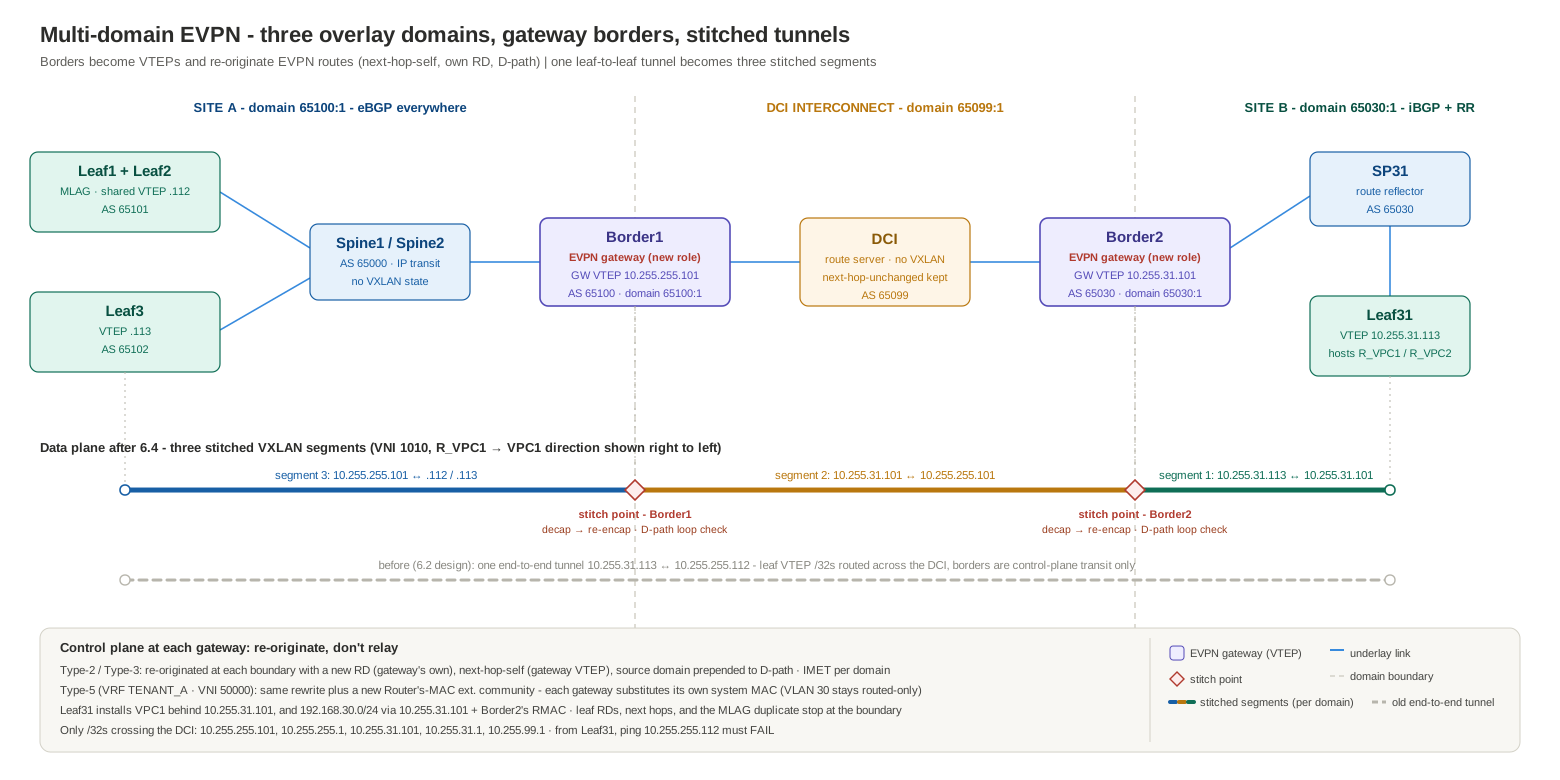
The same design as text:
      Site A domain (65100:1)      |  DCI domain (65099:1)  |      Site B domain (65030:1)
                                   |                        |
  Leaf1/Leaf2 --\                  |                        |                  /-- Leaf31
  VTEP .112      >-- spines -- Border1 ----- DCI ----- Border2 -- SP31 -------<   VTEP 10.255.31.113
  Leaf3 --------/         VTEP .101|      (no VXLAN)    |VTEP 10.255.31.101   \-- (hosts R_VPC1/R_VPC2)
  VTEP .113                        |                        |
                                   |                        |
  tunnels:   leaf <-> 10.255.255.101   10.255.255.101 <-> 10.255.31.101   10.255.31.101 <-> 10.255.31.113
                                   ^                        ^
                            stitch point             stitch point
And the migration contract that section 6 spent seven phases protecting — VTEP IPs, next hops, and the data plane never change — is now deliberately broken, because breaking it is the point of multi-domain. Four mechanics replace it:
- The borders become VTEPs. Border1 and Border2 each get a
Loopback1and aninterface Vxlan1carrying the stretched VNIs (1010, 1020) and the L3 VNI 50000. A gateway must terminate tunnels in both of its domains; a router with no VTEP can relay the routes (section 6.2’s design) but never stitch the traffic. - Routes are re-originated, not relayed. A gateway imports a route from one domain and advertises it into the next with next-hop-self (its own VTEP), its own RD, and a D-path (Domain Path) attribute recording the domain the route came from — the draft-ietf-bess-evpn-ipvpn-interworking machinery. Every
next-hop-unchangedthat section 6 so carefully protected on the borders is deleted: its entire job — stopping a transit hop from rewriting next hops — is obsolete when rewriting the next hop is precisely what the gateway is for. The knob survives exactly where transit survives: the DCI route server keeps its pair (transit inside the interconnect domain), and the spines keep theirs (transit inside site A — Walk 4 still depends on Border1 receiving next hop10.255.255.112intact). Only the borders’ copies go. - Tunnels are stitched, not end-to-end. One leaf-to-leaf tunnel becomes three independent segments: site-B leaf → Border2, Border2 → Border1 across the DCI, Border1 → site-A leaf. Each gateway decapsulates and re-encapsulates; the inner frame rides through untouched.
- Loop prevention moves to D-path. A gateway rejects any EVPN route whose D-path already contains one of its own domain identifiers — the EVPN equivalent of the AS-path loop check, one layer up. This is also what makes a second gateway per site safe later: neither can re-inject the other’s re-originations back into the domain they came from.
Addressing, and what stops crossing the DCI
Two new loopbacks, following the same conventions as everything else:
| Device | Loopback1 (gateway VTEP) |
|---|---|
| Border1 | 10.255.255.101/32 |
| Border2 | 10.255.31.101/32 |
The underlay consequence is the biggest operational win of the whole design. In the section 6 build, Border1 has to advertise every site A loopback to the DCI — the leaf VTEPs .112 and .113 must be routable from Leaf31, or the end-to-end tunnels die. In multi-domain, the only /32s that cross the DCI IPv4 sessions are the gateway VTEPs and the overlay peering loopbacks: 10.255.255.101, 10.255.255.1, 10.255.31.101, 10.255.31.1, 10.255.99.1. Both borders filter everything else outbound. Inside each site the diet is even stricter: no site A device except Border1 needs a single site B prefix, because no site A device except Border1 ever encapsulates toward site B — the spines route stitched traffic only as far as 10.255.255.101.
That makes the design testable from day one: from Leaf31, ping 10.255.255.112 must now fail while VPC1 still answers. The 6.2 bring-up checklist required the mirror image — show ip route 10.255.255.112 on Leaf31 had to return the site A anycast VTEP; here that route must be absent, and reachability succeeding means a filter is missing. A site A underlay convergence event — a leaf reload, an ECMP reshuffle, a VTEP moving — is now invisible to Leaf31’s forwarding state, which points at 10.255.31.101 and nothing else. That is the failure containment the architecture post’s 13.2 promises, realized on this addressing plan.
RDs and RTs need no new design at all — they need the old design to keep doing its job a third time:
- RTs stay
1:10/1:20/1:50000everywhere. They are ASN-free and domain-free, so both gateways import and re-export with zero rewriting. A fabric on auto-derived RTs would be writing RT-rewrite policy at every gateway right now. - RDs stay per-device — and become domain-scoped automatically. Leaf1 mints
10.255.255.21:10; Border1’s re-origination replaces it with10.255.255.1:10; site B never sees a leaf RD at all. The MLAG pair’s two copies of every MAC (RDs...21:10and...22:10, same next hop) collapse into one route at the gateway, because Border1 re-originates its imported MAC-VRF entry, not the raw NLRI. Remote-site EVPN state stops scaling with the remote site’s leaf count and starts scaling with its gateway count.
BUM at the boundary
Each domain floods independently; the gateways translate between flood domains:
- Site A leaves’ VNI 1010 flood lists hold the other site A VTEPs plus
10.255.255.101(Border1’s Type-3) — and no longer10.255.31.113. - Border1’s interconnect-domain flood list for VNI 1010 holds exactly
10.255.31.101. - Border2 floods into site B per its own domain’s IMET set.
This decouples the replication modes per domain — a future site running a multicast underlay internally (section 4.1’s config, on hardware that forwards it) attaches without any other site knowing, the gateway doing the translation at the boundary. It also fixes a scaling quirk the section 6 design quietly carries: an ARP from R_VPC1 today crosses the DCI as one HER copy per site A VTEP in the flood list. Multi-domain sends one copy across, and Border1 fans out locally.
Configuration
Border1’s delta from its Phase 4 final state. Three blocks: become a VTEP, become a gateway, put the underlay on its diet:
interface Loopback1
   ip address 10.255.255.101/32
!
vlan 10,20
!
vrf instance TENANT_A
ip routing vrf TENANT_A
!
interface Vxlan1
   vxlan source-interface Loopback1
   vxlan udp-port 4789
   vxlan vlan 10 vni 1010
   vxlan vlan 20 vni 1020
   vxlan vrf TENANT_A vni 50000
!
ip prefix-list DCI-OUT seq 10 permit 10.255.255.101/32   ! gateway VTEP
ip prefix-list DCI-OUT seq 20 permit 10.255.255.1/32     ! overlay peering loopback
!
route-map DCI-OUT permit 10
   match ip address prefix-list DCI-OUT
!
router bgp 65100
   !
   address-family ipv4
      network 10.255.255.101/32                 ! gateway VTEP into both underlays
      neighbor 10.0.103.0 route-map DCI-OUT out ! leaf VTEPs stop crossing the DCI
   !
   address-family evpn
      domain identifier 65100:1                 ! this device's local domain
      domain identifier 65099:1 remote          ! the interconnect domain's shared name
      neighbor 10.255.99.1 domain remote        ! the DCI session is the domain boundary
      no neighbor EVPN next-hop-unchanged       ! transit-hop knob, obsolete: the gateway
      no neighbor 10.255.99.1 next-hop-unchanged !  now rewrites next hops on purpose
   !
   vlan 10
      rd 10.255.255.1:10
      route-target both 1:10
   vlan 20
      rd 10.255.255.1:20
      route-target both 1:20
   vrf TENANT_A
      rd 10.255.255.1:50000
      route-target import evpn 1:50000
      route-target export evpn 1:50000
domain identifier plus neighbor … domain remote is the entire gateway switch: routes crossing that session boundary are re-originated with next-hop-self and D-path stamping, in both directions. The remote identifier is not decoration — both gateways must name the interconnect domain identically (65099:1) or the D-path loop check has nothing coherent to match on. (Two more items for the TOI check: some EOS trains want the L3 side made explicit with neighbor … next-hop-self received-evpn-routes route-type ip-prefix before Type-5s are re-originated rather than relayed, and the feature’s domain-scoped RD/RT forms — rd evpn domain all …, route-target … evpn domain remote … — are how the TOI’s own gateway examples pin what each MAC-VRF re-originates into the interconnect; the plain single-domain forms shown here lean on defaults.) Border2 is the mirror image — AS 65030, local domain identifier 65030:1 with the same 65099:1 remote, VTEP 10.255.31.101, RDs 10.255.31.1:*, the same outbound prefix filter — re-advertising into site B over its ordinary iBGP session to SP31. The DCI router changes nothing: still no interface Vxlan1, still next-hop-unchanged on both sessions (it is intra-domain transit for the interconnect), just five /32s on its IPv4 sessions instead of two sites’ worth of loopbacks. Note what is absent from the borders’ MAC-VRF blocks: no redistribute learned — a gateway has no access ports; its EVPN job is re-origination, not origination.
Two deployment notes. First, redundancy: with one border per site the gateway is a single point of failure for inter-site traffic — but it already was in section 6.2, as the Phase 4 outage window demonstrated. The multi-domain fix is a second gateway per site: same domain identifier on both, distinct VTEP loopbacks, and D-path keeps them from re-importing each other’s re-originations, so remote traffic simply ECMPs across two gateway next hops. It slots in without touching a single leaf. What EOS’s D-path model doesn’t need is most of the NX-OS Multi-Site apparatus the architecture post’s section 13 catalogs — no Multi-Site VIP, no evpn multisite border-gateway site-id, no dedicated DCI-tracking state machine; the trade is that without a shared VIP, per-gateway PIP next hops are what remote sites load-balance across. Second, MTU: the DCI links still need the +50-byte VXLAN headroom — stitching changes whose packets cross (gateway-to-gateway only), not what wraps them.
Walk 4 — control plane: the same routes, re-originated twice
The multi-domain successor to Walk 3. How VPC1 (192.168.10.10, behind the MLAG anycast VTEP) becomes reachable from Leaf31 now:
- Site A domain — byte-for-byte Walk 3. Leaf1 and Leaf2 originate the Type-2 under RDs
10.255.255.21:10/10.255.255.22:10, RT1:10, next hop10.255.255.112; the spines pass it to Border1 with AS path65000 65101. Nothing inside a site knows multi-domain exists — the entire delta of this redesign lives on the two borders; leaves, spines, SP31, and the DCI all keep their configs. - Border1 imports — and collapses. As a VTEP carrying VLAN 10, Border1 imports on
1:10like any leaf and installs VPC1’s MAC behind10.255.255.112. The MLAG pair’s two RD copies become one MAC-VRF entry. - Border1 re-originates into the interconnect domain. One new Type-2 toward the DCI: RD
10.255.255.1:10(its own), RT1:10(untouched — the static-RT dividend, third payout), next hop10.255.255.101by next-hop-self, D-path now carrying65100:1, AS path growing to65100 65000 65101. The leaf’s RD, the leaf’s next hop, and the duplicate MLAG copy all stop at the boundary. - The DCI relays it to Border2 unchanged — its
next-hop-unchangednow preserves a gateway VTEP instead of a leaf VTEP, but its job description hasn’t changed. AS path:65099 65100 65000 65101, still the readable chain from Walk 3. - Border2 runs the loop check, imports, re-originates again. The received D-path carries exactly one segment —
65100:1, Border1’s stamp — and contains neither of Border2’s own domains (65030:1,65099:1), so the route is accepted. Border2 installs VPC1’s MAC behind10.255.255.101, then advertises into site B over iBGP: RD10.255.31.1:10, next hop10.255.31.101, and the D-path extended with the domain the route was learned in — Leaf31 sees65099:1 65100:1, the route’s domain history in the same reverse-reading order as an AS path. Had this route ever looped back toward site A, Border1 would find65100:1in the D-path and drop it silently — no policy, no communities, no hand-written filters. - SP31 reflects to Leaf31, which imports on
1:10and installs VPC1 behind10.255.31.101— a next hop inside its own site, reachable through its own underlay, owned by its own operations team.
The whole walk as one grid — five stages, what each one rewrites (amber) and what it deliberately preserves (green), with the Type-5’s extra Router-MAC row:
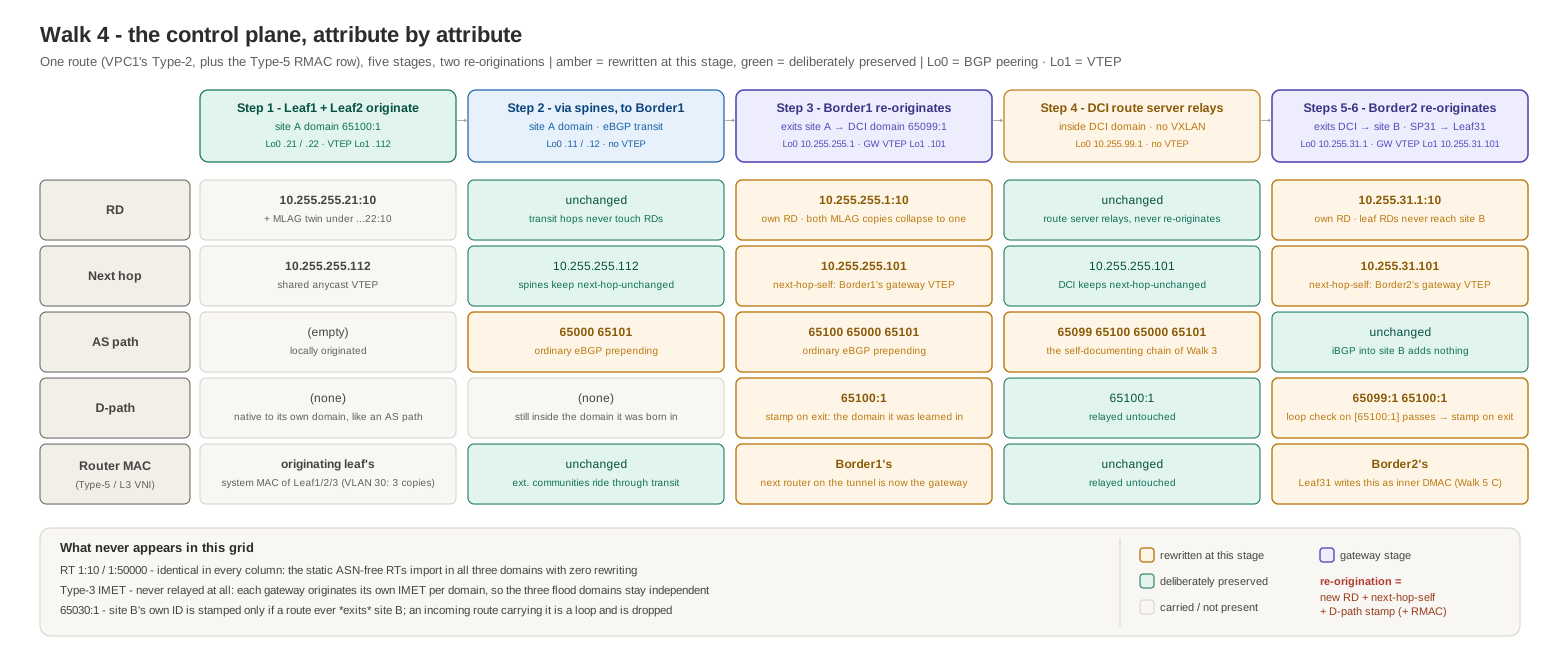
And the same walk clickable — step through the hops, toggling between the bridged Type-2, the routed Type-5 (watch the extra Router-MAC rewrite appear), and the Type-3 IMET mode, which walks the one route type gateways never relay — two terminations, three originations:
The Type-3s run the same three-stage relay: Leaf31’s IMET reaches only site B and Border2; Border2 originates its own IMET into the interconnect domain; Border1 originates into site A. Three flood domains, joined only at the gateways.
The Type-5s add one rewrite the bridged walk never needed. VLAN 30 is deliberately not stretched, so its subnet crosses the fabric only as routed reachability in VRF TENANT_A — and, as the 6.2 captures showed, 192.168.30.0/24 is originated by all three site A leaves (Leaf1 and Leaf2 carry VLAN 30 too): three Type-5 copies under RDs 10.255.255.21/22/23:50000, next hops .112 and .113, each carrying its originator’s system MAC in the Router’s MAC extended community. Follow Leaf3’s copy — RD 10.255.255.23:50000, RT 1:50000, next hop 10.255.255.113. Each gateway gives it the full Type-2 treatment — own RD, next-hop-self, D-path stamp, RT untouched — plus a new Router’s MAC: its own. That community is not bookkeeping; it is the inner destination MAC a remote VTEP writes on every routed VXLAN packet, and it has to name the device that performs the next routing lookup — which is now the gateway at the far end of the first tunnel segment, not Leaf3 three segments away. A relayed Type-5 keeping a leaf’s RMAC behind a rewritten next hop would have Leaf31 building inner frames addressed to a router that is not at the other end of its tunnel. And the Walk 4 step 2 collapse repeats: Border1 imports all three copies into VRF TENANT_A and re-originates the prefix once, under its own RD. So Leaf31 installs 192.168.30.0/24 via the single VTEP 10.255.31.101 with Border2’s router MAC — where the 6.2 design held three routes, two next hops (.112, .113), and their originators’ RMACs — and Walk 5’s routed case is exactly this route being spent. The symmetric-IRB Type-2s for the stretched VLANs — MAC-IP routes carrying the L2 RT and the L3 context together — collect both rewrites at once: RD/next-hop/D-path as in step 3, RMAC substitution as here.
The verification signatures — the multi-domain equivalents of Phase 3’s gates, and everything the control plane shows even on vEOS-lab: on Leaf31, show bgp evpn route-type mac-ip 192.168.10.10 detail must show next hop 10.255.31.101, RD 10.255.31.1:10, and a D-path attribute — three fields that read 10.255.255.112, 10.255.255.21:10, and absent in the 6.2 captures. On Border1, show bgp evpn holds the same MAC twice: the leaf-originated route in the site A domain and its own re-origination in the interconnect domain. The routed check is show bgp evpn route-type ip-prefix ipv4 detail on Leaf31 — 192.168.30.0/24 arriving with next hop 10.255.31.101 and Border2’s MAC in the Router’s MAC community — and show ip route vrf TENANT_A 192.168.30.30 resolving over Vxlan1 toward the gateway, not toward Leaf3. And the underlay check inverts: show ip route 10.255.255.112 on Border2 must come back empty.
Walk 5 — data plane: three stitched tunnels
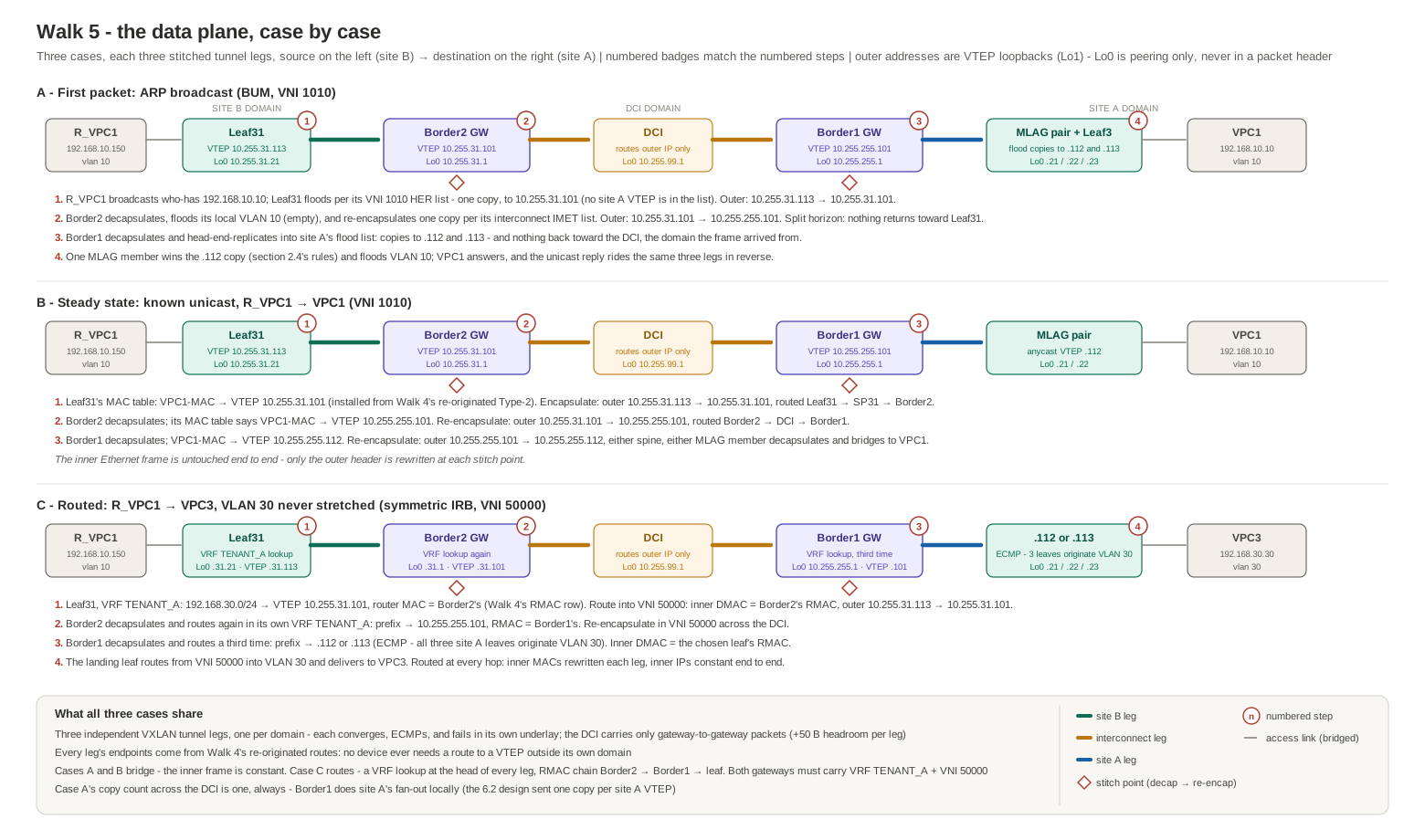
The three cases at a glance above; each itemized below.
First packet — R_VPC1’s ARP for 192.168.10.10 (BUM).
- R_VPC1 broadcasts; Leaf31 floods per its VNI 1010 HER list, which now names
10.255.31.101, not10.255.255.112. Segment 1: outer10.255.31.113 → 10.255.31.101, routed Leaf31 → SP31 → Border2, decapsulated at Border2. - Border2 floods the inner frame into its local VLAN 10 (no hosts there) and re-encapsulates one copy per its interconnect flood list. Segment 2: outer
10.255.31.101 → 10.255.255.101, routed Border2 → DCI → Border1. Domain split horizon means the copy never turns back toward Leaf31. - Border1 decapsulates and head-end-replicates into site A’s flood list. Segments 3a/3b: outer
10.255.255.101 → 10.255.255.112and→ 10.255.255.113. From here section 2.4’s rules own the packet — one MLAG member wins the anycast VTEP copy, floods VLAN 10, VPC1 hears the ARP. Nothing goes back toward the DCI: that is the domain the frame arrived from. - VPC1’s unicast reply rides the same three segments in reverse; every hop already holds R_VPC1’s MAC from the Walk 4 relay.
Steady state — known unicast, R_VPC1 → VPC1. Three lookups, three tunnels, three underlays:
| Hop | MAC table says | Outer VXLAN header | Underlay path |
|---|---|---|---|
| Leaf31 | VPC1-MAC → VTEP 10.255.31.101 | 10.255.31.113 → 10.255.31.101, VNI 1010 | Leaf31 → SP31 → Border2 |
| Border2 (decap, re-encap) | VPC1-MAC → VTEP 10.255.255.101 | 10.255.31.101 → 10.255.255.101, VNI 1010 | Border2 → DCI → Border1 |
| Border1 (decap, re-encap) | VPC1-MAC → VTEP 10.255.255.112 | 10.255.255.101 → 10.255.255.112, VNI 1010 | Border1 → either spine → either MLAG member |
The inner Ethernet frame is untouched end to end; only the outer header is rewritten at each stitch point. Walk 1 carried the same frame in one 10.255.31.113 → 10.255.255.112 tunnel — same host experience, but every site A underlay event was Leaf31’s problem. Now each segment converges, ECMPs, and fails independently.
Routed traffic — R_VPC1 → VPC3 (VLAN 30, deliberately never stretched). Symmetric IRB composes with stitching exactly as section 5.6 built it, one domain at a time — three routed VXLAN segments, a fresh VRF lookup at the head of each:
- Leaf31 looks up 192.168.30.30 in VRF
TENANT_Aand finds Walk 4’s re-originated route: via VTEP10.255.31.101, router MAC = Border2’s — each gateway substituted its own RMAC when it re-originated into the L3 VNI. Leaf31 routes into VNI 50000 with Border2’s RMAC as the inner destination MAC. - Border2 decapsulates and routes again in its own VRF
TENANT_A: the prefix points at10.255.255.101with Border1’s RMAC; it re-encapsulates in VNI 50000 across the DCI. - Border1 decapsulates and routes a third time:
10.255.255.112or10.255.255.113— all three site A leaves originate the prefix, so it ECMPs across both VTEPs — re-encapsulating with the chosen leaf’s RMAC as the inner destination. - The landing leaf routes from VNI 50000 into VLAN 30 and delivers the frame to VPC3 — routed at every hop: inner MACs rewritten leg by leg, inner IPs constant end to end.
Both gateways therefore must carry the VRF and VNI 50000 — and that requirement is the policy boundary the architecture post’s 13.6 describes: a VLAN or VRF absent from a gateway’s config simply does not exist outside its site. VLAN 30 is unreachable at L2 from site B not because a filter says so, but because no gateway ever re-originated it.
The same three cases, clickable — pick a case and follow the packet’s headers through each stitch point, amber where a hop rewrites them and green where they must stay constant:
Section 6.2’s design vs. this one
| 6.2 (single overlay domain) | 6.4 (multi-domain gateways) | |
|---|---|---|
| Borders are | EVPN transit (next-hop-unchanged) | EVPN gateways (VTEPs, re-origination) |
| Tunnels | One, leaf to leaf | Three stitched segments |
| Leaf VTEP /32s cross the DCI | Required | Filtered out; only gateway VTEPs cross |
| Remote site sees | Every leaf’s RD and next hop | One RD and next hop per gateway |
| BUM across the DCI | One HER copy per remote VTEP | One copy total; far gateway fans out |
| Loop prevention | AS path only | D-path domain check |
| Blast radius of a site’s underlay event | Both sites’ forwarding state | Contained at the gateway |
| Cost | Nothing extra | Borders become VTEPs (hardware VXLAN + gateway feature); one decap/re-encap per boundary |
Neither design is wrong — 6.2 is legitimately simpler and this lab ran a live migration through it without the overlay noticing. The honest selection rule falls out of the table: two sites under one operations team with modest scale can live on the single-domain design and its shared fate; the moment the sites have separate failure budgets, separate teams, or a leaf count that makes “every leaf’s /32 and RD, everywhere” read as a liability, the borders stop being transit and start being gateways. And section 7’s MOP is unaffected either way: BGP unnumbered is a fabric-link pattern, and the DCI links stay numbered on purpose — an administrative boundary between ASes under different control is exactly where explicit addressing keeps earning its keep.
7. MOP: converting the eBGP underlay to BGP unnumbered
Section 6.3’s migration ended with a deliberate deferral: the underlay became eBGP everywhere, but every session still runs over configured /31s — one control-plane variable per migration. This section is the deferred phase, written as a method of procedure: convert site A’s fabric links to BGP unnumbered — interface eBGP sessions over IPv6 link-local addresses, carrying the IPv4 underlay with RFC 8950 next hops — and release the point-to-point addressing. The architecture post’s section 4.1 explains the mechanics — link-local autoconfiguration, neighbor discovery instead of neighbor statements, IPv4-over-IPv6 next hops; this MOP is those mechanics applied to a running fabric. The exact EOS semantics below follow ipSpace’s interface-EBGP writeup, which documents them against netlab-verified configs.
7.1 Scope and design decisions
In scope — the eight fabric links, both ends of each:
| Link | Numbered today (released at the end) | Interfaces |
|---|---|---|
| Leaf1 – Spine1 | 10.0.11.0/31 | Leaf1 Et1 / Spine1 Et1 |
| Leaf1 – Spine2 | 10.0.21.0/31 | Leaf1 Et2 / Spine2 Et2 |
| Leaf2 – Spine1 | 10.0.12.0/31 | Leaf2 Et2 / Spine1 Et2 |
| Leaf2 – Spine2 | 10.0.22.0/31 | Leaf2 Et1 / Spine2 Et1 |
| Leaf3 – Spine1 | 10.0.13.0/31 | Leaf3 Et4 / Spine1 Et4 |
| Leaf3 – Spine2 | 10.0.23.0/31 | Leaf3 Et3 / Spine2 Et3 |
| Border1 – Spine1 | 10.0.101.0/31 | Border1 Et5 / Spine1 Et5 |
| Border1 – Spine2 | 10.0.102.0/31 | Border1 Et4 / Spine2 Et4 |
Out of scope, deliberately: every loopback (router-ids, overlay peering, VTEP sources — unnumbered is a fabric-link pattern, not a fabric-wide one), the EVPN overlay sessions (loopback-to-loopback multihop, untouched), the Border1–DCI link (an administrative boundary between ASes under different control — keep it numbered, filterable, and boring), and site B (still nobody’s business).
Four design decisions carry the whole procedure:
- A new peer group, not the old one. Adding
next-hop address-family ipv6 originateto the existingUNDERLAY/UNDERLAY-EBGPgroups would change the capabilities of every established numbered session — and a capability change resets the session. The unnumbered sessions get their own group (UNDERLAY-LL), so nothing existing so much as blinks until it is retired on purpose. - Make-before-break, per link. A numbered session (between the /31 addresses) and an unnumbered session (between link-locals) are different BGP sessions and coexist on the same wire. Each wave brings the link-local session up alongside the numbered one, verifies doubled paths, and only then retires the numbered neighbor. Headroom check: during the overlap a leaf holds up to four underlay paths per spine prefix — exactly its
maximum-paths 4. - The ASN plan stays enforced. EOS interface neighbors take an explicit
remote-asper statement, so the spine still names 65101/65102/65100 per port — noremote-as auto, no accidental widening of trust. - Explicit router-ids are now a prerequisite, not a nicety. After the /31s are removed, these devices have no IPv4 interface addresses left to derive anything from. Every device already carries an explicit
router-idfrom section 6 — verify it anyway in the prechecks, because a missing one surfaces as a BGP identity change at the worst possible time.
7.2 Prechecks
show version                        ! interface eBGP sessions: supported on this vEOS-lab 4.33 image
show running-config | include router-id     ! explicit on every device - mandatory before the /31s go away
show ip bgp summary                 ! all numbered underlay sessions Established - the baseline
show bgp evpn summary               ! overlay baseline (these sessions must never notice this MOP)
show vxlan vtep                     ! data-plane baseline
show ip route summary               ! route counts to diff against after every wave
Snapshot the full Phase 0 command set once more; every wave below diffs against it. The contract for this MOP is even stricter than section 6’s: not one EVPN route, VTEP, or next hop may change — only the underlay sessions’ identities and the RIB’s next-hop format (fe80::…%EtX instead of /31 addresses).
7.3 The procedure
Step A — global preparation, all site A devices, hitless. IPv6 routing must be enabled even though no global IPv6 addresses are configured anywhere, and ip routing ipv6 interfaces is what allows IPv4 forwarding over interfaces whose only address is a link-local:
ipv6 unicast-routing
ip routing ipv6 interfaces
!
interface Ethernet1               ! repeat per fabric interface from the 7.1 table
   ipv6 enable
ipv6 enable puts an autoconfigured fe80:: address on each fabric interface and starts neighbor discovery. Nothing about the numbered sessions changes.
Step B — the new peer group, all site A devices, hitless. Leaves and Border1 (single upstream AS, so remote-as lives on the group):
router bgp 65101                   ! 65102 on Leaf3, 65100 on Border1
   neighbor UNDERLAY-LL peer group
   neighbor UNDERLAY-LL remote-as 65000
   neighbor UNDERLAY-LL send-community
   !
   address-family ipv4
      neighbor UNDERLAY-LL activate
      neighbor UNDERLAY-LL next-hop address-family ipv6 originate
Spines (mixed downstream ASNs, so remote-as moves onto the per-interface statements in step C):
router bgp 65000
   neighbor UNDERLAY-LL peer group
   neighbor UNDERLAY-LL send-community
   neighbor UNDERLAY-LL maximum-routes 12000
   !
   address-family ipv4
      neighbor UNDERLAY-LL activate
      neighbor UNDERLAY-LL next-hop address-family ipv6 originate
next-hop address-family ipv6 originate is the RFC 8950 half of the design: without it on both ends, the sessions establish and then advertise IPv4 prefixes with unusable next hops — the unnumbered edition of the next-hop-unchanged class of silent failure.
Step C — wave 1: Leaf1. Interface neighbors on both ends of both links:
! Leaf1
router bgp 65101
   neighbor interface Ethernet1 peer-group UNDERLAY-LL remote-as 65000   ! -> Spine1
   neighbor interface Ethernet2 peer-group UNDERLAY-LL remote-as 65000   ! -> Spine2
! Spine1
router bgp 65000
   neighbor interface Ethernet1 peer-group UNDERLAY-LL remote-as 65101
! Spine2
router bgp 65000
   neighbor interface Ethernet2 peer-group UNDERLAY-LL remote-as 65101
The link-local sessions establish next to the numbered ones. Verify the overlap before breaking anything:
show ip bgp summary                 ! numbered pair still Established, PLUS fe80::...%Et1 / %Et2 entries
show ip bgp neighbors               ! on the LL sessions: IPv4 Unicast negotiated, IPv6 next-hop capability negotiated
show ip route 10.255.255.11/32      ! still via the /31 next hop - the RIB keeps the oldest eBGP path (see the wave-1 captures below)
Then retire the numbered pair — both ends, matching the make-before-break promise:
! Leaf1                                   ! Spine1                       ! Spine2
router bgp 65101                          router bgp 65000               router bgp 65000
   no neighbor 10.0.11.0                     no neighbor 10.0.11.1          no neighbor 10.0.21.1
   no neighbor 10.0.21.0
Re-verify (same commands — the numbered sessions leave the summary and the RIB flips to the fe80 next hops, nothing else moves), then release the addressing, which is the entire point of the exercise:
! Leaf1                                   ! Spine1                       ! Spine2
interface Ethernet1                       interface Ethernet1            interface Ethernet2
   no ip address                             no ip address                  no ip address
interface Ethernet2
   no ip address
Close the wave with the invariants: show bgp evpn summary identical to the precheck, show vxlan vtep identical, one bridged and one routed ping from the walk-1 set.
Wave 1 ran live on this fabric. Leaf1’s side, end to end — the interface neighbors going in, and the overlap forming in real time:
Leaf1 — show bgp summary (25 lines)
Leaf1(config-router-bgp-af)#exit
Leaf1(config-router-bgp)#neighbor interface Ethernet1 peer-group UNDERLAY-LL remote-as 65000
Leaf1(config-router-bgp)#neighbor interface Ethernet2 peer-group UNDERLAY-LL remote-as 65000
Leaf1(config-router-bgp)#show bgp summary
BGP summary information for VRF default
Router identifier 10.255.255.21, local AS number 65101
Neighbor                             AS Session State AFI/SAFI                AFI/SAFI State   NLRI Rcd   NLRI Acc
--------------------------- ----------- ------------- ----------------------- -------------- ---------- ----------
10.0.11.0                         65000 Established   IPv4 Unicast            Negotiated              5          5
10.0.21.0                         65000 Established   IPv4 Unicast            Negotiated              5          5
10.255.255.11                     65000 Established   L2VPN EVPN              Negotiated              5          5
10.255.255.12                     65000 Established   L2VPN EVPN              Negotiated              5          5
fe80::5200:ff:fe03:3766%Et1       65000 Connect       IPv4 Unicast            Configured              0          0
fe80::5200:ff:fe15:f4e8%Et2       65000 Connect       IPv4 Unicast            Configured              0          0
Leaf1(config-router-bgp)#show bgp summary
BGP summary information for VRF default
Router identifier 10.255.255.21, local AS number 65101
Neighbor                             AS Session State AFI/SAFI                AFI/SAFI State   NLRI Rcd   NLRI Acc
--------------------------- ----------- ------------- ----------------------- -------------- ---------- ----------
10.0.11.0                         65000 Established   IPv4 Unicast            Negotiated              5          5
10.0.21.0                         65000 Established   IPv4 Unicast            Negotiated              5          5
10.255.255.11                     65000 Established   L2VPN EVPN              Negotiated              5          5
10.255.255.12                     65000 Established   L2VPN EVPN              Negotiated              5          5
fe80::5200:ff:fe03:3766%Et1       65000 Established   IPv4 Unicast            Negotiated              5          5
fe80::5200:ff:fe15:f4e8%Et2       65000 Established   IPv4 Unicast            Negotiated              5          5
The first summary catches the link-local sessions still in Connect — the Configured AFI/SAFI state means the neighbor statement exists but neighbor discovery hasn’t yet handed BGP a peer address — and one refresh later both are Established at five NLRI each, alongside the untouched /31 pair. Four underlay sessions on two wires: make-before-break in its most literal form. The full neighbor detail, taken mid-overlap:
Leaf1 — show ip bgp nei (499 lines)
Leaf1(config-router-bgp)#show ip bgp nei
BGP neighbor is 10.0.11.0, remote AS 65000, external link
  BGP version 4, remote router ID 10.255.255.11, VRF default
  Inherits configuration from and member of peer-group UNDERLAY
  Last read 00:00:02, last write 00:00:38
  Hold time is 180, keepalive interval is 60 seconds
  Configured hold time is 180, keepalive interval is 60 seconds
  Effective minimum hold time is 3 seconds
  Send failure hold time is 0 seconds
  Hold timer is active, time left: 00:02:58
  Keepalive timer is active, time left: 00:00:18
  Connect timer is inactive
  Idle-restart timer is inactive
  BGP state is Established, up for 00:31:19
  Number of transitions to established: 1
  Last state was OpenConfirm
  Last event was RecvUpdate
  Types of communities advertised: standard extended large
  Enhanced route refresh stale path removal disabled
  Outbound enhanced route refresh enabled
  Neighbor Capabilities:
    Multiprotocol IPv4 Unicast: advertised and received and negotiated
    Four Octet ASN: advertised and received and negotiated
    Route Refresh: advertised and received and negotiated
    Enhanced route refresh: advertised and received and negotiated
    Send End-of-RIB messages: advertised and received and negotiated
    Additional-paths recv capability:
      IPv4 Unicast: advertised
    Additional-paths send capability:
      IPv4 Unicast: received
    Graceful Restart advertised:
      Restart-time is 300
      Restart-State bit: yes
      Graceful notification: yes
    Graceful Restart received:
      Restart-time is 300
      Restart-State bit: no
      Graceful notification: yes
  Restart timer is inactive
  End of rib timer is inactive
    IPv4 Unicast End-of-RIB received: Yes
      Received 00:31:18
      Number of stale paths removed after graceful restart: 0
      Number of paths received before End-of-RIB: 10
  IPv4 Unicast AS_SET/AS_CONFED_SET processing: accept
  IPv6 Unicast AS_SET/AS_CONFED_SET processing: accept
  AIGP attribute send and receive for IPv4 Unicast are disabled
  AIGP attribute send and receive for IPv4 with MPLS Labels are disabled
  AIGP attribute send and receive for IPv6 Unicast are disabled
  AIGP attribute send and receive for IPv6 with MPLS Labels are disabled
  BGP session driven failover for IPv4 Unicast is disabled
  BGP session driven failover for IPv6 Unicast is disabled
  Message Statistics:
                                  Sent      Rcvd
    Opens:                           1         1
    Notifications:                   0         0
    Updates:                        16        15
    Keepalives:                     34        34
    Enhanced Route Refresh:          0         0
    Begin of Route Refresh:          0         0
    End of Route Refresh:            0         0
    Total messages:                 51        50
  Prefix Statistics:
                                   Sent      Rcvd     Best Paths     Best ECMP Paths
    IPv4 Unicast:                     7         5              5                   0
    IPv6 Unicast:                     0         0              0                   0
  Configured maximum total number of routes is 256000, warning limit is 204800
  Inbound updates dropped by reason:
    AS path loop detection: 1
    Cluster ID loop detection: 0
    Enforced First AS: 0
    Malformed MPBGP routes: 0
    Originator ID matches local router ID: 0
    Nexthop matches local IP address: 0
    Unexpected IPv6 nexthop for IPv4 routes: 0
    AS_SET/AS_CONFED_SET in AS_PATH for IPv4 Unicast: 0
    AS_SET/AS_CONFED_SET in AS_PATH for IPv6 Unicast: 0
  Inbound updates with attribute errors:
    Resulting in removal of all paths in update (treat as withdraw): 0
    Resulting in AFI/SAFI disable: 0
    Resulting in attribute ignore: 0
    Disabled AFI/SAFIs: None
  Inbound paths dropped by reason:
    IPv4 unicast NLRIs dropped due to martian prefix: 0
    IPv4 unicast NLRIs dropped due to maximum route limit violation: 0
    IPv6 unicast NLRIs dropped due to martian prefix: 0
    IPv4 labeled-unicast NLRIs dropped due to excessive labels: 0
    IPv4 labeled-unicast NLRIs dropped due to martian prefix: 0
    IPv6 labeled-unicast NLRIs dropped due to excessive labels: 0
    IPv6 labeled-unicast NLRIs dropped due to martian prefix: 0
    VPN-IPv4 NLRIs dropped due to route import match failure: 0
    VPN-IPv6 NLRIs dropped due to route import match failure: 0
    L2VPN EVPN NLRIs dropped due to route import match failure: 0
    L2VPN EVPN NLRIs dropped due to unsupported route type: 0
    Link-state NLRIs dropped because reception is unsupported: 0
    RT Membership NLRIs dropped due to local origin ASN received from external peer: 0
  Outbound paths dropped by reason:
    IPv4 local address not available: 0
    IPv6 local address not available: 0
Local AS is 65101, local router ID 10.255.255.21
TTL is 1
Local TCP address is 10.0.11.1, local port is 45863
Remote TCP address is 10.0.11.0, remote port is 179
Local next hop for next hop self:
  IPv4 Unicast: 10.0.11.1
TCP Socket Information:
  TCP state is ESTABLISHED
  Recv-Q: 0/32768
  Send-Q: 0/46080
  Outgoing Maximum Segment Size (MSS): 1448
  Total Number of TCP retransmissions: 2
  Options:
    Timestamps enabled: yes
    Selective Acknowledgments enabled: yes
    Window Scale enabled: yes
    Explicit Congestion Notification (ECN) enabled: no
  Socket Statistics:
    Window Scale (wscale): 7,7
    Retransmission Timeout (rto): 216.0ms
    Round-trip Time (rtt/rtvar): 13.3ms/14.1ms
    Delayed Ack Timeout (ato): 40.0ms
    Congestion Window (cwnd): 10
    TCP Throughput: 8.70 Mbps
    Advertised Recv Window (rcv_space): 14480

BGP neighbor is 10.0.21.0, remote AS 65000, external link
  BGP version 4, remote router ID 10.255.255.12, VRF default
  Inherits configuration from and member of peer-group UNDERLAY
  Last read 00:00:21, last write 00:00:14
  Hold time is 180, keepalive interval is 60 seconds
  Configured hold time is 180, keepalive interval is 60 seconds
  Effective minimum hold time is 3 seconds
  Send failure hold time is 0 seconds
  Hold timer is active, time left: 00:02:39
  Keepalive timer is active, time left: 00:00:38
  Connect timer is inactive
  Idle-restart timer is inactive
  BGP state is Established, up for 00:31:19
  Number of transitions to established: 1
  Last state was OpenConfirm
  Last event was RecvUpdate
  Types of communities advertised: standard extended large
  Enhanced route refresh stale path removal disabled
  Outbound enhanced route refresh enabled
  Neighbor Capabilities:
    Multiprotocol IPv4 Unicast: advertised and received and negotiated
    Four Octet ASN: advertised and received and negotiated
    Route Refresh: advertised and received and negotiated
    Enhanced route refresh: advertised and received and negotiated
    Send End-of-RIB messages: advertised and received and negotiated
    Additional-paths recv capability:
      IPv4 Unicast: advertised
    Additional-paths send capability:
      IPv4 Unicast: received
    Graceful Restart advertised:
      Restart-time is 300
      Restart-State bit: yes
      Graceful notification: yes
    Graceful Restart received:
      Restart-time is 300
      Restart-State bit: no
      Graceful notification: yes
  Restart timer is inactive
  End of rib timer is inactive
    IPv4 Unicast End-of-RIB received: Yes
      Received 00:31:18
      Number of stale paths removed after graceful restart: 0
      Number of paths received before End-of-RIB: 10
  IPv4 Unicast AS_SET/AS_CONFED_SET processing: accept
  IPv6 Unicast AS_SET/AS_CONFED_SET processing: accept
  AIGP attribute send and receive for IPv4 Unicast are disabled
  AIGP attribute send and receive for IPv4 with MPLS Labels are disabled
  AIGP attribute send and receive for IPv6 Unicast are disabled
  AIGP attribute send and receive for IPv6 with MPLS Labels are disabled
  BGP session driven failover for IPv4 Unicast is disabled
  BGP session driven failover for IPv6 Unicast is disabled
  Message Statistics:
                                  Sent      Rcvd
    Opens:                           1         1
    Notifications:                   0         0
    Updates:                         7        19
    Keepalives:                     35        34
    Enhanced Route Refresh:          0         0
    Begin of Route Refresh:          0         0
    End of Route Refresh:            0         0
    Total messages:                 43        54
  Prefix Statistics:
                                   Sent      Rcvd     Best Paths     Best ECMP Paths
    IPv4 Unicast:                     3         5              5                   4
    IPv6 Unicast:                     0         0              0                   0
  Configured maximum total number of routes is 256000, warning limit is 204800
  Inbound updates dropped by reason:
    AS path loop detection: 1
    Cluster ID loop detection: 0
    Enforced First AS: 0
    Malformed MPBGP routes: 0
    Originator ID matches local router ID: 0
    Nexthop matches local IP address: 0
    Unexpected IPv6 nexthop for IPv4 routes: 0
    AS_SET/AS_CONFED_SET in AS_PATH for IPv4 Unicast: 0
    AS_SET/AS_CONFED_SET in AS_PATH for IPv6 Unicast: 0
  Inbound updates with attribute errors:
    Resulting in removal of all paths in update (treat as withdraw): 0
    Resulting in AFI/SAFI disable: 0
    Resulting in attribute ignore: 0
    Disabled AFI/SAFIs: None
  Inbound paths dropped by reason:
    IPv4 unicast NLRIs dropped due to martian prefix: 0
    IPv4 unicast NLRIs dropped due to maximum route limit violation: 0
    IPv6 unicast NLRIs dropped due to martian prefix: 0
    IPv4 labeled-unicast NLRIs dropped due to excessive labels: 0
    IPv4 labeled-unicast NLRIs dropped due to martian prefix: 0
    IPv6 labeled-unicast NLRIs dropped due to excessive labels: 0
    IPv6 labeled-unicast NLRIs dropped due to martian prefix: 0
    VPN-IPv4 NLRIs dropped due to route import match failure: 0
    VPN-IPv6 NLRIs dropped due to route import match failure: 0
    L2VPN EVPN NLRIs dropped due to route import match failure: 0
    L2VPN EVPN NLRIs dropped due to unsupported route type: 0
    Link-state NLRIs dropped because reception is unsupported: 0
    RT Membership NLRIs dropped due to local origin ASN received from external peer: 0
  Outbound paths dropped by reason:
    IPv4 local address not available: 0
    IPv6 local address not available: 0
Local AS is 65101, local router ID 10.255.255.21
TTL is 1
Local TCP address is 10.0.21.1, local port is 38393
Remote TCP address is 10.0.21.0, remote port is 179
Local next hop for next hop self:
  IPv4 Unicast: 10.0.21.1
TCP Socket Information:
  TCP state is ESTABLISHED
  Recv-Q: 0/32768
  Send-Q: 0/46080
  Outgoing Maximum Segment Size (MSS): 1448
  Total Number of TCP retransmissions: 2
  Options:
    Timestamps enabled: yes
    Selective Acknowledgments enabled: yes
    Window Scale enabled: yes
    Explicit Congestion Notification (ECN) enabled: no
  Socket Statistics:
    Window Scale (wscale): 7,7
    Retransmission Timeout (rto): 236.0ms
    Round-trip Time (rtt/rtvar): 21.2ms/22.8ms
    Delayed Ack Timeout (ato): 56.0ms
    Congestion Window (cwnd): 10
    TCP Throughput: 5.46 Mbps
    Advertised Recv Window (rcv_space): 14480

BGP neighbor is 10.255.255.11, remote AS 65000, external link
  BGP version 4, remote router ID 10.255.255.11, VRF default
  Inherits configuration from and member of peer-group EVPN
  Last read 00:00:29, last write 00:00:29
  Hold time is 180, keepalive interval is 60 seconds
  Configured hold time is 180, keepalive interval is 60 seconds
  Effective minimum hold time is 3 seconds
  Send failure hold time is 0 seconds
  Hold timer is active, time left: 00:02:31
  Keepalive timer is active, time left: 00:00:15
  Connect timer is inactive
  Idle-restart timer is inactive
  BGP state is Established, up for 00:31:16
  Number of transitions to established: 1
  Last state was OpenConfirm
  Last event was RecvUpdate
  Types of communities advertised: extended
  Enhanced route refresh stale path removal disabled
  Outbound enhanced route refresh enabled
  Neighbor Capabilities:
    Multiprotocol L2VPN EVPN: advertised and received and negotiated
    Four Octet ASN: advertised and received and negotiated
    Route Refresh: advertised and received and negotiated
    Enhanced route refresh: advertised and received and negotiated
    Send End-of-RIB messages: advertised and received and negotiated
    Additional-paths recv capability:
      L2VPN EVPN: advertised
    Additional-paths send capability:
      L2VPN EVPN: received
    Graceful Restart advertised:
      Restart-time is 300
      Restart-State bit: yes
      Graceful notification: yes
    Graceful Restart received:
      Restart-time is 300
      Restart-State bit: no
      Graceful notification: yes
  Restart timer is inactive
  End of rib timer is inactive
    L2VPN EVPN End-of-RIB received: Yes
      Received 00:31:14
      Number of stale paths removed after graceful restart: 0
      Number of paths received before End-of-RIB: 9
  IPv4 Unicast AS_SET/AS_CONFED_SET processing: accept
  IPv6 Unicast AS_SET/AS_CONFED_SET processing: accept
  AIGP attribute send and receive for IPv4 Unicast are disabled
  AIGP attribute send and receive for IPv4 with MPLS Labels are disabled
  AIGP attribute send and receive for IPv6 Unicast are disabled
  AIGP attribute send and receive for IPv6 with MPLS Labels are disabled
  BGP session driven failover for IPv4 Unicast is disabled
  BGP session driven failover for IPv6 Unicast is disabled
  Message Statistics:
                                  Sent      Rcvd
    Opens:                           1         1
    Notifications:                   0         0
    Updates:                        19        19
    Keepalives:                     34        35
    Enhanced Route Refresh:          0         0
    Begin of Route Refresh:          0         0
    End of Route Refresh:            0         0
    Total messages:                 54        55
  Prefix Statistics:
                                   Sent      Rcvd     Best Paths     Best ECMP Paths
    IPv4 Unicast:                     0         0              0                   0
    IPv6 Unicast:                     0         0              0                   0
    EVPN:                            11         5              5                   0
  Configured maximum total number of routes is 256000, warning limit is 204800
  Inbound updates dropped by reason:
    AS path loop detection: 4
    Cluster ID loop detection: 0
    Enforced First AS: 0
    Malformed MPBGP routes: 0
    Originator ID matches local router ID: 0
    Nexthop matches local IP address: 0
    Unexpected IPv6 nexthop for IPv4 routes: 0
    AS_SET/AS_CONFED_SET in AS_PATH for IPv4 Unicast: 0
    AS_SET/AS_CONFED_SET in AS_PATH for IPv6 Unicast: 0
  Inbound updates with attribute errors:
    Resulting in removal of all paths in update (treat as withdraw): 0
    Resulting in AFI/SAFI disable: 0
    Resulting in attribute ignore: 0
    Disabled AFI/SAFIs: None
  Inbound paths dropped by reason:
    IPv4 unicast NLRIs dropped due to martian prefix: 0
    IPv6 unicast NLRIs dropped due to martian prefix: 0
    IPv4 labeled-unicast NLRIs dropped due to excessive labels: 0
    IPv4 labeled-unicast NLRIs dropped due to martian prefix: 0
    IPv6 labeled-unicast NLRIs dropped due to excessive labels: 0
    IPv6 labeled-unicast NLRIs dropped due to martian prefix: 0
    VPN-IPv4 NLRIs dropped due to route import match failure: 0
    VPN-IPv6 NLRIs dropped due to route import match failure: 0
    L2VPN EVPN NLRIs dropped due to route import match failure: 0
    L2VPN EVPN NLRIs dropped due to unsupported route type: 0
    L2VPN EVPN NLRIs dropped due to maximum route limit violation: 0
    Link-state NLRIs dropped because reception is unsupported: 0
    RT Membership NLRIs dropped due to local origin ASN received from external peer: 0
  Outbound paths dropped by reason:
    IPv4 local address not available: 0
    IPv6 local address not available: 0
Local AS is 65101, local router ID 10.255.255.21
TTL is 3, external peer can be 3 hops away
Local TCP address is 10.255.255.21, local port is 40939
Remote TCP address is 10.255.255.11, remote port is 179
Local next hop for next hop self:
  L2VPN EVPN: 10.255.255.112
TCP Socket Information:
  TCP state is ESTABLISHED
  Recv-Q: 0/32768
  Send-Q: 0/46080
  Outgoing Maximum Segment Size (MSS): 1448
  Total Number of TCP retransmissions: 2
  Options:
    Timestamps enabled: yes
    Selective Acknowledgments enabled: yes
    Window Scale enabled: yes
    Explicit Congestion Notification (ECN) enabled: no
  Socket Statistics:
    Window Scale (wscale): 7,7
    Retransmission Timeout (rto): 228.0ms
    Round-trip Time (rtt/rtvar): 22.4ms/24.0ms
    Delayed Ack Timeout (ato): 40.0ms
    Congestion Window (cwnd): 2
    TCP Throughput: 1.03 Mbps
    Recv Round-trip Time (rcv_rtt): 30.0ms
    Advertised Recv Window (rcv_space): 14480

BGP neighbor is 10.255.255.12, remote AS 65000, external link
  BGP version 4, remote router ID 10.255.255.12, VRF default
  Inherits configuration from and member of peer-group EVPN
  Last read 00:00:13, last write 00:00:11
  Hold time is 180, keepalive interval is 60 seconds
  Configured hold time is 180, keepalive interval is 60 seconds
  Effective minimum hold time is 3 seconds
  Send failure hold time is 0 seconds
  Hold timer is active, time left: 00:02:47
  Keepalive timer is active, time left: 00:00:43
  Connect timer is inactive
  Idle-restart timer is inactive
  BGP state is Established, up for 00:31:19
  Number of transitions to established: 1
  Last state was OpenConfirm
  Last event was RecvUpdate
  Types of communities advertised: extended
  Enhanced route refresh stale path removal disabled
  Outbound enhanced route refresh enabled
  Neighbor Capabilities:
    Multiprotocol L2VPN EVPN: advertised and received and negotiated
    Four Octet ASN: advertised and received and negotiated
    Route Refresh: advertised and received and negotiated
    Enhanced route refresh: advertised and received and negotiated
    Send End-of-RIB messages: advertised and received and negotiated
    Additional-paths recv capability:
      L2VPN EVPN: advertised
    Additional-paths send capability:
      L2VPN EVPN: received
    Graceful Restart advertised:
      Restart-time is 300
      Restart-State bit: yes
      Graceful notification: yes
    Graceful Restart received:
      Restart-time is 300
      Restart-State bit: no
      Graceful notification: yes
  Restart timer is inactive
  End of rib timer is inactive
    L2VPN EVPN End-of-RIB received: Yes
      Received 00:31:18
      Number of stale paths removed after graceful restart: 0
      Number of paths received before End-of-RIB: 9
  IPv4 Unicast AS_SET/AS_CONFED_SET processing: accept
  IPv6 Unicast AS_SET/AS_CONFED_SET processing: accept
  AIGP attribute send and receive for IPv4 Unicast are disabled
  AIGP attribute send and receive for IPv4 with MPLS Labels are disabled
  AIGP attribute send and receive for IPv6 Unicast are disabled
  AIGP attribute send and receive for IPv6 with MPLS Labels are disabled
  BGP session driven failover for IPv4 Unicast is disabled
  BGP session driven failover for IPv6 Unicast is disabled
  Message Statistics:
                                  Sent      Rcvd
    Opens:                           1         1
    Notifications:                   0         0
    Updates:                         7        20
    Keepalives:                     36        36
    Enhanced Route Refresh:          0         0
    Begin of Route Refresh:          0         0
    End of Route Refresh:            0         0
    Total messages:                 44        57
  Prefix Statistics:
                                   Sent      Rcvd     Best Paths     Best ECMP Paths
    IPv4 Unicast:                     0         0              0                   0
    IPv6 Unicast:                     0         0              0                   0
    EVPN:                             6         5              5                   5
  Configured maximum total number of routes is 256000, warning limit is 204800
  Inbound updates dropped by reason:
    AS path loop detection: 4
    Cluster ID loop detection: 0
    Enforced First AS: 0
    Malformed MPBGP routes: 0
    Originator ID matches local router ID: 0
    Nexthop matches local IP address: 0
    Unexpected IPv6 nexthop for IPv4 routes: 0
    AS_SET/AS_CONFED_SET in AS_PATH for IPv4 Unicast: 0
    AS_SET/AS_CONFED_SET in AS_PATH for IPv6 Unicast: 0
  Inbound updates with attribute errors:
    Resulting in removal of all paths in update (treat as withdraw): 0
    Resulting in AFI/SAFI disable: 0
    Resulting in attribute ignore: 0
    Disabled AFI/SAFIs: None
  Inbound paths dropped by reason:
    IPv4 unicast NLRIs dropped due to martian prefix: 0
    IPv6 unicast NLRIs dropped due to martian prefix: 0
    IPv4 labeled-unicast NLRIs dropped due to excessive labels: 0
    IPv4 labeled-unicast NLRIs dropped due to martian prefix: 0
    IPv6 labeled-unicast NLRIs dropped due to excessive labels: 0
    IPv6 labeled-unicast NLRIs dropped due to martian prefix: 0
    VPN-IPv4 NLRIs dropped due to route import match failure: 0
    VPN-IPv6 NLRIs dropped due to route import match failure: 0
    L2VPN EVPN NLRIs dropped due to route import match failure: 0
    L2VPN EVPN NLRIs dropped due to unsupported route type: 0
    L2VPN EVPN NLRIs dropped due to maximum route limit violation: 0
    Link-state NLRIs dropped because reception is unsupported: 0
    RT Membership NLRIs dropped due to local origin ASN received from external peer: 0
  Outbound paths dropped by reason:
    IPv4 local address not available: 0
    IPv6 local address not available: 0
Local AS is 65101, local router ID 10.255.255.21
TTL is 3, external peer can be 3 hops away
Local TCP address is 10.255.255.21, local port is 35489
Remote TCP address is 10.255.255.12, remote port is 179
Local next hop for next hop self:
  L2VPN EVPN: 10.255.255.112
TCP Socket Information:
  TCP state is ESTABLISHED
  Recv-Q: 0/32768
  Send-Q: 0/46080
  Outgoing Maximum Segment Size (MSS): 1448
  Total Number of TCP retransmissions: 0
  Options:
    Timestamps enabled: yes
    Selective Acknowledgments enabled: yes
    Window Scale enabled: yes
    Explicit Congestion Notification (ECN) enabled: no
  Socket Statistics:
    Window Scale (wscale): 7,7
    Retransmission Timeout (rto): 216.0ms
    Round-trip Time (rtt/rtvar): 13.1ms/15.0ms
    Delayed Ack Timeout (ato): 40.0ms
    Congestion Window (cwnd): 10
    TCP Throughput: 8.88 Mbps
    Advertised Recv Window (rcv_space): 14480
Three things in there are worth the scroll. The numbered sessions still announce member of peer-group UNDERLAY — the old world, alive and captured minutes before its retirement. AS path loop detection: 1 on each underlay session and 4 on each overlay session — section 6’s MLAG same-AS rejection, no longer a migration anecdote but a steady-state counter, quietly incrementing on every UPDATE that carries 65101 back to Leaf1. And on the EVPN sessions, TTL is 3 with next-hop-self 10.255.255.112 — the overlay’s fingerprints, byte-identical to the section 6 end state, exactly as the scope table promised.
Then the pre-retirement route check — and a correction the lab made to this MOP’s own draft:
Leaf1 — show ip route 10.255.255.11/32, show ip route 10.255.255.11, … (84 lines)
Leaf1(config-router-bgp)#show ip route 10.255.255.11/32

VRF: default
Source Codes:
       C - connected, S - static, K - kernel,
       O - OSPF, IA - OSPF inter area, E1 - OSPF external type 1,
       E2 - OSPF external type 2, N1 - OSPF NSSA external type 1,
       N2 - OSPF NSSA external type2, B - Other BGP Routes,
       B I - iBGP, B E - eBGP, R - RIP, I L1 - IS-IS level 1,
       I L2 - IS-IS level 2, O3 - OSPFv3, A B - BGP Aggregate,
       A O - OSPF Summary, NG - Nexthop Group Static Route,
       V - VXLAN Control Service, M - Martian,
       DH - DHCP client installed default route,
       DP - Dynamic Policy Route, L - VRF Leaked,
       G  - gRIBI, RC - Route Cache Route,
       CL - CBF Leaked Route

 B E      10.255.255.11/32 [200/0]
           via 10.0.11.0, Ethernet1

Leaf1(config-router-bgp)#show ip route 10.255.255.11

VRF: default
Source Codes:
       C - connected, S - static, K - kernel,
       O - OSPF, IA - OSPF inter area, E1 - OSPF external type 1,
       E2 - OSPF external type 2, N1 - OSPF NSSA external type 1,
       N2 - OSPF NSSA external type2, B - Other BGP Routes,
       B I - iBGP, B E - eBGP, R - RIP, I L1 - IS-IS level 1,
       I L2 - IS-IS level 2, O3 - OSPFv3, A B - BGP Aggregate,
       A O - OSPF Summary, NG - Nexthop Group Static Route,
       V - VXLAN Control Service, M - Martian,
       DH - DHCP client installed default route,
       DP - Dynamic Policy Route, L - VRF Leaked,
       G  - gRIBI, RC - Route Cache Route,
       CL - CBF Leaked Route

 B E      10.255.255.11/32 [200/0]
           via 10.0.11.0, Ethernet1

Leaf1(config-router-bgp)#no neighbor 10.0.11.0
Leaf1(config-router-bgp)#Aug  1 11:12:53 Leaf1 Bgp: %BGP-3-NOTIFICATION: sent to neighbor 10.0.11.0 (VRF default AS 65000) 6/3 (Cease/peer de-configured <Hard Reset>) 0 bytes
no neighbor 10.0.21.0
Leaf1(config-router-bgp)#Aug  1 11:12:58 Leaf1 Bgp: %BGP-3-NOTIFICATION: sent to neighbor 10.0.21.0 (VRF default AS 65000) 6/3 (Cease/peer de-configured <Hard Reset>) 0 bytes

Leaf1(config-router-bgp)#int et-2
% Invalid input
Leaf1(config-router-bgp)#int e1-2
Leaf1(config-if-Et1-2)#no ip
% Incomplete command
Leaf1(config-if-Et1-2)#no ip address
Leaf1(config-if-Et1-2)#show bgp summary
BGP summary information for VRF default
Router identifier 10.255.255.21, local AS number 65101
Neighbor                             AS Session State AFI/SAFI                AFI/SAFI State   NLRI Rcd   NLRI Acc
--------------------------- ----------- ------------- ----------------------- -------------- ---------- ----------
10.255.255.11                     65000 Established   L2VPN EVPN              Negotiated              5          5
10.255.255.12                     65000 Established   L2VPN EVPN              Negotiated              5          5
fe80::5200:ff:fe03:3766%Et1       65000 Established   IPv4 Unicast            Negotiated              5          5
fe80::5200:ff:fe15:f4e8%Et2       65000 Established   IPv4 Unicast            Negotiated              5          5
Leaf1(config-if-Et1-2)#


Leaf1(config-if-Et1-2)#show ip route 10.255.255.11

VRF: default
Source Codes:
       C - connected, S - static, K - kernel,
       O - OSPF, IA - OSPF inter area, E1 - OSPF external type 1,
       E2 - OSPF external type 2, N1 - OSPF NSSA external type 1,
       N2 - OSPF NSSA external type2, B - Other BGP Routes,
       B I - iBGP, B E - eBGP, R - RIP, I L1 - IS-IS level 1,
       I L2 - IS-IS level 2, O3 - OSPFv3, A B - BGP Aggregate,
       A O - OSPF Summary, NG - Nexthop Group Static Route,
       V - VXLAN Control Service, M - Martian,
       DH - DHCP client installed default route,
       DP - Dynamic Policy Route, L - VRF Leaked,
       G  - gRIBI, RC - Route Cache Route,
       CL - CBF Leaked Route

 B E      10.255.255.11/32 [200/0]
           via fe80::5200:ff:fe03:3766, Ethernet1

Leaf1(config-if-Et1-2)#
B E 10.255.255.11/32 [200/0] via 10.0.11.0 — still the numbered next hop, and still that Arista [200/0]. During the overlap the RIB does not double: the link-local session offers an otherwise-equal eBGP path, and EOS keeps the oldest one — the numbered session’s — as best. The “doubled paths” this MOP’s verification step originally predicted turns out to be a session-table fact, not a RIB fact (the comment above has been corrected accordingly); the RIB flip is the retirement’s job. And so it lands: the numbered neighbors go down as Cease/peer de-configured <Hard Reset> — a dismantling, not a failure — no ip address strips both uplinks in one range command (typos preserved: int et-2 is not a valid range, no ip on its own is not a command), and the closing lookup is the state this whole section exists to produce: an IPv4 route whose next hop is fe80::5200:ff:fe03:3766 on Ethernet1.
The spine side of the same wave:
SP1, SP2 — show bgp summary, show lldp nei (78 lines)
SP1(config-router-bgp)#show bgp summary
BGP summary information for VRF default
Router identifier 10.255.255.11, local AS number 65000
Neighbor                             AS Session State AFI/SAFI                AFI/SAFI State   NLRI Rcd   NLRI Acc
--------------------------- ----------- ------------- ----------------------- -------------- ---------- ----------
10.0.11.1                         65101 Established   IPv4 Unicast            Negotiated              2          2
10.0.12.1                         65101 Established   IPv4 Unicast            Negotiated              2          2
10.0.13.1                         65102 Established   IPv4 Unicast            Negotiated              2          2
10.0.101.1                        65100 Established   IPv4 Unicast            Negotiated              2          2
10.255.255.1                      65100 Established   L2VPN EVPN              Negotiated              0          0
10.255.255.21                     65101 Established   L2VPN EVPN              Negotiated              6          6
10.255.255.22                     65101 Established   L2VPN EVPN              Negotiated              6          6
10.255.255.23                     65102 Established   L2VPN EVPN              Negotiated              5          5
fe80::5200:ff:fed7:ee0b%Et1       65101 Established   IPv4 Unicast            Negotiated              2          2
SP1(config-router-bgp)#
SP1(config-router-bgp)#show bgp summary
BGP summary information for VRF default
Router identifier 10.255.255.11, local AS number 65000
Neighbor                             AS Session State AFI/SAFI                AFI/SAFI State   NLRI Rcd   NLRI Acc
--------------------------- ----------- ------------- ----------------------- -------------- ---------- ----------
10.0.11.1                         65101 Connect       IPv4 Unicast            Configured              0          0
10.0.12.1                         65101 Established   IPv4 Unicast            Negotiated              2          2
10.0.13.1                         65102 Established   IPv4 Unicast            Negotiated              2          2
10.0.101.1                        65100 Established   IPv4 Unicast            Negotiated              2          2
10.255.255.1                      65100 Established   L2VPN EVPN              Negotiated              0          0
10.255.255.21                     65101 Established   L2VPN EVPN              Negotiated              6          6
10.255.255.22                     65101 Established   L2VPN EVPN              Negotiated              6          6
10.255.255.23                     65102 Established   L2VPN EVPN              Negotiated              5          5
fe80::5200:ff:fed7:ee0b%Et1       65101 Established   IPv4 Unicast            Negotiated              2          2
SP1(config-router-bgp)#no neighbor 10.0.11.1
SP1(config-router-bgp)#show lldp nei
Last table change time   : 0:59:21 ago
Number of table inserts  : 9
Number of table deletes  : 5
Number of table drops    : 0
Number of table age-outs : 3

Port          Neighbor Device ID       Neighbor Port ID    TTL
---------- ------------------------ ---------------------- ---
Et1           Leaf1                    Ethernet1           120
Et2           Leaf2                    Ethernet2           120
Et4           Leaf3                    Ethernet4           120
Et5           Border1                  Ethernet5           120

SP1(config-router-bgp)#int e1
SP1(config-if-Et1)#no ip address
SP1(config-if-Et1)#show bgp summary
BGP summary information for VRF default
Router identifier 10.255.255.11, local AS number 65000
Neighbor                             AS Session State AFI/SAFI                AFI/SAFI State   NLRI Rcd   NLRI Acc
--------------------------- ----------- ------------- ----------------------- -------------- ---------- ----------
10.0.12.1                         65101 Established   IPv4 Unicast            Negotiated              2          2
10.0.13.1                         65102 Established   IPv4 Unicast            Negotiated              2          2
10.0.101.1                        65100 Established   IPv4 Unicast            Negotiated              2          2
10.255.255.1                      65100 Established   L2VPN EVPN              Negotiated              0          0
10.255.255.21                     65101 Established   L2VPN EVPN              Negotiated              6          6
10.255.255.22                     65101 Established   L2VPN EVPN              Negotiated              6          6
10.255.255.23                     65102 Established   L2VPN EVPN              Negotiated              5          5
fe80::5200:ff:fed7:ee0b%Et1       65101 Established   IPv4 Unicast            Negotiated              2          2
SP1(config-if-Et1)#


SP2(config-router-bgp)#show bgp summary
BGP summary information for VRF default
Router identifier 10.255.255.12, local AS number 65000
Neighbor                             AS Session State AFI/SAFI                AFI/SAFI State   NLRI Rcd   NLRI Acc
--------------------------- ----------- ------------- ----------------------- -------------- ---------- ----------
10.0.21.1                         65101 Established   IPv4 Unicast            Negotiated              2          2
10.0.22.1                         65101 Established   IPv4 Unicast            Negotiated              2          2
10.0.23.1                         65102 Established   IPv4 Unicast            Negotiated              2          2
10.0.102.1                        65100 Established   IPv4 Unicast            Negotiated              2          2
10.255.255.1                      65100 Established   L2VPN EVPN              Negotiated              0          0
10.255.255.21                     65101 Established   L2VPN EVPN              Negotiated              6          6
10.255.255.22                     65101 Established   L2VPN EVPN              Negotiated              6          6
10.255.255.23                     65102 Established   L2VPN EVPN              Negotiated              5          5
fe80::5200:ff:fed7:ee0b%Et2       65101 Established   IPv4 Unicast            Negotiated              2          2
SP2(config-router-bgp)#
Three notes from up here. The ordering shows in the summaries: SP1’s first snapshot has both 10.0.11.1 and fe80::...%Et1 Established — the overlap seen from above — and its second has the numbered session in Connect, because Leaf1 retired its side first and a half-deconfigured session is indistinguishable from a broken one. That is why the MOP retires both ends inside the same step. Second, show lldp nei right before no ip address: the question the /31 table used to answer — which wire is Et1? — now gets answered by LLDP and interface names instead of IPAM, which is the quiet operational shift an unnumbered fabric commits you to. Third, two artifacts of the reboot that preceded this test: SP2’s 10.0.102.1 session to Border1 is Established — the wire that was dead through Phases 4–6 came back with the host, closing that saga — while the spines’ EVPN sessions to Border1 (10.255.255.1) sit Established at 0 NLRI, meaning site B’s routes are not arriving yet. Most plausibly the second site is still converging after the reboot; but Established-and-empty is also exactly what a broken import looks like, so it stays on the checklist for a re-check before this wave’s soak is called clean.
Then Leaf2 (its Et2/Et1, spine ports Et2/Et1, remote-as 65101), then Leaf3 (Et4/Et3, spine ports Et4/Et3, remote-as 65102), then Border1 (Et5/Et4, spine ports Et5/Et4, remote-as 65100) — same wave, four times. The MLAG pair needs no special ordering here: with make-before-break there is no window in which a member has fewer paths than it started with, so no drain and no funnel.
Wave 2 — the MLAG pair’s second member — ran next, and this time the captures cover both ends of every wire. Leaf2 first:
Leaf2 — show bgp summary, show lldp nei, … (263 lines)
Leaf2(config-if-Et1-2)# router bgp 65101
Leaf2(config-router-bgp)#   neighbor UNDERLAY-LL peer group
   neighbor UNDERLAY-LL remote-as 65000
   neighbor UNDERLAY-LL send-community
   !
   address-family ipv4
      neighbor UNDERLAY-LL activate
      neighbor UNDERLAY-LL next-hop address-family ipv6 originateLeaf2(config-router-bgp)#   neighbor UNDERLAY-LL remote-as 65000
Leaf2(config-router-bgp)#   neighbor UNDERLAY-LL send-community
Leaf2(config-router-bgp)#   !
Leaf2(config-router-bgp)#   address-family ipv4
Leaf2(config-router-bgp-af)#      neighbor UNDERLAY-LL activate
Leaf2(config-router-bgp-af)#      neighbor UNDERLAY-LL next-hop address-family ipv6 originate
Leaf2(config-router-bgp-af)#
Leaf2(config-router-bgp-af)#
Leaf2(config-router-bgp-af)#
Leaf2(config-router-bgp-af)#show bgp summary
BGP summary information for VRF default
Router identifier 10.255.255.22, local AS number 65101
Neighbor               AS Session State AFI/SAFI                AFI/SAFI State   NLRI Rcd   NLRI Acc
------------- ----------- ------------- ----------------------- -------------- ---------- ----------
10.0.12.0           65000 Established   IPv4 Unicast            Negotiated              5          5
10.0.22.0           65000 Established   IPv4 Unicast            Negotiated              5          5
10.255.255.11       65000 Established   L2VPN EVPN              Negotiated              5          5
10.255.255.12       65000 Established   L2VPN EVPN              Negotiated              5          5
Leaf2(config-router-bgp-af)#wr
Copy completed successfully.
Leaf2(config-router-bgp-af)#exit
Leaf2(config-router-bgp)#show lldp nei
Last table change time   : 0:32:42 ago
Number of table inserts  : 17
Number of table deletes  : 14
Number of table drops    : 0
Number of table age-outs : 11

Port          Neighbor Device ID       Neighbor Port ID    TTL
---------- ------------------------ ---------------------- ---
Et1           SP2                      Ethernet1           120
Et2           SP1                      Ethernet2           120
Et8           Leaf1                    Ethernet8           120

Leaf2(config-router-bgp)#show

% Incomplete command
Leaf2(config-router-bgp)#
Leaf2(config-router-bgp)#show run | b r b
router bgp 65101
   router-id 10.255.255.22
   no bgp default ipv4-unicast
   maximum-paths 4 ecmp 4
   neighbor EVPN peer group
   neighbor EVPN remote-as 65000
   neighbor EVPN update-source Loopback0
   neighbor EVPN ebgp-multihop 3
   neighbor EVPN send-community extended
   neighbor UNDERLAY peer group
   neighbor UNDERLAY remote-as 65000
   neighbor UNDERLAY send-community
   neighbor UNDERLAY-LL peer group
   neighbor UNDERLAY-LL remote-as 65000
   neighbor UNDERLAY-LL send-community
   neighbor 10.0.12.0 peer group UNDERLAY
   neighbor 10.0.22.0 peer group UNDERLAY
   neighbor 10.255.255.11 peer group EVPN
   neighbor 10.255.255.12 peer group EVPN
   !
   vlan 10
      rd 10.255.255.22:10
      route-target both 1:10
      redistribute learned
   !
   vlan 20
      rd 10.255.255.22:20
      route-target both 1:20
      redistribute learned
   !
   vlan 30
      rd 10.255.255.22:30
      route-target both 1:30
      redistribute learned
   !
   address-family evpn
      neighbor EVPN activate
   !
   address-family ipv4
      neighbor UNDERLAY activate
      neighbor UNDERLAY-LL activate
      neighbor UNDERLAY-LL next-hop address-family ipv6 originate
      network 10.255.255.22/32
      network 10.255.255.112/32
   !
   vrf TENANT_A
      rd 10.255.255.22:50000
      route-target import evpn 1:50000
      route-target export evpn 1:50000
      redistribute connected
!
router multicast
   ipv4
      software-forwarding kernel
   !
   ipv6
      software-forwarding kernel
!
end
Leaf2(config-router-bgp)#show lldp nei
Last table change time   : 0:40:03 ago
Number of table inserts  : 17
Number of table deletes  : 14
Number of table drops    : 0
Number of table age-outs : 11

Port          Neighbor Device ID       Neighbor Port ID    TTL
---------- ------------------------ ---------------------- ---
Et1           SP2                      Ethernet1           120
Et2           SP1                      Ethernet2           120
Et8           Leaf1                    Ethernet8           120

Leaf2(config-router-bgp)#neighbor interface Ethernet1 peer-group UNDERLAY-LL remote-as 65000
Leaf2(config-router-bgp)#neighbor interface Ethernet2 peer-group UNDERLAY-LL remote-as 65000
Leaf2(config-router-bgp)#Aug  1 11:21:43 Leaf2 Bgp: %BGP-3-NOTIFICATION: received from neighbor 10.0.12.0 (VRF default AS 65000) 6/3 (Cease/peer de-configured <Hard Reset>) 0 bytes
Aug  1 11:21:51 Leaf2 Bgp: %BGP-3-NOTIFICATION: received from neighbor 10.0.22.0 (VRF default AS 65000) 6/3 (Cease/peer de-configured <Hard Reset>) 0 bytes

Leaf2(config-router-bgp)#show run | b r b
router bgp 65101
   router-id 10.255.255.22
   no bgp default ipv4-unicast
   maximum-paths 4 ecmp 4
   neighbor EVPN peer group
   neighbor EVPN remote-as 65000
   neighbor EVPN update-source Loopback0
   neighbor EVPN ebgp-multihop 3
   neighbor EVPN send-community extended
   neighbor UNDERLAY peer group
   neighbor UNDERLAY remote-as 65000
   neighbor UNDERLAY send-community
   neighbor UNDERLAY-LL peer group
   neighbor UNDERLAY-LL remote-as 65000
   neighbor UNDERLAY-LL send-community
   neighbor 10.0.12.0 peer group UNDERLAY
   neighbor 10.0.22.0 peer group UNDERLAY
   neighbor 10.255.255.11 peer group EVPN
   neighbor 10.255.255.12 peer group EVPN
   neighbor interface Et1-2 peer-group UNDERLAY-LL remote-as 65000
   !
   vlan 10
      rd 10.255.255.22:10
      route-target both 1:10
      redistribute learned
   !
   vlan 20
      rd 10.255.255.22:20
      route-target both 1:20
      redistribute learned
   !
   vlan 30
      rd 10.255.255.22:30
      route-target both 1:30
      redistribute learned
   !
   address-family evpn
      neighbor EVPN activate
   !
   address-family ipv4
      neighbor UNDERLAY activate
      neighbor UNDERLAY-LL activate
      neighbor UNDERLAY-LL next-hop address-family ipv6 originate
      network 10.255.255.22/32
      network 10.255.255.112/32
   !
   vrf TENANT_A
      rd 10.255.255.22:50000
      route-target import evpn 1:50000
      route-target export evpn 1:50000
      redistribute connected
!
router multicast
   ipv4
      software-forwarding kernel
   !
   ipv6
      software-forwarding kernel
!
end
Leaf2(config-router-bgp)#no neighbor 10.0.12.0
Leaf2(config-router-bgp)#no neighbor 10.0.22.0
Leaf2(config-router-bgp)#no neighbor UNDERLAY peer group
Leaf2(config-router-bgp)#show bgp summary
BGP summary information for VRF default
Router identifier 10.255.255.22, local AS number 65101
Neighbor                             AS Session State AFI/SAFI                AFI/SAFI State   NLRI Rcd   NLRI Acc
--------------------------- ----------- ------------- ----------------------- -------------- ---------- ----------
10.255.255.11                     65000 Established   L2VPN EVPN              Negotiated              5          5
10.255.255.12                     65000 Established   L2VPN EVPN              Negotiated              5          5
fe80::5200:ff:fe03:3766%Et2       65000 Established   IPv4 Unicast            Negotiated              5          5
fe80::5200:ff:fe15:f4e8%Et1       65000 Established   IPv4 Unicast            Negotiated              5          5
Leaf2(config-router-bgp)#
Leaf2(config-router-bgp)#
Leaf2(config-router-bgp)#
Leaf2(config-router-bgp)#show lldp nei
Last table change time   : 0:44:40 ago
Number of table inserts  : 17
Number of table deletes  : 14
Number of table drops    : 0
Number of table age-outs : 11

Port          Neighbor Device ID       Neighbor Port ID    TTL
---------- ------------------------ ---------------------- ---
Et1           SP2                      Ethernet1           120
Et2           SP1                      Ethernet2           120
Et8           Leaf1                    Ethernet8           120

Leaf2(config-router-bgp)#show ip int bri
                                                                        Address
Interface       IP Address            Status     Protocol         MTU   Owner
--------------- --------------------- ---------- ------------ --------- -------
Ethernet1       10.0.22.1/31          up         up              1500
Ethernet2       10.0.12.1/31          up         up              1500
Loopback0       10.255.255.22/32      up         up             65535
Loopback1       10.255.255.112/32     up         up             65535
Management1     unassigned            up         up              1500
Vlan10          192.168.10.1/24       up         up              1500
Vlan20          192.168.20.1/24       up         up              1500
Vlan30          192.168.30.1/24       up         up              1500
Vlan4094        169.254.1.2/30        up         up              1500
Vlan4097        unassigned            up         up              9164

Leaf2(config-router-bgp)#int e1-2
Leaf2(config-if-Et1-2)#no ip
% Incomplete command
Leaf2(config-if-Et1-2)#no ip add
Leaf2(config-if-Et1-2)#show ip int br
                                                                        Address
Interface       IP Address            Status     Protocol         MTU   Owner
--------------- --------------------- ---------- ------------ --------- -------
Ethernet1       unassigned            up         up              1500
Ethernet2       unassigned            up         up              1500
Loopback0       10.255.255.22/32      up         up             65535
Loopback1       10.255.255.112/32     up         up             65535
Management1     unassigned            up         up              1500
Vlan10          192.168.10.1/24       up         up              1500
Vlan20          192.168.20.1/24       up         up              1500
Vlan30          192.168.30.1/24       up         up              1500
Vlan4094        169.254.1.2/30        up         up              1500
Vlan4097        unassigned            up         up              9164

Leaf2(config-if-Et1-2)#show ipv6 int bri
Interface  Status    MTU   IPv6 Address                 Addr State  Addr Source
---------- ------- ------ ---------------------------- ------------ -----------
Et1        up       1500   fe80::5200:ff:fed5:5dc0/64   up          link local
Et2        up       1500   fe80::5200:ff:fed5:5dc0/64   up          link local
Vl4097     up       9164   fe80::5200:ff:fed5:5dc0/64   up          link local

Leaf2(config-if-Et1-2)#show bgp summary
BGP summary information for VRF default
Router identifier 10.255.255.22, local AS number 65101
Neighbor                             AS Session State AFI/SAFI                AFI/SAFI State   NLRI Rcd   NLRI Acc
--------------------------- ----------- ------------- ----------------------- -------------- ---------- ----------
10.255.255.11                     65000 Established   L2VPN EVPN              Negotiated              5          5
10.255.255.12                     65000 Established   L2VPN EVPN              Negotiated              5          5
fe80::5200:ff:fe03:3766%Et2       65000 Established   IPv4 Unicast            Negotiated              5          5
fe80::5200:ff:fe15:f4e8%Et1       65000 Established   IPv4 Unicast            Negotiated              5          5
Leaf2(config-if-Et1-2)#
The staging shows its own harmlessness: with the UNDERLAY-LL peer group in place but no interface neighbors yet, show bgp summary still lists exactly the four old sessions — configuration without effect, which is what a make-before-break step should look like until the moment you arm it. Then show lldp nei as pre-flight, and it earns its place: Leaf2’s wires are crossed relative to Leaf1 — Et1 lands on SP2 and Et2 on SP1 — precisely the kind of per-device detail the interface-neighbor commands depend on and the /31 table used to encode. The two show run | b r b snapshots bracket the change and double as rollback records, and the second one holds a small EOS surprise: the two separate neighbor interface Ethernet1 / Ethernet2 commands come back folded into one line, neighbor interface Et1-2 peer-group UNDERLAY-LL remote-as 65000 — the config model treats consecutive interface neighbors as a range.
Then the notifications, and the ordering lesson runs in reverse this time: Leaf2 receives the Cease from both spines — 11:21:43 from 10.0.12.0, 11:21:51 from 10.0.22.0 — because the spine side retired first, the opposite order to wave 1, with the same non-event result: the fe80 sessions never blink, five NLRI throughout. Leaf2 also goes one step beyond the wave script and deletes the now-empty UNDERLAY peer group — the right hygiene once nothing references it. And two quiet facts sit in the interface tables: Vlan4094’s peer-link address and Loopback1’s anycast VTEP are exactly where MLAG needs them, untouched; and show ipv6 int bri shows every port carrying the same link-local address, derived from the system MAC — which is exactly why every neighbor entry, route, and summary line needs its %Et interface qualifier to mean anything at all.
The spine captures for this wave rewind further than wave 1’s did — each opens with that spine’s wave-1 half, frames the earlier paste didn’t include. SP2:
SP2 — show bgp summary, show run | b r b, … (291 lines)
Copy completed successfully.
SP2(config-if-Et1-4)#router bgp 65000
   neighbor UNDERLAY-LL peer group
   neighbor UNDERLAY-LL send-community
   neighbor UNDERLAY-LL maximum-routes 12000
   !
   address-family ipv4
      neighbor UNDERLAY-LL activate
      neighbor UNDERLAY-LL next-hop address-family ipv6 originateSP2(config-router-bgp)#   neighbor UNDERLAY-LL peer group
SP2(config-router-bgp)#   neighbor UNDERLAY-LL send-community
SP2(config-router-bgp)#   neighbor UNDERLAY-LL maximum-routes 12000
SP2(config-router-bgp)#   !
SP2(config-router-bgp)#   address-family ipv4
SP2(config-router-bgp-af)#      neighbor UNDERLAY-LL activate
SP2(config-router-bgp-af)#      neighbor UNDERLAY-LL next-hop address-family ipv6 originate
SP2(config-router-bgp-af)#
SP2(config-router-bgp-af)#
SP2(config-router-bgp-af)#wr
Copy completed successfully.
SP2(config-router-bgp-af)#show bgp summary
BGP summary information for VRF default
Router identifier 10.255.255.12, local AS number 65000
Neighbor               AS Session State AFI/SAFI                AFI/SAFI State   NLRI Rcd   NLRI Acc
------------- ----------- ------------- ----------------------- -------------- ---------- ----------
10.0.21.1           65101 Established   IPv4 Unicast            Negotiated              2          2
10.0.22.1           65101 Established   IPv4 Unicast            Negotiated              2          2
10.0.23.1           65102 Established   IPv4 Unicast            Negotiated              2          2
10.0.102.1          65100 Established   IPv4 Unicast            Negotiated              2          2
10.255.255.1        65100 Established   L2VPN EVPN              Negotiated              0          0
10.255.255.21       65101 Established   L2VPN EVPN              Negotiated              6          6
10.255.255.22       65101 Established   L2VPN EVPN              Negotiated              6          6
10.255.255.23       65102 Established   L2VPN EVPN              Negotiated              5          5
SP2(config-router-bgp-af)#exit
SP2(config-router-bgp)#neighbor interface Ethernet2 peer-group UNDERLAY-LL remote-as 65101
SP2(config-router-bgp)#show bgp summary
BGP summary information for VRF default
Router identifier 10.255.255.12, local AS number 65000
Neighbor                             AS Session State AFI/SAFI                AFI/SAFI State   NLRI Rcd   NLRI Acc
--------------------------- ----------- ------------- ----------------------- -------------- ---------- ----------
10.0.21.1                         65101 Established   IPv4 Unicast            Negotiated              2          2
10.0.22.1                         65101 Established   IPv4 Unicast            Negotiated              2          2
10.0.23.1                         65102 Established   IPv4 Unicast            Negotiated              2          2
10.0.102.1                        65100 Established   IPv4 Unicast            Negotiated              2          2
10.255.255.1                      65100 Established   L2VPN EVPN              Negotiated              0          0
10.255.255.21                     65101 Established   L2VPN EVPN              Negotiated              6          6
10.255.255.22                     65101 Established   L2VPN EVPN              Negotiated              6          6
10.255.255.23                     65102 Established   L2VPN EVPN              Negotiated              5          5
fe80::5200:ff:fed7:ee0b%Et2       65101 Established   IPv4 Unicast            Negotiated              2          2
SP2(config-router-bgp)#Aug  1 11:12:59 SP2 Bgp: %BGP-3-NOTIFICATION: received from neighbor 10.0.21.1 (VRF default AS 65101) 6/3 (Cease/peer de-configured <Hard Reset>) 0 bytes

SP2(config-router-bgp)#
SP2(config-router-bgp)#
SP2(config-router-bgp)#show bgp summary
BGP summary information for VRF default
Router identifier 10.255.255.12, local AS number 65000
Neighbor                             AS Session State AFI/SAFI                AFI/SAFI State   NLRI Rcd   NLRI Acc
--------------------------- ----------- ------------- ----------------------- -------------- ---------- ----------
10.0.21.1                         65101 Connect       IPv4 Unicast            Configured              0          0
10.0.22.1                         65101 Established   IPv4 Unicast            Negotiated              2          2
10.0.23.1                         65102 Established   IPv4 Unicast            Negotiated              2          2
10.0.102.1                        65100 Established   IPv4 Unicast            Negotiated              2          2
10.255.255.1                      65100 Established   L2VPN EVPN              Negotiated              0          0
10.255.255.21                     65101 Established   L2VPN EVPN              Negotiated              6          6
10.255.255.22                     65101 Established   L2VPN EVPN              Negotiated              6          6
10.255.255.23                     65102 Established   L2VPN EVPN              Negotiated              5          5
fe80::5200:ff:fed7:ee0b%Et2       65101 Established   IPv4 Unicast            Negotiated              2          2
SP2(config-router-bgp)#show run | b r b
router bgp 65000
   router-id 10.255.255.12
   no bgp default ipv4-unicast
   maximum-paths 64 ecmp 64
   bgp listen range 10.255.255.0/24 peer-group EVPN-EBGP peer-filter LEAF-ASNS
   neighbor EVPN-EBGP peer group
   neighbor EVPN-EBGP update-source Loopback0
   neighbor EVPN-EBGP ebgp-multihop 3
   neighbor EVPN-EBGP send-community extended
   neighbor EVPN-EBGP maximum-routes 0
   neighbor UNDERLAY-EBGP peer group
   neighbor UNDERLAY-EBGP send-community
   neighbor UNDERLAY-EBGP maximum-routes 12000
   neighbor UNDERLAY-LL peer group
   neighbor UNDERLAY-LL send-community
   neighbor UNDERLAY-LL maximum-routes 12000
   neighbor 10.0.21.1 peer group UNDERLAY-EBGP
   neighbor 10.0.21.1 remote-as 65101
   neighbor 10.0.22.1 peer group UNDERLAY-EBGP
   neighbor 10.0.22.1 remote-as 65101
   neighbor 10.0.23.1 peer group UNDERLAY-EBGP
   neighbor 10.0.23.1 remote-as 65102
   neighbor 10.0.102.1 peer group UNDERLAY-EBGP
   neighbor 10.0.102.1 remote-as 65100
   neighbor interface Et2 peer-group UNDERLAY-LL remote-as 65101
   !
   address-family evpn
      neighbor EVPN-EBGP activate
      neighbor EVPN-EBGP next-hop-unchanged
   !
   address-family ipv4
      neighbor UNDERLAY-EBGP activate
      neighbor UNDERLAY-LL activate
      neighbor UNDERLAY-LL next-hop address-family ipv6 originate
      network 10.255.255.12/32
!
router multicast
   ipv4
      software-forwarding kernel
   !
   ipv6
      software-forwarding kernel
!
end
SP2(config-router-bgp)#no neighbor 10.0.21.1
SP2(config-router-bgp)#show lldp nei
Last table change time   : 1:02:10 ago
Number of table inserts  : 9
Number of table deletes  : 5
Number of table drops    : 0
Number of table age-outs : 3

Port          Neighbor Device ID       Neighbor Port ID    TTL
---------- ------------------------ ---------------------- ---
Et1           Leaf2                    Ethernet1           120
Et2           Leaf1                    Ethernet2           120
Et3           Leaf3                    Ethernet3           120
Et4           Border1                  Ethernet4           120

SP2(config-router-bgp)#int e2
SP2(config-if-Et2)#no ip address
SP2(config-if-Et2)#show bgp summary
BGP summary information for VRF default
Router identifier 10.255.255.12, local AS number 65000
Neighbor                             AS Session State AFI/SAFI                AFI/SAFI State   NLRI Rcd   NLRI Acc
--------------------------- ----------- ------------- ----------------------- -------------- ---------- ----------
10.0.22.1                         65101 Established   IPv4 Unicast            Negotiated              2          2
10.0.23.1                         65102 Established   IPv4 Unicast            Negotiated              2          2
10.0.102.1                        65100 Established   IPv4 Unicast            Negotiated              2          2
10.255.255.1                      65100 Established   L2VPN EVPN              Negotiated              0          0
10.255.255.21                     65101 Established   L2VPN EVPN              Negotiated              6          6
10.255.255.22                     65101 Established   L2VPN EVPN              Negotiated              6          6
10.255.255.23                     65102 Established   L2VPN EVPN              Negotiated              5          5
fe80::5200:ff:fed7:ee0b%Et2       65101 Established   IPv4 Unicast            Negotiated              2          2
SP2(config-if-Et2)#show ip int bri
                                                                        Address
Interface       IP Address           Status     Protocol         MTU    Owner
--------------- -------------------- ---------- ------------ ---------- -------
Ethernet1       10.0.22.0/31         up         up              1500
Ethernet2       unassigned           up         up              1500
Ethernet3       10.0.23.0/31         up         up              1500
Ethernet4       10.0.102.0/31        up         up              1500
Loopback0       10.255.255.12/32     up         up             65535
Management1     unassigned           up         up              1500

SP2(config-if-Et2)#show ipv6 interface brief
Interface  Status    MTU   IPv6 Address                 Addr State  Addr Source
---------- ------- ------ ---------------------------- ------------ -----------
Et1        up       1500   fe80::5200:ff:fe15:f4e8/64   up          link local
Et2        up       1500   fe80::5200:ff:fe15:f4e8/64   up          link local
Et3        up       1500   fe80::5200:ff:fe15:f4e8/64   up          link local
Et4        up       1500   fe80::5200:ff:fe15:f4e8/64   up          link local

SP2(config-if-Et2)# show lldp nei
Last table change time   : 1:06:43 ago
Number of table inserts  : 9
Number of table deletes  : 5
Number of table drops    : 0
Number of table age-outs : 3

Port          Neighbor Device ID       Neighbor Port ID    TTL
---------- ------------------------ ---------------------- ---
Et1           Leaf2                    Ethernet1           120
Et2           Leaf1                    Ethernet2           120
Et3           Leaf3                    Ethernet3           120
Et4           Border1                  Ethernet4           120

SP2(config-if-Et2)#show run | b r b
router bgp 65000
   router-id 10.255.255.12
   no bgp default ipv4-unicast
   maximum-paths 64 ecmp 64
   bgp listen range 10.255.255.0/24 peer-group EVPN-EBGP peer-filter LEAF-ASNS
   neighbor EVPN-EBGP peer group
   neighbor EVPN-EBGP update-source Loopback0
   neighbor EVPN-EBGP ebgp-multihop 3
   neighbor EVPN-EBGP send-community extended
   neighbor EVPN-EBGP maximum-routes 0
   neighbor UNDERLAY-EBGP peer group
   neighbor UNDERLAY-EBGP send-community
   neighbor UNDERLAY-EBGP maximum-routes 12000
   neighbor UNDERLAY-LL peer group
   neighbor UNDERLAY-LL send-community
   neighbor UNDERLAY-LL maximum-routes 12000
   neighbor 10.0.22.1 peer group UNDERLAY-EBGP
   neighbor 10.0.22.1 remote-as 65101
   neighbor 10.0.23.1 peer group UNDERLAY-EBGP
   neighbor 10.0.23.1 remote-as 65102
   neighbor 10.0.102.1 peer group UNDERLAY-EBGP
   neighbor 10.0.102.1 remote-as 65100
   neighbor interface Et2 peer-group UNDERLAY-LL remote-as 65101
   !
   address-family evpn
      neighbor EVPN-EBGP activate
      neighbor EVPN-EBGP next-hop-unchanged
   !
   address-family ipv4
      neighbor UNDERLAY-EBGP activate
      neighbor UNDERLAY-LL activate
      neighbor UNDERLAY-LL next-hop address-family ipv6 originate
      network 10.255.255.12/32
!
router multicast
   ipv4
      software-forwarding kernel
   !
   ipv6
      software-forwarding kernel
!
end
SP2(config-if-Et2)#neighbor interface Ethernet1 peer-group UNDERLAY-LL remote-as 65101
% Invalid input
SP2(config-if-Et2)#router bgp 65000
SP2(config-router-bgp)#neighbor interface Ethernet1 peer-group UNDERLAY-LL remote-as 65101
SP2(config-router-bgp)#
SP2(config-router-bgp)#
SP2(config-router-bgp)#show bgp summary
BGP summary information for VRF default
Router identifier 10.255.255.12, local AS number 65000
Neighbor                             AS Session State AFI/SAFI                AFI/SAFI State   NLRI Rcd   NLRI Acc
--------------------------- ----------- ------------- ----------------------- -------------- ---------- ----------
10.0.22.1                         65101 Established   IPv4 Unicast            Negotiated              2          2
10.0.23.1                         65102 Established   IPv4 Unicast            Negotiated              2          2
10.0.102.1                        65100 Established   IPv4 Unicast            Negotiated              2          2
10.255.255.1                      65100 Established   L2VPN EVPN              Negotiated              0          0
10.255.255.21                     65101 Established   L2VPN EVPN              Negotiated              6          6
10.255.255.22                     65101 Established   L2VPN EVPN              Negotiated              6          6
10.255.255.23                     65102 Established   L2VPN EVPN              Negotiated              5          5
fe80::5200:ff:fed5:5dc0%Et1       65101 Established   IPv4 Unicast            Negotiated              2          2
fe80::5200:ff:fed7:ee0b%Et2       65101 Established   IPv4 Unicast            Negotiated              2          2
SP2(config-router-bgp)#
SP2(config-router-bgp)#
SP2(config-router-bgp)#no neighbor 10.0.22.1
SP2(config-router-bgp)#Aug  1 11:21:51 SP2 Bgp: %BGP-3-NOTIFICATION: sent to neighbor 10.0.22.1 (VRF default AS 65101) 6/3 (Cease/peer de-configured <Hard Reset>) 0 bytes

SP2(config-router-bgp)#show lldp nei
Last table change time   : 1:10:59 ago
Number of table inserts  : 9
Number of table deletes  : 5
Number of table drops    : 0
Number of table age-outs : 3

Port          Neighbor Device ID       Neighbor Port ID    TTL
---------- ------------------------ ---------------------- ---
Et1           Leaf2                    Ethernet1           120
Et2           Leaf1                    Ethernet2           120
Et3           Leaf3                    Ethernet3           120
Et4           Border1                  Ethernet4           120

SP2(config-router-bgp)#int et1
SP2(config-if-Et1)#no ip add
SP2(config-if-Et1)#show bgp summary
BGP summary information for VRF default
Router identifier 10.255.255.12, local AS number 65000
Neighbor                             AS Session State AFI/SAFI                AFI/SAFI State   NLRI Rcd   NLRI Acc
--------------------------- ----------- ------------- ----------------------- -------------- ---------- ----------
10.0.23.1                         65102 Established   IPv4 Unicast            Negotiated              2          2
10.0.102.1                        65100 Established   IPv4 Unicast            Negotiated              2          2
10.255.255.1                      65100 Established   L2VPN EVPN              Negotiated              0          0
10.255.255.21                     65101 Established   L2VPN EVPN              Negotiated              6          6
10.255.255.22                     65101 Established   L2VPN EVPN              Negotiated              6          6
10.255.255.23                     65102 Established   L2VPN EVPN              Negotiated              5          5
fe80::5200:ff:fed5:5dc0%Et1       65101 Established   IPv4 Unicast            Negotiated              2          2
fe80::5200:ff:fed7:ee0b%Et2       65101 Established   IPv4 Unicast            Negotiated              2          2
SP2(config-if-Et1)#show ip int bri
                                                                        Address
Interface       IP Address           Status     Protocol         MTU    Owner
--------------- -------------------- ---------- ------------ ---------- -------
Ethernet1       unassigned           up         up              1500
Ethernet2       unassigned           up         up              1500
Ethernet3       10.0.23.0/31         up         up              1500
Ethernet4       10.0.102.0/31        up         up              1500
Loopback0       10.255.255.12/32     up         up             65535
Management1     unassigned           up         up              1500

SP2(config-if-Et1)#show ipv6 int brief
Interface  Status    MTU   IPv6 Address                 Addr State  Addr Source
---------- ------- ------ ---------------------------- ------------ -----------
Et1        up       1500   fe80::5200:ff:fe15:f4e8/64   up          link local
Et2        up       1500   fe80::5200:ff:fe15:f4e8/64   up          link local
Et3        up       1500   fe80::5200:ff:fe15:f4e8/64   up          link local
Et4        up       1500   fe80::5200:ff:fe15:f4e8/64   up          link local

SP2(config-if-Et1)#
SP2’s opening is its side of wave 1: UNDERLAY-LL staged, neighbor interface Ethernet2 armed toward Leaf1, and Leaf1’s Cease arriving at 11:12:59 — the receiving end of the very log line Leaf1’s wave-1 capture shows being sent at 11:12:58, the two ends of one wire logging the same event a second apart. Then the familiar sequence: the Connect ghost, the retirement, the release. Its wave-2 half opens with a small CLI-mode lesson — neighbor interface ... pasted while still in config-if-Et2 gets % Invalid input; the command only exists under router bgp — and one line in its running config is notable for being absent: the stale neighbor 10.255.255.11 that Phase 6 left behind is gone. That leftover is now off the books.
And SP1, whose capture likewise replays its wave-1 half — the pre-change summary with no fe80 entries at all, the pre-change running config, the received side of Leaf1’s 11:12:53 Cease — before its wave-2 half:
SP1 — show bgp summary, show run | b r b, … (313 lines)
Copy completed successfully.
SP1(config-router-bgp-af)#show bgp summary
BGP summary information for VRF default
Router identifier 10.255.255.11, local AS number 65000
Neighbor               AS Session State AFI/SAFI                AFI/SAFI State   NLRI Rcd   NLRI Acc
------------- ----------- ------------- ----------------------- -------------- ---------- ----------
10.0.11.1           65101 Established   IPv4 Unicast            Negotiated              2          2
10.0.12.1           65101 Established   IPv4 Unicast            Negotiated              2          2
10.0.13.1           65102 Established   IPv4 Unicast            Negotiated              2          2
10.0.101.1          65100 Established   IPv4 Unicast            Negotiated              2          2
10.255.255.1        65100 Established   L2VPN EVPN              Negotiated              0          0
10.255.255.21       65101 Established   L2VPN EVPN              Negotiated              6          6
10.255.255.22       65101 Established   L2VPN EVPN              Negotiated              6          6
10.255.255.23       65102 Established   L2VPN EVPN              Negotiated              5          5
SP1(config-router-bgp-af)#
SP1(config-router-bgp-af)#
SP1(config-router-bgp-af)#exit
SP1(config-router-bgp)#show run | b r b
router bgp 65000
   router-id 10.255.255.11
   no bgp default ipv4-unicast
   maximum-paths 64 ecmp 64
   bgp listen range 10.255.255.0/24 peer-group EVPN-EBGP peer-filter LEAF-ASNS
   neighbor EVPN-EBGP peer group
   neighbor EVPN-EBGP update-source Loopback0
   neighbor EVPN-EBGP ebgp-multihop 3
   neighbor EVPN-EBGP send-community extended
   neighbor EVPN-EBGP maximum-routes 0
   neighbor UNDERLAY-EBGP peer group
   neighbor UNDERLAY-EBGP send-community
   neighbor UNDERLAY-EBGP maximum-routes 12000
   neighbor UNDERLAY-LL peer group
   neighbor UNDERLAY-LL send-community
   neighbor UNDERLAY-LL maximum-routes 12000
   neighbor 10.0.11.1 peer group UNDERLAY-EBGP
   neighbor 10.0.11.1 remote-as 65101
   neighbor 10.0.12.1 peer group UNDERLAY-EBGP
   neighbor 10.0.12.1 remote-as 65101
   neighbor 10.0.13.1 peer group UNDERLAY-EBGP
   neighbor 10.0.13.1 remote-as 65102
   neighbor 10.0.101.1 peer group UNDERLAY-EBGP
   neighbor 10.0.101.1 remote-as 65100
   !
   address-family evpn
      neighbor EVPN-EBGP activate
      neighbor EVPN-EBGP next-hop-unchanged
   !
   address-family ipv4
      neighbor UNDERLAY-EBGP activate
      neighbor UNDERLAY-LL activate
      neighbor UNDERLAY-LL next-hop address-family ipv6 originate
      network 10.255.255.11/32
!
router multicast
   ipv4
      software-forwarding kernel
   !
   ipv6
      software-forwarding kernel
!
end
SP1(config-router-bgp)#neighbor interface Ethernet1 peer-group UNDERLAY-LL remote-as 65101
SP1(config-router-bgp)#show bgp summary
BGP summary information for VRF default
Router identifier 10.255.255.11, local AS number 65000
Neighbor                             AS Session State AFI/SAFI                AFI/SAFI State   NLRI Rcd   NLRI Acc
--------------------------- ----------- ------------- ----------------------- -------------- ---------- ----------
10.0.11.1                         65101 Established   IPv4 Unicast            Negotiated              2          2
10.0.12.1                         65101 Established   IPv4 Unicast            Negotiated              2          2
10.0.13.1                         65102 Established   IPv4 Unicast            Negotiated              2          2
10.0.101.1                        65100 Established   IPv4 Unicast            Negotiated              2          2
10.255.255.1                      65100 Established   L2VPN EVPN              Negotiated              0          0
10.255.255.21                     65101 Established   L2VPN EVPN              Negotiated              6          6
10.255.255.22                     65101 Established   L2VPN EVPN              Negotiated              6          6
10.255.255.23                     65102 Established   L2VPN EVPN              Negotiated              5          5
fe80::5200:ff:fed7:ee0b%Et1       65101 Established   IPv4 Unicast            Negotiated              2          2
SP1(config-router-bgp)#show bgp summary
BGP summary information for VRF default
Router identifier 10.255.255.11, local AS number 65000
Neighbor                             AS Session State AFI/SAFI                AFI/SAFI State   NLRI Rcd   NLRI Acc
--------------------------- ----------- ------------- ----------------------- -------------- ---------- ----------
10.0.11.1                         65101 Established   IPv4 Unicast            Negotiated              2          2
10.0.12.1                         65101 Established   IPv4 Unicast            Negotiated              2          2
10.0.13.1                         65102 Established   IPv4 Unicast            Negotiated              2          2
10.0.101.1                        65100 Established   IPv4 Unicast            Negotiated              2          2
10.255.255.1                      65100 Established   L2VPN EVPN              Negotiated              0          0
10.255.255.21                     65101 Established   L2VPN EVPN              Negotiated              6          6
10.255.255.22                     65101 Established   L2VPN EVPN              Negotiated              6          6
10.255.255.23                     65102 Established   L2VPN EVPN              Negotiated              5          5
fe80::5200:ff:fed7:ee0b%Et1       65101 Established   IPv4 Unicast            Negotiated              2          2
SP1(config-router-bgp)#Aug  1 11:12:53 SP1 Bgp: %BGP-3-NOTIFICATION: received from neighbor 10.0.11.1 (VRF default AS 65101) 6/3 (Cease/peer de-configured <Hard Reset>) 0 bytes

SP1(config-router-bgp)#
SP1(config-router-bgp)#
SP1(config-router-bgp)#show run | b r b
router bgp 65000
   router-id 10.255.255.11
   no bgp default ipv4-unicast
   maximum-paths 64 ecmp 64
   bgp listen range 10.255.255.0/24 peer-group EVPN-EBGP peer-filter LEAF-ASNS
   neighbor EVPN-EBGP peer group
   neighbor EVPN-EBGP update-source Loopback0
   neighbor EVPN-EBGP ebgp-multihop 3
   neighbor EVPN-EBGP send-community extended
   neighbor EVPN-EBGP maximum-routes 0
   neighbor UNDERLAY-EBGP peer group
   neighbor UNDERLAY-EBGP send-community
   neighbor UNDERLAY-EBGP maximum-routes 12000
   neighbor UNDERLAY-LL peer group
   neighbor UNDERLAY-LL send-community
   neighbor UNDERLAY-LL maximum-routes 12000
   neighbor 10.0.11.1 peer group UNDERLAY-EBGP
   neighbor 10.0.11.1 remote-as 65101
   neighbor 10.0.12.1 peer group UNDERLAY-EBGP
   neighbor 10.0.12.1 remote-as 65101
   neighbor 10.0.13.1 peer group UNDERLAY-EBGP
   neighbor 10.0.13.1 remote-as 65102
   neighbor 10.0.101.1 peer group UNDERLAY-EBGP
   neighbor 10.0.101.1 remote-as 65100
   neighbor interface Et1 peer-group UNDERLAY-LL remote-as 65101
   !
   address-family evpn
      neighbor EVPN-EBGP activate
      neighbor EVPN-EBGP next-hop-unchanged
   !
   address-family ipv4
      neighbor UNDERLAY-EBGP activate
      neighbor UNDERLAY-LL activate
      neighbor UNDERLAY-LL next-hop address-family ipv6 originate
      network 10.255.255.11/32
!
router multicast
   ipv4
      software-forwarding kernel
   !
   ipv6
      software-forwarding kernel
!
end
SP1(config-router-bgp)#show bgp summary
BGP summary information for VRF default
Router identifier 10.255.255.11, local AS number 65000
Neighbor                             AS Session State AFI/SAFI                AFI/SAFI State   NLRI Rcd   NLRI Acc
--------------------------- ----------- ------------- ----------------------- -------------- ---------- ----------
10.0.11.1                         65101 Connect       IPv4 Unicast            Configured              0          0
10.0.12.1                         65101 Established   IPv4 Unicast            Negotiated              2          2
10.0.13.1                         65102 Established   IPv4 Unicast            Negotiated              2          2
10.0.101.1                        65100 Established   IPv4 Unicast            Negotiated              2          2
10.255.255.1                      65100 Established   L2VPN EVPN              Negotiated              0          0
10.255.255.21                     65101 Established   L2VPN EVPN              Negotiated              6          6
10.255.255.22                     65101 Established   L2VPN EVPN              Negotiated              6          6
10.255.255.23                     65102 Established   L2VPN EVPN              Negotiated              5          5
fe80::5200:ff:fed7:ee0b%Et1       65101 Established   IPv4 Unicast            Negotiated              2          2
SP1(config-router-bgp)#no neighbor 10.0.11.1
SP1(config-router-bgp)#show lldp nei
Last table change time   : 0:59:21 ago
Number of table inserts  : 9
Number of table deletes  : 5
Number of table drops    : 0
Number of table age-outs : 3

Port          Neighbor Device ID       Neighbor Port ID    TTL
---------- ------------------------ ---------------------- ---
Et1           Leaf1                    Ethernet1           120
Et2           Leaf2                    Ethernet2           120
Et4           Leaf3                    Ethernet4           120
Et5           Border1                  Ethernet5           120

SP1(config-router-bgp)#int e1
SP1(config-if-Et1)#no ip address
SP1(config-if-Et1)#show bgp summary
BGP summary information for VRF default
Router identifier 10.255.255.11, local AS number 65000
Neighbor                             AS Session State AFI/SAFI                AFI/SAFI State   NLRI Rcd   NLRI Acc
--------------------------- ----------- ------------- ----------------------- -------------- ---------- ----------
10.0.12.1                         65101 Established   IPv4 Unicast            Negotiated              2          2
10.0.13.1                         65102 Established   IPv4 Unicast            Negotiated              2          2
10.0.101.1                        65100 Established   IPv4 Unicast            Negotiated              2          2
10.255.255.1                      65100 Established   L2VPN EVPN              Negotiated              0          0
10.255.255.21                     65101 Established   L2VPN EVPN              Negotiated              6          6
10.255.255.22                     65101 Established   L2VPN EVPN              Negotiated              6          6
10.255.255.23                     65102 Established   L2VPN EVPN              Negotiated              5          5
fe80::5200:ff:fed7:ee0b%Et1       65101 Established   IPv4 Unicast            Negotiated              2          2
SP1(config-if-Et1)#show lldp nei
Last table change time   : 1:03:02 ago
Number of table inserts  : 9
Number of table deletes  : 5
Number of table drops    : 0
Number of table age-outs : 3

Port          Neighbor Device ID       Neighbor Port ID    TTL
---------- ------------------------ ---------------------- ---
Et1           Leaf1                    Ethernet1           120
Et2           Leaf2                    Ethernet2           120
Et4           Leaf3                    Ethernet4           120
Et5           Border1                  Ethernet5           120

SP1(config-if-Et1)#
SP1(config-if-Et1)#router bgp 65000
SP1(config-router-bgp)#neighbor interface Ethernet2 peer-group UNDERLAY-LL remote-as 65101
SP1(config-router-bgp)#
SP1(config-router-bgp)#
SP1(config-router-bgp)#
SP1(config-router-bgp)#show bgp summary
BGP summary information for VRF default
Router identifier 10.255.255.11, local AS number 65000
Neighbor                             AS Session State AFI/SAFI                AFI/SAFI State   NLRI Rcd   NLRI Acc
--------------------------- ----------- ------------- ----------------------- -------------- ---------- ----------
10.0.12.1                         65101 Established   IPv4 Unicast            Negotiated              2          2
10.0.13.1                         65102 Established   IPv4 Unicast            Negotiated              2          2
10.0.101.1                        65100 Established   IPv4 Unicast            Negotiated              2          2
10.255.255.1                      65100 Established   L2VPN EVPN              Negotiated              0          0
10.255.255.21                     65101 Established   L2VPN EVPN              Negotiated              6          6
10.255.255.22                     65101 Established   L2VPN EVPN              Negotiated              6          6
10.255.255.23                     65102 Established   L2VPN EVPN              Negotiated              5          5
fe80::5200:ff:fed5:5dc0%Et2       65101 Established   IPv4 Unicast            Negotiated              2          2
fe80::5200:ff:fed7:ee0b%Et1       65101 Established   IPv4 Unicast            Negotiated              2          2
SP1(config-router-bgp)#show run | b r b
router bgp 65000
   router-id 10.255.255.11
   no bgp default ipv4-unicast
   maximum-paths 64 ecmp 64
   bgp listen range 10.255.255.0/24 peer-group EVPN-EBGP peer-filter LEAF-ASNS
   neighbor EVPN-EBGP peer group
   neighbor EVPN-EBGP update-source Loopback0
   neighbor EVPN-EBGP ebgp-multihop 3
   neighbor EVPN-EBGP send-community extended
   neighbor EVPN-EBGP maximum-routes 0
   neighbor UNDERLAY-EBGP peer group
   neighbor UNDERLAY-EBGP send-community
   neighbor UNDERLAY-EBGP maximum-routes 12000
   neighbor UNDERLAY-LL peer group
   neighbor UNDERLAY-LL send-community
   neighbor UNDERLAY-LL maximum-routes 12000
   neighbor 10.0.12.1 peer group UNDERLAY-EBGP
   neighbor 10.0.12.1 remote-as 65101
   neighbor 10.0.13.1 peer group UNDERLAY-EBGP
   neighbor 10.0.13.1 remote-as 65102
   neighbor 10.0.101.1 peer group UNDERLAY-EBGP
   neighbor 10.0.101.1 remote-as 65100
   neighbor interface Et1-2 peer-group UNDERLAY-LL remote-as 65101
   !
   address-family evpn
      neighbor EVPN-EBGP activate
      neighbor EVPN-EBGP next-hop-unchanged
   !
   address-family ipv4
      neighbor UNDERLAY-EBGP activate
      neighbor UNDERLAY-LL activate
      neighbor UNDERLAY-LL next-hop address-family ipv6 originate
      network 10.255.255.11/32
!
router multicast
   ipv4
      software-forwarding kernel
   !
   ipv6
      software-forwarding kernel
!
end
SP1(config-router-bgp)#no neighbor 10.0.12.1
SP1(config-router-bgp)#Aug  1 11:21:43 SP1 Bgp: %BGP-3-NOTIFICATION: sent to neighbor 10.0.12.1 (VRF default AS 65101) 6/3 (Cease/peer de-configured <Hard Reset>) 0 bytes

SP1(config-router-bgp)#
SP1(config-router-bgp)#show lldp nei
Last table change time   : 1:08:14 ago
Number of table inserts  : 9
Number of table deletes  : 5
Number of table drops    : 0
Number of table age-outs : 3

Port          Neighbor Device ID       Neighbor Port ID    TTL
---------- ------------------------ ---------------------- ---
Et1           Leaf1                    Ethernet1           120
Et2           Leaf2                    Ethernet2           120
Et4           Leaf3                    Ethernet4           120
Et5           Border1                  Ethernet5           120

SP1(config-router-bgp)#int e2
SP1(config-if-Et2)#no ip add
SP1(config-if-Et2)#show bgp summary
BGP summary information for VRF default
Router identifier 10.255.255.11, local AS number 65000
Neighbor                             AS Session State AFI/SAFI                AFI/SAFI State   NLRI Rcd   NLRI Acc
--------------------------- ----------- ------------- ----------------------- -------------- ---------- ----------
10.0.13.1                         65102 Established   IPv4 Unicast            Negotiated              2          2
10.0.101.1                        65100 Established   IPv4 Unicast            Negotiated              2          2
10.255.255.1                      65100 Established   L2VPN EVPN              Negotiated              0          0
10.255.255.21                     65101 Established   L2VPN EVPN              Negotiated              6          6
10.255.255.22                     65101 Established   L2VPN EVPN              Negotiated              6          6
10.255.255.23                     65102 Established   L2VPN EVPN              Negotiated              5          5
fe80::5200:ff:fed5:5dc0%Et2       65101 Established   IPv4 Unicast            Negotiated              2          2
fe80::5200:ff:fed7:ee0b%Et1       65101 Established   IPv4 Unicast            Negotiated              2          2
SP1(config-if-Et2)#show ip v6 int bri
% Invalid input
SP1(config-if-Et2)#show ipv6 int bri
Interface  Status    MTU   IPv6 Address                 Addr State  Addr Source
---------- ------- ------ ---------------------------- ------------ -----------
Et1        up       1500   fe80::5200:ff:fe03:3766/64   up          link local
Et2        up       1500   fe80::5200:ff:fe03:3766/64   up          link local
Et4        up       1500   fe80::5200:ff:fe03:3766/64   up          link local
Et5        up       1500   fe80::5200:ff:fe03:3766/64   up          link local

SP1(config-if-Et2)#show ip int bri
                                                                        Address
Interface       IP Address           Status     Protocol         MTU    Owner
--------------- -------------------- ---------- ------------ ---------- -------
Ethernet1       unassigned           up         up              1500
Ethernet2       unassigned           up         up              1500
Ethernet4       10.0.13.0/31         up         up              1500
Ethernet5       10.0.101.0/31        up         up              1500
Loopback0       10.255.255.11/32     up         up             65535
Management1     unassigned           up         up              1500
The bookkeeping at the bottom is the halfway mark made visible: on both spines show ip int bri is half-unnumbered — the Leaf1 and Leaf2 ports unassigned, the Leaf3 and Border1 /31s still in place, waves 3 and 4’s work sitting right there as addressing. SP1’s running config shows the same Et1-2 range folding as Leaf2’s, and each spine, like each leaf, presents one link-local address on all its ports. The invariants held through both waves: the EVPN sessions never moved, and their NLRI counts — 5/5 on the leaves, 6/6/5 across the spines’ view of site A — are byte-identical from the first capture to the last. One watch item survives: Border1’s EVPN sessions (10.255.255.1) still show 0 NLRI at 11:21, nine minutes after wave 1 first flagged it — “still converging after the reboot” is wearing thin as an explanation, and site B earns its investigation before this MOP’s soak is called clean.
Wave 3 — Leaf3, the single-homed leaf, remote-as 65102 — and this wave earned the section its best mistake. The captures arrived by device, not by time; the timestamps will re-order them for us. SP2 first:
SP2 — show lldp nei, show bgp summary, … (105 lines)
SP2(config-if-Et1)#
SP2(config-if-Et1)#show lldp nei
Last table change time   : 1:58:57 ago
Number of table inserts  : 9
Number of table deletes  : 5
Number of table drops    : 0
Number of table age-outs : 3

Port          Neighbor Device ID       Neighbor Port ID    TTL
---------- ------------------------ ---------------------- ---
Et1           Leaf2                    Ethernet1           120
Et2           Leaf1                    Ethernet2           120
Et3           Leaf3                    Ethernet3           120
Et4           Border1                  Ethernet4           120

SP2(config-if-Et1)#router bgp 65000
SP2(config-router-bgp)#neighbor interface Ethernet3 peer-group UNDERLAY-LL remote-as 65102
SP2(config-router-bgp)#show bgp summary
BGP summary information for VRF default
Router identifier 10.255.255.12, local AS number 65000
Neighbor                             AS Session State AFI/SAFI                AFI/SAFI State   NLRI Rcd   NLRI Acc
--------------------------- ----------- ------------- ----------------------- -------------- ---------- ----------
10.0.23.1                         65102 Established   IPv4 Unicast            Negotiated              2          2
10.0.102.1                        65100 Established   IPv4 Unicast            Negotiated              2          2
10.255.255.1                      65100 Established   L2VPN EVPN              Negotiated              0          0
10.255.255.21                     65101 Established   L2VPN EVPN              Negotiated              6          6
10.255.255.22                     65101 Established   L2VPN EVPN              Negotiated              6          6
10.255.255.23                     65102 Established   L2VPN EVPN              Negotiated              5          5
fe80::5200:ff:fe72:8b31%Et3       65102 Established   IPv4 Unicast            Negotiated              0          0
fe80::5200:ff:fed5:5dc0%Et1       65101 Established   IPv4 Unicast            Negotiated              2          2
fe80::5200:ff:fed7:ee0b%Et2       65101 Established   IPv4 Unicast            Negotiated              2          2
SP2(config-router-bgp)#show run | b r b
router bgp 65000
   router-id 10.255.255.12
   no bgp default ipv4-unicast
   maximum-paths 64 ecmp 64
   bgp listen range 10.255.255.0/24 peer-group EVPN-EBGP peer-filter LEAF-ASNS
   neighbor EVPN-EBGP peer group
   neighbor EVPN-EBGP update-source Loopback0
   neighbor EVPN-EBGP ebgp-multihop 3
   neighbor EVPN-EBGP send-community extended
   neighbor EVPN-EBGP maximum-routes 0
   neighbor UNDERLAY-EBGP peer group
   neighbor UNDERLAY-EBGP send-community
   neighbor UNDERLAY-EBGP maximum-routes 12000
   neighbor UNDERLAY-LL peer group
   neighbor UNDERLAY-LL send-community
   neighbor UNDERLAY-LL maximum-routes 12000
   neighbor 10.0.23.1 peer group UNDERLAY-EBGP
   neighbor 10.0.23.1 remote-as 65102
   neighbor 10.0.102.1 peer group UNDERLAY-EBGP
   neighbor 10.0.102.1 remote-as 65100
   neighbor interface Et1-2 peer-group UNDERLAY-LL remote-as 65101
   neighbor interface Et3 peer-group UNDERLAY-LL remote-as 65102
   !
   address-family evpn
      neighbor EVPN-EBGP activate
      neighbor EVPN-EBGP next-hop-unchanged
   !
   address-family ipv4
      neighbor UNDERLAY-EBGP activate
      neighbor UNDERLAY-LL activate
      neighbor UNDERLAY-LL next-hop address-family ipv6 originate
      network 10.255.255.12/32
!
router multicast
   ipv4
      software-forwarding kernel
   !
   ipv6
      software-forwarding kernel
!
end
SP2(config-router-bgp)#no neighbor 10.0.23.1
SP2(config-router-bgp)#Aug  1 12:13:37 SP2 Bgp: %BGP-3-NOTIFICATION: sent to neighbor 10.0.23.1 (VRF default AS 65102) 6/3 (Cease/peer de-configured <Hard Reset>) 0 bytes

SP2(config-router-bgp)#
SP2(config-router-bgp)#show bgp summary
BGP summary information for VRF default
Router identifier 10.255.255.12, local AS number 65000
Neighbor                             AS Session State AFI/SAFI                AFI/SAFI State   NLRI Rcd   NLRI Acc
--------------------------- ----------- ------------- ----------------------- -------------- ---------- ----------
10.0.102.1                        65100 Established   IPv4 Unicast            Negotiated              2          2
10.255.255.1                      65100 Established   L2VPN EVPN              Negotiated              0          0
10.255.255.21                     65101 Established   L2VPN EVPN              Negotiated              6          6
10.255.255.22                     65101 Established   L2VPN EVPN              Negotiated              6          6
10.255.255.23                     65102 Established   L2VPN EVPN              Negotiated              5          5
fe80::5200:ff:fe72:8b31%Et3       65102 Established   IPv4 Unicast            Negotiated              2          2
fe80::5200:ff:fed5:5dc0%Et1       65101 Established   IPv4 Unicast            Negotiated              2          2
fe80::5200:ff:fed7:ee0b%Et2       65101 Established   IPv4 Unicast            Negotiated              2          2
SP2(config-router-bgp)#int e3
SP2(config-if-Et3)#no ip address
SP2(config-if-Et3)#show bgp summary
BGP summary information for VRF default
Router identifier 10.255.255.12, local AS number 65000
Neighbor                             AS Session State AFI/SAFI                AFI/SAFI State   NLRI Rcd   NLRI Acc
--------------------------- ----------- ------------- ----------------------- -------------- ---------- ----------
10.0.102.1                        65100 Established   IPv4 Unicast            Negotiated              2          2
10.255.255.1                      65100 Established   L2VPN EVPN              Negotiated              0          0
10.255.255.21                     65101 Established   L2VPN EVPN              Negotiated              6          6
10.255.255.22                     65101 Established   L2VPN EVPN              Negotiated              6          6
10.255.255.23                     65102 Established   L2VPN EVPN              Negotiated              5          5
fe80::5200:ff:fe72:8b31%Et3       65102 Established   IPv4 Unicast            Negotiated              2          2
fe80::5200:ff:fed5:5dc0%Et1       65101 Established   IPv4 Unicast            Negotiated              2          2
fe80::5200:ff:fed7:ee0b%Et2       65101 Established   IPv4 Unicast            Negotiated              2          2
SP2’s run is the wave script working as written: LLDP confirms its Leaf3 wire is Et3, the arm lands, and the first summary catches the LL session freshly Established at 0 NLRI — the moment after the OPEN, before the first UPDATE batch — alongside the still-live numbered 10.0.23.1. The running config now reads as a roster, Et1-2 at 65101 and Et3 at 65102, the per-interface remote-as carrying what the /31 table used to. Retire at 12:13:37, release, done. One chronology note: Leaf3 had already armed its own interface neighbors by this point — its received Ceases match the spines’ sent ones to the second — which is why SP2’s LL session comes up Established immediately rather than sitting in Connect.
Then SP1, and the detour:
SP1 — show lldp nei, show bgp summary, … (156 lines)
SP1(config-router-bgp)#show lldp nei
Last table change time   : 1:54:25 ago
Number of table inserts  : 9
Number of table deletes  : 5
Number of table drops    : 0
Number of table age-outs : 3

Port          Neighbor Device ID       Neighbor Port ID    TTL
---------- ------------------------ ---------------------- ---
Et1           Leaf1                    Ethernet1           120
Et2           Leaf2                    Ethernet2           120
Et4           Leaf3                    Ethernet4           120
Et5           Border1                  Ethernet5           120

SP1(config-router-bgp)#neighbor interface Ethernet3 peer-group UNDERLAY-LL remote-as 65102
SP1(config-router-bgp)#show bgp summary
BGP summary information for VRF default
Router identifier 10.255.255.11, local AS number 65000
Neighbor                             AS Session State AFI/SAFI                AFI/SAFI State   NLRI Rcd   NLRI Acc
--------------------------- ----------- ------------- ----------------------- -------------- ---------- ----------
10.0.13.1                         65102 Established   IPv4 Unicast            Negotiated              2          2
10.0.101.1                        65100 Established   IPv4 Unicast            Negotiated              2          2
10.255.255.1                      65100 Established   L2VPN EVPN              Negotiated              0          0
10.255.255.21                     65101 Established   L2VPN EVPN              Negotiated              6          6
10.255.255.22                     65101 Established   L2VPN EVPN              Negotiated              6          6
10.255.255.23                     65102 Established   L2VPN EVPN              Negotiated              5          5
fe80::5200:ff:fed5:5dc0%Et2       65101 Established   IPv4 Unicast            Negotiated              2          2
fe80::5200:ff:fed7:ee0b%Et1       65101 Established   IPv4 Unicast            Negotiated              2          2
SP1(config-router-bgp)#show bgp summary
BGP summary information for VRF default
Router identifier 10.255.255.11, local AS number 65000
Neighbor                             AS Session State AFI/SAFI                AFI/SAFI State   NLRI Rcd   NLRI Acc
--------------------------- ----------- ------------- ----------------------- -------------- ---------- ----------
10.0.13.1                         65102 Established   IPv4 Unicast            Negotiated              2          2
10.0.101.1                        65100 Established   IPv4 Unicast            Negotiated              2          2
10.255.255.1                      65100 Established   L2VPN EVPN              Negotiated              0          0
10.255.255.21                     65101 Established   L2VPN EVPN              Negotiated              6          6
10.255.255.22                     65101 Established   L2VPN EVPN              Negotiated              6          6
10.255.255.23                     65102 Established   L2VPN EVPN              Negotiated              5          5
fe80::5200:ff:fed5:5dc0%Et2       65101 Established   IPv4 Unicast            Negotiated              2          2
fe80::5200:ff:fed7:ee0b%Et1       65101 Established   IPv4 Unicast            Negotiated              2          2
SP1(config-router-bgp)#no neighbor interface Ethernet3 peer-group UNDERLAY-LL remote-as 65102
SP1(config-router-bgp)#neighbor interface Ethernet4 peer-group UNDERLAY-LL remote-as 65102
SP1(config-router-bgp)#show bgp summary
BGP summary information for VRF default
Router identifier 10.255.255.11, local AS number 65000
Neighbor                             AS Session State AFI/SAFI                AFI/SAFI State   NLRI Rcd   NLRI Acc
--------------------------- ----------- ------------- ----------------------- -------------- ---------- ----------
10.0.13.1                         65102 Established   IPv4 Unicast            Negotiated              2          2
10.0.101.1                        65100 Established   IPv4 Unicast            Negotiated              2          2
10.255.255.1                      65100 Established   L2VPN EVPN              Negotiated              0          0
10.255.255.21                     65101 Established   L2VPN EVPN              Negotiated              6          6
10.255.255.22                     65101 Established   L2VPN EVPN              Negotiated              6          6
10.255.255.23                     65102 Established   L2VPN EVPN              Negotiated              5          5
fe80::5200:ff:fe72:8b31%Et4       65102 Established   IPv4 Unicast            Negotiated              0          0
fe80::5200:ff:fed5:5dc0%Et2       65101 Established   IPv4 Unicast            Negotiated              2          2
fe80::5200:ff:fed7:ee0b%Et1       65101 Established   IPv4 Unicast            Negotiated              2          2
SP1(config-router-bgp)# show run | b r b
router bgp 65000
   router-id 10.255.255.11
   no bgp default ipv4-unicast
   maximum-paths 64 ecmp 64
   bgp listen range 10.255.255.0/24 peer-group EVPN-EBGP peer-filter LEAF-ASNS
   neighbor EVPN-EBGP peer group
   neighbor EVPN-EBGP update-source Loopback0
   neighbor EVPN-EBGP ebgp-multihop 3
   neighbor EVPN-EBGP send-community extended
   neighbor EVPN-EBGP maximum-routes 0
   neighbor UNDERLAY-EBGP peer group
   neighbor UNDERLAY-EBGP send-community
   neighbor UNDERLAY-EBGP maximum-routes 12000
   neighbor UNDERLAY-LL peer group
   neighbor UNDERLAY-LL send-community
   neighbor UNDERLAY-LL maximum-routes 12000
   neighbor 10.0.13.1 peer group UNDERLAY-EBGP
   neighbor 10.0.13.1 remote-as 65102
   neighbor 10.0.101.1 peer group UNDERLAY-EBGP
   neighbor 10.0.101.1 remote-as 65100
   neighbor interface Et1-2 peer-group UNDERLAY-LL remote-as 65101
   neighbor interface Et4 peer-group UNDERLAY-LL remote-as 65102
   !
   address-family evpn
      neighbor EVPN-EBGP activate
      neighbor EVPN-EBGP next-hop-unchanged
   !
   address-family ipv4
      neighbor UNDERLAY-EBGP activate
      neighbor UNDERLAY-LL activate
      neighbor UNDERLAY-LL next-hop address-family ipv6 originate
      network 10.255.255.11/32
!
router multicast
   ipv4
      software-forwarding kernel
   !
   ipv6
      software-forwarding kernel
!
end
SP1(config-router-bgp)#no neighbor 10.0.13.1
SP1(config-router-bgp)#Aug  1 12:12:47 SP1 Bgp: %BGP-3-NOTIFICATION: sent to neighbor 10.0.13.1 (VRF default AS 65102) 6/3 (Cease/peer de-configured <Hard Reset>) 0 bytes

SP1(config-router-bgp)#
SP1(config-router-bgp)#show bgp summary
BGP summary information for VRF default
Router identifier 10.255.255.11, local AS number 65000
Neighbor                             AS Session State AFI/SAFI                AFI/SAFI State   NLRI Rcd   NLRI Acc
--------------------------- ----------- ------------- ----------------------- -------------- ---------- ----------
10.0.101.1                        65100 Established   IPv4 Unicast            Negotiated              2          2
10.255.255.1                      65100 Established   L2VPN EVPN              Negotiated              0          0
10.255.255.21                     65101 Established   L2VPN EVPN              Negotiated              6          6
10.255.255.22                     65101 Established   L2VPN EVPN              Negotiated              6          6
10.255.255.23                     65102 Established   L2VPN EVPN              Negotiated              5          5
fe80::5200:ff:fe72:8b31%Et4       65102 Established   IPv4 Unicast            Negotiated              2          2
fe80::5200:ff:fed5:5dc0%Et2       65101 Established   IPv4 Unicast            Negotiated              2          2
fe80::5200:ff:fed7:ee0b%Et1       65101 Established   IPv4 Unicast            Negotiated              2          2
SP1(config-router-bgp)#show lldp nei
Last table change time   : 1:58:24 ago
Number of table inserts  : 9
Number of table deletes  : 5
Number of table drops    : 0
Number of table age-outs : 3

Port          Neighbor Device ID       Neighbor Port ID    TTL
---------- ------------------------ ---------------------- ---
Et1           Leaf1                    Ethernet1           120
Et2           Leaf2                    Ethernet2           120
Et4           Leaf3                    Ethernet4           120
Et5           Border1                  Ethernet5           120

SP1(config-router-bgp)#show ip int bri
                                                                        Address
Interface       IP Address           Status     Protocol         MTU    Owner
--------------- -------------------- ---------- ------------ ---------- -------
Ethernet1       unassigned           up         up              1500
Ethernet2       unassigned           up         up              1500
Ethernet4       10.0.13.0/31         up         up              1500
Ethernet5       10.0.101.0/31        up         up              1500
Loopback0       10.255.255.11/32     up         up             65535
Management1     unassigned           up         up              1500

SP1(config-router-bgp)#int e4
SP1(config-if-Et4)#no ip address
SP1(config-if-Et4)#show bgp summary
BGP summary information for VRF default
Router identifier 10.255.255.11, local AS number 65000
Neighbor                             AS Session State AFI/SAFI                AFI/SAFI State   NLRI Rcd   NLRI Acc
--------------------------- ----------- ------------- ----------------------- -------------- ---------- ----------
10.0.101.1                        65100 Established   IPv4 Unicast            Negotiated              2          2
10.255.255.1                      65100 Established   L2VPN EVPN              Negotiated              0          0
10.255.255.21                     65101 Established   L2VPN EVPN              Negotiated              6          6
10.255.255.22                     65101 Established   L2VPN EVPN              Negotiated              6          6
10.255.255.23                     65102 Established   L2VPN EVPN              Negotiated              5          5
fe80::5200:ff:fe72:8b31%Et4       65102 Established   IPv4 Unicast            Negotiated              2          2
fe80::5200:ff:fed5:5dc0%Et2       65101 Established   IPv4 Unicast            Negotiated              2          2
fe80::5200:ff:fed7:ee0b%Et1       65101 Established   IPv4 Unicast            Negotiated              2          2
neighbor interface Ethernet3 peer-group UNDERLAY-LL remote-as 65102 — on the spine whose Leaf3 wire is Et4. SP1’s own LLDP table, printed seconds earlier, lists Et1, Et2, Et4, Et5 and no Et3 at all. And look at the failure mode: nothing. No error, no Connect row, no log — an interface neighbor on a port with nobody behind it simply never discovers a peer, so it never appears in the summary. The two byte-identical show bgp summary outputs in a row are the operator noticing that nothing is happening. The fix is symmetric — no neighbor interface Ethernet3 ..., arm Et4, session up — but the lesson deserves stating: a numbered neighbor with a wrong address at least shows up as a visibly dead Active/Connect row you can stare at; a wrong-port interface neighbor fails silently. SP2 has Leaf3 on Et3, SP1 has it on Et4 — the crossed-port trap is exactly why the 7.1 table has a which-wire column and why LLDP runs before every arm step. That asymmetry is part of the price of giving up per-link addresses, and LLDP is the compensating control.
Leaf3’s own capture is the longest, because it starts further back: this is the first device in the wave list that needed the section 7.2 prerequisites applied live — and it shows the whole show run before and after:
Leaf3 — show bgp summary, show lldp nei, … (520 lines)
Leaf3#show bgp summary
BGP summary information for VRF default
Router identifier 10.255.255.23, local AS number 65102
Neighbor               AS Session State AFI/SAFI                AFI/SAFI State   NLRI Rcd   NLRI Acc
------------- ----------- ------------- ----------------------- -------------- ---------- ----------
10.0.13.0           65000 Established   IPv4 Unicast            Negotiated             11         11
10.0.23.0           65000 Established   IPv4 Unicast            Negotiated             11         11
10.255.255.11       65000 Established   L2VPN EVPN              Negotiated             16         16
10.255.255.12       65000 Established   L2VPN EVPN              Negotiated             16         16
Leaf3#
Leaf3#
Leaf3#conf t
Leaf3(config)#ipv6 unicast-routing
Leaf3(config)#ip routing ipv6 interfaces
Leaf3(config)#show lldp nei
Last table change time   : 0:41:36 ago
Number of table inserts  : 5
Number of table deletes  : 3
Number of table drops    : 0
Number of table age-outs : 3

Port          Neighbor Device ID       Neighbor Port ID    TTL
---------- ------------------------ ---------------------- ---
Et3           SP2                      Ethernet3           120
Et4           SP1                      Ethernet4           120

Leaf3(config)#int e3-4
Leaf3(config-if-Et3-4)#ipv6 enable
Leaf3(config-if-Et3-4)#wr
Copy completed successfully.
Leaf3(config-if-Et3-4)#show run
! Command: show running-config
! device: Leaf3 (vEOS-lab, EOS-4.33.1.1F)
!
! boot system flash:/vEOS-lab.swi
!
no aaa root
!
no service interface inactive port-id allocation disabled
!
transceiver qsfp default-mode 4x10G
!
service routing protocols model multi-agent
!
hostname Leaf3
!
spanning-tree mode mstp
!
system l1
   unsupported speed action error
   unsupported error-correction action error
!
vlan 10,20,30
!
vrf instance TENANT_A
!
interface Ethernet1
   switchport access vlan 20
!
interface Ethernet2
   switchport access vlan 30
!
interface Ethernet3
   no switchport
   ip address 10.0.23.1/31
   ipv6 enable
   ip ospf network point-to-point
   ip ospf area 0.0.0.0
!
interface Ethernet4
   no switchport
   ip address 10.0.13.1/31
   ipv6 enable
   ip ospf network point-to-point
   ip ospf area 0.0.0.0
!
interface Ethernet5
!
interface Ethernet6
!
interface Ethernet7
!
interface Ethernet8
!
interface Loopback0
   ip address 10.255.255.23/32
   ip ospf area 0.0.0.0
!
interface Loopback1
   ip address 10.255.255.113/32
   ip ospf area 0.0.0.0
!
interface Management1
!
interface Vlan10
   ip address virtual 192.168.10.1/24
!
interface Vlan20
   no autostate
   vrf TENANT_A
   ip address virtual 192.168.20.1/24
!
interface Vlan30
   no autostate
   vrf TENANT_A
   ip address virtual 192.168.30.1/24
!
interface Vxlan1
   vxlan source-interface Loopback1
   vxlan udp-port 4789
   vxlan vlan 10 vni 1010
   vxlan vlan 20 vni 1020
   vxlan vlan 30 vni 1030
   vxlan vrf TENANT_A vni 50000
!
ip virtual-router mac-address 00:1c:73:00:00:01
!
ip routing ipv6 interfaces
ip routing vrf TENANT_A
!
ipv6 unicast-routing
!
router bgp 65102
   router-id 10.255.255.23
   no bgp default ipv4-unicast
   maximum-paths 4 ecmp 4
   neighbor EVPN peer group
   neighbor EVPN remote-as 65000
   neighbor EVPN update-source Loopback0
   neighbor EVPN ebgp-multihop 3
   neighbor EVPN send-community extended
   neighbor UNDERLAY peer group
   neighbor UNDERLAY remote-as 65000
   neighbor UNDERLAY send-community
   neighbor 10.0.13.0 peer group UNDERLAY
   neighbor 10.0.23.0 peer group UNDERLAY
   neighbor 10.255.255.11 peer group EVPN
   neighbor 10.255.255.12 peer group EVPN
   !
   vlan 10
      rd 10.255.255.23:10
      route-target both 1:10
      redistribute learned
   !
   vlan 20
      rd 10.255.255.23:20
      route-target both 1:20
      redistribute learned
   !
   vlan 30
      rd 10.255.255.23:30
      route-target both 1:30
      redistribute learned
   !
   address-family evpn
      neighbor EVPN activate
   !
   address-family ipv4
      neighbor UNDERLAY activate
      network 10.255.255.23/32
      network 10.255.255.113/32
   !
   vrf TENANT_A
      rd 10.255.255.23:50000
      route-target import evpn 1:50000
      route-target export evpn 1:50000
      redistribute connected
!
router multicast
   ipv4
      software-forwarding kernel
   !
   ipv6
      software-forwarding kernel
!
end
Leaf3(config-if-Et3-4)# router bgp 65102
Leaf3(config-router-bgp)#   neighbor UNDERLAY-LL peer group
   neighbor UNDERLAY-LL remote-as 65000
   neighbor UNDERLAY-LL send-community
   !
   address-family ipv4
      neighbor UNDERLAY-LL activate
      neighbor UNDERLAY-LL next-hop address-family ipv6 originateLeaf3(config-router-bgp)#   neighbor UNDERLAY-LL remote-as 65000
Leaf3(config-router-bgp)#   neighbor UNDERLAY-LL send-community
Leaf3(config-router-bgp)#   !
Leaf3(config-router-bgp)#   address-family ipv4
Leaf3(config-router-bgp-af)#      neighbor UNDERLAY-LL activate
Leaf3(config-router-bgp-af)#      neighbor UNDERLAY-LL next-hop address-family ipv6 originate
Leaf3(config-router-bgp-af)#
Leaf3(config-router-bgp-af)#
Leaf3(config-router-bgp-af)#wr
Copy completed successfully.
Leaf3(config-router-bgp-af)#
Leaf3(config-router-bgp-af)#
Leaf3(config-router-bgp-af)#
Leaf3(config-router-bgp-af)#
Leaf3(config-router-bgp-af)#show bgp summary
BGP summary information for VRF default
Router identifier 10.255.255.23, local AS number 65102
Neighbor               AS Session State AFI/SAFI                AFI/SAFI State   NLRI Rcd   NLRI Acc
------------- ----------- ------------- ----------------------- -------------- ---------- ----------
10.0.13.0           65000 Established   IPv4 Unicast            Negotiated              6          6
10.0.23.0           65000 Established   IPv4 Unicast            Negotiated              6          6
10.255.255.11       65000 Established   L2VPN EVPN              Negotiated             12         12
10.255.255.12       65000 Established   L2VPN EVPN              Negotiated             12         12
Leaf3(config-router-bgp-af)#show lldp nei
Last table change time   : 1:04:10 ago
Number of table inserts  : 5
Number of table deletes  : 3
Number of table drops    : 0
Number of table age-outs : 3

Port          Neighbor Device ID       Neighbor Port ID    TTL
---------- ------------------------ ---------------------- ---
Et3           SP2                      Ethernet3           120
Et4           SP1                      Ethernet4           120

Leaf3(config-router-bgp-af)#show ip int bri
                                                                        Address
Interface       IP Address            Status     Protocol         MTU   Owner
--------------- --------------------- ---------- ------------ --------- -------
Ethernet3       10.0.23.1/31          up         up              1500
Ethernet4       10.0.13.1/31          up         up              1500
Loopback0       10.255.255.23/32      up         up             65535
Loopback1       10.255.255.113/32     up         up             65535
Management1     unassigned            up         up              1500
Vlan10          192.168.10.1/24       up         up              1500
Vlan20          192.168.20.1/24       up         up              1500
Vlan30          192.168.30.1/24       up         up              1500
Vlan4097        unassigned            up         up              9164

Leaf3(config-router-bgp-af)#
Leaf3(config-router-bgp-af)#
Leaf3(config-router-bgp-af)#show run | b r b
router bgp 65102
   router-id 10.255.255.23
   no bgp default ipv4-unicast
   maximum-paths 4 ecmp 4
   neighbor EVPN peer group
   neighbor EVPN remote-as 65000
   neighbor EVPN update-source Loopback0
   neighbor EVPN ebgp-multihop 3
   neighbor EVPN send-community extended
   neighbor UNDERLAY peer group
   neighbor UNDERLAY remote-as 65000
   neighbor UNDERLAY send-community
   neighbor UNDERLAY-LL peer group
   neighbor UNDERLAY-LL remote-as 65000
   neighbor UNDERLAY-LL send-community
   neighbor 10.0.13.0 peer group UNDERLAY
   neighbor 10.0.23.0 peer group UNDERLAY
   neighbor 10.255.255.11 peer group EVPN
   neighbor 10.255.255.12 peer group EVPN
   !
   vlan 10
      rd 10.255.255.23:10
      route-target both 1:10
      redistribute learned
   !
   vlan 20
      rd 10.255.255.23:20
      route-target both 1:20
      redistribute learned
   !
   vlan 30
      rd 10.255.255.23:30
      route-target both 1:30
      redistribute learned
   !
   address-family evpn
      neighbor EVPN activate
   !
   address-family ipv4
      neighbor UNDERLAY activate
      neighbor UNDERLAY-LL activate
      neighbor UNDERLAY-LL next-hop address-family ipv6 originate
      network 10.255.255.23/32
      network 10.255.255.113/32
   !
   vrf TENANT_A
      rd 10.255.255.23:50000
      route-target import evpn 1:50000
      route-target export evpn 1:50000
      redistribute connected
!
router multicast
   ipv4
      software-forwarding kernel
   !
   ipv6
      software-forwarding kernel
!
end
Leaf3(config-router-bgp-af)#router bgp 65102
Leaf3(config-router-bgp)#show lldp nei
Last table change time   : 1:46:40 ago
Number of table inserts  : 5
Number of table deletes  : 3
Number of table drops    : 0
Number of table age-outs : 3

Port          Neighbor Device ID       Neighbor Port ID    TTL
---------- ------------------------ ---------------------- ---
Et3           SP2                      Ethernet3           120
Et4           SP1                      Ethernet4           120

Leaf3(config-router-bgp)#neighbor interface Ethernet3 peer-group UNDERLAY-LL remote-as 65000
Leaf3(config-router-bgp)#neighbor interface Ethernet4 peer-group UNDERLAY-LL remote-as 65000
Leaf3(config-router-bgp)#show ip int bri
                                                                        Address
Interface       IP Address            Status     Protocol         MTU   Owner
--------------- --------------------- ---------- ------------ --------- -------
Ethernet3       10.0.23.1/31          up         up              1500
Ethernet4       10.0.13.1/31          up         up              1500
Loopback0       10.255.255.23/32      up         up             65535
Loopback1       10.255.255.113/32     up         up             65535
Management1     unassigned            up         up              1500
Vlan10          192.168.10.1/24       up         up              1500
Vlan20          192.168.20.1/24       up         up              1500
Vlan30          192.168.30.1/24       up         up              1500
Vlan4097        unassigned            up         up              9164

Leaf3(config-router-bgp)#Aug  1 12:12:48 Leaf3 Bgp: %BGP-3-NOTIFICATION: received from neighbor 10.0.13.0 (VRF default AS 65000) 6/3 (Cease/peer de-configured <Hard Reset>) 0 bytes
Aug  1 12:13:37 Leaf3 Bgp: %BGP-3-NOTIFICATION: received from neighbor 10.0.23.0 (VRF default AS 65000) 6/3 (Cease/peer de-configured <Hard Reset>) 0 bytes

Leaf3(config-router-bgp)#
Leaf3(config-router-bgp)#
Leaf3(config-router-bgp)#show lldp nei
Last table change time   : 1:53:06 ago
Number of table inserts  : 5
Number of table deletes  : 3
Number of table drops    : 0
Number of table age-outs : 3

Port          Neighbor Device ID       Neighbor Port ID    TTL
---------- ------------------------ ---------------------- ---
Et3           SP2                      Ethernet3           120
Et4           SP1                      Ethernet4           120

Leaf3(config-router-bgp)#show ip int bri
                                                                        Address
Interface       IP Address            Status     Protocol         MTU   Owner
--------------- --------------------- ---------- ------------ --------- -------
Ethernet3       10.0.23.1/31          up         up              1500
Ethernet4       10.0.13.1/31          up         up              1500
Loopback0       10.255.255.23/32      up         up             65535
Loopback1       10.255.255.113/32     up         up             65535
Management1     unassigned            up         up              1500
Vlan10          192.168.10.1/24       up         up              1500
Vlan20          192.168.20.1/24       up         up              1500
Vlan30          192.168.30.1/24       up         up              1500
Vlan4097        unassigned            up         up              9164

Leaf3(config-router-bgp)#show run | b r b
router bgp 65102
   router-id 10.255.255.23
   no bgp default ipv4-unicast
   maximum-paths 4 ecmp 4
   neighbor EVPN peer group
   neighbor EVPN remote-as 65000
   neighbor EVPN update-source Loopback0
   neighbor EVPN ebgp-multihop 3
   neighbor EVPN send-community extended
   neighbor UNDERLAY peer group
   neighbor UNDERLAY remote-as 65000
   neighbor UNDERLAY send-community
   neighbor UNDERLAY-LL peer group
   neighbor UNDERLAY-LL remote-as 65000
   neighbor UNDERLAY-LL send-community
   neighbor 10.0.13.0 peer group UNDERLAY
   neighbor 10.0.23.0 peer group UNDERLAY
   neighbor 10.255.255.11 peer group EVPN
   neighbor 10.255.255.12 peer group EVPN
   neighbor interface Et3-4 peer-group UNDERLAY-LL remote-as 65000
   !
   vlan 10
      rd 10.255.255.23:10
      route-target both 1:10
      redistribute learned
   !
   vlan 20
      rd 10.255.255.23:20
      route-target both 1:20
      redistribute learned
   !
   vlan 30
      rd 10.255.255.23:30
      route-target both 1:30
      redistribute learned
   !
   address-family evpn
      neighbor EVPN activate
   !
   address-family ipv4
      neighbor UNDERLAY activate
      neighbor UNDERLAY-LL activate
      neighbor UNDERLAY-LL next-hop address-family ipv6 originate
      network 10.255.255.23/32
      network 10.255.255.113/32
   !
   vrf TENANT_A
      rd 10.255.255.23:50000
      route-target import evpn 1:50000
      route-target export evpn 1:50000
      redistribute connected
!
router multicast
   ipv4
      software-forwarding kernel
   !
   ipv6
      software-forwarding kernel
!
end
Leaf3(config-router-bgp)#no neighbor 10.0.13.0
Leaf3(config-router-bgp)#no neighbor 10.0.23.0
Leaf3(config-router-bgp)#no neighbor UNDERLAY peer group
Leaf3(config-router-bgp)#show run | b r b
router bgp 65102
   router-id 10.255.255.23
   no bgp default ipv4-unicast
   maximum-paths 4 ecmp 4
   neighbor EVPN peer group
   neighbor EVPN remote-as 65000
   neighbor EVPN update-source Loopback0
   neighbor EVPN ebgp-multihop 3
   neighbor EVPN send-community extended
   neighbor UNDERLAY-LL peer group
   neighbor UNDERLAY-LL remote-as 65000
   neighbor UNDERLAY-LL send-community
   neighbor 10.255.255.11 peer group EVPN
   neighbor 10.255.255.12 peer group EVPN
   neighbor interface Et3-4 peer-group UNDERLAY-LL remote-as 65000
   !
   vlan 10
      rd 10.255.255.23:10
      route-target both 1:10
      redistribute learned
   !
   vlan 20
      rd 10.255.255.23:20
      route-target both 1:20
      redistribute learned
   !
   vlan 30
      rd 10.255.255.23:30
      route-target both 1:30
      redistribute learned
   !
   address-family evpn
      neighbor EVPN activate
   !
   address-family ipv4
      neighbor UNDERLAY-LL activate
      neighbor UNDERLAY-LL next-hop address-family ipv6 originate
      network 10.255.255.23/32
      network 10.255.255.113/32
   !
   vrf TENANT_A
      rd 10.255.255.23:50000
      route-target import evpn 1:50000
      route-target export evpn 1:50000
      redistribute connected
!
router multicast
   ipv4
      software-forwarding kernel
   !
   ipv6
      software-forwarding kernel
!
end
Leaf3(config-router-bgp)#show bgp summary
BGP summary information for VRF default
Router identifier 10.255.255.23, local AS number 65102
Neighbor                             AS Session State AFI/SAFI                AFI/SAFI State   NLRI Rcd   NLRI Acc
--------------------------- ----------- ------------- ----------------------- -------------- ---------- ----------
10.255.255.11                     65000 Established   L2VPN EVPN              Negotiated             12         12
10.255.255.12                     65000 Established   L2VPN EVPN              Negotiated             12         12
fe80::5200:ff:fe03:3766%Et4       65000 Established   IPv4 Unicast            Negotiated              6          6
fe80::5200:ff:fe15:f4e8%Et3       65000 Established   IPv4 Unicast            Negotiated              6          6
Leaf3(config-router-bgp)#ent e3-4
% Invalid input
Leaf3(config-router-bgp)#int e3-4
Leaf3(config-if-Et3-4)#no ip add
Leaf3(config-if-Et3-4)#show ip int bri
                                                                        Address
Interface       IP Address            Status     Protocol         MTU   Owner
--------------- --------------------- ---------- ------------ --------- -------
Ethernet3       unassigned            up         up              1500
Ethernet4       unassigned            up         up              1500
Loopback0       10.255.255.23/32      up         up             65535
Loopback1       10.255.255.113/32     up         up             65535
Management1     unassigned            up         up              1500
Vlan10          192.168.10.1/24       up         up              1500
Vlan20          192.168.20.1/24       up         up              1500
Vlan30          192.168.30.1/24       up         up              1500
Vlan4097        unassigned            up         up              9164

Leaf3(config-if-Et3-4)#show ipv6 int bri
Interface  Status    MTU   IPv6 Address                 Addr State  Addr Source
---------- ------- ------ ---------------------------- ------------ -----------
Et3        up       1500   fe80::5200:ff:fe72:8b31/64   up          link local
Et4        up       1500   fe80::5200:ff:fe72:8b31/64   up          link local
Vl4097     up       9164   fe80::5200:ff:fe72:8b31/64   up          link local

Leaf3(config-if-Et3-4)#show lldp nei
Last table change time   : 1:55:02 ago
Number of table inserts  : 5
Number of table deletes  : 3
Number of table drops    : 0
Number of table age-outs : 3

Port          Neighbor Device ID       Neighbor Port ID    TTL
---------- ------------------------ ---------------------- ---
Et3           SP2                      Ethernet3           120
Et4           SP1                      Ethernet4           120

Leaf3(config-if-Et3-4)#
The prerequisites go in exactly as 7.2 lists them — ipv6 unicast-routing, ip routing ipv6 interfaces, ipv6 enable on Et3-4 — and the full running config proves them in place. That same config shows something else worth a cleanup ticket: ip ospf network point-to-point and ip ospf area 0.0.0.0 still sitting on Et3, Et4, and both loopbacks. Phase 5 removed the OSPF process; the orphaned interface statements stayed behind, inert but misleading to the next reader. Then the by-now-familiar wave: staging, LLDP, arm, the received Ceases (spines moved first again), no neighbor UNDERLAY peer group hygiene, the config folding to neighbor interface Et3-4, the ent e3-4 typo, release, and one link-local address (fe80::5200:ff:fe72:8b31) on every port. No Vlan4094 in Leaf3’s interface table and none needed — single-homed, its own VTEP at 10.255.255.113, nothing MLAG to protect.
Two route-count observations in Leaf3’s summaries reward the arithmetic. First, Leaf3 accepts 12 EVPN NLRI where wave 1 showed Leaf1 accepting only 5: Leaf3 takes Leaf1’s 6 plus Leaf2’s 6, while each MLAG member loop-drops the other’s 65101-tagged routes and accepts only Leaf3’s 5 — the same fabric, different Rcd columns, all of it explained by the AS path loop detection counters from wave 1. Second, the anomaly: Leaf3’s first frame shows 11 underlay and 16 EVPN NLRI per session; by the staged state minutes later it is 6 and 12. Five underlay routes and four EVPN routes are missing — exactly the shape of site B’s contribution. The explanation (confirmed in wave 4’s notes) is simpler than any protocol theory: the richer first frame is pre-reboot scrollback, still sitting in Leaf3’s console buffer from when the whole lab was lit, and every frame actually captured during the MOP shows a fabric without site B. Why that is so — and why it is fine — is wave 4’s story.
Wave 4 — Border1, remote-as 65100, the wave with the sharpest scope line: the spine uplinks (Et4 to SP2, Et5 to SP1) convert, the DCI link (Et3) does not. It also produced the section’s second detour, and where wave 3’s was silent, this one is loud. SP2’s frame first:
SP2 — show bgp summary, show run | b r b, … (171 lines)
SP2(config-if-Et3)#router bgp 65000
SP2(config-router-bgp)#neighbor interface Ethernet4 peer-group UNDERLAY-LL remote-as 65100
SP2(config-router-bgp)#Aug  1 12:22:15 SP2 Bgp: %BGP-3-NOTIFICATION: received from neighbor fe80::5200:ff:fe6b:2e70%Et4 (VRF default AS 65100) 6/5 (Cease/connection rejected) 0 bytes
Aug  1 12:22:23 SP2 Bgp: %BGP-3-NOTIFICATION: received from neighbor fe80::5200:ff:fe6b:2e70%Et4 (VRF default AS 65100) 6/5 (Cease/connection rejected) 0 bytes (message repeated 1 times in 8.41806 secs)
Aug  1 12:22:34 SP2 Bgp: %BGP-3-NOTIFICATION: received from neighbor fe80::5200:ff:fe6b:2e70%Et4 (VRF default AS 65100) 6/5 (Cease/connection rejected) 0 bytes (message repeated 1 times in 10.153 secs)
Aug  1 12:23:51 SP2 Bgp: %BGP-3-NOTIFICATION: received from neighbor fe80::5200:ff:fe6b:2e70%Et4 (VRF default AS 65100) 6/5 (Cease/connection rejected) 0 bytes (message repeated 1 times in 77.3781 secs)
Aug  1 12:25:26 SP2 Bgp: %BGP-3-NOTIFICATION: received from neighbor fe80::5200:ff:fe6b:2e70%Et4 (VRF default AS 65100) 6/5 (Cease/connection rejected) 0 bytes

SP2(config-router-bgp)#
SP2(config-router-bgp)#
SP2(config-router-bgp)#show bgp summary
BGP summary information for VRF default
Router identifier 10.255.255.12, local AS number 65000
Neighbor                             AS Session State AFI/SAFI                AFI/SAFI State   NLRI Rcd   NLRI Acc
--------------------------- ----------- ------------- ----------------------- -------------- ---------- ----------
10.0.102.1                        65100 Established   IPv4 Unicast            Negotiated              2          2
10.255.255.1                      65100 Established   L2VPN EVPN              Negotiated              0          0
10.255.255.21                     65101 Established   L2VPN EVPN              Negotiated              6          6
10.255.255.22                     65101 Established   L2VPN EVPN              Negotiated              6          6
10.255.255.23                     65102 Established   L2VPN EVPN              Negotiated              5          5
fe80::5200:ff:fe6b:2e70%Et4       65100 Established   IPv4 Unicast            Negotiated              2          2
fe80::5200:ff:fe72:8b31%Et3       65102 Established   IPv4 Unicast            Negotiated              2          2
fe80::5200:ff:fed5:5dc0%Et1       65101 Established   IPv4 Unicast            Negotiated              2          2
fe80::5200:ff:fed7:ee0b%Et2       65101 Established   IPv4 Unicast            Negotiated              2          2
SP2(config-router-bgp)#Aug  1 12:26:29 SP2 Bgp: %BGP-3-NOTIFICATION: received from neighbor 10.0.102.1 (VRF default AS 65100) 6/3 (Cease/peer de-configured <Hard Reset>) 0 bytes


SP2(config-router-bgp)#
SP2(config-router-bgp)#show bgp summary
BGP summary information for VRF default
Router identifier 10.255.255.12, local AS number 65000
Neighbor                             AS Session State AFI/SAFI                AFI/SAFI State   NLRI Rcd   NLRI Acc
--------------------------- ----------- ------------- ----------------------- -------------- ---------- ----------
10.0.102.1                        65100 Connect       IPv4 Unicast            Configured              0          0
10.255.255.1                      65100 Established   L2VPN EVPN              Negotiated              0          0
10.255.255.21                     65101 Established   L2VPN EVPN              Negotiated              6          6
10.255.255.22                     65101 Established   L2VPN EVPN              Negotiated              6          6
10.255.255.23                     65102 Established   L2VPN EVPN              Negotiated              5          5
fe80::5200:ff:fe6b:2e70%Et4       65100 Established   IPv4 Unicast            Negotiated              2          2
fe80::5200:ff:fe72:8b31%Et3       65102 Established   IPv4 Unicast            Negotiated              2          2
fe80::5200:ff:fed5:5dc0%Et1       65101 Established   IPv4 Unicast            Negotiated              2          2
fe80::5200:ff:fed7:ee0b%Et2       65101 Established   IPv4 Unicast            Negotiated              2          2
SP2(config-router-bgp)#show run | b r b
router bgp 65000
   router-id 10.255.255.12
   no bgp default ipv4-unicast
   maximum-paths 64 ecmp 64
   bgp listen range 10.255.255.0/24 peer-group EVPN-EBGP peer-filter LEAF-ASNS
   neighbor EVPN-EBGP peer group
   neighbor EVPN-EBGP update-source Loopback0
   neighbor EVPN-EBGP ebgp-multihop 3
   neighbor EVPN-EBGP send-community extended
   neighbor EVPN-EBGP maximum-routes 0
   neighbor UNDERLAY-EBGP peer group
   neighbor UNDERLAY-EBGP send-community
   neighbor UNDERLAY-EBGP maximum-routes 12000
   neighbor UNDERLAY-LL peer group
   neighbor UNDERLAY-LL send-community
   neighbor UNDERLAY-LL maximum-routes 12000
   neighbor 10.0.102.1 peer group UNDERLAY-EBGP
   neighbor 10.0.102.1 remote-as 65100
   neighbor interface Et1-2 peer-group UNDERLAY-LL remote-as 65101
   neighbor interface Et3 peer-group UNDERLAY-LL remote-as 65102
   neighbor interface Et4 peer-group UNDERLAY-LL remote-as 65100
   !
   address-family evpn
      neighbor EVPN-EBGP activate
      neighbor EVPN-EBGP next-hop-unchanged
   !
   address-family ipv4
      neighbor UNDERLAY-EBGP activate
      neighbor UNDERLAY-LL activate
      neighbor UNDERLAY-LL next-hop address-family ipv6 originate
      network 10.255.255.12/32
!
router multicast
   ipv4
      software-forwarding kernel
   !
   ipv6
      software-forwarding kernel
!
end
SP2(config-router-bgp)#no  neighbor 10.0.102.1
SP2(config-router-bgp)#no neighbor UNDERLAY-EBGP peer group
SP2(config-router-bgp)#show bgp summary
BGP summary information for VRF default
Router identifier 10.255.255.12, local AS number 65000
Neighbor                             AS Session State AFI/SAFI                AFI/SAFI State   NLRI Rcd   NLRI Acc
--------------------------- ----------- ------------- ----------------------- -------------- ---------- ----------
10.255.255.1                      65100 Established   L2VPN EVPN              Negotiated              0          0
10.255.255.21                     65101 Established   L2VPN EVPN              Negotiated              6          6
10.255.255.22                     65101 Established   L2VPN EVPN              Negotiated              6          6
10.255.255.23                     65102 Established   L2VPN EVPN              Negotiated              5          5
fe80::5200:ff:fe6b:2e70%Et4       65100 Established   IPv4 Unicast            Negotiated              2          2
fe80::5200:ff:fe72:8b31%Et3       65102 Established   IPv4 Unicast            Negotiated              2          2
fe80::5200:ff:fed5:5dc0%Et1       65101 Established   IPv4 Unicast            Negotiated              2          2
fe80::5200:ff:fed7:ee0b%Et2       65101 Established   IPv4 Unicast            Negotiated              2          2
SP2(config-router-bgp)#
SP2(config-router-bgp)#
SP2(config-router-bgp)#show ip int bri
                                                                        Address
Interface       IP Address           Status     Protocol         MTU    Owner
--------------- -------------------- ---------- ------------ ---------- -------
Ethernet1       unassigned           up         up              1500
Ethernet2       unassigned           up         up              1500
Ethernet3       unassigned           up         up              1500
Ethernet4       10.0.102.0/31        up         up              1500
Loopback0       10.255.255.12/32     up         up             65535
Management1     unassigned           up         up              1500

SP2(config-router-bgp)#int e4
SP2(config-if-Et4)#no ip add
SP2(config-if-Et4)#show ip int bri
                                                                        Address
Interface       IP Address           Status     Protocol         MTU    Owner
--------------- -------------------- ---------- ------------ ---------- -------
Ethernet1       unassigned           up         up              1500
Ethernet2       unassigned           up         up              1500
Ethernet3       unassigned           up         up              1500
Ethernet4       unassigned           up         up              1500
Loopback0       10.255.255.12/32     up         up             65535
Management1     unassigned           up         up              1500

SP2(config-if-Et4)#show ipv6 int bri
Interface  Status    MTU   IPv6 Address                 Addr State  Addr Source
---------- ------- ------ ---------------------------- ------------ -----------
Et1        up       1500   fe80::5200:ff:fe15:f4e8/64   up          link local
Et2        up       1500   fe80::5200:ff:fe15:f4e8/64   up          link local
Et3        up       1500   fe80::5200:ff:fe15:f4e8/64   up          link local
Et4        up       1500   fe80::5200:ff:fe15:f4e8/64   up          link local

SP2(config-if-Et4)#show run | b r b
router bgp 65000
   router-id 10.255.255.12
   no bgp default ipv4-unicast
   maximum-paths 64 ecmp 64
   bgp listen range 10.255.255.0/24 peer-group EVPN-EBGP peer-filter LEAF-ASNS
   neighbor EVPN-EBGP peer group
   neighbor EVPN-EBGP update-source Loopback0
   neighbor EVPN-EBGP ebgp-multihop 3
   neighbor EVPN-EBGP send-community extended
   neighbor EVPN-EBGP maximum-routes 0
   neighbor UNDERLAY-LL peer group
   neighbor UNDERLAY-LL send-community
   neighbor UNDERLAY-LL maximum-routes 12000
   neighbor interface Et1-2 peer-group UNDERLAY-LL remote-as 65101
   neighbor interface Et3 peer-group UNDERLAY-LL remote-as 65102
   neighbor interface Et4 peer-group UNDERLAY-LL remote-as 65100
   !
   address-family evpn
      neighbor EVPN-EBGP activate
      neighbor EVPN-EBGP next-hop-unchanged
   !
   address-family ipv4
      neighbor UNDERLAY-LL activate
      neighbor UNDERLAY-LL next-hop address-family ipv6 originate
      network 10.255.255.12/32
!
router multicast
   ipv4
      software-forwarding kernel
   !
   ipv6
      software-forwarding kernel
!
end
SP2(config-if-Et4)#wr
Copy completed successfully.
SP2(config-if-Et4)#
SP2(config-if-Et4)#
The log tells the story before the summaries do: for over three minutes SP2 receives Cease/connection rejected from fe80::5200:ff:fe6b:2e70%Et4 — Border1’s link-local — at 8, 10, 77-second intervals. SP2’s own side is fully staged and blameless; the far end keeps slamming the door. (Hold that thought for Border1’s capture, which explains it.) At 12:25-something the rejections stop, the summary shows the LL session Established at 2 NLRI, and the wave resumes its familiar shape: Border1 retires the numbered pair from its side first (10.0.102.1 Cease received at 12:26:29, the Connect ghost appears), and then SP2 does something no earlier wave could: no neighbor 10.0.102.1 and no neighbor UNDERLAY-EBGP peer group — with the last numbered neighbor gone, the entire numbered scaffold comes down. The closing show ip int bri is the end state this MOP promised: every Ethernet on SP2 unassigned, Loopback0 the only IPv4 address on the box.
SP1, same storm, same ending:
SP1 — show lldp nei, show run | b r b, … (221 lines)
SP1(config-if-Et4)#
SP1(config-if-Et4)#
SP1(config-if-Et4)#show lldp nei
Last table change time   : 2:05:39 ago
Number of table inserts  : 9
Number of table deletes  : 5
Number of table drops    : 0
Number of table age-outs : 3

Port          Neighbor Device ID       Neighbor Port ID    TTL
---------- ------------------------ ---------------------- ---
Et1           Leaf1                    Ethernet1           120
Et2           Leaf2                    Ethernet2           120
Et4           Leaf3                    Ethernet4           120
Et5           Border1                  Ethernet5           120

SP1(config-if-Et4)#router bgp 65000
SP1(config-router-bgp)#neighbor interface Ethernet5 peer-group UNDERLAY-LL remote-as 65100
SP1(config-router-bgp)#Aug  1 12:21:48 SP1 Bgp: %BGP-3-NOTIFICATION: received from neighbor fe80::5200:ff:fe6b:2e70%Et5 (VRF default AS 65100) 6/5 (Cease/connection rejected) 0 bytes
Aug  1 12:21:57 SP1 Bgp: %BGP-3-NOTIFICATION: received from neighbor fe80::5200:ff:fe6b:2e70%Et5 (VRF default AS 65100) 6/5 (Cease/connection rejected) 0 bytes (message repeated 1 times in 8.6541 secs)
Aug  1 12:22:02 SP1 Bgp: %BGP-3-NOTIFICATION: received from neighbor fe80::5200:ff:fe6b:2e70%Et5 (VRF default AS 65100) 6/5 (Cease/connection rejected) 0 bytes
Aug  1 12:22:11 SP1 Bgp: %BGP-3-NOTIFICATION: received from neighbor fe80::5200:ff:fe6b:2e70%Et5 (VRF default AS 65100) 6/5 (Cease/connection rejected) 0 bytes (message repeated 1 times in 9.16215 secs)

SP1(config-router-bgp)#
SP1(config-router-bgp)#
SP1(config-router-bgp)#
SP1(config-router-bgp)#show run | b r b
router bgp 65000
   router-id 10.255.255.11
   no bgp default ipv4-unicast
   maximum-paths 64 ecmp 64
   bgp listen range 10.255.255.0/24 peer-group EVPN-EBGP peer-filter LEAF-ASNS
   neighbor EVPN-EBGP peer group
   neighbor EVPN-EBGP update-source Loopback0
   neighbor EVPN-EBGP ebgp-multihop 3
   neighbor EVPN-EBGP send-community extended
   neighbor EVPN-EBGP maximum-routes 0
   neighbor UNDERLAY-EBGP peer group
   neighbor UNDERLAY-EBGP send-community
   neighbor UNDERLAY-EBGP maximum-routes 12000
   neighbor UNDERLAY-LL peer group
   neighbor UNDERLAY-LL send-community
   neighbor UNDERLAY-LL maximum-routes 12000
   neighbor 10.0.101.1 peer group UNDERLAY-EBGP
   neighbor 10.0.101.1 remote-as 65100
   neighbor interface Et1-2 peer-group UNDERLAY-LL remote-as 65101
   neighbor interface Et4 peer-group UNDERLAY-LL remote-as 65102
   neighbor interface Et5 peer-group UNDERLAY-LL remote-as 65100
   !
   address-family evpn
      neighbor EVPN-EBGP activate
      neighbor EVPN-EBGP next-hop-unchanged
   !
   address-family ipv4
      neighbor UNDERLAY-EBGP activate
      neighbor UNDERLAY-LL activate
      neighbor UNDERLAY-LL next-hop address-family ipv6 originate
      network 10.255.255.11/32
!
router multicast
   ipv4
      software-forwarding kernel
   !
   ipv6
      software-forwarding kernel
!
end
SP1(config-router-bgp)#Aug  1 12:23:20 SP1 Bgp: %BGP-3-NOTIFICATION: received from neighbor fe80::5200:ff:fe6b:2e70%Et5 (VRF default AS 65100) 6/5 (Cease/connection rejected) 0 bytes

SP1(config-router-bgp)#
SP1(config-router-bgp)#Aug  1 12:24:40 SP1 Bgp: %BGP-3-NOTIFICATION: received from neighbor fe80::5200:ff:fe6b:2e70%Et5 (VRF default AS 65100) 6/5 (Cease/connection rejected) 0 bytes

SP1(config-router-bgp)#
SP1(config-router-bgp)#show bgp summary
BGP summary information for VRF default
Router identifier 10.255.255.11, local AS number 65000
Neighbor                             AS Session State AFI/SAFI                AFI/SAFI State   NLRI Rcd   NLRI Acc
--------------------------- ----------- ------------- ----------------------- -------------- ---------- ----------
10.0.101.1                        65100 Established   IPv4 Unicast            Negotiated              2          2
10.255.255.1                      65100 Established   L2VPN EVPN              Negotiated              0          0
10.255.255.21                     65101 Established   L2VPN EVPN              Negotiated              6          6
10.255.255.22                     65101 Established   L2VPN EVPN              Negotiated              6          6
10.255.255.23                     65102 Established   L2VPN EVPN              Negotiated              5          5
fe80::5200:ff:fe6b:2e70%Et5       65100 Established   IPv4 Unicast            Negotiated              2          2
fe80::5200:ff:fe72:8b31%Et4       65102 Established   IPv4 Unicast            Negotiated              2          2
fe80::5200:ff:fed5:5dc0%Et2       65101 Established   IPv4 Unicast            Negotiated              2          2
fe80::5200:ff:fed7:ee0b%Et1       65101 Established   IPv4 Unicast            Negotiated              2          2
SP1(config-router-bgp)#Aug  1 12:26:22 SP1 Bgp: %BGP-3-NOTIFICATION: received from neighbor 10.0.101.1 (VRF default AS 65100) 6/3 (Cease/peer de-configured <Hard Reset>) 0 bytes

SP1(config-router-bgp)#
SP1(config-router-bgp)#
SP1(config-router-bgp)#
SP1(config-router-bgp)#show run | b r b
router bgp 65000
   router-id 10.255.255.11
   no bgp default ipv4-unicast
   maximum-paths 64 ecmp 64
   bgp listen range 10.255.255.0/24 peer-group EVPN-EBGP peer-filter LEAF-ASNS
   neighbor EVPN-EBGP peer group
   neighbor EVPN-EBGP update-source Loopback0
   neighbor EVPN-EBGP ebgp-multihop 3
   neighbor EVPN-EBGP send-community extended
   neighbor EVPN-EBGP maximum-routes 0
   neighbor UNDERLAY-EBGP peer group
   neighbor UNDERLAY-EBGP send-community
   neighbor UNDERLAY-EBGP maximum-routes 12000
   neighbor UNDERLAY-LL peer group
   neighbor UNDERLAY-LL send-community
   neighbor UNDERLAY-LL maximum-routes 12000
   neighbor 10.0.101.1 peer group UNDERLAY-EBGP
   neighbor 10.0.101.1 remote-as 65100
   neighbor interface Et1-2 peer-group UNDERLAY-LL remote-as 65101
   neighbor interface Et4 peer-group UNDERLAY-LL remote-as 65102
   neighbor interface Et5 peer-group UNDERLAY-LL remote-as 65100
   !
   address-family evpn
      neighbor EVPN-EBGP activate
      neighbor EVPN-EBGP next-hop-unchanged
   !
   address-family ipv4
      neighbor UNDERLAY-EBGP activate
      neighbor UNDERLAY-LL activate
      neighbor UNDERLAY-LL next-hop address-family ipv6 originate
      network 10.255.255.11/32
!
router multicast
   ipv4
      software-forwarding kernel
   !
   ipv6
      software-forwarding kernel
!
end
SP1(config-router-bgp)#no neighbor 10.0.101.1
SP1(config-router-bgp)#no neighbor UNDERLAY-EBGP
% Incomplete command
SP1(config-router-bgp)#no neighbor UNDERLAY-EBGP peer group
SP1(config-router-bgp)#show bgp summary
BGP summary information for VRF default
Router identifier 10.255.255.11, local AS number 65000
Neighbor                             AS Session State AFI/SAFI                AFI/SAFI State   NLRI Rcd   NLRI Acc
--------------------------- ----------- ------------- ----------------------- -------------- ---------- ----------
10.255.255.1                      65100 Established   L2VPN EVPN              Negotiated              0          0
10.255.255.21                     65101 Established   L2VPN EVPN              Negotiated              6          6
10.255.255.22                     65101 Established   L2VPN EVPN              Negotiated              6          6
10.255.255.23                     65102 Established   L2VPN EVPN              Negotiated              5          5
fe80::5200:ff:fe6b:2e70%Et5       65100 Established   IPv4 Unicast            Negotiated              2          2
fe80::5200:ff:fe72:8b31%Et4       65102 Established   IPv4 Unicast            Negotiated              2          2
fe80::5200:ff:fed5:5dc0%Et2       65101 Established   IPv4 Unicast            Negotiated              2          2
fe80::5200:ff:fed7:ee0b%Et1       65101 Established   IPv4 Unicast            Negotiated              2          2
SP1(config-router-bgp)#show run | b r b
router bgp 65000
   router-id 10.255.255.11
   no bgp default ipv4-unicast
   maximum-paths 64 ecmp 64
   bgp listen range 10.255.255.0/24 peer-group EVPN-EBGP peer-filter LEAF-ASNS
   neighbor EVPN-EBGP peer group
   neighbor EVPN-EBGP update-source Loopback0
   neighbor EVPN-EBGP ebgp-multihop 3
   neighbor EVPN-EBGP send-community extended
   neighbor EVPN-EBGP maximum-routes 0
   neighbor UNDERLAY-LL peer group
   neighbor UNDERLAY-LL send-community
   neighbor UNDERLAY-LL maximum-routes 12000
   neighbor interface Et1-2 peer-group UNDERLAY-LL remote-as 65101
   neighbor interface Et4 peer-group UNDERLAY-LL remote-as 65102
   neighbor interface Et5 peer-group UNDERLAY-LL remote-as 65100
   !
   address-family evpn
      neighbor EVPN-EBGP activate
      neighbor EVPN-EBGP next-hop-unchanged
   !
   address-family ipv4
      neighbor UNDERLAY-LL activate
      neighbor UNDERLAY-LL next-hop address-family ipv6 originate
      network 10.255.255.11/32
!
router multicast
   ipv4
      software-forwarding kernel
   !
   ipv6
      software-forwarding kernel
!
end
SP1(config-router-bgp)#wr
Copy completed successfully.
SP1(config-router-bgp)#show ip int bri
                                                                        Address
Interface       IP Address           Status     Protocol         MTU    Owner
--------------- -------------------- ---------- ------------ ---------- -------
Ethernet1       unassigned           up         up              1500
Ethernet2       unassigned           up         up              1500
Ethernet4       unassigned           up         up              1500
Ethernet5       10.0.101.0/31        up         up              1500
Loopback0       10.255.255.11/32     up         up             65535
Management1     unassigned           up         up              1500

SP1(config-router-bgp)#int e5
SP1(config-if-Et5)#no ip add
SP1(config-if-Et5)#show ip int bri
                                                                        Address
Interface       IP Address           Status     Protocol         MTU    Owner
--------------- -------------------- ---------- ------------ ---------- -------
Ethernet1       unassigned           up         up              1500
Ethernet2       unassigned           up         up              1500
Ethernet4       unassigned           up         up              1500
Ethernet5       unassigned           up         up              1500
Loopback0       10.255.255.11/32     up         up             65535
Management1     unassigned           up         up              1500

SP1(config-if-Et5)#show ipv6 int bri
Interface  Status    MTU   IPv6 Address                 Addr State  Addr Source
---------- ------- ------ ---------------------------- ------------ -----------
Et1        up       1500   fe80::5200:ff:fe03:3766/64   up          link local
Et2        up       1500   fe80::5200:ff:fe03:3766/64   up          link local
Et4        up       1500   fe80::5200:ff:fe03:3766/64   up          link local
Et5        up       1500   fe80::5200:ff:fe03:3766/64   up          link local

SP1(config-if-Et5)#wr
Copy completed successfully.
Rejections from the same Border1 link-local on Et5 from 12:21:48 to 12:24:40, then Established, the received Cease at 12:26:22, the retirement — with a small CLI note, no neighbor UNDERLAY-EBGP alone is % Incomplete command; deleting a peer group takes the full phrase — and SP1 joins SP2 at the destination: four Ethernets, four unassigned, one loopback.
Border1’s capture is the explanation, the DCI proof, and the wave’s best lesson in one:
Border1 — show run | b r b, show bgp summary, … (288 lines)
Border1(config)#
Border1(config)#
Border1(config)#show run | b r b
router bgp 65100
   router-id 10.255.255.1
   no bgp default ipv4-unicast
   neighbor EVPN peer group
   neighbor EVPN remote-as 65000
   neighbor EVPN update-source Loopback0
   neighbor EVPN ebgp-multihop 3
   neighbor EVPN send-community extended
   neighbor UNDERLAY peer group
   neighbor UNDERLAY remote-as 65000
   neighbor UNDERLAY send-community
   neighbor 10.0.101.0 peer group UNDERLAY
   neighbor 10.0.102.0 peer group UNDERLAY
   neighbor 10.0.103.0 remote-as 65099
   neighbor 10.255.99.1 remote-as 65099
   neighbor 10.255.99.1 update-source Loopback0
   neighbor 10.255.99.1 ebgp-multihop 3
   neighbor 10.255.99.1 send-community extended
   neighbor 10.255.255.11 peer group EVPN
   neighbor 10.255.255.12 peer group EVPN
   !
   address-family evpn
      neighbor EVPN activate
      neighbor EVPN next-hop-unchanged
      neighbor 10.255.99.1 activate
      neighbor 10.255.99.1 next-hop-unchanged
   !
   address-family ipv4
      neighbor UNDERLAY activate
      neighbor 10.0.103.0 activate
      network 10.255.255.1/32
!
router multicast
   ipv4
      software-forwarding kernel
   !
   ipv6
      software-forwarding kernel
!
end
Border1(config)#router bgp 65100
Border1(config-router-bgp)# show bgp summary
BGP summary information for VRF default
Router identifier 10.255.255.1, local AS number 65100
Neighbor               AS Session State AFI/SAFI                AFI/SAFI State   NLRI Rcd   NLRI Acc
------------- ----------- ------------- ----------------------- -------------- ---------- ----------
10.0.101.0          65000 Established   IPv4 Unicast            Negotiated              6          6
10.0.102.0          65000 Established   IPv4 Unicast            Negotiated              6          6
10.0.103.0          65099 Established   IPv4 Unicast            Negotiated              1          1
10.255.99.1         65099 Established   L2VPN EVPN              Negotiated              0          0
10.255.255.11       65000 Established   L2VPN EVPN              Negotiated             17         17
10.255.255.12       65000 Established   L2VPN EVPN              Negotiated             17         17
Border1(config-router-bgp)#neighbor interface Ethernet4-5 peer-group UNDERLAY-LL remote-as 65000
Border1(config-router-bgp)#Aug  1 12:21:49 Border1 Bgp: %BGP-3-NOTIFICATION: sent to neighbor fe80::5200:ff:fe03:3766%Et5 (VRF default AS 65000) 6/5 (Cease/connection rejected) 0 bytes
Aug  1 12:22:15 Border1 Bgp: %BGP-3-NOTIFICATION: sent to neighbor fe80::5200:ff:fe15:f4e8%Et4 (VRF default AS 65000) 6/5 (Cease/connection rejected) 0 bytes

Border1(config-router-bgp)#
Border1(config-router-bgp)#
Border1(config-router-bgp)#show bgp summary
BGP summary information for VRF default
Router identifier 10.255.255.1, local AS number 65100
Neighbor                             AS Session State AFI/SAFI                AFI/SAFI State   NLRI Rcd   NLRI Acc
--------------------------- ----------- ------------- ----------------------- -------------- ---------- ----------
10.0.101.0                        65000 Established   IPv4 Unicast            Negotiated              6          6
10.0.102.0                        65000 Established   IPv4 Unicast            Negotiated              6          6
10.0.103.0                        65099 Established   IPv4 Unicast            Negotiated              1          1
10.255.99.1                       65099 Established   L2VPN EVPN              Negotiated              0          0
10.255.255.11                     65000 Established   L2VPN EVPN              Negotiated             17         17
10.255.255.12                     65000 Established   L2VPN EVPN              Negotiated             17         17
Border1(config-router-bgp)#show run | b r b
router bgp 65100
   router-id 10.255.255.1
   no bgp default ipv4-unicast
   neighbor EVPN peer group
   neighbor EVPN remote-as 65000
   neighbor EVPN update-source Loopback0
   neighbor EVPN ebgp-multihop 3
   neighbor EVPN send-community extended
   neighbor UNDERLAY peer group
   neighbor UNDERLAY remote-as 65000
   neighbor UNDERLAY send-community
   neighbor UNDERLAY-LL peer group
   neighbor 10.0.101.0 peer group UNDERLAY
   neighbor 10.0.102.0 peer group UNDERLAY
   neighbor 10.0.103.0 remote-as 65099
   neighbor 10.255.99.1 remote-as 65099
   neighbor 10.255.99.1 update-source Loopback0
   neighbor 10.255.99.1 ebgp-multihop 3
   neighbor 10.255.99.1 send-community extended
   neighbor 10.255.255.11 peer group EVPN
   neighbor 10.255.255.12 peer group EVPN
   neighbor interface Et4-5 peer-group UNDERLAY-LL remote-as 65000
   !
   address-family evpn
      neighbor EVPN activate
      neighbor EVPN next-hop-unchanged
      neighbor 10.255.99.1 activate
      neighbor 10.255.99.1 next-hop-unchanged
   !
   address-family ipv4
      neighbor UNDERLAY activate
      neighbor 10.0.103.0 activate
      network 10.255.255.1/32
!
router multicast
   ipv4
      software-forwarding kernel
   !
   ipv6
      software-forwarding kernel
!
end
Border1(config-router-bgp)#no neighbor interface Et4-5 peer-group UNDERLAY-LL remote-as 65000
Border1(config-router-bgp)#    neighbor UNDERLAY-LL peer group
   neighbor UNDERLAY-LL remote-as 65000
   neighbor UNDERLAY-LL send-communityBorder1(config-router-bgp)#   neighbor UNDERLAY-LL remote-as 65000
Border1(config-router-bgp)#   neighbor UNDERLAY-LL send-community
Border1(config-router-bgp)#
Border1(config-router-bgp)#
Border1(config-router-bgp)#neighbor interface Et4-5 peer-group UNDERLAY-LL remote-as 65000
Border1(config-router-bgp)#Aug  1 12:25:26 Border1 Bgp: %BGP-3-NOTIFICATION: sent to neighbor fe80::5200:ff:fe15:f4e8%Et4 (VRF default AS 65000) 6/5 (Cease/connection rejected) 0 bytes
   address-family ipv4
      neighbor UNDERLAY-LL activate
      neighbor UNDERLAY-LL next-hop address-family ipv6 originateBorder1(config-router-bgp-af)#      neighbor UNDERLAY-LL activate
Border1(config-router-bgp-af)#      neighbor UNDERLAY-LL next-hop address-family ipv6 originate
Border1(config-router-bgp-af)#
Border1(config-router-bgp-af)#
Border1(config-router-bgp-af)#
Border1(config-router-bgp-af)#show run | b r b
router bgp 65100
   router-id 10.255.255.1
   no bgp default ipv4-unicast
   neighbor EVPN peer group
   neighbor EVPN remote-as 65000
   neighbor EVPN update-source Loopback0
   neighbor EVPN ebgp-multihop 3
   neighbor EVPN send-community extended
   neighbor UNDERLAY peer group
   neighbor UNDERLAY remote-as 65000
   neighbor UNDERLAY send-community
   neighbor UNDERLAY-LL peer group
   neighbor UNDERLAY-LL remote-as 65000
   neighbor UNDERLAY-LL send-community
   neighbor 10.0.101.0 peer group UNDERLAY
   neighbor 10.0.102.0 peer group UNDERLAY
   neighbor 10.0.103.0 remote-as 65099
   neighbor 10.255.99.1 remote-as 65099
   neighbor 10.255.99.1 update-source Loopback0
   neighbor 10.255.99.1 ebgp-multihop 3
   neighbor 10.255.99.1 send-community extended
   neighbor 10.255.255.11 peer group EVPN
   neighbor 10.255.255.12 peer group EVPN
   neighbor interface Et4-5 peer-group UNDERLAY-LL remote-as 65000
   !
   address-family evpn
      neighbor EVPN activate
      neighbor EVPN next-hop-unchanged
      neighbor 10.255.99.1 activate
      neighbor 10.255.99.1 next-hop-unchanged
   !
   address-family ipv4
      neighbor UNDERLAY activate
      neighbor UNDERLAY-LL activate
      neighbor UNDERLAY-LL next-hop address-family ipv6 originate
      neighbor 10.0.103.0 activate
      network 10.255.255.1/32
!
router multicast
   ipv4
      software-forwarding kernel
   !
   ipv6
      software-forwarding kernel
!
end
Border1(config-router-bgp-af)#show bgp summary
BGP summary information for VRF default
Router identifier 10.255.255.1, local AS number 65100
Neighbor                             AS Session State AFI/SAFI                AFI/SAFI State   NLRI Rcd   NLRI Acc
--------------------------- ----------- ------------- ----------------------- -------------- ---------- ----------
10.0.101.0                        65000 Established   IPv4 Unicast            Negotiated              6          6
10.0.102.0                        65000 Established   IPv4 Unicast            Negotiated              6          6
10.0.103.0                        65099 Established   IPv4 Unicast            Negotiated              1          1
10.255.99.1                       65099 Established   L2VPN EVPN              Negotiated              0          0
10.255.255.11                     65000 Established   L2VPN EVPN              Negotiated             17         17
10.255.255.12                     65000 Established   L2VPN EVPN              Negotiated             17         17
fe80::5200:ff:fe03:3766%Et5       65000 Established   IPv4 Unicast            Negotiated              6          6
fe80::5200:ff:fe15:f4e8%Et4       65000 Established   IPv4 Unicast            Negotiated              6          6
Border1(config-router-bgp-af)#
Border1(config-router-bgp-af)#
Border1(config-router-bgp-af)#
Border1(config-router-bgp-af)#no neighbor 10.0.101.0
Border1(config-router-bgp)#Aug  1 12:26:22 Border1 Bgp: %BGP-3-NOTIFICATION: sent to neighbor 10.0.101.0 (VRF default AS 65000) 6/3 (Cease/peer de-configured <Hard Reset>) 0 bytes

Border1(config-router-bgp)#no neighbor 10.0.102.0
Border1(config-router-bgp)#Aug  1 12:26:29 Border1 Bgp: %BGP-3-NOTIFICATION: sent to neighbor 10.0.102.0 (VRF default AS 65000) 6/3 (Cease/peer de-configured <Hard Reset>) 0 bytes

Border1(config-router-bgp)#
Border1(config-router-bgp)#show bgp summary
BGP summary information for VRF default
Router identifier 10.255.255.1, local AS number 65100
Neighbor                             AS Session State AFI/SAFI                AFI/SAFI State   NLRI Rcd   NLRI Acc
--------------------------- ----------- ------------- ----------------------- -------------- ---------- ----------
10.0.103.0                        65099 Established   IPv4 Unicast            Negotiated              1          1
10.255.99.1                       65099 Established   L2VPN EVPN              Negotiated              0          0
10.255.255.11                     65000 Established   L2VPN EVPN              Negotiated             17         17
10.255.255.12                     65000 Established   L2VPN EVPN              Negotiated             17         17
fe80::5200:ff:fe03:3766%Et5       65000 Established   IPv4 Unicast            Negotiated              6          6
fe80::5200:ff:fe15:f4e8%Et4       65000 Established   IPv4 Unicast            Negotiated              6          6
Border1(config-router-bgp)#
Border1(config-router-bgp)#
Border1(config-router-bgp)#
Border1(config-router-bgp)#int e4-5
Border1(config-if-Et4-5)#no ip add
Border1(config-if-Et4-5)#router bgp 65100
Border1(config-router-bgp)#no neighbor UNDERLAY peer group
Border1(config-router-bgp)#show run | b r b
router bgp 65100
   router-id 10.255.255.1
   no bgp default ipv4-unicast
   neighbor EVPN peer group
   neighbor EVPN remote-as 65000
   neighbor EVPN update-source Loopback0
   neighbor EVPN ebgp-multihop 3
   neighbor EVPN send-community extended
   neighbor UNDERLAY-LL peer group
   neighbor UNDERLAY-LL remote-as 65000
   neighbor UNDERLAY-LL send-community
   neighbor 10.0.103.0 remote-as 65099
   neighbor 10.255.99.1 remote-as 65099
   neighbor 10.255.99.1 update-source Loopback0
   neighbor 10.255.99.1 ebgp-multihop 3
   neighbor 10.255.99.1 send-community extended
   neighbor 10.255.255.11 peer group EVPN
   neighbor 10.255.255.12 peer group EVPN
   neighbor interface Et4-5 peer-group UNDERLAY-LL remote-as 65000
   !
   address-family evpn
      neighbor EVPN activate
      neighbor EVPN next-hop-unchanged
      neighbor 10.255.99.1 activate
      neighbor 10.255.99.1 next-hop-unchanged
   !
   address-family ipv4
      neighbor UNDERLAY-LL activate
      neighbor UNDERLAY-LL next-hop address-family ipv6 originate
      neighbor 10.0.103.0 activate
      network 10.255.255.1/32
!
router multicast
   ipv4
      software-forwarding kernel
   !
   ipv6
      software-forwarding kernel
!
end
Border1(config-router-bgp)#show bgp summary
BGP summary information for VRF default
Router identifier 10.255.255.1, local AS number 65100
Neighbor                             AS Session State AFI/SAFI                AFI/SAFI State   NLRI Rcd   NLRI Acc
--------------------------- ----------- ------------- ----------------------- -------------- ---------- ----------
10.0.103.0                        65099 Established   IPv4 Unicast            Negotiated              1          1
10.255.99.1                       65099 Established   L2VPN EVPN              Negotiated              0          0
10.255.255.11                     65000 Established   L2VPN EVPN              Negotiated             17         17
10.255.255.12                     65000 Established   L2VPN EVPN              Negotiated             17         17
fe80::5200:ff:fe03:3766%Et5       65000 Established   IPv4 Unicast            Negotiated              6          6
fe80::5200:ff:fe15:f4e8%Et4       65000 Established   IPv4 Unicast            Negotiated              6          6
Border1(config-router-bgp)#wr
Copy completed successfully.
Border1(config-router-bgp)#show ipv6 int bri
Interface  Status    MTU   IPv6 Address                 Addr State  Addr Source
---------- ------- ------ ---------------------------- ------------ -----------
Et4        up       1500   fe80::5200:ff:fe6b:2e70/64   up          link local
Et5        up       1500   fe80::5200:ff:fe6b:2e70/64   up          link local

Border1(config-router-bgp)#show ip int bri
                                                                        Address
Interface       IP Address          Status     Protocol          MTU    Owner
--------------- ------------------- ---------- ------------- ---------- -------
Ethernet3       10.0.103.1/31       up         up               1500
Ethernet4       unassigned          up         up               1500
Ethernet5       unassigned          up         up               1500
Loopback0       10.255.255.1/32     up         up              65535
Management1     unassigned          up         up               1500
The detour first. Border1 (its 7.2 prerequisites already in place — Et4 and Et5 hold link-locals from the start) arms neighbor interface Ethernet4-5 peer-group UNDERLAY-LL remote-as 65000 — the range form, legal here because both uplinks face the same AS — before staging the peer group. EOS does not object; it silently auto-creates an empty neighbor UNDERLAY-LL peer group, visible in the next show run. And an interface neighbor bound to a peer group with no activated address family answers every incoming OPEN with Cease/connection rejected. Both spines, fully staged, knock every few seconds; Border1 rejects them for four minutes, with logs accumulating on both ends. The unblocking is visible in the sequence: the peer-group body goes in (remote-as, send-community), one more rejection lands at 12:25:26 — proof those alone are not enough — then neighbor UNDERLAY-LL activate plus the RFC 8950 next-hop line, and the very next summary shows both LL sessions Established at 6 NLRI. The lesson is the MOP’s own step order, stated by counterexample: stage the peer group completely, then arm. And set the two detours side by side: a wrong port fails silently (wave 3), a half-staged peer group fails noisily (wave 4) — and make-before-break absorbed both, because the numbered sessions carried the fabric the whole time.
Now the scope line. Through the entire wave — storm, retirement (10.0.101.0 and 10.0.102.0 sent their Ceases at 12:26:22 and 12:26:29, matching the spines’ logs to the second), no neighbor UNDERLAY peer group hygiene, no ip add on Et4-5 — the DCI machinery never moves: 10.0.103.0 (the route-server wire, numbered) stays Established at 1 NLRI, 10.255.99.1 (the route-server EVPN session) stays up untouched, and the final show ip int bri reads exactly like 7.1 said it would: Et3 keeps 10.0.103.1/31 while Et4 and Et5 go unassigned. The show ipv6 int bri above it lists only Et4 and Et5 — the DCI port never got ipv6 enable because it never needed it.
And the watch item resolves — not with a fix, but with a confession. Border1 receives 17 EVPN NLRI from each spine — site A’s full table, 6 + 6 + 5 — while 10.255.99.1, the DCI route server session, reads 0 NLRI received. The reason is operational, not protocol: after the reboot, site B (Border2, SP31, Leaf31) was deliberately left powered off. The lab host’s memory budget covers the devices this MOP actually touches — the same RAM arithmetic that made this a vEOS lab in the first place — and a site A underlay conversion does not need the second site lit. The route server is up with nobody behind it, so Established-and-empty is the correct state here, and the invariant that matters is the one the captures do show: the DCI sessions themselves never blinked. The three-wave paper trail still earns its keep as a lesson, though: an Established session at 0 NLRI cannot tell you whether the far side is broken or simply absent — only the far side’s operator can. In production, wave 2’s “go look” would have been a phone call, and the answer would have been “we turned it off.”
With that, the 7.1 table is complete: eight fabric links unnumbered, one DCI link numbered by design, and the only IPv4 addresses left in site A’s underlay are the loopbacks that were always the point.
7.4 Verification, rollback, and what must not change
The end-state checks, fabric-wide:
show ip bgp summary                 ! every fabric session an fe80::...%EtX entry; no /31 neighbors left in site A
show ip route                       ! underlay next hops all link-local-on-interface; loopbacks still the only /32s
show bgp evpn summary               ! byte-for-byte the section 6 end state - the overlay never noticed
show vxlan address-table            ! unchanged
ping 192.168.10.150                 ! from VPC1: the cross-site walk still works
Rollback is symmetrical and boring, which is what a MOP wants: re-apply the /31 from the 7.1 table to both ends of the affected link, re-add the numbered neighbor pair, and (optionally) remove the interface neighbors — the numbered session re-forms exactly as it was, because nothing else was touched. Keep the released /31s quarantined until the soak completes; readdressing them elsewhere while a rollback is still plausible converts a routing rollback into an addressing project.
What this MOP deliberately leaves behind: a fabric whose links need no IPAM entries, whose cabling changes need no addressing changes, and whose underlay configuration is nearly identical on every device — with the loopbacks, the overlay, the RTs, and the site’s external identity exactly where section 6 left them.
8. Summary: HER vs multicast, IGMP snooping, versions, and queriers
8.1 HER vs multicast underlay
Both solve the same problem — delivering one BUM frame to N remote VTEPs — at opposite ends of a classic trade: HER spends bandwidth to keep the network stateless; multicast spends state and protocol complexity to keep bandwidth minimal.
With HER, the ingress VTEP makes N-1 unicast copies. A broadcast entering a fabric of 100 VTEPs leaves the ingress leaf’s uplinks 99 times. With a multicast underlay it leaves once, and the PIM tree forks it only where paths actually diverge — spines replicate, links never carry duplicates.
| Head-end replication | Multicast underlay | |
|---|---|---|
| Copies on ingress uplink | one per remote VTEP in the VNI | exactly one |
| Underlay requirements | plain IP unicast | PIM-SM everywhere, RP design, RPF-clean topology |
| State in the core | none — spines just route unicast | (*,G)/(S,G) per group on every router in the tree |
| Flood list / tree maintenance | static: manual (section 2); EVPN: automatic Type-3 (section 4) | PIM joins/prunes; EVPN PMSI signals group membership (section 4.1) |
| Troubleshooting | easy — it’s unicast; ping and traceroute tell the truth | mroute state, RPF failures, RP health all in play |
| Failure domain | per-VTEP | RP is critical shared infrastructure (mitigate with anycast RP) |
| Scales badly when | many VTEPs per VNI and lots of BUM (each of N VTEPs replicating to N-1 peers is O(N²) fabric-wide) | operational scale: many groups, many trees, multicast expertise required |
| Virtual lab support | works on vEOS-lab | data plane unsupported on vEOS-lab (sections 3, 4.1) |
| Typical fit | the default; small-to-large fabrics with modest BUM | very large fabrics, or overlays carrying real multicast applications (market data, IPTV, storage sync) |
Rules of thumb:
- Default to EVPN + HER. ARP suppression removes most broadcast before replication even matters, and a fabric with no multicast in the underlay is dramatically simpler to operate. This is also Arista’s mainstream deployment model.
- Move to a multicast underlay when BUM volume is genuinely high — usually because tenants run multicast applications over the overlay — or when VTEP counts per VNI reach the point where ingress replication measurably loads leaf uplinks.
- Group-to-VNI mapping is a design knob: one group per VNI (as here) gives precise delivery but more state; sharing one group across many VNIs shrinks state but delivers BUM to VTEPs that must then drop it — the same bandwidth-vs-state trade-off one level down.
8.2 IGMP snooping
Everything above moves multicast between routers. IGMP snooping is the L2 half of the story: inside a VLAN, a switch treats multicast like broadcast and floods it to every port unless something tells it who the receivers are. A snooping switch listens to the IGMP conversation between hosts and routers, learns which ports have members of which group, and constrains forwarding to member ports plus multicast-router (mrouter) ports.
Where it matters in this lab’s context:
- On host-facing VLANs: if VPC2’s VLAN 20 carried a 10 Gb/s multicast feed, without snooping every port in VLAN 20 on that switch receives it, interested or not.
- On the underlay it’s irrelevant here — all fabric links are routed /31s with no L2 segment to snoop.
- In the overlay, snooping composes with EVPN: EOS supports IGMP snooping over VXLAN, and EVPN Type-6 (SMET) routes extend it fabric-wide, so a VTEP with no interested receivers doesn’t get overlay multicast at all — snooping’s port-level idea lifted to the VTEP level.
One classic trap: a snooping switch only learns from IGMP packets it actually sees, and hosts only send reports when queried. Which is why versions and queriers matter.
8.3 IGMPv1 vs v2 vs v3
| IGMPv1 (RFC 1112) | IGMPv2 (RFC 2236) | IGMPv3 (RFC 3376) | |
|---|---|---|---|
| Join | Membership Report | Membership Report | Report to 224.0.0.22, with source lists |
| Leave | silent — stop reporting, group times out (minutes) | Leave Group to 224.0.0.2; router sends Group-Specific Query | per-source leave via INCLUDE/EXCLUDE state change |
| Querier election | none in the protocol (left to the routing protocol/DR) | lowest IP address wins | lowest IP address wins |
| Source selection | any source | any source | source filtering — “group G only from source S” |
| Enables | ASM only | ASM, fast leave | SSM (232.0.0.0/8) — no RP needed, host names the source |
| Report suppression | yes | yes (one host answers per group) | no — every host reports, so snooping switches see every member |
Practical notes:
- v2’s Leave + Group-Specific Query cut leave latency from minutes to seconds — that alone made v1 obsolete.
- v3’s per-host unsuppressed reports are a gift to IGMP snooping: the switch sees every member on every port instead of one spokesman per group.
- Version mismatches degrade to the lowest common version on the segment, losing v3’s source filtering — pin versions where SSM matters.
- SSM (v3-only) removes the RP entirely: the host asks for (S,G) directly and the tree is built straight to the source. If this lab’s underlay used SSM-mapped groups, Border-as-RP would not exist as a failure point at all.
8.4 When you need an IGMP querier
Snooping is a listener — it depends on somebody transmitting periodic General Queries to make hosts refresh their membership. Normally the PIM router on the VLAN is that somebody (in this lab’s multicast sections, the leaves would be).
The failure mode appears on L2-only VLANs with snooping enabled and no multicast router: nobody queries, hosts never re-report, the snooping entries age out (~2-3 minutes), and multicast either goes dark or collapses back to flooding depending on the platform. It’s a notorious “multicast worked for two minutes then died” symptom.
The fix is a snooping querier — a switch faking the router’s query role:
ip igmp snooping querier
ip igmp snooping vlan 20 querier
ip igmp snooping vlan 20 querier address 192.168.20.1
Guidelines: enable a querier on every snooped VLAN that has no PIM router; give it a source address valid for that subnet (a low one, since lowest-IP wins election if a real router shows up later — the real querier should win); one active querier per VLAN with a second switch configured as standby is plenty.
8.5 Closing checklist
The one-paragraph version of this whole lab: build a boring OSPF underlay, let EVPN build the flood lists (HER) and suppress the ARP that would have needed them, keep MLAG peers presenting one shared VTEP IP, remember that bridging across the fabric and routing across the fabric are two separate features, and reach for a multicast underlay only when BUM volume or overlay multicast applications justify carrying PIM state in the core — and when that day comes, test it on hardware, because vEOS-lab will happily run the entire multicast control plane while forwarding none of it.
The four failures that cost the most time here, and the command that catches each one:
| Symptom | Cause | Command that finds it | |
|---|---|---|---|
| No BUM crosses the fabric; remote MACs never learned | VXLAN source interface does not match the IP remote VTEPs are addressing | `show interfaces vxlan 1 \ | include Source` |
PIM up, RP known, show ip mroute permanently empty | vEOS-lab does not implement the VXLAN multicast data plane | show ip mroute on every node | |
| Same-VLAN pings work, inter-VLAN pings fail | SVI down from autostate, or missing virtual VTEP IP | show ip interface brief, show vxlan config-sanity detail | |
| Routed traffic hairpins across the MLAG peer-link | MLAG shared router MAC not enabled | `show interfaces vxlan 1 \ | include Shared Router MAC` |
show vxlan config-sanity detail is worth running after every change in this lab. It catches three of the four on its own.
And the final state of the lab — show vxlan config-sanity detail on all three leaves with everything in this post applied, every check green, including the Routing row that failed back in section 5.3:
Leaf1, Leaf2, Leaf3 — show vxlan config-sanity detail (103 lines)
Leaf1#show vxlan config-sanity detail
Category                            Result
---------------------------------- --------
Local VTEP Configuration Check        OK
  Loopback IP Address                 OK
  VLAN-VNI Map                        OK
  Flood List                          OK
  Routing                             OK
  VNI VRF ACL                         OK
  Decap VRF-VNI Map                   OK
  VRF-VNI Dynamic VLAN                OK
Remote VTEP Configuration Check       OK
  Remote VTEP                         OK
Platform Dependent Check              OK
  VXLAN Bridging                      OK
  VXLAN Routing                       OK
CVX Configuration Check               OK
  CVX Server                          OK
MLAG Configuration Check              OK
  Peer VTEP IP                        OK
  MLAG VTEP IP                        OK
  Peer VLAN-VNI                       OK
  Virtual VTEP IP                     OK
  MLAG Inactive State                 OK

Detail
--------------------------------------------------

Not in controller client mode
Run 'show mlag config-sanity' to verify MLAG config

Leaf1#

Leaf2#show vxlan config-sanity detail
Category                            Result
---------------------------------- --------
Local VTEP Configuration Check        OK
  Loopback IP Address                 OK
  VLAN-VNI Map                        OK
  Flood List                          OK
  Routing                             OK
  VNI VRF ACL                         OK
  Decap VRF-VNI Map                   OK
  VRF-VNI Dynamic VLAN                OK
Remote VTEP Configuration Check       OK
  Remote VTEP                         OK
Platform Dependent Check              OK
  VXLAN Bridging                      OK
  VXLAN Routing                       OK
CVX Configuration Check               OK
  CVX Server                          OK
MLAG Configuration Check              OK
  Peer VTEP IP                        OK
  MLAG VTEP IP                        OK
  Peer VLAN-VNI                       OK
  Virtual VTEP IP                     OK
  MLAG Inactive State                 OK

Detail
--------------------------------------------------

Not in controller client mode
Run 'show mlag config-sanity' to verify MLAG config

Check this command from the peer

Leaf2#


Leaf3#show vxlan config-sanity detail
Category                            Result
---------------------------------- --------
Local VTEP Configuration Check        OK
  Loopback IP Address                 OK
  VLAN-VNI Map                        OK
  Flood List                          OK
  Routing                             OK
  VNI VRF ACL                         OK
  Decap VRF-VNI Map                   OK
  VRF-VNI Dynamic VLAN                OK
Remote VTEP Configuration Check       OK
  Remote VTEP                         OK
Platform Dependent Check              OK
  VXLAN Bridging                      OK
  VXLAN Routing                       OK
CVX Configuration Check               OK
  CVX Server                          OK
MLAG Configuration Check              OK
  Peer VTEP IP                        OK
  MLAG VTEP IP                        OK
  Peer VLAN-VNI                       OK
  Virtual VTEP IP                     OK
  MLAG Inactive State                 OK

Detail
--------------------------------------------------

Not in controller client mode
Run 'show mlag config-sanity' to verify MLAG config
MLAG peer is not connected

Leaf3#