
SaltStack_Guide
Target platform: Debian / Ubuntu. Current LTS at time of writing: Salt 3008 LTS. Packages are now hosted on Broadcom’s Artifactory (the old repo.saltproject.io has been retired).
1. What Salt is
Salt (formerly SaltStack) is an open-source automation and infrastructure management framework used for:
- Configuration management
- Remote command execution
- Software deployment
- Server orchestration
- Compliance enforcement
- Infrastructure automation
- Network device automation
It runs in two common modes:
- Master / minion (agent) mode — a central
salt-mastersends commands to manysalt-minionagents over an encrypted ZeroMQ message bus. This is the classic, scalable setup:
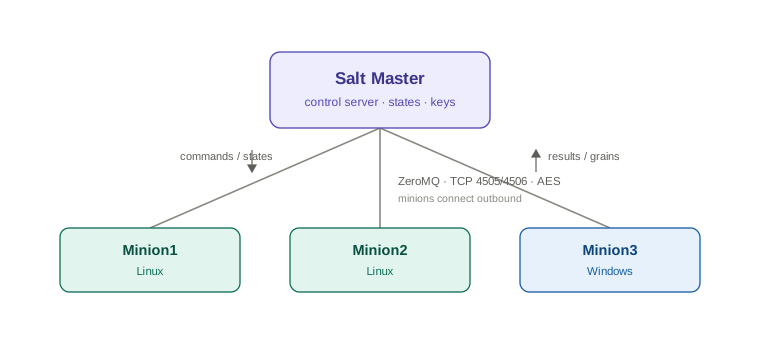
The Salt Master defines the desired state. Salt Minions execute commands and enforce configurations. Salt is designed to manage thousands of systems and provides both remote execution and declarative configuration management through Salt States.
- Masterless (
salt-call --local) mode — a single machine applies its own configuration with no master. Good for testing, small setups, or immutable-image workflows.
Core building blocks:
| Concept | What it is |
|---|---|
| Execution modules | Ad-hoc commands you run right now (e.g. install a package, restart a service). |
| States (SLS files) | Declarative YAML describing the desired end state of a system. |
| Grains | Static facts about a minion (OS, CPU, IP, custom labels). |
| Pillar | Secure, per-minion data (secrets, variables) defined on the master. |
| Top file | Maps which states/pillars apply to which minions. |
| Targeting | Selecting which minions a command hits (by ID, grain, regex, etc.). |
1.1 Main components in more detail
Salt Master — the controller node. Responsibilities:
- Stores configurations
- Sends commands
- Manages authentication keys
- Executes orchestration
- Maintains state files
Example:
salt-master01
IP: 10.10.80.99
OS: Ubuntu 24.04
Salt Minion — the managed node. Responsibilities:
- Receives commands
- Executes modules
- Applies states
- Reports results
Example:
web01
IP: 10.10.80.91

db01
IP: 10.10.80.92
Salt States — a declarative configuration language. Instead of the imperative sequence:
Install nginx, copy config, start service
you describe the outcome:
This server should have nginx installed and running.
Example:
nginx:
  pkg.installed

nginx-service:
  service.running:
    - enable: True
Salt ensures the system reaches this state — and keeps it there on every subsequent run (see Section 7).
Salt Pillar — stores sensitive or environment-specific data, such as:
- database passwords
- API keys
- SSL certificates
- environment variables
Example:
pillar/
 |
 └── database.sls
# database.sls
mysql_password: MySecret123
(Pillar is covered in detail in Section 8.)
Salt Grains — static information collected from minions. Examples:
OS:        Ubuntu
CPU:       Intel Xeon
Hostname:  web01
IP:        10.10.80.91
Query them with:
salt '*' grains.items
1.2 Communication model
Salt’s transport stack uses:
- ZeroMQ over TCP
- AES encryption for the message bus
- Public key authentication for minion identity (the
salt-keyhandshake, Section 4)
| Port | Purpose |
|---|---|
| 4505 | Publisher (master pushes commands to all minions) |
| 4506 | Request server (minions return results, fetch files) |
Salt Master
   |
   |  TCP 4505/4506
   |
Minions
Connections are initiated outbound from the minions to the master, so only the master needs these two ports opened (firewall commands in Section 3.2).
2. Installation (Debian / Ubuntu, APT)
2.1 Decide the topology
- One control node → install
salt-master(and usuallysalt-minionon the same box so it can manage itself). - Each managed node → install
salt-minion. - Single/standalone box → install
salt-miniononly and run masterless.
2.2 Add the Salt repository and GPG key
Run on every node (master and minions):
# Create the keyring directory
sudo mkdir -m 0755 -p /etc/apt/keyrings

# Import the Salt Project signing key
curl -fsSL https://packages.broadcom.com/artifactory/api/security/keypair/SaltProjectKey/public \
  | gpg --dearmor \
  | sudo tee /etc/apt/keyrings/salt-archive-keyring.pgp > /dev/null

# Add the repo definition (points at packages.broadcom.com/artifactory/saltproject-deb/)
curl -fsSL https://github.com/saltstack/salt-install-guide/releases/latest/download/salt.sources \
  | sudo tee /etc/apt/sources.list.d/salt.sources
2.3 (Recommended) Pin the major version
Pinning stops an unintended jump to a new major release during a routine apt upgrade:
sudo tee /etc/apt/preferences.d/salt-pin-1001 > /dev/null <<'EOF'
Package: salt-*
Pin: version 3008.*
Pin-Priority: 1001
EOF
2.4 Refresh metadata and install
sudo apt update

# On the control node:
sudo apt install -y salt-master salt-minion

# On each managed node:
sudo apt install -y salt-minion
salt-common is pulled in automatically as a dependency (it contains the shared Salt libraries and the salt-call binary).
To install an exact point release instead of the newest in the pinned series:
sudo apt install -y salt-minion=3008.2 salt-common=3008.2
Note on packaging: Modern Salt ships as onedir — a self-contained bundle with its own Python. It no longer depends on the system Python, so upgrades are cleaner and there are no
pip-versus-system conflicts.
2.5 Alternative: the bootstrap script (cross-distro, quick)
If you want a single command that detects the OS and installs for you (handy for provisioning scripts, or on non-Debian systems):
curl -fsSL https://github.com/saltstack/salt-bootstrap/releases/latest/download/bootstrap-salt.sh -o bootstrap-salt.sh

# Install a minion for the 3008 (Argon) LTS series:
sudo sh bootstrap-salt.sh -X stable 3008

# Install BOTH master and minion (-M adds the master):
sudo sh bootstrap-salt.sh -M -X stable 3008
Flags worth knowing: -M also install the master, -N install no minion, -X don’t start services immediately, -P allow pip-based deps.
Always review a bootstrap script before piping it to a shell as root.
3. Configuration
Config lives under /etc/salt/. Files ending in .conf inside /etc/salt/master.d/ and /etc/salt/minion.d/ are merged in — that’s the tidy way to add settings without editing the big default file.
3.1 Point the minion at the master
Edit /etc/salt/minion (or drop a file in /etc/salt/minion.d/):
# /etc/salt/minion.d/master.conf
master: 192.0.2.10          # IP or DNS name of your salt-master
id: web01.example.com       # optional; defaults to the machine's FQDN
If you use the DNS name salt for your master, minions find it automatically with zero config — a common convention.
3.2 Open the firewall on the master
The master listens on TCP 4505 (publish/command bus) and 4506 (return/file server). Allow these from your minions, e.g.:
sudo ufw allow 4505:4506/tcp
Note that ufw requires the /tcp (or /udp) suffix whenever you use a port range with the colon — it won’t accept a bare range — so that short form is exactly what you want here. If you’d rather restrict it to only your minion subnet (better practice than opening it to the world), use a from clause:
sudo ufw allow from 10.10.80.0/24 to any port 4505:4506 proto tcp
Verify it landed:
sudo ufw status numbered
Check firewall status:
sudo ufw status
Enable firewall:
sudo ufw enable
That shows whether the firewall is active and lists every rule (To / Action / From). Two useful variants:
sudo ufw status numbered   # adds an index number to each rule
sudo ufw status verbose    # adds default policies, logging level, and profile info
The numbered view is the one you’ll use most, because deleting a rule is done by its number:
sudo ufw delete 3 # removes rule #3 from the numbered list
A couple of things worth knowing:
If ufw status just prints Status: inactive, no rules are being enforced at all (even if you’ve added some — they’re staged but not active until sudo ufw enable). ufw is only the friendly front-end. If you want to see what’s actually loaded in the kernel — including rules from Docker, Salt, or other tools that bypass ufw — look at the underlying tables:
sudo iptables -L -n -v        # legacy view
sudo nft list ruleset         # nftables (modern Ubuntu default backend)
3.3 Start and enable the services
# On the master:
sudo systemctl enable --now salt-master

# On each minion:
sudo systemctl enable --now salt-minion
Check Status:
Master:
ekou@saltmaster:~$ sudo systemctl status salt-master
● salt-master.service - The Salt Master Server
     Loaded: loaded (/usr/lib/systemd/system/salt-master.service; enabled; preset: enabled)
     Active: active (running) since Tue 2026-07-21 09:38:28 UTC; 34min ago
       Docs: man:salt-master(1)
             file:///usr/share/doc/salt/html/contents.html
             https://docs.saltproject.io/en/latest/contents.html
   Main PID: 821 (/opt/saltstack/)
      Tasks: 33 (limit: 4543)
     Memory: 297.7M (peak: 304.2M)
        CPU: 17.392s
     CGroup: /system.slice/salt-master.service
             ├─ 821 "/opt/saltstack/salt/bin/python3.14 /usr/bin/salt-master MainProcess"
             ├─1253 "/opt/saltstack/salt/bin/python3.14 /usr/bin/salt-master EventPublisher"
             ├─1327 "/opt/saltstack/salt/bin/python3.14 /usr/bin/salt-master PubServerChannel._publish_daemon"
             ├─1330 "/opt/saltstack/salt/bin/python3.14 /usr/bin/salt-master EventMonitor"
             ├─1331 "/opt/saltstack/salt/bin/python3.14 /usr/bin/salt-master Maintenance"
             ├─1332 "/opt/saltstack/salt/bin/python3.14 /usr/bin/salt-master BatchManager"
             ├─1334 "/opt/saltstack/salt/bin/python3.14 /usr/bin/salt-master RequestServer ReqServer_ProcessManager"
             ├─1335 "/opt/saltstack/salt/bin/python3.14 /usr/bin/salt-master RequestServer MWorkerQueue"
             ├─1336 "/opt/saltstack/salt/bin/python3.14 /usr/bin/salt-master FileServerUpdate"
             ├─1376 "/opt/saltstack/salt/bin/python3.14 /usr/bin/salt-master RequestServer MWorker-default-0"
             ├─1377 "/opt/saltstack/salt/bin/python3.14 /usr/bin/salt-master RequestServer MWorker-default-1"
             ├─1378 "/opt/saltstack/salt/bin/python3.14 /usr/bin/salt-master RequestServer MWorker-default-2"
             ├─1383 "/opt/saltstack/salt/bin/python3.14 /usr/bin/salt-master RequestServer MWorker-default-3"
             └─1384 "/opt/saltstack/salt/bin/python3.14 /usr/bin/salt-master RequestServer MWorker-default-4"

Jul 21 09:38:26 saltmaster systemd[1]: Starting salt-master.service - The Salt Master Server...
Jul 21 09:38:28 saltmaster systemd[1]: Started salt-master.service - The Salt Master Server.
On Minion: one thing worth to notice is that the Minion may start automatically after you install it. So the new conf will take effect only after restart the service.
Verification command:
sudo salt-call --local config.get master
ekou@ubuntu1:~$ sudo salt-call --local config.get master
local:
    saltmaster
Monitor log:
sudo journalctl -u salt-minion -f
ekou@ubuntu2:~$ sudo journalctl -u salt-minion -f
Jul 21 10:18:37 ubuntu2 salt-minion[2234]: [ERROR   ] DNS lookup or connection check of 'salt' failed.
Jul 21 10:18:37 ubuntu2 salt-minion[2234]: [ERROR   ] Master hostname: 'salt' not found or not responsive. Retrying in 30 seconds
Jul 21 10:19:07 ubuntu2 salt-minion[2234]: [ERROR   ] DNS lookup or connection check of 'salt' failed.
Jul 21 10:19:07 ubuntu2 salt-minion[2234]: [ERROR   ] Master hostname: 'salt' not found or not responsive. Retrying in 30 seconds
Jul 21 10:19:37 ubuntu2 salt-minion[2234]: [ERROR   ] DNS lookup or connection check of 'salt' failed.
Jul 21 10:19:37 ubuntu2 salt-minion[2234]: [ERROR   ] Master hostname: 'salt' not found or not responsive. Retrying in 30 seconds
Jul 21 10:20:07 ubuntu2 salt-minion[2234]: [ERROR   ] DNS lookup or connection check of 'salt' failed.
Jul 21 10:20:07 ubuntu2 salt-minion[2234]: [ERROR   ] Master hostname: 'salt' not found or not responsive. Retrying in 30 seconds
Jul 21 10:20:37 ubuntu2 salt-minion[2234]: [ERROR   ] DNS lookup or connection check of 'salt' failed.
Jul 21 10:20:37 ubuntu2 salt-minion[2234]: [ERROR   ] Master hostname: 'salt' not found or not responsive. Retrying in 30 seconds
  q^C
ekou@ubuntu2:~$
Verify keys on salt master:
ekou@saltmaster:~$ sudo salt-key -L
Accepted Keys:
Denied Keys:
Unaccepted Keys:
skou_test
Rejected Keys:
Note: deleting the key here is purely for testing — normally you would simply accept it, since it is sitting in the Unaccepted list. Delete a key:
ekou@saltmaster:~$ sudo salt-key -d skou_test
The following keys are going to be deleted:
Unaccepted Keys:
skou_test
Proceed? [N/y] y
Key for minion skou_test deleted.
Note: take note of how the minion ID is determined (here
id:is set in the config file, so that value wins — the full logic is below):
id: in the config — if present, always wins (what you're doing now).
/etc/salt/minion_id — a cache file. Once the ID is determined the first time, Salt writes it here and reuses it forever after.
Auto-detected FQDN — if neither of the above exists, Salt computes the ID from the machine's fully-qualified domain name (essentially socket.getfqdn()), deliberately avoiding localhost.

So the auto value is the FQDN when the box has a domain — e.g. ubuntu1.example.com. If there's no domain (which is my case — my /etc/hosts only has 127.0.1.1 ubuntu1 with no domain suffix), the FQDN collapses to just the short hostname, so the ID would come out as ubuntu1. If it can't resolve any usable name at all, it falls back to an IP address as a last resort.
Two things that trip people up here:
The /etc/salt/minion_id cache means the ID sticks. If you let it auto-detect as ubuntu1, then later rename the host to web01, the minion will still report as ubuntu1 — because it reads the cached file, not the current hostname. To force re-detection you delete that file (and the minion's key), then restart:
to remove the id cache:
sudo rm /etc/salt/minion_id
sudo systemctl restart salt-minion
And because the ID is what the key and all your targeting/states are tied to, changing it later is disruptive — the minion presents a new ID, generates/uses a key under that name, and you’d re-accept it on the master (salt-key) and update any state/pillar top-file matches. That’s exactly why setting id: explicitly, like you did with skou_test, is the cleaner approach: it’s stable and predictable rather than dependent on whatever DNS/hostname happens to resolve to at first boot.
Restart service on Minion
sudo systemctl restart salt-minion

ekou@ubuntu1:~$ sudo systemctl restart salt-minion
ekou@ubuntu1:~$ sudo systemctl status salt-minion
● salt-minion.service - The Salt Minion
     Loaded: loaded (/usr/lib/systemd/system/salt-minion.service; enabled; preset: enabled)
     Active: active (running) since Tue 2026-07-21 10:29:53 UTC; 1min 8s ago
       Docs: man:salt-minion(1)
             file:///usr/share/doc/salt/html/contents.html
             https://docs.saltproject.io/en/latest/contents.html
   Main PID: 3101 (python3.14)
      Tasks: 7 (limit: 4543)
     Memory: 88.7M (peak: 92.3M)
        CPU: 2.198s
     CGroup: /system.slice/salt-minion.service
             ├─3101 /opt/saltstack/salt/bin/python3.14 /usr/bin/salt-minion
             └─3109 "/opt/saltstack/salt/bin/python3.14 /usr/bin/salt-minion MultiMinionProcessManager MinionProcessManager"

Jul 21 10:29:53 ubuntu1 systemd[1]: Starting salt-minion.service - The Salt Minion...
Jul 21 10:29:53 ubuntu1 systemd[1]: Started salt-minion.service - The Salt Minion.
4. Key management (the trust handshake)
Salt is secure by default: a minion generates a key on first start and the master must accept it before any command will reach that minion.
# On the master, list pending/accepted keys:
sudo salt-key -L

# Accept one minion by ID:
sudo salt-key -a web01.example.com

# Accept everything currently pending (fine for a lab, cautious in prod):
sudo salt-key -A

# Reject or delete a key:
sudo salt-key -r <id>
sudo salt-key -d <id>
For production, verify the key fingerprint matches on both ends (salt-key -f <id> on the master, salt-call --local key.finger on the minion) before accepting.
5. First contact — execution modules
Once keys are accepted, test connectivity:
# Ping all minions (this is Salt's test.ping, not ICMP):
sudo salt '*' test.ping

# Run a shell command everywhere:
sudo salt '*' cmd.run 'uptime'

# Gather system facts:
sudo salt '*' grains.items
sudo salt '*' grains.get os

# Package + service management:
sudo salt 'web*' pkg.install nginx
sudo salt 'web*' service.restart nginx
sudo salt '*' disk.usage
Test output:
ekou@saltmaster:~$ sudo salt '*' test.ping
skou_test1:
    True
skou_test:
    True
salt_master:
    True
ekou@saltmaster:~$ sudo salt '*' cmd.run 'uptime'
salt_master:
     10:39:51 up  1:01,  3 users,  load average: 0.18, 0.05, 0.02
skou_test1:
     10:39:51 up  1:04,  2 users,  load average: 0.41, 0.52, 0.30
skou_test:
     10:39:51 up  1:04,  2 users,  load average: 0.01, 0.02, 0.06

ekou@saltmaster:~$ sudo salt '*' grains.get os
skou_test1:
    Ubuntu
skou_test:
    Ubuntu
salt_master:
    Ubuntu

ekou@saltmaster:~$ sudo salt -E 'skou_[a-z]+'  grains.get os
skou_test1:
    Ubuntu
skou_test:
    Ubuntu
ekou@saltmaster:~$ sudo salt -E 'skou_[a-z]+$' grains.get os
skou_test:
    Ubuntu
ekou@saltmaster:~$ sudo salt '*' cmd.run 'ip a'
[sudo] password for ekou:
skou_test:
    1: lo: <LOOPBACK,UP,LOWER_UP> mtu 65536 qdisc noqueue state UNKNOWN group default qlen 1000
        link/loopback 00:00:00:00:00:00 brd 00:00:00:00:00:00
        inet 127.0.0.1/8 scope host lo
           valid_lft forever preferred_lft forever
        inet6 ::1/128 scope host noprefixroute
           valid_lft forever preferred_lft forever
    2: ens33: <BROADCAST,MULTICAST,UP,LOWER_UP> mtu 1500 qdisc fq_codel state UP group default qlen 1000
        link/ether 00:0c:29:a0:4a:ce brd ff:ff:ff:ff:ff:ff
        altname enp2s1
        inet 10.10.80.91/24 brd 10.10.80.255 scope global ens33
           valid_lft forever preferred_lft forever
        inet6 fe80::20c:29ff:fea0:4ace/64 scope link
           valid_lft forever preferred_lft forever
salt_master:
    1: lo: <LOOPBACK,UP,LOWER_UP> mtu 65536 qdisc noqueue state UNKNOWN group default qlen 1000
        link/loopback 00:00:00:00:00:00 brd 00:00:00:00:00:00
        inet 127.0.0.1/8 scope host lo
           valid_lft forever preferred_lft forever
        inet6 ::1/128 scope host noprefixroute
           valid_lft forever preferred_lft forever
    2: ens33: <BROADCAST,MULTICAST,UP,LOWER_UP> mtu 1500 qdisc fq_codel state UP group default qlen 1000
        link/ether 00:0c:29:d1:fe:ea brd ff:ff:ff:ff:ff:ff
        altname enp2s1
        inet 10.10.80.99/24 brd 10.10.80.255 scope global ens33
           valid_lft forever preferred_lft forever
        inet6 fe80::20c:29ff:fed1:feea/64 scope link
           valid_lft forever preferred_lft forever
skou_test1:
    1: lo: <LOOPBACK,UP,LOWER_UP> mtu 65536 qdisc noqueue state UNKNOWN group default qlen 1000
        link/loopback 00:00:00:00:00:00 brd 00:00:00:00:00:00
        inet 127.0.0.1/8 scope host lo
           valid_lft forever preferred_lft forever
        inet6 ::1/128 scope host noprefixroute
           valid_lft forever preferred_lft forever
    2: ens33: <BROADCAST,MULTICAST,UP,LOWER_UP> mtu 1500 qdisc fq_codel state UP group default qlen 1000
        link/ether 00:0c:29:1f:8a:61 brd ff:ff:ff:ff:ff:ff
        altname enp2s1
        inet 10.10.80.92/24 brd 10.10.80.255 scope global ens33
           valid_lft forever preferred_lft forever
        inet6 fe80::20c:29ff:fe1f:8a61/64 scope link
           valid_lft forever preferred_lft forever
ekou@saltmaster:~$ sudo salt '*' cmd.run 'netstat -rn'
skou_test:
    Kernel IP routing table
    Destination     Gateway         Genmask         Flags   MSS Window  irtt Iface
    0.0.0.0         10.10.80.2      0.0.0.0         UG        0 0          0 ens33
    10.10.80.0      0.0.0.0         255.255.255.0   U         0 0          0 ens33
skou_test1:
    Kernel IP routing table
    Destination     Gateway         Genmask         Flags   MSS Window  irtt Iface
    0.0.0.0         10.10.80.2      0.0.0.0         UG        0 0          0 ens33
    10.10.80.0      0.0.0.0         255.255.255.0   U         0 0          0 ens33
salt_master:
    Kernel IP routing table
    Destination     Gateway         Genmask         Flags   MSS Window  irtt Iface
    0.0.0.0         10.10.80.2      0.0.0.0         UG        0 0          0 ens33
    10.10.80.0      0.0.0.0         255.255.255.0   U         0 0          0 ens33
Use Regex to filter devices:
Salt targets by minion ID with regex using the -E (or –pcre) flag. The pattern is standard Python/PCRE regex, matched against each minion’s ID:
sudo salt -E 'skou_.*' test.ping          # skou_test and any skou_ siblings
sudo salt -E 'skou_[a-z]+$' grains.get os
sudo salt -E 'web.*' test.ping           # any ID starting with "web"
sudo salt -E 'web0[1-3]' test.ping        # web01, web02, web03
sudo salt -E '(web|db)\d+' test.ping      # web or db followed by digits
sudo salt -E '.*\.example\.com$' test.ping  # IDs ending in .example.com
Salt’s ID regex is anchored at the start of the ID but not at the end. So web matches web01, web-prod, and website alike. If you need an exact end, anchor with $ — e.g. -E 'web01$' to match only web01 and not web011.
To target by a grain with regex instead of the ID, use -P (grain PCRE):
sudo salt -P 'os:Ubuntu.*' test.ping           # os grain matching regex
sudo salt -P 'kernelrelease:5\.15.*' test.ping  # kernel version pattern
Inside a top file, set the match type to pcre (the top file itself is explained in detail in section 7.2):
base:
  'web0[1-9]':
    - match: pcre
    - nginx
And in compound targeting (mixing matchers with and/or/not), regex uses the E@ prefix for IDs and P@ for grains:
sudo salt -C 'E@web.* and G@os:Ubuntu' test.ping
sudo salt -C 'E@db.* and not E@db99' test.ping
Command anatomy: salt <target> <module.function> [arguments].
Masterless equivalent (no master needed)
Run the same functions locally on a single box:
sudo salt-call --local test.ping
sudo salt-call --local pkg.install nginx
6. Targeting minions
The <target> field selects which minions run the command:
sudo salt '*' test.ping                       # all minions (glob)
sudo salt 'web*' test.ping                     # glob on minion ID
sudo salt -E 'web(1|2)\.example\.com' test.ping  # regex (-E)
sudo salt -L 'web01,db01' test.ping            # explicit list (-L)
sudo salt -G 'os:Ubuntu' test.ping             # by grain (-G)
sudo salt -I 'role:webserver' test.ping        # by pillar (-I)
sudo salt -C 'web* and G@os:Ubuntu' test.ping  # compound (-C)
7. States — declarative configuration
States describe the desired end state and are stored on the master, by default under /srv/salt/.
7.1 A simple state file
Create /srv/salt/nginx.sls:
install_nginx:
  pkg.installed:
    - name: nginx

nginx_running:
  service.running:
    - name: nginx
    - enable: True
    - require:
      - pkg: install_nginx      # ordering: install before starting
Apply it directly to a target:
sudo salt 'web*' state.apply nginx
7.2 The top file — mapping states to minions
What the top file is for
So far every command targeted minions ad hoc, one command at a time — salt -E 'skou_[a-z]+$' grains.get os. The top file is how you make those assignments permanent and declarative instead. It is a mapping that says “these minions should always have these states applied to them.” When you run a highstate, Salt reads the top file, works out which states each minion is assigned, and applies them.
Where it lives
On the master, at the root of your state directory:
/srv/salt/top.sls
(/srv/salt/ is the default file_roots — the same place your .sls state files live. The pillar system has its own separate top file at /srv/pillar/top.sls, covered in Section 8.)
To verify where your server actualy uses:
ekou@saltmaster:~$ sudo salt-run config.get file_roots
base:
    - /srv/salt
    - /srv/spm/salt
Its structure
Three levels of indentation, each meaning something specific:
base:                          # 1. the environment (usually "base")
  '<target>':                  # 2. which minions
    - <state to apply>         # 3. what to apply to them
By default the <target> is interpreted as a glob (shell-style wildcards like web*). To make Salt read it as a regex instead, you add one special line — - match: pcre — as the first item in the list under that target. That line isn’t a state; it’s an instruction telling Salt how to interpret the target string above it. The same mechanism selects any other matcher: - match: grain, - match: list, - match: compound, and so on.
A concrete example
Say you have a state file /srv/salt/ntp.sls and you want it applied to skou_test but not skou_test1 — the exact case solved on the CLI in Section 5 with -E 'skou_[a-z]+$'. Your /srv/salt/top.sls would be:
base:
  'skou_[a-z]+$':
    - match: pcre
    - ntp
Reading that top-to-bottom: in the base environment, for every minion whose ID matches the regex skou_[a-z]+$ (interpret it as PCRE, not a glob), apply the state called ntp. Because of the $ anchor, skou_test matches and skou_test1 doesn’t — same logic as the command line.
You can stack multiple target blocks, mixing match types freely. A minion that matches several blocks gets the union of all of them:
base:
  '*':                         # glob (default) — everyone
    - common
  'skou_[a-z]+$':              # regex — only skou_test
    - match: pcre
    - ntp
  'web0[1-9]':                 # regex — web01 through web09
    - match: pcre
    - nginx
  'os:Ubuntu':                 # grain match
    - match: grain
    - ubuntu_tweaks
One practical note: only put - match: pcre under targets that are actually regex. A plain '*' or 'web*' should stay as glob (no match line), since those are wildcard patterns, not regex.
What - common, - ntp, - nginx actually are
Those entries are the states to apply — each one is the name of a .sls file containing the actual configuration instructions. In the top file you’re just referencing them by name; the real content lives in separate files. Salt resolves each name to a file under /srv/salt/ in one of two ways:
- common   →  /srv/salt/common.sls
              (or /srv/salt/common/init.sls  if you organize it as a folder)
- ntp      →  /srv/salt/ntp.sls
- nginx    →  /srv/salt/nginx.sls
So - nginx means “apply everything defined in /srv/salt/nginx.sls to the matched minions.” The dash makes it a YAML list item, because a minion can be assigned several states at once:
  'web0[1-9]':
    - match: pcre
    - common      # apply common.sls
    - ntp         # AND ntp.sls
    - nginx       # AND nginx.sls
The names are just labels you choose — common, ntp, nginx aren’t built-in keywords; they’re whatever you named your files (the nginx.sls from Section 7.1 is exactly such a file). The convention is that common is the state you apply to everything (base packages, users, standard config), while ntp and nginx are role-specific — only certain minions need them. That’s exactly why the top file exists: it’s the map that decides which of those state files lands on which minions.
The full picture, end to end
# /srv/salt/top.sls  — the MAP (who gets what)
base:
  '*':
    - common          # every minion gets common.sls
  'web0[1-9]':
    - match: pcre
    - nginx           # only web minions also get nginx.sls
# /srv/salt/common.sls  — the actual work for "common"
install_vim:
  pkg.installed:
    - name: vim
# /srv/salt/nginx.sls  — the actual work for "nginx"
install_nginx:
  pkg.installed:
    - name: nginx
When you run a highstate, Salt reads top.sls, sees that every minion gets common and web minions additionally get nginx, then opens those .sls files and enforces what’s inside them.
Running it — the highstate
Once the top file is saved on the master, trigger it with a highstate. This tells each targeted minion to apply everything the top file assigns to it:
sudo salt '*' state.highstate                 # apply to all minions
sudo salt '*' state.apply                     # equivalent: state.apply with NO state name runs the highstate
sudo salt '*' state.highstate test=True       # DRY RUN first — see what would change
sudo salt skou_test state.highstate           # just one minion
Note the distinction: state.apply nginx applies one named state directly, ignoring the top file’s assignments; state.apply with no argument is the highstate.
A subtlety that trips people up: the CLI target and the top-file target are two different layers, and they compose. The CLI target answers “who should run a highstate right now?”; the top file answers “what does each minion get when it runs one?”. state.highstate never means “apply the top file’s states to whatever I typed” — each targeted minion consults the top file and applies only what matches its own ID. So sudo salt '*' state.highstate is always safe in the sense that minions matched nowhere in the top file simply report “No Top file or master_tops data matches found” and change nothing. The reason to narrow the CLI target anyway is blast radius: in a large fleet you don’t want every minion re-converging just because you are iterating on one box. In fully automated setups (a scheduled highstate, or startup_states: highstate in the minion config) there is no CLI target at all — the top file alone decides everything.
The mental model: -E vs match: pcre
The CLI -E flag and the - match: pcre line do the exact same regex matching — they’re just used in two different places. -E is for one-off ad-hoc commands you type; match: pcre is for making that same targeting a saved, repeatable rule inside the top file. The reason the top file needs the explicit match: line is that, unlike the command line where you chose the -E flag, the top file defaults to glob matching — so you have to tell it when a target should be treated as a regex.
7.3 Test before you commit
Always dry-run with test=True — it reports what would change without changing anything:
sudo salt 'web*' state.apply nginx test=True
7.4 Worked example — install MySQL on skou_test via the top file
Everything from 7.1 to 7.3 in one small, real exercise: make skou_test a MySQL server, declaratively.
Step 1 — the state file. On the master, create /srv/salt/mysql.sls:
install_mysql:
  pkg.installed:
    - name: mysql-server

mysql_running:
  service.running:
    - name: mysql
    - enable: True
    - require:
      - pkg: install_mysql
Same shape as the nginx state in 7.1: install the package, then keep the service running and enabled at boot, with require guaranteeing the install happens first. On Ubuntu the package mysql-server provides a service named mysql; on Debian, which ships MariaDB instead, you would use mariadb-server and service mariadb.
Step 2 — the top file. Add the assignment to /srv/salt/top.sls, reusing the regex targeting from 7.2:
base:
  'skou_[a-z]+$':
    - match: pcre
    - mysql
The - match: pcre line tells Salt to treat the target as a regex, and the $ anchor makes skou_[a-z]+$ match skou_test but not skou_test1 — exactly the selection built on the CLI in Section 5. If this target block already exists in your top file (e.g. with - ntp from 7.2), just append - mysql to its list rather than creating a duplicate block. The simpler alternative — targeting the literal ID 'skou_test' with no match: line, since a glob without wildcards matches exactly one minion — also works; the regex form is used here to practice the pattern you’ll actually need once minions multiply.
Step 3 — dry-run, apply, verify:
sudo salt skou_test state.highstate test=True   # dry run: both IDs show as "would be installed/started"
sudo salt skou_test state.highstate             # actually apply
Why name skou_test on the CLI when the top file already targets it? Because these are two different layers (see the note at the end of 7.2): the CLI ID only scopes who runs a highstate now; the top file still decides what they get. sudo salt '*' state.highstate would produce the identical result on skou_test — with every unmatched minion reporting “no matches found” — but narrowing the CLI target keeps the run fast and quiet while you iterate on one box.
Test output:
ekou@saltmaster:~$ sudo salt '*' state.highstate
skou_test1:
----------
          ID: states
    Function: no.None
      Result: False
     Comment: No Top file or master_tops data matches found. Please see master log for details.
     Changes:

Summary for skou_test1
------------
Succeeded: 0
Failed:    1
------------
Total states run:     1
Total run time:   0.000 ms
salt_master:
----------
          ID: states
    Function: no.None
      Result: False
     Comment: No Top file or master_tops data matches found. Please see master log for details.
     Changes:

Summary for salt_master
------------
Succeeded: 0
Failed:    1
------------
Total states run:     1
Total run time:   0.000 ms
skou_test:
----------
          ID: install_mysql
    Function: pkg.installed
        Name: mysql-server
      Result: True
     Comment: All specified packages are already installed
     Started: 12:26:46.271866
    Duration: 44.855 ms
     Changes:
----------
          ID: mysql_running
    Function: service.running
        Name: mysql
      Result: True
     Comment: The service mysql is already running
     Started: 12:26:46.362049
    Duration: 129.403 ms
     Changes:

Summary for skou_test
------------
Succeeded: 2
Failed:    0
------------
Total states run:     2
Total run time: 174.258 ms
ERROR: Minions returned with non-zero exit code
The summary at the bottom should report Succeeded: 2 (changed=2) on the first run. Re-run the same highstate and it reports Succeeded: 2 with no changes — that’s idempotence, the whole point of states: Salt enforces the end state rather than re-executing installation commands.
Confirm from the master:
sudo salt skou_test pkg.version mysql-server    # e.g. 8.0.x
sudo salt skou_test service.status mysql        # True
sudo salt skou_test cmd.run 'mysql --version'
The full first-run capture from this lab — the top file and state exactly as created, the dry run, the real install (42 s; the apt dependency list is trimmed for readability), and the verification:
ekou@saltmaster:~$ cat /srv/salt/top.sls
base:
  'skou_[a-z]+$':
    - match: pcre
    - mysql
ekou@saltmaster:~$ cat /srv/salt/mysql.sls
install_mysql:
  pkg.installed:
    - name: mysql-server

mysql_running:
  service.running:
    - name: mysql
    - enable: True
    - require:
      - pkg: install_mysql
ekou@saltmaster:~$ sudo salt skou_test state.highstate test=True
skou_test:
----------
          ID: install_mysql
    Function: pkg.installed
        Name: mysql-server
      Result: None
     Comment: The following packages would be installed/updated: mysql-server
     Started: 12:12:12.699933
    Duration: 3171.076 ms
     Changes:
              ----------
              mysql-server:
                  ----------
                  new:
                      8.0.46-0ubuntu0.24.04.3
                  old:
----------
          ID: mysql_running
    Function: service.running
        Name: mysql
      Result: None
     Comment: Service mysql not present; if created in this state run, it would have been started
     Started: 12:12:15.892350
    Duration: 40.825 ms
     Changes:

Summary for skou_test
------------
Succeeded: 2 (unchanged=2, changed=1)
Failed:    0
------------
Total states run:     2
Total run time:   3.212 s
ekou@saltmaster:~$ sudo salt skou_test state.highstate
skou_test:
----------
          ID: install_mysql
    Function: pkg.installed
        Name: mysql-server
      Result: True
     Comment: The following packages were installed/updated: mysql-server
     Started: 12:12:26.515181
    Duration: 42540.467 ms
     Changes:
              ----------
              ...(22 non-MySQL dependency packages trimmed)...
              mysql-client-8.0:
                  ----------
                  new:
                      8.0.46-0ubuntu0.24.04.3
                  old:
              mysql-client-core-8.0:
                  ----------
                  new:
                      8.0.46-0ubuntu0.24.04.3
                  old:
              mysql-common:
                  ----------
                  new:
                      5.8+1.1.0build1
                  old:
              mysql-server:
                  ----------
                  new:
                      8.0.46-0ubuntu0.24.04.3
                  old:
              mysql-server-8.0:
                  ----------
                  new:
                      8.0.46-0ubuntu0.24.04.3
                  old:
              mysql-server-core-8.0:
                  ----------
                  new:
                      8.0.46-0ubuntu0.24.04.3
                  old:
----------
          ID: mysql_running
    Function: service.running
        Name: mysql
      Result: True
     Comment: The service mysql is already running
     Started: 12:13:09.073003
    Duration: 49.261 ms
     Changes:

Summary for skou_test
------------
Succeeded: 2 (changed=1)
Failed:    0
------------
Total states run:     2
Total run time:  42.590 s
ekou@saltmaster:~$ sudo salt skou_test pkg.version mysql-server
skou_test:
    8.0.46-0ubuntu0.24.04.3
ekou@saltmaster:~$ sudo salt skou_test service.status mysql
skou_test:
    True
ekou@saltmaster:~$ sudo salt skou_test cmd.run 'mysql --version'
skou_test:
    mysql  Ver 8.0.46-0ubuntu0.24.04.3 for Linux on x86_64 ((Ubuntu))
ekou@saltmaster:~$
Because the assignment lives in the top file, it is now permanent: every future highstate re-asserts that skou_test has MySQL installed and running — if someone stops the service or removes the package, the next highstate puts it back.
7.5 Worked example continued — database, user and password via pillar
A real MySQL deployment doesn’t stop at “installed and running”: it needs a database, a table, an application user, and a password — and the password must not be hardcoded in the state file, because states are not secret (any minion assigned the state can render it, and it usually ends up in git). This is exactly the split Salt is designed around: the what lives in the state, the secrets live in pillar (introduced formally in Section 8 — peek ahead if needed).
Step 1 — pillar data. Pillar has its own top file, with the same matching rules as the state top file. On the master, create /srv/pillar/top.sls:
base:
  'skou_[a-z]+$':
    - match: pcre
    - mysql
And /srv/pillar/mysql.sls:
# Connection default for Salt's mysql modules: talk to MySQL over the unix
# socket, where Ubuntu's auth_socket lets root in without a password.
mysql.unix_socket: /var/run/mysqld/mysqld.sock

# Application database definition — names plus the actual secret.
appdb:
  name: ekou_test_db
  table: ekou_test_table
  user: ekoumysql
  password: Cisco12345
Only minions matched in the pillar top file ever see this data — that per-minion scoping is the point of pillar. (It is still plaintext on the master; for production-grade secrets Salt supports encrypting pillar values with the GPG renderer.)
Step 2 — extend the state. Four Ubuntu/Salt realities shape it:
- Salt’s
mysql_*modules need the PyMySQL Python library — and modern Salt is onedir, bundling its own Python, so installingpython3-pymysqlwith apt is invisible to Salt. It has to go into Salt’s own Python viasalt-pip. - On Salt 3008, the
mysql_*state modules are no longer in core. Salt’s “great module migration” moved them to the saltext-mysql extension — core 3008 still ships the execution module (mysql.db_listworks), butmysql_database.presentand friends do not exist until the extension is installed. Section 7.6 shows how this was discovered the hard way. - A fresh Ubuntu
mysql-serversets root toauth_socket: no password, authenticated by the OS user over the unix socket. Sincesalt-minionruns as root, Salt can administer MySQL through the socket with no credentials — which is what makes the first run work at all. - Salt has states for databases, users and grants, but no state for tables — schema normally belongs to the application (migrations), not the config-management layer. For a lab table,
mysql_query.runexecutes raw SQL, with anunlessguard so it stays idempotent.
Replace /srv/salt/mysql.sls with:
{% set db = pillar['appdb'] %}

install_mysql:
  pkg.installed:
    - name: mysql-server

mysql_running:
  service.running:
    - name: mysql
    - enable: True
    - require:
      - pkg: install_mysql

# Salt is onedir: both libraries must go into Salt's bundled Python, not
# the system Python. pymysql is the MySQL client; saltext-mysql provides
# the mysql_* STATE modules that Salt 3008 removed from core.
salt_mysql_deps:
  cmd.run:
    - name: salt-pip install pymysql saltext-mysql
    - unless: /opt/saltstack/salt/bin/python3 -c "import pymysql, saltext.mysql"
    - reload_modules: True
    - require:
      - service: mysql_running

appdb_database:
  mysql_database.present:
    - name: {{ db.name }}
    - require:
      - cmd: salt_mysql_deps

appdb_user:
  mysql_user.present:
    - name: {{ db.user }}
    - host: localhost
    - password: '{{ db.password }}'
    - require:
      - mysql_database: appdb_database

appdb_grants:
  mysql_grants.present:
    - grant: ALL PRIVILEGES
    - database: {{ db.name }}.*
    - user: {{ db.user }}
    - host: localhost
    - require:
      - mysql_user: appdb_user

# No mysql_table state exists - create the table with raw SQL. The unless
# guard keeps the state idempotent: once the table exists, nothing runs.
appdb_table:
  mysql_query.run:
    - database: {{ db.name }}
    - query: |
        CREATE TABLE IF NOT EXISTS {{ db.table }} (
          id INT AUTO_INCREMENT PRIMARY KEY,
          name VARCHAR(64) NOT NULL,
          created_at TIMESTAMP DEFAULT CURRENT_TIMESTAMP
        )
    - unless: mysql -N -e "SHOW TABLES IN {{ db.name }} LIKE '{{ db.table }}'" | grep -q {{ db.table }}
    - require:
      - mysql_database: appdb_database
The {{ ... }} expressions are Jinja (Section 9): the state file is a template that pulls its values from pillar at render time, so the same state serves any minion — each renders with its own pillar data, and no secret ever appears in the state file. With the pillar above, this run produces database ekou_test_db containing table ekou_test_table, owned (via grants) by appuser.
Step 3 — refresh pillar, then apply:
sudo salt skou_test saltutil.refresh_pillar          # push the new pillar data
sudo salt skou_test pillar.items                     # confirm appdb is visible
sudo salt skou_test state.highstate test=True
sudo salt skou_test state.highstate
Expect the first converge to take two runs plus a restart, and don’t let the intermediate errors scare you:
- The
test=Truedry run reports'mysql_database.present' is not availablewith a cascade of requisite failures. Expected: test mode doesn’t actually run thesalt-pipbootstrap, so the modules it would provide can’t exist yet. - The first real run installs
pymysqlandsaltext-mysql, but themysql_*states still fail with “not available” in that same run — newly installed state modules don’t become loadable mid-highstate, even withreload_modules. - Restart the minion so it builds its loader in a world where the packages exist, then run again:
sudo salt skou_test service.restart salt-minion      # "Minion did not return" is expected
sudo salt skou_test test.ping                        # wait a few seconds, confirm it is back
sudo salt skou_test state.highstate                  # converges: Succeeded: 7 (changed=4)
Every run after that is a clean no-op single pass. Section 7.6 walks through how each of those first-run errors was diagnosed in this lab.
Troubleshooting: pillar.items comes back empty. This is what it looks like when it goes wrong — a real capture from this lab:
ekou@saltmaster:~$ sudo salt skou_test saltutil.refresh_pillar
skou_test:
    True
ekou@saltmaster:~$ sudo salt skou_test pillar.items
skou_test:
    ----------
That bare ---------- is not normal: it means the master rendered zero pillar data for this minion. The True from refresh_pillar is misleading — it only confirms the minion asked for a refresh, not that anything matched. With the files from Step 1 in place you should see mysql.unix_socket and the whole appdb block here.
The most common cause is the pillar top file: either /srv/pillar/top.sls doesn’t exist, or the assignment was added to /srv/salt/top.sls instead — the classic mix-up, because pillar has its own top file and a mysql.sls sitting in /srv/pillar/ is assigned to nobody until the pillar top file maps it. Runner-up causes: a tab instead of spaces in the YAML (fails silently as a no-match), a misspelled filename, or a changed pillar_roots.
Diagnose from the master side before touching the minion:
sudo salt-run pillar.show_top minion=skou_test   # what does the pillar top file assign?
sudo salt-run pillar.show_pillar skou_test       # what does it render to?
If pillar.show_top is empty, fix the pillar top file; if it shows - mysql but the minion still gets nothing, re-run saltutil.refresh_pillar and check the minion again. The full set of pillar-debugging commands, and how they mirror the state-side ones, is in Section 8.1.
Step 4 — verify:
sudo salt skou_test mysql.db_list                    # ekou_test_db listed
sudo salt skou_test mysql.db_tables ekou_test_db     # ekou_test_table listed
sudo salt skou_test mysql.user_list                  # appuser@localhost listed
sudo salt skou_test cmd.run "mysql -u appuser -pMySecret123 -e 'SHOW TABLES IN ekou_test_db;'"
The last command proves the whole chain end to end: the password that only exists in pillar on the master now authenticates a real client on the minion, and that client can see the table the state created.
Why this example does not set the root password. It could — mysql_user.present for root@localhost with a pillar password — but think through the second run: once root has a password, every later Salt connection needs it too (mysql.pass in pillar), and if the state half-applies you can lock Salt out of its own database. On Ubuntu the practical convention is to leave root on auth_socket (root shell access already implies database admin) and manage application users the pillar way shown here. If you do password root, set mysql.pass in the same pillar before the run that changes it.
7.6 Troubleshooting the first 7.5 run — a real debugging walkthrough
The first time 7.5 was applied in this lab, it failed — repeatedly, with the same error — and the diagnosis took five distinct stages. They are reproduced here with the real outputs, because the method transfers to any State 'X' was not found in SLS error, and because the root cause (a Salt 3008 packaging change) will hit anyone following this guide on the current LTS.
Stage 1 — the dry run fails, and that’s expected. The first state.highstate test=True reported:
          ID: appdb_database
    Function: mysql_database.present
        Name: ekou_test_db
      Result: False
     Comment: State 'mysql_database.present' was not found in SLS 'mysql'
              Reason: 'mysql_database.present' is not available.
with the user, grants and table states failing as One or more requisite failed dominoes. This is a test-mode artifact: test=True never actually ran the salt-pip bootstrap (its Result: None / “would have been executed”), so the modules that install provides can’t exist yet. A dry run cannot fully validate a state that bootstraps its own dependencies.
Stage 2 — the real run installs the library, and still fails. The first real highstate showed the bootstrap genuinely succeed…
ekou@saltmaster:~$ sudo salt skou_test state.highstate


skou_test:
----------
          ID: install_mysql
    Function: pkg.installed
        Name: mysql-server
      Result: True
     Comment: All specified packages are already installed
     Started: 12:50:41.326848
    Duration: 38.183 ms
     Changes:
----------
          ID: mysql_running
    Function: service.running
        Name: mysql
      Result: True
     Comment: The service mysql is already running
     Started: 12:50:41.385162
    Duration: 107.177 ms
     Changes:
----------
          ID: salt_pymysql
    Function: cmd.run
        Name: salt-pip install pymysql
      Result: True
     Comment: unless condition is true
     Started: 12:50:41.498519
    Duration: 2175.542 ms
     Changes:
----------
          ID: appdb_database
    Function: mysql_database.present
        Name: ekou_test_db
      Result: False
     Comment: State 'mysql_database.present' was not found in SLS 'mysql'
              Reason: 'mysql_database.present' is not available.
     Changes:
----------
          ID: appdb_user
    Function: mysql_user.present
        Name: ekoumysql
      Result: False
     Comment: One or more requisite failed: mysql.appdb_database
     Started: 12:50:43.687603
    Duration: 0.021 ms
     Changes:
----------
          ID: appdb_grants
    Function: mysql_grants.present
      Result: False
     Comment: One or more requisite failed: mysql.appdb_user
     Started: 12:50:43.691035
    Duration: 0.014 ms
     Changes:
----------
          ID: appdb_table
    Function: mysql_query.run
      Result: False
     Comment: One or more requisite failed: mysql.appdb_database
     Started: 12:50:43.693716
    Duration: 0.011 ms
     Changes:

Summary for skou_test
------------
Succeeded: 3
Failed:    4
------------
Total states run:     7
Total run time:   2.321 s
ERROR: Minions returned with non-zero exit code
…followed by the same not available failure in the same run. Newly installed modules did not become loadable mid-highstate, despite reload_modules: True. And a second run was no better — this time salt_pymysql reported unless condition is true (proving PyMySQL was importable) while mysql_database.present stayed unavailable. Package present, loader blind.
Stage 3 — probe the loader directly, and eliminate the cache theory. Instead of re-running the whole highstate, ask the minion what its loader is offering. An empty reply under the minion ID means “that state module does not exist as far as my loader is concerned”:
ekou@saltmaster:~$ sudo salt skou_test sys.list_state_functions mysql_database
skou_test:
ekou@saltmaster:~$
The obvious suspect was the long-running minion daemon caching a stale module list. So: restart the daemon on the minion box and probe again —
ekou@ubuntu1:~$ sudo systemctl restart salt-minion
ekou@ubuntu1:~$ sudo systemctl status salt-minion
● salt-minion.service - The Salt Minion
     Loaded: loaded (/usr/lib/systemd/system/salt-minion.service; enabled; preset: enabled)
     Active: active (running) since Tue 2026-07-21 13:00:15 UTC; 1s ago
ekou@saltmaster:~$ sudo salt skou_test sys.list_state_functions mysql_database
skou_test:
ekou@saltmaster:~$
Empty before, empty after a fresh daemon. Whatever this was, it was not a cache.
Stage 4 — fresh-process test, and a misleading error worth understanding. salt-call --local builds a brand-new loader in a brand-new process, bypassing the daemon entirely. Two lessons came out of it. First, run it on the right machine — running it on the master probes the master’s local minion, where PyMySQL was never installed:
ekou@saltmaster:~$ sudo salt-call --local mysql.db_list -l debug 2>&1 | grep -i mysql
'mysql' __virtual__ returned False: No python mysql client installed.   <-- the MASTER, expected
On the actual minion, the module loaded fine — and promptly failed with a different error:
ekou@ubuntu1:~$ sudo salt-call --local mysql.db_list -l debug 2>&1 | grep -iE 'mysql|virtual'
[DEBUG   ] LazyLoaded mysql.db_list
[ERROR   ] MySQL Error 1698: Access denied for user 'root'@'localhost'
That 1698 is an artifact of the diagnostic itself, not a real problem: --local means masterless, so no pillar was delivered, so mysql.unix_socket was absent, so PyMySQL connected over TCP — and auth_socket cannot authenticate root over TCP (no OS peer credentials to check). Confirmation came from running the same probe through the master, pillar included:
ekou@saltmaster:~$ sudo salt skou_test mysql.db_list
skou_test:
    - information_schema
    - mysql
    - performance_schema
    - sys
Stage 5 — the contradiction that named the culprit. At this point the evidence was: execution module loads and connects everywhere (mysql.db_list works), PyMySQL is confirmed in the right onedir location —
ekou@saltmaster:~$ sudo salt skou_test cmd.run '/opt/saltstack/salt/bin/python3 -c "import pymysql; print(pymysql.__file__)"'
skou_test:
    /opt/saltstack/salt/extras-3.14/pymysql/__init__.py
— yet the state module lists empty even in a fresh process on the minion:
ekou@saltmaster:~$ sudo salt skou_test cmd.run 'salt-call --local sys.list_state_functions mysql_database'
skou_test:
    local:
An execution module without its sibling state modules points at packaging, not configuration. Check the disk:
ekou@saltmaster:~$ sudo salt skou_test cmd.run 'ls /opt/saltstack/salt/lib/python3.14/site-packages/salt/states/ | grep -i mysql'
skou_test:
                                     <-- EMPTY: no mysql state files exist
ekou@saltmaster:~$ sudo salt skou_test cmd.run 'ls /opt/saltstack/salt/lib/python3.14/site-packages/salt/modules/ | grep -i mysql'
skou_test:
    mysql.py                         <-- the execution module is there
Root cause: Salt’s “great module migration.” Salt 3008 moved the mysql_* state modules out of core into the saltext-mysql extension, while the execution module survived in core — which is exactly why every “is mysql working?” probe half-succeeded. The fix:
sudo salt skou_test cmd.run 'salt-pip install saltext-mysql'
sudo salt skou_test service.restart salt-minion
sudo salt skou_test test.ping
Command output:
ekou@saltmaster:~$ sudo salt skou_test cmd.run 'salt-pip install saltext-mysql'
skou_test:
    Requirement already satisfied: saltext-mysql in /opt/saltstack/salt/extras-3.14 (1.1.0)
    Requirement already satisfied: salt>=3006 in /opt/saltstack/salt/lib/python3.14/site-packages (from saltext-mysql) (3008.2)
    Requirement already satisfied: sqlparse in /opt/saltstack/salt/extras-3.14 (from saltext-mysql) (0.5.5)
    Requirement already satisfied: aiohappyeyeballs==2.6.1 in /opt/saltstack/salt/lib/python3.14/site-packages (from salt>=3006->saltext-mysql) (2.6.1)
    ....... output ommitted
    Requirement already satisfied: zipp==4.1.0 in /opt/saltstack/salt/lib/python3.14/site-packages (from salt>=3006->saltext-mysql) (4.1.0)
    WARNING: Running pip as the 'root' user can result in broken permissions and conflicting behaviour with the system package manager, possibly rendering your system unusable. It is recommended to use a virtual environment instead: https://pip.pypa.io/warnings/venv. Use the --root-user-action option if you know what you are doing and want to suppress this warning.

    [notice] A new release of pip is available: 25.2 -> 26.1.2
    [notice] To update, run: /opt/saltstack/salt/bin/python3.14 -m pip install --upgrade pip
ekou@saltmaster:~$ sudo salt skou_test service.restart salt-minion
skou_test:
    True

ekou@saltmaster:~$ sudo salt skou_test test.ping
skou_test:
    True
ekou@saltmaster:~$ sudo salt skou_test sys.list_state_functions mysql_database
skou_test:
    - mysql_database.absent
    - mysql_database.present
And the proof, immediately after:
ekou@saltmaster:~$ sudo salt skou_test test.ping
skou_test:
    True
ekou@saltmaster:~$ sudo salt skou_test sys.list_state_functions mysql_database
skou_test:
    - mysql_database.absent
    - mysql_database.present
ekou@saltmaster:~$ sudo salt skou_test state.highstate

skou_test:
----------
          ID: install_mysql
    Function: pkg.installed
        Name: mysql-server
      Result: True
     Comment: All specified packages are already installed
     Started: 13:07:45.122998
    Duration: 35.414 ms
     Changes:
----------
          ID: mysql_running
    Function: service.running
        Name: mysql
      Result: True
     Comment: The service mysql is already running
     Started: 13:07:45.175226
    Duration: 48.966 ms
     Changes:
----------
          ID: salt_pymysql
    Function: cmd.run
        Name: salt-pip install pymysql
      Result: True
     Comment: unless condition is true
     Started: 13:07:45.225424
    Duration: 1902.711 ms
     Changes:
----------
          ID: appdb_database
    Function: mysql_database.present
        Name: ekou_test_db
      Result: True
     Comment: The database ekou_test_db has been created
     Started: 13:07:47.128440
    Duration: 107.082 ms
     Changes:
              ----------
              ekou_test_db:
                  Present
----------
          ID: appdb_user
    Function: mysql_user.present
        Name: ekoumysql
      Result: True
     Comment: The user ekoumysql@localhost has been added
     Started: 13:07:47.235733
    Duration: 385.417 ms
     Changes:
              ----------
              ekoumysql:
                  Present
----------
          ID: appdb_grants
    Function: mysql_grants.present
      Result: True
     Comment: Grant ALL PRIVILEGES on ekou_test_db.* to ekoumysql@localhost has been added
     Started: 13:07:47.621563
    Duration: 299.971 ms
     Changes:
              ----------
              appdb_grants:
                  Present
----------
          ID: appdb_table
    Function: mysql_query.run
      Result: True
     Comment: {'query time': {'human': '57.1ms', 'raw': '0.05713'}, 'rows affected': 0}
     Started: 13:07:47.921771
    Duration: 207.329 ms
     Changes:
              ----------
              query:
                  Executed

Summary for skou_test
------------
Succeeded: 7 (changed=4)
Failed:    0
------------
Total states run:     7
Total run time:   2.987 s
Final confirmation from inside MySQL on the minion:
ekou@ubuntu1:~$ sudo mysql -u root
mysql> show databases;
+--------------------+
| ekou_test_db       |
| information_schema |
| mysql              |
| performance_schema |
| sys                |
+--------------------+
mysql> use ekou_test_db;
mysql> show tables;
+------------------------+
| Tables_in_ekou_test_db |
+------------------------+
| ekou_test_table        |
+------------------------+
(The state file in 7.5 already incorporates the lesson — its bootstrap installs pymysql and saltext-mysql together.)
The reusable debugging ladder. Each rung discriminates between two possible worlds, which is what made the diagnosis converge instead of guessing:
| Rung | Command | Question it answers |
|---|---|---|
| 1 | state.highstate test=True vs real run | Is this just a dry-run artifact of a self-bootstrapping state? |
| 2 | the unless result in the state output | Is the dependency actually installed? |
| 3 | sys.list_state_functions <module> | Does the minion’s loader offer the state module right now? |
| 4 | restart salt-minion, probe again | Stale daemon cache, or something deeper? |
| 5 | salt-call --local <fn> -l debug on the minion | Does a fresh loader agree? And why does it refuse? (__virtual__ returned False: <reason>) |
| 6 | exec module vs state module behavior | Loads half-way = suspect packaging, not configuration |
| 7 | ls .../salt/states/ | grep <name> | Does the module even exist on disk? |
Two traps worth remembering from stage 4: salt-call --local probes the machine you type it on, not your target minion — and it runs without pillar, so any behavior that depends on pillar (like the mysql.unix_socket connection setting) will differ from a master-driven run. An error seen only under salt-call --local is not necessarily a real error.
7.7 Organizing states: mysql.sls versus mysql/init.sls
Everything so far keeps each state as one flat file next to the top file:
/srv/salt/
├── top.sls
├── ntp.sls
└── mysql.sls
That layout is completely valid, and for a guide this size it is the better choice — every state is visible in one ls, and there is no namespace convention to explain before the first highstate. But it does not scale: as soon as a state needs supporting files (a config template, an HTML file, a Jinja map), those files pile up loose in /srv/salt/, and it stops being obvious whether nginx.conf belongs to nginx.sls or to something else.
The production convention is one directory per service with an init.sls inside:
/srv/salt/
├── top.sls
└── mysql/
    └── init.sls
The key fact that makes the migration painless: Salt treats mysql.sls and mysql/init.sls as the same SLS name, mysql. An init.sls inherits its parent directory’s name, so the top file, state.apply mysql, and every requisite keep working unchanged. Two rules follow from how the name resolves:
- Never keep both forms at once — Salt looks up
mysql.slsfirst and silently ignoresmysql/init.sls, which makes edits to the directory version mysteriously do nothing. - The dotted notation maps to files inside the directory:
mysql.installis/srv/salt/mysql/install.sls, and each piece is individually runnable withstate.apply mysql.install.
The 7.5 MySQL state, reorganized
Nothing below changes what the highstate does — same state IDs, same requisites, same result. It is purely file organization. The one flat file becomes:
/srv/salt/mysql/
├── init.sls        # the seam: includes the pieces
├── install.sls     # the package
├── service.sls     # the daemon
└── appdb.sls       # Salt's own deps + the pillar-driven database objects
/srv/salt/mysql/init.sls — nothing but glue:
include:
  - mysql.install
  - mysql.service
  - mysql.appdb
/srv/salt/mysql/install.sls:
install_mysql:
  pkg.installed:
    - name: mysql-server
/srv/salt/mysql/service.sls — the require still points at the ID in install.sls; requisites reference state IDs, which stay global across included files:
mysql_running:
  service.running:
    - name: mysql
    - enable: True
    - require:
      - pkg: install_mysql
/srv/salt/mysql/appdb.sls — the bootstrap and every mysql_* state from 7.5, moved verbatim:
{% set db = pillar['appdb'] %}

salt_mysql_deps:
  cmd.run:
    - name: salt-pip install pymysql saltext-mysql
    - unless: /opt/saltstack/salt/bin/python3 -c "import pymysql, saltext.mysql"
    - reload_modules: True
    - require:
      - service: mysql_running

appdb_database:
  mysql_database.present:
    - name: {{ db.name }}
    - require:
      - cmd: salt_mysql_deps

# appdb_user, appdb_grants, appdb_table exactly as in 7.5
The top file entry does not change at all — it still assigns - mysql, and the pillar files are untouched. But you gain granular handles for iterating: sudo salt skou_test state.apply mysql.appdb test=True reruns just the database layer without touching package or service state.
An nginx example with a managed config file
The directory layout earns its keep the moment a state manages files, because the files live inside the state’s own tree and the salt:// paths say who owns them:
/srv/salt/nginx/
├── init.sls
├── install.sls
├── config.sls
├── service.sls
└── files/
    └── nginx.conf      # the actual config, served from the master's file server
nginx/init.sls:
include:
  - nginx.install
  - nginx.config
  - nginx.service
nginx/install.sls:
install_nginx:
  pkg.installed:
    - name: nginx
nginx/config.sls — the managed file’s source path is self-documenting:
/etc/nginx/nginx.conf:
  file.managed:
    - source: salt://nginx/files/nginx.conf
    - require:
      - pkg: install_nginx
nginx/service.sls — note the new requisite, watch: like require, but it additionally restarts the service whenever the watched file changes. This is the piece that turns “config file managed” into “config change deployed”:
nginx_running:
  service.running:
    - name: nginx
    - enable: True
    - require:
      - pkg: install_nginx
    - watch:
      - file: /etc/nginx/nginx.conf
Edit files/nginx.conf on the master, run the highstate, and Salt rewrites the file on every matched minion and bounces nginx only where the file actually changed — idempotence extended to configuration content.
The practical rule
Use mysql.sls while the state is one short file; move to mysql/init.sls the moment it needs supporting files or a second SLS. The migration is mkdir + git mv mysql.sls mysql/init.sls — the top file, CLI commands, and requisites all keep working, because the state’s name never changed.
7.8 Adding a second database — and the include rule the layout teaches
With the 7.7 layout in place, adding a second database to skou_test should be three touches: one pillar block, one SLS file, one include line. This lab run did exactly that — and hit a compile error on the way that teaches the one rule about include: that 7.7 didn’t cover. Both the error and the fix are reproduced with the real outputs.
Step 1 — the pillar block. /srv/pillar/mysql.sls grows a second definition (the pillar top file already matches, so nothing else changes):
ekou@saltmaster:~$ cat /srv/pillar/mysql.sls
# Connection default for Salt's mysql modules: talk to MySQL over the unix
# socket, where Ubuntu's auth_socket lets root in without a password.
mysql.unix_socket: /var/run/mysqld/mysqld.sock

# Application database definition — names plus the actual secret.
appdb:
  name: ekou_test_db
  table: ekou_test_table
  user: ekoumysql
  password: Cisco12345

reportdb:
  name: ekou_report_db
  table: ekou_report_table
  user: reportuser
  password: Report12345
Step 2 — the new state file. /srv/salt/mysql/reportdb.sls is the same shape as appdb.sls with a different pillar key — and distinct state IDs, because IDs are global across a compiled run, so appdb_database cannot appear twice.
For reference, this is appdb.sls as it stood at that moment — the 7.7 version, still carrying the salt_mysql_deps bootstrap block. Keep an eye on that ID; it is the one reportdb.sls is about to require:
{% set db = pillar['appdb'] %}

salt_mysql_deps:                        # <-- the shared bootstrap is defined HERE,
  cmd.run:                              #     inside appdb.sls - that placement is the bug
    - name: salt-pip install pymysql saltext-mysql
    - unless: /opt/saltstack/salt/bin/python3 -c "import pymysql, saltext.mysql"
    - reload_modules: True
    - require:
      - service: mysql_running

appdb_database:
  mysql_database.present:
    - name: {{ db.name }}
    - require:
      - cmd: salt_mysql_deps            # same file: this require always resolves

appdb_user:
  mysql_user.present:
    - name: {{ db.user }}
    - host: localhost
    - password: '{{ db.password }}'
    - require:
      - mysql_database: appdb_database

appdb_grants:
  mysql_grants.present:
    - grant: ALL PRIVILEGES
    - database: {{ db.name }}.*
    - user: {{ db.user }}
    - host: localhost
    - require:
      - mysql_user: appdb_user

appdb_table:
  mysql_query.run:
    - database: {{ db.name }}
    - query: |
        CREATE TABLE IF NOT EXISTS {{ db.table }} (
          id INT AUTO_INCREMENT PRIMARY KEY,
          name VARCHAR(64) NOT NULL,
          created_at TIMESTAMP DEFAULT CURRENT_TIMESTAMP
        )
    - unless: mysql -N -e "SHOW TABLES IN {{ db.name }} LIKE '{{ db.table }}'" | grep -q {{ db.table }}
    - require:
      - mysql_database: appdb_database
And the new reportdb.sls as first written — note there is no include: line yet, an omission that is about to matter:
{% set db = pillar['reportdb'] %}

reportdb_database:
  mysql_database.present:
    - name: {{ db.name }}
    - require:
      - cmd: salt_mysql_deps            # <-- requires an ID that lives in a DIFFERENT
                                        #     file (appdb.sls), and nothing here
                                        #     includes that file - the coming error
reportdb_user:
  mysql_user.present:
    - name: {{ db.user }}
    - host: localhost
    - password: '{{ db.password }}'
    - require:
      - mysql_database: reportdb_database

reportdb_grants:
  mysql_grants.present:
    - grant: ALL PRIVILEGES
    - database: {{ db.name }}.*
    - user: {{ db.user }}
    - host: localhost
    - require:
      - mysql_user: reportdb_user

reportdb_table:
  mysql_query.run:
    - database: {{ db.name }}
    - query: |
        CREATE TABLE IF NOT EXISTS {{ db.table }} (
          id INT AUTO_INCREMENT PRIMARY KEY,
          name VARCHAR(64) NOT NULL,
          created_at TIMESTAMP DEFAULT CURRENT_TIMESTAMP
        )
    - unless: mysql -N -e "SHOW TABLES IN {{ db.name }} LIKE '{{ db.table }}'" | grep -q {{ db.table }}
    - require:
      - mysql_database: reportdb_database
The difference between the two files is the whole story: in appdb.sls, the require: cmd: salt_mysql_deps points at an ID defined in the same file, so it always resolves. In reportdb.sls, the identical-looking require points at an ID in another file — fine in a full highstate where init.sls renders everything, broken the moment the file is applied alone.
At this point init.sls also gained its - mysql.reportdb line, and the full highstate would indeed have worked. The trap only springs when applying the file alone.
Step 3 — first attempt, and the compile error. Applying just the new piece, exactly as the 7.7 layout promises you can:
ekou@saltmaster:~$ sudo salt skou_test state.apply mysql.reportdb test=True
skou_test:
    Data failed to compile:
----------
    Referenced state does not exist for requisite [require: (cmd: salt_mysql_deps)] in state [ekou_report_db] in SLS [mysql.reportdb]
ERROR: Minions returned with non-zero exit code
The diagnosis: state.apply mysql.reportdb renders only that file — not the whole mysql/ directory. Its require points at salt_mysql_deps, which at that moment lived in appdb.sls, outside the render. Requisites are global within one compiled run, not across files that were never included. Hence the rule:
Every SLS must
include:the SLS files whose IDs it requires. Then any file is independently applyable, because it drags in its own dependency chain.
And the chain doesn’t stop at one level: salt_mysql_deps requires mysql_running (service.sls), which requires install_mysql (install.sls). Each link includes the one above it: install ← service ← deps ← appdb / reportdb.
Step 4 — the fix. The bootstrap moves out of appdb.sls into its own deps.sls, and every file gains the include it depends on. The final tree, from the lab:
ekou@saltmaster:~$ ls -l /srv/salt/mysql/
total 24
-rw-rw-r-- 1 ekou ekou 1120 Jul 26 04:46 appdb.sls
-rw-rw-r-- 1 ekou ekou  260 Jul 26 04:45 deps.sls
-rw-rw-r-- 1 ekou ekou   96 Jul 26 04:47 init.sls
-rw-rw-r-- 1 ekou ekou   57 Jul 26 04:36 install.sls
-rw-rw-r-- 1 ekou ekou  997 Jul 26 04:46 reportdb.sls
-rw-rw-r-- 1 ekou ekou  142 Jul 26 04:46 service.sls

ekou@saltmaster:~$ cat /srv/salt/mysql/deps.sls
include:
  - mysql.service

salt_mysql_deps:
  cmd.run:
    - name: salt-pip install pymysql saltext-mysql
    - unless: /opt/saltstack/salt/bin/python3 -c "import pymysql, saltext.mysql"
    - reload_modules: True
    - require:
      - service: mysql_running

ekou@saltmaster:~$ cat /srv/salt/mysql/service.sls
include:
  - mysql.install

mysql_running:
  service.running:
    - name: mysql
    - enable: True
    - require:
      - pkg: install_mysql

ekou@saltmaster:~$ cat /srv/salt/mysql/reportdb.sls
include:             # <--calls the deps to include salt_mysql_deps
  - mysql.deps

{% set db = pillar['reportdb'] %}

reportdb_database:
  mysql_database.present:
    - name: {{ db.name }}
    - require:
      - cmd: salt_mysql_deps

reportdb_user:
  mysql_user.present:
    - name: {{ db.user }}
    - host: localhost
    - password: '{{ db.password }}'
    - require:
      - mysql_database: reportdb_database

reportdb_grants:
  mysql_grants.present:
    - grant: ALL PRIVILEGES
    - database: {{ db.name }}.*
    - user: {{ db.user }}
    - host: localhost
    - require:
      - mysql_user: reportdb_user

reportdb_table:
  mysql_query.run:
    - database: {{ db.name }}
    - query: |
        CREATE TABLE IF NOT EXISTS {{ db.table }} (
          id INT AUTO_INCREMENT PRIMARY KEY,
          name VARCHAR(64) NOT NULL,
          created_at TIMESTAMP DEFAULT CURRENT_TIMESTAMP
        )
    - unless: mysql -N -e "SHOW TABLES IN {{ db.name }} LIKE '{{ db.table }}'" | grep -q {{ db.table }}
    - require:
      - mysql_database: reportdb_database

ekou@saltmaster:~$ cat /srv/salt/mysql/init.sls
include:
  - mysql.deps
  - mysql.install
  - mysql.service
  - mysql.appdb
  - mysql.reportdb
(appdb.sls gets the same treatment: the salt_mysql_deps block deleted, include: - mysql.deps added at the top. Order inside init.sls doesn’t matter — includes are deduplicated and requisites, not listing order, decide execution order.)
Step 5 — dry-run the new piece alone. Now it compiles, and the render shows the whole dependency chain pulled in automatically — that’s the unchanged=4 in the summary:
ekou@saltmaster:~$ sudo salt skou_test state.apply mysql.reportdb test=True
skou_test:
----------
          ID: install_mysql
    Function: pkg.installed
        Name: mysql-server
      Result: True
     Comment: All specified packages are already installed
----------
          ID: mysql_running
    Function: service.running
        Name: mysql
      Result: True
     Comment: The service mysql is already running
----------
          ID: salt_mysql_deps
    Function: cmd.run
        Name: salt-pip install pymysql saltext-mysql
      Result: True
     Comment: unless condition is true
----------
          ID: reportdb_database
    Function: mysql_database.present
        Name: ekou_report_db
      Result: None
     Comment: Database ekou_report_db is not present and needs to be created
----------
          ID: reportdb_user
    Function: mysql_user.present
        Name: reportuser
      Result: None
     Comment: User reportuser@localhost is set to be added
----------
          ID: reportdb_grants
    Function: mysql_grants.present
      Result: None
     Comment: MySQL grant reportdb_grants is set to be created
----------
          ID: reportdb_table
    Function: mysql_query.run
      Result: None
     Comment: Database reportdb_table is not present

Summary for skou_test
------------
Succeeded: 7 (unchanged=4)
Failed:    0
------------
Total states run:     7
Total run time:   2.349 s
Result: None is test-mode for “would change”. Note this dry run works where 7.5’s first dry run failed with “not available” — the minion already has PyMySQL and saltext-mysql from the 7.6 saga, so there is no bootstrap chicken-and-egg this time.
Step 6 — apply, then prove idempotence across the whole tree:
ekou@saltmaster:~$ sudo salt skou_test state.apply mysql.reportdb
skou_test:
----------
          ID: reportdb_database
    Function: mysql_database.present
        Name: ekou_report_db
      Result: True
     Comment: The database ekou_report_db has been created
     Changes:
              ----------
              ekou_report_db:
                  Present
----------
          ID: reportdb_user
    Function: mysql_user.present
        Name: reportuser
      Result: True
     Comment: The user reportuser@localhost has been added
     Changes:
              ----------
              reportuser:
                  Present
----------
          ID: reportdb_grants
    Function: mysql_grants.present
      Result: True
     Comment: Grant ALL PRIVILEGES on ekou_report_db.* to reportuser@localhost has been added
     Changes:
              ----------
              reportdb_grants:
                  Present
----------
          ID: reportdb_table
    Function: mysql_query.run
      Result: True
     Comment: {'query time': {'human': '29.2ms', 'raw': '0.02916'}, 'rows affected': 0}
     Changes:
              ----------
              query:
                  Executed

Summary for skou_test
------------
Succeeded: 7 (changed=4)
Failed:    0
------------
Total states run:     7
Total run time:   1.713 s
(The three unchanged dependency states are trimmed above; the full run contains them exactly as in the dry run.) Then the full highstate — now 11 states: the 7 from the appdb tree plus the 4 new ones, every single one a no-op:
ekou@saltmaster:~$ sudo salt skou_test state.highstate
...
          ID: appdb_database
     Comment: Database ekou_test_db is already present
          ID: appdb_user
     Comment: User ekoumysql@localhost is already present with the desired password
          ID: reportdb_database
     Comment: Database ekou_report_db is already present
          ID: reportdb_user
     Comment: User reportuser@localhost is already present with the desired password
          ID: reportdb_table
     Comment: unless condition is true

Summary for skou_test
-------------
Succeeded: 11
Failed:     0
-------------
Total states run:     11
Total run time:    1.380 s

ekou@saltmaster:~$ sudo salt skou_test mysql.db_list
skou_test:
    - ekou_report_db
    - ekou_test_db
    - information_schema
    - mysql
    - performance_schema
    - sys
ekou@saltmaster:~$ sudo salt skou_test mysql.db_tables ekou_report_db
skou_test:
    - ekou_report_table
When the third database arrives: going data-driven
Copying reportdb.sls a third time is the signal to go data-driven: make the pillar a dict of databases and replace all the per-database files with one loop. The migration touches three things — the pillar, one new state file, and init.sls — and this lab performed it live for a third database, ekou_audit_db, hitting one instructive gap on the way.
Migration step 1 — pillar. The per-database blocks become one dict; this lab kept the old keys commented out during the cutover:
ekou@saltmaster:~$ cat /srv/pillar/mysql.sls
# Connection default for Salt's mysql modules: talk to MySQL over the unix
# socket, where Ubuntu's auth_socket lets root in without a password.
mysql.unix_socket: /var/run/mysqld/mysqld.sock

#appdb:
#  name: ekou_test_db
#  ...
#reportdb:
#  name: ekou_report_db
#  ...

mysql_databases:
  ekou_test_db:   {table: ekou_test_table,   user: ekoumysql,  password: Cisco12345}
  ekou_report_db: {table: ekou_report_table, user: reportuser, password: Report12345}
  ekou_audit_db:  {table: ekou_audit_table,  user: audituser,  password: Audit12345}
Migration step 2 — init.sls swaps the includes. This is a real edit the migration needs (only after the migration do new databases become pillar-only):
ekou@saltmaster:~$ cat /srv/salt/mysql/init.sls
include:
  - mysql.deps
  - mysql.install
  - mysql.service
  - mysql.databases
#  - mysql.appdb
#  - mysql.reportdb
Retire appdb.sls and reportdb.sls properly — move them out of /srv/salt/mysql/ rather than leaving them dormant. They are worse than clutter now: their pillar keys (appdb, reportdb) no longer exist, so anyone running state.apply mysql.appdb gets a Jinja rendering error on pillar['appdb'].
Migration step 3 — the loop file, and the gap this lab hit. The first version of databases.sls used in the lab was the schematic from above — with a # ...user, grants, table follow the same pattern comment standing in for three-quarters of the loop body. Pasted literally, it manages only the databases. The apply looked like a success:
ekou@saltmaster:~$ sudo salt skou_test state.apply mysql.databases test=True
...
          ID: ekou_test_db_database
     Comment: Database ekou_test_db is already present
          ID: ekou_report_db_database
     Comment: Database ekou_report_db is already present
          ID: ekou_audit_db_database
      Result: None
     Comment: Database ekou_audit_db is not present and needs to be created

Summary for skou_test
------------
Succeeded: 6 (unchanged=1)
Failed:    0
------------

ekou@saltmaster:~$ sudo salt skou_test state.apply mysql.databases
...
          ID: ekou_audit_db_database
      Result: True
     Comment: The database ekou_audit_db has been created
     Changes:
              ----------
              ekou_audit_db:
                  Present

Summary for skou_test
------------
Succeeded: 6 (changed=1)
Failed:    0
------------

ekou@saltmaster:~$ sudo salt skou_test mysql.db_list
skou_test:
    - ekou_audit_db
    - ekou_report_db
    - ekou_test_db
    ...
ekou@saltmaster:~$ sudo salt skou_test mysql.db_tables ekou_audit_db
skou_test:
ekou@saltmaster:~$
Database present — table missing, and no user or grants either. Nothing failed; the states for them simply never existed, because a schematic’s # ... comment is load-bearing. Salt only manages what renders: a green summary means “everything I was given converged,” never “everything you meant is covered.” The complete loop file:
# /srv/salt/mysql/databases.sls — replaces appdb.sls and reportdb.sls
include:
  - mysql.deps

{% for name, db in pillar.get('mysql_databases', {}).items() %}
{{ name }}_database:
  mysql_database.present:
    - name: {{ name }}
    - require:
      - cmd: salt_mysql_deps

{{ name }}_user:
  mysql_user.present:
    - name: {{ db.user }}
    - host: localhost
    - password: '{{ db.password }}'
    - require:
      - mysql_database: {{ name }}_database

{{ name }}_grants:
  mysql_grants.present:
    - grant: ALL PRIVILEGES
    - database: {{ name }}.*
    - user: {{ db.user }}
    - host: localhost
    - require:
      - mysql_user: {{ name }}_user

{{ name }}_table:
  mysql_query.run:
    - database: {{ name }}
    - query: |
        CREATE TABLE IF NOT EXISTS {{ db.table }} (
          id INT AUTO_INCREMENT PRIMARY KEY,
          name VARCHAR(64) NOT NULL,
          created_at TIMESTAMP DEFAULT CURRENT_TIMESTAMP
        )
    - unless: mysql -N -e "SHOW TABLES IN {{ name }} LIKE '{{ db.table }}'" | grep -q {{ db.table }}
    - require:
      - mysql_database: {{ name }}_database
{% endfor %}
With the full file in place, the next run renders 3 + 3×4 = 15 states. The real dry run, trimmed to the interesting rows — every object from the appdb/reportdb era reports no change (same MySQL objects, merely under new state IDs), and only the three missing audit pieces show Result: None:
ekou@saltmaster:~$ sudo salt skou_test state.apply mysql.databases test=True
skou_test:
...
          ID: ekou_test_db_user
     Comment: User ekoumysql@localhost is already present with the desired password
          ID: ekou_test_db_table
     Comment: unless condition is true
          ID: ekou_report_db_grants
     Comment: Grant ALL PRIVILEGES on ekou_report_db.* to reportuser@localhost is already present
          ID: ekou_audit_db_database
      Result: True
     Comment: Database ekou_audit_db is already present
          ID: ekou_audit_db_user
      Result: None
     Comment: User audituser@localhost is set to be added
          ID: ekou_audit_db_grants
      Result: None
     Comment: MySQL grant ekou_audit_db_grants is set to be created
          ID: ekou_audit_db_table
      Result: None
     Comment: Query would execute, not storing result

Summary for skou_test
-------------
Succeeded: 15 (unchanged=3)
Failed:     0
-------------
Total states run:     15
Total run time:    1.515 s
And the real apply — exactly the predicted three changes:
ekou@saltmaster:~$ sudo salt skou_test state.apply mysql.databases
skou_test:
...
          ID: ekou_audit_db_user
    Function: mysql_user.present
        Name: audituser
      Result: True
     Comment: The user audituser@localhost has been added
     Changes:
              ----------
              audituser:
                  Present
----------
          ID: ekou_audit_db_grants
    Function: mysql_grants.present
      Result: True
     Comment: Grant ALL PRIVILEGES on ekou_audit_db.* to audituser@localhost has been added
     Changes:
              ----------
              ekou_audit_db_grants:
                  Present
----------
          ID: ekou_audit_db_table
    Function: mysql_query.run
      Result: True
     Comment: {'query time': {'human': '11.9ms', 'raw': '0.01185'}, 'rows affected': 0}
     Changes:
              ----------
              query:
                  Executed

Summary for skou_test
-------------
Succeeded: 15 (changed=3)
Failed:     0
-------------
Total states run:     15
Total run time:    1.734 s

ekou@saltmaster:~$ sudo salt skou_test mysql.db_tables ekou_audit_db
skou_test:
    - ekou_audit_table
(Both runs also contain the twelve already-converged states — install, service, deps, and the four states for each of the two older databases — all reporting no change, exactly as in the dry run.) The migration is complete: three databases, one loop file, and the gap from the schematic version closed with the table now present.
After the migration, a fourth database really is a pillar edit only — no new state file, no init.sls change. That is the end point of the whole section-7 progression: ad-hoc commands → states → the top file → pillar as data → states as templates that consume it.
Applying one database without touching the others
The loop costs you the per-file handle: there is no state.apply mysql.auditdb any more, because all databases render from one SLS. Two answers, in order of preference.
The Salt-native answer: don’t isolate — idempotence already does it. Run state.apply mysql.databases test=True and read it: in the capture above, the two existing databases report “already present” while only the audit states show Result: None. “Not touching” in Salt does not mean not running a state — it means running it and changing nothing, which the dry run proves before you commit. For almost every case this is the right workflow, and the full highstate gives the same guarantee fleet-wide.
The surgical answer: shrink the pillar for one run. When a change window genuinely covers only the new database, override the pillar on the CLI — a pillar= argument replaces the top-level key for that run, so the loop renders only what you pass:
sudo salt skou_test state.apply mysql.databases \
  pillar='{"mysql_databases": {"ekou_audit_db": {"table": "ekou_audit_table", "user": "audituser", "password": "Audit12345"}}}' \
  test=True
Only the four ekou_audit_db_* states render; the others cannot be modified because they do not exist in this run (and nothing is removed — unrendered states are simply not run). The same trick also lets you trial a database that is not in pillar yet, then commit the block once it applies cleanly.
Two narrower tools worth knowing: state.sls_id ekou_audit_db_table mysql.databases re-runs a single state ID out of the rendered SLS — good for re-poking one failed state, awkward for deploying a four-state unit; and state.single mysql_database.present name=... bypasses SLS and pillar entirely — handy ad hoc, but whatever it creates is not yet under management.
The honest framing: this question is the price of Approach 2. Per-file layout gives file-level handles; the loop gives data-level scale with only pillar-level handles, and the CLI override buys the granularity back at the cost of an uglier command line. If your change process routinely demands single-database applies, that is a legitimate reason to stay with one-file-per-database longer than aesthetics suggest.
Adding more tables per database — the obvious refactor, and why it deserves a warning
The next wish is predictable: ekou_audit_db needs a second and third table. The mechanical answer follows the same pattern as everything above — evolve the pillar key from table: (singular) to tables: (a list), for all databases at once:
mysql_databases:
  ekou_test_db:
    user: ekoumysql
    password: Cisco12345
    tables:
      - ekou_test_table
  ekou_report_db:
    user: reportuser
    password: Report12345
    tables:
      - ekou_report_table
  ekou_audit_db:
    user: audituser
    password: Audit12345
    tables:
      - ekou_audit_table
      - ekou_audit_log
      - ekou_audit_archive
…and replace the single {{ name }}_table state in databases.sls with a nested loop:
{% for table in db.get('tables', []) %}
{{ name }}_table_{{ table }}:
  mysql_query.run:
    - database: {{ name }}
    - query: |
        CREATE TABLE IF NOT EXISTS {{ table }} (
          id INT AUTO_INCREMENT PRIMARY KEY,
          name VARCHAR(64) NOT NULL,
          created_at TIMESTAMP DEFAULT CURRENT_TIMESTAMP
        )
    - unless: mysql -N -e "SHOW TABLES IN {{ name }} LIKE '{{ table }}'" | grep -q {{ table }}
    - require:
      - mysql_database: {{ name }}_database
{% endfor %}
Expected result: 17 rendered states (3 core + 3×[database, user, grants] + 5 table states), changed=2 for the two new audit tables, and every existing table passing its unless check.
⚠️ But this refactor is not the proper way to grow tables, and the reason is the state IDs. The old ID ekou_audit_db_table ceases to exist; per-table IDs like ekou_audit_db_table_ekou_audit_log replace it. That matters more than it looks:
- Salt has no memory of retired IDs. State IDs are how Salt correlates “what I manage” across runs. Rename an ID and, from Salt’s perspective, one managed thing vanished and an unrelated new one appeared — nothing reconciles them.
- The rename is only safe here because of the
unlessguard.mysql_query.runre-executes on every run unless guarded; a renamed ID with no guard would have re-run its action as if new.CREATE TABLE IF NOT EXISTSplus theunlessmakes this rename a silent no-op — for a less careful state (a barecmd.runbootstrap, a one-shot import), the same rename re-fires the action. - Anything that referenced the old ID breaks. A
require: - mysql_query: ekou_audit_db_tablein another file becomes exactly the 7.8 compile error — after a refactor that “changed nothing.”
The design lesson: state IDs are contracts — pick loop-stable IDs on day one (the per-table ID scheme from the start), because renaming them later is a migration, not an edit. If the flat-table schema is already deployed, the honest options are: accept the one-time rename knowing every table state is unless-guarded (as here), or keep the old singular-table state alongside the new loop until every environment has converged once, then delete it.
And the deeper caveat from 7.5 still applies: this loop stamps out identical schemas, which is lab scaffolding. Real tables differ — different columns, indexes, and types — which the identical-schema loop cannot express at all.
The proper way: keep the schema in a .sql file and let Salt run it
The refactor above fails the “state IDs are contracts” test and can only produce identical tables. The idiomatic fix removes both problems at once: put the schema in a real .sql file, and give it one stable state ID per database. Adding a table is then an edit inside the SQL file — no Salt state is ever renamed, and each table can have whatever columns and indexes it needs, because you are writing real SQL instead of templating YAML.
The 7.7 directory layout already has the right home for it — mysql/files/. Create /srv/salt/mysql/files/ekou_audit_db.sql:
-- Schema for ekou_audit_db. Every statement is idempotent, so this file
-- is safe to re-run: existing objects are left untouched, new ones created.

CREATE TABLE IF NOT EXISTS ekou_audit_table (
    id          INT AUTO_INCREMENT PRIMARY KEY,
    name        VARCHAR(64) NOT NULL,
    created_at  TIMESTAMP DEFAULT CURRENT_TIMESTAMP
);

CREATE TABLE IF NOT EXISTS ekou_audit_log (
    id          BIGINT AUTO_INCREMENT PRIMARY KEY,
    actor       VARCHAR(64)  NOT NULL,
    action      VARCHAR(128) NOT NULL,
    detail      TEXT,
    created_at  TIMESTAMP DEFAULT CURRENT_TIMESTAMP,
    INDEX idx_actor (actor),
    INDEX idx_created_at (created_at)
);

CREATE TABLE IF NOT EXISTS ekou_audit_archive (
    id           BIGINT AUTO_INCREMENT PRIMARY KEY,
    original_id  BIGINT NOT NULL,
    archived_at  TIMESTAMP DEFAULT CURRENT_TIMESTAMP
);
Then, in databases.sls, replace the per-table loop with two states that carry one stable ID per database — push the file to the minion, then run it. Here is the complete file, exactly as run in the lab: the database/user/grants stay as before, and the schema block is folded into the same loop under an {% if db.get('schema') %} guard so only databases that declare a schema: key get one:
# /srv/salt/mysql/databases.sls — replaces appdb.sls and reportdb.sls
include:
  - mysql.deps

{% for name, db in pillar.get('mysql_databases', {}).items() %}
{{ name }}_database:
  mysql_database.present:
    - name: {{ name }}
    - require:
      - cmd: salt_mysql_deps

{{ name }}_user:
  mysql_user.present:
    - name: {{ db.user }}
    - host: localhost
    - password: '{{ db.password }}'
    - require:
      - mysql_database: {{ name }}_database

{{ name }}_grants:
  mysql_grants.present:
    - grant: ALL PRIVILEGES
    - database: {{ name }}.*
    - user: {{ db.user }}
    - host: localhost
    - require:
      - mysql_user: {{ name }}_user

{% if db.get('schema') %}
{{ name }}_schema_file:
  file.managed:
    - name: /etc/mysql/schemas/{{ name }}.sql
    - source: salt://mysql/files/{{ db.schema }}
    - makedirs: True
    - require:
      - mysql_database: {{ name }}_database

{{ name }}_schema_apply:
  cmd.run:
    - name: mysql {{ name }} < /etc/mysql/schemas/{{ name }}.sql
    - onchanges:
      - file: {{ name }}_schema_file
{% endif %}
{% endfor %}
Note the structure carefully — this is exactly the shape the gotcha at the end of this section is about. There is one loop, not two; the schema {% if %} lives inside it; and the old per-table block is gone, not commented. A second nested {% for %} or a #-commented leftover block is what produces the errors that follow.
and point the pillar at the file per database (only ekou_audit_db has one here):
mysql_databases:
  ekou_test_db:
    user: ekoumysql
    password: Cisco12345
  ekou_report_db:
    user: reportuser
    password: Report12345
  ekou_audit_db:
    user: audituser
    password: Audit12345
    schema: ekou_audit_db.sql
Why this is the proper pattern:
- The state ID is stable.
ekou_audit_db_schema_fileandekou_audit_db_schema_applynever change no matter how many tables the file grows to. Addingekou_audit_reportis one moreCREATE TABLEin the.sql, not a new — or renamed — Salt state. The contract holds. - SQL lives as SQL. The schema is readable, diffable in git, lintable, and ownable by whoever owns the database — not buried in Jinja. Per-table differences (the
BIGINTkeys and indexes above) are trivial, where the loop could only stamp identical shapes. onchangesis the idempotence mechanism.cmd.runruns only whenfile.managedreports the file changed. First apply: the file is created, the script runs, tables appear. Re-apply with no edit:file.managedreports no change, socmd.runis skipped entirely — a clean no-op, no perpetual “changed” noise. Edit the.sqlto add a table: the file changes, the script re-runs, andCREATE TABLE IF NOT EXISTSmakes the existing tables no-ops while the new one is created.- Connection stays on the socket.
salt-minionruns as root, somysql {{ name }} < file.sqlauthenticates through Ubuntu’sauth_socketwith no password — the same mechanism the rest of section 7 relies on. Themysqlclient path needs no PyMySQL, so this works even independently of thesaltext-mysqlbootstrap.
One honest limit to understand: onchanges tracks the file, not the database. If someone manually drops ekou_audit_log while the .sql is unchanged, Salt will not notice or recreate it on the next run — the script only re-runs when its content changes. That is the deliberate trade of the “schema as a versioned artifact” model (the same model Flyway and Liquibase use): the file is the source of truth, applied when it advances. If you need Salt to actively reconcile every object on every run, that is exactly what the per-object states give you — at the cost of the unstable IDs the previous section warned about. Pick the guarantee you actually want; do not expect both from one design.
And the ceiling from 7.5 is unchanged: this is still provisioning-grade schema management. A production database with evolving, versioned schema belongs to real migration tooling — Flyway, Liquibase, Alembic, or the application’s own migrations — where each change is an ordered, checksummed, rollback-aware step. Salt’s proper role there shrinks to what it does best: ensure the migration tool is installed and the schema files are present, then invoke the tool. It should not try to be the migration engine.
The switch in practice — one gotcha, then the working run
Making this switch in the lab tripped over one of Salt’s most counterintuitive traps. The instinct when replacing the old per-table loop is to comment it out with # rather than delete it — and that produces a compile error that points at a line you thought was disabled:
ekou@saltmaster:~$ sudo salt skou_test state.apply mysql.databases test=True
skou_test:
    Data failed to compile:
----------
    Rendering SLS 'base:mysql.databases' failed: Jinja variable
    'salt.utils.secret.MaskedDict object' has no attribute 'table'; line 33
...
#        CREATE TABLE IF NOT EXISTS {{ db.table }} (    <====== line 33, inside a "#" comment
The cause: I initially thought the sls is a yaml file so I use # to hash out things, but it is not. Salt renders Jinja first, YAML second. A # is a YAML comment, but Jinja runs before YAML ever sees the file, so {{ db.table }} inside that “commented” block is still evaluated — and the new pillar has no table key, so it fails. # hides a line from YAML, never from Jinja. Two rules follow:
- To disable a line that contains Jinja, delete it or wrap it in a Jinja comment
{# ... #}— a{# #}block is removed during the Jinja pass, so nothing inside it is evaluated. - Don’t keep dead template code “just in case.” Unlike a plain config file, a commented-out Salt state can still crash the render if it references pillar keys that no longer exist.
(The MaskedDict in the message is just the 3008 pillar value masking from Section 8.1 — a red herring; the real fault is the missing attribute.)
With the old block deleted (not commented) and the single-loop databases.sls from above in place, the dry run compiles and previews both schema states without touching anything — note the actual table list is still just the one pre-existing table:
ekou@saltmaster:~$ sudo salt skou_test state.apply mysql.databases test=True
...
          ID: ekou_audit_db_schema_file
    Function: file.managed
        Name: /etc/mysql/schemas/ekou_audit_db.sql
      Result: None
     Comment: The file /etc/mysql/schemas/ekou_audit_db.sql is set to be changed
     Changes:
              ----------
              newfile:
                  /etc/mysql/schemas/ekou_audit_db.sql
----------
          ID: ekou_audit_db_schema_apply
    Function: cmd.run
        Name: mysql ekou_audit_db < /etc/mysql/schemas/ekou_audit_db.sql
      Result: None
     Comment: Command "mysql ekou_audit_db < /etc/mysql/schemas/ekou_audit_db.sql" would have been executed

Summary for skou_test
-------------
Succeeded: 14 (unchanged=2, changed=2)
Failed:     0
-------------

ekou@saltmaster:~$ sudo salt skou_test mysql.db_tables ekou_audit_db
skou_test:
    - ekou_audit_table
Then the real apply — file.managed writes the schema, onchanges fires cmd.run, and the script runs (retcode: 0, empty stderr):
ekou@saltmaster:~$ sudo salt skou_test state.apply mysql.databases
...
          ID: ekou_audit_db_schema_file
    Function: file.managed
        Name: /etc/mysql/schemas/ekou_audit_db.sql
      Result: True
     Comment: File /etc/mysql/schemas/ekou_audit_db.sql updated
     Changes:
              ----------
              diff:
                  New file
----------
          ID: ekou_audit_db_schema_apply
    Function: cmd.run
        Name: mysql ekou_audit_db < /etc/mysql/schemas/ekou_audit_db.sql
      Result: True
     Comment: Command "mysql ekou_audit_db < /etc/mysql/schemas/ekou_audit_db.sql" run
     Changes:
              ----------
              pid:
                  4127
              retcode:
                  0
              stderr:
              stdout:

Summary for skou_test
-------------
Succeeded: 14 (changed=2)
Failed:     0
-------------

ekou@saltmaster:~$ sudo salt skou_test mysql.db_tables ekou_audit_db
skou_test:
    - ekou_audit_archive
    - ekou_audit_log
    - ekou_audit_table
Three things this run confirms about the pattern:
- The
test=Truelist proves the dry run was inert — still one table afterward. Only the real apply createdekou_audit_logandekou_audit_archive;ekou_audit_tablealready existed and theCREATE TABLE IF NOT EXISTSskipped it. onchangesdid its job. The file was newly written (a change), socmd.runfired. A third run with no edit to the.sqlwould report the file unchanged and skip the command entirely — the clean no-op that keeps this idempotent.- Two states, any number of tables. Adding a fourth table is one more
CREATE TABLEinekou_audit_db.sql; the state IDsekou_audit_db_schema_fileandekou_audit_db_schema_applynever change. That is the whole point — the contract the per-table loop broke.
One note from this lab session: the retired flat mysql.sls was renamed to REMOVE_THIS_mysql.sls intentionally as I want to make a backup of the test file. but left inside /srv/salt/ — where it is still a servable state named REMOVE_THIS_mysql. Harmless while nothing references it, but move retired files out of the file roots entirely in prod is a good approach (sudo mv /srv/salt/REMOVE_THIS_mysql.sls ~/mysql.sls.flat-backup).
8. Pillar — secure per-minion data
Pillar holds variables and secrets, rendered per-minion so machines only see their own data. It lives under /srv/pillar/ by default.
/srv/pillar/top.sls:
base:
  'web*':
    - webserver
/srv/pillar/webserver.sls:
nginx_worker_processes: 4
tls_cert_password: s3cr3t
Reference pillar data inside a state or template with Jinja:
# in an SLS file
worker_processes {{ pillar['nginx_worker_processes'] }};
Refresh pillar data on minions after changes:
sudo salt '*' saltutil.refresh_pillar
sudo salt 'web01' pillar.items          # inspect what a minion sees
8.1 Debugging pillar — which files is Salt actually using?
When a minion’s pillar looks wrong (or comes back empty, as in the 7.5 troubleshooting note), work down this funnel — from “where does Salt even look” to “what did the minion actually get.” All four commands run on the master:
1. Which directory Salt searches for pillar files — pillar_roots is a master config setting:
sudo salt-run config.get pillar_roots
Real output from this lab:
ekou@saltmaster:~$ sudo salt-run config.get pillar_roots
base:
    - /srv/pillar
    - /srv/spm/pillar
/srv/pillar is the default; the second entry, /srv/spm/pillar, is added by SPM (the Salt Package Manager) and is normal on this build — pillar files in either directory are picked up. Use the runner form here — salt-call --local config.get pillar_roots would read the minion config on that box instead, which is not what decides where your pillar files must live.
2. Which pillar SLS files the pillar top file assigns to a given minion:
sudo salt-run pillar.show_top minion=skou_test
Real output with the 7.5 pillar top file in place:
ekou@saltmaster:~$ sudo salt-run pillar.show_top minion=skou_test
base:
    ----------
    skou_[a-z]+$:
        |_
          ----------
          match:
              pcre
        - mysql
Read it structurally: under the base environment, the target skou_[a-z]+$ matched this minion; the nested match: pcre entry is the matcher directive from the top file (rendered as data, which is what it really is), and - mysql is the SLS assigned. This is usually the one-shot answer: empty output means the pillar top file isn’t matching (missing file, wrong target, tab in the YAML); the - mysql at the bottom means the mapping is fine and any problem is further down.
3. What that assignment renders into — the full pillar computed master-side, no minion involved:
sudo salt-run pillar.show_pillar skou_test
Real output — the rendered result of this lab’s mysql.sls (the live lab used its own credentials, ekoumysql/Cisco12345, in place of the 7.5 example’s appuser/MySecret123 — throwaway lab values, shown unredacted deliberately):
ekou@saltmaster:~$ sudo salt-run pillar.show_pillar skou_test
appdb:
    ----------
    name:
        ekou_test_db
    password:
        Cisco12345
    table:
        ekou_test_table
    user:
        ekoumysql
mysql.unix_socket:
    /var/run/mysqld/mysqld.sock
Note that the secret is printed in clear text — this command shows exactly what the matched minion would receive, which is the point, but it also means treat master shell history and scrollback as sensitive. Compare with step 4 below, where the same data comes back masked.
4. What the minion actually holds — its cached copy, updated by saltutil.refresh_pillar:
sudo salt skou_test pillar.items
Real output, healthy:
ekou@saltmaster:~$ sudo salt skou_test pillar.items
skou_test:
    ----------
    appdb:
        ----------
        name:
            **********
        password:
            **********
        table:
            **********
        user:
            **********
    mysql.unix_socket:
        **********
Two things to read here. First, the keys are what prove delivery: appdb with its four fields plus mysql.unix_socket present under the minion’s ID means the minion holds the full pillar. Second, on this Salt 3008 build the values come back masked (**********) — every value, not just the password — so pillar.items answers “did the data arrive?”, while actual values are verified master-side with pillar.show_pillar (step 3, where they print in clear).
Broken, the same command returns the bare ---------- shown in the real capture in the 7.5 troubleshooting note — the master rendered zero pillar for this minion, and steps 1–3 above tell you which link in the chain dropped it. If step 3 shows the data but the minion still returns nothing, re-run saltutil.refresh_pillar and check again.
The state and pillar systems mirror each other, but the commands differ:
| Question | States | Pillar |
|---|---|---|
| Where are files searched? | salt-run config.get file_roots | salt-run config.get pillar_roots |
| What does the top file assign this minion? | salt skou_test state.show_top | salt-run pillar.show_top minion=skou_test |
| Fully rendered result? | salt skou_test state.show_highstate | salt-run pillar.show_pillar skou_test |
| What is live on the minion? | state.highstate test=True | salt skou_test pillar.items |
The asymmetry is deliberate: the state commands are execution modules (the minion fetches and renders state files from the master’s file server), while the pillar ones are runners (salt-run) that execute purely on the master — pillar is rendered on the master and only the finished, per-minion result is ever sent down. That is also why secrets in pillar never exist as files on the minion.
9. Templating with Jinja
SLS and managed config files support Jinja, so states adapt to each minion’s grains/pillar:
# /srv/salt/motd.sls
/etc/motd:
  file.managed:
    - contents: |
        Welcome to {{ grains['id'] }}
        OS: {{ grains['os'] }} {{ grains['osrelease'] }}
        Managed by Salt — do not edit by hand.
For larger files, use file.managed with a - source: salt://path/to/template.jinja and - template: jinja.
10. Day-to-day operations & troubleshooting
# Version / health
salt --versions-report
sudo systemctl status salt-master salt-minion

# Run master/minion in the foreground with debug logging:
sudo salt-master -l debug
sudo salt-minion -l debug

# Logs:
sudo tail -f /var/log/salt/master
sudo tail -f /var/log/salt/minion

# Force a minion to re-sync custom modules/states from the master:
sudo salt '*' saltutil.sync_all

# Job management:
sudo salt-run jobs.active           # currently running jobs
sudo salt-run manage.up             # which minions are responsive
sudo salt-run manage.down           # which are not answering
Common gotchas:
- Minion not showing in
salt-key -L→ check it can reach the master on 4505/4506 (firewall/DNS), and thatmaster:is set correctly. No responsefrom a minion → thesalt-minionservice may be stopped, or the key was deleted after acceptance (delete on the minion side too and re-handshake).- Time skew → master and minions should have synced clocks (NTP/chrony); large skew breaks the crypto handshake.
- State applies on master but not minions → confirm
/srv/saltis on the master and minions were told tostate.apply(the file server serves from the master).
11. Impact of changing an IP address
The short version: Salt identifies machines by their minion ID, not their IP, and the cryptographic keys are tied to that ID — so changing an IP does not invalidate keys or force you to re-accept anything with salt-key. That’s the part people usually worry about, and it’s fine. The impact depends entirely on whose IP changes.
11.1 If a minion’s IP changes
This is mostly transparent. Minions initiate the connection outbound to the master (on 4505/4506), so the master doesn’t care what address a minion comes from; it matches on the accepted key/ID. The minion just reconnects from its new address. The things that do shift:
- Its IP-related grains (
ipv4,ip_interfaces,fqdn_ip4, etc.) update after the minion restarts or you runsalt '<id>' saltutil.refresh_grains. If any of your states, pillar top files, or targeting use-G 'ipv4:...', those matches move with it. - If you use the Salt mine to share IPs between minions (a common pattern for load-balancer or
/etc/hostsconfigs), refresh it withsalt '*' mine.updateso consumers pick up the new value. - Any firewall rule on the master that whitelists the minion by source IP needs updating, or the minion will be silently blocked on 4505/4506.
- Config files your states rendered with the old IP won’t self-correct until the next
state.apply/highstate.
Best practice after the change:
sudo systemctl restart salt-minion
salt '<id>' saltutil.refresh_grains
salt '*' mine.update        # only if the Salt mine is used
11.2 If the master’s IP changes
This is the disruptive case, because every minion is configured to reach the master. What happens next depends on how you pointed them at it:
- If minions reference the master by IP (
master: 192.0.2.10in/etc/salt/minion), they’ll all stop connecting until you update that value on each one and restartsalt-minion. Chicken-and-egg problem: you can’t easily push that change through Salt once they’re disconnected, so you’d need config management from your provisioning layer, SSH, orsalt-ssh. - If minions reference it by DNS name (or the conventional
salthostname, as in Section 3.1), you just update the DNS record and the minions reconnect on their own — no per-minion edits. This is exactly why pointing minions at a name rather than a raw IP is the recommended setup. - The master’s own key pair is not IP-bound, so no keys regenerate and all previously accepted minion keys stay accepted.
- Update the master’s firewall for the new address, and if you use TLS certs or a published
salt://endpoint bound to the old IP, refresh those.
11.3 Takeaway
Minion IP changes are low-risk (restart + refresh grains/mine). Master IP changes are only painful if your minions hardcode the IP — and the fix for that going forward is to address the master by DNS name, so a future IP change is a one-line DNS update instead of a fleet-wide reconfiguration.
12. Upgrading
Because the major version is pinned (Section 2.3), routine patching stays within the series:
sudo apt update && sudo apt upgrade salt-master salt-minion salt-common
To move to a new major LTS, edit the pin file to the new series (e.g. Pin: version 3009.*), apt update, then upgrade the master first, followed by minions. A master must be the same or newer version than its minions.
13. Quick reference card
salt-key -L / -a / -A / -d        # manage minion trust; -L alone = full inventory
                                  # (every Accepted key = a managed node, online or not)
salt-run manage.status            # that inventory split into up / down in one output
salt-run manage.up                # only responsive minions
salt-run manage.down              # only unresponsive minions
salt '<target>' test.ping         # connectivity (message-bus ping, not ICMP)
salt '<target>' cmd.run '<cmd>'   # ad-hoc shell
salt '<target>' grains.items      # facts about a host
salt '<target>' pkg.install <p>   # install a package
salt '<target>' state.apply <s>   # apply a state
salt '<target>' state.apply test=True   # dry run
salt '<target>' state.highstate   # apply everything from top.sls
salt-call --local <fn>            # masterless / local run
Docs: Salt install guide — https://docs.saltproject.io/salt/install-guide/en/latest/ · Salt user guide — https://docs.saltproject.io/salt/user-guide/en/latest/