
VXLAN_EVPN_Cumulus_Lab_Test
This lab builds a VXLAN EVPN fabric on Cumulus Linux 5.4: one BGP spine, an MLAG leaf pair (leaf1/leaf2) acting as a single logical VTEP, and a standalone leaf (leaf3). Linux1 is dual-homed to the MLAG pair over an LACP bond, while Linux21 and Linux22 share a stretched VLAN with a distributed anycast gateway.
Lab requirements
- VLAN 100: Linux1
192.168.100.10/24, gateway192.168.100.1 - VLAN 121: Linux21
192.168.121.21/24, Linux22192.168.121.22/24, anycast gateway192.168.121.1on all leaves
Lab environment
This lab runs in EVE-NG. The four switches (spine, leaf1, leaf2, leaf3) are Cumulus VX 5.4 nodes, and the three hosts (Linux1, Linux21, Linux22) are lightweight Alpine-style Linux nodes configured through /etc/network/interfaces and OpenRC’s rc-service. Any emulator that boots Cumulus VX 5.4 with the port mapping in section 2 will work; adjust the host commands if your Linux image uses a different init system or network configuration method.
1. Design overview
One spine, three leaves, and three hosts:
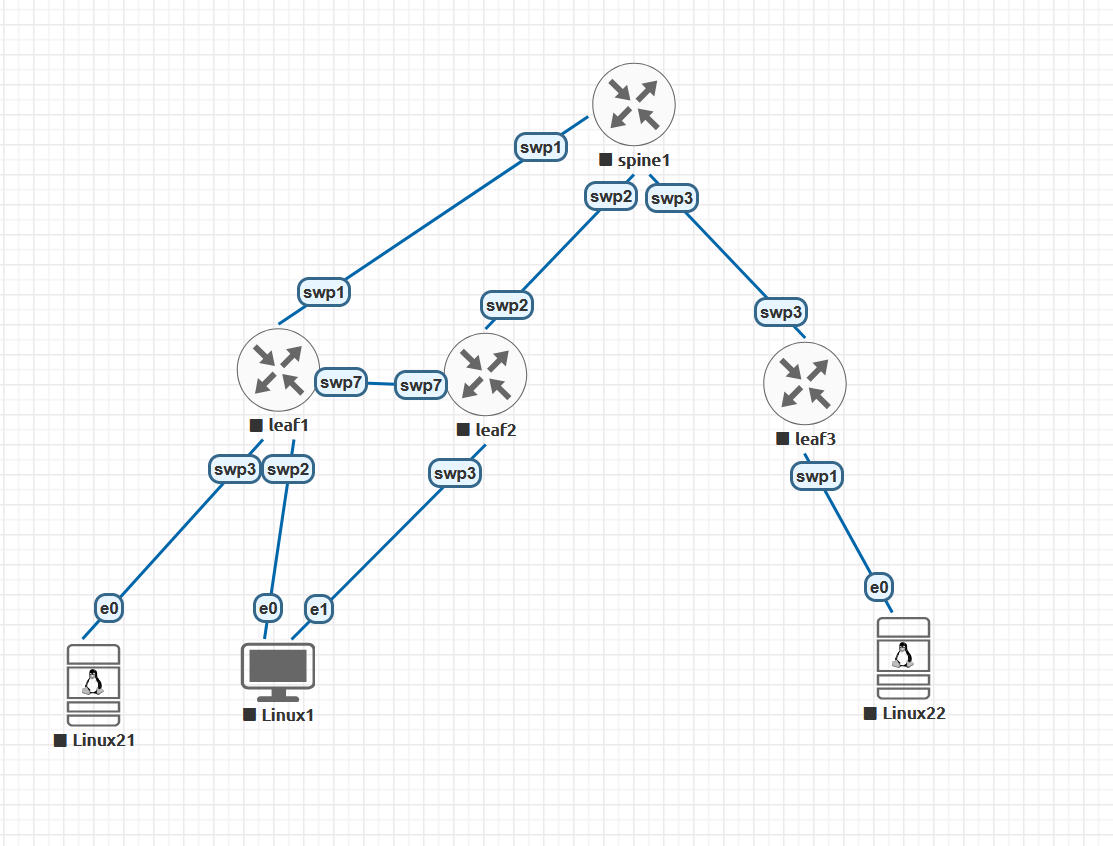
The same topology as text:
                  +----------------------------------+
                  | spine    AS 65000   lo 10.255.0.1 |
                  +----------------------------------+
                    swp1 |       swp2 |       swp3 |
                         |            |            |
                    swp1 |       swp2 |       swp3 |
              +-----------+     +-----------+     +-----------+
              |   leaf1   |swp7 |   leaf2   |     |   leaf3   |
              | AS 65101  |=====| AS 65102  |     | AS 65103  |
              | lo .0.11  |swp7 | lo .0.12  |     | lo .0.13  |
              +-----------+     +-----------+     +-----------+
              swp3 |  swp2 \     / swp3                | swp1
                   |        \   /                      |
                e0 |      e0 \ / e1                 e0 |
             +---------+  +---------+            +---------+
             | Linux21 |  | Linux1  |            | Linux22 |
             | .121.21 |  | .100.10 |            | .121.22 |
             +---------+  +---------+            +---------+
                           bond0 (LACP)

  leaf1 + leaf2: MLAG pair, shared VTEP 10.255.0.10, peerlink swp7
  VLAN 100 -> VNI 10100 (Linux1)   VLAN 121 -> VNI 10121 (Linux21/22)
  L3 VNI 50000 in VRF TENANT1
This topology supports:
- One BGP spine.
- Two MLAG (Multi-Chassis Link Aggregation) leaves acting as one logical VTEP (VXLAN tunnel endpoint).
- One standalone leaf/VTEP.
- VLAN 100 connected to Linux1 through an MLAG LACP bond.
- VLAN 121 stretched between Linux21 and Linux22.
- Symmetric EVPN routing through tenant VRF
TENANT1. - Distributed anycast gateways.
The switch commands use NVUE (nv set / nv config), the CLI of Cumulus Linux 5.x, with 5.4-specific syntax such as address-family l2vpn-evpn enable on and ip vrr state up. NVUE replaced the older NCLU net add syntax of Cumulus 3.x/4.x, so these commands will not paste into pre-5.x images.
2. Device and port mapping
| Device | Position | Connections |
|---|---|---|
spine | Top | swp1 to leaf1, swp2 to leaf2, swp3 to leaf3 |
leaf1 | Bottom-left | swp1 to spine, swp2 to Linux1 e0, swp3 to Linux21 e0, swp7 to leaf2 |
leaf2 | Bottom-middle | swp2 to spine, swp3 to Linux1 e1, swp7 to leaf1 |
leaf3 | Bottom-right | swp3 to spine, swp1 to Linux22 e0 |
Host ports are shown with their EVE-NG labels (e0, e1); inside the guest OS the same interfaces appear as eth0 and eth1, the names used in the host configuration sections below.
The lab uses a single spine, which is enough for the fabric to work, but that spine is a single point of failure.
3. Addressing and EVPN plan
| Purpose | Value |
|---|---|
| Spine ASN | 65000 |
| Leaf1 ASN | 65101 |
| Leaf2 ASN | 65102 |
| Leaf3 ASN | 65103 |
| Spine loopback | 10.255.0.1/32 |
| Leaf1 loopback | 10.255.0.11/32 |
| Leaf2 loopback | 10.255.0.12/32 |
| MLAG shared VTEP | 10.255.0.10 |
| Leaf3 loopback/VTEP | 10.255.0.13/32 |
| VLAN 100 L2 VNI | 10100 |
| VLAN 121 L2 VNI | 10121 |
| Tenant L3 VNI | 50000 |
| Tenant VRF | TENANT1 |
| Fabric-wide gateway MAC | 00:00:5e:00:01:01 |
| MLAG system MAC (leaf1/leaf2, must match) | 44:38:39:be:ef:aa |
| MLAG L3VNI anycast MAC (leaf1/leaf2, must match) | 44:38:39:ff:00:10 |
| SVI primary IPs | leaf1 .2, leaf2 .3 (VLANs 100 and 121); leaf3 .4 (VLAN 121 only) |
The underlay uses eBGP unnumbered, so no IPv4 addresses are required on the spine-to-leaf links. NVIDIA recommends unnumbered BGP for data-center fabrics because it simplifies link addressing. See the Cumulus Linux 5.4 BGP documentation.
The L3 VNI provides symmetric inter-subnet routing: the ingress and egress VTEPs both perform a routing lookup in TENANT1. See Cumulus Linux 5.4 inter-subnet routing.
3.1 BGP unnumbered: how it works and who supports it
Three mechanisms combine to make the address-free fabric links work:
- IPv6 link-local addresses come for free. Every interface with IPv6 enabled derives an
fe80::address from its MAC automatically — that is the address BGP actually peers over, and it needs no planning. - Neighbor discovery replaces neighbor configuration.
nv set vrf default router bgp neighbor swp1 remote-as externalnames an interface, not a peer IP. FRR learns the peer’s link-local address and MAC from its IPv6 router advertisements and opens the session tofe80::…%swp1;remote-as externalaccepts any AS except its own, so every fabric port on every switch carries the identical line. - IPv4 routes ride the IPv6 session. RFC 5549/8950 extended next-hop encoding lets IPv4 prefixes (the loopbacks) carry an IPv6 next hop; FRR installs them against the interface with an onlink next hop (
169.254.0.1) resolved to the peer’s MAC.
The payoff shows up throughout this guide: show bgp summary lists neighbors as leaf1(swp1) — hostname plus interface, because there is no neighbor address — and the MLAG peer-ip is simply linklocal (verified in section 13), so the peerlink needed no address either. In an N-leaf × M-spine fabric this eliminates the entire /31 addressing plan and every mistyped-peer-IP failure mode with it. Host-facing SVIs and VTEP loopbacks still need real addresses — unnumbered is a fabric-link pattern, not a fabric-wide one.
Platform support — this is no longer a Cumulus-only trick; the standards involved (ND/RA discovery plus the RFC 8950 extended next-hop capability, negotiated in the BGP OPEN) are implemented broadly:
| Platform | Support | Notes |
|---|---|---|
| Cumulus Linux | Native (FRR) | The reference implementation; used throughout this lab |
| SONiC | Native (same FRR) | Same neighbor <intf> interface remote-as external syntax; decide config ownership (config_db vs split mode vs unified FRR management) so config reload does not overwrite it |
| Arista EOS | Yes | Interface eBGP sessions (neighbor interface Et1 peer-group …); requires ipv6 enable on fabric links and RFC 8950 next-hop encoding in the IPv4 address family |
| Cisco NX-OS | Yes, recent | RFC 5549 next hops since 9.2(2); full interface peering with link-local auto-discovery arrived in the 10.x train — which is why classic Nexus VXLAN designs show numbered /31s or ip unnumbered loopback0 instead |
Mixed-vendor unnumbered fabrics work — for example a Cumulus leaf peering with a SONiC spine — since all sides speak the same standards. The characteristic failure in mixed setups is one side missing ipv6 enable or not negotiating the extended next-hop capability: the session either never leaves Active (the bare-interface AS 0 symptom described in section 13) or establishes but installs no IPv4 routes.
References:
- RFC 8950: Advertising IPv4 NLRI with an IPv6 Next Hop (obsoletes RFC 5549)
- Cumulus Linux 5.4: Basic BGP configuration (BGP unnumbered)
- Edgecore SONiC: BGP Unnumbered
- SONiC: Unified FRR management interface design
- Arista Community: BGP IPv6 link-local peer discovery
- ipSpace: Interface EBGP sessions on Arista EOS
- Cisco Nexus 9000 NX-OS 10.6(x): BGP configuration (interface peering via IPv6 link-local)
4. Understanding the three anycast settings
There are three related but different concepts in this configuration.
4.1 Gateway anycast
- Gateway IP:
192.168.121.1 - Gateway MAC:
00:00:5e:00:01:01 - Present on leaf1, leaf2 and leaf3.
- Hosts use the nearest leaf as their gateway.
VLAN 100 also uses an active-active gateway on the MLAG pair:
- Gateway IP:
192.168.100.1 - Gateway MAC:
00:00:5e:00:01:01
4.2 MLAG shared VTEP address
- Address:
10.255.0.10 - Shared only between leaf1 and leaf2.
- Remote VTEPs see the MLAG pair as one VXLAN endpoint.
4.3 MLAG L3VNI router MAC
- Address:
44:38:39:ff:00:10 - Shared only between leaf1 and leaf2.
- Used when the MLAG pair advertises EVPN symmetric-routing next hops.
Cumulus VRR (Virtual Router Redundancy) is active-active. Unlike traditional VRRP, there is no active/standby gateway election. All participating VTEPs answer using the same gateway IP and fabric-wide MAC. See the Cumulus Linux 5.4 VRR documentation.
5. Back up the current configurations
Run on every Cumulus switch:
nv config save
nv config show > ~/before-vxlan-evpn.txt
The following commands merge with the existing NVUE (NVIDIA User Experience, the nv CLI) configuration. If a node already has conflicting bridge, BGP, IP or bond settings, inspect the pending changes before applying:
nv config diff
6. Configure the spine
Run on spine:
nv set system hostname spine

nv set interface lo ip address 10.255.0.1/32
nv set interface swp1-3

nv set router bgp autonomous-system 65000
nv set router bgp router-id 10.255.0.1

nv set vrf default router bgp neighbor swp1 remote-as external
nv set vrf default router bgp neighbor swp2 remote-as external
nv set vrf default router bgp neighbor swp3 remote-as external

nv set vrf default router bgp address-family l2vpn-evpn enable on
nv set vrf default router bgp neighbor swp1 address-family l2vpn-evpn enable on
nv set vrf default router bgp neighbor swp2 address-family l2vpn-evpn enable on
nv set vrf default router bgp neighbor swp3 address-family l2vpn-evpn enable on

nv set vrf default router bgp address-family ipv4-unicast redistribute connected enable on

nv config apply
nv config save
The spine performs two jobs:
- IPv4 unicast BGP distributes VTEP loopback reachability.
- The
l2vpn-evpnaddress family carries EVPN MAC, IP and VNI routes between leaves.
The spine does not need VLANs, SVIs (switch virtual interfaces), VXLAN interfaces or the tenant VRF. The instance-level address-family l2vpn-evpn enable on matters here: unlike the leaves, the spine has no nv set evpn enable on, so this command is what activates EVPN route exchange. The leaves do not need the instance-level enable — their nv set evpn enable on covers it.
7. Configure leaf1
Leaf1 is the left MLAG switch.
7.1 Interfaces and MLAG
nv set system hostname leaf1

nv set interface lo ip address 10.255.0.11/32
nv set interface swp1,swp2,swp3,swp7

nv set interface peerlink bond member swp7
nv set mlag mac-address 44:38:39:be:ef:aa
nv set mlag peer-ip linklocal
nv set mlag backup 10.255.0.12
The peer link uses swp7. Cumulus automatically creates the routed MLAG control interface peerlink.4094.
The backup IP uses the underlay as a secondary MLAG control path. It may initially show inactive until BGP has learned 10.255.0.12.
7.2 Linux1 MLAG bond and Linux21 port
nv set interface bond1 bond member swp2
nv set interface bond1 bond mlag id 100
nv set interface bond1 bridge domain br_default
nv set interface bond1 bridge domain br_default access 100

nv set interface swp3 bridge domain br_default
nv set interface swp3 bridge domain br_default access 121
bond1 on leaf1 and bond1 on leaf2 use the same MLAG ID. This tells Cumulus that they are the two sides of one dual-connected server bond.
7.3 Bridge and L2 VNIs
nv set bridge domain br_default vlan 100,121
nv set bridge domain br_default vlan 100 vni 10100
nv set bridge domain br_default vlan 121 vni 10121
This maps:
- VLAN 100 to VXLAN VNI 10100.
- VLAN 121 to VXLAN VNI 10121.
Although leaf1 is the only MLAG peer directly connected to Linux21, VLAN 121 must exist on both MLAG peers for consistent forwarding.
7.4 Tenant VRF and gateways
nv set vrf TENANT1

nv set interface vlan100 ip vrf TENANT1
nv set interface vlan100 ip address 192.168.100.2/24
nv set interface vlan100 ip vrr address 192.168.100.1/24
nv set interface vlan100 ip vrr state up

nv set interface vlan121 ip vrf TENANT1
nv set interface vlan121 ip address 192.168.121.2/24
nv set interface vlan121 ip vrr address 192.168.121.1/24
nv set interface vlan121 ip vrr state up

nv set system global fabric-mac 00:00:5e:00:01:01
nv set system global anycast-mac 44:38:39:ff:00:10
The primary SVI addresses ending in .2 are used for switch-originated traffic and troubleshooting. Hosts use only the VRR addresses ending in .1.
VLAN 100’s gateway is also anycast on the MLAG pair. Linux1 therefore keeps the same gateway when either leaf fails.
7.5 VXLAN and L3 VNI
nv set nve vxlan enable on
nv set nve vxlan source address 10.255.0.11
nv set nve vxlan mlag shared-address 10.255.0.10
nv set nve vxlan arp-nd-suppress on
nv set nve vxlan flooding head-end-replication evpn

nv set evpn enable on
nv set vrf TENANT1 evpn vni 50000
flooding head-end-replication evpn makes the VTEP replicate broadcast, unknown-unicast and multicast (BUM) traffic itself, sending one unicast VXLAN copy to each remote VTEP learned through EVPN, instead of relying on underlay multicast.
The two L2 VNIs carry frames within their respective VLANs. L3 VNI 50000 carries routed traffic inside TENANT1.
When nv set vrf TENANT1 evpn vni 50000 is applied, NVUE automatically creates the internal L3VNI plumbing. Do not manually add its automatically allocated internal VLAN to br_default.
7.6 BGP
nv set router bgp autonomous-system 65101
nv set router bgp router-id 10.255.0.11

nv set vrf default router bgp neighbor swp1 remote-as external
nv set vrf default router bgp neighbor peerlink.4094 remote-as external

nv set vrf default router bgp neighbor swp1 address-family l2vpn-evpn enable on
nv set vrf default router bgp neighbor peerlink.4094 address-family l2vpn-evpn enable on

nv set vrf default router bgp address-family ipv4-unicast network 10.255.0.11/32
nv set vrf default router bgp address-family ipv4-unicast redistribute connected enable on

nv set vrf TENANT1 router bgp autonomous-system 65101
nv set vrf TENANT1 router bgp router-id 10.255.0.11
nv set vrf TENANT1 router bgp address-family ipv4-unicast redistribute connected enable on
nv set vrf TENANT1 router bgp address-family ipv4-unicast route-export to-evpn enable on

nv config diff
nv config apply
nv config save
The peerlink BGP adjacency gives the MLAG peers an additional underlay and EVPN control-plane path.
The vrf TENANT1 router bgp block enables type-5 (prefix) route export, and it takes both address-family lines to work: redistribute connected puts the SVI subnets into the tenant VRF’s BGP table, and route-export to-evpn exports that table into EVPN as type-5 routes. With only route-export to-evpn, the tenant BGP table contains nothing local to export and no type-5 routes are ever generated (show bgp l2vpn evpn route type prefix answers No EVPN prefixes (of requested type) exist). With both lines, every VTEP holds routes to 192.168.100.0/24 and 192.168.121.0/24 even before any host has transmitted.
Note that only the per-leaf loopback appears in an explicit network statement. The shared VTEP address 10.255.0.10/32 is never configured statically in BGP: clagd adds it to lo as a second address only after MLAG peering and the VXLAN consistency check succeed, and it reaches the fabric solely through redistribute connected. Do not remove that statement — or, if you prefer explicit advertisement, add nv set vrf default router bgp address-family ipv4-unicast network 10.255.0.10/32 on both MLAG leaves.
8. Configure leaf2
Leaf2 is the middle MLAG switch.
8.1 Interfaces and MLAG
nv set system hostname leaf2

nv set interface lo ip address 10.255.0.12/32
nv set interface swp2,swp3,swp7

nv set interface peerlink bond member swp7
nv set mlag mac-address 44:38:39:be:ef:aa
nv set mlag peer-ip linklocal
nv set mlag backup 10.255.0.11
The MLAG system MAC must exactly match leaf1.
8.2 Linux1 MLAG bond
nv set interface bond1 bond member swp3
nv set interface bond1 bond mlag id 100
nv set interface bond1 bridge domain br_default
nv set interface bond1 bridge domain br_default access 100
Even though Linux1 uses different physical switch ports—leaf1 swp2 and leaf2 swp3—the logical bond name and MLAG ID match.
8.3 Bridge and L2 VNIs
nv set bridge domain br_default vlan 100,121
nv set bridge domain br_default vlan 100 vni 10100
nv set bridge domain br_default vlan 121 vni 10121
8.4 Tenant VRF and gateways
nv set vrf TENANT1

nv set interface vlan100 ip vrf TENANT1
nv set interface vlan100 ip address 192.168.100.3/24
nv set interface vlan100 ip vrr address 192.168.100.1/24
nv set interface vlan100 ip vrr state up

nv set interface vlan121 ip vrf TENANT1
nv set interface vlan121 ip address 192.168.121.3/24
nv set interface vlan121 ip vrr address 192.168.121.1/24
nv set interface vlan121 ip vrr state up

nv set system global fabric-mac 00:00:5e:00:01:01
nv set system global anycast-mac 44:38:39:ff:00:10
The anycast-mac must match leaf1. It should not be reused by another MLAG pair.
8.5 VXLAN and L3 VNI
nv set nve vxlan enable on
nv set nve vxlan source address 10.255.0.12
nv set nve vxlan mlag shared-address 10.255.0.10
nv set nve vxlan arp-nd-suppress on
nv set nve vxlan flooding head-end-replication evpn

nv set evpn enable on
nv set vrf TENANT1 evpn vni 50000
8.6 BGP
nv set router bgp autonomous-system 65102
nv set router bgp router-id 10.255.0.12

nv set vrf default router bgp neighbor swp2 remote-as external
nv set vrf default router bgp neighbor peerlink.4094 remote-as external

nv set vrf default router bgp neighbor swp2 address-family l2vpn-evpn enable on
nv set vrf default router bgp neighbor peerlink.4094 address-family l2vpn-evpn enable on

nv set vrf default router bgp address-family ipv4-unicast network 10.255.0.12/32
nv set vrf default router bgp address-family ipv4-unicast redistribute connected enable on

nv set vrf TENANT1 router bgp autonomous-system 65102
nv set vrf TENANT1 router bgp router-id 10.255.0.12
nv set vrf TENANT1 router bgp address-family ipv4-unicast redistribute connected enable on
nv set vrf TENANT1 router bgp address-family ipv4-unicast route-export to-evpn enable on

nv config diff
nv config apply
nv config save
Cumulus VXLAN active-active allows leaf1 and leaf2 to terminate traffic using the shared VTEP address 10.255.0.10. See the Cumulus Linux 5.4 VXLAN active-active documentation.
9. Configure leaf3
Leaf3 is the standalone right leaf.
9.1 Interfaces and host port
nv set system hostname leaf3

nv set interface lo ip address 10.255.0.13/32
nv set interface swp1,swp3

nv set interface swp1 bridge domain br_default
nv set interface swp1 bridge domain br_default access 121
9.2 VLAN and L2 VNI
nv set bridge domain br_default vlan 121
nv set bridge domain br_default vlan 121 vni 10121
Leaf3 does not need VLAN 100 or VNI 10100. It learns the 192.168.100.0/24 prefix as an EVPN type-5 route and Linux1’s host route as a type-2 route, both through L3 VNI 50000.
9.3 Tenant VRF and VLAN 121 anycast gateway
nv set vrf TENANT1

nv set interface vlan121 ip vrf TENANT1
nv set interface vlan121 ip address 192.168.121.4/24
nv set interface vlan121 ip vrr address 192.168.121.1/24
nv set interface vlan121 ip vrr state up

nv set system global fabric-mac 00:00:5e:00:01:01
Leaf3 uses the same gateway IP and fabric MAC as the MLAG pair.
Do not configure nve vxlan mlag shared-address on leaf3 because it is not an MLAG member. Also do not reuse the MLAG pair’s system global anycast-mac on this standalone VTEP.
9.4 VXLAN and L3 VNI
nv set nve vxlan enable on
nv set nve vxlan source address 10.255.0.13
nv set nve vxlan arp-nd-suppress on
nv set nve vxlan flooding head-end-replication evpn

nv set evpn enable on
nv set vrf TENANT1 evpn vni 50000
9.5 BGP
nv set router bgp autonomous-system 65103
nv set router bgp router-id 10.255.0.13

nv set vrf default router bgp neighbor swp3 remote-as external
nv set vrf default router bgp neighbor swp3 address-family l2vpn-evpn enable on

nv set vrf default router bgp address-family ipv4-unicast network 10.255.0.13/32
nv set vrf default router bgp address-family ipv4-unicast redistribute connected enable on

nv set vrf TENANT1 router bgp autonomous-system 65103
nv set vrf TENANT1 router bgp router-id 10.255.0.13
nv set vrf TENANT1 router bgp address-family ipv4-unicast redistribute connected enable on
nv set vrf TENANT1 router bgp address-family ipv4-unicast route-export to-evpn enable on

nv config diff
nv config apply
nv config save
VLAN-to-VNI mapping through nv set bridge domain ... vlan ... vni ... is the standard Cumulus single-VXLAN-device model. See the Cumulus Linux 5.4 VXLAN device documentation.
10. Configure Linux1
Linux1 connects to the MLAG pair through:
- Linux1
eth0to leaf1swp2. - Linux1
eth1to leaf2swp3.
The switch ports are untagged access ports, so Linux1 does not need a VLAN subinterface.
The Linux hosts in this lab are Alpine-based EVE-NG nodes, which use apk for packages, /etc/network/interfaces for network configuration, and OpenRC (rc-service networking restart) to apply changes. If your image is Debian or Ubuntu based, install packages with apt and apply the equivalent network configuration with that image’s tooling (netplan or systemd-networkd) instead.
Package installation needs internet access through the management network. If eth2 (the management interface) is not configured yet, bring it up temporarily first:
ip address add 192.168.0.102/24 dev eth2
ip link set eth2 up
ip route add default via 192.168.0.1
Optional but convenient: create a personal sudo user instead of working as root (the Alpine image ships without sudo, so install it first):
apk add sudo
adduser ekou
echo 'ekou ALL=(ALL) ALL' >> /etc/sudoers
After logging in as the new user, prefix the host commands below with sudo.
If bonding support is not already installed:
apk add bonding iproute2 ethtool iperf3 tcpdump
modprobe bonding
grep -qxF bonding /etc/modules || echo bonding >> /etc/modules
Edit /etc/network/interfaces:
auto lo
iface lo inet loopback

auto eth0
iface eth0 inet manual

auto eth1
iface eth1 inet manual

auto eth2
iface eth2 inet static
        address 192.168.0.102
        netmask 255.255.255.0
        gateway 192.168.0.1

auto bond0
iface bond0 inet static
        address 192.168.100.10
        netmask 255.255.255.0
        up ip route add 192.168.121.0/24 via 192.168.100.1
        bond-slaves eth0 eth1
        bond-mode 802.3ad
        bond-miimon 100
        bond-xmit-hash-policy layer3+4
eth2 is the management interface, connected to the EVE-NG Cloud/NAT network (192.168.0.0/24 here — substitute your management subnet). The default route lives on eth2: package installs (apk add ...) need internet access, which only the management network provides. bond0 therefore has no gateway line; instead, the up ip route add 192.168.121.0/24 via 192.168.100.1 hook installs a specific route for the remote lab subnet through the fabric gateway, so the cross-VLAN tests in section 13 use the fabric rather than leaking out the management interface. Keep exactly one default route — two default gateways is the pitfall noted in section 12. If you add more lab subnets later, add an up ip route add ... line for each.
Remove any old DHCP configuration from eth0 and eth1, then apply:
rc-service networking restart
Verify:
ip -br address
ip route
cat /proc/net/bonding/bond0
Expected results:
bond0has192.168.100.10/24.- Both
eth0andeth1appear as bond slaves. - The aggregator is using 802.3ad/LACP.
- The default route points to
192.168.0.1oneth2(management/internet). ip routeshows192.168.121.0/24 via 192.168.100.1for the lab fabric.
One traffic flow normally uses only one physical bond member. LACP load-balances flows, not individual packets.
If the slaves instead show Speed: Unknown and Duplex: Unknown and no aggregator ever forms, see 10.1 — this is an EVE-NG NIC model problem, not a configuration error.
10.1 If the bond never aggregates: fix the EVE-NG NIC model
Symptom: cat /proc/net/bonding/bond0 lists both slaves and LACPDUs are clearly arriving from the switches, yet the ports never join an aggregator — the slaves report Speed: Unknown and Duplex: Unknown, and pings across the bond fail.
Root cause: this is a Linux limitation combined with an EVE-NG default. The bonding driver receives packets on the interfaces, but it cannot make the ports eligible for an 802.3ad aggregator because the NIC driver does not provide speed/duplex information. EVE-NG’s default QEMU NIC model, virtio-net-pci, does not report link speed or duplex through ethtool, and the kernel’s 802.3ad implementation needs those values to build a valid aggregator. Nothing on the Cumulus side can fix this.
Fix the EVE-NG NIC type:
- Stop Linux1 completely in EVE-NG (a reboot is not enough — node settings only apply to a stopped node).
- Edit the Linux1 node.
- Find QEMU NIC and select
e1000. - Save and restart Linux1.
Do not select virtio-net-pci for this particular LACP test.
Then verify that the NICs now report link details:
apk add ethtool
ethtool -i eth0
ethtool eth0
ethtool -i eth1
ethtool eth1
Both interfaces need to show something similar to:
driver: e1000
Speed: 1000Mb/s
Duplex: Full
Link detected: yes
If they still show Unknown, the NIC model change did not take effect.
Reinitialize the bond. If you also want the fast LACP timer (LACPDUs every second instead of every 30), set it in the bond stanza rather than at runtime — the kernel refuses to change lacp_rate on a bond that is up, so ip link set bond0 type bond lacp_rate fast returns Operation not permitted. Add one line to the bond0 stanza in /etc/network/interfaces:
bond-lacp-rate fast
The rate is a nicety, not a requirement for the aggregator to form. Then, from the EVE-NG console on Linux1:
rc-service networking restart
sleep 5
cat /proc/net/bonding/bond0
A working result shows:
Number of ports: 2
Actor Key: <nonzero>
Partner Mac Address: 44:38:39:be:ef:aa
and, for both slaves: Speed: 1000 Mbps, Duplex: full, the same Aggregator ID, and Partner Churn State: none.
The partner MAC deserves a second look: 44:38:39:be:ef:aa is the MLAG system MAC configured on leaf1 and leaf2. Linux1 sees both switches as a single LACP partner — exactly the illusion MLAG is designed to create.
Confirm on both Cumulus switches:
nv show interface bond1
clagctl
bond1 should be oper up on leaf1 and leaf2, and clagctl should show MLAG ID 100 as dual-connected.
11. Configure Linux21
Edit /etc/network/interfaces:
auto lo
iface lo inet loopback

auto eth0
iface eth0 inet static
        address 192.168.121.21
        netmask 255.255.255.0
        gateway 192.168.121.1
Apply and verify:
rc-service networking restart
ip address
ip route
Plain ip address is used on these hosts because BusyBox’s built-in ip lacks the -br brief flag; install iproute2 as on Linux1 if you prefer the compact output.
12. Configure Linux22
Edit /etc/network/interfaces:
auto lo
iface lo inet loopback

auto eth0
iface eth0 inet static
        address 192.168.121.22
        netmask 255.255.255.0
        gateway 192.168.121.1
Apply and verify:
rc-service networking restart
ip address
ip route
If these hosts also have an EVE-NG Cloud/NAT management interface, avoid installing two default gateways. Put the Cloud/NAT connection on a separate interface without another default route, or use policy routing.
13. Verify the lab in layers
Note: NVUE detects the terminal width and shortens wide table columns, replacing the hidden text with an ellipsis ("…"). This is common with narrow EVE-NG HTML5 consoles and is not a Cumulus fault or a hidden error message.
Check the detected dimensions:
stty size
echo "$COLUMNS"
Widen the console window, reduce the browser zoom, or temporarily set more columns:
stty cols 200
nv show interface
13.1 Verify MLAG
On leaf1 and leaf2:
nv show mlag
clagctl
Look for:
peer-alive True.- The same MLAG system MAC on both peers.
- Shared VXLAN address
10.255.0.10. bond1with MLAG ID 100.- No
PROTO_DOWNreason forbond1or the VXLAN device.
If MLAG is not up, fix it before testing EVPN.
Real output captured from this lab, first on leaf1:
cumulus@leaf1:mgmt:~$ nv show mlag
                operational           applied
--------------  --------------------  -----------------
enable                                on
debug                                 off
init-delay                            180
mac-address     44:38:39:be:ef:aa     44:38:39:be:ef:aa
peer-ip         fe80::5200:ff:fe05:7  linklocal
priority        32768                 32768
[backup]        10.255.0.12           10.255.0.12
anycast-ip      10.255.0.10
backup-active   True
backup-reason
local-id        50:00:00:01:00:07
local-role      primary
peer-alive      True
peer-id         50:00:00:05:00:07
peer-interface  peerlink.4094
peer-priority   32768
peer-role       secondary
cumulus@leaf1:mgmt:~$ clagctl
The peer is alive
     Our Priority, ID, and Role: 32768 50:00:00:01:00:07 primary
    Peer Priority, ID, and Role: 32768 50:00:00:05:00:07 secondary
          Peer Interface and IP: peerlink.4094 fe80::5200:ff:fe05:7 (linklocal)
               VxLAN Anycast IP: 10.255.0.10
                      Backup IP: 10.255.0.12 (active)
                     System MAC: 44:38:39:be:ef:aa

CLAG Interfaces
Our Interface      Peer Interface     CLAG Id   Conflicts              Proto-Down Reason
----------------   ----------------   -------   --------------------   -----------------
           bond1   bond1              100       -                      -
         vxlan48   vxlan48            -         -                      -
Then on leaf2:
cumulus@leaf2:mgmt:~$ nv show mlag
                operational           applied
--------------  --------------------  -----------------
enable                                on
debug                                 off
init-delay                            180
mac-address     44:38:39:be:ef:aa     44:38:39:be:ef:aa
peer-ip         fe80::5200:ff:fe01:7  linklocal
priority        32768                 32768
[backup]        10.255.0.11           10.255.0.11
anycast-ip      10.255.0.10
backup-active   True
backup-reason
local-id        50:00:00:05:00:07
local-role      secondary
peer-alive      True
peer-id         50:00:00:01:00:07
peer-interface  peerlink.4094
peer-priority   32768
peer-role       primary
cumulus@leaf2:mgmt:~$ clagctl
The peer is alive
     Our Priority, ID, and Role: 32768 50:00:00:05:00:07 secondary
    Peer Priority, ID, and Role: 32768 50:00:00:01:00:07 primary
          Peer Interface and IP: peerlink.4094 fe80::5200:ff:fe01:7 (linklocal)
               VxLAN Anycast IP: 10.255.0.10
                      Backup IP: 10.255.0.11 (active)
                     System MAC: 44:38:39:be:ef:aa

CLAG Interfaces
Our Interface      Peer Interface     CLAG Id   Conflicts              Proto-Down Reason
----------------   ----------------   -------   --------------------   -----------------
           bond1   bond1              100       -                      -
         vxlan48   vxlan48            -         -                      -
How to read these outputs:
peer-alive True/ “The peer is alive” on both switches confirms the MLAG control session overpeerlink.4094is healthy. The roles are complementary — leaf1 primary, leaf2 secondary. With equal priorities (32768) the election falls back to a MAC comparison; the role only decides internal coordination duties, and both switches forward traffic.peer-ip: the applied value islinklocal, and the operational column shows what it resolved to — the peer’s IPv6 link-local address (fe80::…) onpeerlink.4094. No addresses ever had to be configured on the peerlink.anycast-ip 10.255.0.10appears only in the operational column because it is not part of the MLAG configuration itself:clagdreads it fromnve vxlan mlag shared-addressand activates it once the VXLAN consistency checks pass. This is also the moment10.255.0.10/32is added toloand starts being redistributed into BGP (the behavior described in the note at the end of section 7.6).Backup IP … (active): the secondary keepalive over the routed underlay works, and each leaf correctly points at the other leaf’s loopback (leaf1 →10.255.0.12, leaf2 →10.255.0.11). This path only matters when the peerlink fails.local-id/peer-idare the individual system MACs of the two switches, whileSystem MAC 44:38:39:be:ef:aais the shared MLAG MAC from sections 7.1/8.1 — identical on both peers, and the same MAC Linux1 sees as its LACP partner in section 10.1.- The
CLAG Interfacestable is the per-interface consistency check.bond1 ↔ bond1with CLAG Id 100 and no conflicts confirms both switches agree they are the two sides of Linux1’s dual-homed bond.vxlan48is listed too because in VXLAN active-active mode the single VXLAN device is itself an MLAG-synchronized interface; a mismatch between the peers would appear here as aProto-Down Reasoninstead of-.
13.2 Verify BGP IPv4 and EVPN sessions
On the spine:
sudo vtysh -c "show bgp summary"
sudo vtysh -c "show bgp l2vpn evpn summary"
Expected spine neighbors:
- swp1 to leaf1.
- swp2 to leaf2.
- swp3 to leaf3.
On leaf1 and leaf2, expect two neighbors:
- The spine.
- The other MLAG peer through
peerlink.4094.
On leaf3, expect one neighbor: the spine.
Real output captured on the spine in the working lab:
cumulus@spine:mgmt:~$ sudo vtysh -c "show bgp summary"
[sudo] password for cumulus:

IPv4 Unicast Summary:
BGP router identifier 10.255.0.1, local AS number 65000 vrf-id 0
BGP table version 105
RIB entries 9, using 1800 bytes of memory
Peers 3, using 68 KiB of memory

Neighbor        V         AS   MsgRcvd   MsgSent   TblVer  InQ OutQ  Up/Down State/PfxRcd   PfxSnt
leaf1(swp1)     4      65101      1921      2135        0    0    0 00:11:06            3        5
leaf2(swp2)     4      65102      1979      2138        0    0    0 00:11:00            3        5
leaf3(swp3)     4      65103      2074      2104        0    0    0 00:23:47            1        5

Total number of neighbors 3

L2VPN EVPN Summary:
BGP router identifier 10.255.0.1, local AS number 65000 vrf-id 0
BGP table version 0
RIB entries 11, using 2200 bytes of memory
Peers 3, using 68 KiB of memory

Neighbor        V         AS   MsgRcvd   MsgSent   TblVer  InQ OutQ  Up/Down State/PfxRcd   PfxSnt
leaf1(swp1)     4      65101      1921      2135        0    0    0 00:11:06           10       24
leaf2(swp2)     4      65102      1979      2138        0    0    0 00:11:00           10       24
leaf3(swp3)     4      65103      2074      2104        0    0    0 00:23:47            4       24

Total number of neighbors 3
cumulus@spine:mgmt:~$ sudo vtysh -c "show bgp l2vpn evpn summary"
BGP router identifier 10.255.0.1, local AS number 65000 vrf-id 0
BGP table version 0
RIB entries 11, using 2200 bytes of memory
Peers 3, using 68 KiB of memory

Neighbor        V         AS   MsgRcvd   MsgSent   TblVer  InQ OutQ  Up/Down State/PfxRcd   PfxSnt
leaf1(swp1)     4      65101      1923      2136        0    0    0 00:11:11           10       24
leaf2(swp2)     4      65102      1981      2139        0    0    0 00:11:05           10       24
leaf3(swp3)     4      65103      2075      2105        0    0    0 00:23:52            4       24

Total number of neighbors 3
How to read this:
- Neighbors appear as
leaf1(swp1)— hostname plus interface — because the sessions are unnumbered and FRR exchanges hostnames once a session establishes. A neighbor that instead shows a bare interface name withAS 0and stateActiveis a session that never came up. - One TCP session per neighbor carries both address families, which is why the counters and uptimes in the IPv4 block and the EVPN block are identical.
show bgp summaryprints every address family;show bgp l2vpn evpn summaryprints the EVPN block alone (captured a few seconds later, hence the slightly higher message counters). - IPv4
PfxRcd: 3 from each MLAG leaf and 1 from leaf3. Leaf1’s three prefixes are its own loopback10.255.0.11/32, the clagd-managed anycast VTEP10.255.0.10/32(picked up byredistribute connectedonce MLAG converged), and leaf2’s loopback re-advertised across the peerlink eBGP session; leaf2 mirrors this. Leaf3 sends only its own loopback.PfxSnt 5is the spine advertising the complete set: its own loopback plus.10,.11,.12and.13. - EVPN
PfxRcd: 10 from each MLAG leaf (five routes per L2 VNI — dissected in 13.4) and 4 from leaf3, which carries a single L2 VNI.PfxSnt 24 = 10 + 10 + 4: the spine reflects every EVPN route to every leaf without importing any of them. (These EVPN counts predate the type-5 fix in 13.6 — with prefix export active, each MLAG leaf originates two more routes and leaf3 one more, so expectPfxRcd12/12/5 andPfxSnt29.) MsgRcvd/MsgSentare cumulative since FRR started, whileUp/Downis the age of the current session only. Here the leaf1/leaf2 sessions are about 11 minutes old because those nodes were disturbed during the Linux1 LACP repair (section 10.1); the message counters remember the whole history.
The spine capture continued with three commands that appear to “fail” — all three results are correct and expected:
cumulus@spine:mgmt:~$ sudo vtysh -c "show evpn vni"
cumulus@spine:mgmt:~$ nv show nve vxlan
        operational  applied  pending
------  -----------  -------  -------
enable  off          off      off
cumulus@spine:mgmt:~$ sudo vtysh -c "show bgp vrf TENANT1 ipv4 unicast"
View/Vrf TENANT1 is unknown
The spine has no VNIs, no VTEP and no tenant VRF, exactly as designed in section 6. It forwards VXLAN packets as ordinary IP unicast between VTEP loopbacks and relays EVPN routes between leaves without ever decoding them. If a spine ever shows VNIs, a leaf configuration was pasted onto the wrong node.
The leaf side of the same session, captured on leaf3:
cumulus@leaf3:mgmt:~$ sudo vtysh -c "show bgp l2vpn evpn summary"
BGP router identifier 10.255.0.13, local AS number 65103 vrf-id 0
BGP table version 0
RIB entries 11, using 2200 bytes of memory
Peers 1, using 23 KiB of memory

Neighbor        V         AS   MsgRcvd   MsgSent   TblVer  InQ OutQ  Up/Down State/PfxRcd   PfxSnt
spine(swp3)     4      65000       527       523        0    0    0 00:07:36           14       18

Total number of neighbors 1
Leaf3 has exactly one neighbor, the spine — correct for a standalone leaf. Two details worth noting:
PfxRcd 14is a point-in-time value taken while the fabric was still learning; it grows toward 20 as hosts on the other leaves generate traffic and their MAC/IP routes are originated (the full table captured later, in 13.4, shows all 20 remote routes). It also never reaches the spine’sPfxSnt 24, because the spine echoes leaf3’s own 4 routes back and leaf3’s eBGP loop check rejects anything carrying AS 65103. (With the type-5 fix from 13.6 in place, the remote total rises to 24.)PfxSnt 18is leaf3’s own 4 routes plus the 14 remote routes it dutifully re-advertises back toward the spine, where the spine’s own loop check discards them. Echoed-and-discarded routes are normal eBGP behavior, not a misconfiguration.
Check VTEP reachability from leaf1:
ip route get 10.255.0.13
ping 10.255.0.13
13.3 Verify VNIs
On each leaf:
sudo vtysh -c "show evpn vni"
nv show nve vxlan
Expected VNIs:
| Switch | Expected VNIs |
|---|---|
| leaf1 | 10100, 10121, 50000 |
| leaf2 | 10100, 10121, 50000 |
| leaf3 | 10121, 50000 |
VNI 50000 should be identified as an L3 VNI associated with TENANT1.
Real output from the working lab — leaf1:
cumulus@leaf1:mgmt:~$ sudo vtysh -c "show evpn vni"
[sudo] password for cumulus:
VNI        Type VxLAN IF              # MACs   # ARPs   # Remote VTEPs  Tenant VRF
10121      L2   vxlan48               3        4        1               TENANT1
10100      L2   vxlan48               2        2        0               TENANT1
50000      L3   vxlan48               1        1        n/a             TENANT1
cumulus@leaf1:mgmt:~$ nv show nve vxlan
                          operational  applied
------------------------  -----------  -----------
enable                    on           on
arp-nd-suppress           on           on
mac-learning              off          off
mtu                       9216         9216
port                      4789         4789
decapsulation
  dscp
    action                derive       derive
encapsulation
  dscp
    action                derive       derive
flooding
  enable                  on           on
  [head-end-replication]  evpn         evpn
mlag
  shared-address          10.255.0.10  10.255.0.10
source
  address                 10.255.0.11  10.255.0.11
Leaf2:
cumulus@leaf2:mgmt:~$ sudo vtysh -c "show evpn vni"
[sudo] password for cumulus:
VNI        Type VxLAN IF              # MACs   # ARPs   # Remote VTEPs  Tenant VRF
10121      L2   vxlan48               3        4        1               TENANT1
10100      L2   vxlan48               2        2        0               TENANT1
50000      L3   vxlan48               1        1        n/a             TENANT1
cumulus@leaf2:mgmt:~$ nv show nve vxlan
                          operational  applied
------------------------  -----------  -----------
enable                    on           on
arp-nd-suppress           on           on
mac-learning              off          off
mtu                       9216         9216
port                      4789         4789
decapsulation
  dscp
    action                derive       derive
encapsulation
  dscp
    action                derive       derive
flooding
  enable                  on           on
  [head-end-replication]  evpn         evpn
mlag
  shared-address          10.255.0.10  10.255.0.10
source
  address                 10.255.0.12  10.255.0.12
Leaf3:
cumulus@leaf3:mgmt:~$ sudo vtysh -c "show evpn vni"
[sudo] password for cumulus:
VNI        Type VxLAN IF              # MACs   # ARPs   # Remote VTEPs  Tenant VRF
10121      L2   vxlan48               4        4        1               TENANT1
50000      L3   vxlan99               1        1        n/a             TENANT1
cumulus@leaf3:mgmt:~$ nv show nve vxlan
                          operational  applied
------------------------  -----------  -----------
enable                    on           on
arp-nd-suppress           on           on
mac-learning              off          off
mtu                       9216         9216
port                      4789         4789
decapsulation
  dscp
    action                derive       derive
encapsulation
  dscp
    action                derive       derive
flooding
  enable                  on           on
  [head-end-replication]  evpn         evpn
mlag
  shared-address          none         none
source
  address                 10.255.0.13  10.255.0.13
How to read these outputs:
- Leaf1 and leaf2 carry all three VNIs on a single VXLAN device,
vxlan48— the single-VXLAN-device model referenced in section 9. On leaf3 the L3 VNI happens to sit on a second device,vxlan99; the device name is an internal allocation detail with no functional meaning. # Remote VTEPsis the most instructive column. VNI 10121 shows exactly 1 remote VTEP on every leaf: from the MLAG pair, the only other VTEP carrying VLAN 121 is leaf3 (10.255.0.13); from leaf3, the entire MLAG pair is one VTEP (10.255.0.10). VNI 10100 shows 0 remote VTEPs on leaf1 and leaf2 even though two switches carry it — the MLAG peer’s routes arrive with next hop10.255.0.10, which is a local address on both leaves, so no remote VTEP entry is created. That is the anycast VTEP abstraction working exactly as intended: the pair does not tunnel VLAN 100 traffic to itself; it bridges over the peerlink instead.- The MAC and ARP counters are snapshots that change as hosts talk and entries age out. They cover local host MACs, remote host MACs learned through EVPN type-2 routes, and the switches’ own SVI MACs — leaf3’s
4 MACsin VNI 10121 versus the pair’s3just reflects who had learned what at capture time. - In
nv show nve vxlan, notemac-learning off: with EVPN as the control plane, flood-and-learn on the VXLAN ports is disabled and the bridge MAC table is populated from type-2 routes instead.arp-nd-suppress onandflooding head-end-replication evpnmatch the intent from section 7.5, andport 4789is the IANA-standard VXLAN UDP port. The MLAG pair showsmlag shared-address 10.255.0.10while leaf3 correctly showsnone(the warning from section 9.3), and every leaf keeps its own uniquesource address.
13.4 Generate host learning
From Linux21:
ping -c 3 192.168.121.1
ping -c 3 192.168.121.22
From Linux22:
ping -c 3 192.168.121.1
ping -c 3 192.168.121.21
Linux21-to-Linux22 tests VLAN 121 L2 extension through VNI 10121. Because both hosts are in the same /24, their traffic does not use the gateway.
Examine EVPN routes:
sudo vtysh -c "show bgp l2vpn evpn route"
You should eventually see MAC/IP routes for:
192.168.121.21.192.168.121.22.
Here is the full table captured on leaf1 in the working lab:
cumulus@leaf1:mgmt:~$ sudo vtysh -c "show bgp l2vpn evpn route"
BGP table version is 79, local router ID is 10.255.0.11
Status codes: s suppressed, d damped, h history, * valid, > best, i - internal
Origin codes: i - IGP, e - EGP, ? - incomplete
EVPN type-1 prefix: [1]:[ESI]:[EthTag]:[IPlen]:[VTEP-IP]:[Frag-id]
EVPN type-2 prefix: [2]:[EthTag]:[MAClen]:[MAC]:[IPlen]:[IP]
EVPN type-3 prefix: [3]:[EthTag]:[IPlen]:[OrigIP]
EVPN type-4 prefix: [4]:[ESI]:[IPlen]:[OrigIP]
EVPN type-5 prefix: [5]:[EthTag]:[IPlen]:[IP]

   Network          Next Hop            Metric LocPrf Weight Path
                    Extended Community
Route Distinguisher: 10.255.0.11:3
*> [2]:[0]:[48]:[00:50:00:00:08:00] RD 10.255.0.11:3
                    10.255.0.10 (leaf1)
                                                       32768 i
                    ET:8 RT:65101:10100
*> [2]:[0]:[48]:[00:50:00:00:08:00]:[32]:[192.168.100.10] RD 10.255.0.11:3
                    10.255.0.10 (leaf1)
                                                       32768 i
                    ET:8 RT:65101:10100 RT:65101:50000 Rmac:44:38:39:ff:00:10
*> [2]:[0]:[48]:[00:50:00:00:08:00]:[128]:[fe80::250:ff:fe00:800] RD 10.255.0.11:3
                    10.255.0.10 (leaf1)
                                                       32768 i
                    ET:8 RT:65101:10100
*> [2]:[0]:[48]:[50:00:00:05:00:08] RD 10.255.0.11:3
                    10.255.0.10 (leaf1)
                                                       32768 i
                    ET:8 RT:65101:10100 MM:0, sticky MAC
*> [3]:[0]:[32]:[10.255.0.10] RD 10.255.0.11:3
                    10.255.0.10 (leaf1)
                                                       32768 i
                    ET:8 RT:65101:10100
Route Distinguisher: 10.255.0.11:4
*> [2]:[0]:[48]:[00:50:00:00:0a:00] RD 10.255.0.11:4
                    10.255.0.10 (leaf1)
                                                       32768 i
                    ET:8 RT:65101:10121
*> [2]:[0]:[48]:[00:50:00:00:0a:00]:[32]:[192.168.121.21] RD 10.255.0.11:4
                    10.255.0.10 (leaf1)
                                                       32768 i
                    ET:8 RT:65101:10121 RT:65101:50000 Rmac:44:38:39:ff:00:10
*> [2]:[0]:[48]:[00:50:00:00:0a:00]:[128]:[fe80::250:ff:fe00:a00] RD 10.255.0.11:4
                    10.255.0.10 (leaf1)
                                                       32768 i
                    ET:8 RT:65101:10121
*> [2]:[0]:[48]:[50:00:00:05:00:08] RD 10.255.0.11:4
                    10.255.0.10 (leaf1)
                                                       32768 i
                    ET:8 RT:65101:10121 MM:0, sticky MAC
*> [3]:[0]:[32]:[10.255.0.10] RD 10.255.0.11:4
                    10.255.0.10 (leaf1)
                                                       32768 i
                    ET:8 RT:65101:10121
Route Distinguisher: 10.255.0.13:2
*  [2]:[0]:[48]:[00:50:00:00:09:00] RD 10.255.0.13:2
                    10.255.0.13 (leaf2)
                                                           0 65102 65000 65103 i
                    RT:65103:10121 ET:8
*> [2]:[0]:[48]:[00:50:00:00:09:00] RD 10.255.0.13:2
                    10.255.0.13 (spine)
                                                           0 65000 65103 i
                    RT:65103:10121 ET:8
*  [2]:[0]:[48]:[00:50:00:00:09:00]:[32]:[192.168.121.22] RD 10.255.0.13:2
                    10.255.0.13 (leaf2)
                                                           0 65102 65000 65103 i
                    RT:65103:10121 RT:65103:50000 ET:8 Rmac:50:00:00:07:00:08
*> [2]:[0]:[48]:[00:50:00:00:09:00]:[32]:[192.168.121.22] RD 10.255.0.13:2
                    10.255.0.13 (spine)
                                                           0 65000 65103 i
                    RT:65103:10121 RT:65103:50000 ET:8 Rmac:50:00:00:07:00:08
*  [2]:[0]:[48]:[00:50:00:00:09:00]:[128]:[fe80::250:ff:fe00:900] RD 10.255.0.13:2
                    10.255.0.13 (leaf2)
                                                           0 65102 65000 65103 i
                    RT:65103:10121 ET:8
*> [2]:[0]:[48]:[00:50:00:00:09:00]:[128]:[fe80::250:ff:fe00:900] RD 10.255.0.13:2
                    10.255.0.13 (spine)
                                                           0 65000 65103 i
                    RT:65103:10121 ET:8
*  [3]:[0]:[32]:[10.255.0.13] RD 10.255.0.13:2
                    10.255.0.13 (leaf2)
                                                           0 65102 65000 65103 i
                    RT:65103:10121 ET:8
*> [3]:[0]:[32]:[10.255.0.13] RD 10.255.0.13:2
                    10.255.0.13 (spine)
                                                           0 65000 65103 i
                    RT:65103:10121 ET:8

Displayed 14 prefixes (18 paths)
How to read this table:
- The header explains the prefix formats. This capture contains only type-2 (MAC/IP advertisement) and type-3 (inclusive multicast, or IMET) routes; there are no type-5 prefix routes here — see the note at the end of 13.6 for why. With the final configuration applied, the same command also lists the
[5]routes shown in 13.6, so expect your totals to run above theDisplayedcounts in these captures. - Routes are grouped by route distinguisher.
10.255.0.11:3and10.255.0.11:4are leaf1’s own automatically derived per-VNI RDs (the MAC-VRFs for VLAN 100/VNI 10100 and VLAN 121/VNI 10121), and10.255.0.13:2is leaf3’s. The RD is what keeps one VTEP’s routes distinct from another’s even when the contents look identical. - Leaf1’s own routes carry
Weight 32768(FRR’s marker for self-originated routes) and — the key MLAG detail — next hop10.255.0.10, not10.255.0.11. An MLAG member originates EVPN routes with the shared anycast VTEP as next hop, so remote VTEPs cannot tell, and do not need to know, which member of the pair owns the host. - The name in parentheses after a next hop, such as
10.255.0.13 (spine), is the BGP peer the path was learned from, not the owner of the address. EVPN next hops always identify the originating VTEP and are preserved unchanged through the eBGP fabric. - Each active host generates three type-2 routes: MAC-only (for bridging), MAC+IPv4, and MAC+IPv6 link-local (the hosts autoconfigure
fe80::addresses, and ARP/ND suppression tracks both protocols). The EVE-NG hosts are easy to identify by MAC:00:50:00:00:08:00is Linux1 (192.168.100.10),00:50:00:00:0a:00is Linux21 (192.168.121.21), and00:50:00:00:09:00is Linux22 (192.168.121.22). - The MAC+IP routes carry two route targets — the L2 VNI RT (
RT:65101:10100) that remote MAC-VRFs import for bridging, plus the L3 VNI RT (RT:65101:50000) that remoteTENANT1instances import for routing — and anRmacextended community naming the router MAC to use for symmetric routing over VNI 50000. The MLAG pair advertises its shared anycast MAC44:38:39:ff:00:10(section 4.3); leaf3’s routes instead carry its own bridge MAC50:00:00:07:00:08, because a standalone VTEP needs no anycast MAC. [2]:[0]:[48]:[50:00:00:05:00:08] … MM:0, sticky MACis not a host: it is leaf2’s own bridge MAC, learned by leaf1 across the peerlink and advertised as sticky (static). The sticky flag exempts the MAC from mobility processing, so remote VTEPs never mistake a switch’s own MAC appearing somewhere for a host move.- The type-3 routes
[3]:[0]:[32]:[10.255.0.10](one per VNI) implement the head-end replication configured in section 7.5: every VTEP announces “I participate in this VNI; send me a copy of BUM traffic”, and each VTEP’s flood list is exactly the set of these routes. - Leaf3’s routes each appear with two paths: the best (
*>) learned directly from the spine with AS path65000 65103, and a valid alternate (*) learned from leaf2 overpeerlink.4094with the longer path65102 65000 65103. The peerlink EVPN session from section 7.6 is quietly providing a redundant control-plane path that would take over if the spine session failed.
Decoding the type-2 NLRI — taking Linux1’s MAC+IP route from the capture above:
[2]:[0]:[48]:[00:50:00:00:08:00]:[32]:[192.168.100.10]
 │   │   │           │            │          │
 │   │   │           │            │          └── Host IP address
 │   │   │           │            └───────────── IP length: 32 bits (128 in the fe80:: variant)
 │   │   │           └────────────────────────── Host MAC address (Linux1)
 │   │   └────────────────────────────────────── MAC length: 48 bits
 │   └────────────────────────────────────────── Ethernet Tag: 0 (VLAN-based service)
 └────────────────────────────────────────────── EVPN Route Type 2: MAC/IP advertisement
The route tells a remote switch: MAC 00:50:00:00:08:00 — and, in this variant, IP 192.168.100.10 — lives behind the VTEP in the next hop (10.255.0.10). What a receiver does with it depends on which route target it imports: a MAC-VRF importing RT:65101:10100 installs the MAC in its VNI 10100 bridge table; a TENANT1 instance importing RT:65101:50000 installs the /32 host route via L3 VNI 50000, using the advertised Rmac as the inner destination MAC. The MAC-only and IPv6 link-local variants carry just the L2 RT — bridging needs no L3 import. Type 2 = where a host is attached.
Decoding the type-3 NLRI — the flood-list route:
[3]:[0]:[32]:[10.255.0.10]
 │   │   │        │
 │   │   │        └── Originating router/VTEP IP
 │   │   └─────────── IP address length: 32 bits
 │   └─────────────── Ethernet Tag: 0
 └─────────────────── EVPN Route Type 3: Inclusive Multicast Ethernet Tag (IMET)
The route tells a remote switch: VTEP 10.255.0.10 participates in the L2 VNI identified by the attached RT (RT:65101:10100), so BUM traffic for that VNI must include this VTEP as one of its head-end-replication copies. Each VTEP’s flood list is exactly the set of these routes, and a withdrawal removes that VTEP from the list. Type 3 = VTEP/VNI membership and BUM delivery.
On the extended communities that appear on both types: ET:8 is the encapsulation extended community — encapsulation type 8 = VXLAN — telling the receiver which tunnel type this route uses (not to be confused with the Ethernet Tag field, the [0] inside the NLRI). MM:0, sticky MAC is the MAC Mobility community: sequence number 0 with the static (sticky) flag set, exempting the MAC from mobility processing as described in the bullet above.
Why there are no type-1 or type-4 routes. The header legend lists all five NLRI formats, but that describes what FRR can display, not what this fabric contains. Types 1 (Ethernet Auto-Discovery) and 4 (Ethernet Segment) exist only for ESI-based EVPN multihoming: type 4 lets switches attached to the same Ethernet Segment find each other and elect a designated forwarder (so a multihomed host receives BUM traffic exactly once), and type 1 enables aliasing and mass withdrawal (one route withdrawal invalidating every MAC behind a failed segment). This lab multihomes Linux1 with MLAG, which solves both problems before EVPN ever sees them: the bond hashes each frame to one member (no DF election needed), and both members originate every route with the shared anycast VTEP 10.255.0.10 as next hop, so to the rest of the fabric the pair is a single VTEP — there is no Ethernet Segment to describe, and the ESI field in every type-2 route is zero. Configuring the bond with an ESI instead (nv set interface bond1 evpn multihoming segment local-id …) would switch the design to EVPN-MH: type-1/type-4 routes would appear and the clagd/anycast-VTEP machinery would go away. The design trade-offs between the two models are covered in section 8.7 of the VXLAN EVPN architecture post.
Leaf2’s table is the mirror image — its own routes sit under RDs 10.255.0.12:3 and 10.255.0.12:4 with the same shared next hop 10.255.0.10, the sticky-MAC entry is now leaf1’s bridge MAC 50:00:00:01:00:08, and the alternate paths for leaf3’s routes arrive from leaf1 instead:
cumulus@leaf2:mgmt:~$ sudo vtysh -c "show bgp l2vpn evpn route"
BGP table version is 99, local router ID is 10.255.0.12
Status codes: s suppressed, d damped, h history, * valid, > best, i - internal
Origin codes: i - IGP, e - EGP, ? - incomplete
EVPN type-1 prefix: [1]:[ESI]:[EthTag]:[IPlen]:[VTEP-IP]:[Frag-id]
EVPN type-2 prefix: [2]:[EthTag]:[MAClen]:[MAC]:[IPlen]:[IP]
EVPN type-3 prefix: [3]:[EthTag]:[IPlen]:[OrigIP]
EVPN type-4 prefix: [4]:[ESI]:[IPlen]:[OrigIP]
EVPN type-5 prefix: [5]:[EthTag]:[IPlen]:[IP]

   Network          Next Hop            Metric LocPrf Weight Path
                    Extended Community
Route Distinguisher: 10.255.0.12:3
*> [2]:[0]:[48]:[00:50:00:00:08:00] RD 10.255.0.12:3
                    10.255.0.10 (leaf2)
                                                       32768 i
                    ET:8 RT:65102:10100
*> [2]:[0]:[48]:[00:50:00:00:08:00]:[32]:[192.168.100.10] RD 10.255.0.12:3
                    10.255.0.10 (leaf2)
                                                       32768 i
                    ET:8 RT:65102:10100 RT:65102:50000 Rmac:44:38:39:ff:00:10
*> [2]:[0]:[48]:[00:50:00:00:08:00]:[128]:[fe80::250:ff:fe00:800] RD 10.255.0.12:3
                    10.255.0.10 (leaf2)
                                                       32768 i
                    ET:8 RT:65102:10100
*> [2]:[0]:[48]:[50:00:00:01:00:08] RD 10.255.0.12:3
                    10.255.0.10 (leaf2)
                                                       32768 i
                    ET:8 RT:65102:10100
*> [3]:[0]:[32]:[10.255.0.10] RD 10.255.0.12:3
                    10.255.0.10 (leaf2)
                                                       32768 i
                    ET:8 RT:65102:10100
Route Distinguisher: 10.255.0.12:4
*> [2]:[0]:[48]:[00:50:00:00:0a:00] RD 10.255.0.12:4
                    10.255.0.10 (leaf2)
                                                       32768 i
                    ET:8 RT:65102:10121
*> [2]:[0]:[48]:[00:50:00:00:0a:00]:[32]:[192.168.121.21] RD 10.255.0.12:4
                    10.255.0.10 (leaf2)
                                                       32768 i
                    ET:8 RT:65102:10121 RT:65102:50000 Rmac:44:38:39:ff:00:10
*> [2]:[0]:[48]:[00:50:00:00:0a:00]:[128]:[fe80::250:ff:fe00:a00] RD 10.255.0.12:4
                    10.255.0.10 (leaf2)
                                                       32768 i
                    ET:8 RT:65102:10121
*> [2]:[0]:[48]:[50:00:00:01:00:08] RD 10.255.0.12:4
                    10.255.0.10 (leaf2)
                                                       32768 i
                    ET:8 RT:65102:10121
*> [3]:[0]:[32]:[10.255.0.10] RD 10.255.0.12:4
                    10.255.0.10 (leaf2)
                                                       32768 i
                    ET:8 RT:65102:10121
Route Distinguisher: 10.255.0.13:2
*> [2]:[0]:[48]:[00:50:00:00:09:00] RD 10.255.0.13:2
                    10.255.0.13 (spine)
                                                           0 65000 65103 i
                    RT:65103:10121 ET:8
*  [2]:[0]:[48]:[00:50:00:00:09:00] RD 10.255.0.13:2
                    10.255.0.13 (leaf1)
                                                           0 65101 65000 65103 i
                    RT:65103:10121 ET:8
*> [2]:[0]:[48]:[00:50:00:00:09:00]:[32]:[192.168.121.22] RD 10.255.0.13:2
                    10.255.0.13 (spine)
                                                           0 65000 65103 i
                    RT:65103:10121 RT:65103:50000 ET:8 Rmac:50:00:00:07:00:08
*  [2]:[0]:[48]:[00:50:00:00:09:00]:[32]:[192.168.121.22] RD 10.255.0.13:2
                    10.255.0.13 (leaf1)
                                                           0 65101 65000 65103 i
                    RT:65103:10121 RT:65103:50000 ET:8 Rmac:50:00:00:07:00:08
*> [2]:[0]:[48]:[00:50:00:00:09:00]:[128]:[fe80::250:ff:fe00:900] RD 10.255.0.13:2
                    10.255.0.13 (spine)
                                                           0 65000 65103 i
                    RT:65103:10121 ET:8
*  [2]:[0]:[48]:[00:50:00:00:09:00]:[128]:[fe80::250:ff:fe00:900] RD 10.255.0.13:2
                    10.255.0.13 (leaf1)
                                                           0 65101 65000 65103 i
                    RT:65103:10121 ET:8
*> [3]:[0]:[32]:[10.255.0.13] RD 10.255.0.13:2
                    10.255.0.13 (spine)
                                                           0 65000 65103 i
                    RT:65103:10121 ET:8
*  [3]:[0]:[32]:[10.255.0.13] RD 10.255.0.13:2
                    10.255.0.13 (leaf1)
                                                           0 65101 65000 65103 i
                    RT:65103:10121 ET:8

Displayed 14 prefixes (18 paths)
One asymmetry worth noticing between the two tables: leaf1 advertises leaf2’s bridge MAC with the sticky MAC flag, while leaf2’s advertisement of leaf1’s 50:00:00:01:00:08 in this capture carries no flag — the flag reflects how each switch happened to install the peer MAC (statically vs. dynamically learned) at that moment. Both are switch MACs, not hosts.
And the view from the standalone side — leaf3:
cumulus@leaf3:mgmt:~$ sudo vtysh -c "show bgp l2vpn evpn route"
BGP table version is 211, local router ID is 10.255.0.13
Status codes: s suppressed, d damped, h history, * valid, > best, i - internal
Origin codes: i - IGP, e - EGP, ? - incomplete
EVPN type-1 prefix: [1]:[ESI]:[EthTag]:[IPlen]:[VTEP-IP]:[Frag-id]
EVPN type-2 prefix: [2]:[EthTag]:[MAClen]:[MAC]:[IPlen]:[IP]
EVPN type-3 prefix: [3]:[EthTag]:[IPlen]:[OrigIP]
EVPN type-4 prefix: [4]:[ESI]:[IPlen]:[OrigIP]
EVPN type-5 prefix: [5]:[EthTag]:[IPlen]:[IP]

   Network          Next Hop            Metric LocPrf Weight Path
                    Extended Community
Route Distinguisher: 10.255.0.11:3
*> [2]:[0]:[48]:[00:50:00:00:08:00] RD 10.255.0.11:3
                    10.255.0.10 (spine)
                                                           0 65000 65101 i
                    RT:65101:10100 ET:8
*> [2]:[0]:[48]:[00:50:00:00:08:00]:[32]:[192.168.100.10] RD 10.255.0.11:3
                    10.255.0.10 (spine)
                                                           0 65000 65101 i
                    RT:65101:10100 RT:65101:50000 ET:8 Rmac:44:38:39:ff:00:10
*> [2]:[0]:[48]:[00:50:00:00:08:00]:[128]:[fe80::250:ff:fe00:800] RD 10.255.0.11:3
                    10.255.0.10 (spine)
                                                           0 65000 65101 i
                    RT:65101:10100 ET:8
*> [2]:[0]:[48]:[50:00:00:05:00:08] RD 10.255.0.11:3
                    10.255.0.10 (spine)
                                                           0 65000 65101 i
                    RT:65101:10100 ET:8 MM:0, sticky MAC
*> [3]:[0]:[32]:[10.255.0.10] RD 10.255.0.11:3
                    10.255.0.10 (spine)
                                                           0 65000 65101 i
                    RT:65101:10100 ET:8
Route Distinguisher: 10.255.0.11:4
*> [2]:[0]:[48]:[00:50:00:00:0a:00] RD 10.255.0.11:4
                    10.255.0.10 (spine)
                                                           0 65000 65101 i
                    RT:65101:10121 ET:8
*> [2]:[0]:[48]:[00:50:00:00:0a:00]:[32]:[192.168.121.21] RD 10.255.0.11:4
                    10.255.0.10 (spine)
                                                           0 65000 65101 i
                    RT:65101:10121 RT:65101:50000 ET:8 Rmac:44:38:39:ff:00:10
*> [2]:[0]:[48]:[00:50:00:00:0a:00]:[128]:[fe80::250:ff:fe00:a00] RD 10.255.0.11:4
                    10.255.0.10 (spine)
                                                           0 65000 65101 i
                    RT:65101:10121 ET:8
*> [2]:[0]:[48]:[50:00:00:05:00:08] RD 10.255.0.11:4
                    10.255.0.10 (spine)
                                                           0 65000 65101 i
                    RT:65101:10121 ET:8 MM:0, sticky MAC
*> [3]:[0]:[32]:[10.255.0.10] RD 10.255.0.11:4
                    10.255.0.10 (spine)
                                                           0 65000 65101 i
                    RT:65101:10121 ET:8
Route Distinguisher: 10.255.0.12:3
*> [2]:[0]:[48]:[00:50:00:00:08:00] RD 10.255.0.12:3
                    10.255.0.10 (spine)
                                                           0 65000 65102 i
                    RT:65102:10100 ET:8
*> [2]:[0]:[48]:[00:50:00:00:08:00]:[32]:[192.168.100.10] RD 10.255.0.12:3
                    10.255.0.10 (spine)
                                                           0 65000 65102 i
                    RT:65102:10100 RT:65102:50000 ET:8 Rmac:44:38:39:ff:00:10
*> [2]:[0]:[48]:[00:50:00:00:08:00]:[128]:[fe80::250:ff:fe00:800] RD 10.255.0.12:3
                    10.255.0.10 (spine)
                                                           0 65000 65102 i
                    RT:65102:10100 ET:8
*> [2]:[0]:[48]:[50:00:00:01:00:08] RD 10.255.0.12:3
                    10.255.0.10 (spine)
                                                           0 65000 65102 i
                    RT:65102:10100 ET:8
*> [3]:[0]:[32]:[10.255.0.10] RD 10.255.0.12:3
                    10.255.0.10 (spine)
                                                           0 65000 65102 i
                    RT:65102:10100 ET:8
Route Distinguisher: 10.255.0.12:4
*> [2]:[0]:[48]:[00:50:00:00:0a:00] RD 10.255.0.12:4
                    10.255.0.10 (spine)
                                                           0 65000 65102 i
                    RT:65102:10121 ET:8
*> [2]:[0]:[48]:[00:50:00:00:0a:00]:[32]:[192.168.121.21] RD 10.255.0.12:4
                    10.255.0.10 (spine)
                                                           0 65000 65102 i
                    RT:65102:10121 RT:65102:50000 ET:8 Rmac:44:38:39:ff:00:10
*> [2]:[0]:[48]:[00:50:00:00:0a:00]:[128]:[fe80::250:ff:fe00:a00] RD 10.255.0.12:4
                    10.255.0.10 (spine)
                                                           0 65000 65102 i
                    RT:65102:10121 ET:8
*> [2]:[0]:[48]:[50:00:00:01:00:08] RD 10.255.0.12:4
                    10.255.0.10 (spine)
                                                           0 65000 65102 i
                    RT:65102:10121 ET:8
*> [3]:[0]:[32]:[10.255.0.10] RD 10.255.0.12:4
                    10.255.0.10 (spine)
                                                           0 65000 65102 i
                    RT:65102:10121 ET:8
Route Distinguisher: 10.255.0.13:2
*> [2]:[0]:[48]:[00:50:00:00:09:00] RD 10.255.0.13:2
                    10.255.0.13 (leaf3)
                                                       32768 i
                    ET:8 RT:65103:10121
*> [2]:[0]:[48]:[00:50:00:00:09:00]:[32]:[192.168.121.22] RD 10.255.0.13:2
                    10.255.0.13 (leaf3)
                                                       32768 i
                    ET:8 RT:65103:10121 RT:65103:50000 Rmac:50:00:00:07:00:08
*> [2]:[0]:[48]:[00:50:00:00:09:00]:[128]:[fe80::250:ff:fe00:900] RD 10.255.0.13:2
                    10.255.0.13 (leaf3)
                                                       32768 i
                    ET:8 RT:65103:10121
*> [3]:[0]:[32]:[10.255.0.13] RD 10.255.0.13:2
                    10.255.0.13 (leaf3)
                                                       32768 i
                    ET:8 RT:65103:10121

Displayed 24 prefixes (24 paths)
What leaf3’s table shows:
- 24 prefixes and 24 paths: 4 self-originated plus 20 remote, each with a single path, because leaf3 has only one BGP session. Compare the MLAG leaves’
14 prefixes (18 paths)— their extra paths come from the peerlink session. (Again, pre-type-5 numbers.) - Every remote route — whether it sits under leaf1’s RDs (
10.255.0.11:x) or leaf2’s (10.255.0.12:x) — carries the same next hop10.255.0.10. From leaf3’s chair, the MLAG pair is simply one VTEP that happens to advertise everything twice. - Both copies of each host route are marked best (
*>). They do not compete in path selection because different RDs make them formally different prefixes — this duplication is the route distinguisher doing precisely its job, letting two VTEPs advertise the same MAC/IP without overwriting each other. - Leaf3 also holds VNI 10100 information (Linux1’s routes under RT
65101:10100/65102:10100) in its BGP table, but since no local bridge domain imports that L2 RT, only the L3 RT…:50000is imported — intoTENANT1as the host route seen in 13.6.
13.5 Verify the VLAN 121 anycast gateway
On Linux21 and Linux22:
ping -c 2 192.168.121.1
ip neigh show 192.168.121.1
Both hosts should learn this gateway MAC:
00:00:5e:00:01:01
Linux21 reaches the gateway on the MLAG VTEP, while Linux22 reaches the gateway on leaf3. The IP and MAC remain identical.
13.6 Test symmetric inter-subnet routing
From Linux1:
ping -c 5 192.168.121.21
ping -c 5 192.168.121.22
Interpretation:
- Linux1 to Linux21 tests routing between VLANs on the MLAG pair.
- Linux1 to Linux22 tests symmetric EVPN routing through L3 VNI 50000.
Test the reverse direction from Linux22:
ping -c 5 192.168.100.10
On the leaves, inspect the tenant routing table:
ip route show vrf TENANT1
sudo vtysh -c "show bgp vrf TENANT1 ipv4 unicast"
Host (/32) routes are learned dynamically after hosts generate ARP or other traffic, so a completely silent host might not appear immediately. The pair of redistribute connected and route-export to-evpn lines in the tenant BGP block additionally advertises each leaf’s connected SVI subnets as EVPN type-5 routes, so every leaf holds a route to 192.168.100.0/24 and 192.168.121.0/24 even before any host transmits. Verify with sudo vtysh -c "show bgp l2vpn evpn route type prefix".
A heads-up before reading on: the first captures below were taken before the type-5 export was fully configured, so those /24s are deliberately absent from them. The note after the captures walks through that failure and its fix, and ends with the working type-5 output.
Real output from the working lab. (Each leaf’s kernel table was captured twice during the session — before and after the EVPN checks — with identical output both times, so it is shown once here.) Leaf1:
cumulus@leaf1:mgmt:~$ ip route show vrf TENANT1
unreachable default metric 4278198272
192.168.100.0/24 dev vlan100 proto kernel scope link src 192.168.100.2
192.168.100.0/24 dev vlan100-v0 proto kernel scope link src 192.168.100.1 metric 1024
192.168.121.0/24 dev vlan121 proto kernel scope link src 192.168.121.2
192.168.121.0/24 dev vlan121-v0 proto kernel scope link src 192.168.121.1 metric 1024
192.168.121.22 nhid 230 proto bgp metric 20
cumulus@leaf1:mgmt:~$ sudo vtysh -c "show bgp vrf TENANT1 ipv4 unicast"
BGP table version is 4, local router ID is 192.168.121.2, vrf id 16
Default local pref 100, local AS 65101
Status codes:  s suppressed, d damped, h history, * valid, > best, = multipath,
               i internal, r RIB-failure, S Stale, R Removed
Nexthop codes: @NNN nexthop's vrf id, < announce-nh-self
Origin codes:  i - IGP, e - EGP, ? - incomplete

   Network          Next Hop            Metric LocPrf Weight Path
*  192.168.121.22/32
                    10.255.0.13<                           0 65102 65000 65103 i
*>                  10.255.0.13<                           0 65000 65103 i

Displayed  1 routes and 2 total paths
Leaf2:
cumulus@leaf2:mgmt:~$ ip route show vrf TENANT1
unreachable default metric 4278198272
192.168.100.0/24 dev vlan100 proto kernel scope link src 192.168.100.3
192.168.100.0/24 dev vlan100-v0 proto kernel scope link src 192.168.100.1 metric 1024
192.168.121.0/24 dev vlan121 proto kernel scope link src 192.168.121.3
192.168.121.0/24 dev vlan121-v0 proto kernel scope link src 192.168.121.1 metric 1024
192.168.121.22 nhid 724 proto bgp metric 20
cumulus@leaf2:mgmt:~$ sudo vtysh -c "show bgp vrf TENANT1 ipv4 unicast"
BGP table version is 60, local router ID is 10.255.0.12, vrf id 16
Default local pref 100, local AS 65102
Status codes:  s suppressed, d damped, h history, * valid, > best, = multipath,
               i internal, r RIB-failure, S Stale, R Removed
Nexthop codes: @NNN nexthop's vrf id, < announce-nh-self
Origin codes:  i - IGP, e - EGP, ? - incomplete

   Network          Next Hop            Metric LocPrf Weight Path
*> 192.168.121.22/32
                    10.255.0.13<                           0 65000 65103 i
*                   10.255.0.13<                           0 65101 65000 65103 i

Displayed  1 routes and 2 total paths
Leaf3 — note the hpet: unable to read current time from RTC kernel messages splattered across the console; they are QEMU/EVE-NG virtual-RTC noise, unrelated to the fabric:
cumulus@leaf3:mgmt:~$ [ 2764.123165] hpet: unable to read current time from RTC
[ 3168.109117] hpet: unable to read current time from RTC
ip route show vrf TENANT1
unreachable default metric 4278198272
192.168.100.10 nhid 134 proto bgp metric 20
192.168.121.0/24 dev vlan121 proto kernel scope link src 192.168.121.4
192.168.121.0/24 dev vlan121-v0 proto kernel scope link src 192.168.121.1 metric 1024
192.168.121.21 nhid 134 proto bgp metric 20
cumulus@leaf3:mgmt:~$ sudo vtysh -c "show bgp vrf TENANT1 ipv4 unicast"
BGP table version is 43, local router ID is 10.255.0.13, vrf id 14
Default local pref 100, local AS 65103
Status codes:  s suppressed, d damped, h history, * valid, > best, = multipath,
               i internal, r RIB-failure, S Stale, R Removed
Nexthop codes: @NNN nexthop's vrf id, < announce-nh-self
Origin codes:  i - IGP, e - EGP, ? - incomplete

   Network          Next Hop            Metric LocPrf Weight Path
*  192.168.100.10/32
                    10.255.0.10<                           0 65000 65102 i
*>                  10.255.0.10<                           0 65000 65101 i
*  192.168.121.21/32
                    10.255.0.10<                           0 65000 65102 i
*>                  10.255.0.10<                           0 65000 65101 i

Displayed  2 routes and 4 total paths
How to read these outputs:
unreachable default metric 4278198272: Cumulus (ifupdown2) installs this unreachable default route at the lowest possible priority when it creates a VRF, so traffic that matches nothing is dropped inside the VRF instead of leaking into the default VRF’s routing table. It is not part of the FRR configuration — do not go looking for it invtysh.- Each connected /24 appears twice: once on the SVI with the leaf’s real address (
vlan100, src.2) and once on the VRR companion interface (vlan100-v0, src.1, metric 1024). VRR implements the anycast gateway as a separate kernel interface that owns the virtual IP and MAC — that is the-v0device. 192.168.121.22 nhid 230 proto bgp metric 20on leaf1 is the EVPN type-2-derived host route to Linux22. Thenhidreferences a kernel nexthop object that VXLAN-encapsulates toward10.255.0.13over L3 VNI 50000 (inspect it withip nexthop show). On leaf3, both host routes sharenhid 134— a single nexthop object, because both hosts live behind the same anycast VTEP10.255.0.10.- Which hosts get /32 routes is instructive. Leaf1 and leaf2 carry a host route only for Linux22: Linux1 and Linux21 are locally attached, reached through the connected /24 and ARP, so no EVPN route is needed. Leaf3 mirrors this — host routes for Linux1 and Linux21, and no
192.168.100.0/24at all, since it does not carry VLAN 100. - In the BGP views, the
<after10.255.0.13is the legend’sannounce-nh-selfflag: these routes were imported from EVPN intoTENANT1, and because their next hops are VTEP loopbacks living in the default VRF, BGP marks them to be re-announced with next-hop-self. Leaf1 holds two paths to Linux22: best via the spine (65000 65103) and an alternate via leaf2 over the peerlink (65102 65000 65103). Leaf3 holds two paths to each MLAG-attached host — one advertised by leaf1 (65000 65101), one by leaf2 (65000 65102) — both with the same anycast next hop, so the RD-level duplication from 13.4 collapses into ordinary BGP path selection here. - One deliberate observation: there are no type-5 routes anywhere in this capture, and consequently no
/24prefixes in the tenant BGP tables — leaf3 reaches VLAN 100 only through Linux1’s/32. The tenant BGP configuration was in a mixed state at this point: on leaf1 thevrf TENANT1 router bgpblock from section 7.6 was missing entirely — its auto-selected router ID (192.168.121.2) instead of the configured10.255.0.11is the telltale — while leaf2 and leaf3 already carried their configured router IDs, yet no leaf was exporting any prefix. Everything still works, because type-2 host routes cover every host that has sent traffic — but a completely silent host in VLAN 100 would be unreachable from leaf3.
Restoring the type-5 routes takes both address-family lines of the vrf TENANT1 router bgp block (sections 7.6, 8.6 and 9.5). Applying only route-export to-evpn is the trap this lab walked into next: with the blocks applied everywhere but redistribute connected still absent, route-export exports the tenant VRF’s BGP table, that table holds nothing local, and every leaf still answers:
cumulus@leaf2:mgmt:~$ sudo vtysh -c "show bgp l2vpn evpn route type prefix"
[sudo] password for cumulus:
No EVPN prefixes (of requested type) exist
Once redistribute connected is added under vrf TENANT1 router bgp address-family ipv4-unicast on each leaf, the SVI subnets enter the tenant BGP table and are exported as [5] routes. Here is the proof, captured after applying the fix on all three leaves. The transcripts keep the raw console noise — read past it: each nv config diff shows only the TENANT1 redistribute line because everything else (including the vrf-default redistribute connected re-entered at the top) was already configured; the nv config savew on leaf1 is a mistype NVUE rejects; and leaf3’s first nv config save, run before nv config apply, saved nothing new — nv config apply is what activates a change. Leaf1:
cumulus@leaf1:mgmt:~$ nv set vrf default router bgp address-family ipv4-unicast redistribute connected enable on
cumulus@leaf1:mgmt:~$ nv set vrf TENANT1 router bgp address-family ipv4-unicast redistribute connected enable on
cumulus@leaf1:mgmt:~$ nv config diff
- set:
    vrf:
      TENANT1:
        router:
          bgp:
            address-family:
              ipv4-unicast:
                redistribute:
                  connected:
                    enable: on
cumulus@leaf1:mgmt:~$ nv config apply
applied [rev_id: 5]
cumulus@leaf1:mgmt:~$ nv config save
saved [rev_id: applied]
cumulus@leaf1:mgmt:~$ sudo vtysh -c "show bgp l2vpn evpn route type prefix"
BGP table version is 63, local router ID is 10.255.0.11
Status codes: s suppressed, d damped, h history, * valid, > best, i - internal
Origin codes: i - IGP, e - EGP, ? - incomplete
EVPN type-1 prefix: [1]:[ESI]:[EthTag]:[IPlen]:[VTEP-IP]:[Frag-id]
EVPN type-2 prefix: [2]:[EthTag]:[MAClen]:[MAC]:[IPlen]:[IP]
EVPN type-3 prefix: [3]:[EthTag]:[IPlen]:[OrigIP]
EVPN type-4 prefix: [4]:[ESI]:[IPlen]:[OrigIP]
EVPN type-5 prefix: [5]:[EthTag]:[IPlen]:[IP]

   Network          Next Hop            Metric LocPrf Weight Path
                    Extended Community
Route Distinguisher: 10.255.0.11:2
*> [5]:[0]:[24]:[192.168.100.0] RD 10.255.0.11:2
                    10.255.0.11 (leaf1)
                                             0         32768 ?
                    ET:8 RT:65101:50000 Rmac:50:00:00:01:00:08
*> [5]:[0]:[24]:[192.168.121.0] RD 10.255.0.11:2
                    10.255.0.11 (leaf1)
                                             0         32768 ?
                    ET:8 RT:65101:50000 Rmac:50:00:00:01:00:08
Route Distinguisher: 10.255.0.12:2
*  [5]:[0]:[24]:[192.168.100.0] RD 10.255.0.12:2
                    10.255.0.12 (spine)
                                                           0 65000 65102 ?
                    RT:65102:50000 ET:8 Rmac:50:00:00:05:00:08
*> [5]:[0]:[24]:[192.168.100.0] RD 10.255.0.12:2
                    10.255.0.12 (leaf2)
                                             0             0 65102 ?
                    RT:65102:50000 ET:8 Rmac:50:00:00:05:00:08
*  [5]:[0]:[24]:[192.168.121.0] RD 10.255.0.12:2
                    10.255.0.12 (spine)
                                                           0 65000 65102 ?
                    RT:65102:50000 ET:8 Rmac:50:00:00:05:00:08
*> [5]:[0]:[24]:[192.168.121.0] RD 10.255.0.12:2
                    10.255.0.12 (leaf2)
                                             0             0 65102 ?
                    RT:65102:50000 ET:8 Rmac:50:00:00:05:00:08
Route Distinguisher: 10.255.0.13:3
*  [5]:[0]:[24]:[192.168.121.0] RD 10.255.0.13:3
                    10.255.0.13 (leaf2)
                                                           0 65102 65000 65103 ?
                    RT:65103:50000 ET:8 Rmac:50:00:00:07:00:08
*> [5]:[0]:[24]:[192.168.121.0] RD 10.255.0.13:3
                    10.255.0.13 (spine)
                                                           0 65000 65103 ?
                    RT:65103:50000 ET:8 Rmac:50:00:00:07:00:08

Displayed 5 prefixes (8 paths) (of requested type)
Leaf2:
cumulus@leaf2:mgmt:~$ nv set vrf default router bgp address-family ipv4-unicast redistribute connected enable on
cumulus@leaf2:mgmt:~$ nv set vrf TENANT1 router bgp address-family ipv4-unicast redistribute connected enable on
cumulus@leaf2:mgmt:~$ nv config diff
- set:
    vrf:
      TENANT1:
        router:
          bgp:
            address-family:
              ipv4-unicast:
                redistribute:
                  connected:
                    enable: on
cumulus@leaf2:mgmt:~$ nv config apply
applied [rev_id: 2]
cumulus@leaf2:mgmt:~$ nv config save
saved [rev_id: applied]
cumulus@leaf2:mgmt:~$ sudo vtysh -c "show bgp l2vpn evpn route type prefix"
BGP table version is 23, local router ID is 10.255.0.12
Status codes: s suppressed, d damped, h history, * valid, > best, i - internal
Origin codes: i - IGP, e - EGP, ? - incomplete
EVPN type-1 prefix: [1]:[ESI]:[EthTag]:[IPlen]:[VTEP-IP]:[Frag-id]
EVPN type-2 prefix: [2]:[EthTag]:[MAClen]:[MAC]:[IPlen]:[IP]
EVPN type-3 prefix: [3]:[EthTag]:[IPlen]:[OrigIP]
EVPN type-4 prefix: [4]:[ESI]:[IPlen]:[OrigIP]
EVPN type-5 prefix: [5]:[EthTag]:[IPlen]:[IP]

   Network          Next Hop            Metric LocPrf Weight Path
                    Extended Community
Route Distinguisher: 10.255.0.11:2
*  [5]:[0]:[24]:[192.168.100.0] RD 10.255.0.11:2
                    10.255.0.11 (spine)
                                                           0 65000 65101 ?
                    RT:65101:50000 ET:8 Rmac:50:00:00:01:00:08
*> [5]:[0]:[24]:[192.168.100.0] RD 10.255.0.11:2
                    10.255.0.11 (leaf1)
                                             0             0 65101 ?
                    RT:65101:50000 ET:8 Rmac:50:00:00:01:00:08
*  [5]:[0]:[24]:[192.168.121.0] RD 10.255.0.11:2
                    10.255.0.11 (spine)
                                                           0 65000 65101 ?
                    RT:65101:50000 ET:8 Rmac:50:00:00:01:00:08
*> [5]:[0]:[24]:[192.168.121.0] RD 10.255.0.11:2
                    10.255.0.11 (leaf1)
                                             0             0 65101 ?
                    RT:65101:50000 ET:8 Rmac:50:00:00:01:00:08
Route Distinguisher: 10.255.0.12:2
*> [5]:[0]:[24]:[192.168.100.0] RD 10.255.0.12:2
                    10.255.0.12 (leaf2)
                                             0         32768 ?
                    ET:8 RT:65102:50000 Rmac:50:00:00:05:00:08
*> [5]:[0]:[24]:[192.168.121.0] RD 10.255.0.12:2
                    10.255.0.12 (leaf2)
                                             0         32768 ?
                    ET:8 RT:65102:50000 Rmac:50:00:00:05:00:08
Route Distinguisher: 10.255.0.13:3
*  [5]:[0]:[24]:[192.168.121.0] RD 10.255.0.13:3
                    10.255.0.13 (leaf1)
                                                           0 65101 65000 65103 ?
                    RT:65103:50000 ET:8 Rmac:50:00:00:07:00:08
*> [5]:[0]:[24]:[192.168.121.0] RD 10.255.0.13:3
                    10.255.0.13 (spine)
                                                           0 65000 65103 ?
                    RT:65103:50000 ET:8 Rmac:50:00:00:07:00:08

Displayed 5 prefixes (8 paths) (of requested type)
Leaf3:
cumulus@leaf3:mgmt:~$ nv set vrf default router bgp address-family ipv4-unicast redistribute connected enable on
cumulus@leaf3:mgmt:~$ nv set vrf TENANT1 router bgp address-family ipv4-unicast redistribute connected enable on
cumulus@leaf3:mgmt:~$ nv config diff
- set:
    vrf:
      TENANT1:
        router:
          bgp:
            address-family:
              ipv4-unicast:
                redistribute:
                  connected:
                    enable: on
cumulus@leaf3:mgmt:~$ nv config save
saved [rev_id: applied]
cumulus@leaf3:mgmt:~$ nv config apply
applied [rev_id: 2]
cumulus@leaf3:mgmt:~$ nv config save
saved [rev_id: applied]
cumulus@leaf3:mgmt:~$
cumulus@leaf3:mgmt:~$ sudo vtysh -c "show bgp l2vpn evpn route type prefix"
BGP table version is 105, local router ID is 10.255.0.13
Status codes: s suppressed, d damped, h history, * valid, > best, i - internal
Origin codes: i - IGP, e - EGP, ? - incomplete
EVPN type-1 prefix: [1]:[ESI]:[EthTag]:[IPlen]:[VTEP-IP]:[Frag-id]
EVPN type-2 prefix: [2]:[EthTag]:[MAClen]:[MAC]:[IPlen]:[IP]
EVPN type-3 prefix: [3]:[EthTag]:[IPlen]:[OrigIP]
EVPN type-4 prefix: [4]:[ESI]:[IPlen]:[OrigIP]
EVPN type-5 prefix: [5]:[EthTag]:[IPlen]:[IP]

   Network          Next Hop            Metric LocPrf Weight Path
                    Extended Community
Route Distinguisher: 10.255.0.11:2
*> [5]:[0]:[24]:[192.168.100.0] RD 10.255.0.11:2
                    10.255.0.11 (spine)
                                                           0 65000 65101 ?
                    RT:65101:50000 ET:8 Rmac:50:00:00:01:00:08
*> [5]:[0]:[24]:[192.168.121.0] RD 10.255.0.11:2
                    10.255.0.11 (spine)
                                                           0 65000 65101 ?
                    RT:65101:50000 ET:8 Rmac:50:00:00:01:00:08
Route Distinguisher: 10.255.0.12:2
*> [5]:[0]:[24]:[192.168.100.0] RD 10.255.0.12:2
                    10.255.0.12 (spine)
                                                           0 65000 65102 ?
                    RT:65102:50000 ET:8 Rmac:50:00:00:05:00:08
*> [5]:[0]:[24]:[192.168.121.0] RD 10.255.0.12:2
                    10.255.0.12 (spine)
                                                           0 65000 65102 ?
                    RT:65102:50000 ET:8 Rmac:50:00:00:05:00:08
Route Distinguisher: 10.255.0.13:3
*> [5]:[0]:[24]:[192.168.121.0] RD 10.255.0.13:3
                    10.255.0.13 (leaf3)
                                             0         32768 ?
                    ET:8 RT:65103:50000 Rmac:50:00:00:07:00:08

Displayed 5 prefixes (5 paths) (of requested type)
What the type-5 routes reveal:
- Five prefixes fabric-wide: both /24s from each MLAG leaf, but only
192.168.121.0/24from leaf3 — leaf3 has no VLAN 100 SVI to redistribute, exactly as designed in section 9.2. Silent hosts in VLAN 100 are now reachable from leaf3 through the subnet routes instead of depending on per-host type-2 routes. - A new set of RDs. The prefix routes live under per-VRF L3 RDs (
10.255.0.11:2,10.255.0.12:2,10.255.0.13:3), separate from the per-VNI MAC-VRF RDs seen in 13.4. The numeric suffix is just an internal index — leaf1’s L3 RD ends in:2while leaf3’s ends in:3; do not read meaning into it. - Origin
?(incomplete) on every route: the fingerprint ofredistribute connected, as opposed to theiorigin that anetworkstatement would produce. - The next hops are the individual loopbacks, not the anycast VTEP. Compare with the type-2 routes in 13.4, which the MLAG pair originated with the shared
10.255.0.10: the type-5 routes carry10.255.0.11(leaf1) and10.255.0.12(leaf2), each with the switch’s own bridge MAC asRmac(50:00:00:01:00:08/50:00:00:05:00:08— the same MACs that appeared as type-2 routes in 13.4, one of them sticky-flagged; distinct from the…:07MLAG system IDs in 13.1). Host reachability stays anchored to the anycast VTEP, while subnet reachability is advertised per switch; a remote VTEP therefore learns192.168.100.0/24from both MLAG members independently and keeps working if either one fails. - Only the L3 route target. Type-5 routes carry
RT:…:50000alone — no L2 VNI RT, because there is nothing to bridge; they are imported only by remoteTENANT1instances and routed over L3 VNI 50000. - Path selection flips compared to 13.4. On leaf1, leaf2’s prefixes arrive twice: directly over the peerlink with AS path
65102(one hop) and via the spine with65000 65102(two hops) — and this time the peerlink path wins (*>) because it is shorter. For leaf3’s prefix the spine path still wins (65000 65103beats65102 65000 65103). Leaf3, with its single BGP session, shows exactly 5 prefixes and 5 paths — four learned from the spine plus its own self-originated192.168.121.0/24(weight 32768).
Decoding the type-5 NLRI — taking leaf1’s VLAN 100 subnet route from the capture above:
[5]:[0]:[24]:[192.168.100.0]
 │   │   │         │
 │   │   │         └── IP prefix (network address)
 │   │   └─────────── Prefix length: 24 bits
 │   └─────────────── Ethernet Tag: 0
 └─────────────────── EVPN Route Type 5: IP prefix route
The route tells a remote switch: subnet 192.168.100.0/24 is reachable by routing to the VTEP in the next hop (10.255.0.11 — the individual loopback, per the bullet above). There is no MAC and no L2 VNI RT in this route because there is nothing to bridge: a receiver imports it only into the VRF matching RT:65101:50000, installs it as an ordinary route in TENANT1, and forwards matching traffic over L3 VNI 50000 with the advertised Rmac (50:00:00:01:00:08) as the inner destination MAC. Type 5 = where a subnet is reachable, independent of any individual host — which is exactly why it covers the silent-host problem that per-host type-2 routes cannot.
Side by side, the three route types divide the work: type 2 answers “where is this host” (bridging plus optional host routing), type 3 answers “who needs BUM copies for this VNI” (flood-list membership), and type 5 answers “where is this subnet” (pure routing). The first two operate per MAC-VRF with L2 RTs; type 5 operates per IP-VRF with the L3 RT alone.
13.7 Verify MTU before load testing
VXLAN adds roughly 50 bytes of encapsulation, so every underlay link must carry frames at least 50 bytes larger than the host MTU. Cumulus Linux defaults switch ports to MTU 9216, so the switch side is normally fine — but EVE-NG inter-node links often cap the effective MTU at 1500 regardless of what the VMs configure. The result is the classic “ping works, iperf3 fails” symptom: small ICMP packets fit, full-size 1500-byte TCP segments cannot be encapsulated.
Check the switch side on each leaf and the spine:
ip link show swp1 | grep mtu # expect 9216 (Cumulus default)
Then test the encapsulated path end to end from Linux1 (1472 payload + 28 bytes ICMP/IP header = a 1500-byte packet):
ping -M do -s 1472 -c 3 192.168.121.22
If BusyBox ping lacks -M do, plain ping -s 1472 sends full-size packets but is a weaker test: without the DF bit the underlay may fragment and reassemble the encapsulated packet, hiding the very MTU limit being probed — in that case treat the section 14 iperf3 run as the authoritative check. If the 1472-byte ping fails while ping -s 1372 succeeds, the underlay is stuck at 1500. The simplest fix in EVE-NG is to lower the host MTU so encapsulated frames fit: add mtu 1450 to the bond0 stanza on Linux1 and the eth0 stanzas on Linux21 and Linux22 in /etc/network/interfaces (or apply immediately with ip link set bond0 mtu 1450), then rerun the equivalent test (ping -M do -s 1422).
14. Generate traffic
On Linux22:
iperf3 -s
On Linux1:
iperf3 -c 192.168.121.22 -P 4 -t 30
Using multiple parallel flows gives LACP more flows to hash across Linux1’s two links.
For reverse traffic:
# Linux1
iperf3 -s

# Linux22
iperf3 -c 192.168.100.10 -P 4 -t 30
15. Failure tests
After normal connectivity works, perform these tests one at a time.
15.1 Disable one Linux1 bond member
ip link set eth0 down
ping 192.168.121.22
ip link set eth0 up
15.2 Stop leaf1
Note that Linux21 is single-homed to leaf1 (swp3), so it becomes unreachable during this test — that is expected and is not an MLAG failover problem. Use test targets that do not depend on leaf1.
Start a continuous ping on Linux1 before inducing the failure:
ping 192.168.121.22
In EVE-NG, right-click the leaf1 node and select Stop (or, for a less disruptive test, shut its host-facing port with nv set interface swp2 link state down followed by nv config apply on leaf1 — without the apply, the change is only staged and the port stays up).
Expected results:
- The ping continues with at most a few lost packets while LACP and MLAG converge.
- On Linux1,
cat /proc/net/bonding/bond0shows the eth0 slave down and eth1 still up. - On leaf2,
clagctlreports the peer as not alive while leaf2 keeps forwarding for the bond.
Restart leaf1 and wait for clagctl on both leaves to show the peer alive again before the next test.
15.3 Stop leaf2
Repeat the same procedure, stopping the leaf2 node instead. The continuous ping from Linux1 should survive via leaf1, cat /proc/net/bonding/bond0 on Linux1 should show only eth1 down, and clagctl on leaf1 should report the peer as not alive. Restart leaf2 and confirm MLAG recovers before continuing.
15.4 Stop leaf3
Stop the leaf3 node in EVE-NG. Expected results:
ping 192.168.121.22from Linux1 fails (Linux22 is single-homed behind leaf3).ping 192.168.121.21from Linux1 andping 192.168.100.10from Linux21 still work, showing VLAN 100 and Linux21 are unaffected.
Restart leaf3 and verify Linux22 becomes reachable again.
Do not test peerlink failure until ordinary MLAG failover works. With only one peerlink interface, losing swp7 forces MLAG split-brain protection behavior.
16. Troubleshooting matrix
| Symptom | Most likely check |
|---|---|
| Linux1 bond does not form | Same MLAG ID on both leaves; Linux bond mode 802.3ad; slaves report real speed/duplex — EVE-NG virtio-net-pci does not, use e1000 (see 10.1) |
| MLAG peer not alive | swp7 wiring, peerlink configuration, matching MLAG MAC |
| IPv4 BGP up but EVPN down | l2vpn-evpn enable on on both sides of every BGP link |
| Linux21 cannot ping Linux22 | VLAN 121 to VNI 10121 mapping on all three leaves |
| Gateway works but cross-VLAN fails | Both SVIs in TENANT1; L3 VNI 50000 on every VTEP |
| Leaf3 cannot reach shared VTEP | clagd adds 10.255.0.10/32 to lo only after MLAG is up; redistribute connected exports it — check clagctl and show ip bgp |
VXLAN is PROTO_DOWN on MLAG peer | Shared VTEP, VNI and bridge configurations differ between leaf1 and leaf2 |
| First cross-subnet ping fails but later works | Host ARP/MAC-IP route had not yet been learned |
Active hosts reachable but silent hosts are not; no [5] routes in the EVPN table | Both redistribute connected and route-export to-evpn under vrf TENANT1 router bgp address-family ipv4-unicast on every leaf (see the note in 13.6) |
| Large packets fail | Check underlay MTU and VXLAN encapsulation overhead (see 13.7) |